UniConverter

UniConverter

Less Time, Higher Quality

#1 dans Video Converter
1 czas czytania · Zaktualizowano 10/3/2025
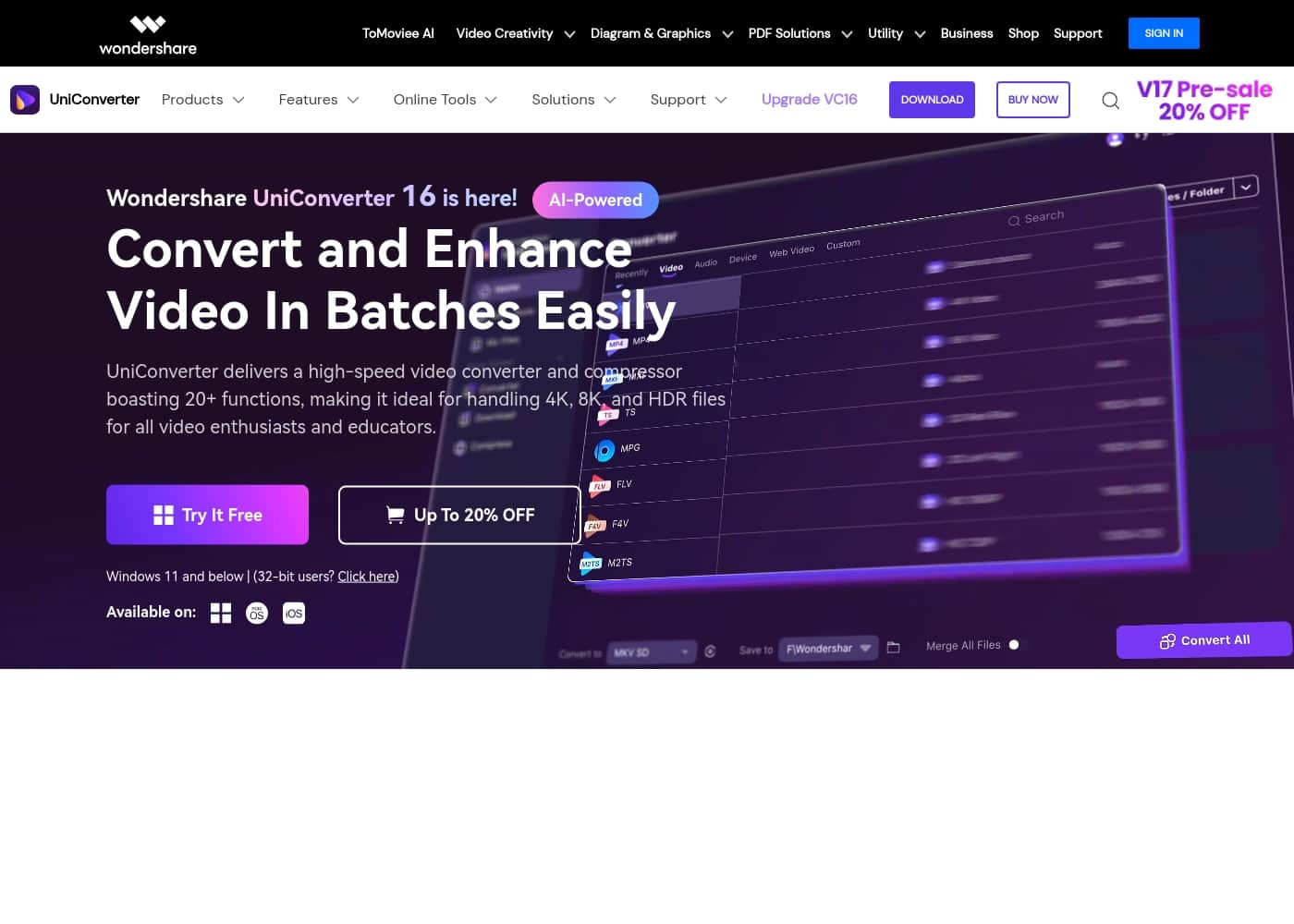
Zrzut ekranu strony głównej UniConverter

At a glance

Quick overview for UniConverter: rating, pricing summary, key features, and highlights.

Recenzja Ciroapp

4.7
Rapid, Reliable Video Conversion Powerhouse.

We assessed UniConverter 16 as an exceptionally fast and comprehensive media management suite, capable of handling demanding 4K/8K content with AI enhancement. The high user rating confirms its reliable performance and intuitive design for batch operations. Overall, UniConverter offers best-in-class conversion speed and features, making it a strong recommendation for creators and professionals.

Zalety

  • Pro:Ultra-fast 4K/8K conversion speed (up to 130X).
  • Pro:Wide-ranging tools include editing, recording, and AI enhancement.
  • Pro:Intuitive interface that is easy for all users.
  • Pro:Handles batch processing reliably without quality loss.

Wady

  • Con:Perpetual license requires repurchasing upon subsequent major version upgrades.
  • Con:May struggle when uploading very large iPhone RAW photos (>40MB).
Bezpłatny okres próbny
Yes — 7 dni
Gwarancja zwrotu pieniędzy
Yes — 30 dni
Zakres: $9.99/month – $85.99 One-timeFree trial, Monthly subscription, Yearly subscription, One-time payment
This section is a summary. Detailed sections about features, use cases, pricing, and reviews follow below.

Recenzja UniConverter, ceny, funkcje, zalety i wady

Dealing with high-quality media files like 4K and 8K can be frustrating. You worry about slow processing or losing perfect quality during conversion. UniConverter 16 eliminates this pain point.

It provides high-speed conversion and compression, letting you handle massive batches while keeping your quality intact. That’s efficiency and clarity, all in one platform. ✨

Czym jest UniConverter?

UniConverter 16 is an all-in-one solution for anyone managing digital media. It focuses on delivering professional quality through a user-friendly interface. This software is ideal for tackling demanding files like 4K, 8K, and HDR video.

You get versatile format support, handling over 1,000 video and audio types. Furthermore, UniConverter delivers rapid work, showcasing conversions optimized to process at an incredible 130X speed. It really meets all your needs for getting, editing, enjoying, and sharing media. ✅

UniConverter Kluczowe funkcje

✨ Ultra-Fast 4K and 8K Conversion

Start transforming your media efficiently with incredible speed and perfect clarity. UniConverter handles demanding video types like 4K, 8K, and HDR files without compromising video quality. Your files maintain their original, pristine quality through the entire conversion process.

Processing speeds are boosted significantly, driven by a 50% improvement in efficiency. This optimization allows UniConverter to achieve rapid video conversions reaching speeds up to 130X. You gain versatile support for importing and exporting over 1,000 video and audio formats, ensuring compatibility with all modern devices.

✨ Smart AI-Powered Enhancement Tools

Give your older footage an instant professional update using powerful AI technology. The advanced AI feature instantly takes video quality to the next level. You can batch upgrade low-resolution videos and effortlessly upscale them to crisp 8K output in just one click.

This enhancement process also corrects colors and intelligently removes distracting video noise. The same technology is applied to images, intelligently boosting photo quality and increasing resolution for sharper results. It reliably improves clarity while still maintaining the most intricate visual details.

✨ Intelligent File Compression Without Quality Loss

Manage storage constraints easily by reducing massive file sizes without sacrificing High Definition clarity. UniConverter features a newly enhanced AI compression model built specifically for efficiency. This smart compression can reduce your file size up to 150%.

It delivers true HD compression designed to avoid quality degradation entirely. This feature eases your storage constraints and optimizes consumption. You can also significantly boost efficiency by compressing multiple video and audio files simultaneously.

✨ Powerful Workflow and Preset Batch Editing

Save precious time by tackling huge projects simultaneously and recalling customized settings. Productivity jumps when you master batch processing across all core functions. You can convert, compress, and edit numerous video and audio files at the same time.

This software also makes consistency easy by enabling batch editing of videos. You can save custom parameter presets for later reuse, allowing faster and more accurate task completion. This helps SMB executives and content creators save time and reduce expenses by recalling previous settings.

✨ Precision Removal and Media Utility Suite

Instantly clean up your videos and images by removing unwanted elements with simple, targeted tools. The intuitive Watermark Remover helps you achieve a clean, professional look instantly. It seamlessly removes logos, text, objects, and even people from videos and images. You won't need complex editing skills to eliminate distracting watermarks.

UniConverter provides additional practical utilities that meet every editing need, all in one place.

✨ Advanced Subtitle and Audio Management

Beyond file handling, UniConverter provides specialized tools for enhancing content sharing and accessibility globally. The Speech-to-Text capability accurately converts audio and video into text across multiple languages. This delivers an effective solution for all your transcription requirements while saving considerable time.

The Subtitle Editor smoothly pulls audio from video to produce subtitles automatically. You can streamline the process of adding, translating, and permanently embedding subtitles into your films. Other features include a Text-to-Speech tool and dedicated Vocal and Background removers.

Przypadki użycia

✨ Converting Professional 8K Footage Without Quality Loss

You invested in a high-end 8K camera to capture stunning visuals. These high-resolution files are demanding and often incompatible with standard software or playback devices. UniConverter 16 expertly handles 4K, 8K, and HDR video conversion.

It processes your footage at an incredible 130X speed, ensuring your work never slows down. You can convert these massive files to any required format while keeping the perfect, pristine quality secure every time.

📲 Optimizing Videos for Social Sharing

Social media platforms have strict file size limits, but you don't want to sacrifice quality when sharing your projects. The AI-Enhanced Compressor tackles this challenge directly. You can reduce file size significantly, achieving up to 150% reduction in many cases.

This clever compression keeps your HD video details intact. Batch compress multiple clips instantly so you can quickly meet platform requirements and boost your online presence.

🧼 Enhancing and Cleaning Low-Resolution Archive Clips

Sometimes you need to use older or low-quality footage, but it looks noisy and distracting. The advanced AI enhancement feature automatically solves this problem. Effortlessly upgrade those low-resolution videos and quickly upscale them to crisp 8K resolution with just one click.

Simultaneously, the smart Watermark Remover tool can batch remove unwanted logos, date stamps, or distracting text from the video or image. This gives your archive material a clean, professional refresh without needing complex editing skills.

⏱️ Efficient Workflow for Content Creation

Converting and editing numerous clips manually eats up valuable production time. UniConverter 16 is built for batch processing, handling hundreds of media files simultaneously.

Tip: Save custom parameter presets in the Batch Editor after setting up your preferred output settings. You can then apply these exact settings to large batches of future videos with a single click. This guarantees speed and consistency across all your ongoing projects.

📚 Educator Workflow: Creating Accessible Course Material

You need to prepare a critical lecture for your students, ensuring maximum accessibility across different devices and platforms. Here is an easy step flow to follow:

  1. Use the Video Recorder to capture your presentation screen and voice-over instruction.
  2. Apply the Speech-to-Text tool, which automatically generates accurate subtitles from the audio track.
  3. Convert and compress the final video into platform-friendly formats for immediate sharing.

Expected outcome: Your students receive high-quality, perfectly formatted course videos with accurate subtitles that work everywhere.

Przegląd cen UniConverter

Zakres cen
$9.99/month – $85.99 One-time
Typy cen
Free trial, Monthly subscription, Yearly subscription, One-time payment
Gwarancja zwrotu pieniędzy
Tak — 30 dni

UniConverter offers flexible pricing for individuals, ranging from a monthly subscription of $9.99 to a Perpetual one-time fee of $85.99. Subscriptions automatically renew, while the Perpetual option grants access to the current license version plus its updates indefinitely.

Plany i ceny

Free Trial

Miesięczne0
Roczne0
Feature usage severely limited; 7-day trial for V16+
  • 50 Bonus AI Credits
  • High-Speed Conversion (1/3 length limitation)
  • 4K/8K Video Conversion (1/3 length limitation)
  • Compress Video/Audio (1 file, ≤5 mins)
  • Record Screen (1 min limitation)
  • Download (1 file, max 480P resolution)

Monthly Plan

Miesięczne$9.99
Automatically renews, cancel anytime.
  • 1-Month Access to Features
  • 600 Bonus Credits for AI Tools
  • Supports 4K/8K Conversion
  • Supports 10,000+ Download Sites
  • Batch Compression, Trim, Crop, & Watermark
  • Priority Customer Support

Yearly Plan

Miesięczne$4.99 (calculated)
Roczne$59.99
Automatically renews, cancel anytime. Discounted 15%
  • 1-Year Access to Features
  • 600 Bonus Credits for AI Tools
  • Ultra-Fast Video Conversion
  • Smart AI-Powered Video Compression
  • AI-Powered Photo and Video Enhancer
  • Auto Subtitle Generator and Translator
  • Access to Nearly 1,000 Media Platforms

2-Year Plan

Miesięczne$3.33 (calculated)
Roczne$39.99 (calculated)
Automatically renews after 2 years. Discounted 20%
  • Exclusive 2-Year Access to Tools
  • 600 Bonus Credits for AI Tools
  • Ultra-Fast Video Conversion
  • Smart AI-Powered Video Compression
  • AI-Powered Photo and Video Enhancer
  • Access to Nearly 1,000 Media Platforms
  • Priority Customer Support

Perpetual Plan

Skontaktuj się w sprawie cen
One-Time Fee. Does not include future version releases. Discounted 20%
  • Lifetime Access to Purchased Version Features
  • 1,000 Bonus Credits for AI Tools
  • Ultra-Fast Video Conversion
  • Smart AI-Powered Video Compression
  • AI-Powered Photo and Video Enhancer
  • Priority Customer Support

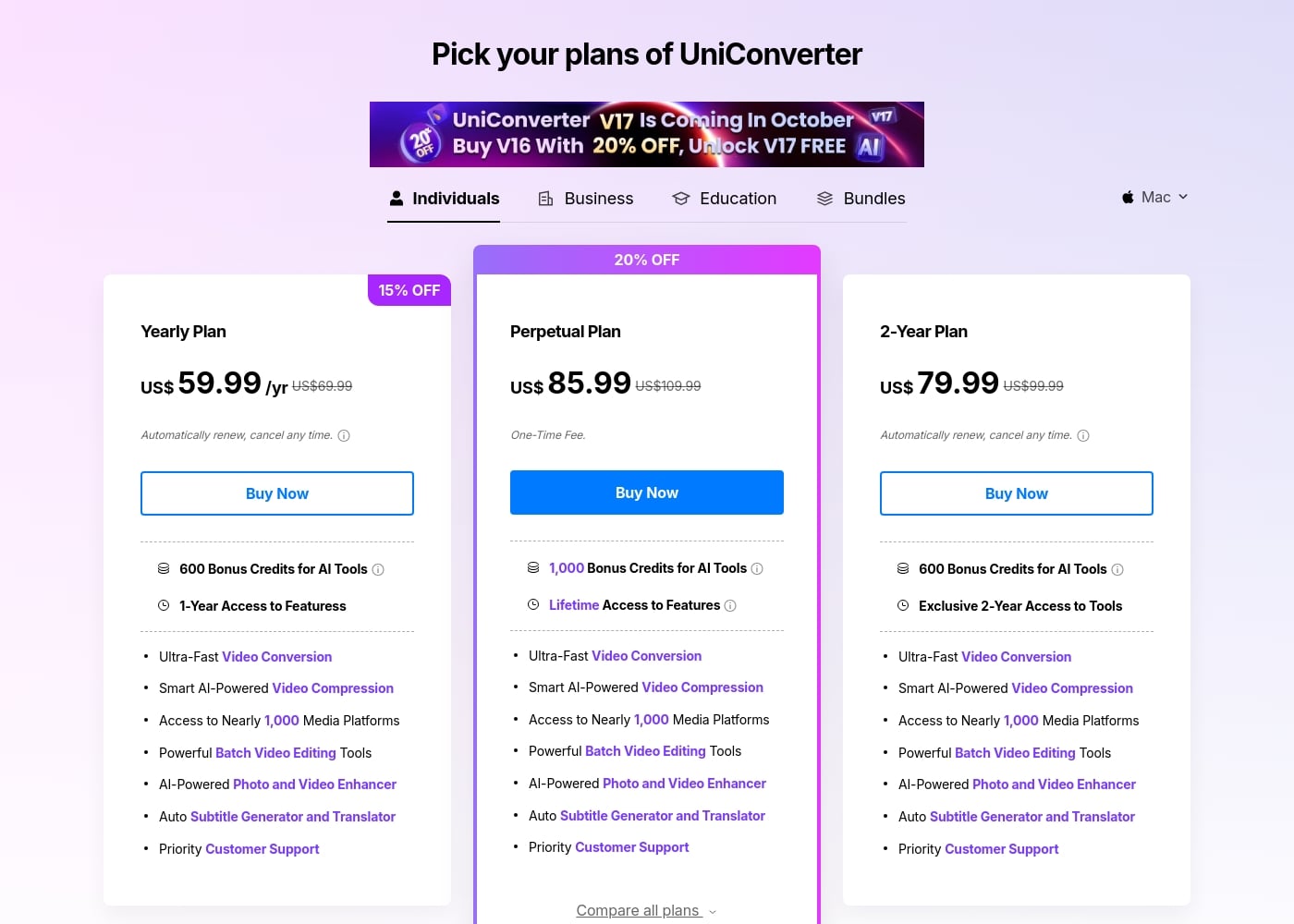
UniConverter costs between $9.99 per month and $85.99 (one-time fee) with four main individual plans: Monthly Plan at $9.99/month, Yearly Plan at $59.99/year, 2-Year Plan at $79.99, and Perpetual Plan at $85.99.

Here is a look at the features and commitments included in UniConverter's individual licenses.

Monthly Plan

Price: $9.99 per month Websites Supported: Supports 10,000+ download sites Best For: Short-term or occasional use Refund Policy: 30-day money-back guarantee (under accepted circumstances) Other Features:

  • 1-Month Access
  • 600 Bonus Credits for AI Tools
  • Supports 4K/8K Conversion
  • Batch High-Quality Compression
  • Priority Customer Support

This plan works well if you need UniConverter for a specific project before committing long-term. You can automatically renew or cancel your subscription at any time without penalty.

Yearly Plan

Price: $59.99 per year (discounted from $69.99) Websites Supported: Access to Nearly 1,000 Media Platforms Best For: Regular creators and video enthusiasts looking for annual savings Refund Policy: 30-day money-back guarantee (under accepted circumstances) Other Features:

  • 1-Year Access to Features
  • 600 Bonus Credits for AI Tools
  • Ultra-Fast Video Conversion and Smart AI Compression
  • AI-Powered Photo and Video Enhancer
  • Auto Subtitle Generator and Translator

Choosing the Yearly Plan gives you a full year of access at a discounted rate, averaging down the monthly cost significantly compared to the month-to-month option. This subscription renews automatically, but you're free to cancel easily whenever you need to.

2-Year Plan

Price: $79.99 (one-time charge for two years, discounted from $99.99) Websites Supported: Access to Nearly 1,000 Media Platforms Best For: Dedicated users seeking maximum long-term savings Refund Policy: 30-day money-back guarantee (under accepted circumstances) Other Features:

  • Exclusive 2-Year Access to Tools
  • 600 Bonus Credits for AI Tools
  • Powerful Batch Video Editing Tools
  • Priority Customer Support

The 2-Year Plan is an excellent way to lock in the lowest possible annual price while ensuring you have continuous access to all the latest video tools for an extended period. This plan also renews automatically after the 2-year period.

Perpetual Plan

Price: $85.99 One-Time Fee (discounted from $109.99) Websites Supported: Access to Nearly 1,000 Media Platforms Best For: Users who prefer a single payment over recurring subscriptions Refund Policy: 30-day money-back guarantee (under accepted circumstances) Other Features:

  • Lifetime Access to Features
  • 1,000 Bonus Credits for AI Tools (highest credit allocation)
  • Ultra-Fast Video Conversion and Smart AI Compression
  • Auto Subtitle Generator and Translator
  • Note: Does not include future major software versions

If you dislike subscriptions, the Perpetual Plan offers the ultimate commitment-free option and includes the most bonus AI credits upfront. Remember this fee grants you lifetime access only to the version purchased and its subsequent updates, not later major version releases.

UniConverter also provides a Free Trial, which is 7 days for Version 16 and above, though the trial version limits actions like conversion length (1/3 of the video) and download resolution (max 480P). All paid plans are secured by a 30-Day Money-Back Guarantee, allowing you plenty of time to ensure the software suits your workflow.
Recenzje użytkowników

User feedback across Trustpilot is exceptionally positive, highlighting UniConverter’s role as a powerful, all-in-one media tool. Customers consistently praise the software’s intuitive interface and its remarkable speed for large file processing and downloads.

Reviewers confirm that batch video conversions are handled seamlessly without crashing or losing quality. Key features users value include wide format support, compression tools, and the reliability of the screen recorder.

Customer support is frequently singled out for being friendly, patient, and quick to resolve technical issues, even assisting with complex upgrade processes. While the sentiment is high, a minor recurring point of confusion relates to the Perpetual license: users love the one-time payment structure but sometimes express frustration that it requires repurchasing for major version updates.

Overall, users see it as an essential, high-value tool that constantly receives helpful updates. 👍

Co mówią użytkownicy gdzie indziej

Alex D.
· Trustpilot
5.0 / 5

Wondershare UniConverter is fast, easy to use, and incredibly powerful. I rely on it to convert large video files in various formats quickly. It's truly one of the best tools I’ve added to my creative toolkit.

Maria G.
· Trustpilot
5.0 / 5

I had problems downloading various videos for weeks, but the customer care provided by the tech team was incredible. They are constantly striving to better their software with helpful updates. I am extremely happy with their assistance.

Brak recenzji.

Napisz recenzję

Napisz recenzję dla UniConverter
0/100 znaków
0/2000 znaków

Dlaczego używać UniConverter?

Why should UniConverter 16 be your go-to media tool? It dramatically speeds up your creative workflow while ensuring your output is spotless. The combination of speed and AI power provides excellent, reliable results.

Here are the key advantages you gain:

  • Maintain Perfect Quality: Convert demanding 4K, 8K, and HDR videos without any quality degradation, keeping your files pristine every time.
  • Master Batch Processing: Enhance productivity by efficiently batch converting, compressing, and editing multiple files simultaneously.
  • Utilize Powerful AI Enhancement: Effortlessly upgrade low-resolution videos and quickly upscale them to crisp 8K output.
  • Achieve Minimum Size: The AI compression can reduce file size up to 150% while still maintaining the original HD video quality.
  • Clean Up Footage: Intelligently remove logos or distracting watermarks from your videos and images with a single click. 💡

This robust, reliable tool simplifies your workflow and boosts productivity. Discover your new superpowers in video creation today!

Gotowy na transformację przepływu pracy z UniConverter?

UniConverter Alternatywne narzędzia

Inne narzędzia w kategorii Video Converter

Najczęściej zadawane pytania

How limited is the functionality during the 7-day free trial?

The trial version has several restrictions. You can only convert 1/3 of a video's length, and downloads are limited to one file at a maximum resolution of 480P. Screen recording is also capped at one minute.

What is the policy regarding major software upgrades for Perpetual License holders?

The Perpetual Plan grants lifetime access only to the major software version you purchased, including its minor updates. If a brand new version is released later, like V17, you would typically need to pay an upgrade fee, although special upgrade offers are sometimes available.

If I purchase a subscription, how do I stop the automatic renewal?

All individual subscription plans, including Monthly, Yearly, and 2-Year options, automatically renew. You can easily cancel your subscription at any time without penalty before the next billing cycle begins.

Can I use the same license key on both my Windows PC and my Mac?

No, you must purchase a separate license for each platform you want to use. The functions and compatibility often differ between the Windows and Mac versions, requiring distinct licenses.

How quickly can I expect a response if I contact customer support with an issue?

Paid users receive priority support. Knowledgeable representatives aim to respond to support requests submitted via the Support Center within 24 hours, available through instant live chat and email.

What happens if I run out of the bundled AI Credits?

The AI tools, such as Video Enhancer and Watermark Remover, consume credits. If you use all your bonus credits, you can easily purchase additional AI Credits separately to continue using those advanced features.

What is the difference between an individual and a commercial license?

The individual license is strictly for personal use, like hobbies or home projects. If you plan to use UniConverter for business activities or generate commercial output, you must purchase the commercial license.

Do I have unlimited conversion and compression access with a paid plan?

Yes, once you move past the free trial, all paid plans offer unlimited usage. This includes unlimited batch conversion, lossless audio/video conversion, and compression capabilities.

How is my personal and payment information secured?

The company values your privacy and uses security measures to protect your data. Payment processing is secured through advanced encryption and robust fraud protection methods.

What kind of person is UniConverter 16 best suited for?

UniConverter is perfect for anyone managing high-quality media, especially 4K and 8K video. It’s ideal for content creators, social media enthusiasts, or SMB executives who need fast, reliable batch processing.

What is the primary benefit of GPU Accelerated Conversion?

GPU Accelerated Conversion significantly speeds up the processing time. It uses the parallel processing capabilities of your graphics card to handle video conversions much faster than the CPU alone.

Which plan provides the most AI Credits upfront?

The Perpetual Plan offers the highest bonus allocation. You receive 1,000 bonus credits for AI Tools, compared to 600 credits included with the Monthly, Yearly, and 2-Year subscriptions.

Gotowy, aby wypróbować UniConverter? Zobacz oficjalną stronę lub cennik.