NinjaOne vs Techinline
NinjaOne and Techinline are both IT essentials, but they tackle different problems. NinjaOne is a full IT operations platform, while Techinline specializes in remote access. Your choice depends on whether you need a complete management suite or just a rock-solid remote connection.
Best for: IT teams consolidating multiple management tools into one console, MSPs scaling operations with AI-powered automation
Best for: Solo IT consultants needing simple unattended access, Support teams providing instant, on-demand client help
長所
短所
Solid remote support with scalable pricing.
We found Techinline SetMe to be a capable and secure remote access solution, especially for IT professionals and small teams needing reliable unattended and on-demand support. Its tiered pricing offers flexibility, but the lack of a clear refund policy is a notable gap for potential buyers.
長所
- Simple, instant client connections via a set.me link.
- Scalable plans from individual use to enterprise-level team management.
- Stable connections with auto-reconnect and multi-monitor support.
- Centralized dashboard for managing all devices and permissions.
短所
- Limited public user reviews made independent sentiment analysis impossible.
- No explicit refund policy is detailed on the website.
- Advanced team features require upgrading to higher-tier, per-seat plans.
- The 'Core' plan for individual use lacks on-demand support features.
についてNinjaOne
についてTechinline
SetMe is a remote support and management tool 🛠️ designed for IT professionals, support teams, and managed service providers. It lets you instantly connect to any computer, whether you’re providing live help or managing unattended servers and desktops from a central dashboard.
ハイライト
機能比較
機能の概要
主な違いを強調し、各機能の勝者を選びます。
Core Purpose
NinjaOne is a complete IT operations hub. Techinline is a dedicated remote access tool.
NinjaOne consolidates RMM, patching, backup, and service desk into one console. It's built to replace multiple IT tools. Techinline SetMe focuses solely on remote support. It provides instant connections and unattended device management. NinjaOne offers broad IT management. Techinline offers deep, specialized remote access. Choose NinjaOne for full IT oversight. Choose Techinline if remote access is your only need.
Deployment Speed
NinjaOne promises full deployment in under 30 days. Techinline setup is immediate.
NinjaOne customers report being fully deployed in under 30 days with operator proficiency in under 10. It's a comprehensive platform rollout. Techinline can be set up and used within minutes. There's no complex infrastructure to deploy. NinjaOne requires more initial configuration for its broader features. Techinline is ready to go instantly. For immediate remote access, Techinline wins. For a full IT platform, NinjaOne's speed is impressive.
Remote Connection Quality
Both offer fast, reliable connections. Techinline emphasizes zero-lag performance.
NinjaOne provides single-click remote access described as significantly faster than previous methods. Users report connecting within seconds. Techinline markets 'zero-lag control' and stable connections even on low-speed internet. It auto-reconnects after drops. Both tools prioritize connection speed and reliability. Techinline makes specific marketing claims about performance. Real-world performance depends on your network, but both are built for speed.
On-Demand Support
Techinline's set.me link is ultra-simple. NinjaOne integrates it into a larger workflow.
Techinline lets you share a simple set.me link. Clients visit the URL, and you're connected instantly without downloads. NinjaOne also offers on-demand support, but it's part of its unified service desk and ticketing system. Techinline's method is simpler for one-off, non-technical client help. NinjaOne adds context from device management. For ad-hoc client support, Techinline's link is brilliantly straightforward.
Team Management
NinjaOne is built for IT teams. Techinline scales with per-seat pricing.
NinjaOne includes user management, roles, and integrates with its service desk for team workflows. It's designed for MSPs and IT departments. Techinline offers user management and access controls on its Professional and Business plans. Pricing is per seat. NinjaOne's team tools are part of its IT operations suite. Techinline's are focused on securing remote access. NinjaOne offers more holistic team features. Techinline's are specifically for managing remote access permissions.
Security & Compliance
NinjaOne has built-in compliance standards. Techinline focuses on session security.
NinjaOne is built on SOC 2, ISO 27001, and FedRAMP compliant infrastructure. This is for the entire platform. Techinline uses end-to-end encryption for all remote sessions. Its compliance certifications aren't listed. NinjaOne provides enterprise-grade platform security. Techinline secures the remote session itself. For regulated industries, NinjaOne's compliance posture is a major advantage.
Pricing Structure
NinjaOne is per device. Techinline is per user/seat.
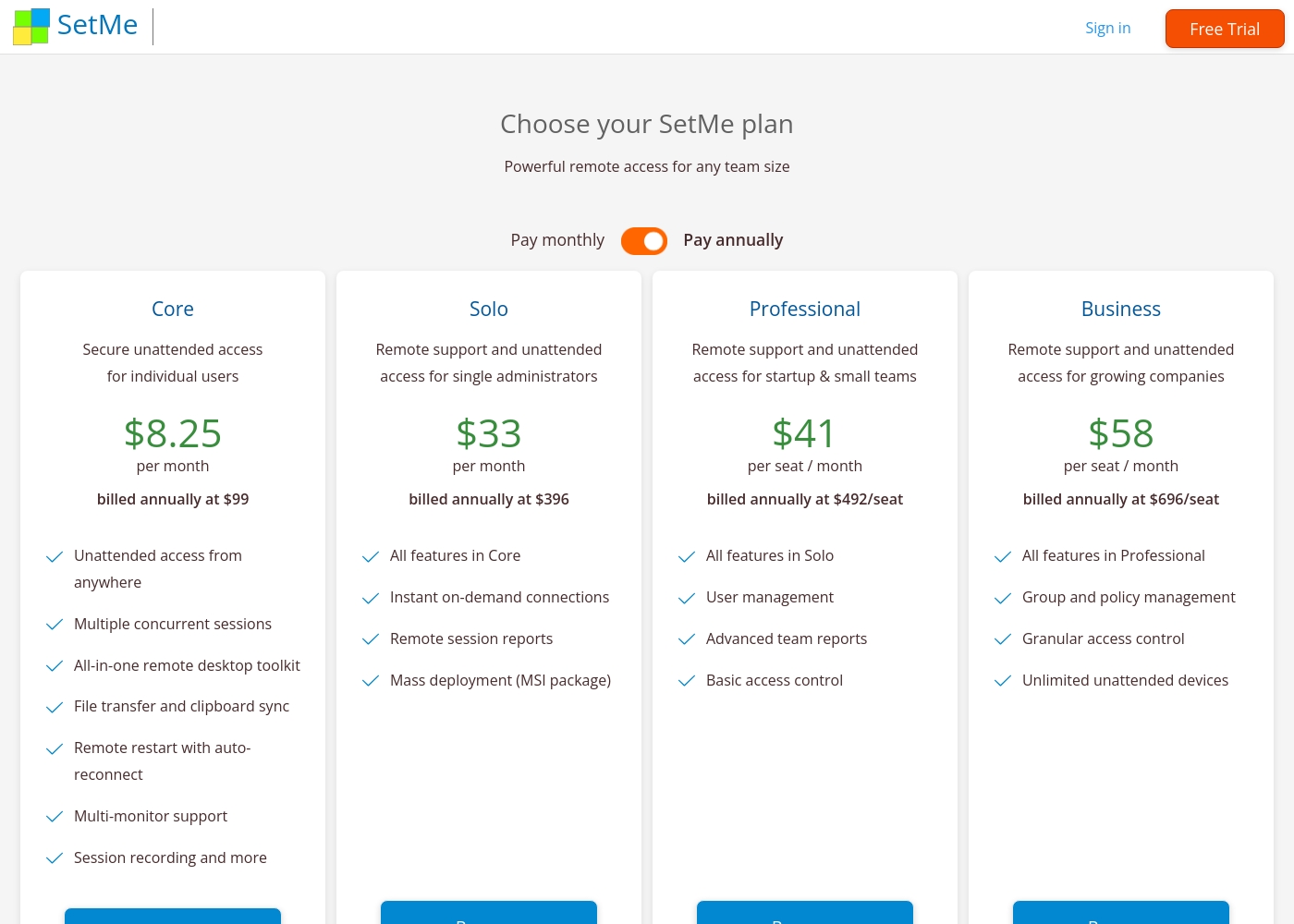
NinjaOne costs $1.50-$3.75 per device per month, decreasing with volume. It's one plan. Techinline starts at $8.25/month for solo unattended access. Team plans are $41-$58 per seat per month. NinjaOne's pricing scales with your endpoint count. Techinline's scales with your team size. For large device fleets, NinjaOne may be more cost-effective. For small teams, Techinline's entry price is low.
Techinline pricing: Techinline offers four SetMe plans starting at $8.25 per month (billed annually) for individual unattended access. Pricing scales based on features like on-demand support, seat count, and team management tools, with both monthly and yearly billing available for most tiers.
Core
Price: $8.25 per month (billed annually at $99) Best For: Individual users needing secure unattended access Other Features: Multiple concurrent sessions, File transfer and clipboard sync, Remote restart with auto-reconnect, Multi-monitor support, Session recording
This plan is perfect for individuals who only need to manage their own remote machines. It's a reliable choice if you don't need to provide instant on-demand support to new clients.
Pricing Notes
- NinjaOne's per-device cost decreases as you add more endpoints.
- Techinline's Core plan is for individual unattended access only.
- NinjaOne includes free onboarding, support, and training.
- Techinline's highest tier (Business) is required for unlimited unattended devices.
Pricing Head-to-Head
ユーザーレビュー
External reviews for Techinline SetMe were not accessible during this review. The provided Trustpilot URL returned a 403 error, preventing access to user feedback. Consequently, the review relies solely on the product's website information and our independent analysis of its features and pricing structure.
私たちの判定
This isn't a close contest—it's a choice between a complete IT platform and a specialized tool. NinjaOne wins for teams that need to manage everything from one place. NinjaOne's superpower is consolidation. It replaces your RMM, patching, backup, and service desk tools. One director cut from 15 tools down to NinjaOne alone. Techinline's superpower is focused simplicity. Its set.me link lets you help a client in seconds. It's perfect for quick, reliable remote sessions without the overhead. The deciding factor is your core need. If your day involves patching servers, managing mobile devices, and ticketing, pick NinjaOne. If your day is mostly connecting to client machines, pick Techinline. Choose NinjaOne to unify your entire IT stack. Choose Techinline if remote access is the only problem you need to solve.
よくある質問
Which is better for small teams: NinjaOne or Techinline?
Techinline might be cheaper if you only need remote access. NinjaOne is better value if you also need patch management, backup, and ticketing.
Does NinjaOne have on-demand support like Techinline?
Yes, NinjaOne offers on-demand support. However, Techinline's set.me link is a dedicated, ultra-simple method for instant client connections.
Is Techinline worth the extra cost over NinjaOne?
It's not a direct comparison. Techinline costs less per user for remote access. NinjaOne's per-device cost may be lower if you manage hundreds of endpoints.
Can I migrate from NinjaOne to Techinline easily?
Migration isn't typical as they serve different purposes. Techinline handles remote access, while NinjaOne manages the entire device lifecycle.
Which tool has better compliance for regulated industries?
NinjaOne is built on SOC 2, ISO 27001, and FedRAMP compliant infrastructure. Techinline's compliance certifications are not specified.
Do both tools offer a free trial?
Yes. NinjaOne offers a 14-day free trial. Techinline offers a 15-day free trial with no credit card required.
選択する準備はできましたか?
両方のツールにはそれぞれの強みがあります。特定のニーズに基づいて選択してください。