Traduction complète bientôt — détails produit en anglais, navigation localisée.
Kixie

Avis sur Kixie

Simple PowerCalls for better sales conversations.

Par Équipe éditoriale Ciroapp · Mis à jour 15 mai 2026

Commission possible sans coût supplémentaire

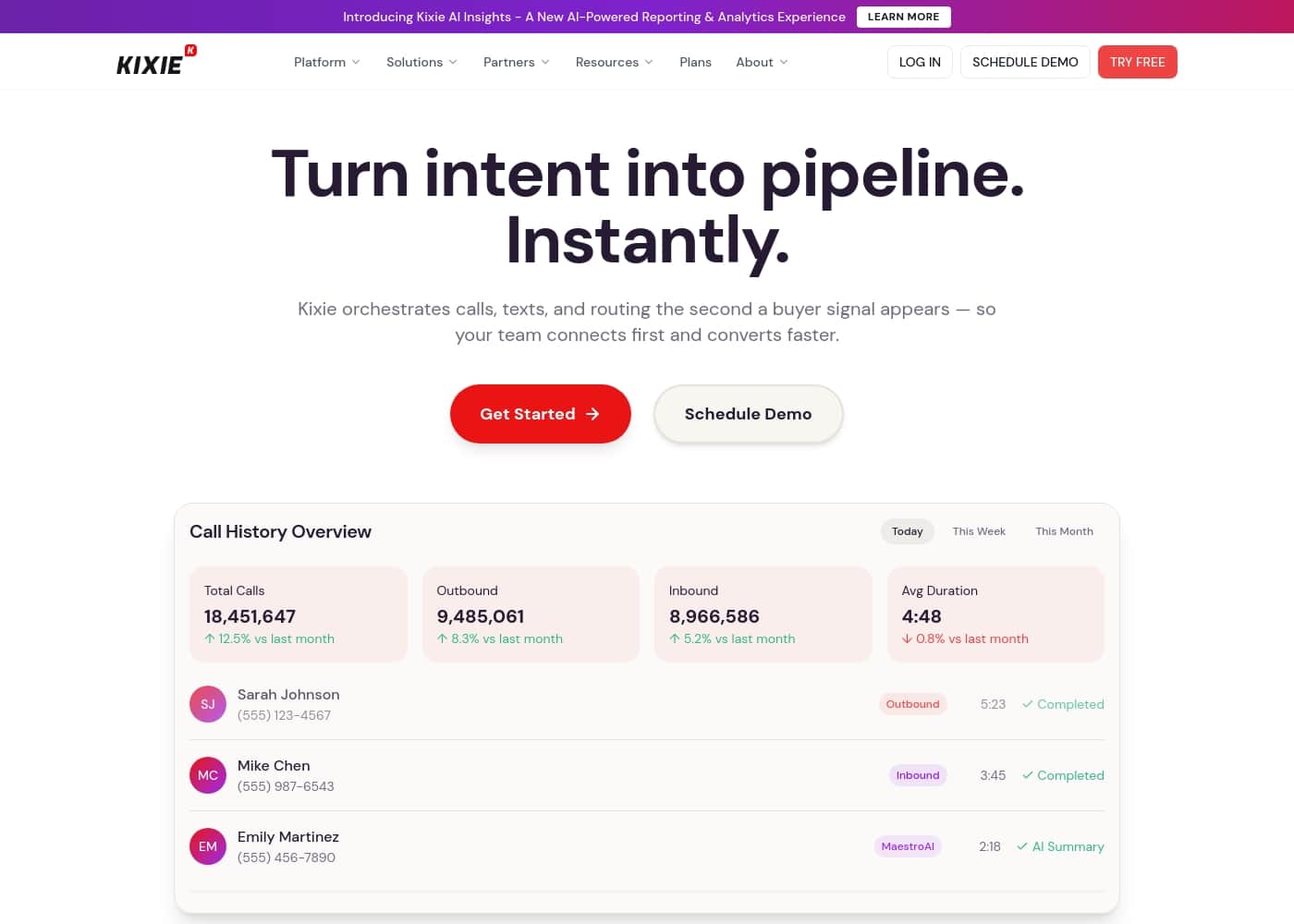
Capture d'écran de la page d'accueil Kixie

En bref

Vue rapide de Kixie : note, résumé des tarifs, fonctionnalités clés et points forts.
Page du fournisseur consultée le 23 oct. 2026

Score Ciroapp

3.8/ 5

Powerful Dialer, but Watch for Glitches

We found Kixie PowerCall to be a robust tool for sales teams focused on high-volume calling and SMS outreach. Its core power dialer and AI prompt library deliver on the promise of streamlined conversations. Overall, it's a strong choice for boosting call efficiency, though users should be prepared for occasional technical hiccups and a less-than-transparent pricing structure.

Avantages

  • Effective single and multi-line power dialer significantly increases call volume
  • Useful AI Sales Prompts Library and SMS templates guide conversations
  • Generally praised for ease of use and simple interface

Inconvénients

  • Pricing details are not transparently listed on the public website
  • Some users report technical issues with call connections and voicemail drops
  • Onboarding and setup process could be clearer for new users
Idéal pour
  • Inside sales reps focused on high-volume calling
  • SDRs looking for structured conversation guidance
  • Teams wanting to improve SMS response rates
Essai gratuit
Yes — 7 jours
Cette section est un résumé. Les sections détaillées sur les fonctionnalités, les cas d'usage, les tarifs et les avis suivent plus bas.

Qu’est-ce que Kixie ?

Tired of manual dialing eating up your sales team's day? 😓 Kixie PowerCall promises to streamline outreach with AI-powered calling and SMS tools. It's designed to help you have smarter, more productive conversations with prospects, turning raw calls into closed deals.

The platform focuses on making the process simple. You get features like an AI Sales Prompts Library and pre-written templates to help you say the right thing and get replies, not blocks. It's about working smarter, not just harder.

Kixie PowerCall is a sales engagement platform centered on voice and SMS communication. 💡 It's built for sales professionals who need to make more calls, send effective follow-up texts, and have more productive conversations. The system provides tools to help automate the dialing process and gives you smart prompts and templates to use during your outreach.

Faut-il choisir Kixie ?

Repères rapides avant de comparer les plans ou de visiter le site.

Choisissez-le si

  • Teams that benefit from having pre-written sales scripts and prompts
  • Professionals who need to manage both call and SMS outreach from one place
  • Salespeople who value learning resources like blogs and template libraries
  • Users looking for a tool that emphasizes simplicity in its core function

Évitez-le si

  • Teams needing extensive CRM integration details (not prominent on homepage)
  • Companies looking for transparent annual pricing upfront (not listed on homepage)
  • Users who require a full-fledged, all-in-one marketing automation suite
  • Buyers who need to see a detailed feature breakdown before trying

Étapes avant achat

  1. 1Visit the Kixie.com homepage to explore the PowerCall feature details.
  2. 2Review the available AI Sales Prompts and SMS Templates to see if they match your communication style.
  3. 3Look for pricing information or a 'Get Started' page to understand plans and any trial options.
  4. 4Read the blog articles to get a sense of their sales philosophy and best practices.

Kixie Fonctionnalités clés

📞 Smart Calling with PowerCall

Kixie's core feature is PowerCall, a dialer designed to maximize your talk time. It automates the manual parts of calling, so you can focus on the conversation. The system connects you to prospects faster, reducing the time spent dialing numbers one by one.

It's the foundation for making your sales outreach more efficient.

💡 AI-Powered Conversation Guidance

Never be at a loss for words during a sales call. Kixie provides an AI Sales Prompts Library with over 50 templates. These prompts guide your conversations in real-time, helping you ask the right questions and overcome objections.

You can use these during calls to stay on track and move deals forward.

✨ Effective SMS and Texting Tools

Follow up with prospects using SMS templates designed for sales. These templates help you craft messages that get genuine replies instead of being marked as spam. You can manage both your calls and text messages from a single, focused interface.

It's a simple way to add another effective channel to your outreach.

✨ Simple, Integrated Sales Experience

Kixie focuses on simplicity. The platform provides essential tools like click-to-call and click-to-text, voicemail drops, and live call coaching. Everything is built to work with your existing CRM, giving you full visibility into your conversations.

The goal is to give you a straightforward tool that just works.

Cas d’usage

💬 Closing More Deals with Guided Conversations

Meet Sarah, a sales rep who used to freeze up after the initial greeting. She worried about forgetting key points or losing the prospect's interest. Now, she uses Kixie's AI Sales Prompts Library during her calls. The library gives her over 50 pre-written templates and talking points in real-time. She sees a prompt on her screen, says the right thing, and guides the conversation toward a close with confidence.

Expected outcome: More structured, confident conversations that keep prospects engaged and move deals forward.

📱 Scaling Outreach Without Getting Blocked

The team needed to follow up with hundreds of leads via text but kept getting marked as spam. They switched from generic messages to Kixie's AI SMS Templates. These templates are crafted to sound human and get genuine replies. The team now sends personalized follow-ups that feel natural, not robotic. This simple change dramatically improved their response rates and kept their sender reputation clean.

Tip: Use the SMS templates to schedule a quick follow-up call, creating a seamless multi-channel touchpoint.

📞 High-Volume Calling for Fast-Moving SDRs

An SDR's main goal is to get through the list and book meetings. Kixie's Single-Line PowerDialer automates the dialing process. The rep uploads a list, starts a calling session, and the system handles the clicks. This eliminates time wasted manually punching in numbers. The SDR can focus entirely on the conversation, moving from one lead to the next efficiently.

Approach: Automate dialing with a PowerDialer to maximize talk time. Outcome: More conversations per day and a higher volume of booked meetings.

🚀 Onboarding New Reps Faster with Scripts

Getting a new hire up to speed on what to say can be slow. Instead of shadowing for weeks, a new rep can use Kixie's library from day one. The prompts act as a cheat sheet, providing proven scripts for different call scenarios. This gives the new rep a solid foundation, allowing them to sound professional and handle objections while they build experience.

Tip: Pair the prompts with the Live Call Coaching feature for real-time guidance during initial calls.

⚡ Managing a Simple Two-Tool Workflow

Many salespeople juggle a separate phone, texting app, and CRM. Kixie combines calling, SMS, and CRM integration into one clean interface. A rep can click-to-call from the CRM, log the outcome automatically, and send a follow-up text using a template—all without switching tabs. This keeps their workflow simple and reduces data entry errors.

Expected outcome: Less app-switching, cleaner data, and more time selling.

Tarifs Kixie

  • 3 formules

Prix pas encore vérifiés — consultez le site de l'éditeur.

la page tarifs de Kixie

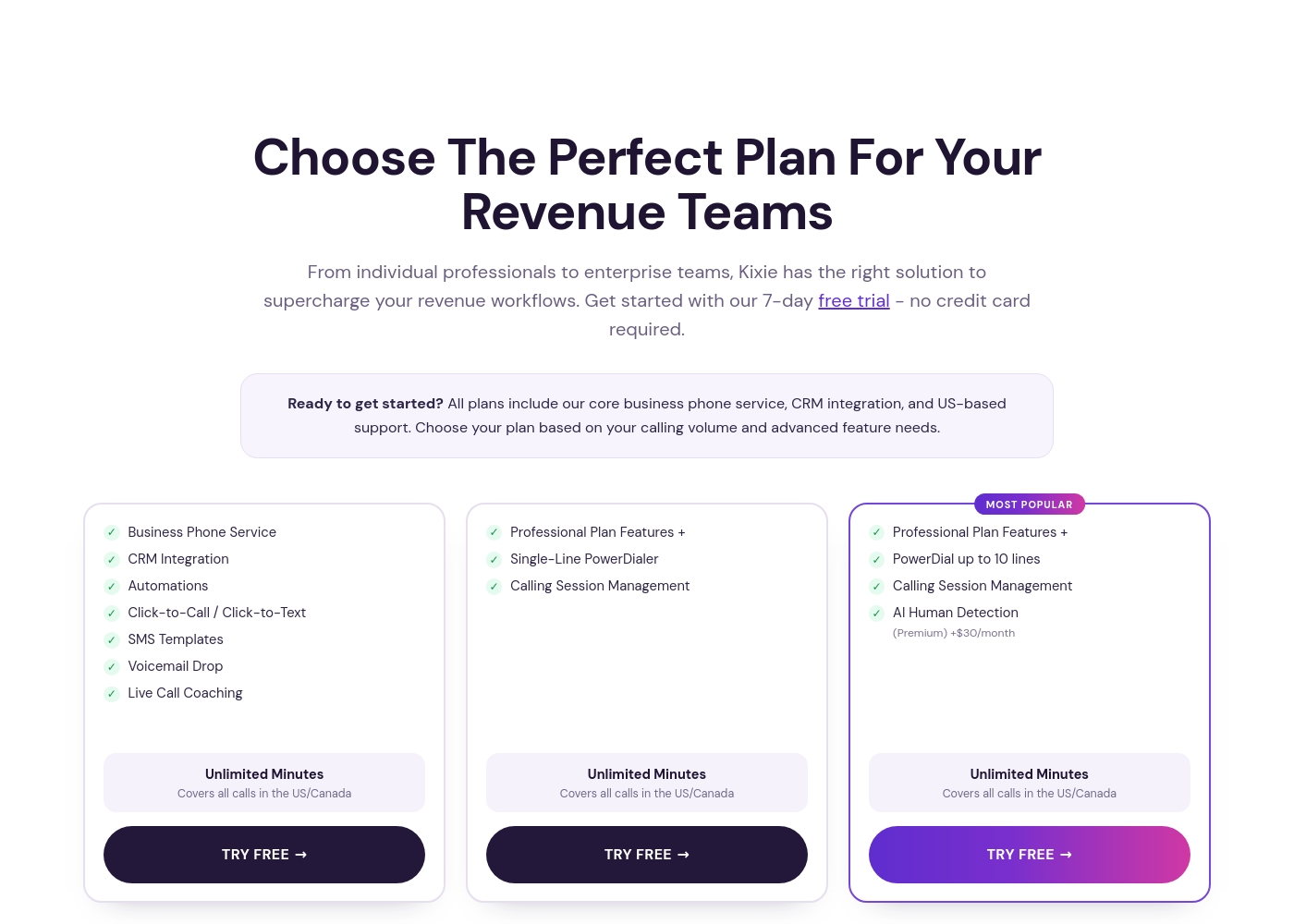
Capture d'écran de la page tarifs de KixieVoir la capture de la page tarifs
FormulePaiement mensuelPaiement annuelInclus
Professional
Voir le site de l'éditeur
Unlimited Minutes (US/Canada)
  • Business Phone Service
  • CRM Integration
  • Automations
  • Click-to-Call / Click-to-Text
  • SMS Templates
  • +2
Single-Line PowerDialer
Voir le site de l'éditeur
Unlimited Minutes (US/Canada)
  • Professional Plan Features +
  • Single-Line PowerDialer
  • Calling Session Management
  • Developer API
Multi-Line PowerDialer
Voir le site de l'éditeur
Unlimited Minutes (US/Canada)
  • Professional Plan Features +
  • PowerDial up to 10 lines
  • Calling Session Management
  • AI Human Detection (Premium)
  • IVR Auto-Attendant

Historique des prix

Prix suivis depuis le 1 oct. 2026. Aucun changement détecté pour l'instant.

Types de tarification: Free trial, Monthly subscription, Per seat pricing, Usage-based pricing

Notes sur les tarifs

Kixie offers three primary subscription tiers tailored for revenue teams, featuring unlimited minutes for US and Canada. Each plan scales with advanced dialer capabilities and automation tools to fit different calling volumes.

Take a look at the feature sets below to find the best fit for your team.

Professional

Best For: Individual professionals and small teams needing core CRM integration

Other Features: Business Phone Service, CRM Integration, Click-to-Call / Click-to-Text, Voicemail Drop, Live Call Coaching

If you're focused on standard outbound and inbound calling with full CRM visibility, this is your starting point. It provides all the essential tools to manage your business phone needs without the complexity of an automated dialer.

Single-Line PowerDialer

Best For: High-volume sales reps who want to automate their outreach

Other Features: Single-Line PowerDialer, Calling Session Management, Unlimited US/Canada Minutes, SMS Templates, Developer API

This plan is built for the active salesperson who needs to move quickly through a lead list. You get all the Professional features plus a more efficient way to manage your heavy calling sessions.

Multi-Line PowerDialer

Price: AI Human Detection available for +$30/month

Best For: Enterprise teams maximizing call volume and efficiency

Other Features: PowerDial up to 10 lines, AI Human Voice Detection, Calling Session Management, IVR Auto-Attendant, Ring Groups

This is the most powerful option for teams that want to scale their outreach. It allows agents to dial multiple leads at once and utilizes AI to filter out non-human responses. 🚀

Kixie offers a 7-day free trial that doesn’t require a credit card to sign up. This allows you to test the CRM integrations and dialer tools before committing to a paid plan.

Comment payer Kixie moins cher

  • Profitez de l'essai gratuit de 7 jours avant de payer.
Démarrer l'essai gratuit

M’avertir quand Kixie change de prix

Un e-mail quand nous détectons un changement sur la page tarifs de l’éditeur. Pas de newsletter, pas de promos. Désinscription en un clic.

Avis des utilisateurs

External reviews for Kixie are notably scarce, with Capterra currently inaccessible due to a security block. Trustpilot shows a very limited number of ratings, making a comprehensive sentiment analysis difficult.

Based on the available snippets, users praise the platform's ease of use and the effectiveness of the power dialer for boosting call volume. Some feedback highlights good customer support when issues arise.

However, recurring themes also point to occasional technical glitches with call connections and voicemails. A few users mention the pricing can feel steep, especially for smaller teams, and the onboarding process could be smoother.

Overall, the sentiment is mixed but leans positive for core functionality. 📞

Synthèse des avis publics sur Trustpilot, Capterra

Aucun avis pour le moment.

Rédiger un avis

Rédiger un avis pour Kixie
0/100 caractères
0/2000 caractères

Pourquoi utiliser Kixie ?

Ready to boost your sales outreach efficiency? ✅ Kixie offers several compelling reasons to consider it for your team:

  • Save Time on Dialing: The PowerCall feature lets you connect with prospects faster, minimizing manual entry and maximizing talk time.
  • Never Run Out of Things to Say: The AI Sales Prompts Library gives you over 50 templates to guide conversations and help close deals more effectively.
  • Improve SMS Engagement: Use crafted AI SMS templates that are designed to get genuine replies and avoid being marked as spam or blocked.
  • Stay Informed on Best Practices: Access their blog to learn about industry trends and sales tips, helping your strategy evolve.
  • Simple, Focused Interface: The core promise is "Better Sales Made Simple," suggesting a tool that prioritizes usability over overwhelming complexity.

Alternatives à Kixie

Autres outils dans la catégorie Système téléphonique d'entreprise

Voir tous les outils Système téléphonique d'entreprise
CallHippo

CallHippo

Business Phone System4.1/5

Une plateforme unique avec IA pour les appels professionnels, la messagerie et l'automatisation.

OpenPhone

OpenPhone

Business Phone System3.9/5

Des solutions d'appels et de messagerie intelligentes pour les petites entreprises.

Logiciels Système téléphonique d'entreprise les moins chers pour 1 à 25 utilisateurs

Kixie : questions fréquentes

What are the main Kixie plans, and who is each one for?

Kixie has three plans: Professional for core calling and CRM integration, Single-Line PowerDialer for high-volume reps, and Multi-Line PowerDialer for teams dialing up to 10 lines at once.

Does the unlimited minutes feature cover international calls?

No, unlimited minutes only cover calls within the US and Canada. International calls are not included in this feature.

What does the 7-day free trial include?

The trial gives you full access to all features in your chosen plan. You don't need a credit card to start.

How does billing work? Are prices per seat or usage-based?

Kixie uses a per-seat subscription model. Exact monthly prices aren't listed publicly, but plans scale based on features and dialing power.

Can I cancel my subscription at any time?

You should confirm the cancellation terms in your agreement before purchase.

What CRMs does Kixie integrate with?

All plans include bi-directional CRM integration. The specific CRM systems supported are not listed on the pricing page, so check with Kixie directly for compatibility.

Are there any data security or privacy certifications mentioned?

You should request their security documentation or privacy policy during the sales process.

What are the usage limits or quotas for SMS or calling?

Calls to US/Canada are unlimited. For SMS, templates are included, but message volume limits aren't specified. Confirm details before starting.

Is there a refund policy if I'm not satisfied?

It's best to clarify the refund terms with support before committing to a paid plan.

How does Kixie handle onboarding and data migration?

Kixie says you can get started in 2 minutes. Details on assisted onboarding or migrating existing data are not provided on the public site.

What kind of customer support is available, and are there SLAs?

All plans include US-based support. Specific response times or service level agreements (SLAs) are not mentioned on the pricing page.

In which languages and regions is Kixie available?

The platform is primarily focused on the US and Canada, as indicated by the unlimited minutes feature. Support for other regions isn't detailed.

What premium add-ons are available and how much do they cost?

Add-ons include ConnectionBoost, Conversation Intelligence, and DNC compliance. Only AI Human Detection has a listed price of $30/month for the Multi-Line plan.

Is Kixie best for a small startup or a large enterprise team?

It's designed for a range of teams, from individual professionals to enterprise teams. The best fit depends on your calling volume and need for advanced dialing features.

Prêt à essayer Kixie ? Découvrez le site officiel ou les tarifs.

Vous êtes Kixie ? Revendiquer cette fiche · Obtenir le badge