Traduction complète bientôt — détails produit en anglais, navigation localisée.
Framer

Avis sur Framer

AI agents that design, code, and run your website — with you in control

Par Ciroapp Editorial Team · Mis à jour 16 sept. 2026

Commission possible sans coût supplémentaire

Capture d'écran de la page d'accueil Framer

En bref

Vue rapide de Framer : note, résumé des tarifs, fonctionnalités clés et points forts.
Page du fournisseur consultée le 13 oct. 2026

Score Ciroapp

4.1/ 5

Framer's AI agents design layouts, run your CMS, and write custom code right on a visual canvas — and every change stays editable. Hosting, analytics, variant testing, and a big template community come included, but exact paid prices aren't shown upfront. Overall, it's a strong pick for design-led teams that want AI speed without losing control.

Avantages

  • Avantages:AI design agent works directly on your canvas, generating and refining layouts in place while every change stays visible, editable, and under your control — no black-box generation or locked templates
  • Avantages:CMS agent sets up, organizes, and updates collections connected straight to the canvas, so content-heavy sites like blogs and careers pages can publish frequently without design rework
  • Avantages:Code agent writes custom effects and complex interactions onto your site on request, eliminating the need to hand-code every interaction or wait on a developer

Inconvénients

  • Inconvénients:Exact paid plan prices aren't listed upfront, so budget planning requires checking the live pricing page, and capacity ceilings like 40,000 CMS items, 2 TB bandwidth, or 700 pages require purchasing add-ons that complicate cost forecasting
  • Inconvénients:Connecting a custom domain requires upgrading from the free plan, which caps uploads at 5 MB, limits you to one locale, and restricts collaboration to three editors
  • Inconvénients:Several standout workflows depend on external tools — Slack, GitHub, Claude Code, Cursor, or Codex — so value drops noticeably if your team doesn't already use them
Idéal pour
  • Designers who want a visual canvas with AI that edits in place
  • Startups and marketing teams shipping sites without a large dev team
  • Content-heavy sites — blogs, careers, events — that need CMS and design in sync
Garantie satisfait ou remboursé
Yes — 14 jours
Cette section est un résumé. Les sections détaillées sur les fonctionnalités, les cas d'usage, les tarifs et les avis suivent plus bas.

Qu’est-ce que Framer ?

Building a polished website often means juggling separate tools for design, content, and code. Framer puts AI agents right on the canvas, so you can generate layouts, run your CMS, and ship custom code in one place. Every change stays visible and editable, so the agents speed things up without taking control away.

Framer is a website platform with AI agents built into a visual design canvas. The agents help generate layouts, manage CMS content, and write custom code, while you stay in control of every change. It includes hosting, analytics, variant testing, and multi-language support, and connects to tools like Slack, Claude Code, and Cursor.

It's built for designers, startups, and teams shipping marketing sites.

Faut-il choisir Framer ?

Repères rapides avant de comparer les plans ou de visiter le site.

Choisissez-le si

  • You want AI help while keeping every change visible, editable, and under your control
  • You publish content often and want your CMS connected directly to the design canvas
  • You need custom effects or interactions without hand-writing everything
  • You already work in Slack, GitHub, or tools like Claude Code, Cursor, and Codex
  • Performance matters — the site reports strong Core Web Vitals and 99.99% uptime

Évitez-le si

  • Several standout workflows depend on external tools — Slack, GitHub, Claude Code, Cursor, or Codex — so value drops if your team doesn't use them
  • The WordPress migration example relies on REST API access; moving from platforms without similar connections isn't detailed on the site
  • Framer is a hosted platform, and the site doesn't explain export or code hand-off paths — confirm this if code ownership matters to you
  • The agents are built to work with you rather than replace you, so teams wanting fully autonomous site building may be disappointed

Étapes avant achat

  1. 1Confirm the integrations you rely on — Slack, GitHub, Claude Code, Cursor, Codex — match how your team works
  2. 2Browse the marketplace templates, plugins, and components to see how close you can start to a finished site
  3. 3If you're migrating, verify whether your current platform, like WordPress, offers the API access shown in Framer's import example
  4. 4Look up trial and refund terms before paying, and compare against one or two alternatives on hosting, CMS, and analytics

Facilité d'utilisation

Onboarding looks approachable based on what the site shows. There's a Framer Academy, a marketplace of templates and plugins, and a community library with over 12,000 resources. Agents handle much of the setup work for design and CMS, and everything they produce stays editable by you.

Framer Fonctionnalités clés

🎨 Design with an agent on your canvas

You get a professional design agent that lives right on the canvas. Ask for ideas and it generates and refines layouts in place. Every change stays visible, editable, and yours, so AI speeds things up without taking control.

It's a fit for design-led work.

✨ Publish faster with an agent-run CMS

Publish faster without breaking your design. The CMS agent sets up, organizes, and updates your entire CMS, connecting it straight to the canvas. Content and design stay in sync, so frequent publishing doesn't mean constant rework.

✨ Code custom touches on request

Ask for anything from a simple effect to a complex interaction, and the agent writes it onto your site. You can request layout variations too — keep the content, try new compositions side by side. It's handy when custom details matter but hand-coding everything doesn't.

✨ Take action from anywhere

Your site connects to the AI tools your team already uses, so updates don't have to start on the canvas:

  • Update copy from Slack
  • Trigger CMS changes from the terminal
  • Ship changes from a GitHub PR

Framer works with Claude Code, Cursor, Codex in ChatGPT, and any external AI.

⚡ A full platform under the agents

The agents aren't the whole story. Hosting, analytics, variant testing, multi-language support, and branch-based versioning come built in. The site reports 99.99% uptime and strong Core Web Vitals.

Add a community with 12,447 resources plus marketplace templates, plugins, and components, and you start ahead.

Cas d’usage

🎨 Design marketing sites faster

Designers and startups use the design agent to generate layout variations right on the canvas. Ask for a few homepage options, keep your content, and refine the one you like. Every change stays visible and editable.

Expected outcome: A polished layout without starting from a blank page.

📝 Keep content and design in sync

Content-heavy teams — think blogs, careers, or events — let the CMS agent set up and update collections. Content connects straight to the canvas, so publishing faster doesn't break your design.

Expected outcome: You publish more without juggling separate tools.

⚡ Add custom code without the grind

Need a custom effect or a tricky interaction? Just ask. The agent writes the code and places it on your site, so you're not hand-coding everything yourself.

Expected outcome: Interactive touches ship without waiting on a developer.

🔌 Run your site from tools you already use

Developer-minded teams update copy from Slack, trigger CMS changes from a terminal, or ship from a GitHub PR with Claude Code, Cursor, or Codex. The site even shows a WordPress import that moved 47 posts automatically.

Tip: Confirm the integrations your team relies on before you commit.

Tarifs Framer

  • 3 formules
  • Formule gratuite disponible

Page du fournisseur consultée le 13 oct. 2026 ; vérifiez les prix actuels sur la page tarifs de Framer

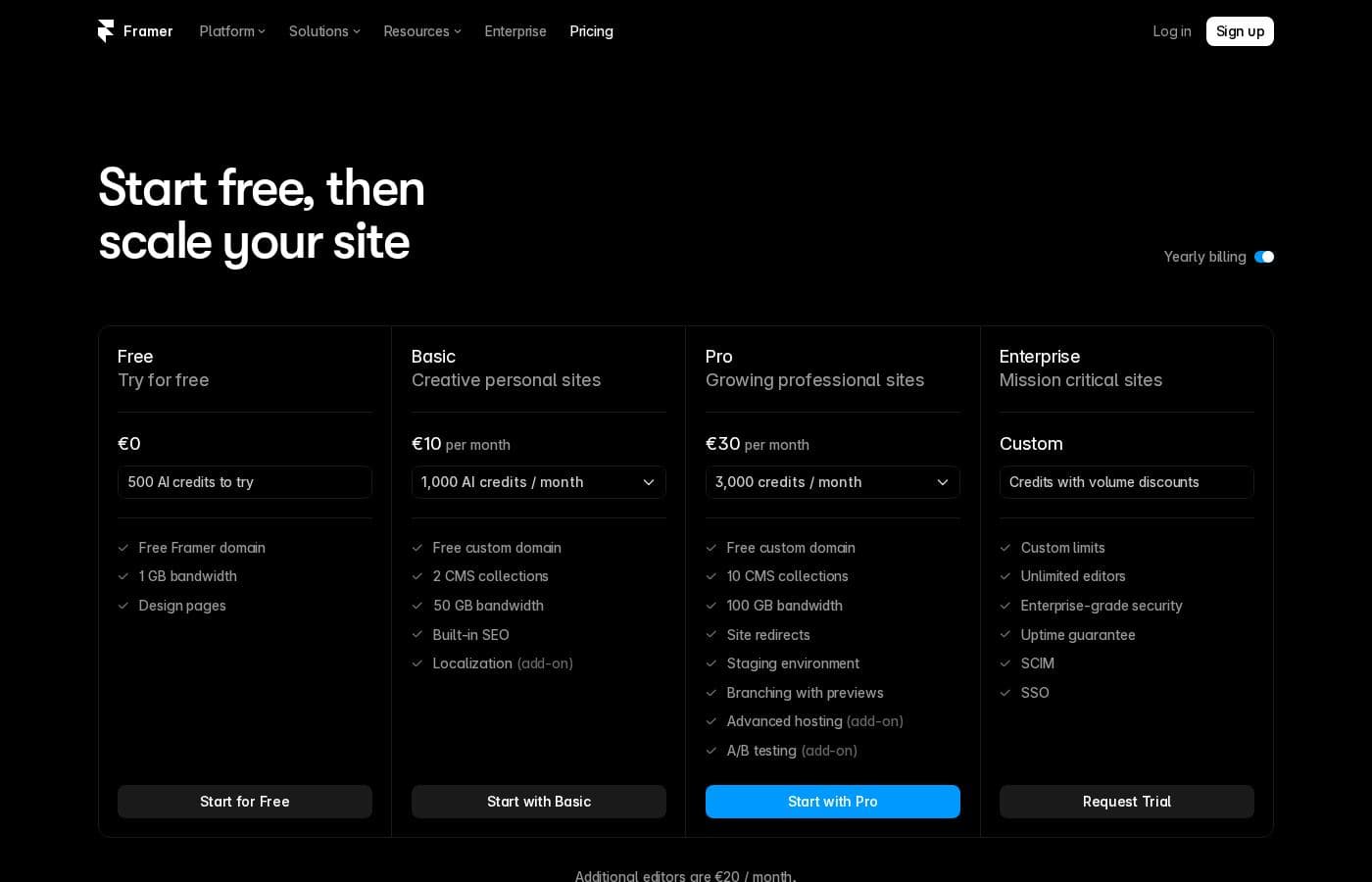
Capture d'écran de la page tarifs de FramerVoir la capture de la page tarifs
FormulePaiement mensuelPaiement annuelInclus
Free
Gratuit
—
Custom domain connection requires an upgrade to a paid plan
  • 10 CMS collections
  • 1,000 pages
  • 5 MB file uploads
  • One free locale
  • 500 credits to try AI Agents
  • +1
Pro
Voir le site de l'éditeur
Maximum capacities require purchasing add-ons; going over some limits prompts an upgrade, while bandwidth overages are tolerated for one month
  • Monthly credits for Agents, Localization, and other AI features, shared across the workspace
  • Add-ons up to 40,000 CMS items and 40 CMS collections
  • Add-ons up to 2 TB of bandwidth, 700 pages, and 1.5M events
  • Convert add-on with up to 5 A/B tests, billed by monthly analytics events
  • Advanced Hosting add-on with 6 rewrites, custom security headers, and 50 static file uploads
Enterprise
Voir le site de l'éditeur
  • Custom billing options, including credit cards or bank transfers

Historique des prix

Prix suivis depuis le 30 sept. 2026. Aucun changement détecté pour l'instant.

Types de tarification: Free plan, Monthly subscription, Per seat pricing, Usage-based pricing

Notes sur les tarifs

Framer offers a free plan plus paid subscription tiers that add custom domains, AI credits, and higher limits. Editors are billed per seat, and add-ons extend capacity for CMS items, bandwidth, pages, and events.

Framer offers a free plan to get started, plus paid subscription tiers that unlock custom domains, AI credits, and higher limits. Editors are billed per seat, and add-ons extend your capacity when you outgrow a plan.

Here's how the tiers break down.

Free

Other Features:

  • 10 CMS collections and 1,000 pages
  • 5 MB file uploads and one free locale
  • 500 credits to try AI Agents
  • Collaboration with up to three editors

The Free plan is a solid fit if you're exploring Framer, using it as a design tool, or building templates. Just remember that connecting a custom domain requires an upgrade, so move to a paid plan when you're ready to launch.

Pro

Other Features:

  • Monthly credits that power Agents, Localization, and other AI features, shared across your workspace
  • Add-ons can take you up to 40,000 CMS items, 40 CMS collections, 2 TB of bandwidth, 700 pages, and 1.5M events
  • A Convert add-on with up to 5 A/B tests, billed by your site's monthly analytics events
  • An Advanced Hosting add-on with up to 6 rewrites, custom security headers, and 50 static file uploads

Pro works well for growing sites that need more room and AI firepower. Add-ons stack on top when you hit a ceiling, and extra editors can join anytime. Because exact prices and plan limits aren't listed on this page, confirm current rates in the pricing panel before you subscribe.

Enterprise

Other Features:

  • Custom billing options, including credit cards or bank transfers

Enterprise suits teams that need tailored billing arrangements rather than a standard card checkout. Other plans are paid by credit card or, in some regions, PayPal.

There's no paid trial mentioned here, but the free plan is available to everyone, so you can explore the platform without spending anything. If you live in the EU or Turkey, you're legally eligible for a refund within 14 days of purchase — just contact Support and they'll cancel and process it. Worried about limits? Framer lets you exceed bandwidth caps for one month while you decide whether to upgrade, and it offers flexible arrangements for open-source or non-revenue side projects.

Comment payer Framer moins cher

  • Commencez avec la formule gratuite et passez à la suite seulement quand vous atteignez ses limites.
  • Garantie satisfait ou remboursé de 14 jours.
Visiter Framer

M’avertir quand Framer change de prix

Un e-mail quand nous détectons un changement sur la page tarifs de l’éditeur. Pas de newsletter, pas de promos. Désinscription en un clic.

Avis des utilisateurs

Aucun avis pour le moment.

Rédiger un avis

Rédiger un avis pour Framer
0/100 caractères
0/2000 caractères

Pourquoi utiliser Framer ?

Most AI builders hand you a template and hope for the best. Framer's agents work directly on your actual site, and the site reports 754 billion agent tokens processed through OpenRouter in a single week — this isn't a side experiment. Here's where it stands out:

  • Agents that edit, not just suggest. The design agent generates and refines on your canvas, and every change stays visible, editable, and yours.
  • Content and design stay in sync. The CMS agent sets up, organizes, and updates your collections, connecting them straight to the canvas.
  • Code without the grind. Ask for anything from a simple effect to a complex interaction, and the agent writes it onto your site.
  • Your existing AI tools plug in. Update copy from Slack, trigger CMS changes from a terminal, or ship from a GitHub PR using Claude Code, Cursor, or Codex in ChatGPT.
  • A platform, not a prototype. The site cites 99.99% uptime, strong Core Web Vitals scores, built-in analytics, variant testing, and multi-language support.
  • A real head start. Tap into 12,447 community resources plus marketplace templates, plugins, and components.

If you want AI speed without losing creative control, start a project in Framer and watch what the agents actually do.

Alternatives à Framer

Autres outils dans la catégorie Créateur de site web

Voir tous les outils Créateur de site web
Duda

Duda

Website Builder4.1/5

La plateforme de site Web optimisée par l'IA, conçue pour les professionnels

Carrd

Carrd

Website Builder4.1/5

Des sites d'une page simples, gratuits et totalement responsifs pour presque tout.

Zenfolio

Zenfolio

Website Builder4.1/5

La plateforme complète pour organiser, présenter et vendre vos photos.

Squarespace

Squarespace

Website Builder4.1/5

Un constructeur de site tout-en-un avec configuration IA, hébergement et outils de vente intégrés.

Phonesites

Phonesites

Website Builder4/5

La manière la plus simple de transformer les visiteurs en prospects et en clients.

UENI.com

UENI.com

Website Builder4/5

Des pros créent le site web de votre petite entreprise en 7 jours — 79 $ au départ, puis 24,99 $ par mois.

Logiciels Créateur de site web les moins chers pour 1 à 25 utilisateurs

Framer : questions fréquentes

Framer propose-t-il une formule gratuite ?

Oui. Framer propose une formule gratuite (Free).

Framer propose-t-il un essai gratuit ou une garantie satisfait ou remboursé ?

Une garantie satisfait ou remboursé de 14 jours est proposée.

Le prix de Framer a-t-il changé récemment ?

Non. Aucun changement de prix détecté depuis le début du suivi, le 30 sept. 2026.

How are extra editors billed?

Editors are billed per seat, and you can add them to your workspace or projects anytime. Framer notifies you when an editor is added to your billing, and you're charged within 24 hours.

What happens if I exceed my plan's limits?

For most limits, Framer asks you to upgrade. Bandwidth is more forgiving: you can go over for one month while deciding, and you'll get an email so you can upgrade in time.

Prêt à essayer Framer ? Découvrez le site officiel ou les tarifs.

Vous êtes Framer ? Revendiquer cette fiche · Obtenir le badge