Vollständige Übersetzung folgt — Produktdetails auf Englisch, lokalisierte Navigation.
Plansom

Plansom review

AI work OS that turns team goals into shareable plans with AI agents

Plansom kostet ab 20,83 $ (≈ 18,63 €)/Monat · 3 Tarife · Kostenloser Tarif verfügbar · Preise geprüft am 12. Okt. 2026

Von Ciroapp Editorial Team · Aktualisiert 9. Okt. 2026

Provision möglich, ohne zusätzliche Kosten

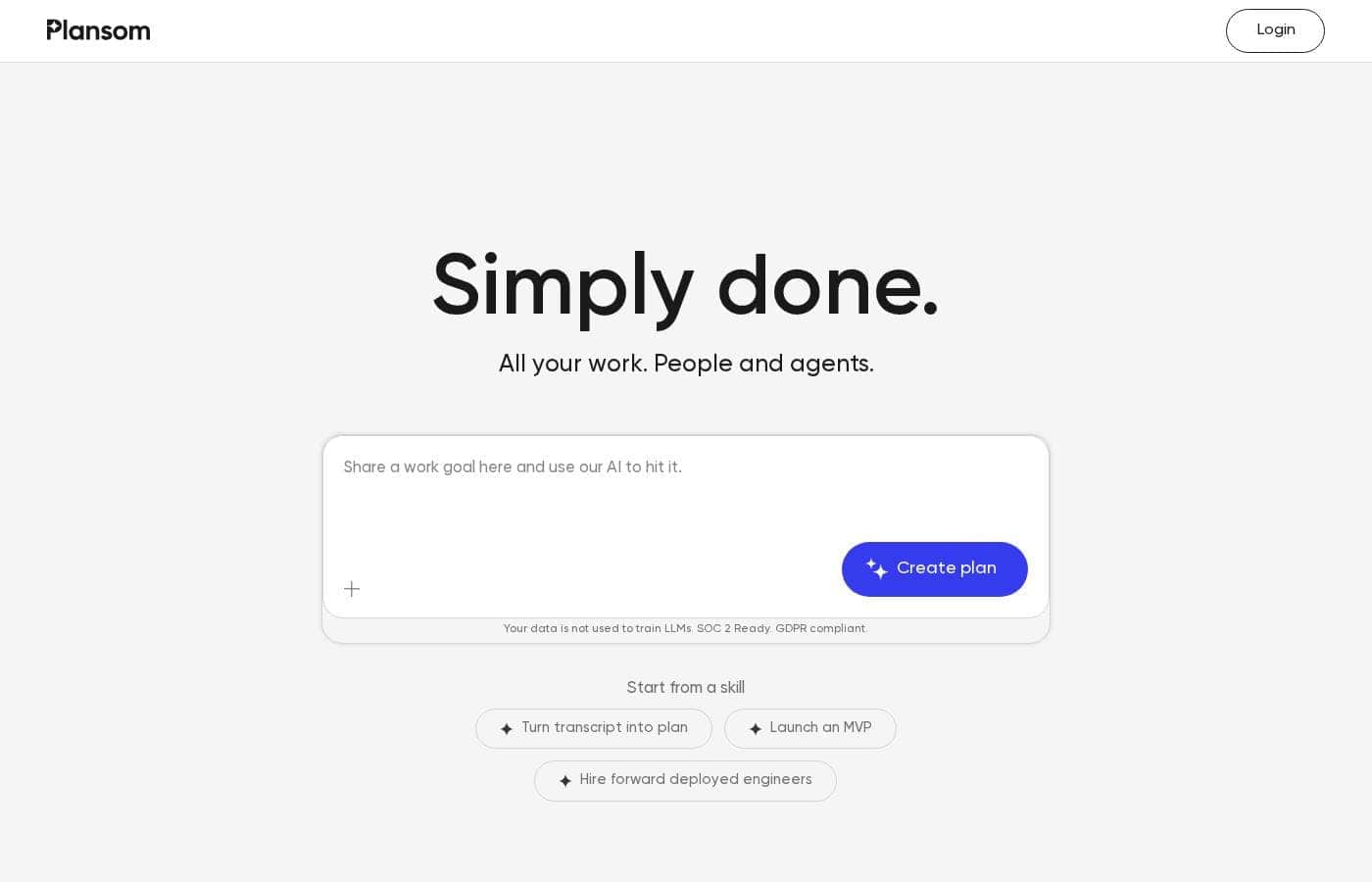
Plansom Homepage-Screenshot

Auf einen Blick

Kurzüberblick zu Plansom: Bewertung, Preisübersicht, wichtige Funktionen und Highlights.
Preise geprüft am 12. Okt. 2026

Ciroapp-Score

3.7/ 5

Goal-first planning, but pricing stays hidden

Plansom starts from the outcome, not the task list. Give it a goal, KPI, or OKR and it drafts tasks, timelines, and hours your team can share. AI agents take on repetitive steps, and the integrations run wide. Pricing stays unpublished, so you can't compare plans up front. Overall, a promising goal-first tool best tested on one real project before any wider rollout.

Vorteile

  • Vorteile:Builds a shareable plan with tasks, timelines, and hours from a single goal, KPI, or OKR
  • Vorteile:Ranks tasks so bottlenecks and blockers surface before less urgent work
  • Vorteile:Lets you assign tasks to AI agents and follow their progress and output

Nachteile

  • Nachteile:No public price list, so paid tiers, seat limits, and billing periods are unclear
  • Nachteile:The only confirmed cost detail is a 7-day free trial, and no money-back guarantee is stated
  • Nachteile:SOC 2 is listed as Ready rather than certified, so you can't read an audit report on the site
Am besten für
  • Startup and product teams pushing toward a dated milestone like an MVP launch
  • Founders and operators who track work as KPIs or OKRs
  • Teams already living in Slack, Notion, Microsoft 365, or Google Workspace
Kostenlose Testphase
Yes — 7 Tage
Dieser Abschnitt ist eine Zusammenfassung. Details zu Funktionen, Anwendungsfällen, Preisen und Bewertungen folgen weiter unten.

Was ist Plansom?

Plansom is an AI work simplifier and project management tool for teams. You set a goal, KPI, or OKR, and it builds a shareable plan with tasks, timelines, and hours. It connects to tools like Slack, Gmail, Outlook, Notion, and HubSpot, plus AI assistants such as Claude, ChatGPT, and Gemini.

Tasks can be assigned to AI agents that report outcomes. Work also links into Microsoft Teams through Microsoft Foundry SDKs.

Verdict

Best for Small product, operations, and founder-led teams that run on goals and want AI agents to absorb repetitive work.

Plansom fits teams that think in goals and want a plan generated for them, with AI agents handling repetitive steps. The 7-day free trial makes it easy to test on one real project. Check pricing and your key integrations before a wider rollout.

Strengths

  • Builds a shareable plan with tasks, timelines, and hours from a single goal, KPI, or OKR
  • Ranks tasks to help teams spot bottlenecks and blockers
  • Assigns tasks to AI agents and reports progress and output

Watch-outs

  • Plan pricing and billing structure aren't published on the site
  • Setup guides and onboarding documentation aren't shown publicly
  • SOC 2 is listed as Ready rather than certified

Plansom Wichtige Funktionen

✨ Goal-First Planning

Start with the outcome, not a blank board. Type one goal, a KPI, or an OKR, such as launch an MVP in six weeks. Plansom drafts a ready-to-share plan with goals, tasks, timelines, and hours.

Invite the team, and the plan is live before the meeting ends.

✨ Priorities That Surface Themselves

Plansom ranks your tasks so bottlenecks and blockers show up first. Overdue items and tight deadlines rise to the top, so you can approve, review, or delegate the thing that matters right now. Instead of scanning a long list, you see where to focus.

🤖 AI Agents That Handle the Busywork

Assign a task to an AI agent and follow its progress and output. In one demo, an agent turned a weekly marketing sync into three blog drafts, an updated press release, and a launch email. You check the work, then keep moving.

Agents run in the background while you sleep.

✨ One Place for Scattered Work

Your work lives across your inbox, chat, docs, and CRM. Plansom connects them, so plans stay current straight from your inbox. It links a wide stack, including:

  • Chat and meetings: Slack, Zoom, Fireflies, Granola, Otter
  • Docs, files, and CRM: Notion, HubSpot, Pipedrive, Google Workspace, Microsoft 365
  • AI assistants and code: Claude, ChatGPT, Gemini, Perplexity, Microsoft Copilot, GitHub

✨ Skip Setup, Then Repeat What Works

Prebuilt skills cut setup to minutes. Turn a transcript into a plan, scope an MVP, or plan a hiring push without starting from scratch. Once a plan works, track what happened and run it again.

Plansom states your data isn't used to train LLMs, and lists SOC 2 Ready status and GDPR compliance.

Anwendungsfälle

🚀 Plan an MVP launch from one goal

A founder types "Launch MVP in six weeks." Plansom drafts the tasks, timelines, and hours, then the team gets invited. Priorities surface blockers first, so dev starts after design sign-off. Expected outcome: a shareable plan before the kickoff meeting ends.

🎙️ Turn meeting transcripts into ready plans

Start from the "Turn transcript into plan" skill. Paste the transcript, and Plansom builds goals, tasks, and hours you can share. Teams already recording in Zoom, Fireflies, or Granola skip the blank page.

Tip: review the draft tasks, then invite the team.

🤖 Hand repetitive work to AI agents

Assign a task to an AI agent and follow progress as it works. One demo turns a weekly marketing sync into three blog drafts, an updated press release, and a launch email. Expected outcome: busywork handled while you check the output.

🔗 Keep one plan current across your tools

Connect Gmail, Outlook, Slack, Notion, HubSpot, Microsoft 365, and Google Workspace. Status updates and requests land in the same plan instead of scattered threads. Managers rank priorities so bottlenecks show up first.

Tip: confirm your key integrations before rollout.

Plansom Preise

Ab20,83 $/Monat≈ 18,63 €

  • Von der Preisseite des Anbieters, geprüft am 12. Okt. 2026
  • 3 Tarife
  • Kostenloser Tarif verfügbar

Preise geprüft am 12. Okt. 2026 auf der Preisseite von Plansom

Screenshot der Preisseite von PlansomScreenshot der Preisseite ansehen
TarifMonatlichJährlichEnthalten
Free Plan
Kostenlos
—
Pro Plan Monthly
25 $/Monat
≈ 22,36 €
—
Pro Plan Annual
—
20,83 $/Monat
≈ 18,63 €
250 $ pro Jahr

Umgerechnet zum EZB-Referenzkurs vom 12. Okt. 2026; der Anbieter kann einen anderen lokalen Preis verlangen.

Preisverlauf

Preise werden seit 9. Okt. 2026 beobachtet. Bisher keine Preisänderung erkannt.

Preistypen: Free trial

Hinweise zu den Preisen

Plansom currently offers a 7-day free trial with full access and no credit card required. Public plan prices aren't listed yet, so expect paid tiers to be shaped around seats or usage once you're in the product.

Plansom's public site doesn't list plan prices yet, but you can try the full product free for 7 days with no credit card required.

Here's what's clear today, and how to judge the fit.

Plansom is an AI work simplifier. You set a goal — an OKR, a KPI, an MVP scope — and it builds a ready-to-share plan with goals, tasks, timelines, and hours. From there you invite the team, rank priorities so bottlenecks surface first, and hand tasks to AI agents that work in the background.

Because no published tiers appear on the site, pricing looks likely to follow seats or usage rather than one flat fee. Check the seat count and usage limits you'd actually need before you buy.

What you can try today:

  • 7-day free trial with full access to the product
  • No credit card required to start
  • Goal-to-plan generation, with tasks, timelines, and hours
  • Priority ranking that puts blockers in front of you
  • AI agents you can assign work to
  • Integrations with Claude, ChatGPT, Gemini, Slack, Notion, Gmail, Outlook, HubSpot, Microsoft 365, Google Workspace, Zoom, GitHub, and more

Plansom also says your data isn't used to train LLMs, and it's SOC 2 Ready and GDPR compliant — useful if you're bringing it into a company with real security reviews.

Who it suits

Teams that plan constantly and want the plan to stay current. Startups shipping an MVP, agencies juggling client work, and product or ops leads drowning in status updates all fit the same pattern. A Microsoft partnership aimed at bringing result management into Microsoft Teams reinforces that team-first angle.

The bottom line

Plansom's most concrete offer right now is the 7-day free trial: full access, no card, no commitment while you test it. Run it on one real project — a launch, a hiring push, a board cycle — and see whether the generated plan matches how your team already works. If it does, the pricing conversation gets much easier, whatever the tiers turn out to be. If it doesn't, you've lost a week and nothing else.

For current numbers, ask Plansom directly or start the trial and check the upgrade screen inside the app.
Kostenrechner

Berechnen Sie, was Plansom für Ihr Team kostet.

Abrechnung
Pro Monat
25 $≈ 22,36 €
Pro Jahr
300 $≈ 268,31 €

Pro Plan Monthly nennt kein Nutzerlimit: als ein Preis für das ganze Konto gerechnet. Den Preis für 5 Nutzer beim Anbieter prüfen. Schätzung auf Basis veröffentlichter Listenpreise, ohne Steuern, Add-ons und Rabatte.

Umgerechnet zum EZB-Referenzkurs vom 12. Okt. 2026; der Anbieter kann einen anderen lokalen Preis verlangen.

So zahlen Sie weniger für Plansom

  • Mit dem kostenlosen Tarif starten und erst beim Erreichen der Limits upgraden.
  • Nutzen Sie die 7-tägige kostenlose Testphase vor dem Kauf.
  • Günstigere Tools dieser Kategorie starten bei 5 $/Monat.
Kostenlos testen

Benachrichtigen, wenn sich der Preis von Plansom ändert

Eine E-Mail, wenn wir eine Änderung auf der Preisseite des Anbieters erkennen. Kein Newsletter, keine Angebote. Abmeldung mit einem Klick.

Nutzerbewertungen

Noch keine Bewertungen.

Bewertung schreiben

Bewertung für Plansom schreiben
0/100 Zeichen
0/2000 Zeichen

Warum Plansom nutzen?

Most project tools ask you to build the plan yourself. Plansom starts from the outcome instead, so the plan is ready before the meeting ends.

  • Goal-first planning. Enter a goal, KPI, or OKR, and Plansom drafts the tasks, timelines, and hours you need. Invite the team and share it.
  • Priorities that surface themselves. Your tasks are ranked to help you clear bottlenecks and blockers first, so you focus where it matters.
  • AI agents do the busywork. Assign a task to an AI agent and follow the progress and output. One demo shows an agent turning a weekly marketing sync into blog drafts, an updated press release, and a launch email.
  • One place for scattered work. Connect Slack, Gmail, Outlook, Notion, HubSpot, GitHub, Google Workspace, Microsoft 365, and AI tools like Claude, ChatGPT, and Perplexity.
  • Fast starts, not blank pages. Prebuilt skills such as turning a transcript into a plan or scoping an MVP cut setup time to minutes.
  • Clear data rules. Plansom states your data is not used to train LLMs, and lists SOC 2 Ready status and GDPR compliance.

Once a plan works, you can repeat it. That is the point: track what worked, then run it again.

Alternativen zu Plansom

Weitere Tools in der Kategorie Projektmanagement

Alle Projektmanagement-Tools ansehen
Notion

Notion

Project Management4.2/5

Ihre KI-Alles-App. Mehr Produktivität. Weniger Tools.

Trello

Trello

Project Management4.2/5Ab 6 $/Monat (≈ 5,37 €)

Ihre Produktivitätszentrale zur Bewältigung von Unordnung und Chaos.

Asana

Asana

Project Management4.2/5

Verwalten Sie die Arbeit, Projekte und Aufgaben Ihres Teams online.

Teamwork

Teamwork

Project Management4.1/5

Projekt- und Ressourcenmanagement, das Kopfschmerzen in ein Erfolgserlebnis verwandelt.

ClickUp

ClickUp

Project Management4.1/5Ab 7 $/Monat (≈ 6,26 €)

Die Everything App für die Arbeit.

Monday.com

Monday.com

Project Management4.1/5

Eine KI-Arbeitsplattform für jede Art von Arbeit.

Hive

Hive

Ab 5 $/Monat (≈ 4,47 €)
Ora

Ora

Ab 5,99 $/Monat (≈ 5,36 €)
Günstigste Projektmanagement-Software für 1 bis 25 Nutzer

Plansom FAQ

Was kostet Plansom?

Der günstigste kostenpflichtige Tarif von Plansom, Pro Plan Annual, kostet 20,83 $ (≈ 18,63 €) pro Monat. Die kostenpflichtigen Tarife liegen zwischen 20,83 $ und 25 $ pro Monat. Preise am 12. Okt. 2026 auf der Preisseite des Anbieters geprüft.

Hat Plansom einen kostenlosen Tarif?

Ja. Plansom hat einen kostenlosen Tarif (Free Plan); kostenpflichtige Tarife beginnen bei 20,83 $ (≈ 18,63 €) pro Monat.

Bietet Plansom eine kostenlose Testphase oder eine Geld-zurück-Garantie?

Plansom bietet eine 7-tägige kostenlose Testphase.

Hat sich der Preis von Plansom kürzlich geändert?

Nein. Seit Beginn der Beobachtung am 9. Okt. 2026 haben wir keine Preisänderung erkannt.

Which tools does Plansom connect with?

It links Slack, Gmail, Outlook, Notion, HubSpot, GitHub, Google Workspace, and Microsoft 365, plus AI assistants like Claude, ChatGPT, and Gemini. Work also reaches Microsoft Teams through Microsoft's SDKs.

Is my data safe, and does Plansom train AI on it?

Plansom states your data isn't used to train LLMs. It lists SOC 2 Ready status and GDPR compliance. That's Ready, not certified, so request the audit report before a formal security review.

How fast is onboarding, and can we migrate existing work?

Setup starts with one goal, KPI, or OKR, and Plansom drafts the tasks, timelines, and hours. Prebuilt skills cut common jobs to minutes. Public migration guides aren't shown, so ask about imports first.

Bereit, Plansom auszuprobieren? Besuchen Sie die offizielle Website oder sehen Sie sich die Preise an.

Sind Sie Plansom? Eintrag beanspruchen · Badge holen