Webydo vs Ycode
Webydo and Ycode both aim for professional, code-free website design. Ycode offers superior value and powerful collaboration features for expanding teams. Webydo targets high-precision agency work but users report crippling technical instability.
Best for: Web design agencies requiring full White Label branding solutions., Designers who mandate highly specific, pixel-perfect breakpoint control.
Best for: Founders and designers prioritizing affordability and financial transparency., Teams demanding unlimited collaborators without paying extra user seat fees.
Professional features, questionable stability.
We observe that Webydo provides unique features such as white labeling and advanced CMS tools specifically built for professional agencies and designers. However, we cannot recommend a product where frequent platform glitches, extremely unreliable support, and aggressive billing practices are consistently reported by users. Overall, designers should exercise extreme caution before committing to this platform, especially for critical client projects.
Pros
- No-code, pixel-perfect design capabilities available.
- Includes client-facing CMS functionality for easy content updates.
- Professional features like White Labeling and custom branding for agencies.
- Centralized dashboard simplifies management of multiple client projects.
Cons
- Users report frequent platform glitches and operational unreliability.
- Customer support is consistently described as poor, slow, or non-existent.
- Reports of unexpected billing, charges, and sudden price hikes.
- Fees to export sites create a feeling of being 'captive' designers.
Powerful visual editor with smart pricing.
We see Ycode successfully bridges the gap between powerful design tools and affordability, offering extensive features like an integrated CMS and team collaboration without excessive cost. Overall, this platform presents a compelling alternative for designers and founders seeking complete control over their complex projects.
Pros
- Extremely competitive pricing structure beginning at $5/month annually.
- Comprehensive Free plan perfect for development and testing new projects.
- Total design autonomy via an intuitive visual editor, requiring no code.
- Integrated CMS simplifies content structuring and data management.
Cons
- Custom code integration is restricted to Basic and Pro plans.
- The Mini plan is significantly limited in scope (only 5 published pages).
- No explicit refund policy or money-back guarantee is provided.
AboutWebydo
Webydo is a powerful professional platform built specifically for designers and agencies. It empowers you to design and publish complex websites without dealing with underlying code. The platform's editor allows drag and drop functionality directly onto the design canvas. ✅
This platform automatically handles code generation. This gives you the professional features you need to create custom websites down to the last pixel. Over 246,000 designers and agencies are already using Webydo to grow their businesses.
AboutYcode
Ycode is a comprehensive, all-in-one website builder and integrated CMS. It's built specifically for designers, creators, and founders who want professional results without relying on code. Using its intuitive visual editor, you gain complete design control to craft beautiful, fully responsive websites. You can publish your creations instantly and manage everything easily from one reliable platform. ✅
Highlights
Feature Comparison
Features Overview
We highlight the main differences and pick a winner for each feature.
Platform Reliability
Webydo users report severe glitches and instability issues. Ycode is praised by users for its proven stability.
Webydo has long-standing, critical complaints regarding platform reliability and frequent bugs. Users report that Webydo changes designs unprompted and glitches constantly on live sites. Ycode maintains a strong reputation for stability, giving users confidence in project viability. The potential for unexpected live site errors makes Webydo a definite risk for professionals. You are risking your client reputation by launching unstable Webydo projects.
Team Collaboration
Ycode supports unlimited free collaborators instantly. Webydo drastically limits designer seats via expensive plans.
Ycode immediately allows unlimited collaborators on every single plan, even the Free tier. Ycode keeps costs predictable by focusing on project resources instead of headcount. Webydo's Team plan allows three accounts; the Agency plan allows ten designer seats. Agencies scaling with Webydo must upgrade their account plan just for more designer seats. Ycode is the clear winner for cost-effective, large-scale team projects.
Pricing Model
Ycode uses simple, low-cost tiered plans. Webydo combines account fees with separate per-site hosting costs.
Ycode's pricing is transparent, starting from a strong Free plan up to $25/month annually. Ycode gives users a substantial discount when choosing annual billing. Webydo's costs are confusing, pairing account plans (Agency, Team) with separate per-site fees. Webydo charges an additional $7.50 to $15 per month for each active client site. Webydo's convoluted pricing structure means forecasting agency costs is harder than with Ycode.
Agency Tools & Branding
Webydo offers strong tools crucial for agencies and client hand-off. Ycode omits specific agency-centric management features.
Webydo explicitly offers full White Label Branding and built-in Client Billing features on higher tiers. These tools help Webydo agencies present a unified, professional brand experience. Webydo also offers a dedicated account manager on the Agency plan. Ycode offers collaboration but does not list these specific financial or branding tools. Webydo is purpose-built for the agency workflow, excelling at client presentation.
Customer Support
Webydo's support is widely reported as slow and unhelpful. Ycode provides responsive support that users praise highly.
External reports warn Webydo's customer support often takes over 24 hours for a response. Troubleshooting on Webydo rarely solves the core issue for frustrated designers. Ycode includes email and community support across all plans with timely responses mentioned frequently. Poor customer support is a major liability when utilizing Webydo for professional projects. Choose Ycode for better peace of mind.
Vendor Lock-in
Webydo charges high fees if you try to export your creations. Ycode implies easy ownership through an open system.
Webydo creates vendor lock-in by charging substantial fees to export designed websites. Users feel trapped on the Webydo platform after paying expensive annual fees. The Agency plan lists 100 site exports, implying charges for additional attempts. Ycode's model incentivizes staying through genuine affordability and value. If you want control over your assets, Ycode is the much safer option.
Localization
Ycode excels at global scaling and multi-language support. Webydo lacks prominent focused localization tools.
Ycode is built for global success, offering unlimited languages on its Pro tier. Even the Free and Mini Ycode plans support two languages for testing. Webydo does not highlight advanced localization features in its pitch to designers. If your projects involve global audiences, Ycode gives you the necessary scaling tools. Ycode provides a comprehensive localization solution right out of the box.
Design Control
Webydo prioritizes pixel-perfect static design. Ycode offers more focus on modern dynamic interactions.
Webydo focuses on pixel-perfect results using familiar design software methods. It allows specific tailoring of layouts for individual device breakpoints. Ycode provides total visual autonomy, emphasizing dynamic elements like scroll effects and hover states. Both tools achieve code-free responsive design effortlessly. Webydo offers more explicit control over specific device sizes.
Webydo offers subscription packages focusing on Designer Accounts, starting with a general site plan at $12 per month (billed annually).
Selecting the right Webydo plan depends on the number of sites you manage and the scope of features required for your agency or freelance business. All plans fully include hosting and the Content Management System (CMS) for your use and for your clients.
General Site Pricing
Price: $15/month or $12/month (billed annually) Websites Supported: 1 Best For: Individuals building and hosting one site effortlessly Other Features: Included hosting and CMS
- Ideal for individuals
- Build and host one site effortlessly
- Included hosting and CMS
- 1 Designer Account
- Free hosting & CMS included
- Email Support
- 1 Designer Account
- Chat & Email Support
- Client Billing
- Free hosting & CMS included
- 3 Designer Accounts
- Full Onboarding & Setup
- Client Billing
- White Label CMS & Branding
- Add Code to Site

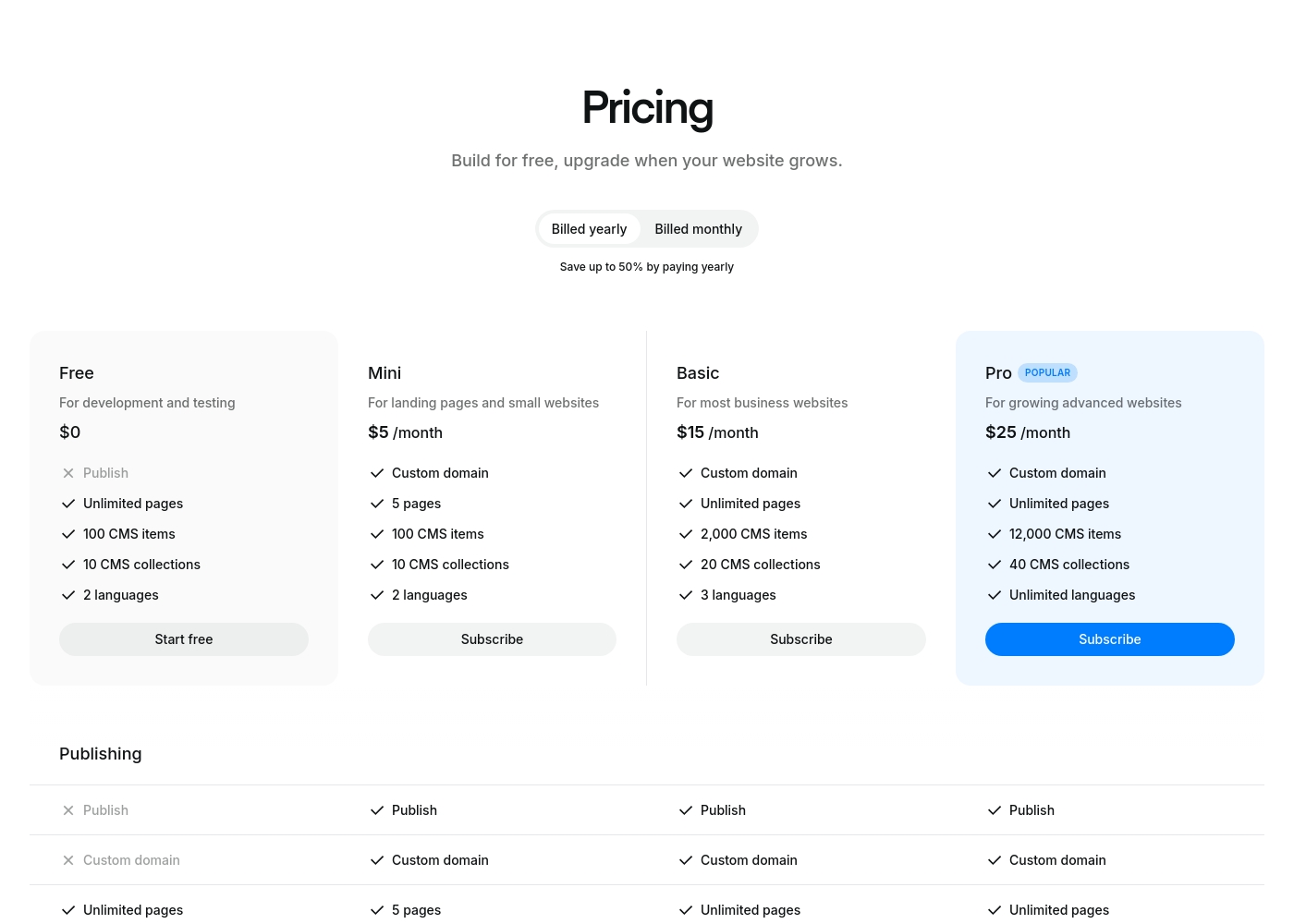
Ycode costs between $0 and $30 per month, with four plans: Free at $0, Mini at $5/month (billed yearly), Basic at $15/month (billed yearly), and Pro at $25/month (billed yearly).
Here’s a breakdown of what each tier offers so you can choose the best fit for your project.
Free
Price: $0 Best For: development and testing Other Features: Unlimited pages on a ycode.site domain, 100 CMS items, 10 CMS collections, 2 languages, 1K monthly visits.
- Publish to ycode.site
- Unlimited pages
- 100 CMS items
- 10 CMS collections
- 2 languages
- Custom domain
- 5 pages
- 100 CMS items
- 10 CMS collections
- 2 languages
- Custom domain
- Unlimited pages
- 2,000 CMS items
- 20 CMS collections
- 3 languages
- Custom domain
- Unlimited pages
- 12,000 CMS items
- 40 CMS collections
- Unlimited languages
Pricing Notes
- Webydo’s pricing is complex, combining expensive account subscriptions with mandatory per-site hosting fees ($7.50-$15/month/site).
- Ycode is significantly more affordable; its Pro plan is only $25/month annually (compared to Webydo's unknown base cost plus per-site fees).
- Ycode offers permanent Free usage for development, while Webydo offers a restrictive 14-day trial requiring a credit card.
- Webydo users report unexpected charges and arbitrary price hikes, adding severe financial risk.
Pricing Head-to-Head
User Reviews
The public feedback available for Webydo is overwhelmingly negative, pointing to significant reliability and customer support issues. Users consistently describe the platform as glitchy and unstable; long-term users noted that it "makes changes on its own" and frequently "crashes a lot." The most consistent complaint concerns the extremely poor quality of customer service, described by multiple reviewers as "awful," "slow at best," and frequently non-existent.
Support response times often exceeded 24 hours without resolving the core problem. Furthermore, several reviews highlight major concerns regarding billing and platform lock-in.
Been using it for almost a decade, and it’s the worst web builder available. It glitches constantly and Webydo support is truly awful. I do not recommend this service at all; find an alternative.
Ycode is strongly positioned as a high-value and professional alternative to established web development platforms, frequently emphasizing user satisfaction and powerful design capabilities. The company maintains that thousands of users worldwide praise its innovation and supportive environment.
This platform aims to cut through complexity by combining powerful features with an intuitive, user-friendly interface. Key themes promoted internally include superior user interface design and competitive pricing compared to rivals like Webflow, alongside strong functionality for animation and visual effects.
Our Verdict
Webydo versus Ycode is the ultimate reliability test for professional designers. Ycode is the emphatic winner for stability, affordability, and streamlined teamwork. Ycode offers superior value starting with its permanent Free plan for testing development. Webydo’s great superpower is professional agency branding for high-end clients. It offers exclusive White Label branding and built-in Client Billing tools. Webydo targets pixel-perfect design control using specific device breakpoints. However, Ycode’s strength lies in its remarkable stability and cost-effectiveness for rapid growth. Ycode allows unlimited collaborators on every plan at absolutely no extra user cost. This makes Ycode the optimal choice for large design teams collaborating affordably. If you value stability and trust, Ycode is the necessary choice for launching client sites. Webydo suffers from crippling technical glitches and reports of awful customer support. This makes Webydo a massive liability for any professional. Only choose Webydo if strict brand control and client billing are mandatory requirements. Otherwise, Ycode provides a powerful, affordable, and dependable platform for serious projects.
Frequently Asked Questions
Which platform is more stable for live client websites: Webydo or Ycode?
Ycode is overwhelmingly considered more stable and reliable by users. Webydo users frequently report constant glitches and designs changing unprompted. Ycode maintains a professional reputation for consistent platform performance.
Does Webydo offer unlimited collaboration seats like Ycode?
No, Webydo limits designer seats based on your expensive account tier (Team/Agency). Ycode impresses by allowing unlimited, free collaborators on every single plan. Ycode is far more cost-effective for growing teams.
Which platform truly offers the best dedicated agency management features?
Feature-wise, Webydo wins with its White Label Branding and Client Billing tools. However, Ycode’s platform stability and affordable scalability are a much safer choice for managing clients over the long term.
How does Webydo's pricing compare to Ycode's when scaling to many sites?
Ycode maintains low, fixed monthly costs, capping at $25/month annually for the Pro plan. Webydo’s cost scales steeply, requiring expensive account tiers plus extra monthly fees per published client site.
Is migrating a website away from Webydo easy to do?
Consumers report severe vendor lock-in issues with Webydo. They charge substantial, high fees to export your finished web creations. Ycode does not have this reputation for penalizing users leaving the platform.
Can both Webydo and Ycode handle advanced multi-language localization?
Ycode is explicitly designed for global success, offering support for up to unlimited languages on its Pro plan. Webydo does not prominently feature advanced localization tools in its core offering.
Ready to Choose?
Both tools have their strengths. Choose based on your specific needs.