Webwatcher vs Xnspy
Webwatcher and Xnspy are both vying for pole position in the mobile monitoring market. Xnspy delivers far more advanced features and is easier on your wallet. However, Webwatcher boasts true cross-platform coverage including PC and Mac. This comparison reveals which tool offers better overall reliability and value.
Best for: Users who absolutely require monitoring coverage across PC, Mac, Android, and iPhone., Non-technical users who need the quickest possible initial setup.
Best for: Budget-conscious users seeking the lowest cost entry point ($4.99/month)., Parents needing advanced interception like Call Recording, Keylogger, or Geo-fencing.
Extreme risk due to billing and support issues.
We found Webwatcher markets itself strongly on guaranteed functionality and comprehensive support for parental monitoring needs. However, our review of public user feedback showed severe, concrete accusations of fraudulent billing, refusal to issue refunds, and complete non-response from customer support. Overall, the serious financial and reliability risks reported by consumers necessitate a very low rating.
Pros
- Advertised compatibility across major devices (Android, iPhone, PC, Mac).
- Unlimited data storage is included in the current subscription plan.
- Setup is claimed to be quick and easy (under five minutes).
- Functionality is officially guaranteed with a full refund if issues cannot be resolved.
Cons
- Users report being refused refunds despite the official money-back guarantee.
- Specific claims of fraudulent double billing and funds theft were reported.
- Customer support was reported as non-responsive or misleading ('runaround').
- Product allegedly failed to work properly for some customers.
Effective Monitoring, Comprehensive Customer Support.
We find Xnspy delivers robust remote monitoring capabilities, offering comprehensive tracking of communications and social media for both Android and iPhone devices. While the setup can be tricky, the powerful 24/7 live customer support team earns significant praise for assisting users through installation hurdles. Overall, Xnspy provides strong feature value for its price, but users should be aware of potential data synchronization delays and the limiting partial refund policy.
Pros
- Runs discreetly in the background, minimizing detection.
- Comprehensive social media and communication monitoring features.
- Professional and quick 24/7 live customer support available.
- Effective for parental control and providing peace of mind.
Cons
- Reports of data synchronization delays, particularly on iPhone.
- Setup process is noted as tricky or difficult for average users.
- Strict 10-day partial refund policy is widely criticized.
- Compatibility limitations restrict features (e.g., GPS) on older Android phones.
AboutWebwatcher
WebWatcher is a specialized parental monitoring app. It is primarily aimed at supervising teenagers who may be involved in risky online behavior. The software gives parents necessary visibility into their child's digital footprint.
It works across major platforms including Android, iPhone, PC, and Mac devices. You can monitor everything seamlessly from anywhere using your secure, web-based online account. The application is designed to be discrete and tamper-proof once it's correctly installed. 💡
AboutXnspy
XNSPY is designed as an accessible monitoring solution. It helps you stay informed and provides necessary visibility. The platform works specifically with key mobile systems. You can easily explore compatibility for both Android and iPhone devices before committing. Get instant access to the Live Demo to see the system in action. ✅
Highlights
Feature Comparison
Features Overview
We highlight the main differences and pick a winner for each feature.
Pricing & Value
Xnspy offers significantly lower prices and better tier flexibility than Webwatcher. Webwatcher's single plan is nearly four times higher monthly.
Webwatcher’s only displayed plan is priced at $19.98 per month, calculated from a three-month total payment. This high rate includes unlimited data storage. Xnspy offers two tiers starting at just $4.99/month when billed annually. Even the Xnspy Premium plan is only $7.49/month, offering superior value. Xnspy makes advanced monitoring much more accessible budget-wise than Webwatcher.
Customer Support
Xnspy is highly rated for its professional 24/7 live support; Webwatcher is notorious for non-response and fraud complaints.
Xnspy provides responsive 24/7 customer support and live chat assistance. Users frequently praise Xnspy for helping with complex installations quickly. Webwatcher users report opening many support tickets with zero response from the company. Reviewers claim Webwatcher outright denied refunds and engaged in fraudulent billing practices. For reliability and peace of mind, Xnspy is the clear champion.
Remote Control Features
Xnspy offers powerful remote administrative tools like Keylogger, Call Recording, and Device Lock/Wipe. Webwatcher provides zero such remote intervention features.
Xnspy Premium allows you to remotely record the device’s surroundings and lock or wipe the phone data. Xnspy also features a functional Keylogger to track typed input on Android devices. Webwatcher focuses solely on passive monitoring and data collection. If active control over the device is needed, Xnspy provides critical capabilities. Webwatcher cannot secure or intervene remotely if the device is lost.
Platform Coverage
Webwatcher offers monitoring across Android, iPhone, PC, and Mac, providing better cross-platform options. Xnspy is mobile-focused, and iOS status is currently unstable.
Webwatcher explicitly supports monitoring desktop computers (PC/Mac) plus both phone operating systems. This provides a holistic view of activity across all screens. Xnspy is primarily centered on mobile devices (Android/iPhone). Furthermore, Xnspy currently posts alerts regarding temporary unavailability for iOS monitoring. Choose Webwatcher if you absolutely must monitor Windows or macOS activity.
Setup & Installation
Webwatcher promises a simple setup in under five minutes; Xnspy's installation is frequently called tricky by less technical users.
Webwatcher emphasizes speed and simplicity, claiming a setup process requiring five minutes or less. Installing Xnspy can be a complex process for the average user. Xnspy may require phone rooting or specific iTunes synchronization for certain features or device types. Though Xnspy offers great support, Webwatcher provides an easier, faster start.
Data Storage Limits
Webwatcher provides unlimited data storage included in its subscription price. Xnspy does not specify limits but implies data transfer management is needed.
Webwatcher guarantees unlimited storage for all monitoring data during your active subscription period. This removes any worry about log quotas or archival storage costs. Xnspy does not explicitly define an unlimited storage policy. Although Xnspy allows users to manage data uploads, Webwatcher offers a clearer, worry-free solution for heavy data logs.
Social Media Depth
Xnspy Premium monitors over 10 social media apps comprehensively. Webwatcher provides deep Snapchat monitoring but has less broad coverage overall.
Xnspy Premium captures chats, shared media, and activity across platforms like Instagram, Viber, and Facebook. Webwatcher excels at Snapchat, capturing messages and screenshots on Android. For modern teens using many apps, Xnspy provides a much wider, more comprehensive view. Xnspy ensures fewer hidden conversations escape detection.
Refund Trustworthiness
While both policies are restrictive, Xnspy's 10-day partial refund policy is transparent, unlike Webwatcher's full guarantee which users claim is systematically ignored.
Webwatcher advertises a strong, risk-free guarantee for a full refund if the app fails. Multiple users report Webwatcher support actively ignores refund requests, even demanding legal action. Xnspy's strict 10-day partial refund policy is clearly stated upfront. Due to the high risk of Webwatcher not honoring its guarantee, Xnspy presents a slightly safer purchasing decision.
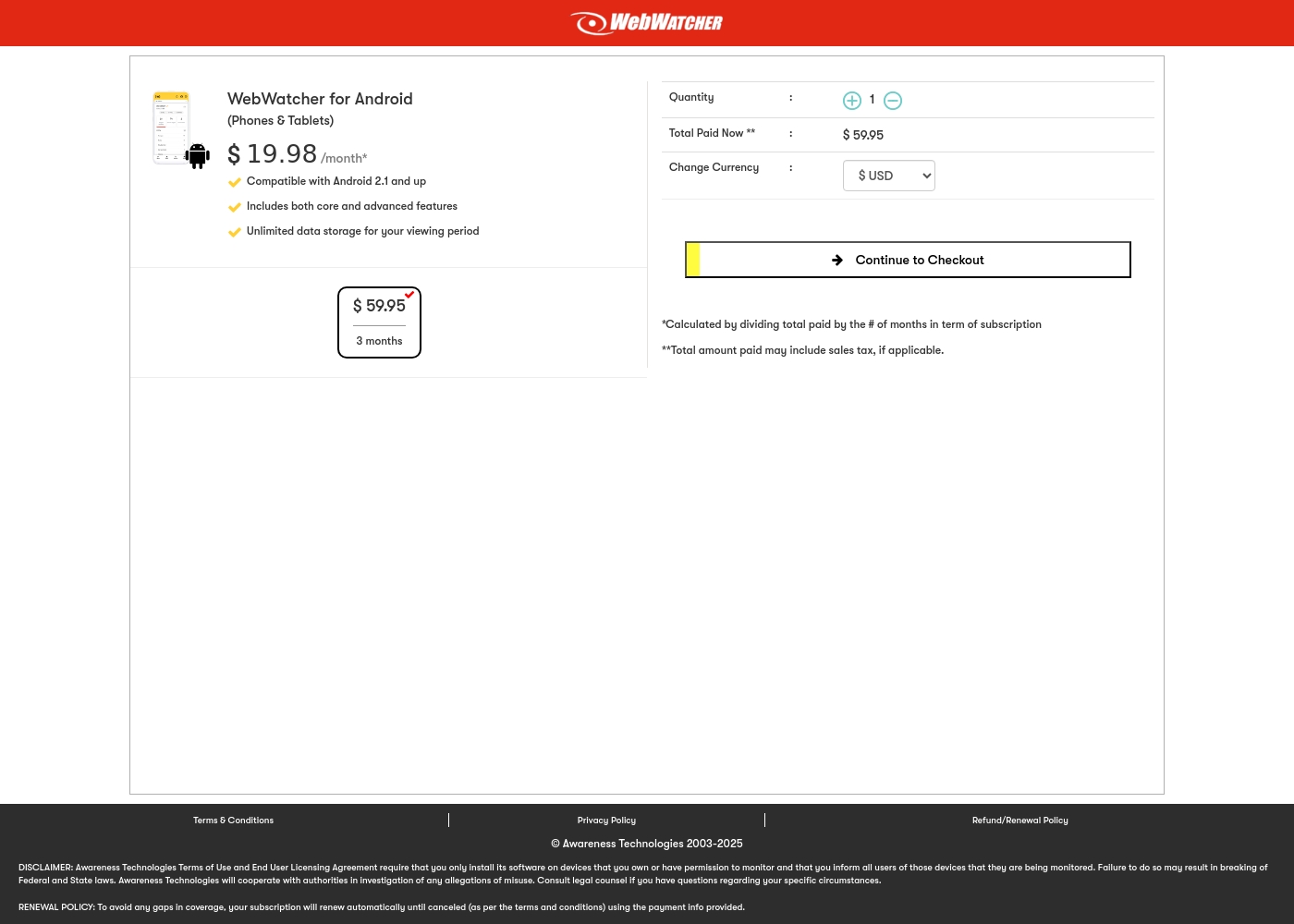
Webwatcher costs $19.98 per month with one explicitly priced plan: the 3-Month Android Subscription at $59.95 total.
Finding the right monitoring solution for your family is simple. Here is a detailed look at the pricing and features available in the current purchase flow.
3-Month Android Subscription
Price: $59.95 (paid every 3 months, calculated at $19.98/month) Best For: Parents monitoring Android phones and tablets Refund Policy: Full refund guaranteed if issues cannot be resolved Other Features:
- Compatible with Android 2.1 and newer versions
- Includes both core and advanced features
- Unlimited data storage for your full viewing period
- Compatible with Android 2.1 and up
- Includes both core and advanced features
- Unlimited data storage for your viewing period
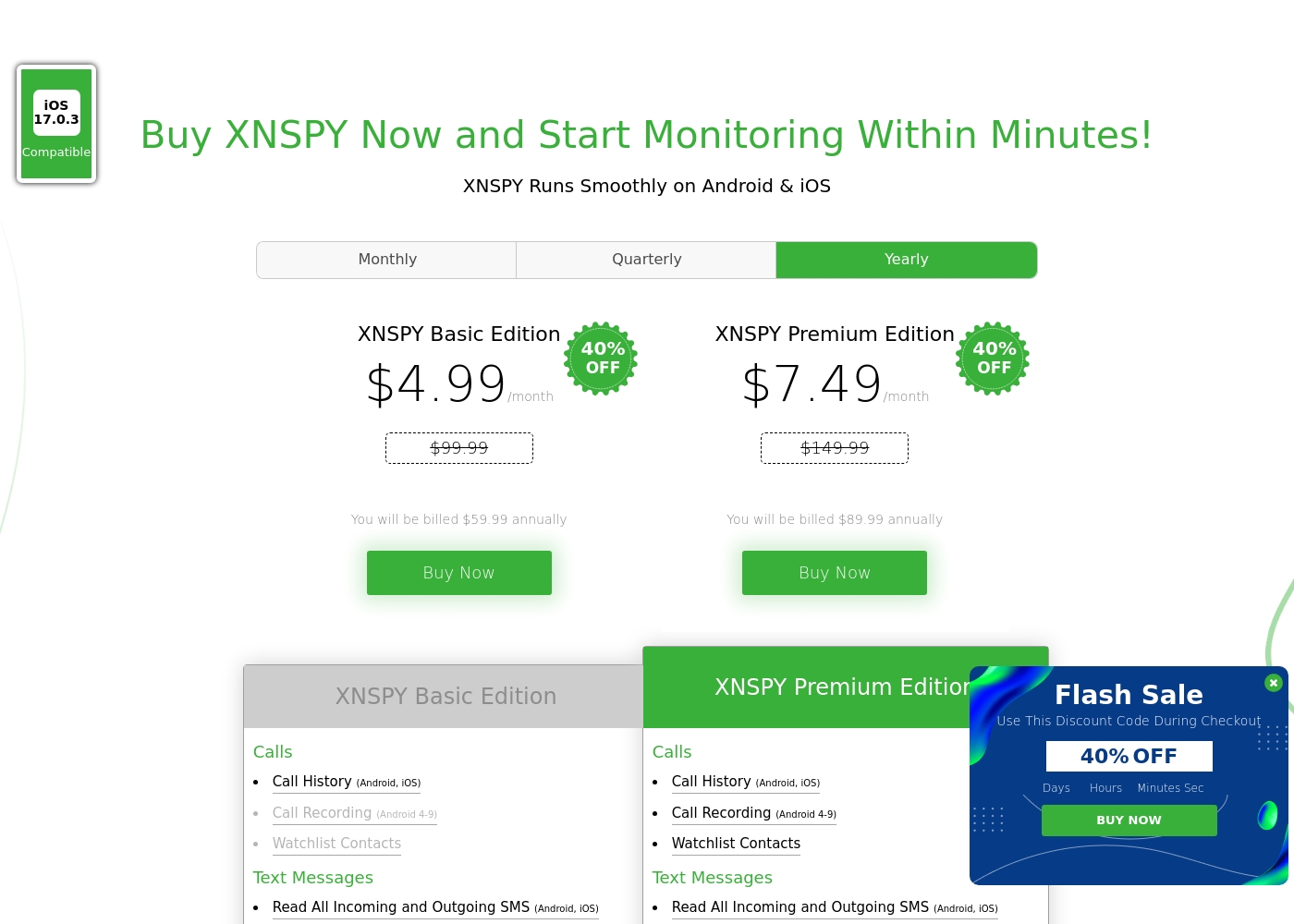
Xnspy costs between $4.99 and $7.49 per month (when billed annually) with 2 plans: XNSPY Basic Edition at $59.99 annually, and XNSPY Premium Edition at $89.99 annually.
These plans offer flexible billing options, including monthly, quarterly, and yearly subscriptions, allowing you to choose the commitment that works best for you.
XNSPY Basic Edition
Price: $59.99 billed annually (equivalent to $4.99/month) Best For: Users who need fundamental call, message, and location monitoring on a budget. Refund Policy: Partial refund within the first 10 days Other Features:
- View full call history and record calls (Android 4-9)
- Read all incoming and outgoing text messages
- Monitor WhatsApp chats and photos
- View internet browsing history and bookmarks
- Monitor keystrokes via Keylogger (Android)
- Call History & Recording (Android 4-9)
- Read All SMS & iMessages
- WhatsApp Chat & Photo Monitoring
- Real-Time Location Lookup
- Keylogger (Android)
- All Basic features included
- Monitor 10+ Social Media Apps (Facebook, Snapchat, Viber, etc.)
- Remotely Record Surroundings (Android)
- Remote Wipe Phone Data & Lock Phone (Android)
- Monitor Gmail App (Android)
Pricing Notes
- Xnspy is significantly cheaper, with its Basic annual plan translating to just $4.99 per month.
- Webwatcher's only displayed plan is effective cost $19.98/month, nearly four times Xnspy's lowest price.
- Webwatcher offers an explicit, though reportedly dishonored, full refund guarantee, while Xnspy has a strict 10-day partial refund policy.
- Webwatcher includes unlimited data storage; Xnspy suggests data upload limits can be managed through settings.
Pricing Head-to-Head
User Reviews
Webwatcher’s external feedback is extremely limited, stemming only from two reviews which resulted in a very low 2.9 TrustScore. While the platform advertises a strong 'risk-free' guarantee and promises excellent, responsive customer care, the limited user reports strongly contradict these claims.
Both reviewers cited severe issues primarily centered on billing and refunds. Users claim they were refused refunds entirely, even when requested within the advertised refund window, despite the monitoring product reportedly failing to work properly.
They refused to honor the risk-free money-back guarantee, even though I submitted the request properly. Furthermore, the product I purchased never actually worked for me as advertised. I absolutely feel like they are ripping me off.
The general sentiment for Xnspy is mixed, reflected in its cumulative Trustpilot score of 3.3/5. Users commonly praise its core capabilities, noting that the app runs discreetly and is effective for monitoring calls, texts, location, and social media activity.
Many parents appreciate the peace of mind it offers, finding the system more straightforward than complex rival monitoring software. A major strength cited frequently across reviews is the responsiveness and professionalism of the 24/7 customer support team.
I’m not very tech-savvy, so I reached out to live support for help with the setup. They opened a support ticket and completed everything for me quickly. The team was professional and really helpful.
Our Verdict
If transparency, pricing, and feature depth matter, Xnspy is the clear recommendation in this comparison. Webwatcher seems fundamentally untrustworthy based on widespread user reports of fraudulent double billing and refund refusals. Xnspy offers a much more reliable service, backed by professional 24/7 customer support. Webwatcher's key advantage lies in its comprehensive platform coverage, supporting PC and Mac devices. It also explicitly guarantees unlimited data storage, which is great for heavy users. If monitoring your child's laptop is non-negotiable, Webwatcher might fit your specific need. Xnspy’s superpower is its deep feature set tailored for mobile interception, including Keylogger and Live Call Recording. Starting at $4.99/month, Xnspy is also a fraction of Webwatcher's price. The deciding factor here is trust and support. Xnspy users may find the setup tricky, but responsive support helps them succeed. Webwatcher users face high costs and risk losing money entirely if the product fails. We recommend Xnspy for 9 out of 10 users seeking powerful mobile monitoring and reliable customer service. Only choose Webwatcher if you absolutely must monitor Windows or Mac devices despite the reported fraud risks.
Frequently Asked Questions
Which is cheaper: Webwatcher or Xnspy?
Xnspy is significantly cheaper for annual commitment, ranging from $4.99 to $7.49 per month. Webwatcher's shortest plan costs $19.98 per month. Xnspy offers far better value for money than Webwatcher.
Does Xnspy offer desktop monitoring like Webwatcher?
No, Xnspy focuses primarily on mobile devices (Android and iPhone). Webwatcher is the superior choice if you need to monitor activity on PC or Mac computers.
Which software has better customer support, Webwatcher or Xnspy?
Xnspy has excellent 24/7 live customer support praised in user reviews. Webwatcher's support is severely criticized for being non-responsive. Based on user reports, Xnspy is far more reliable for technical assistance.
Can Xnspy record phone calls, and does Webwatcher have this feature?
Yes, Xnspy can record phone calls on Android devices (versions 4-9). Webwatcher lacks this advanced interception capability entirely. Xnspy is better for deep communication context.
What about the money-back guarantees for Webwatcher and Xnspy?
Webwatcher offers a full refund guarantee, which users allege is systematically ignored. Xnspy offers a strict 10-day partial refund policy. Xnspy's policy, though restrictive, seems more transparent and trustworthy than Webwatcher's.
Which software is better for advanced social media monitoring?
Xnspy Premium is better, covering over 10 social media applications thoroughly. Webwatcher provides deep Snapchat monitoring on Android but lacks the wide coverage of Xnspy’s Premium tier.
Ready to Choose?
Both tools have their strengths. Choose based on your specific needs.