VEA vs Wrike
VEA and Wrike pull you toward different work realities. VEA sticks to a per-user, no-contract model with AI insights. Wrike offers tiered annual plans and enterprise-grade visibility.
Best for: Solo entrepreneurs juggling customers, invoicing, and scheduling, Small teams (1-15 users) needing predictable per-seat pricing
Best for: Marketing agencies managing multiple client projects, Remote enterprises needing 360° visibility and scalable governance
AI-powered operations with solid basics.
We found VEA AI to be a promising platform for automating back-office tasks, especially for service businesses. Overall, it offers a clear value proposition with tiered pricing, but the external user feedback we could gather is limited to a telehealth service, not the core AI software.
Pros
- Clear tiered pricing structure with defined features per plan
- Promises to automate routine tasks and save 20+ hours per week
- Provides real-time financial clarity and operational dashboards
- All-in-one platform aiming to replace multiple software tools
Cons
- External reviews do not correspond to the AI business platform
- No verified user feedback on the core AI software's performance or reliability
- Limited information on integrations or onboarding process from external sources
- Pricing starts at $24.95 per user, which may be high for small teams
Enterprise Power Meets Complex Commitment.
We find Wrike is an exceptionally versatile project solution, noted for scaling efficiently across corporate environments up to 3000 users and unifying communication across highly complex workflows. Overall, the software offers a powerful feature set for advanced visibility and customization, but we caution users regarding the rigid annual subscriptions and documented difficulties with managing auto-renewal and pricing increases.
Pros
- Transforms and streamlines complex corporate workflows efficiently.
- Highly customizable for various methodologies (e.g., Holacracy, OKR).
- Excellent collaborative transparency and 360° project visibility.
- Provides fast and helpful customer support regarding implementation and bugs.
Cons
- Pricing practices are reported as aggressive, often resulting in significant renewal increases.
- Subscriptions are difficult to cancel, and users report trouble stopping automatic renewal.
- Some teams report challenging adoption and setup processes.
- Users report instances of being oversold on features bundles they did not need.
AboutVEA
VEA AI is an all-in-one business management platform. It's designed for service business owners who want to stop micromanaging. The platform uses AI agents to automate tasks like project tracking, client management, and accounting. It aims to replace a stack of separate tools with a single, intelligent system. 💡
AboutWrike
Wrike is a trusted end-to-end enterprise work management solution. It's designed for organizations ready to transform manual processes into interconnected, automated workflows. Teams from 20 to 20,000 thrive here because Wrike is highly adaptable to any industry or size. It brings multiple teams into the same place for game-changing visual collaboration. Wrike is where you can easily align strategy and effectively execute your projects and programs. 💡
Highlights
Feature Comparison
Features Overview
We highlight the main differences and pick a winner for each feature.
User Interface
VEA keeps it lean; Wrike offers depth and configurability.
VEA's UI is clean and quick to learn. Wrike's UI is feature-rich and may require onboarding. TRADE-OFF: speed vs depth. Real-world: solo founders onboard fast with VEA; larger teams configure Wrike for complex workflows.
Collaboration & Communication
Wrike excels in cross-team collaboration; VEA focuses on ops in one place.
VEA centralizes customers, invoicing, and scheduling for simple collaboration. Wrike centralizes cross-functional work with proofs and guest approvals. TRADE-OFF: Wrike offers richer collaboration; VEA keeps communication lean. Real-world: agencies benefit from Wrike's collaboration; solo shops appreciate VEA's simplicity.
Automation & Workflows
Wrike shines with plan-based automation quotas; VEA leans manual efficiency.
Wrike provides automation quotas per user per plan, enabling scalable workflows. VEA supports templates and AI-guided decisions but fewer automation knobs. TRADE-OFF: Wrike is deeper; VEA is simpler. Real-world: large teams automate many steps in Wrike; small teams automate less in VEA.
Reporting & Analytics
VEA brings AI analytics into a single dashboard; Wrike adds enterprise dashboards.
VEA surfaces AI-driven insights from invoices, customers, and scheduling. Wrike offers real-time reports and AI capabilities across workflows. TRADE-OFF: Wrike provides broader analytics for large teams; VEA keeps insights focused. Real-world: startups act on VEA insights; enterprises rely on Wrike reports.
Integrations & Ecosystem
Wrike dominates with 400+ integrations; VEA is more self-contained.
Wrike Integrate connects Slack, Google, Salesforce, and more. VEA focuses on core ops without a wide integration catalog. TRADE-OFF: Wrike reduces context switching; VEA stays simple. Real-world: Wrike fits complex stacks; VEA suits smaller stacks.
Mobile Experience
Both offer mobile access, but specifics aren’t detailed in data.
VEA ships a mobile-friendly interface for on-the-go tasks. Wrike supports mobile apps across plans. TRADE-OFF: feature parity not clearly defined. Real-world: both help field teams stay synced.
Security & Compliance
Wrike shows well-documented security; VEA's security details aren’t explicit.
Wrike has SOC2 Type II, ISO 27001, 27018, GDPR/CCPA. VEA’s security specifics aren’t stated in data. TRADE-OFF: Wrike is stronger on governance. Real-world: enterprises rely on Wrike security posture.
Customization & Scalability
Wrike scales across teams; VEA stays lean for small teams.
Wrike supports 20-20,000 users with custom workspaces and admin controls. VEA emphasizes a lean, scalable per-seat model without long-term binds. TRADE-OFF: Wrike wins for large scale; VEA wins for fast growth with simplicity. Real-world: agencies scale in Wrike; solopreneurs grow with VEA.
Onboarding & Learning Curve
VEA offers quick-start guidance; Wrike demands guided deployment for teams.
VEA presents a 4-step setup and quick templates. Wrike recommends Professional Services for 20+ users. TRADE-OFF: VEAs ramp is faster; Wrike ensures proper adoption at scale. Real-world: small teams onboard fast with VEA; large teams benefit from Wrike onboarding.
Pricing Model
VEA’s per-user, no-contract pricing; Wrike uses tiered annual plans.
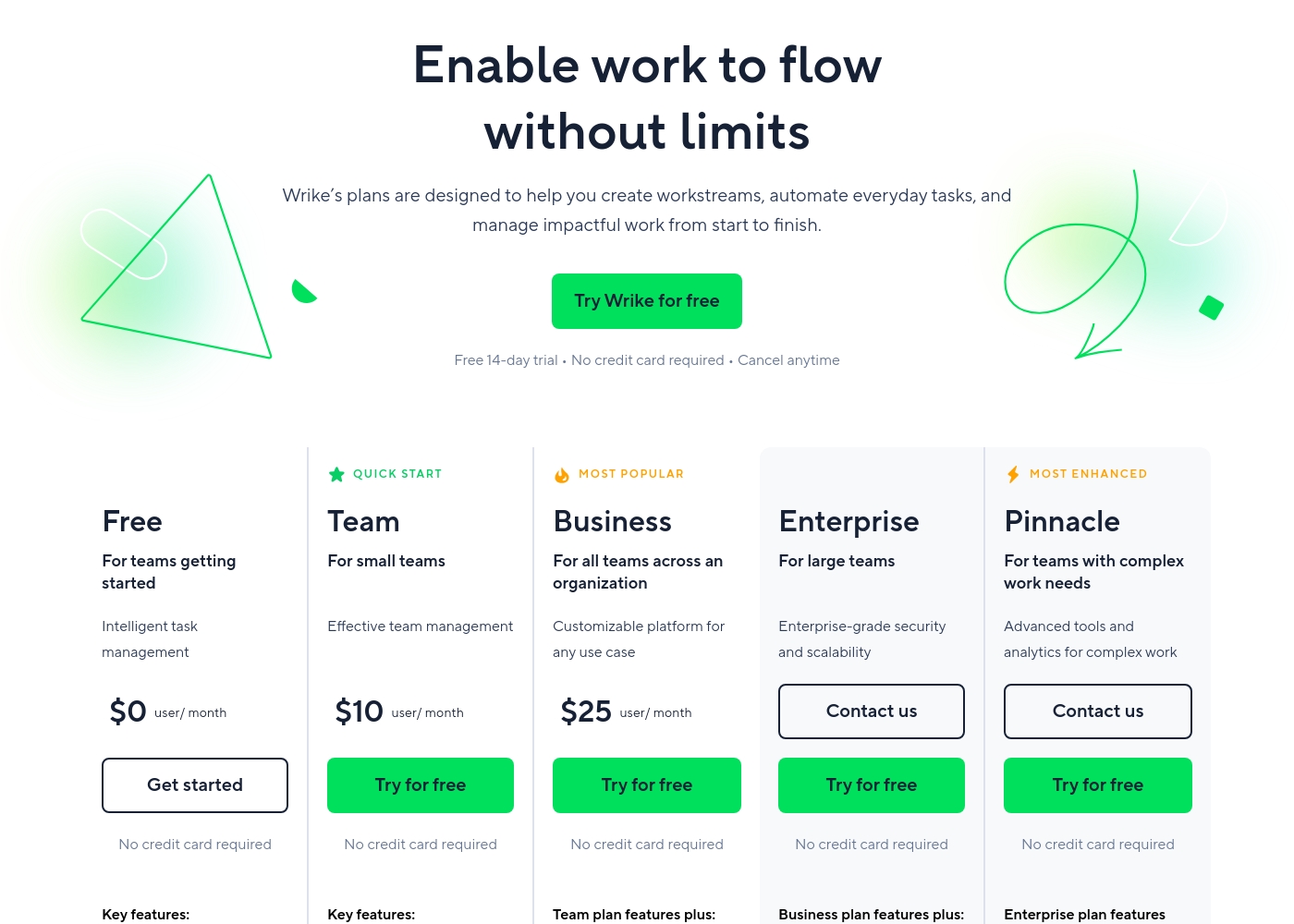
VEA: $24.95 per user per month, no contracts. Wrike: Free, Team $10, Business $25, annual-only upgrades. TRADE-OFF: VEA is budgeting-friendly for lean teams; Wrike offers enterprise-grade scales. Real-world: startups prefer VEA; enterprises often pick Wrike.
VEA costs between $24.95 and $59.95 per user, per month on an annual plan with 3 plans available: Business Class at $24.95, First Class at $39.95, and Private Jet at $59.95.
Take a look below to compare the features included with each options:
Business Class
Price: $24.95 per user, per month (billed annually) Best For: Team alignment and task tracking Other Features: Task tracking, team alignment, smoother operations
- Stop the chaos
- Get your team aligned
- Tasks tracked
- Operations running smoothly without constant check-ins
- AI agents handle grunt work
- Eliminate $15/hour tasks
- Help team move faster
- Focus on what matters
- AI experts analyze your business
- Flag problems before they cost money
- Guide major decisions with trusted data
Wrike costs between $0 and $25 per user/month, with five plans: Free at $0/user/month, Team at $10/user/month, Business at $25/user/month, and Enterprise and Pinnacle which require users to contact sales.
- Web, desktop, and mobile apps
- Project and task management
- Board view (Kanban)
- Table view (spreadsheet format)
- Folders structure & nested projects
- Unlimited projects, tasks, & subtasks
- Gantt charts, Calendar & Chart view
- Generative AI, 2 GB storage per user
- Project Blueprints and Unlimited request forms
- Approvals & guest approvals
- Resource & Capacity Planning
- File and video proofing (30+ file formats)
- Real-time reports
- SAML-based SSO and Two-Factor Authentication (2FA)
- Password policies and custom access roles
- Customizable user types and Admin permissions
- User audit reports
Pricing Notes
- VEA shows per-seat pricing with no stated annual option or free trial.
- Wrike includes a Free plan; higher tiers require annual commitments and price increases are reported by users.
Pricing Head-to-Head
User Reviews
On Trustpilot, VEA (Health) holds a 4.1/5 rating with five reviews in the last 12 months, all positive. Users consistently praise the straightforward ordering process, quick shipping (often 3-4 days), and secure packaging.
📦 Several highlight clear communication and responsive support for questions. One reviewer noted feeling tangible benefits like better energy.
The thing I appreciated most was how normal and straightforward everything felt. No weird process, no pressure, just clear communication and quick shipping. Made the whole experience really comfortable.
Users consistently praise Wrike's powerful capabilities in transforming workflow management and driving organizational efficiency. Many reviewers, including team leads and large enterprise users, call it one of the best project management systems available, noting its strong suitability for high-level customization for specific methodologies like OKR.
Its ability to centralize communication, provide 360° visibility, and manage collaboration across large global teams is frequently highlighted as second to none. Furthermore, customer support is often described as exemplar, particularly regarding implementation and quick bug fixes.
Using Wrike for three years has completely changed how we manage our workflows. The biggest transformation is how streamlined and fast our operations have become. It's truly efficient for our large team.
Our Verdict
Bottom line: Wrike tends to win for growing teams, but VEA shines for lean setups. VEA's simplicity and AI-driven insights let solo founders move fast. Wrike delivers 360° visibility, robust security, and deep integrations for larger teams. The deciding factor is team size and risk tolerance. If you’re 1-15 users, choose VEA; if you need scale, governance, and automation, Wrike is the safer bet for long-term projects.
Frequently Asked Questions
Which is better for small teams: VEA or Wrike?
For very small teams, VEA's simple, per-user pricing can be easier. Wrike offers a Free plan, but higher tiers require annual commitments. Start with VEA to keep costs predictable and onboarding fast.
Does VEA have AI analytics like Wrike?
Yes. VEA includes built-in AI analytics that guide decisions. Wrike also offers AI-driven insights across workflows. The key difference is VEA pairs analytics with a lean dashboard.
Is Wrike worth the extra cost over VEA?
Wrike's plans target larger teams and complex needs. If you need 360° visibility and proofs, Wrike can be worth it. For tiny teams, VEA often provides better ROI.
Can I migrate from VEA to Wrike easily?
Wrike offers onboarding options for teams; some migrations may be guided. VEA data can be exported, then imported into Wrike if needed. Check with sales for a formal plan.
Does Wrike offer a free plan and trial?
Wrike has a Free plan. A 14-day free trial is available for paid tiers. Annual commitments apply to higher plans.
What happens if Wrike renews automatically at a higher price?
Some users report renewal increases. Wrike typically bills annually for higher plans. Evaluate contract terms before upgrading.
Ready to Choose?
Both tools have their strengths. Choose based on your specific needs.