Umobix vs Webwatcher
Umobix and Webwatcher are both popular parental monitoring tools. Umobix provides detailed tracking and highly responsive customer support. Webwatcher, however, is associated with severe user complaints regarding billing and functionality. We'll show you why reliability makes all the difference here.
Best for: Parents prioritizing reliable customer support and service integrity, Users needing to track deleted messages and historical activity
Best for: Users who require guaranteed unlimited data storage volume, Parents focused on deep, specialized Snapchat monitoring (Android users only)
Powerful monitoring, excellent user support.
We find that uMobix offers powerful and highly detailed monitoring capabilities, which users praise for providing considerable oversight, particularly regarding location tracking and social media activity. Overall, while the core functionality and supporting team are excellent, prospective users must proceed with caution regarding the reported persistent issues with billing transparency and unexpected charges.
Pros
- Comprehensive tracking system supports 41 popular apps, calls, and messages.
- Highly responsive and helpful customer support team assists with difficult installations.
- Accurate and reliable GPS location tracking and keylogging functions.
- Provides highly detailed tracking data often missing in competitor applications.
Cons
- Frequent, serious complaints regarding unauthorized charges and unexpected billing practices.
- Users often report difficulty canceling trials or subscriptions and securing refunds.
- Real-time data and updates can sync slowly, especially during the initial setup phase.
- Some reports indicate the application can negatively impact the target device’s battery life or internet efficiency.
Extreme risk due to billing and support issues.
We found Webwatcher markets itself strongly on guaranteed functionality and comprehensive support for parental monitoring needs. However, our review of public user feedback showed severe, concrete accusations of fraudulent billing, refusal to issue refunds, and complete non-response from customer support. Overall, the serious financial and reliability risks reported by consumers necessitate a very low rating.
Pros
- Advertised compatibility across major devices (Android, iPhone, PC, Mac).
- Unlimited data storage is included in the current subscription plan.
- Setup is claimed to be quick and easy (under five minutes).
- Functionality is officially guaranteed with a full refund if issues cannot be resolved.
Cons
- Users report being refused refunds despite the official money-back guarantee.
- Specific claims of fraudulent double billing and funds theft were reported.
- Customer support was reported as non-responsive or misleading ('runaround').
- Product allegedly failed to work properly for some customers.
AboutUmobix
uMobix is a powerful cell phone tracker designed for modern parents. It lets you manage and monitor everything happening on your child's smartphone or tablet. This comprehensive tool supports a wide range of devices, including all iPhones, iPads, and Android OS 4+. You can easily check if your specific model is compatible on the website. uMobix provides real-time access to crucial digital activities and communications. 💡
AboutWebwatcher
WebWatcher is a specialized parental monitoring app. It is primarily aimed at supervising teenagers who may be involved in risky online behavior. The software gives parents necessary visibility into their child's digital footprint.
It works across major platforms including Android, iPhone, PC, and Mac devices. You can monitor everything seamlessly from anywhere using your secure, web-based online account. The application is designed to be discrete and tamper-proof once it's correctly installed. 💡
Highlights
Feature Comparison
Features Overview
We highlight the main differences and pick a winner for each feature.
Customer Support
Umobix has highly professional, praised support. Webwatcher support is allegedly non-responsive and misleading.
Umobix users consistently praise their customer support experience. Agents are named and cited as effective and prompt at resolving issues. Umobix's support offers essential migration details for device upgrades. Webwatcher claims to have 'great customer care' advertised to help right away. However, users report being completely ignored across 17+ support tickets. Negative reports accuse Webwatcher of disabling service during payment disputes. The difference is stark: Umobix delivers on support, while Webwatcher creates major support headaches. Reliable customer service is critical for a technical monitoring application.
Remote Controls
Umobix offers powerful blocking functions. Webwatcher only focuses on visibility.
Umobix provides extensive remote control capabilities for parents. Key actions include restricting specific apps or blocking incoming calls. Umobix can even turn off Wi-Fi or entirely block the target device. Webwatcher’s core feature set emphasizes tracking communication and web activity. It monitors activity but does not offer direct options to restrict device usage. Webwatcher is purely a detection tool. Umobix gives parents proactive control to set digital boundaries quickly. If intervention is critical, Umobix is the superior choice. This functionality is essential for safeguarding teens.
Deleted Activity
Umobix reveals hidden activity. Webwatcher only tracks current communication history.
A key feature of Umobix is the ability to view deleted messages and calls. This helps parents understand activity that was attempted to be hidden. Umobix offers clarity and complete oversight into device history. Webwatcher focuses on recording current activity details like texts, calls, and search terms. Its documentation does not list deleted activity recovery as a feature. Webwatcher provides a limited view of communication. Monitoring deleted historical data is a significant safety advantage. This feature makes Umobix much more robust for serious monitoring needs. Parents need this visibility to uncover concerning behavior.
Data Storage Limits
Webwatcher guarantees unlimited data storage. Umobix does not specify official storage capacity.
Webwatcher explicitly guarantees unlimited data storage with every paid subscription. This promise covers the entire duration of the customer’s viewing period. This is an excellent benefit for heavy users. Umobix documentation confirms access to media logs and message histories. However, Umobix does not specify any monthly data quotas or storage limits mentioned. Local saving is an option. If you anticipate very high data volume, Webwatcher offers a clear advantage here. Umobix users might face implied storage limits over time. Webwatcher promises peace of mind regarding data volume.
Device & Platform Scope
Webwatcher claims wider support (PC/Mac). Umobix offers reliable Android/iOS monitoring.
Umobix focuses on mobile, supporting Android 4+ and iOS devices well. It offers broad visibility across 41 mobile apps. Umobix excels at comprehensive smartphone tracking. Webwatcher claims compatibility across Android, iPhone, PC, and Mac devices. This broader claim theoretically allows for holistic family monitoring. Desktop tracking is a powerful feature for parents. Webwatcher wins on the sheer breadth of claimed coverage. Umobix is better suited if you only need strong, reliable mobile tracking. Verify Webwatcher's PC/Mac functionality carefully.
Snapchat Depth
Webwatcher has specialized Snapchat depth on Android. Umobix provides general app support.
Webwatcher provides deep monitoring for Snapchat on Android devices. It captures received messages and takes screenshots of activity. This specialized insight handles high-risk messaging. Umobix includes Snapchat within its list of 41 monitored apps and social platforms. General tracking is available within the Umobix dashboard. Umobix offers broad, non-specialized monitoring. For parents deeply concerned with high-risk disappearing apps, Webwatcher offers specific technical solutions. Umobix provides standard activity logs. Webwatcher is more dedicated to specific high-risk app monitoring.
While the exact prices aren't currently displayed, Umobix is designed to be a comprehensive mobile monitoring solution featuring cross-platform compatibility. uMobix works seamlessly on all Android devices running OS 4+ and all iPhones and iPads. This broad compatibility ensures that most modern parental devices are supported immediately.
Comprehensive Monitoring Package (Details Not Stated)
Best For: Parents or guardians seeking absolute, real-time activity monitoring across a child's mobile device. Other Features:
- Access to all incoming and outgoing calls, messages, and deleted content.
- Keylogger functionality capturing keystrokes and passwords.
- Real-time and historic GPS location tracking features.
- Total monitoring capability for 41 popular apps and social media platforms.
- Remote control settings (e.g., blocking apps, Wi-Fi, or the device).
This package appears to provide truly extensive surveillance and control tools for monitoring modern Android and iOS devices. If you are prioritizing robust oversight across text communication, social media, and physical location tracking, this feature set is ideal for your needs. The advanced remote controls allow parents to actively manage the device environment, which often provides significant peace of mind. Key features like deleted message recovery and explicit handling of dating apps offer crucial capabilities for proactive parents.

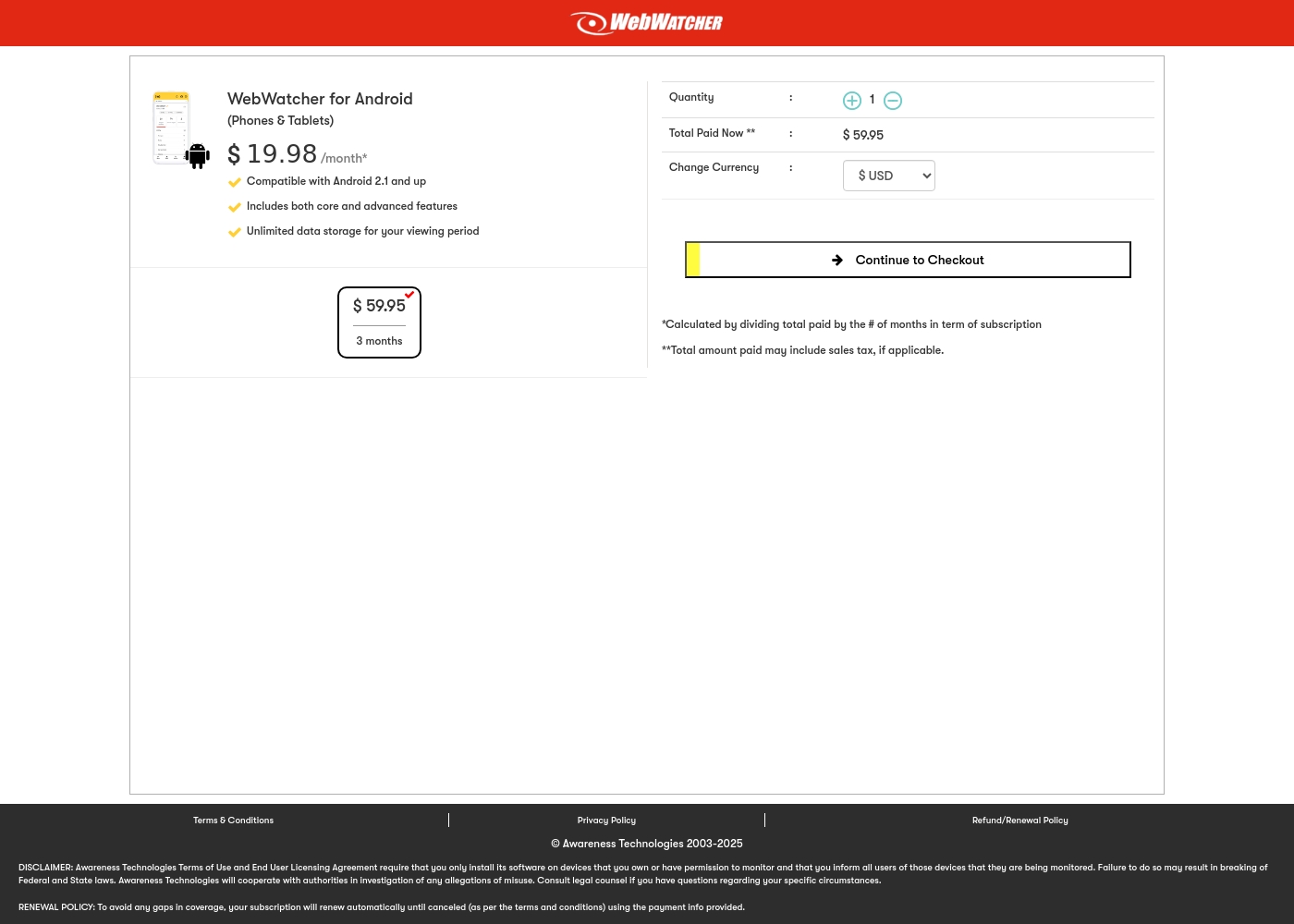
Webwatcher costs $19.98 per month with one explicitly priced plan: the 3-Month Android Subscription at $59.95 total.
Finding the right monitoring solution for your family is simple. Here is a detailed look at the pricing and features available in the current purchase flow.
3-Month Android Subscription
Price: $59.95 (paid every 3 months, calculated at $19.98/month) Best For: Parents monitoring Android phones and tablets Refund Policy: Full refund guaranteed if issues cannot be resolved Other Features:
- Compatible with Android 2.1 and newer versions
- Includes both core and advanced features
- Unlimited data storage for your full viewing period
- Compatible with Android 2.1 and up
- Includes both core and advanced features
- Unlimited data storage for your viewing period
Pricing Notes
- Webwatcher features a straightforward 3-Month Android plan costing $59.95 upfront.
- Umobix uses an opaque pricing structure starting low, likely escalating based on features or duration.
- Webwatcher advertises a 'Try it Risk Free' approach, suggesting a trial or money-back guarantee.
- Warning: Webwatcher users report active refusal to honor the money-back guarantee and severe instances of double billing/fraud.
Pricing Head-to-Head
User Reviews
uMobix has a Trustpilot rating of 3.5/5, reflecting a balanced mix of strong praise and serious complaints from over 500 users. Reviewers frequently emphasize the app’s comprehensive monitoring capabilities, noting its reliability for accurate location tracking, accessing messages, and social media oversight. Many users say it provides essential peace of mind. Customer support receives consistently high marks, described as prompt, patient, and knowledgeable, with agents like Nicky Brown and Julia frequently mentioned for their helpfulness during installation and troubleshooting. 👍
However, the platform faces recurring issues related to billing and transparency, which impact overall user satisfaction. We noted significant complaints alleging unauthorized charges following low-cost trials, difficulty canceling subscriptions, and refusal to process refunds. While the core features are robust, some users report slow syncing or delayed real-time updates, particularly right after installation. Successful implementation depends heavily on careful setup and reliance on the praised technical support staff, but prospective customers must be wary of the potential financial friction.
This helped me gain clarity in my relationship. Info came in slow at first but after like a day it started syncing fine. The support team was super helpful when I had issues.
Webwatcher’s external feedback is extremely limited, stemming only from two reviews which resulted in a very low 2.9 TrustScore. While the platform advertises a strong 'risk-free' guarantee and promises excellent, responsive customer care, the limited user reports strongly contradict these claims.
Both reviewers cited severe issues primarily centered on billing and refunds. Users claim they were refused refunds entirely, even when requested within the advertised refund window, despite the monitoring product reportedly failing to work properly.
They refused to honor the risk-free money-back guarantee, even though I submitted the request properly. Furthermore, the product I purchased never actually worked for me as advertised. I absolutely feel like they are ripping me off.
Our Verdict
This comparison is not a fair fight regarding reliability or customer trust. Umobix is the clear winner for trustworthy parental monitoring, hands down. Webwatcher carries massive financial risk and severe allegations of fraudulent billing practices. Umobix excels in offering parents comprehensive control and deep visibility. Umobix tracks activity across 41 social apps and crucially, it shows deleted messages and calls. Its customer support team is consistently praised, offering high-quality professional assistance. Webwatcher’s advertised strength is its breadth, claiming coverage for PC/Mac devices and guaranteeing unlimited data storage. However, glowing marketing claims mean nothing when support is non-existent. Numerous users report being double-charged and denied refunds by Webwatcher. The deciding factor is service integrity and reliability. Umobix delivers reliable, supported service, even with occasional slow updates. Webwatcher's reported failure to function and its severe financial complaints make it an unacceptable risk. If you want peace of mind and responsive support, choose Umobix immediately. Webwatcher should be completely avoided until they resolve their critical trust and financial issues.
Frequently Asked Questions
Which tool has better customer support: Umobix or Webwatcher?
Umobix has consistently received high praise for its professional and prompt support staff. Webwatcher users report extreme dissatisfaction, claiming zero response and support runarounds. Based purely on user feedback, Umobix is significantly better.
Does Umobix allow app or website blocking like Webwatcher?
Umobix offers robust remote controls, including the ability to restrict apps and block website access. Webwatcher focuses solely on monitoring visibility. It does not provide remote control or blocking features.
Is Webwatcher worth the financial risk due to its low rating?
User reviews for Webwatcher contain severe, specific allegations of billing fraud and refused refunds. We cannot recommend purchasing Webwatcher until these critical financial and trust issues are resolved. Umobix is the fiscally safer option.
Which monitoring software tracks deleted messages and calls?
Umobix has a specific feature that tracks and displays deleted messages and calls. This allows parents to detect activity the child attempted to hide. Webwatcher does not list this critical feature in its capabilities.
Which offers broader device support, including PC and Mac?
Webwatcher claims support for monitoring smartphones, PC, and Mac devices using a secure web account. Umobix is focused primarily on comprehensive Android and iOS smartphone tracking. If desktop monitoring is key, Webwatcher has wider scope.
Does Umobix or Webwatcher offer unlimited data storage?
Webwatcher explicitly includes guaranteed unlimited data storage with its subscriptions. Umobix does not specify official data quotas or storage limits. If you need high capacity, Webwatcher is the only one guaranteeing it.
Ready to Choose?
Both tools have their strengths. Choose based on your specific needs.