Ucraft vs Ycode
People are torn between Ucraft and Ycode. Ucraft moves fast with templates; Ycode delves into customization. Choose based on whether you want speed or control.
Powerful Features, Inconsistent Reliability.
We find Ucraft Next offers robust eCommerce tools, including 0% transaction fees and great features for global scaling and deep customization. While the platform delivers high value, its widespread reports of critical support failures and data loss are concerning. Overall, the platform presents a strong, high-feature option that discerning users should approach cautiously due to issues with functional consistency.
Pros
- Access to a robust, scalable eCommerce platform.
- All paid plans include 0% transaction fees.
- Capability for extensive website customization and deep feature control.
- Specific support agents provide thoughtful, patient assistance.
Cons
- Severe reports of critical data loss and website disappearance.
- Customer support responsiveness is highly inconsistent and often relies on bots.
- Website builder can be tricky and difficult to use initially.
- Mobile representation of websites is sometimes unacceptable.
Powerful visual editor with smart pricing.
We see Ycode successfully bridges the gap between powerful design tools and affordability, offering extensive features like an integrated CMS and team collaboration without excessive cost. Overall, this platform presents a compelling alternative for designers and founders seeking complete control over their complex projects.
Pros
- Extremely competitive pricing structure beginning at $5/month annually.
- Comprehensive Free plan perfect for development and testing new projects.
- Total design autonomy via an intuitive visual editor, requiring no code.
- Integrated CMS simplifies content structuring and data management.
Cons
- Custom code integration is restricted to Basic and Pro plans.
- The Mini plan is significantly limited in scope (only 5 published pages).
- No explicit refund policy or money-back guarantee is provided.
AboutUcraft
Ucraft Next is fundamentally a cutting-edge website maker and B2B eCommerce platform. It’s designed to help anyone create a unique and high-conversion online store or website. You can begin quickly by viewing stunning templates designed by professionals for your specific industry. It even offers AI design assistance to help you speed up the creation process. This platform helps save you time; you can manage products, track orders, and view real-time insights from a single centralized dashboard. 💡
AboutYcode
Ycode is a comprehensive, all-in-one website builder and integrated CMS. It's built specifically for designers, creators, and founders who want professional results without relying on code. Using its intuitive visual editor, you gain complete design control to craft beautiful, fully responsive websites. You can publish your creations instantly and manage everything easily from one reliable platform. ✅
Highlights
Feature Comparison
Features Overview
We highlight the main differences and pick a winner for each feature.
UI & Design Freedom
Ycode offers total visual control with no code, while Ucraft relies on templates.
Ucraft provides AI design assistance to speed up launches, but templates lead the look.Ycode lets you tweak every pixel with a visual editor and no code.Trade-off: Ucraft is quick to deploy; Ycode prioritizes customization and precision.Impact: For agencies, Ucraft speeds client wins; for designers, Ycode delivers unique brands.
Dynamic Interactions
Ycode supports robust, code-free interactions; Ucraft covers standard effects.
Ucraft focuses on templates with practical interactive options for quick sites.Ycode enables advanced hover, scroll, and animation effects without coding.Trade-off: Ycode offers richer interactions; Ucraft keeps things simpler.Impact: Use Ycode for portfolios; use Ucraft when speed matters more than effects.
CMS & Data Management
Ycode's integrated CMS handles data structuring; Ucraft emphasizes product data and inventory.
Ucraft connects inventory with real-time stock across channels for store ops.Ycode centers on content modeling with CMS items and collections for pages.Trade-off: Ucraft wins for commerce data; Ycode wins for content flexibility.Impact: E-commerce teams lean Ucraft; content-driven sites prefer Ycode.
Collaboration & Teams
Ycode supports unlimited collaborators; Ucraft uses plan-based staff limits.
Ucraft limits staff accounts by plan; Unlimited plan removes limits.Ycode allows unlimited collaborators with no extra seat fees.Trade-off: Ycode is better for large teams; Ucraft can be fine for small shops.Impact: Agencies collaborating across regions will prefer Ycode.
Localization & Global Reach
Ycode eliminates localization limits; Ucraft scales across markets with multilingual support.
Ucraft offers multilingual support on multiple plans, plus 100+ markets options.Ycode enables unlimited languages on Pro, with strong localization tooling.Trade-off: Ycode edges out when multiple languages are essential.Impact: Global brands gain consistency with Ycode; Ucraft still handles international needs.
Hosting & Performance
Both offer strong hosting; Ucraft relies on Google Cloud, Ycode on scalable cloud.
Ucraft's hosting emphasizes security and compliance through Google Cloud.Ycode emphasizes fast hosting and optimized controls for SEO.Trade-off: Both are solid; choose based on specific regional performance needs.Impact: Global stores should test latency in target regions with both.
Ecommerce Capabilities
Ucraft leans into 0% fees and store-specific features; Ycode focuses on design.
Ucraft offers 0% transaction fees across eCommerce plans and growth features.Ycode centers on visuals; eCommerce features are less prominent in its docs.Trade-off: If selling online is core, Ucraft has the edge.Impact: Store owners should prioritize Ucraft for pricing and commerce tools.
Pricing Value
Ycode starts with a Free plan; Ucraft prices scale with product count.
Ucraft plans cost $21-$125 per month per project with 14-day trial.Ycode offers Free, Mini, Basic, Pro; annual billing lowers monthly costs.Trade-off: Ycode wins on upfront affordability; Ucraft adds robust commerce.Impact: Budget-first builders may prefer Ycode; scale-focused stores may pick Ucraft.
Support & Resources
Ucraft has multilingual live support; Ycode emphasizes modern collaboration and docs.
Ucraft provides multilingual live chat and 24/7 support on paid plans.Ycode provides collaboration tools and ongoing feature updates with strong docs.Trade-off: Both offer helpful support; experiences may vary by plan.Impact: Teams needing quick help should weigh prior support experiences with each.
Migration & Ecosystem
Ucraft's App Store integrations contrast with Ycode's API-friendly approach.
Ucraft links major apps like MailChimp, Hubspot, and Zoho.Ycode provides an API path for integrations and external tools.Trade-off: If you rely on prebuilt integrations, Ucraft helps now.Impact: Agencies with custom stacks benefit from Ycode's API accessibility.
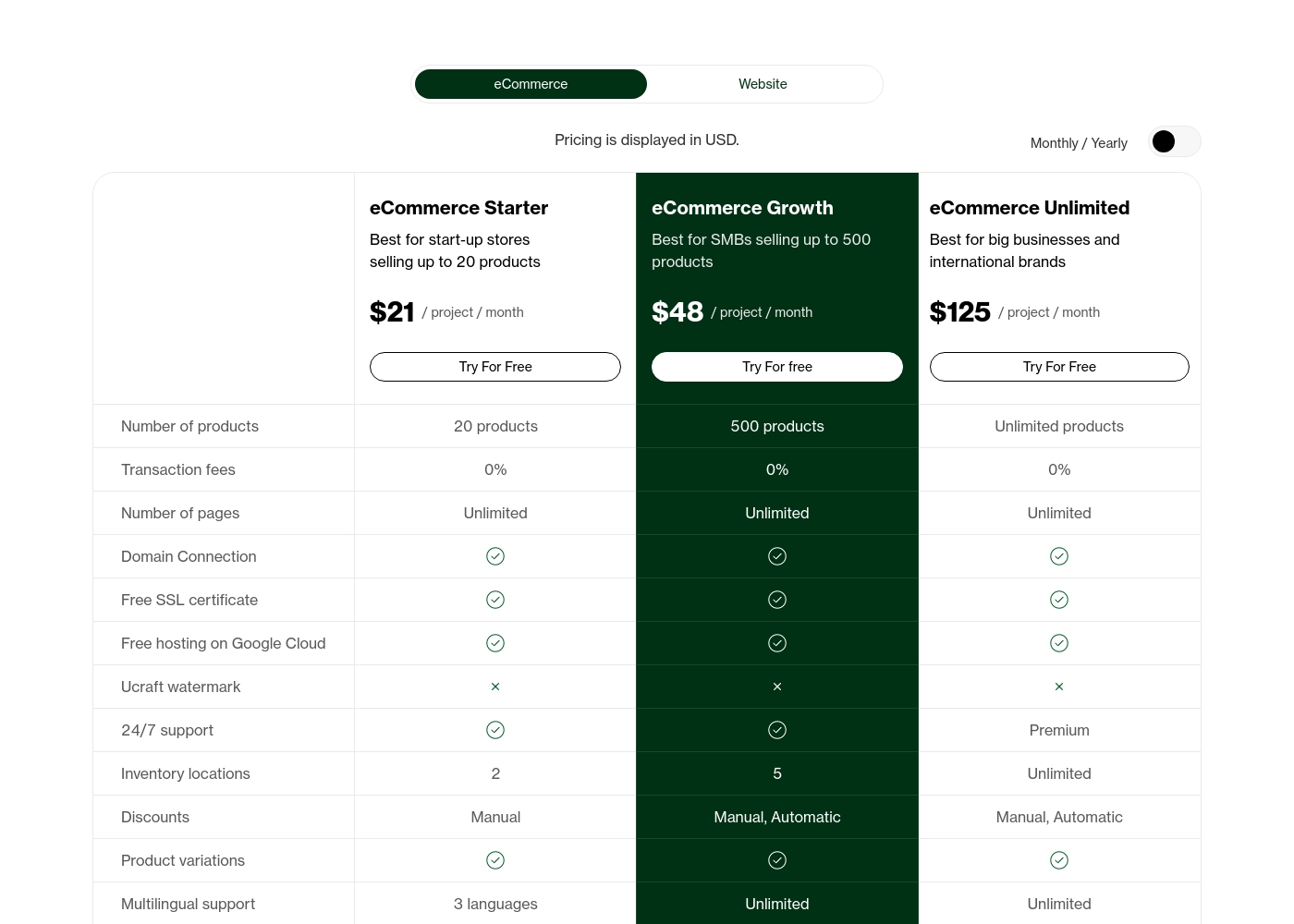
Ucraft's eCommerce plans cost between $21 and $125 per month with three primary options: eCommerce Starter at $21, eCommerce Growth at $48, and eCommerce Unlimited at $125. All prices are displayed in USD, and you can get 20% off if you choose to pay annually.
Now, let's look closer at what each of these powerful eCommerce packages includes for your business.
eCommerce Starter
Price: $21 / project / month Websites Supported: Not explicitly stated (Price is per project) Best For: Start-up stores selling up to 20 products Refund Policy: Not explicitly stated Other Features:
- 20 products max, 0% transaction fees
- 2 inventory locations
- 3 languages for multilingual support
- 5 staff accounts
- 24/7 support included
- 20 products
- 0% transaction fees
- Unlimited pages
- 2 inventory locations
- Manual discounts
- 500 products
- 0% transaction fees
- Unlimited pages
- 5 inventory locations
- Manual, Automatic discounts
- Unlimited products
- 0% transaction fees
- Unlimited pages
- Unlimited inventory locations
- Manual, Automatic discounts
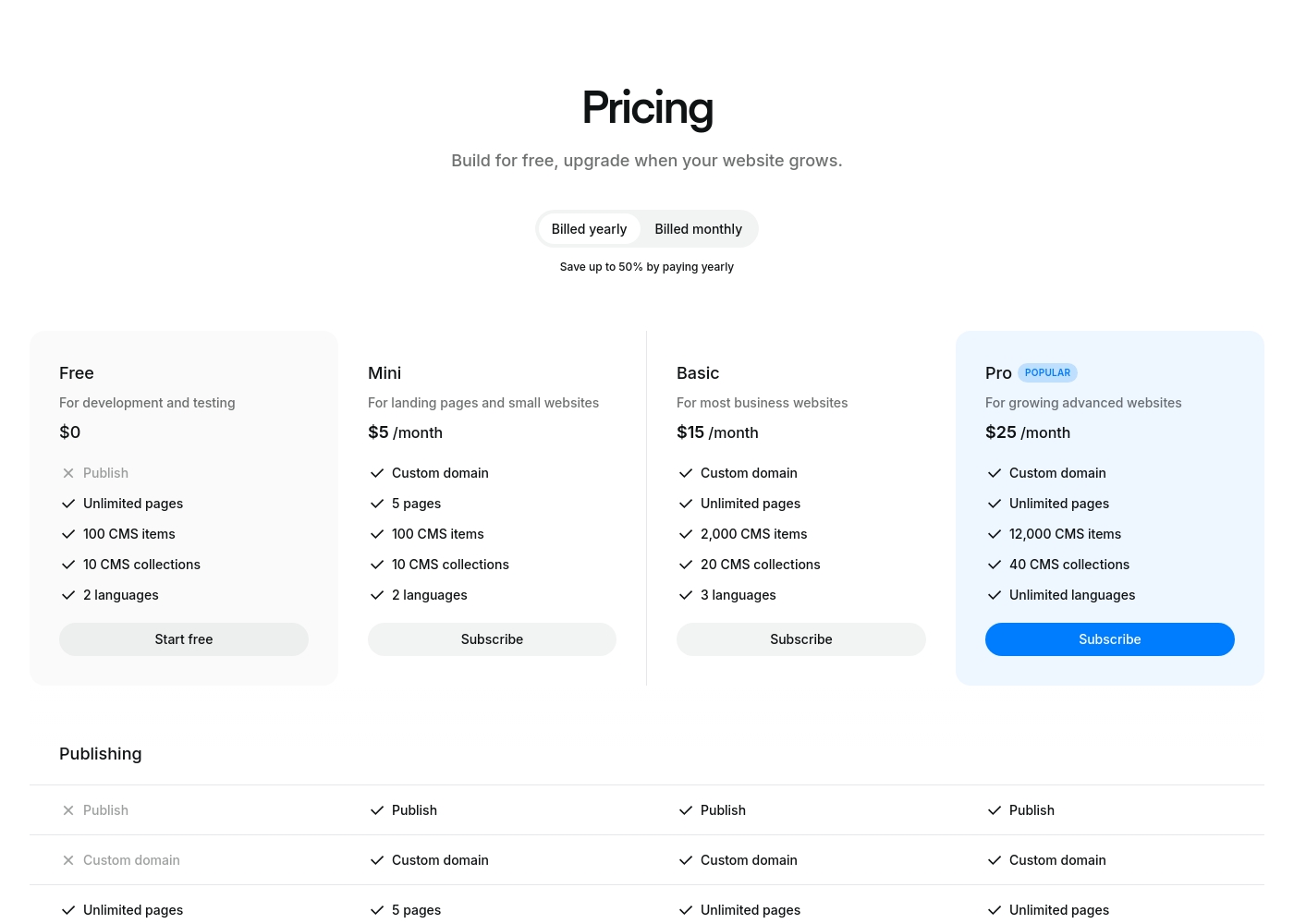
Ycode costs between $0 and $30 per month, with four plans: Free at $0, Mini at $5/month (billed yearly), Basic at $15/month (billed yearly), and Pro at $25/month (billed yearly).
Here’s a breakdown of what each tier offers so you can choose the best fit for your project.
Free
Price: $0 Websites Supported: Not explicitly stated Best For: development and testing Refund Policy: Not explicitly stated Other Features: Unlimited pages on a ycode.site domain, 100 CMS items, 10 CMS collections, 2 languages, 1K monthly visits.
- Publish to ycode.site
- Unlimited pages
- 100 CMS items
- 10 CMS collections
- 2 languages
- Custom domain
- 5 pages
- 100 CMS items
- 10 CMS collections
- 2 languages
- Custom domain
- Unlimited pages
- 2,000 CMS items
- 20 CMS collections
- 3 languages
- Custom domain
- Unlimited pages
- 12,000 CMS items
- 40 CMS collections
- Unlimited languages
Pricing Notes
- Ucraft offers a 14-day free trial and 0% transaction fees on eCommerce plans.
- Ucraft annual billing provides 20% off; pricing is per project across plans.
- Ycode provides a permanent Free plan for development and testing, plus annual discounts.
- Ycode plans scale by CMS items and bandwidth, not just seats or users.
- Migration considerations vary; consider what you value most: price vs. power.
Pricing Head-to-Head
User Reviews
The user feedback for Ucraft is highly divided, creating a substantial dichotomy in user experiences. On one hand, many users praise the platform's customizable features, affordable pricing, and capability to produce professional pages.
Specific feedback mentions patient and swift customer support, especially when dealing with initial learning curves or complex feature setups. Users appreciate the ability to connect a custom domain during the trial, highlighting good value.
I truly enjoy Ucraft. The ability to customize my site goes beyond what other builders offer, which helps me push my creative content limits. Staff is knowledgeable and always willing to find efficient solutions, and the prices are very reasonable.
Ycode is strongly positioned as a high-value and professional alternative to established web development platforms, frequently emphasizing user satisfaction and powerful design capabilities. The company maintains that thousands of users worldwide praise its innovation and supportive environment.
This platform aims to cut through complexity by combining powerful features with an intuitive, user-friendly interface. Key themes promoted internally include superior user interface design and competitive pricing compared to rivals like Webflow, alongside strong functionality for animation and visual effects.
Our Verdict
Bottom line: for most teams, it’s a tie in spirit but a clear choice by priorities. If you want quick setups with solid eCommerce and strong global reach, Ucraft is your pick. If design freedom, cost efficiency, and unlimited collaboration matter most, go with Ycode. The deciding factor is your top priority: speed and scale or control and creativity. If you’re a small storefront, pick Ucraft for fast results; if you’re a design-led team, pick Ycode for maximum control. In short: Ucraft for fast launches; Ycode for deep customization. Your use case decides the winner.
Frequently Asked Questions
Do I need a credit card to sign up for the free trial?
Ucraft offers a Free plan and a 14-day eCommerce Starter trial; no card needed upfront. If you move to Growth or Unlimited, card details may be required. You won’t be billed during the trial period.
What happens if my payment is delayed or fails?
If payment is delayed, your live website may be offline until payment is made. Visibility returns once payment completes.
How do I cancel my subscription if I need to stop using Ucraft?
Log in and go to Project Settings > Billing. Cancel there to stop renewals. You’ll see your status update.
What are the limitations on staff accounts across the plans?
Starter allows 5 staff accounts; Growth allows 10; Unlimited has unlimited staff accounts. Choose per team needs.
Which third-party applications can I integrate with Ucraft?
You can connect MailChimp, Hubspot, Zoho, Pipedrive, Google Calendar, and Mixpanel. Webhooks support deeper connectivity.
Where is my website hosted, and is the hosting secure?
Ucraft hosts on Google Cloud, emphasizing security, performance, and standards compliance. Hosting is scalable and robust.
Ready to Choose?
Both tools have their strengths. Choose based on your specific needs.