Squarespace vs Ycode
Squarespace and Ycode both help you launch professional, high-quality websites. Squarespace offers extreme simplicity and integrated e-commerce tools for quick deployment. Ycode focuses on visual design control, deep customization, and incredible affordability. This comparison decides if you need a template builder or a visual development platform.

Best for: Solo entrepreneurs needing a polished, quick-launch business site., Service businesses requiring integrated booking and invoicing capabilities.
Best for: Web designers or founders demanding total visual autonomy and control., Teams or agencies seeking a cost-effective solution with unlimited free user seats.

Great design, fatally flawed support.
We find that the platform offers elegant design and powerful integrated tools for entrepreneurs. Overall, we must assign a low rating due to pervasive issues with unresponsive customer support, frustrating technical bugs, and major concerns regarding billing transparency.
Pros
- A good all-in-one platform for rapid website building and commerce.
- The dedicated AI Blueprint Builder assists in quick site generation.
- Provides integrated features like payments, scheduling, and inventory.
- Offers an intuitive drag-and-drop editing experience.
Cons
- Customer support is widely criticized as unresponsive and reliant on ineffective chatbots.
- Frequent reports of unexpected charges and aggressive billing practices.
- Website editor performance is often reported as slow and prone to errors.
- Users struggle with critical issues due to a lack of human phone support.
Powerful visual editor with smart pricing.
We see Ycode successfully bridges the gap between powerful design tools and affordability, offering extensive features like an integrated CMS and team collaboration without excessive cost. Overall, this platform presents a compelling alternative for designers and founders seeking complete control over their complex projects.
Pros
- Extremely competitive pricing structure beginning at $5/month annually.
- Comprehensive Free plan perfect for development and testing new projects.
- Total design autonomy via an intuitive visual editor, requiring no code.
- Integrated CMS simplifies content structuring and data management.
Cons
- Custom code integration is restricted to Basic and Pro plans.
- The Mini plan is significantly limited in scope (only 5 published pages).
- No explicit refund policy or money-back guarantee is provided.
AboutSquarespace
Squarespace is an integrated platform built for the modern entrepreneur and creator. It helps you design and manage a website that truly supports your business goals. Whether you’re selling physical products, booking appointments, or launching a blog, the core system delivers the tools you need. It proudly supports over 14 million entrepreneurs globally. You don't need any complex coding skills to create a fully customized, professional site. 💡
AboutYcode
Ycode is a comprehensive, all-in-one website builder and integrated CMS. It's built specifically for designers, creators, and founders who want professional results without relying on code. Using its intuitive visual editor, you gain complete design control to craft beautiful, fully responsive websites. You can publish your creations instantly and manage everything easily from one reliable platform. ✅
Highlights
Feature Comparison
Features Overview
We highlight the main differences and pick a winner for each feature.
Design Autonomy
Ycode provides total visual control; Squarespace confines design within templates.
Squarespace provides beautiful, professional designer templates ready for immediate use. Customization is handled through a drag-and-drop editor based on the chosen template. Ycode uses a powerful visual editor focused on pure control and pixel-perfect design autonomy. You can craft spectacular, high-impact layouts. Ycode specifically features complex, zero-code dynamic interactions like scroll and hover effects. Squarespace has fewer explicit options for this depth. If your brand demands a unique, one-of-a-kind web experience, Ycode provides the necessary visual muscle.
E-commerce & Integrations
Squarespace is a unified e-commerce platform; Ycode requires external tools.
Squarespace offers a complete all-in-one solution for online stores and service providers. It includes integrated payments, inventory, and shipping tools. This platform also integrates Acuity Scheduling for booking services and branded invoicing. Squarespace is designed to handle monetization natively. Ycode focuses on content and design; it requires integrating external tools for complex sales functionality. Dedicated e-commerce features are not listed. If selling products or managing appointments is fundamental to your business model, Squarespace offers unmatched convenience.
Team Collaboration
Ycode offers incredible team value with unlimited free collaborators on every plan.
Squarespace follows a typical model where user seats or collaborators likely increase the monthly cost. Specific team pricing details are not available. Ycode supports real-time project collaboration with unlimited free collaborators on all tiers. This drastically reduces operating expenses for agencies. For teams or agencies, Ycode’s unlimited free seats deliver massive cost efficiency and clear productivity gains. Ycode is built for seamless teamwork without the punitive cost structure of a per-seat model.
Pricing & Value
Ycode is dramatically more affordable, starting at $5/month compared to Squarespace’s higher entry cost.
Squarespace paid plans start higher (around $16/month) and costs increase with every necessary add-on. Users report rising costs and billing confusion. Ycode offers a permanent Free plan for development and the Mini paid plan is just $5/month (billed annually). The top Pro plan is only $25/month annually. Ycode delivers high design power and unlimited team seats for a tiny fraction of typical platform costs. The value proposition is exceptional. If budget is a primary concern, Ycode provides powerful features at a highly competitive, transparent fixed rate.
Integrated CMS
Ycode handles large, structured content sets better; Squarespace is better for blogs.
Squarespace supports standard website content management, focusing on easy content updates and blogging tools. Details on structured data limits are minimal. Ycode provides a powerful integrated CMS for structuring complex data collections efficiently. Paid tiers support up to 12,000 CMS items. Ycode allows users to manage content via manual entry or easy bulk import functions. This simplifies iteration for data-heavy projects. Need to manage a product catalog or large information directory? Ycode is specifically engineered for flexible content scalability.
AI Automation
Squarespace uses AI for rapid setup and copy; Ycode relies purely on user creativity.
Squarespace uses Blueprint AI to accelerate the initial setup process dramatically. AI generates suggested designs, copy, and visuals based on prompts. Squarespace also includes AI site auditing and copy generation for SEO and product descriptions. This speeds up content creation. Ycode does not list any built-in AI tools, focusing entirely on providing the user with total visual control over the editor. If accelerating your launch with intelligent design and copy suggestions is essential, Squarespace leads the pack.
Speed to Launch
Squarespace is faster to launch using templates; Ycode requires more detailed construction.
Squarespace’s core value is its quick turnaround using polished, reliable templates and the drag-and-drop editor. AI makes setup even faster. Squarespace templates ensure a professional look with minimal effort and customization time. It’s an easy, all-in-one publish solution. Ycode requires more time spent in the visual editor to utilize its deep customization features. You are building the design from the ground up. If you want a polished site live within hours, Squarespace removes design friction effectively.
Customer Reviews
Ycode has very strong positive sentiment; Squarespace users commonly report slow support and performance issues.
External reviews for Squarespace are generally critical, citing recurring complaints about a slow editor, billing friction, and poor customer support. The rating is low. Ycode sentiment is highly positive, with users praising the platform's innovation, supportive environment, and superior user interface. Ycode users confirm timely response and better alignment of expectation versus reality. Squarespace often frustrates users with reliability issues. If reliable performance and responsive support are key factors, Ycode holds the clear advantage based on user reports.
Pricing is flexible to grow with your website needs, whether you're just starting out or running a robust online store.
Starting Plan
Best For: Users who need a custom website and basic selling tools. Other Features:
- Access to your own custom website.
- Includes selling tools.
- Free 14-day trial is available.
This is the perfect entry point if you want to professionalize your presence online. You get core access to the platform, including their drag-and-drop editor and useful design tools. It's a great choice for individuals or small businesses establishing their digital foundation.
- Access to your own custom website
- Includes selling tools
- Free 14-day trial available
- State-of-the-art ecommerce features
- Lower payment processing fees
- More robust selling tools

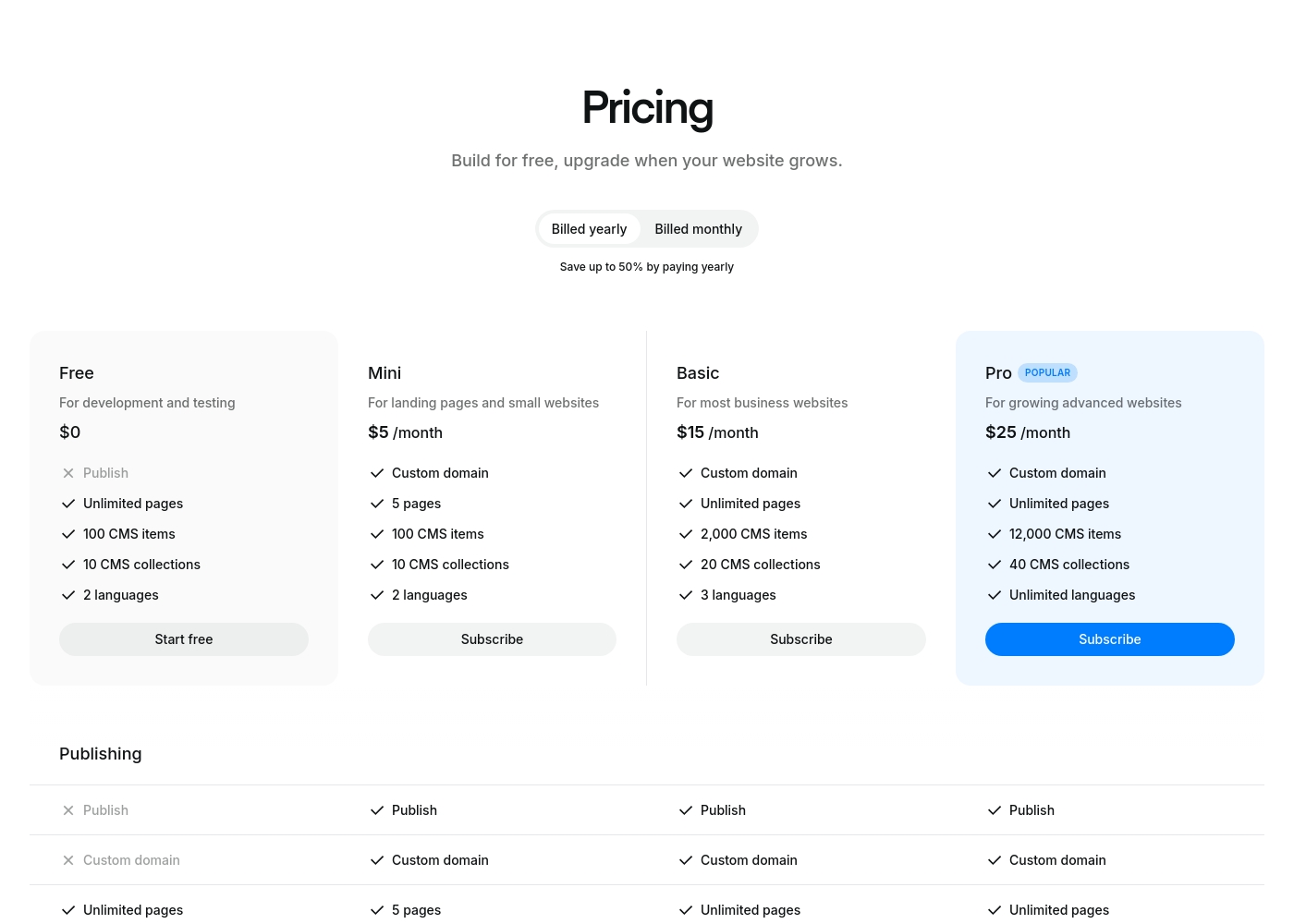
Ycode costs between $0 and $30 per month, with four plans: Free at $0, Mini at $5/month (billed yearly), Basic at $15/month (billed yearly), and Pro at $25/month (billed yearly).
Here’s a breakdown of what each tier offers so you can choose the best fit for your project.
Free
Price: $0 Best For: development and testing Other Features: Unlimited pages on a ycode.site domain, 100 CMS items, 10 CMS collections, 2 languages, 1K monthly visits.
- Publish to ycode.site
- Unlimited pages
- 100 CMS items
- 10 CMS collections
- 2 languages
- Custom domain
- 5 pages
- 100 CMS items
- 10 CMS collections
- 2 languages
- Custom domain
- Unlimited pages
- 2,000 CMS items
- 20 CMS collections
- 3 languages
- Custom domain
- Unlimited pages
- 12,000 CMS items
- 40 CMS collections
- Unlimited languages
Pricing Notes
- Ycode's annual pricing (starting at $5/month) is substantially lower than Squarespace's entry-level paid plan.
- Ycode offers a permanent Free plan for development, replacing the need for a temporary trial.
- Ycode supports unlimited team collaborators across all tiers at no extra charge, saving money for teams.
- Squarespace pricing extends significantly higher ($2025/month maximum) and users report hidden costs and billing friction.
- Ycode's most powerful Pro plan tops out at a very competitive $25/month (annually).
Pricing Head-to-Head
User Reviews
External reviews paint a deeply concerning picture of the user experience, highlighted by an extremely low Trustpilot score. The most significant recurring theme is the abysmal customer support 😬.
Users frequently describe support as non-existent or unhelpful, relying heavily on frustrating chatbots and refusing to offer necessary human or phone contact for critical issues. Reliability is another key problem, with numerous reports of slow website performance, unresponsive editors, and critical login failures or sudden account suspensions.
The customer service is woeful. I only received links to articles I had already read instead of actual help. They made it very difficult to get clear answers, and the entire service was appalling.
Ycode is strongly positioned as a high-value and professional alternative to established web development platforms, frequently emphasizing user satisfaction and powerful design capabilities. The company maintains that thousands of users worldwide praise its innovation and supportive environment.
This platform aims to cut through complexity by combining powerful features with an intuitive, user-friendly interface. Key themes promoted internally include superior user interface design and competitive pricing compared to rivals like Webflow, alongside strong functionality for animation and visual effects.
Our Verdict
This decision pits convenience against ultimate control and price. Choose Squarespace if you need an easy, all-in-one builder and integrated payments. Choose Ycode if deep design freedom and aggressive affordability are your main goals. Squarespace's superpower is its complete, quick ecosystem bolstered by AI. It seamlessly bundles hosting, security, payments, and scheduling right away. Launching an integrated service or portfolio site is incredibly frictionless with Squarespace's designer templates and Blueprint AI. Ycode, conversely, delivers professional power for a fraction of the cost, starting at $5/month annually. You get a visual editor with total autonomy for pixel-perfect designs. Crucially, Ycode saves massive money by allowing unlimited free collaborators for growing teams. The deciding factor is your primary focus: selling tools or design power. Choose Squarespace if integrated e-commerce and lightning-fast AI setup are vital immediately. Pick Ycode if you need complex content structure, design superiority, and scalable team collaboration. Ultimately, Ycode offers better value, deeper design tools, and stronger team scalability for professionals and agencies. Squarespace is the highly convenient choice for quick, non-complex service sites and solo entrepreneurs.
Frequently Asked Questions
Which is better for e-commerce: Squarespace or Ycode?
Squarespace is explicitly better for e-commerce, offering integrated payments and inventory control natively. Ycode requires using external integrations for sales functionality. Squarespace is truly an all-in-one transactional platform.
Does Ycode support teams better than Squarespace?
Yes, Ycode is superior for teams and collaboration regarding cost. Ycode offers unlimited free collaborators on all plans. Squarespace typically charges per user seat or contributor.
Which tool offers more customization: Squarespace or Ycode?
Ycode offers much greater design autonomy via its visual editor. Squarespace provides beautiful templates, but customization is limited by that template structure. Ycode supports complex zero-code interactions.
How do the pricing models of Squarespace and Ycode compare?
Ycode is significantly cheaper at all tiers, with paid plans starting at $5/month annually. Squarespace costs are higher and extend up to $2025/month. Ycode offers superior value for money.
Which tool has the shorter learning curve for beginners?
Squarespace has a shorter learning curve due to its AI-assisted drag-and-drop templates. Ycode requires more effort from the user to leverage its powerful visual editing controls.
Can I manage a large content directory in Squarespace like I can in Ycode?
Ycode is better suited for managing large, structured content with its integrated CMS. Ycode supports up to 12,000 CMS items on the Pro plan. Squarespace focuses more on standard blogging and pages.
Ready to Choose?
Both tools have their strengths. Choose based on your specific needs.
