SpyBubble vs Webwatcher
People struggle choosing between SpyBubble and Webwatcher for critical device monitoring. SpyBubble offers highly flexible multi-device plans for Windows, Mac, and Android users. Webwatcher specializes in broader device coverage, including iPhone, and advanced parental features.
Best for: Users prioritizing cost-effective monitoring for 3-5 Windows, Mac, or Android devices, Tracking requirements that must remain strictly month-to-month with no long-term contracts
Best for: Parents requiring specialized, in-depth monitoring of Snapchat and newly installed apps, Families who absolutely need iPhone/iOS monitoring capability in addition to Android devices
Promises Fall Short of Performance
We note SpyBubble offers a clear pricing structure and includes a three-day trial, supporting Windows, Mac, and Android devices. However, user reports consistently reveal major issues regarding data reliability, security failures, and frustrating customer service. Overall, we cannot recommend this software until the significant performance issues, lack of reliable undetectable operation, and questionable refund practices are fully resolved.
Pros
- Straightforward $24.95 entry price for single-device monitoring.
- Professional plan covers up to five different devices.
- Includes a valuable 3-day free trial period.
- Effective tracking of media, messages, and call logs (when the app functions correctly).
Cons
- Application frequently malfunctions, failing to update or provide complete logs.
- Target device can display obvious detection warnings, violating the 'undetectable' claim.
- Essential features like audio/video streaming are often reported as non-functional.
- The setup process is sometimes described as stressful or difficult.
Extreme risk due to billing and support issues.
We found Webwatcher markets itself strongly on guaranteed functionality and comprehensive support for parental monitoring needs. However, our review of public user feedback showed severe, concrete accusations of fraudulent billing, refusal to issue refunds, and complete non-response from customer support. Overall, the serious financial and reliability risks reported by consumers necessitate a very low rating.
Pros
- Advertised compatibility across major devices (Android, iPhone, PC, Mac).
- Unlimited data storage is included in the current subscription plan.
- Setup is claimed to be quick and easy (under five minutes).
- Functionality is officially guaranteed with a full refund if issues cannot be resolved.
Cons
- Users report being refused refunds despite the official money-back guarantee.
- Specific claims of fraudulent double billing and funds theft were reported.
- Customer support was reported as non-responsive or misleading ('runaround').
- Product allegedly failed to work properly for some customers.
AboutSpyBubble
SpyBubble is a monitoring application designed for effective tracking. It offers an easy solution for those who need to keep tabs on digital device activity. Several customers found that after initial setup, the app handles everything else. User reports show that it delivers expected results and sometimes exceeds expectations. Installation requires physical access to the device; note that it can't be installed remotely. 💡
AboutWebwatcher
WebWatcher is a specialized parental monitoring app. It is primarily aimed at supervising teenagers who may be involved in risky online behavior. The software gives parents necessary visibility into their child's digital footprint.
It works across major platforms including Android, iPhone, PC, and Mac devices. You can monitor everything seamlessly from anywhere using your secure, web-based online account. The application is designed to be discrete and tamper-proof once it's correctly installed. 💡
Highlights
Feature Comparison
Features Overview
We highlight the main differences and pick a winner for each feature.
iOS Capability
Webwatcher supports iPhone/iOS devices; SpyBubble does not.
Webwatcher maintains comprehensive monitoring coverage across all major OS types. Webwatcher supports iPhone, PC, Mac, and Android devices for flexible monitoring. SpyBubble only supports devices running Windows, Mac, and Android operating systems. If monitoring an iPhone is required, you must choose Webwatcher immediately. SpyBubble's lack of iOS support is a significant limitation for many potential users.
Scalability & Devices
SpyBubble scales coverage up to five devices; Webwatcher focuses on one.
SpyBubble offers a significant advantage for larger families or multi-device households. Its Professional plan covers simultaneous monitoring for up to five devices easily. Webwatcher’s current explicitly priced plan is clearly focused on monitoring only one single device. If you need coverage for 3 to 5 devices, SpyBubble is the easier and far cheaper option. SpyBubble wins for sheer volume, but only within its supported OS types.
Specialized Tracking
Webwatcher tracks GPS and Snapchat better; SpyBubble is more general.
Webwatcher specifically lists GPS location monitoring as a core safety feature. Webwatcher also provides advanced tracking for risky social apps like Snapchat on Android. SpyBubble focuses purely on general message logging, call history, and stored activity data. For focused parental tools like location data and targeted social media capture, Webwatcher has a clear edge. Choose Webwatcher if real-time GPS tracking is a necessary monitoring requirement.
Pricing Flexibility
SpyBubble is month-to-month; Webwatcher is cheaper but requires 3 months upfront.
SpyBubble provides full month-to-month billing flexibility starting at $24.95. Its pricing is simple to understand, offering tiers for one or five devices. Webwatcher calculates to a low $19.98 per month but requires a $59.95 payment every three months. If you only need short-term usage, SpyBubble is more convenient to cancel quickly. If you plan on monitoring for six months or longer, Webwatcher offers the better calculated monthly value.
Money-Back Policy
Webwatcher guarantees refunds; SpyBubble does not state one.
Webwatcher officially guarantees a full refund if the product fails to work as advertised. SpyBubble requires users to rely solely on the brief 3-day free trial period for testing reliability. However, user reviews strongly indicate that Webwatcher frequently refuses to honor its stated refund guarantee. The official policy favors Webwatcher, but real-world implementation favors caution with both tools.
Support Reliability
Both services fail catastrophically at customer support, according to users.
User reports describe SpyBubble's support staff as slow, unprofessional, and unresponsive. Webwatcher users report being ignored, given the 'runaround,' and having service shut off after billing disputes. Severe allegations of fraudulent billing plague both Webwatcher and SpyBubble based on external feedback. Due to equally terrible user experiences and alleged financial misconduct, neither service offers reliable support. Avoid relying on customer service for either SpyBubble or Webwatcher for technical resolution.
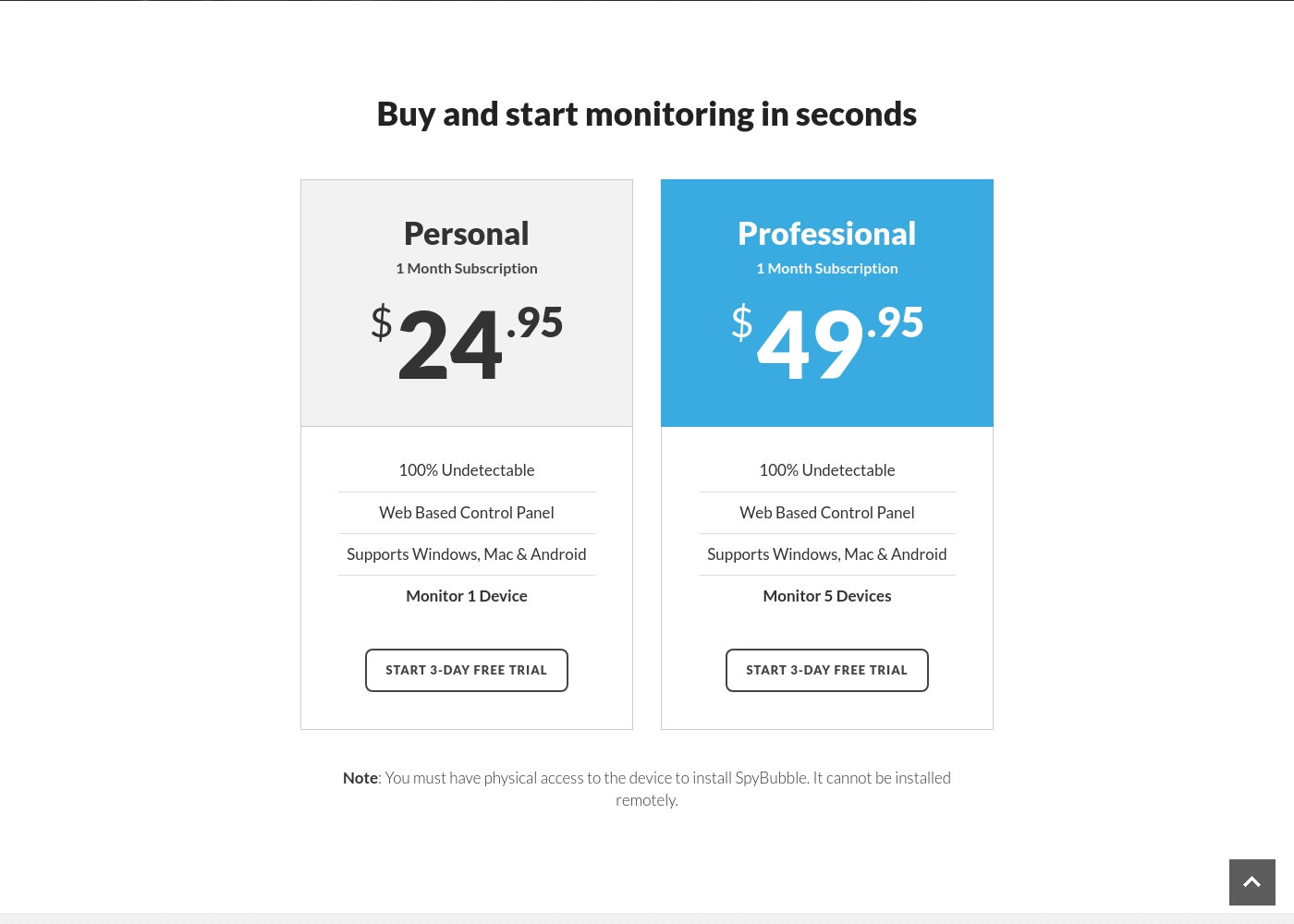
SpyBubble costs between $24.95 and $49.95 per month with 2 plans: Personal at $24.95, and Professional at $49.95.
You can choose between two straightforward monthly plans, depending on how many devices you need to monitor. Both options currently provide access to a 3-day free trial period.
Personal
Price: $24.95 per month Best For: Individual device monitoring Other Features:
- 100% Undetectable monitoring
- Web Based Control Panel access
- Supports Windows, Mac, and Android
- Monitor 1 Device
- 100% Undetectable
- Web Based Control Panel
- Supports Windows, Mac & Android
- Monitor 1 Device
- 100% Undetectable
- Web Based Control Panel
- Supports Windows, Mac & Android
- Monitor 5 Devices
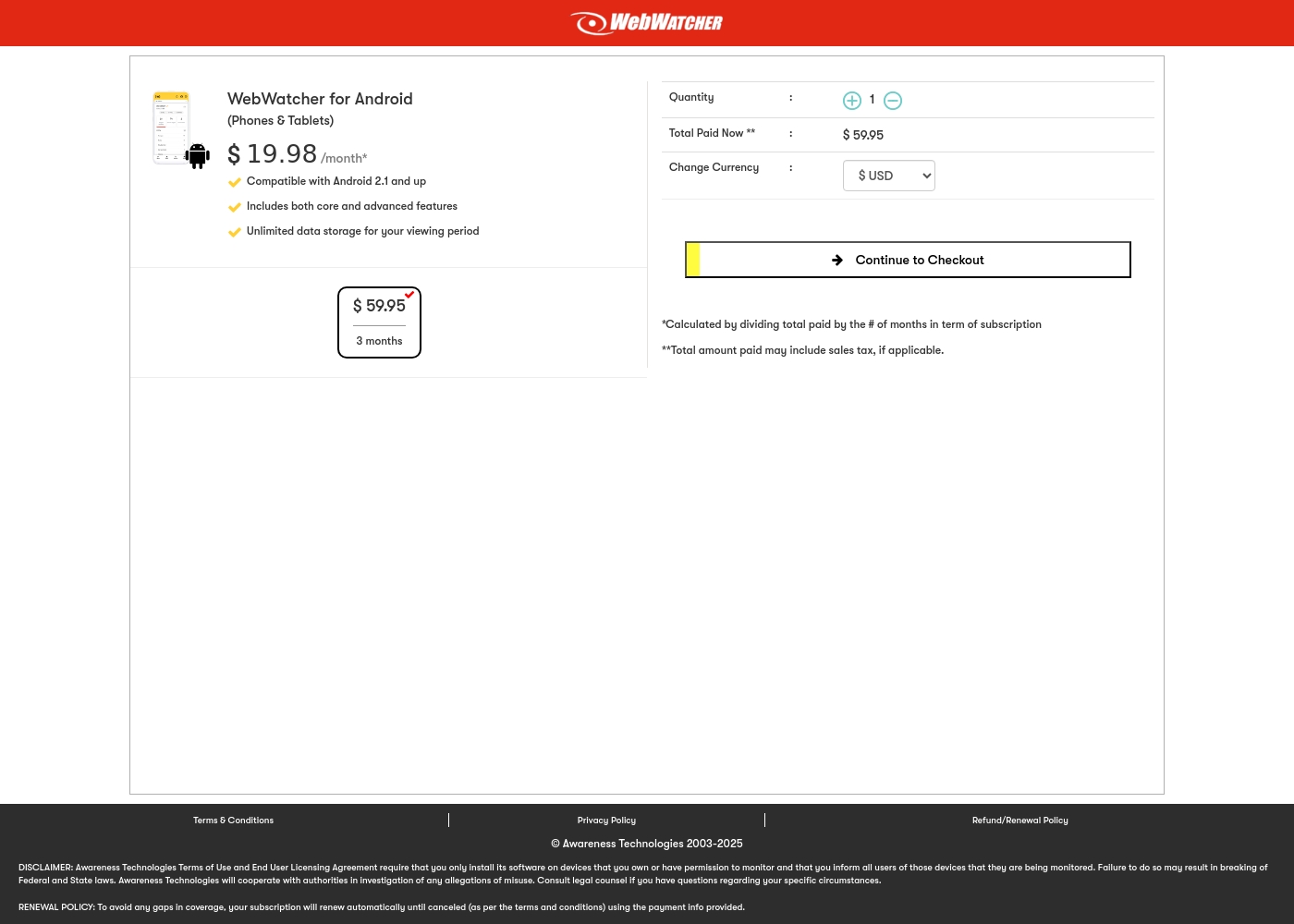
Webwatcher costs $19.98 per month with one explicitly priced plan: the 3-Month Android Subscription at $59.95 total.
Finding the right monitoring solution for your family is simple. Here is a detailed look at the pricing and features available in the current purchase flow.
3-Month Android Subscription
Price: $59.95 (paid every 3 months, calculated at $19.98/month) Best For: Parents monitoring Android phones and tablets Refund Policy: Full refund guaranteed if issues cannot be resolved Other Features:
- Compatible with Android 2.1 and newer versions
- Includes both core and advanced features
- Unlimited data storage for your full viewing period
- Compatible with Android 2.1 and up
- Includes both core and advanced features
- Unlimited data storage for your viewing period
Pricing Notes
- Webwatcher's effective monthly price ($19.98) is lower than SpyBubble's cheapest plan ($24.95).
- SpyBubble offers true month-to-month flexibility; Webwatcher requires a 3-month commitment upfront.
- Both companies face severe complaints centered on fraudulent billing and refusal to issue refunds.
- SpyBubble scales up monitoring coverage to five devices for $49.95.
- Webwatcher focuses strongly on single-device coverage within its explicitly priced plan.
Pricing Head-to-Head
User Reviews
The 3.0-star rating on Trustpilot reflects a stark divergence between user experiences. On one hand, a few users praised SpyBubble as the best tracking app they’ve used, highlighting its quick setup and effective acquisition of media, messages, and call logs.
They specifically noted the convenience of media tracking and reports updating fast. However, the majority of detailed negative feedback aggressively challenges the service’s core promises and reliability.
The app suddenly showed a red mirroring icon on the target phone, instantly making the monitoring obvious. My entire goal was foiled because the target became suspicious and changed devices. Customer service could not resolve this major security flaw or offer a useful solution.
Webwatcher’s external feedback is extremely limited, stemming only from two reviews which resulted in a very low 2.9 TrustScore. While the platform advertises a strong 'risk-free' guarantee and promises excellent, responsive customer care, the limited user reports strongly contradict these claims.
Both reviewers cited severe issues primarily centered on billing and refunds. Users claim they were refused refunds entirely, even when requested within the advertised refund window, despite the monitoring product reportedly failing to work properly.
They refused to honor the risk-free money-back guarantee, even though I submitted the request properly. Furthermore, the product I purchased never actually worked for me as advertised. I absolutely feel like they are ripping me off.
Our Verdict
Choosing between SpyBubble and Webwatcher is difficult because both suffer from terrible user feedback. Both tools report frequent functionality failures and disastrous customer service experiences. SpyBubble focuses on monitoring device count; Webwatcher excels at specific parental features. Your decision relies entirely on your required operating system and device volume parameters. SpyBubble's superpower is device scalability, offering a 5-device Professional plan for $49.95 monthly. SpyBubble is ideal if you need to monitor multiple devices running Windows, Mac, or Android simultaneously. It offers true month-to-month flexibility for users who dislike quarterly commitments. However, SpyBubble completely lacks necessary support for any modern iPhone or iPad devices. Webwatcher's strength is its cross-platform coverage, including crucial iPhone monitoring via PC/Mac connection. Webwatcher also features specialized parental tools like GPS tracking and focused Snapchat capture on Android. Its effective monthly rate is cheaper at $19.98, but it forces you into an upfront 3-month payment. Webwatcher is highly focused on supervising a single child's activity efficiently. The critical deciding factor is iOS support versus device volume. Choose Webwatcher if you need iPhone monitoring or critical GPS location features for parental safety. Pick SpyBubble if you need to cover three to five devices running Android or desktop OSes. Always test functionality rigorously during the trial period for SpyBubble or Webwatcher immediately. We ultimately side with Webwatcher for its broader feature set, including crucial iOS compatibility and specialized tracking tools. However, proceeding with either Webwatcher or SpyBubble involves high risk due to the alarming financial and support complaints cited by users. Webwatcher wins if you cannot live without iOS monitoring despite the acknowledged risks.
Frequently Asked Questions
Does Webwatcher monitor iPhone activity, unlike SpyBubble?
Yes, Webwatcher supports iPhone monitoring via a one-time connection to a PC or Mac during setup. SpyBubble only supports devices running Windows, Mac, and Android operating systems. If monitoring an iPhone is essential, Webwatcher is your only viable option. SpyBubble has no support for any iOS device types.
Which software is better for monitoring multiple devices at once?
SpyBubble is much better for volume monitoring with its Professional plan supporting five devices. Webwatcher focuses strongly on a single device per subscription purchase. If you need coverage for 3–5 Windows, Mac, or Android devices, choose SpyBubble immediately.
Which is more affordable: Webwatcher or SpyBubble?
Webwatcher is more affordable per month at $19.98, though it bills quarterly ($59.95 upfront). SpyBubble's cheapest plan costs $24.95 monthly. Webwatcher gives you more advanced features and iOS support for a lower effective monthly price.
Do I need physical access to install SpyBubble or Webwatcher?
Yes, physical access for installation is mandatory for both SpyBubble and Webwatcher. SpyBubble cannot be installed remotely under any circumstances upon setup. Webwatcher also requires physical device access to establish monitoring coverage initially.
Which tool offers better specialized features like GPS tracking or Snapchat monitoring?
Webwatcher offers superior, specialized monitoring features like dedicated GPS tracking. On Android, Webwatcher captures screenshots and received messages within Snapchat. SpyBubble’s feature set is more generalized and does not explicitly list these advanced capabilities.
How reliable are the money-back guarantees offered by Webwatcher and SpyBubble?
SpyBubble does not offer an explicit money-back guarantee, relying only on the 3-day trial period. Webwatcher guarantees refunds if functionality fails, but users report massive refusal issues. Exercise extreme caution; neither company reliably honors user refund requests in practice.
Ready to Choose?
Both tools have their strengths. Choose based on your specific needs.