Shade vs Vexels
Shade and Vexels serve completely different creative needs. Shade centralizes media files for teams, while Vexels fuels print-on-demand design. Your choice depends entirely on what you're building.
Best for: Creative and media teams of 3-50 people, Marketing departments managing video/photo assets
Best for: Solo print-on-demand sellers, E-commerce entrepreneurs on Etsy or Shopify
Smart search, but pricing is opaque.
We find Shade offers a compelling centralized hub for media teams, with standout AI search and intelligent file streaming. Overall, it's a strong workflow tool, but the lack of public pricing for team plans is a significant drawback for prospective buyers.
Pros
- All-in-one platform for storage, review, and approval
- Intelligent file streaming for fast access to large files
- Powerful AI search and automated metadata
- Secure archiving for long-term project storage
Cons
- Team and enterprise pricing is not publicly disclosed
- Requires a sales demo for detailed quotes and scalability
- Limited external review data for deep validation
Excellent tools, support is unreliable.
We found Vexels excellent for accessing high-quality, readily available POD designs and specialized creation tools. We must note, however, that the platform suffers from alarming reports of poor customer service and billing irregularities, especially for high-tier users. Overall, Vexels provides strong design assets but must seriously improve its administrative reliability.
Pros
- Access to a massive, exclusive library of over 500,000 POD templates.
- Cost-effective plans that offer strong value for money.
- Tools are constantly updated, including new AI design features.
- Easy-to-use online T-Shirt Design Maker and instant Mockup Generator.
Cons
- Frequent, serious complaints regarding unresponsive customer service and technical support.
- Reports of critical billing errors, including multiple unauthorized payments upon sign-up.
- High-tier custom design service often fails to deliver accurate results or accept feedback.
- The platform currently lacks an explicit free trial option.
AboutShade
💡 Shade is an all-in-one platform for media storage and management. It's designed for creative and media teams who handle large files daily. It combines intelligent file streaming, review tools, and smart search in a single place.
AboutVexels
Vexels is the ultimate Print on Demand (POD) merch design tool. It offers an extensive library of high-quality designs and powerful online resources. This platform makes merch creation simple for everyone, whether you are tweaking text or transforming templates. You can use it to upgrade your merch strategy with professional designs and AI-enhanced graphics.
It’s built for immediate use with major POD companies, including Etsy, Shopify, Printful, Printify, and Amazon Merch. 💡
Highlights
Feature Comparison
Features Overview
We highlight the main differences and pick a winner for each feature.
Core Purpose
Shade organizes your team's media files. Vexels creates your next best-selling design.
Shade is a centralized hub for storing, searching, and reviewing video and image assets. It's built for creative teams drowning in scattered files. Vexels is a design tool library. It gives you 500,000+ templates and AI tools to make print-on-demand merchandise. The difference is storage vs. creation. Shade manages what you have; Vexels helps you make new things. For example, a marketing team uses Shade to find last year's campaign footage. A seller uses Vexels to design a new t-shirt graphic.
AI Technology
Shade's AI finds files. Vexels's AI builds designs.
Shade uses AI for automated metadata and powerful search. It tags your files so you can find 'sunset B-roll from 2024' in seconds. Vexels uses AI for design generation. You can input a concept and get multiple printable merch styles instantly from over 20 AI models. One is a smart librarian; the other is a creative partner. A video editor uses Shade's AI to locate a specific clip. A merch seller uses Vexels's AI to generate 50 trending design variations.
Collaboration
Shade is built for team reviews. Vexels is for solo creators.
Shade includes built-in review and approval tools. Team members can leave time-stamped comments directly on media files for clear feedback. Vexels focuses on individual creation. There are no collaboration features mentioned; it's you and the design editor. This is a major workflow difference for teams vs. solo sellers. A design team uses Shade to get client sign-off on a video. A solo entrepreneur uses Vexels to make a product listing.
File Handling
Shade streams giant files. Vexels downloads small design files.
Shade features intelligent file streaming. You can preview and work with massive 4K/8K video files in your browser without downloading them. Vexels deals with design assets like PNGs and vectors. You download these smaller files for production. Streaming changes the game for large media. Downloads are fine for print files. An editor streams a 50GB video project. A seller downloads a t-shirt graphic to upload to Printful.
Pricing Model
Shade has a free tier. Vexels uses paid tiers and lifetime deals.
Shade offers a free plan with core features like AI search and streaming. Paid team/enterprise plans require a custom quote. Vexels has three monthly/annual subscription tiers ($14-$49/mo) plus two expensive lifetime deals ($550-$1500). Shade lowers the entry barrier. Vexels requires investment for full access. A startup tests Shade for free. A merch seller commits to Vexels's $29/mo plan.
Customer Support
Both tools get mixed support reviews.
External reviews for Shade consistently mention slow customer support. Users report delayed responses to billing and technical questions. Reviews for Vexels are more severe, with complaints about unresponsive support and billing errors. High-tier users report issues with custom design requests. Neither shines here, but Vexels has more serious reports. A Shade user waits days for a support answer. A Vexels user struggles to get a refund for a duplicate charge.
Shade costs an undisclosed amount with at least 1 plan: Start for Free at $0.
Finding the right plan depends on your team's specific media storage and workflow needs.
Start for Free
Price: $0 Best For: Individuals or small teams exploring AI search Other Features: Intelligent file streaming, review and approval, automated metadata, AI search, media archiving
- Intelligent file streaming
- Review and approval
- Automated metadata
- AI search
- Archive
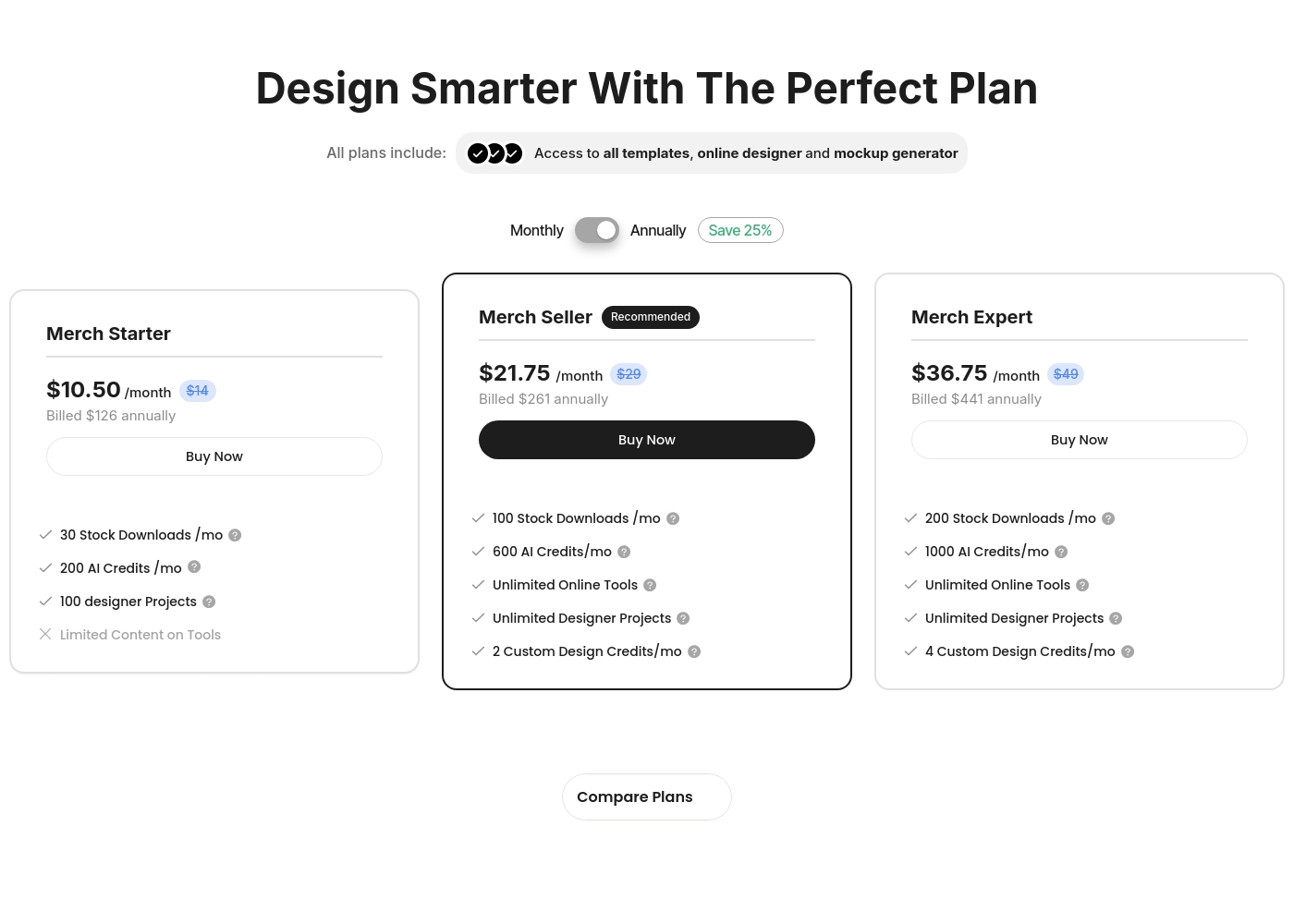
Vexels offers monthly subscription plans, billed annually, ranging from $10.50/month to $36.75/month, alongside one-time lifetime options up to $1,500.
All plans include unlimited access to templates, the online designer, and the mockup generator. Here's a look at the details included within each of the main subscription and lifetime options.
Merch Starter
Price: $10.50/month (Billed $126 annually) Best For: New users or small-scale entrepreneurs Other Features:
- 30 Stock Downloads/mo
- 200 AI Credits/mo
- 100 designer Projects
- Limited Content on Tools
- 30 Stock Downloads /mo
- 200 AI Credits /mo
- 100 designer Projects
- 100 Stock Downloads /mo
- 600 AI Credits /mo
- Unlimited Online Tools
- Unlimited Designer Projects
- 2 Custom Design Credits /mo
- 200 Stock Downloads /mo
- 1000 AI Credits /mo
- Unlimited Online Tools
- Unlimited Designer Projects
- 4 Custom Design Credits /mo
- One Time Payment of $550 (40% off $920)
- 200 Stock Downloads/mo
- 12000 AI Credits*
- 2 Design Request Credits/mo* (limited to first two years)
- Full Access to Online Design Tools
Pricing Notes
- Shade's paid plan pricing is not public; you must contact sales for a quote.
- Vexels offers a 25% discount on annual plans versus monthly billing.
- Vexels's 'Lifetime' plans limit some AI and design request credits to the first two years.
- Shade's free plan lets you test core features like AI search and streaming indefinitely.
Pricing Head-to-Head
User Reviews
External reviews for Shade show a generally positive sentiment, though the sample size appears small. Users on Capterra highlight the platform's ease of use and its strong AI-powered search functionality, which helps teams quickly find files.
Some reviewers note that the onboarding process was smooth and the customer support was responsive. A few mentions point to the value of the centralized media hub for collaboration.
The AI search is a game-changer. We can locate any footage in seconds without digging through endless folders. It has saved our team so much time on projects.
Vexels enjoys a "Great" 4.0 rating on Trustpilot, largely driven by satisfied users who praise the platform's utility and design quality. Many reviewers highlight the robust selection, daily uploads, and the constant updates to the online tools, including the new AI features.
Users feel the service offers excellent value for the price point. ✨ However, external feedback reveals serious deficiencies in customer service and responsiveness. Recurring complaints cite awful technical support, unreturned emails, and frustrating interactions with bots instead of real help.
I'm very happy with this platform. If you take full advantage of all the tools and features, it really pays for itself. For the price point, the value is definitely there.
Our Verdict
For most people, this isn't a close call—it's about your mission. Shade wins for any team drowning in media files. Its killer feature is turning a chaotic folder of videos into a searchable, collaborative library. You stop wasting hours hunting for assets. Vexels wins for anyone selling physical products. Its superpower is giving you 500,000+ POD templates and AI tools. You go from idea to product listing in minutes. The deciding factor is simple: Are you managing files or making new products? Do you need a library or a factory? Pick Shade if you're a creative team that needs order and collaboration. Pick Vexels if you're a seller who needs design speed and volume. Both are solid at their jobs—they're just not competing for the same one.
Frequently Asked Questions
Can I use Shade and Vexels together?
Yes. You could use Shade to store your finalized Vexels designs. However, there is no direct integration mentioned. It would be a manual workflow of downloading from Vexels and uploading to Shade.
Is Shade better for large video files than Vexels?
Yes, absolutely. Shade is designed for it. Its intelligent streaming lets you preview massive 4K/8K files in a browser. Vexels deals with smaller design files like PNGs and vectors.
Which is cheaper: Shade or Vexels?
Shade starts free. Vexels starts at $10.50/month (billed annually). For long-term use, Vexels's lifetime plans could be cheaper than perpetual software, but Shade's free tier is unbeatable for entry.
Do either tool have good customer support?
Both have mixed-to-poor reviews. Shade support is often slow. Vexels has reports of unresponsive support and billing errors. Neither is a strong point.
Which tool is better for a marketing team vs. an Etsy seller?
A marketing team should choose Shade for asset management. An Etsy seller creating merch designs should choose Vexels. The tools serve completely different professions.
Does Vexels have a free plan like Shade?
No. Vexels does not offer a free plan or trial. You must purchase a subscription. Shade's free plan is a major advantage for testing.
Ready to Choose?
Both tools have their strengths. Choose based on your specific needs.