SentryPC vs Xnspy
SentryPC and Xnspy both offer powerful monitoring insights for different use cases. SentryPC emphasizes enterprise features, scale, and cross-platform control. Xnspy excels in deep mobile surveillance and provides flexible monthly billing. Your primary device type and budget will determine the better fit.
Best for: Organizations needing centralized monitoring across Windows, Mac, and Chromebook devices, Parents requiring strict, enforceable time usage limits and content blocking schedules
Best for: Users needing intensive, deep monitoring of communications on Android or iPhone devices, Individuals prioritizing oversight of social media content (Snapchat, Instagram)
Stealth Monitoring, Enterprise Ready.
We find SentryPC offers robust, cloud-based activity monitoring and usage scheduling features that scale well from basic home use to large corporate environments. Overall, the comprehensive feature set—including powerful filtering and stealth operation—makes it a viable choice, but potential users should weigh the mixed external feedback regarding long-term reliability and support experience.
Pros
- Software described positively as 'mind blowing' by some users.
- Comprehensive monitoring and control features are included in all plans.
- Scales effectively from single home use to 1,000+ enterprise licenses.
- Operates remotely and completely unseen in stealth mode.
Cons
- Extremely polarized reports on reliability and core functionality.
- Highly negative feedback reported regarding customer support quality.
- Requires an annual commitment; no free trial is explicitly offered.
Effective Monitoring, Comprehensive Customer Support.
We find Xnspy delivers robust remote monitoring capabilities, offering comprehensive tracking of communications and social media for both Android and iPhone devices. While the setup can be tricky, the powerful 24/7 live customer support team earns significant praise for assisting users through installation hurdles. Overall, Xnspy provides strong feature value for its price, but users should be aware of potential data synchronization delays and the limiting partial refund policy.
Pros
- Runs discreetly in the background, minimizing detection.
- Comprehensive social media and communication monitoring features.
- Professional and quick 24/7 live customer support available.
- Effective for parental control and providing peace of mind.
Cons
- Reports of data synchronization delays, particularly on iPhone.
- Setup process is noted as tricky or difficult for average users.
- Strict 10-day partial refund policy is widely criticized.
- Compatibility limitations restrict features (e.g., GPS) on older Android phones.
AboutSentryPC
SentryPC is a completely cloud-based solution. It seamlessly combines activity monitoring, content filtering, and time management features into one secure platform. If you are a concerned parent or a business looking for employee monitoring, this software is your answer. SentryPC supports devices running Android, Chromebook, Mac, and Windows, helping you manage all your endpoints. Once installed, every activity is recorded in real-time and handled remotely in your account. 💡
AboutXnspy
XNSPY is designed as an accessible monitoring solution. It helps you stay informed and provides necessary visibility. The platform works specifically with key mobile systems. You can easily explore compatibility for both Android and iPhone devices before committing. Get instant access to the Live Demo to see the system in action. ✅
Highlights
Feature Comparison
Features Overview
We highlight the main differences and pick a winner for each feature.
Content Filtering & Limits
SentryPC offers proactive blocking; Xnspy focuses solely on recording actions.
SentryPC provides powerful content filtering for websites, apps, and specific keywords. Users can set clear daily or weekly usage schedules with SentryPC. This ensures devices are used only during designated, approved hours. Xnspy lacks features to actively block or filter content, focusing instead on data collection. If you need to enforce strict screen time rules, SentryPC is the better option. SentryPC allows immediate remote management of these controls instantly via the cloud.
Advanced Mobile Depth
Xnspy provides sophisticated mobile-specific remote and surveillance features.
Xnspy Premium offers features like Surround Recording for capturing ambient sounds. Xnspy also allows remote commands to wipe data or lock devices if lost. SentryPC does not publicly offer these deep, remote security control features. Xnspy is engineered for comprehensive oversight beyond simple logging activity. For maximum control over a mobile device, Xnspy provides superior functionality.
Scalability & Value
SentryPC is built for enterprise volume; Xnspy targets individual mobile devices.
SentryPC offers six distinct business plans scaling up to 1,000 licenses efficiently. The cost per license drops dramatically to only $9.99 annually for large-scale users. Xnspy's pricing structure favors single-device monitoring or small numbers. Xnspy lacks stated enterprise-grade volume discounts or large centralized management tiers. For organizations needing 50+ licenses, SentryPC offers undeniable financial value and superior infrastructure.
Pricing Flexibility
Xnspy offers flexible monthly options; SentryPC demands a mandatory annual commitment.
SentryPC operates strictly using annual pricing, beginning at $69.95 per device per year. Xnspy is available on monthly, quarterly, or yearly billing cycles. Xnspy's Basic Edition can cost the equivalent of $4.99 per month when billed annually. If you need short-term monitoring or budget flexibility, flexible Xnspy is the obvious choice. Xnspy also includes a 10-day partial refund policy, unlike SentryPC.
Social Media Monitoring
Xnspy tracks chat content; SentryPC primarily tracks app usage time.
Xnspy Premium monitors conversations and media on over 10 popular social media applications. This includes capturing chats from platforms like Snapchat and Instagram. SentryPC logs keystrokes and application usage but does not provide deep, in-app conversation insight. For full oversight of modern digital messaging, Xnspy provides significantly better coverage. SentryPC is better suited for monitoring usage on traditional desktop applications.
Platform Scope
SentryPC supports desktops and Chromebooks; Xnspy is strictly focused on mobile phones.
SentryPC supports Windows, Mac, Android, and Chromebook devices easily. This makes SentryPC ideal for managing mixed device environments. Xnspy is solely designed to monitor Android and iPhone devices. Xnspy is not suitable for monitoring activity occurring exclusively on desktop computers. If desktop PC and Chromebook control is essential, SentryPC is required.
Customer Support
Xnspy offers 24/7 live support; SentryPC relies on a ticket-based system.
Xnspy users frequently praise the professional and responsive 24/7 live chat support team. They often help users remotely with complex installation processes quickly. SentryPC offers customer support exclusively through an online ticket system. Reviews indicate highly polarized experiences regarding SentryPC's support quality and responsiveness. Xnspy offers clearer, more immediate support channels for technical issues.
Location Tracking
Both offer Geofencing; SentryPC applies it to physical PCs, which is unique.
SentryPC allows Geofencing alerts specifically for desktop computers and Chromebooks. This tracks stationary devices relative to a defined 'home' location boundary. Xnspy offers Geofencing alerts standardly for mobile devices in the Premium plan. Both systems provide continuous real-time location lookup capabilities successfully. SentryPC adds unique location insight for traditionally stationary devices.
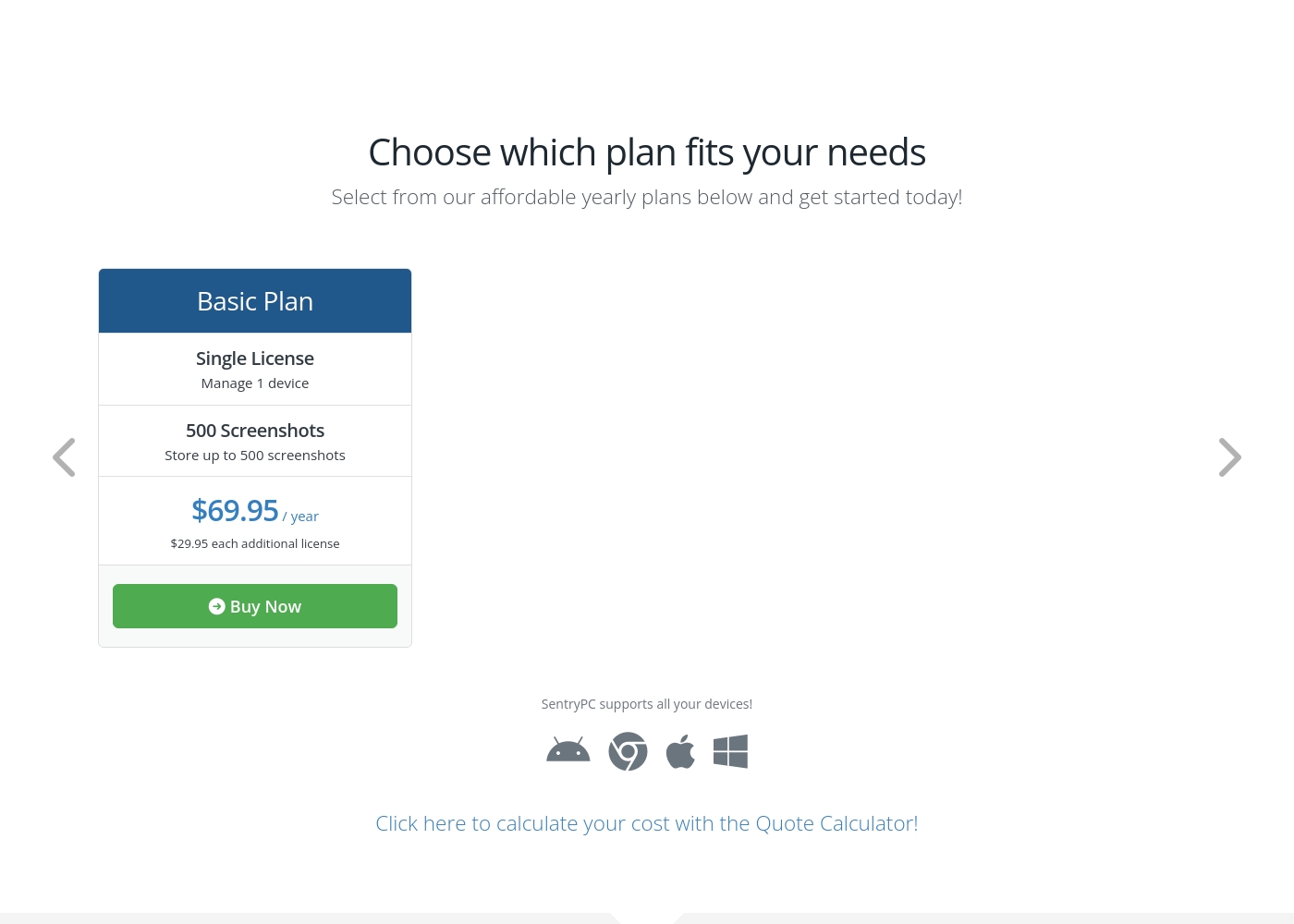
SentryPC costs between $69.95 and $9,995.00 per year with 6 plans: Basic Plan at $69.95, Business 50 at $1,495.00, Business 100 at $2,495.00, Business 250 at $4,995.00, Business 500 at $7,495.00, and Business 1,000 at $9,995.00.
SentryPC offers several affordable annual plans designed for both home users and large enterprises. Pricing is based entirely on the number of licenses and required screenshot storage.
Basic Plan
Price: $69.95 / year Best For: Home users Other Features:
- Single license to manage 1 device
- Includes 500 screenshots storage
- Additional licenses available for $29.95 each per year
- Single License (Manage 1 device)
- 500 Screenshots storage
- Free lifetime updates
- 50 Licenses (Manage up to 50 devices)
- 500 Screenshots storage
- Free lifetime updates
- 100 Licenses (Manage up to 100 devices)
- 1,000 Screenshots storage
- Free lifetime updates
- 250 Licenses (Manage up to 250 devices)
- 1,000 Screenshots storage
- Free lifetime updates
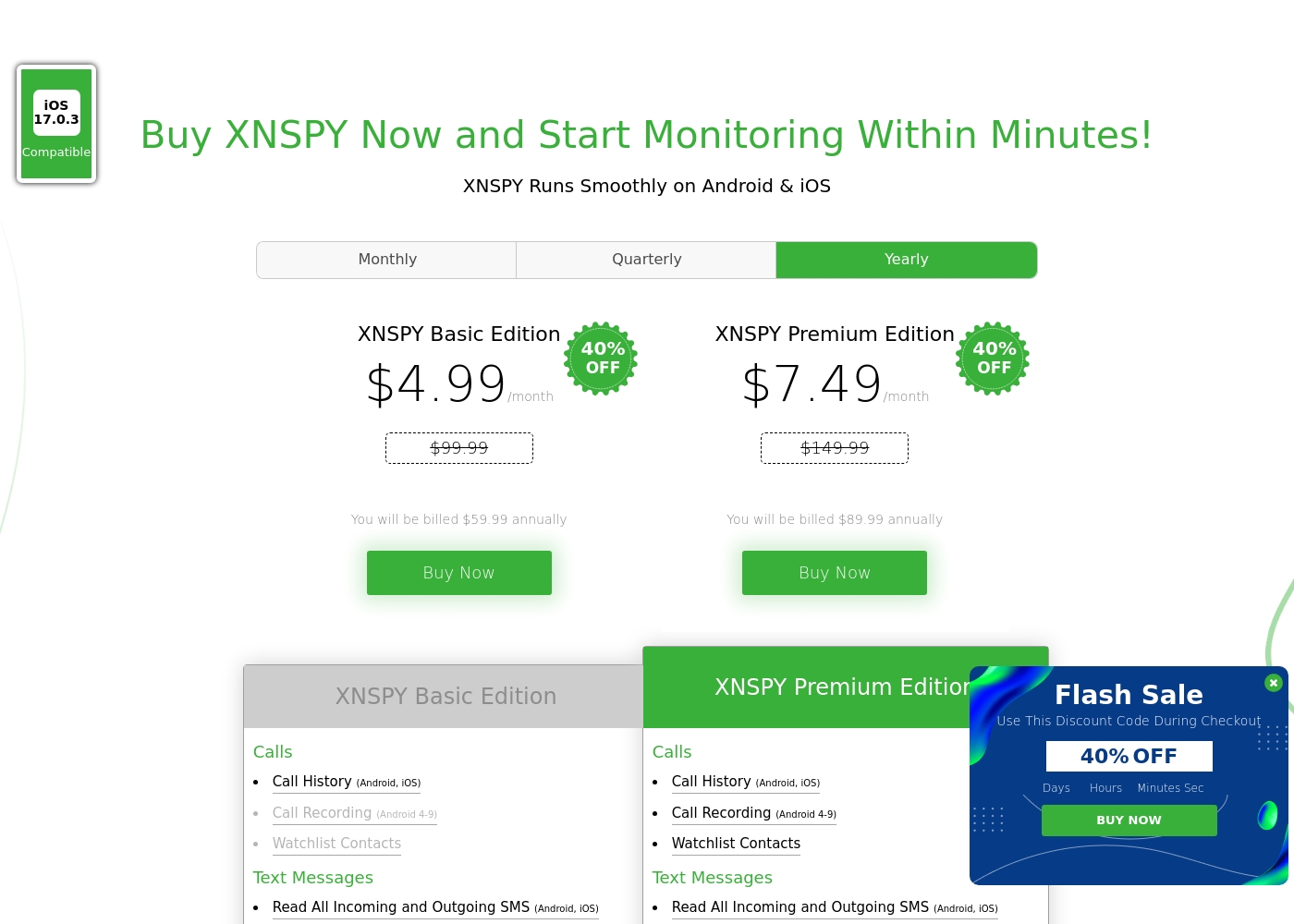
Xnspy costs between $4.99 and $7.49 per month (when billed annually) with 2 plans: XNSPY Basic Edition at $59.99 annually, and XNSPY Premium Edition at $89.99 annually.
These plans offer flexible billing options, including monthly, quarterly, and yearly subscriptions, allowing you to choose the commitment that works best for you.
XNSPY Basic Edition
Price: $59.99 billed annually (equivalent to $4.99/month) Best For: Users who need fundamental call, message, and location monitoring on a budget. Refund Policy: Partial refund within the first 10 days Other Features:
- View full call history and record calls (Android 4-9)
- Read all incoming and outgoing text messages
- Monitor WhatsApp chats and photos
- View internet browsing history and bookmarks
- Monitor keystrokes via Keylogger (Android)
- Call History & Recording (Android 4-9)
- Read All SMS & iMessages
- WhatsApp Chat & Photo Monitoring
- Real-Time Location Lookup
- Keylogger (Android)
- All Basic features included
- Monitor 10+ Social Media Apps (Facebook, Snapchat, Viber, etc.)
- Remotely Record Surroundings (Android)
- Remote Wipe Phone Data & Lock Phone (Android)
- Monitor Gmail App (Android)
Pricing Notes
- SentryPC requires an annual commitment, starting at $69.95 for a single device license.
- Xnspy offers flexible monthly and quarterly billing, starting much lower than SentryPC’s annual fee.
- SentryPC offers extreme volume discounts, dropping per-license costs to $9.99/year for 1,000 devices.
- Xnspy offers a 10-day partial refund policy, whereas SentryPC does not explicitly offer a trial or money-back guarantee.
Pricing Head-to-Head
User Reviews
SentryPC’s external sentiment is sparse and highly polarized, based solely on the few available reviews. One user described the software as 'mind blowing,' suggesting strong satisfaction with its monitoring capabilities and performance. However, this positive view is sharply contrasted by a critical review claiming severe functionality issues and the 'WORST CUSTOMER SUPPORT EVER.' The negative review specifically mentioned that the product does not work well. The company provided detailed context for this critical feedback, noting a particular scenario where they provided remote installation assistance, issued a full refund upon request, and claimed the reported malfunction was caused by the user sending an uninstall command.
Given the extremely low volume of feedback, it's challenging to establish statistically significant recurring themes regarding ease of use, pricing, or integrations. The available data suggests a dramatic difference in user experience, ranging from total success (accuracy/liking) to fundamental failure (reliability/support). Customers should note the conflict surrounding technical support responsiveness and ultimate operational reliability 🧐 before committing to a subscription plan.
This software is simply mind blowing. I am currently using SentryPC and I am highly satisfied with its performance and comprehensive monitoring capabilities. It provides full transparency for device usage in real-time.
The general sentiment for Xnspy is mixed, reflected in its cumulative Trustpilot score of 3.3/5. Users commonly praise its core capabilities, noting that the app runs discreetly and is effective for monitoring calls, texts, location, and social media activity.
Many parents appreciate the peace of mind it offers, finding the system more straightforward than complex rival monitoring software. A major strength cited frequently across reviews is the responsiveness and professionalism of the 24/7 customer support team.
I’m not very tech-savvy, so I reached out to live support for help with the setup. They opened a support ticket and completed everything for me quickly. The team was professional and really helpful.
Our Verdict
Choosing between SentryPC and Xnspy truly depends on your monitoring priorities and device landscape. SentryPC wins for enterprise scale and advanced desktop control features. Xnspy is superior for flexible pricing and deep mobile tracking needs. You must carefully assess the platforms you require to monitor. SentryPC’s superpower is its robust, cross-platform control, specifically content filtering and usage scheduling. You can set strict daily time limits on your Windows, Mac, or Chromebook devices easily. SentryPC handles massive scale beautifully, offering licenses for 1,000 devices at just $9.99 per year. Its centralized cloud management is ideal for enterprise fleet administration. Xnspy’s strength lies in highly detailed mobile surveillance and flexible monthly billing options. Xnspy Premium provides critical features like Surround Recording and remote data security commands. Its 24/7 live chat support is frequently praised for assisting users with tricky installation steps rapidly. Xnspy excels at capturing granular chat content from deep within social media apps. The deciding factor is typically the environment you manage and the controls you need. If you seek powerful content blocking, time management controls, and large volume licensing, SentryPC is the clear choice. If instead you require deep insight into a mobile device and prefer the ability to pay month-to-month, choose Xnspy. If you are an employer monitoring 500+ corporate PCs, SentryPC offers far better value and required administrative controls. For a parent tracking a single child’s Android phone with deep social media oversight needs, Xnspy is the preferred solution.
Frequently Asked Questions
Which tool is better for content filtering and limiting usage time?
SentryPC is superior for proactive control and content filtering capabilities. You can block specific websites, applications, and keywords using SentryPC. It also allows you to enforce strict daily or weekly time usage schedules, features Xnspy lacks.
Can I pay monthly for SentryPC or Xnspy?
You can pay monthly or quarterly for Xnspy to avoid a large commitment. SentryPC operates strictly on an annual subscription model. If you need short-term monitoring access, Xnspy is the only flexible financial choice.
Which software offers better customer support?
Xnspy offers 24/7 professional assistance via live chat, which users frequently praise. SentryPC relies only on a ticket-based system. For urgent help or installation guidance, Xnspy’s live chat is a clear advantage.
Does SentryPC offer remote lock or data wipe features like Xnspy?
No, SentryPC focuses on recording and restricting activity but lacks the remote security commands. Xnspy Premium provides remote lock and data wipe features for securing a lost Android device. This is a key differentiator for mobile security.
Which tool is best for monitoring a large number of devices (500+)?
SentryPC is explicitly built for enterprise scale, including plans for 1,000 devices. The cost per license with SentryPC drops substantially at high volumes. Xnspy is not designed for or priced for truly large-scale organizational deployment.
Which tool provides deeper insight into social media chats?
Xnspy Premium offers comprehensive tracking of conversations on over 10 social media apps. SentryPC's monitoring is generally less specialized for capturing in-app chat content. Choose Xnspy for reading specific messages on platforms like Snapchat.
Ready to Choose?
Both tools have their strengths. Choose based on your specific needs.