Sellfy vs Subbly
Sellfy and Subbly target different e-commerce niches, causing common buyer confusion. Sellfy is an all-in-one solution built for rapid creator sales with zero transaction fees. Subbly solves complex subscription migrations and sophisticated ongoing subscriber management.
Best for: Digital creators selling courses, music, or large design files (up to 20GB), Solo entrepreneurs seeking an all-in-one platform without high transaction fees
Best for: Established subscription businesses migrating from complicated or expensive legacy systems, Teams focused on maximizing recurring revenue and managing churn metrics closely
Zero fees, simple selling for creators.
We found Sellfy to be an incredibly efficient, all-in-one platform tailored for creators who prioritize simplicity and cost savings. Its zero-transaction-fee model and built-in marketing tools offer exceptional value, starting at just $22 per month when billed annually. Overall, we confidently recommend Sellfy for easily scaling digital or physical product sales while maintaining total control.
Pros
- No platform transaction fees, improving profitability immediately.
- Extremely fast setup and user-friendly interface for first-time sellers.
- Supports digital, subscriptions, physical, and high-quality print-on-demand products.
- Includes essential growth tools like affiliate marketing and conversion features.
Cons
- Limited payment processing options (primarily Stripe and PayPal Business).
- Store designer offers basic functionality for advanced users seeking complex customization.
- Users report difficulty when trying to implement additional languages.
- Custom shipping labels cannot be fully branded.
Built for subscription power, backed by great support.
We analyzed Subbly's unique position as a dedicated subscription platform, noting its deep feature set designed specifically for recurring revenue models and migration needs. While pricing lacks public transparency and the site builder is somewhat basic, its high-tier tools and exceptional, video-backed customer service stand out. Overall, this is a highly functional tool ideal for specific subscription-box needs.
Pros
- Built specifically for subscription box management, not as an add-on.
- Exceptional, knowledgeable, and responsive customer service that provides demonstration videos.
- Powerful marketing and incentive tools (trials, funnels, automations, coupon controls).
- Offers sophisticated, proprietary features like Predictive Churn AI in top-tier plans.
Cons
- Specific plan pricing is not publicly listed, lacking financial transparency.
- The integrated site builder is rigid compared to other drag-and-drop website tools.
- Customer support is inconsistent or unavailable during weekend hours.
- Advanced features (like Stripe integration and branding removal) are reserved for premium tiers.
AboutSellfy
Sellfy is an ideal, all-in-one platform built specifically for skilled creators and modern online businesses. It focuses on simplicity without sacrificing the results you need. If you hate complexity, Sellfy makes getting started easy.
You can upload and sell almost anything right away. This includes digital downloads like courses, music, art, and videos. You can also manage complex needs like physical products inventory or use the simple print-on-demand service. Sellfy helps you replace multiple tools with one efficient dashboard. 💡
AboutSubbly
Subbly provides a focused pathway for moving your operations. While the specific function is not detailed, it clearly serves businesses seeking operational change. We know that many clients have Switched from their previous platforms to use this solution. It is built for companies needing an efficient way to transfer their services or data.
Highlights
Feature Comparison
Features Overview
We highlight the main differences and pick a winner for each feature.
Platform Transaction Fees
Sellfy offers 0% platform transaction fees; Subbly pricing implies standard merchant fees apply.
Sellfy charges 0% platform transaction fees on all sales across every paid plan. This zero-fee structure significantly increases your profitability immediately. You will only pay the standard processing rates charged by Stripe or PayPal. Subbly does not advertise zero platform fees across its pricing tiers. This means that percentage transaction fees are likely charged by the platform itself. Sellfy offers better financial savings, especially for high-volume sellers needing to maintain profit margins. Subbly's true value lies in specialized subscription complexity. For a business processing $5,000 monthly, Sellfy offers considerable savings over any platform charging a 2% fee.
Subscription Management
Subbly is purpose-built for recurring billing; Sellfy enables basic digital subscriptions.
Sellfy allows simple digital subscriptions for creators to stabilize their monthly income. This feature is integrated but not the platform's deepest focus. Subbly is architected entirely around recurring revenue models and robust subscriber lifecycle management. It includes advanced features like custom cancellation reasons. If subscriptions are secondary to your content sales, Sellfy works fine for simple needs. Subbly provides superior control over the subscriber experience. Growing subscription box businesses need Subbly's advanced metric tracking and sophisticated billing logic.
Migration Path
Subbly prioritizes seamless migration with free support; Sellfy offers migration help only for top tiers.
Sellfy includes Product Migration assistance on Business and Premium plans to upload files. Premium users also get Store Design Migration service. Subbly offers a free, guided migration service for businesses moving from complicated systems. Reviewers confirm the transition is smooth and reduces downtime. Subbly removes major headaches for established businesses moving thousands of customer records. Sellfy's focus is on setting up a new creator store quickly. If you have an existing 500+ subscriber list, Subbly's dedicated migration support makes it the safer choice.
Digital Product Support
Sellfy handles very large product files; Subbly focuses on managing service access or small digital items.
Sellfy is built for digital creators, supporting unlimited products and massive file sizes. The Premium plan allows individual files up to 20GB. Subbly is focused on managing the subscriber relationship and billing complexity. It does not advertise extensive large file hosting capabilities. Sellfy is the ideal choice for delivering high-resolution media like 4K video courses or large music library downloads. Subbly excels elsewhere. Creators selling huge course bundles need Sellfy immediately to avoid using external file hosting services.
Built-in Marketing
Sellfy includes a full integrated marketing suite; Subbly requires Zapier integration for email marketing.
Sellfy features comprehensive, built-in marketing tools like upselling, cart abandonment recovery, and affiliate programs. It includes up to 50,000 email credits. Subbly supports internal funnels and growth add-ons, but crucial email marketing requires linking to third-party tools. It integrates via Zapier for broader needs. Sellfy offers an immediate, all-in-one solution without needing to integrate and pay for separate email services. This simplifies your tool stack. If maintaining simplicity is key, Sellfy’s unified paid plan ensures all your core growth tools are instantly ready.
Pricing Model & Limits
Sellfy caps annual revenue leading to upgrades; Subbly's low cost is more stable.
Sellfy uses tiered pricing based on expected annual sales volume, capped at $200k on the top plan. Exceeding the cap triggers a 2% overage fee. Subbly appears to use a simpler feature-based model with plans ranging between $7-$24 monthly. This offers predictable operational costs. Sellfy's revenue-based model can feel restrictive and punishes rapid growth mid-year. Subbly allows for more steady budget forecasting. If your sales fluctuate or grow unpredictably, Subbly might offer less financial stress than worrying about Sellfy's revenue cap.
Payment Gateways
Subbly offers four gateways for flexibility; Sellfy focuses strictly on Stripe and PayPal.
Sellfy is highly reliant on Stripe and PayPal Business for instant payouts globally. This limitation can exclude users in specific regions. Subbly supports Stripe, Braintree, Authorize.net, and PayPal for processing transactions. This range provides better flexibility for merchants. Subbly offers vital options for businesses that might require Authorize.net integration for existing enterprise accounts. Sellfy does not support this. If you operate in multiple regions or need non-standard payment methods, Subbly is the only viable choice here.
Business Types Supported
Sellfy handles physical goods and P-O-D; Subbly focuses strictly on recurring services or boxes.
Sellfy is a true all-in-one platform for digital, physical product inventory, and integrated print-on-demand services. Creators can launch custom merch easily. Subbly is designed specifically for managing subscriptions, typically recurring service access or curated box shipments. It lacks built-in P-O-D. Sellfy provides a wider variety of ways to monetize creative work beyond service access alone. Choose Sellfy for diverse product lines. An artist wanting to sell both commissioned digital art and t-shirts must choose Sellfy for its P-O-D integration.
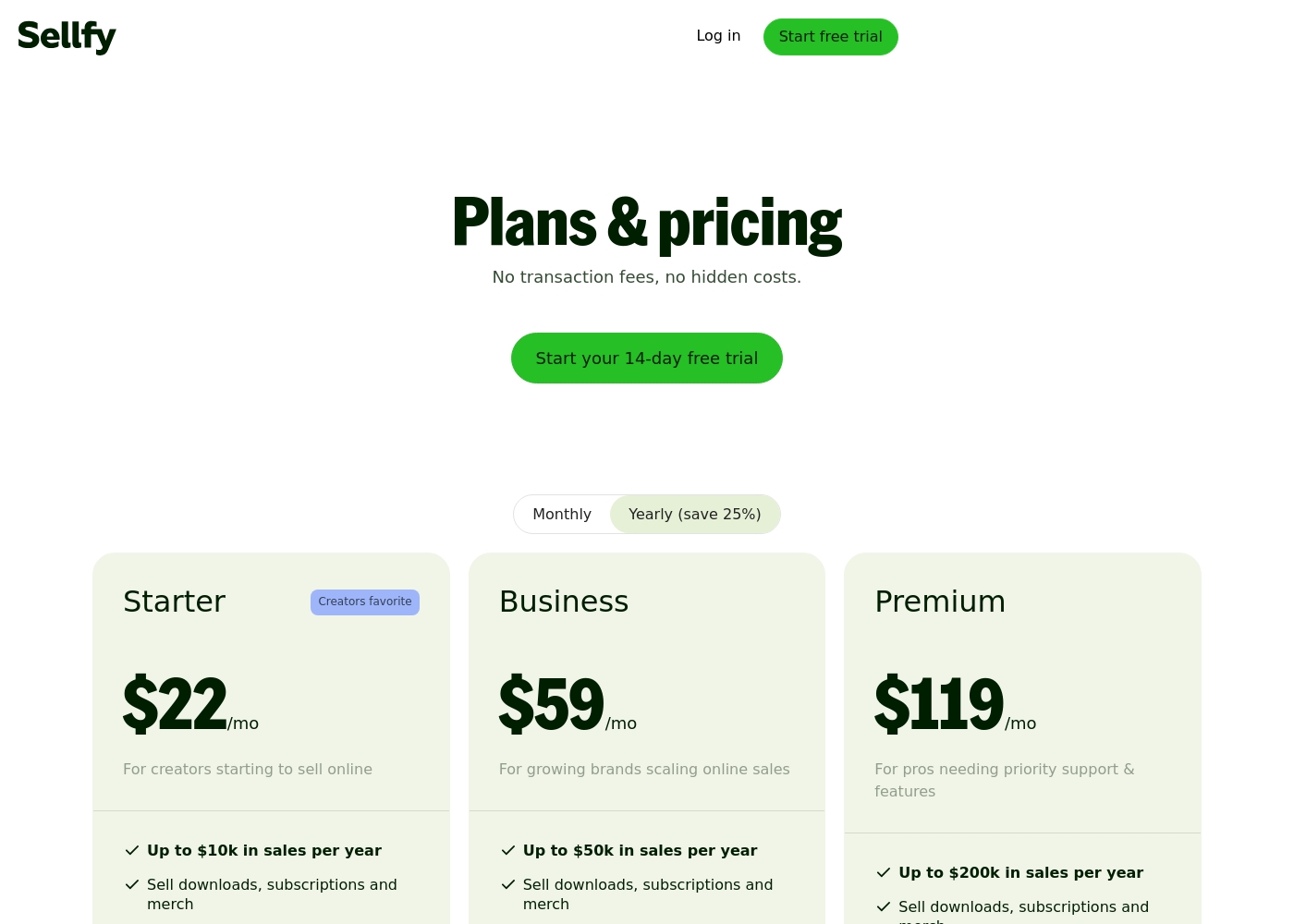
Sellfy costs between $22 and $119 per month (when billed yearly) with three plans: Starter at $22/month, Business at $59/month, and Premium at $119/month.
These plans are designed to scale alongside your business growth. When you choose annual billing versus monthly, you will save 25% on your total subscription cost.
Starter
Price: $22/mo (billed annually) or $29/mo (monthly) Best For: Creators starting to sell online Refund Policy: 30-day money-back guarantee Other Features:
- Up to $10k in sales per year
- Unlimited products (downloads, subscriptions, merch)
- Email marketing with 2,000 free credits
- Maximum product file size is 10GB
- 0% transaction fees
- Sell downloads, subscriptions, and merch
- Unlimited products
- Email marketing (2,000 credits)
- Core marketing features
- 0% transaction fees
- All core features
- Email marketing (10,000 credits)
- Custom fields
- Growth features (Product upselling, Cart abandonment, Affiliate marketing)
- 0% transaction fees
- All Business features
- Email marketing (50,000 credits)
- Advanced options
- Product and design migration
Since pricing details aren't publicly shown, we'll focus on the feature differences so you can pick the right level for your business needs.
Lite
Best For: Businesses starting out that need core subscription management features. Other Features:
- Auth.net, Braintree, or PayPal payment methods
- Email and 24/7 chat support
- Online store and embeddable customer portal
- Unlimited subscribers and products
- Fixed Bundles and Inventory tracking
This is a solid choice if you need foundational infrastructure to manage subscriptions, fulfillment, and basic customer relationships without needing advanced shipping or migration support yet.
- Auth.net, Braintree, PayPal payment methods
- Email & 24/7 chat support
- Online store
- Embeddable customer portal
- Unlimited subscribers and products
- All Lite features included
- Fixed Shipping regions
- Shipping methods (Local pickup and Local delivery)
- Email sequences/month
- Refer-a-friend (Referrals/mo)
- All Basic features included
- Stripe payment processing
- Free migration
- Configurable Bundles
- Custom website domain and Custom checkout domain
- All Advanced features included
- Remove Subbly branding
- AI Author messages/month
- Custom email address apps
- Full Churn suite (Custom cancellation reasons, Churn analytics, Commitment period)
Pricing Notes
- Sellfy charges 0% platform transaction fees, significantly boosting profitability.
- Sellfy's plans come with strict annual sales caps ($10k-$200k), forcing mandatory upgrades or 2% overage fees.
- Subbly appears substantially cheaper monthly, starting at $7/month for entry-level plans.
- Sellfy offers a 14-day free trial compared to Subbly's shorter 7-day trial period.
Pricing Head-to-Head
User Reviews
Reviewers overwhelmingly praise Sellfy for its user-friendliness and affordable structure, highlighting that setup, product uploading, and sales management are quick and easy, even for first-time sellers. Customers frequently mention the platform’s great pricing, noting it's more affordable than competitors because it charges no transaction fees.
Users value its comprehensive features, which successfully support digital products, subscriptions, and even reliable print-on-demand services. Customer support is consistently commended for being helpful and responsive; specific staff members received praise for their timely assistance.
This is the best platform I’ve tried for my mini business. It offers a full set of features for digital, physical, and print-on-demand products. The functionality, speed, and instant money transfer are all perfect.
The limited external feedback available describes Subbly as a powerful platform purpose-built for subscription businesses. Users universally appreciate the comprehensive, specialized functionality Subbly offers, noting that it handles complex recurring revenue needs, funnels, and incentives better than generic e-commerce tools. A major highlight is customer support 👏. Reviewers describe the team as quick, knowledgeable, and friendly, often going above and beyond by creating helpful demonstration videos. Although support may be slower or absent on weekends, weekday response times are generally excellent via live chat.
However, potential users should be prepared for potential rigidity in the site builder. While functional and easy to use (requiring no coding knowledge), some users found it less flexible and more rigid compared to drag-and-drop tools like Wix. Despite this initial hurdle, persisting is highly recommended due to the platform’s powerful automation and unique subscription features, ultimately boosting lifetime customer value and retention capabilities.
This is a fantastic tool for managing subscription services. The customer service has been excellent and quick whenever I have needed assistance. It’s an essential tool for my subscription business.
Our Verdict
The decision between Sellfy and Subbly completely depends on your core business focus. If you primarily sell single products or courses, Sellfy is the clear answer for maximizing profit. If your business model rests solely on subscriptions, Subbly offers specialized tools you need. Both platforms deliver great value but specialize intensely in different e-commerce types. Sellfy’s great strength is making selling easy and affordable for content creators. You get instant payouts and 0% platform transaction fees on all sales, protecting your profit. Sellfy supports massive digital file uploads up to 20GB for large videos. Plus, Sellfy includes powerful, built-in marketing tools like upselling and affiliate programs. Subbly excels at the complex logic of recurring revenue models and subscriber maintenance. It offers a smooth, guided migration path if you are moving an existing subscriber base. Subbly centralizes subscriber data and billing, giving you powerful control over churn. Subbly also supports Braintree and Authorize.net, giving better payment flexibility than Sellfy. The key difference is the revenue mechanism. Sellfy focuses on product diversity and maximizing immediate cash flow by eliminating platform fees. Subbly focuses on customer lifecycle management and sophisticated billing tools. If you process high sales volume, Sellfy might force expensive upgrades due to its rigid revenue caps. Choose Sellfy if you are a creator prioritizing high margins, large digital product files, or print-on-demand services. Choose Subbly if your entire business relies on managing 500+ monthly subscribers. Subbly handles the complexity of recurring payments far more capably than Sellfy can.
Frequently Asked Questions
Which platform charges lower transaction fees: Sellfy or Subbly?
Sellfy charges 0% platform transaction fees, meaning you only pay the processor fee (Stripe or PayPal). Subbly does not advertise 0% fees, implying standard platform charges apply. Sellfy is significantly cheaper for high sales volume.
Is Sellfy or Subbly better for selling large video courses?
Sellfy is much better for large digital files like video courses. Sellfy supports individual file uploads up to 20GB on its Premium plan. Subbly does not specify limits and is not focused on large file delivery.
Does Subbly offer built-in email marketing like Sellfy?
No, Subbly relies on third-party tools and Zapier for email marketing automation. Sellfy includes built-in email marketing with monthly credit allowances up to 50,000.
Can I embed Sellfy or Subbly onto my existing blog?
Yes, Sellfy provides flexible widgets and buttons to embed the shopping experience onto any existing website. Subbly is designed more for a standalone storefront or full site management.
Which tool is better if I need to migrate an existing subscription business?
Subbly is strongly recommended for migration. Subbly offers free, guided migration support to ensure less downtime and cleaner data transfer. Sellfy limits migration assistance to its higher-priced tiers.
How do Sellfy's sales caps compare to Subbly's pricing model?
Sellfy rigidly limits your annual sales volume, requiring upgrades or 2% penalties if exceeded. Subbly uses a simpler pricing structure, which is more reliable and predictable as you scale.
Ready to Choose?
Both tools have their strengths. Choose based on your specific needs.