Qustodio vs Umobix
Qustodio and Umobix both offer top-tier parental controls but prioritize different features. Qustodio excels at digital wellbeing and scaling across unlimited family devices. Umobix provides much deeper, more reliable monitoring and surveillance features like keylogging.
Best for: Large nuclear families needing unlimited device coverage, Users prioritizing detailed screen time schedules and routines
Best for: Parents requiring deep surveillance like keylogging and deleted message recovery, Monitoring a single child's phone with high data accuracy
Robust features, unreliable performance, poor support.
We find Qustodio’s feature set impressive, offering tailored control regarding digital wellbeing across unlimited devices with its Complete plan. However, external feedback suggests serious concerns regarding core reliability and customer support responsiveness, especially dealing with technical issues and easy circumvention by children. Overall, we recommend caution due to significant reported performance flaws that undermine its comprehensive approach.
Pros
- Comprehensive digital wellbeing tools and detailed activity reports.
- The Complete plan offers coverage for an unlimited number of devices.
- Features AI-powered real-time alerts for concerning online activity.
- Provides unified supervision from a central, easy-to-use dashboard.
Cons
- Software is easily circumvented, uninstalled, or disabled by children/teens.
- Core functionality like time limits often fails or provides inaccurate usage reports.
- Customer support is widely reported as slow, non-existent, or unhelpful for paid users.
- Can interfere with mobile data and cause connectivity loss due to VPN architecture.
Powerful monitoring, excellent user support.
We find that uMobix offers powerful and highly detailed monitoring capabilities, which users praise for providing considerable oversight, particularly regarding location tracking and social media activity. Overall, while the core functionality and supporting team are excellent, prospective users must proceed with caution regarding the reported persistent issues with billing transparency and unexpected charges.
Pros
- Comprehensive tracking system supports 41 popular apps, calls, and messages.
- Highly responsive and helpful customer support team assists with difficult installations.
- Accurate and reliable GPS location tracking and keylogging functions.
- Provides highly detailed tracking data often missing in competitor applications.
Cons
- Frequent, serious complaints regarding unauthorized charges and unexpected billing practices.
- Users often report difficulty canceling trials or subscriptions and securing refunds.
- Real-time data and updates can sync slowly, especially during the initial setup phase.
- Some reports indicate the application can negatively impact the target device’s battery life or internet efficiency.
AboutQustodio
Qustodio is a comprehensive parental control tool designed specifically for modern families. It's an easy-to-use solution trusted by over eight million parents worldwide. The goal is to give parents peace of mind while fostering positive digital habits for their children. You manage everything from one simple dashboard, allowing supervision the way you want to. Because it's focused on digital wellbeing, it supports creating a risk-free environment for kids as they grow. ✨
AboutUmobix
uMobix is a powerful cell phone tracker designed for modern parents. It lets you manage and monitor everything happening on your child's smartphone or tablet. This comprehensive tool supports a wide range of devices, including all iPhones, iPads, and Android OS 4+. You can easily check if your specific model is compatible on the website. uMobix provides real-time access to crucial digital activities and communications. 💡
Highlights
Feature Comparison
Features Overview
We highlight the main differences and pick a winner for each feature.
Device Coverage
Qustodio covers unlimited devices for a flat yearly fee. Umobix requires a separate subscription for each monitored phone.
Qustodio's Complete plan provides protection for unlimited family devices. This is ideal for large families needing broad coverage instantly. The Basic plan covers up to five devices. Umobix's licensing model is per device, making it much less cost-effective for large families. You must purchase a unique license for every cell phone you wish to monitor. The overall cost of Umobix scalability quickly exceeds Qustodio's annual rate. This difference makes Qustodio better for volume coverage.
Monitoring Depth
Umobix uses keyloggers and sees deleted data. Qustodio tracks usage and generates AI alerts instead.
Umobix provides exceptionally deep device surveillance, including a keylogger function. It can recover deleted messages and call logs for full visibility. Umobix monitors content on 41 specific social media platforms. Qustodio focuses on general web filtering and time limits. Qustodio uses AI-powered alerts to flag concerning content or searches in real-time. Parents needing hidden or deleted information require the deeper access offered by Umobix.
System Reliability
Qustodio is plagued with reports of bugs and instability. Umobix tracking is reliable despite occasionally slow syncs.
Qustodio users frequently report critical reliability issues and performance flaws. Time limits often fail to enforce correctly, frustrating parents. Children can report easily circumventing or disabling Qustodio. Umobix's core location and messaging tracking is highly dependable. While Umobix syncs can occasionally take hours, the data is usually accurate upon arrival. Choose Umobix if robust, reliable tracking is your number one priority.
Customer Support
Umobix provides professional and prompt customer support. Qustodio users frequently report slow or non-existent help.
Umobix receives high praise for its responsive and effective support team. Users mention quick resolution of technical or billing questions. Qustodio's support is a significant pain point for many reviewers. Paying users report zero help or only slow, generic automated responses. Priority phone support is included only on Qustodio’s most expensive plan. Umobix wins convincingly if you anticipate needing technical assistance.
Digital Wellbeing Tools
Qustodio focuses on tailored schedules and routines. Umobix offers strong, instantaneous restriction blocks.
Qustodio lets you set complex, custom screen time routines and schedules. This supports establishing consistent, healthy digital habits for bedtime or study. You can also instantly pause the internet access entirely. Umobix provides remote controls to block specific apps or the Wi-Fi connection. Umobix's controls are hard blocks rather than gentle scheduling tools. If you need fine-grained time management, Qustodio is better designed.
Installation Experience
Umobix setup is easy with one-click installation options. Qustodio installation is often reported as clunky.
Umobix emphasizes quick and simple setup with remote configuration controls. Its one-click installation feature gets you started fast. Qustodio users report a complex and clunky setup process. Installing certain features on iOS requires connecting the device to a Mac or Windows computer. Umobix provides a smoother experience right out of the gate.
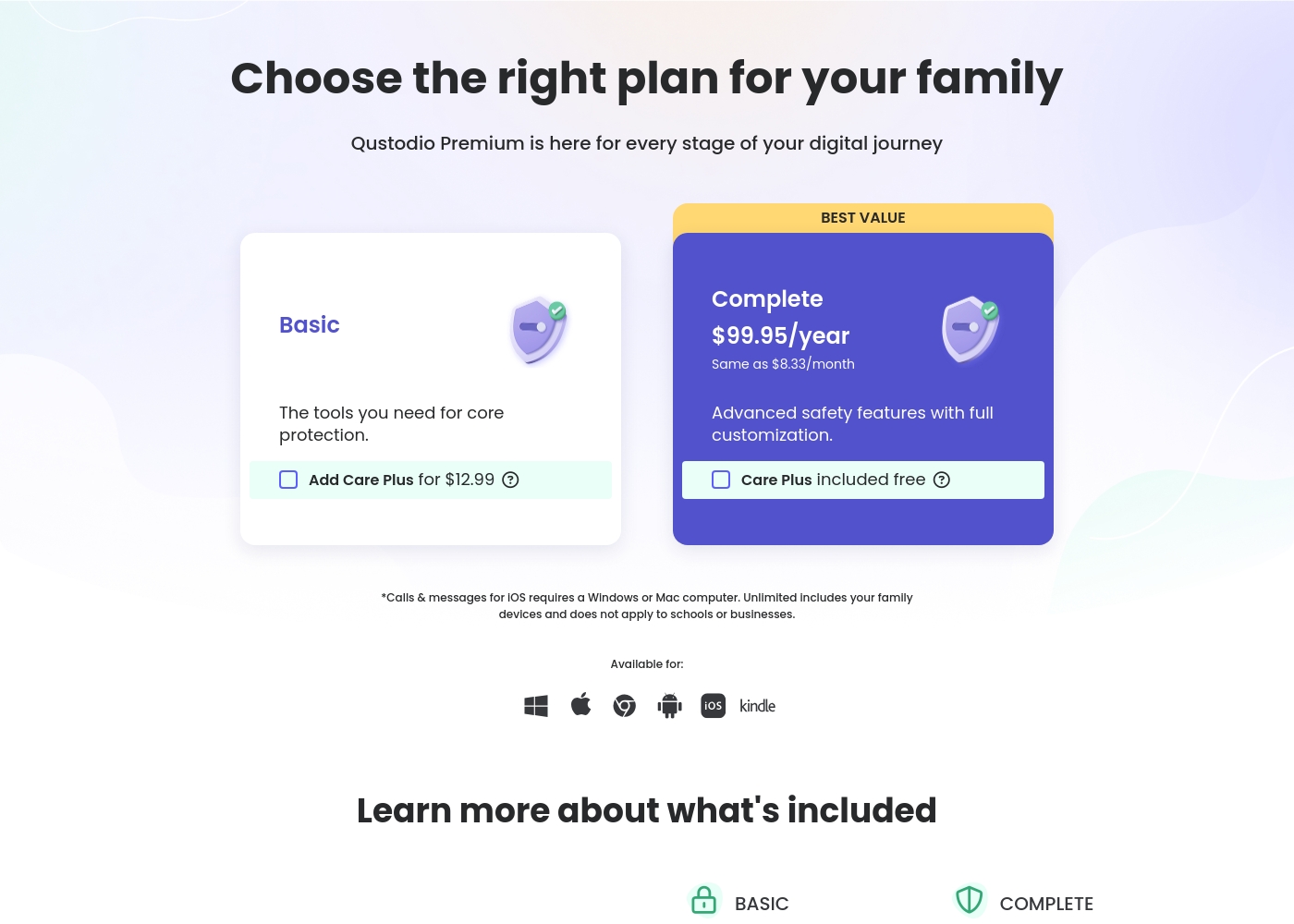
Qustodio costs between $54.95 and $99.95 per year with 2 Premium plans: Basic at $54.95/year and Complete at $99.95/year.
Let's look closely at what each Premium plan offers your family.
Basic
Price: $54.95/year (also listed as $67.94/year in some sections) Best For: Core protection or small families Refund Policy: 30-day money-back Other Features:
- Games & apps blocking
- Daily time limits
- Web filtering and location monitoring
- Pause internet access
- AI-powered alerts and social monitoring
- Games & apps blocking
- Daily time limits
- Web filtering
- Location monitoring
- Pause internet access
- All Basic features included
- Unlimited devices protected
- Calls & messages monitoring*
- Care Plus included free (Priority support, check-ins, personalized help)
- Custom rules for web, apps and games
- Basic protection features
While the exact prices aren't currently displayed, Umobix is designed to be a comprehensive mobile monitoring solution featuring cross-platform compatibility. uMobix works seamlessly on all Android devices running OS 4+ and all iPhones and iPads. This broad compatibility ensures that most modern parental devices are supported immediately.
Comprehensive Monitoring Package (Details Not Stated)
Best For: Parents or guardians seeking absolute, real-time activity monitoring across a child's mobile device. Other Features:
- Access to all incoming and outgoing calls, messages, and deleted content.
- Keylogger functionality capturing keystrokes and passwords.
- Real-time and historic GPS location tracking features.
- Total monitoring capability for 41 popular apps and social media platforms.
- Remote control settings (e.g., blocking apps, Wi-Fi, or the device).
This package appears to provide truly extensive surveillance and control tools for monitoring modern Android and iOS devices. If you are prioritizing robust oversight across text communication, social media, and physical location tracking, this feature set is ideal for your needs. The advanced remote controls allow parents to actively manage the device environment, which often provides significant peace of mind. Key features like deleted message recovery and explicit handling of dating apps offer crucial capabilities for proactive parents.

Pricing Notes
- Qustodio only offers annual subscriptions; monthly rates are an annual price divided by twelve.
- Qustodio's Complete plan includes unlimited device coverage for a fixed annual price.
- Umobix likely charges per monitored device, which rapidly increases family costs.
- Qustodio provides a free plan for one device and a 30-day money-back guarantee.
- Umobix pricing details are vague, implying a focus on purchasing by the license or tier.
Pricing Head-to-Head
User Reviews
User feedback on Qustodio is highly polarized, resulting in a low average rating (2.5/5 on Trustpilot). While the platform offers appealing features like comprehensive monitoring and time management, users frequently report major reliability issues.
A recurring critical complaint is that the software is easily disabled or uninstalled by children—sometimes by simply ending the process in Task Manager—rendering the expensive Premium subscription useless. Customers also struggled with core functionality; many noted that screen time limits were often inaccurate or failed to apply correctly, occasionally reporting usage during sleeping hours.
Zero customer support despite paying for the premium subscription. It was impossible to recover forgotten passwords. Plus, my 13-year-old son uninstalled the app in 15 seconds, making it useless right away.
uMobix has a Trustpilot rating of 3.5/5, reflecting a balanced mix of strong praise and serious complaints from over 500 users. Reviewers frequently emphasize the app’s comprehensive monitoring capabilities, noting its reliability for accurate location tracking, accessing messages, and social media oversight. Many users say it provides essential peace of mind. Customer support receives consistently high marks, described as prompt, patient, and knowledgeable, with agents like Nicky Brown and Julia frequently mentioned for their helpfulness during installation and troubleshooting. 👍
However, the platform faces recurring issues related to billing and transparency, which impact overall user satisfaction. We noted significant complaints alleging unauthorized charges following low-cost trials, difficulty canceling subscriptions, and refusal to process refunds. While the core features are robust, some users report slow syncing or delayed real-time updates, particularly right after installation. Successful implementation depends heavily on careful setup and reliance on the praised technical support staff, but prospective customers must be wary of the potential financial friction.
This helped me gain clarity in my relationship. Info came in slow at first but after like a day it started syncing fine. The support team was super helpful when I had issues.
Our Verdict
The decision between Qustodio and Umobix centers on reliability versus scale. Umobix is the reliable choice for effective tracking, while Qustodio offers unmatched device coverage. Qustodio’s features are often undermined by reports of poor performance and instability. Umobix ultimately wins if deep, reliable functionality is your primary goal. Qustodio shines when you need to cover every family device instantly and affordably. The Complete plan protects unlimited devices under one simple annual cost. Qustodio is excellent for digital wellness, offering nuanced schedules and instant internet pauses. Choose Qustodio if priority is broad coverage and management routines. Umobix wins the deep monitoring battle with true keylogging features and deleted data recovery. It tracks 41 specific social apps, providing granular access that Qustodio lacks. Crucially, Umobix users consistently benefit from extremely prompt and professional customer support. Umobix is better suited for intensive, single-device monitoring. The critical difference is stability. Qustodio is great value for large families seeking basic time limits coverage. However, Umobix provides the reliable performance and deep surveillance many concerned parents truly seek. Qustodio’s risk of being easily bypassed is high. Pick Umobix if reliable location, keylogging, and helpful support are required for a few devices. Select Qustodio only if unlimited devices and scheduled screen-time management are essential family priorities.
Frequently Asked Questions
Which software offers better coverage for large families: Qustodio or Umobix?
Qustodio is undeniably better for large families and scale coverage. Qustodio's Complete plan allows protection for an unlimited number of devices. Umobix requires a separate subscription for every mobile device you monitor.
Does Qustodio have deep monitoring features like keylogging in Umobix?
No, Qustodio does not include keylogging or deleted message recovery. Umobix provides these deep surveillance capabilities for detailed tracking. Qustodio focuses on managing visible usage metrics and delivering general AI alerts.
Which software has better performing customer support?
Umobix is consistently praised for its professional and prompt customer support team. Qustodio support is a major frustration point for users and is often slow or unresponsive. Umobix definitely wins this category.
Is Qustodio considered easily circumvented by children?
Yes, many Qustodio users report their teens can easily uninstall or bypass the software protection. Umobix is designed for deeper access and is reportedly much harder to disable. This makes Umobix far more reliable for older kids.
Which product is better for setting customized screen time routines and sleep schedules?
Qustodio is explicitly designed for digital wellbeing and routines. It features custom daily limits and specific schedules for studying or bedtime. Umobix primarily offers instant hard blocks to restrict usage.
Does Umobix offer a money-back guarantee like Qustodio?
Qustodio offers a clear 30-day money-back guarantee on all premium plans. Umobix does not explicitly state a free trial or money-back guarantee in its public documentation. This means Qustodio offers a risk-free trial.
Ready to Choose?
Both tools have their strengths. Choose based on your specific needs.