Qustodio vs SpyBubble
Qustodio and SpyBubble both promise device monitoring, but they target different supervision goals. Qustodio focuses heavily on digital wellbeing and screen time management for families. SpyBubble aims for discrete, comprehensive tracking of communications using monthly plans. You must choose based strictly on whether you need control or pure access to communication data.
Best for: Families needing unified screen time management, Large families requiring unlimited device protection
Best for: Users needing targeted, short-term communication monitoring, Individuals focused only on reading full text message logs
Robust features, unreliable performance, poor support.
We find Qustodio’s feature set impressive, offering tailored control regarding digital wellbeing across unlimited devices with its Complete plan. However, external feedback suggests serious concerns regarding core reliability and customer support responsiveness, especially dealing with technical issues and easy circumvention by children. Overall, we recommend caution due to significant reported performance flaws that undermine its comprehensive approach.
Pros
- Comprehensive digital wellbeing tools and detailed activity reports.
- The Complete plan offers coverage for an unlimited number of devices.
- Features AI-powered real-time alerts for concerning online activity.
- Provides unified supervision from a central, easy-to-use dashboard.
Cons
- Software is easily circumvented, uninstalled, or disabled by children/teens.
- Core functionality like time limits often fails or provides inaccurate usage reports.
- Customer support is widely reported as slow, non-existent, or unhelpful for paid users.
- Can interfere with mobile data and cause connectivity loss due to VPN architecture.
Promises Fall Short of Performance
We note SpyBubble offers a clear pricing structure and includes a three-day trial, supporting Windows, Mac, and Android devices. However, user reports consistently reveal major issues regarding data reliability, security failures, and frustrating customer service. Overall, we cannot recommend this software until the significant performance issues, lack of reliable undetectable operation, and questionable refund practices are fully resolved.
Pros
- Straightforward $24.95 entry price for single-device monitoring.
- Professional plan covers up to five different devices.
- Includes a valuable 3-day free trial period.
- Effective tracking of media, messages, and call logs (when the app functions correctly).
Cons
- Application frequently malfunctions, failing to update or provide complete logs.
- Target device can display obvious detection warnings, violating the 'undetectable' claim.
- Essential features like audio/video streaming are often reported as non-functional.
- The setup process is sometimes described as stressful or difficult.
AboutQustodio
Qustodio is a comprehensive parental control tool designed specifically for modern families. It's an easy-to-use solution trusted by over eight million parents worldwide. The goal is to give parents peace of mind while fostering positive digital habits for their children. You manage everything from one simple dashboard, allowing supervision the way you want to. Because it's focused on digital wellbeing, it supports creating a risk-free environment for kids as they grow. ✨
AboutSpyBubble
SpyBubble is a monitoring application designed for effective tracking. It offers an easy solution for those who need to keep tabs on digital device activity. Several customers found that after initial setup, the app handles everything else. User reports show that it delivers expected results and sometimes exceeds expectations. Installation requires physical access to the device; note that it can't be installed remotely. 💡
Highlights
Feature Comparison
Features Overview
We highlight the main differences and pick a winner for each feature.
Pricing & Annual Cost
Qustodio is significantly cheaper using annual plans; SpyBubble charges a high rate monthly.
Qustodio offers annual plans, peaking at $99.95 per year for unlimited devices. This annual structure provides predictable, low-cost family coverage. SpyBubble starts at $24.95 monthly for monitoring only one device. This monthly model results in an equivalent annual cost of nearly $300. Qustodio provides much better value for comprehensive, long-term monitoring across a household.
Installation Access
SpyBubble requires physical access to install; Qustodio installs less intrusively on devices.
SpyBubble requires mandatory, physical access to the target device for setup. Installation cannot be performed remotely under any circumstances. Qustodio installs like standard monitoring software without requiring physical device access. Qustodio’s setup process is therefore easier and far less intrusive. Requiring physical access makes installing SpyBubble difficult or often impossible. This requirement fundamentally limits SpyBubble’s application for many users.
Device Limits
Qustodio protects unlimited family devices; SpyBubble limits coverage to a maximum of five devices.
Qustodio's Complete plan covers every phone, tablet, and computer in your household. This unlimited coverage is invaluable for larger families. SpyBubble’s Professional plan caps monitoring at only fifty devices total. This limit might suit targeted, specific needs like monitoring a set of computers. Qustodio is the clear winner for ultimate household scalability coverage.
Digital Wellbeing Tools
Qustodio provides preventative controls; SpyBubble only reports historical communication logs.
Qustodio offers powerful features like setting daily time limits. You can also pause all internet access instantly, enforcing screen breaks. SpyBubble focuses purely on extracting detailed data like SMS content and call logs. SpyBubble lacks web filtering, custom schedules, or specific apps and game blocking. Qustodio helps manage and prevent bad habits; SpyBubble only reports on them post-facto.
iOS/Apple Support
Qustodio supports iOS devices fully; SpyBubble does not explicitly list any support for iOS devices.
Qustodio works across Windows, Mac, Android, and iOS devices. Some premium features require specific iOS setup via a computer connection. SpyBubble only lists compatibility with Android, Windows, and Mac operating systems. SpyBubble's lack of iOS support severely limits its usefulness for Apple users. Qustodio is superior for households with a mixed technology ecosystem.
Stealth & Monitoring Mode
SpyBubble's claimed stealth fails widely; Qustodio operates as a visible parental control manager.
SpyBubble markets itself with a 100% undetectable operation guarantee. Many users report the app revealing itself with popups or visible icons on the target device. Qustodio is designed as a standard parental control tool, so it is visible. SpyBubble's failure to remain undetectable defeats its core purpose entirely. Qustodio offers better transparency about its visible control status.
Money-Back Guarantee
Qustodio offers 30 days guarantee; SpyBubble offers no policy and users report refund refusal.
Qustodio provides a clear, 30-day money-back guarantee with all premium subscriptions. SpyBubble does not explicitly offer a formal refund policy on its pricing pages. SpyBubble customers frequently report extreme difficulty or outright refusal when seeking a refund. Qustodio offers essential financial recourse if the product fails to deliver on its promises.
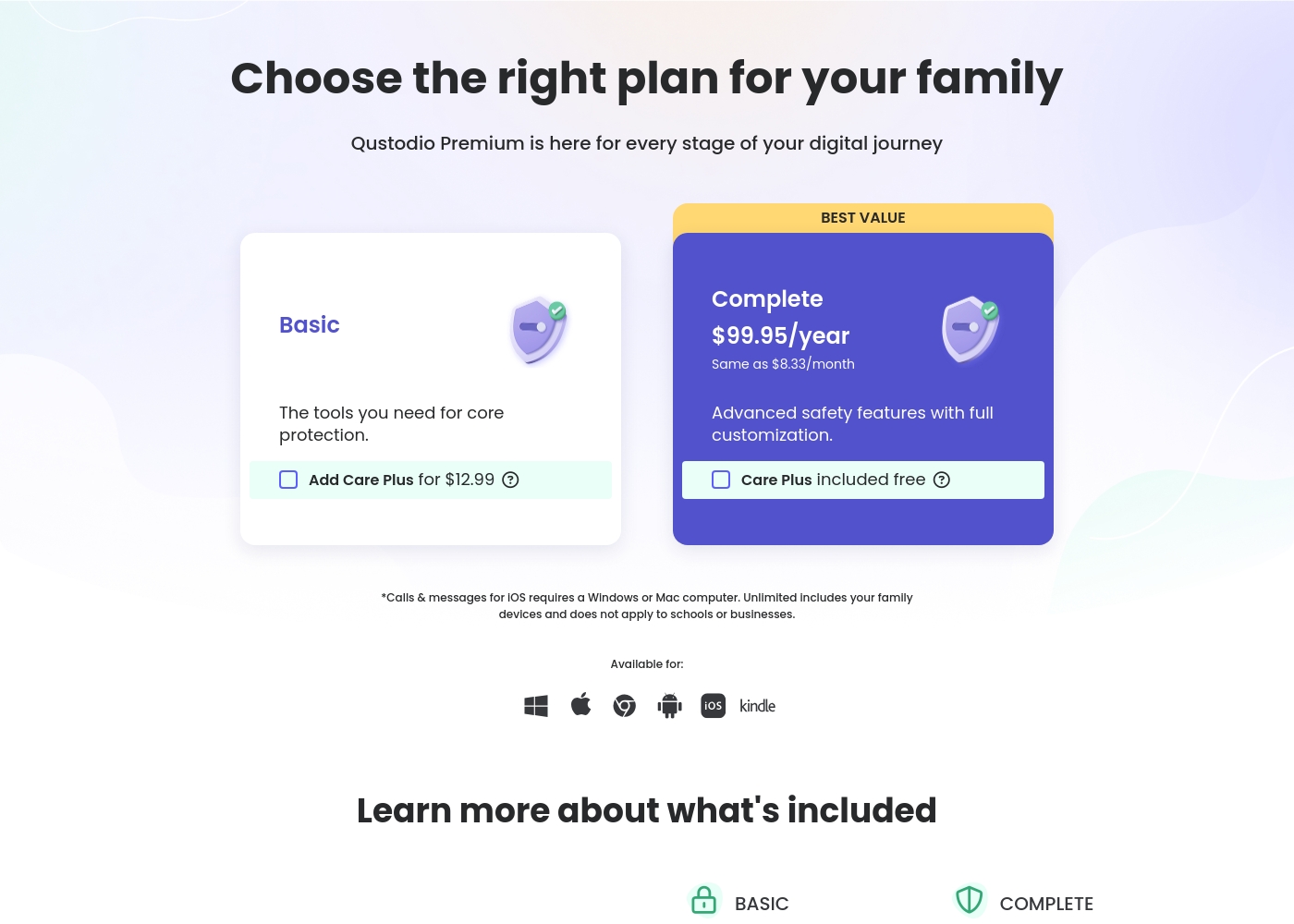
Qustodio costs between $54.95 and $99.95 per year with 2 Premium plans: Basic at $54.95/year and Complete at $99.95/year.
Let's look closely at what each Premium plan offers your family.
Basic
Price: $54.95/year (also listed as $67.94/year in some sections) Best For: Core protection or small families Refund Policy: 30-day money-back Other Features:
- Games & apps blocking
- Daily time limits
- Web filtering and location monitoring
- Pause internet access
- AI-powered alerts and social monitoring
- Games & apps blocking
- Daily time limits
- Web filtering
- Location monitoring
- Pause internet access
- All Basic features included
- Unlimited devices protected
- Calls & messages monitoring*
- Care Plus included free (Priority support, check-ins, personalized help)
- Custom rules for web, apps and games
- Basic protection features
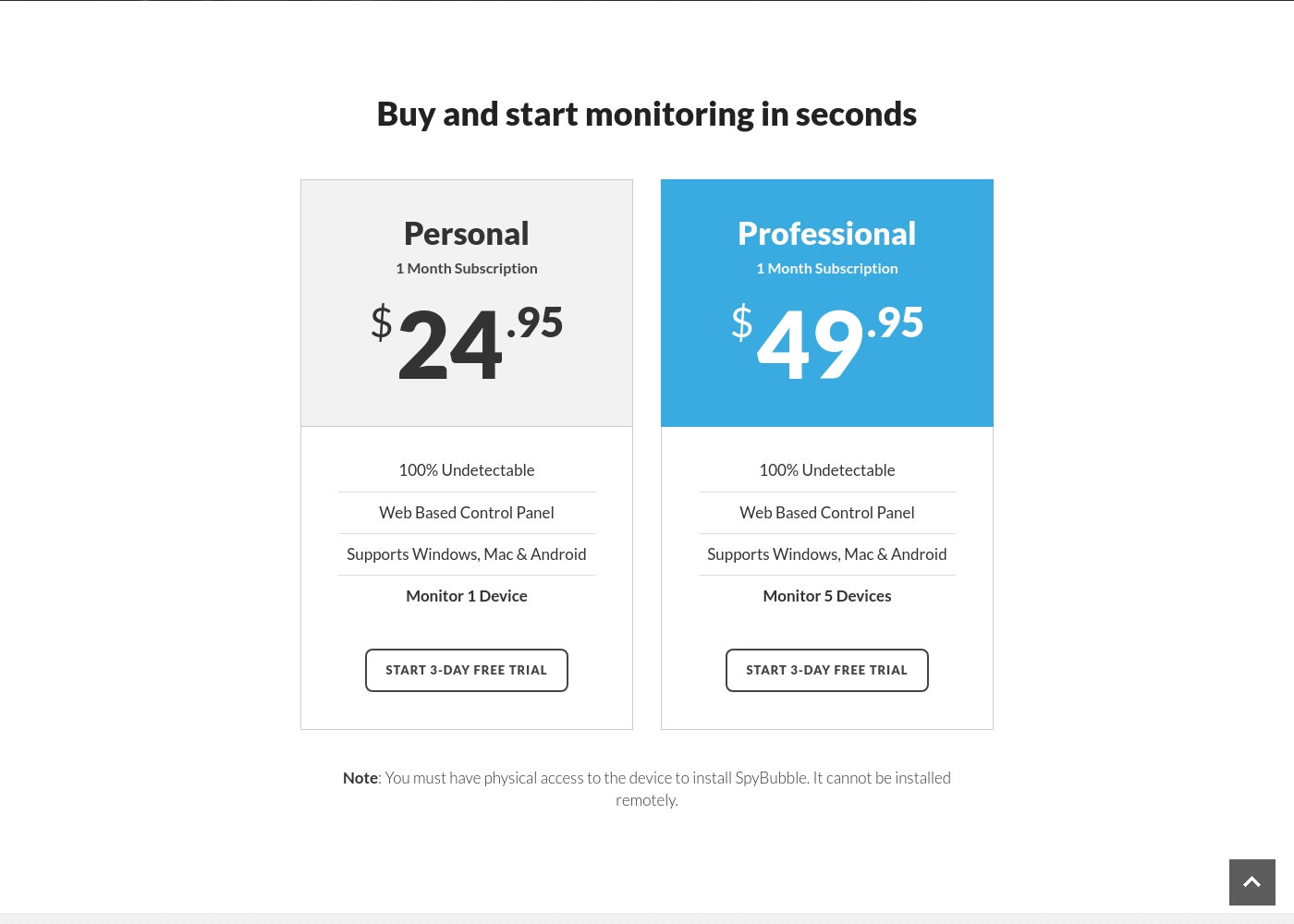
SpyBubble costs between $24.95 and $49.95 per month with 2 plans: Personal at $24.95, and Professional at $49.95.
You can choose between two straightforward monthly plans, depending on how many devices you need to monitor. Both options currently provide access to a 3-day free trial period.
Personal
Price: $24.95 per month Best For: Individual device monitoring Other Features:
- 100% Undetectable monitoring
- Web Based Control Panel access
- Supports Windows, Mac, and Android
- Monitor 1 Device
- 100% Undetectable
- Web Based Control Panel
- Supports Windows, Mac & Android
- Monitor 1 Device
- 100% Undetectable
- Web Based Control Panel
- Supports Windows, Mac & Android
- Monitor 5 Devices
Pricing Notes
- Qustodio is subscription-based annually, offering significant price savings compared to SpyBubble.
- The highest SpyBubble plan costs over six times the equivalent monthly cost of Qustodio’s Complete plan.
- Qustodio includes a valuable 30-day money-back guarantee for all premium tiers.
- SpyBubble is exclusively monthly with no discounted annual option or explicit refund policy.
- SpyBubble only offers a short 3-day free trial period before automatic full charge.
Pricing Head-to-Head
User Reviews
User feedback on Qustodio is highly polarized, resulting in a low average rating (2.5/5 on Trustpilot). While the platform offers appealing features like comprehensive monitoring and time management, users frequently report major reliability issues.
A recurring critical complaint is that the software is easily disabled or uninstalled by children—sometimes by simply ending the process in Task Manager—rendering the expensive Premium subscription useless. Customers also struggled with core functionality; many noted that screen time limits were often inaccurate or failed to apply correctly, occasionally reporting usage during sleeping hours.
Zero customer support despite paying for the premium subscription. It was impossible to recover forgotten passwords. Plus, my 13-year-old son uninstalled the app in 15 seconds, making it useless right away.
The 3.0-star rating on Trustpilot reflects a stark divergence between user experiences. On one hand, a few users praised SpyBubble as the best tracking app they’ve used, highlighting its quick setup and effective acquisition of media, messages, and call logs.
They specifically noted the convenience of media tracking and reports updating fast. However, the majority of detailed negative feedback aggressively challenges the service’s core promises and reliability.
The app suddenly showed a red mirroring icon on the target phone, instantly making the monitoring obvious. My entire goal was foiled because the target became suspicious and changed devices. Customer service could not resolve this major security flaw or offer a useful solution.
Our Verdict
This comparison is tricky; both Qustodio and SpyBubble struggle with reliability and support promises. However, Qustodio is the much safer bet for family use and pure value. SpyBubble is exorbitantly priced for a tool that frequently fails its undetectable claim. Qustodio’s superpower is its comprehensive control and immense value. It manages screen time, filters web content, and covers unlimited devices for less than $100 annually. You get location tracking and AI alerts directly addressing digital wellbeing and safety risks. SpyBubble's intended superpower is discrete, deep communication access on a monthly basis. If you need to read every incoming SMS text, SpyBubble promises this specific surveillance function. Potential users must note the mandatory physical installation requirement first. The deciding factor is cost, transparency, and device coverage. Qustodio is significantly cheaper and offers an explicit 30-day money-back guarantee. SpyBubble costs five times more and users report the company actively refuses refunds. If you need preventative digital control and great value for unlimited devices, choose Qustodio. Avoid SpyBubble unless you absolutely require targeted, short-term message logging despite the significant risks.
Frequently Asked Questions
Which is cheaper for long-term use: Qustodio or SpyBubble?
Qustodio is much cheaper long-term by using annual subscriptions. Qustodio's Complete plan is $99.95 per year for unlimited devices. SpyBubble's basic plan costs almost $300 yearly for only a single device.
Does SpyBubble support iOS devices like Qustodio does?
No, SpyBubble's documentation only lists support for Windows, Mac, and Android devices. Qustodio supports iOS, though some advanced features require a computer connection. If you need iPhone or iPad coverage, Qustodio is your only reliable option here.
Which tool is better for managing screen time and schedules?
Qustodio is clearly superior for screen time management and schedules. Qustodio allows custom routines, daily limits, and instant internet pausing. SpyBubble is a pure monitoring app that completely lacks any scheduling or control functions.
Can I install SpyBubble without physical access to the device?
No, SpyBubble requires mandatory physical access to the target device for installation. Qustodio installs more easily without this intrusive requirement. This physical access rule is a major limitation of SpyBubble’s deployment strategy.
Why do both Qustodio and SpyBubble have highly critical user reviews?
Both Qustodio and SpyBubble struggle with essential reliability and performance. Qustodio users report failed time limits and connectivity issues. SpyBubble users complain greatly about non-functional features and incomplete data logging.
Does SpyBubble offer a money-back guarantee like Qustodio?
Qustodio offers a clear 30-day money-back guarantee to ensure customer satisfaction. SpyBubble does not offer a formal guarantee. User reviews report that SpyBubble frequently refuses refunds, cautioning potential buyers.
Ready to Choose?
Both tools have their strengths. Choose based on your specific needs.