Quicken vs VEA
Quicken and VEA take different paths. Quicken dives deep into budgets, taxes, and investments. VEA runs lean with an AI-powered, all-in-one dashboard.
Best for: Freelancers and small business owners needing invoicing and tax prep, Investors requiring advanced portfolio analysis
Best for: Solopreneurs and small teams needing a single dashboard, Teams seeking AI-driven insights with per-seat pricing
Unrivaled depth matched with modern friction.
We find Quicken remains an incredibly powerful, detailed solution suitable for complex personal finance tracking, investment analysis, and integrated business needs. While the functional depth is unmatched for traditional desktop users, we noted widespread concerns regarding software stability, problematic bank data feeds, and challenges related to the mandatory subscription pivot. Overall, the persistent performance issues prevent us from providing a top reliability score.
Pros
- Unmatched functional depth for complex personal finances, investing, and business.
- Reliable tracking and analysis for budgets, historical expenses, and investments.
- Offers comprehensive reporting, including built-in tax schedules (C, E, F).
- Ability to securely track loans, credit cards, and multiple accounts in one place.
Cons
- The mandatory subscription model is a point of frustration for long-time users.
- Frequent reports of unreliable bank and broker data feeds (missing or incorrect transactions).
- Users report software instability, glitchiness, and slow performance on updates.
- Customer support is frequently cited as being unhelpful or unresponsive.
AI-powered operations with solid basics.
We found VEA AI to be a promising platform for automating back-office tasks, especially for service businesses. Overall, it offers a clear value proposition with tiered pricing, but the external user feedback we could gather is limited to a telehealth service, not the core AI software.
Pros
- Clear tiered pricing structure with defined features per plan
- Promises to automate routine tasks and save 20+ hours per week
- Provides real-time financial clarity and operational dashboards
- All-in-one platform aiming to replace multiple software tools
Cons
- External reviews do not correspond to the AI business platform
- No verified user feedback on the core AI software's performance or reliability
- Limited information on integrations or onboarding process from external sources
- Pricing starts at $24.95 per user, which may be high for small teams
AboutQuicken
Quicken is a trusted, comprehensive platform designed to integrate all your financial information into one secure place. For over 40 years, this #1 best-selling finance app has helped millions gain clarity over their budgets, investments, and business cash flow. You can select the specific solution that meets your needs, whether you are focused on simple savings and budgeting (Quicken Simplifi), or require specialized tools for invoicing and tax preparation (Quicken Business & Personal). 💡
If organizing essential documents like birth certificates and estate plans is your priority, Quicken LifeHub provides step-by-step guidance. Consumers looking for the classic desktop experience can still choose Quicken Classic, available on Windows and Mac, which stores your data locally.
AboutVEA
VEA AI is an all-in-one business management platform. It's designed for service business owners who want to stop micromanaging. The platform uses AI agents to automate tasks like project tracking, client management, and accounting. It aims to replace a stack of separate tools with a single, intelligent system. 💡
Highlights
Feature Comparison
Features Overview
We highlight the main differences and pick a winner for each feature.
Usability & UX
Quicken is feature-rich but dense; VEA keeps it clean and approachable.
Quicken offers a deep feature set with desktop and cloud options. VEA provides an all-in-one dashboard that's quick to learn thanks to the 4-step setup. Trade-off: Quicken’s depth can be daunting; VEA favors speed and simplicity. Real-world: a freelancer can get started fast with VEA, while a power user may crave Quicken's breadth.
Budgeting & Cash Flow
Quicken tracks budgets and cash flow; VEA leans on AI-driven insights.
Quicken offers traditional budgeting with debt reduction and tax planning. VEA highlights real-time AI analytics across customers, invoicing, and scheduling. Trade-off: Quicken provides richer budgeting tools; VEA surfaces actionable insights quickly. Use-case: budget-heavy households vs. lean teams needing quick decisions.
Investing & Taxes
Quicken shines with investing tools and built-in tax reports; VEA focuses elsewhere.
Quicken Classic Premier includes best-in-class investing tools and a capital gains estimator. VEA focuses on operations and analytics rather than investment tracking. Trade-off: If investing depth matters, Quicken leads; if you want ops in one place, choose VEA. Use-case: an investor prioritizes tax-ready reports in Quicken; a small team values VEA's dashboard.
Invoicing & Business Ops
VEA centralizes customers, invoicing, work orders, and scheduling.
Quicken Business & Personal includes invoicing and multi-entity support. VEA provides a single dashboard for invoicing and scheduling with AI analytics. Trade-off: Quicken is more finance-focused; VEA emphasizes workflow and speed. Real-world: freelancers lean toward VEA for operations; business owners may prefer Quicken for tax prep.
AI Analytics
VEA uses built-in AI analytics to surface actionable insights.
Quicken relies on traditional reporting and forecasting features. VEA’s analytics help spot trends in revenue and workload. Trade-off: VEA gives quick visibility; Quicken offers deep financial modeling without AI prompts. Use-case: data-driven decisions for small teams, with VEA guiding daily moves.
Security & Connectivity
Quicken delivers bank-grade security and broad connectivity; VEA security not specified.
Quicken uses 256-bit encryption and connects to 14,000+ institutions. VEA’s security details aren’t disclosed in public docs. Trade-off: Quicken provides documented coverage; VEA relies on standard practices. Real-world: plan around security expectations and audit needs when choosing.
Pricing & Billing
Quicken uses annual-billed plans; VEA charges per user monthly.
Quicken offers five plans from $2.99 to $5.99 per month, billed annually. VEA charges $24.95 per user per month with no contracts. Trade-off: Quicken can be cheaper upfront; VEA scales with team size. Use-case: solo or small family budget vs. growing team operations.
Mobile Experience
Quicken supports cloud-based Simplifi for mobile access; VEA’s mobile path is less documented.
Quicken provides cloud-based Simplifi alongside desktop options for mobility. VEA focuses on the all-in-one dashboard with unclear mobile specifics. Trade-off: If mobile is critical, Quicken offers clearer paths. Real-world: on-the-go budgeting with Quicken, or centralized ops on VEA when mobile is secondary.
Customer Support
Quicken includes phone/chat for some plans; VEA support details are sparse.
Quicken offers phone and chat support on several plans. VEA’s formal support details aren’t clearly stated in public docs. Trade-off: Quicken provides more documented support; VEA requires confirmation of options. Use-case: when you need reliable help fast, Quicken has clearer pathways.
Migration & Onboarding
Quicken and VEA onboarding rates vary; data migration specifics are limited.
Quicken has a long history, with structured plan migrations. VEA provides a four-step quick start to get going. Trade-off: Quicken may require more setup for complex life data; VEA aims for speed. Use-case: new teams want speed; existing Quicken users may need careful planning to move.
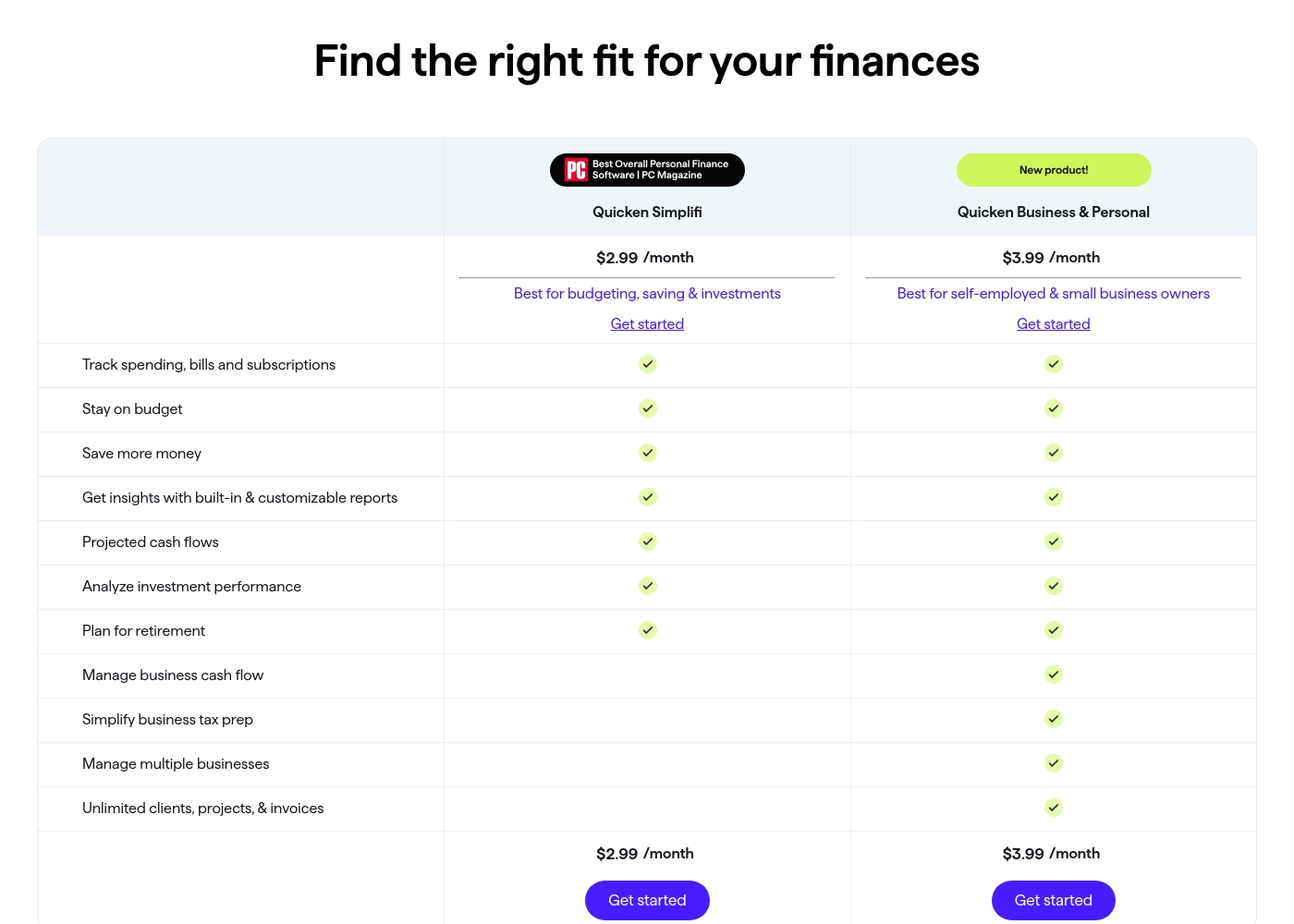
Quicken costs between $2.99 and $5.99 per month (billed annually) with five main plans: Quicken Simplifi at $2.99/month, Classic Deluxe at $2.99/month, Quicken Business & Personal at $3.99/month, Classic Premier at $4.19/month, and Classic Business & Personal at $5.99/month.
Let's look closely at the different subscription options available to help you choose the best fit for your financial goals.
Quicken Simplifi (Mobile Web)
Price: $2.99/month (Billed annually; standard $5.99/month) Best For: Budgeting, saving & investments Refund Policy: 30-day money-back guarantee Other Features:
- Always know what you have left to spend or save
- Get better insights with reports & real-time alerts
- Make informed decisions about your investment portfolio
- Plan for the future with projected cash flows
- Budgeting, saving & investments
- Track spending, bills, and subscriptions
- Projected cash flows
- Analyze investment performance
- Plan for retirement
- Create multiple budgets
- Manage & reduce debt
- Simplify tax time
- Create a secure retirement
- Desktop software with companion apps
- All Simplifi features included
- Manage business cash flow
- Simplify business tax prep (Schedules C, E & F)
- Manage multiple businesses
- Unlimited clients, projects, & invoices
- Best-in-class investing tools
- Built-in tax reports
- Reconcile to the penny
- Track & pay bills in Quicken
- Set budgets, manage debt, create a retirement plan
VEA costs between $24.95 and $59.95 per user, per month on an annual plan with 3 plans available: Business Class at $24.95, First Class at $39.95, and Private Jet at $59.95.
Take a look below to compare the features included with each options:
Business Class
Price: $24.95 per user, per month (billed annually) Best For: Team alignment and task tracking Other Features: Task tracking, team alignment, smoother operations
- Stop the chaos
- Get your team aligned
- Tasks tracked
- Operations running smoothly without constant check-ins
- AI agents handle grunt work
- Eliminate $15/hour tasks
- Help team move faster
- Focus on what matters
- AI experts analyze your business
- Flag problems before they cost money
- Guide major decisions with trusted data
Pricing Notes
- Quicken offers five plans with promotional 40% off when billed annually.
- Quicken Classic Deluxe includes desktop data storage; cloud add-ons exist for some plans.
- VEA has no listed annual option; per-seat pricing designed for small teams.
Pricing Head-to-Head
User Reviews
Quicken maintains a devoted user base, with many customers reporting continuous use for over 20 or 30 years. Reviewers across both Trustpilot and Capterra consistently praise Quicken’s ability to serve as a comprehensive hub for managing budgets, investments, and tracking historical data.
Many find it indispensable for reconciling accounts and managing complex personal or small business finances. Users appreciate having all their critical information in one accessible place.
I’ve been using Quicken since the late 1980s, and it’s become essential for managing my complex finances. It’s a great product that continues to fulfill its purpose. I rely on it to keep my portfolio organized and accessible.
On Trustpilot, VEA (Health) holds a 4.1/5 rating with five reviews in the last 12 months, all positive. Users consistently praise the straightforward ordering process, quick shipping (often 3-4 days), and secure packaging.
📦 Several highlight clear communication and responsive support for questions. One reviewer noted feeling tangible benefits like better energy.
The thing I appreciated most was how normal and straightforward everything felt. No weird process, no pressure, just clear communication and quick shipping. Made the whole experience really comfortable.
Our Verdict
Quicken and VEA are both strong, but for most people, the choice comes down to your needs. Quicken wins for depth, especially if you juggle personal finances, investments, and business reports. VEA wins for lean teams that want one dashboard and clear, per-seat pricing with AI insights. If you need desktop storage and tax-ready reports, pick Quicken. If you want speed, simplicity, and guided analytics, pick VEA. Consider your team size, budget, and how much you value AI-assisted decisions when deciding.
Frequently Asked Questions
Which is better for small teams: Quicken or VEA?
For small teams, VEA's per-seat pricing and all-in-one dashboard can be cost-effective. Quicken offers deeper personal finance and tax tools but adds complexity.
Does Quicken have AI analytics like VEA?
Quicken emphasizes traditional reports and forecasting. VEA includes built-in AI analytics across core modules.
Is VEA worth the extra cost over Quicken?
If you need a lean, single-dashboard platform with AI insights, VEA is worth it. If you need deep finance tools and tax reports, Quicken could be better value.
Can I migrate from Quicken to VEA easily?
Migration specifics aren’t detailed. Check your data export options and plan a staged move if needed.
Does Quicken offer a free plan or trial?
Quicken doesn’t offer a free plan. There is a 30-day money-back guarantee for paid plans.
What about cloud storage with Quicken?
Cloud storage can be added to Classic Deluxe/ Premier plans starting at $1.99 per month.
Ready to Choose?
Both tools have their strengths. Choose based on your specific needs.