Quickbooks vs Software B
Quickbooks and VEA feel different, but both aim to tame busy teams. Quickbooks leans on AI agents and deep integrations; VEA keeps it simple, single-dashboard. If you need breadth at scale, choose Quickbooks; if you want lean ops, pick VEA.

Best for: Growing teams of 5-25 users needing AI agents for finance and project management, Organizations needing 300+ app integrations and scalable user limits
Best for: Solopreneurs juggling customers, invoicing, and scheduling, Small teams seeking simple, predictable per-user pricing
Power, Precision, and Painful Support.
We observe that QuickBooks offers market-leading feature depth and scalability, catering strongly to diverse business needs and growth stages with its tiered plans and AI tools. Overall, however, the severe and repeated reports of poor customer support and reliability issues necessitate caution, significantly hindering its operational effectiveness for many users.
Pros
- Scalable plans supporting solo operations up to 25 users.
- Customized experience based on specific business size and needs.
- Integration of advanced AI tools like Intuit Assist and Accounting Agents.
- Includes a 30-day free trial period for risk-free testing.
Cons
- Customer service is consistently reported as inefficient and unhelpful.
- Aggressive and frequent increases in subscription pricing.
- Software is frequently unstable, unreliable, and prone to accounting errors.
- Constant, unplanned user interface updates frustrate long-time users.
Pros
Cons
AboutQuickbooks
QuickBooks is a system designed to support modern businesses, regardless of their size. It’s built to personalize the site experience using simple criteria, like how many employees you have. ✨
Whether you are running a large team or operate as "Just me," the system aims to tailor features specifically to your needs. This focus on customization helps pave the way for successful business growth.
AboutSoftware B
Highlights
Feature Comparison
Features Overview
We highlight the main differences and pick a winner for each feature.
UI & Onboarding
VEA simplifies setup with a 4-step quick start; Quickbooks personalizes onboarding.
Quickbooks offers tailored onboarding based on business size and needs.VEA provides a straightforward 4-step quick start for fast setup.Trade-off: Quickbooks is powerful but can feel feature-dense; VEA stays lean.Real-world: startups can be up and running quickly on VEA, while growing teams may benefit from Quickbooks' depth.
Automation & AI
Both use AI to save time, but Quickbooks stretches automation across agents.
Quickbooks includes Accounting Agent and Payments Agent across plans; AI-driven postings are faster.VEA relies on AI analytics inside a single dashboard to guide decisions.Key difference: Quickbooks automates core financial tasks; VEA emphasizes data-driven insights.Impact: Quickbooks minimizes manual work; VEA helps you act on insights immediately.
Pricing & Value
Quickbooks scales with four plans; VEA is per-user pricing with no contracts.
Quickbooks starts at $38/mo and goes up to $275/mo for 25 users.VEA charges $24.95 per user per month with no contract noted.Trade-off: Quickbooks offers more features; VEA keeps pricing predictable per seat.Impact: Choose Quickbooks for breadth; pick VEA for budget clarity with team growth.
Integrations
Quickbooks shines with broad integrations; VEA's ecosystem isn’t highlighted.
Quickbooks advertises 300+ app integrations, simplifying data flow.VEA’s integration landscape isn’t detailed in the data provided.Difference: Quickbooks has a richer app ecosystem; VEA focuses on core ops.Impact: If you rely on many apps, Quickbooks is advantageous.
Collaboration with Accountant
Quickbooks includes accountant access on every plan; VEA lacks data here.
Quickbooks explicitly provides accountant access with all subscriptions.VEA’s stance on external accountants isn’t described in the data.Difference: Quickbooks supports collaboration by default; VEA data is unclear.Impact: If accountants are essential, Quickbooks offers clearer support.
Mobile Experience
Quickbooks includes a mobile app; VEA’s mobile support isn’t specified.
Quickbooks Online includes a free mobile app for on-the-go access.VEA’s mobile app availability isn’t stated in the data.Difference: Quickbooks covers mobile first; VEA requires further confirmation.Impact: Mobile access matters for on-the-floor management; Quickbooks has it by default.
Analytics & Insights
VEA centers on AI analytics; Quickbooks offers KPI and AI capabilities too.
VEA surfaces AI-driven insights across customers, invoicing, and scheduling.Quickbooks provides AI tools like Finance Agent and KPI analysis for planning.Difference: Quickbooks blends finance planning with project insight; VEA focuses on decisions.Impact: Data-driven decisions are easy to act on with either, depending on needs.
Onboarding & Growth Path
Quickbooks scales with up to 25 users; VEA starts simple and grows with seats.
Quickbooks supports up to 25 users on Advanced; onboarding scales with team size.VEA uses per-user pricing, making it easy to scale by adding users.Difference: Quickbooks suits growing teams; VEA suits lean teams expanding gradually.Impact: If you expect rapid growth, Quickbooks offers established scale; if not, VEA keeps it simple.
Setup Time
VEA’s quick-start is designed for speed; Quickbooks onboarding is feature-rich.
VEA emphasizes rapid setup with a 4-step process.Quickbooks onboarding may involve more setup due to feature breadth and AI agents.Difference: Speed vs depth; both can be productive once configured.Impact: If speed matters, start with VEA; if you need depth, Quickbooks is the path.
Migration & Migration Path
Data describes some Quickbooks migration paths; VEA migration details are unclear.
Quickbooks highlights migration from Desktop to Online in the context of setup.VEA lacks explicit migration details in the data.Difference: Quickbooks provides some migration context; VEA requires confirmation.Impact: If migrating from legacy systems, Quickbooks may have clearer guidance.
Adoption Risk & Contracts
VEA emphasizes no contracts; Quickbooks often involves tiered plans with changes.
VEA pricing shows no contract terms in the data.Quickbooks pricing has observed price changes as part of plans.Difference: Predictable contracts vs potential price shifts.Impact: If predictable budgeting matters, VEA’s approach helps.
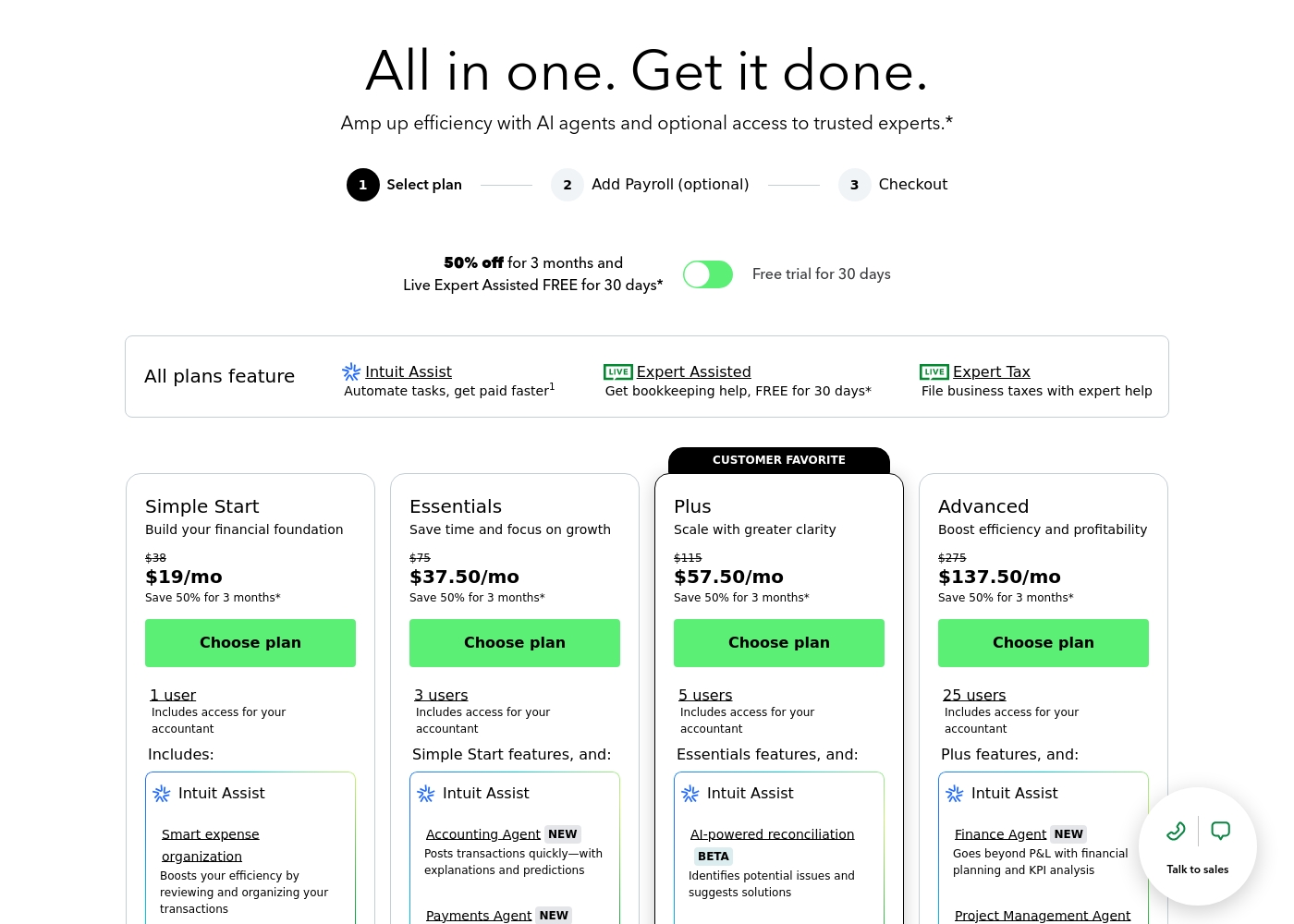
QuickBooks costs between $38 and $275 per month with 4 plans: Simple Start at $38, Essentials at $75, Plus at $115, and Advanced at $275.
Here’s a closer look at what features and capacity are included with each plan.
Simple Start
Price: $38/month (or $19/month for 3 months) Best For: Building your financial foundation Other Features:
- 1 user access
- Includes access for your accountant
- Intuit Assist
- Smart expense organization
- 1 user access
- Includes access for your accountant
- Intuit Assist
- Smart expense organization
- 3 users access
- Simple Start features included
- Accounting Agent NEW
- Payments Agent NEW
- 5 users access
- Essentials features included
- AI-powered reconciliation (BETA)
- 25 users access
- Plus features included
- Finance Agent NEW (Financial planning and KPI analysis)
- Project Management Agent
Pricing Notes
- Quickbooks offers a 30-day free trial with plan-switching flexibility.
- VEA uses per-user pricing with no annual contract shown.
- Advanced Quickbooks plan supports up to 25 users and AI agents.
Pricing Head-to-Head
User Reviews
User sentiment collected primarily from Trustpilot is overwhelmingly negative, frequently contrasting with the platform’s marketing promises of accuracy and seamless growth. While QuickBooks offers feature depth and personalized experiences, the recurring themes of frustration are significant among users.
Customers consistently report atrocious and unhelpful customer service, often involving extremely long holding times, multiple transfers, and conflicting information without resolution. Reliability is a major concern; users describe the software as unstable, prone to costly accounting errors, and sometimes necessitating external accountant intervention.
I spent almost three months migrating from the Desktop to the Online version. The transition was supposed to be easy, but I had constant issues. Customer support was unknowledgeable and unable to assist me thoroughly.
Our Verdict
Quickbooks is the pick for most teams, but VEA shines for lean startups. Quickbooks offers AI-enabled agents and broad integrations that scale as you grow. VEA delivers an all-in-one dashboard with clear per-user pricing and built-in AI analytics. If you need breadth at scale, choose Quickbooks; if you want lean, fast setup and budget predictability, pick VEA. Quickbooks is best for growing teams needing automation and planning, while VEA is ideal for solo operators or small teams seeking simplicity and speed. Bottom line: Quickbooks for breadth and enterprise-ready growth; VEA for simplicity and predictable pricing. Choose Quickbooks if you’re growing to 25 users and rely on AI-powered financial planning; pick VEA if you’re a solo or small team wanting one dashboard, simple pricing, and quick onboarding.
Frequently Asked Questions
Which is better for small teams: Quickbooks or VEA?
For very small teams, VEA's simple dashboard and per-user pricing works well. Quickbooks offers breadth and AI tools, but at higher costs. Your choice hinges on whether you value simplicity or scale.
Does Quickbooks have AI planning tools like VEA?
Yes. Quickbooks includes Intuit Assist and multiple AI agents in higher plans. You also get KPI analysis and AI-powered features in Advanced tiers. If AI depth matters, Quickbooks has broad capabilities.
Is VEA worth the extra cost over Quickbooks?
VEA is $24.95 per user monthly and offers no contracts. Quickbooks scales with more features but higher price. Value depends on needing breadth vs. predictable per-seat pricing.
Can I migrate from Quickbooks to VEA easily?
Migration specifics aren’t described in the data. Quickbooks has Desktop-to-Online context; check with sales for VEA.
Does Quickbooks offer a 30-day free trial?
Yes. Quickbooks Online provides a 30-day free trial with plan-switch flexibility. No annual commitment during trial.
Is annual billing available for VEA?
Not stated. Pricing is listed as per-user monthly; there’s no explicit annual option shown.
Ready to Choose?
Both tools have their strengths. Choose based on your specific needs.