Process Street vs Wrike
Process Street and Wrike solve very different problems for complex organizations. Process Street enforces strict standards and proofs for compliance needs and audibility. Wrike is built for flexible, customizable project and resource management across large teams. Choosing one depends entirely on your operational goals and regulatory environment.
Best for: Regulated industries (Finance, Healthcare) needing ISO 9001/SOC 2 compliance, Teams needing enforceable standard operating procedures (SOPs) and audit governance
Best for: Large cross-functional enterprises (20 to 20,000 users), Marketing and creative teams needing advanced file and video proofing tools
AI-Powered Compliance and Operational Standardization
We find Process Street highly effective for organizations needing to enforce strict operational policies and ensure consistency across large, distributed teams. Overall, the powerful combination of AI automation and centralized document control makes this an essential tool for compliance-driven scaling.
Pros
- AI-enforced workflows guarantee policy compliance.
- Cora AI agent monitors regulations and flags risks 24/7.
- Centralizes policies into live, audit-ready workflows (DOCS).
- Drives consistency and accountability across global teams.
Cons
- Pricing is not publicly disclosed, requiring custom quotes.
- No transparent tiers or fixed subscription costs available.
- Specific features and user limits depend on individualized packages.
- May be overwhelming or costly for very small teams without complex compliance needs.
Enterprise Power Meets Complex Commitment.
We find Wrike is an exceptionally versatile project solution, noted for scaling efficiently across corporate environments up to 3000 users and unifying communication across highly complex workflows. Overall, the software offers a powerful feature set for advanced visibility and customization, but we caution users regarding the rigid annual subscriptions and documented difficulties with managing auto-renewal and pricing increases.
Pros
- Transforms and streamlines complex corporate workflows efficiently.
- Highly customizable for various methodologies (e.g., Holacracy, OKR).
- Excellent collaborative transparency and 360° project visibility.
- Provides fast and helpful customer support regarding implementation and bugs.
Cons
- Pricing practices are reported as aggressive, often resulting in significant renewal increases.
- Subscriptions are difficult to cancel, and users report trouble stopping automatic renewal.
- Some teams report challenging adoption and setup processes.
- Users report instances of being oversold on features bundles they did not need.
AboutProcess Street
Process Street is the compliance operations platform. It helps your business automate consistency and ensure everything is documented correctly.
It's trusted by over a million users to standardize workflows and prove their execution. This tool uses AI to automate essential business processes and enforce policies rigidly.
It ensures you can always deliver audit-ready proof, consistently. The platform handles policy control (DOCS), workflow automation (OPS), and managing risk with its 24/7 AI compliance agent, CORA.
AboutWrike
Wrike is a trusted end-to-end enterprise work management solution. It's designed for organizations ready to transform manual processes into interconnected, automated workflows. Teams from 20 to 20,000 thrive here because Wrike is highly adaptable to any industry or size. It brings multiple teams into the same place for game-changing visual collaboration. Wrike is where you can easily align strategy and effectively execute your projects and programs. 💡
Highlights
Feature Comparison
Features Overview
We highlight the main differences and pick a winner for each feature.
Compliance & Governance
Process Street is built for audit compliance; Wrike focuses fiercely on flexible project execution.
Process Street centralizes policies with full governance for ISO 9001 and SOC 2 needs. It turns static SOPs into live, searchable, and auditable workflows for team usage. Cora, the Process Street AI, actively monitors work to enforce controls and flag risks early. Wrike offers robust project security, but it is not a dedicated tool for formal compliance enforcement. If you require validated, audit-ready proof, Process Street is much more aligned with that goal.
Project Management Depth
Wrike provides superior 360° visibility; Process Street focuses on checklist execution rigidity.
Wrike delivers comprehensive project visualization, including Gantt charts, Calendar, and Chart views. Wrike offers robust resource and capacity planning for optimal workload allocation across departments. Process Street is built around standardized workflows and repeatable operational steps, ensuring consistency. Process Street manages tasks, but it entirely lacks Wrike's strategic, portfolio-level visibility features.
Advanced Automation & AI
Process Street uses AI for enforcement; Wrike uses its AI for prediction and analytical capabilities.
Process Street features Cora, its dedicated AI compliance agent, which flags risks and enforces required compliance controls. This ensures team adherence and makes processes reliably audit-ready every time. Wrike uses advanced AI (Wrike Copilot) for data analysis and resource optimization. Wrike's AI helps predict project risk and facilitates organizational strategic planning. Process Street guarantees compliance; Wrike delivers high-level predictive insights.
Scale & Target User
Process Street nails repeatable operations; Wrike handles sprawling, customized enterprise workflows.
Process Street is trusted by teams needing scalable, auditable, and repeatable process enforcement. Wrike is explicitly optimized for huge operations, thriving with teams ranging from 20 up to 20,000 users. Wrike handles complex organizational mapping and diverse methodologies like OKR governance. Process Street guarantees operational consistency; Wrike organizes massive, varied work environments effectively.
Review & Approval
Wrike excels in media proofing cycles; Process Street enforces compliance controls during workflow steps.
Wrike features dedicated file and video proofing support for over 30 file formats, greatly accelerating creative review cycles. Wrike also allows for guest approvals, simplifying external partner and client feedback collection. Process Street's workflow approvals focus on ensuring mandated compliance controls are met before proceeding. If your work involves design assets or media, Wrike handles this specialized demand better.
Ease of Setup
Process Street is faster to adopt via accessible SOPs; Wrike often requires professional setup assistance.
Process Street speeds up team onboarding by providing centralized, searchable SOPs and live workflow guides. Process Street's focus on clear, sequential steps makes initial process structuring quite straightforward for teams. Wrike recommends Professional Services for implementation for any new team with 20 or more users. Users report that Wrike's complexity sometimes makes setup and proper adoption challenging.
Pricing Commitment
Wrike is transparent with pricing tiers but demands annual subscriptions; Process Street pricing is less visible.
Wrike offers a Free plan and paid tiers starting at $10/user/month for the Team plan. However, paid Wrike accounts require a rigid, non-refundable annual subscription commitment billed yearly. Process Street pricing starts at '1' but requires users to contact sales for plan specifics and commitment details. Users report extreme difficulties with Wrike’s cancellation and auto-renewal policies when trying to leave.
The specific tiers and features included in Process Street's subscription models are not publicly listed in this documentation. Interested users are directed to contact their team for specific pricing.
Pricing Details Available Upon Contact
Best For: Businesses requiring streamlined compliance, AI-powered automation, and strict operational standardization. Other Features:
- The Cora AI compliance agent monitors regulations and flags risks 24/7.
- Automated workflows (OPS) turn policies into repeatable, trackable tasks.
- Centralized document control (DOCS) manages policies for ISO 9001 (and others).
- Real-time visibility into task status and workflow tracking.
- AI-powered intelligence helps generate new workflows quickly.
If you're ready to explore how Process Street can transform your compliance posture and operations, reaching out to their experts is the next step. This customized approach ensures your organization receives the exact feature set and support levels needed for consistent auditing and standardization, especially in highly regulated industries.
- Cora AI compliance agent
- Automated workflows (OPS)
- Centralized policy control (DOCS)
- AI-enforced operational consistency
- Knowledge management
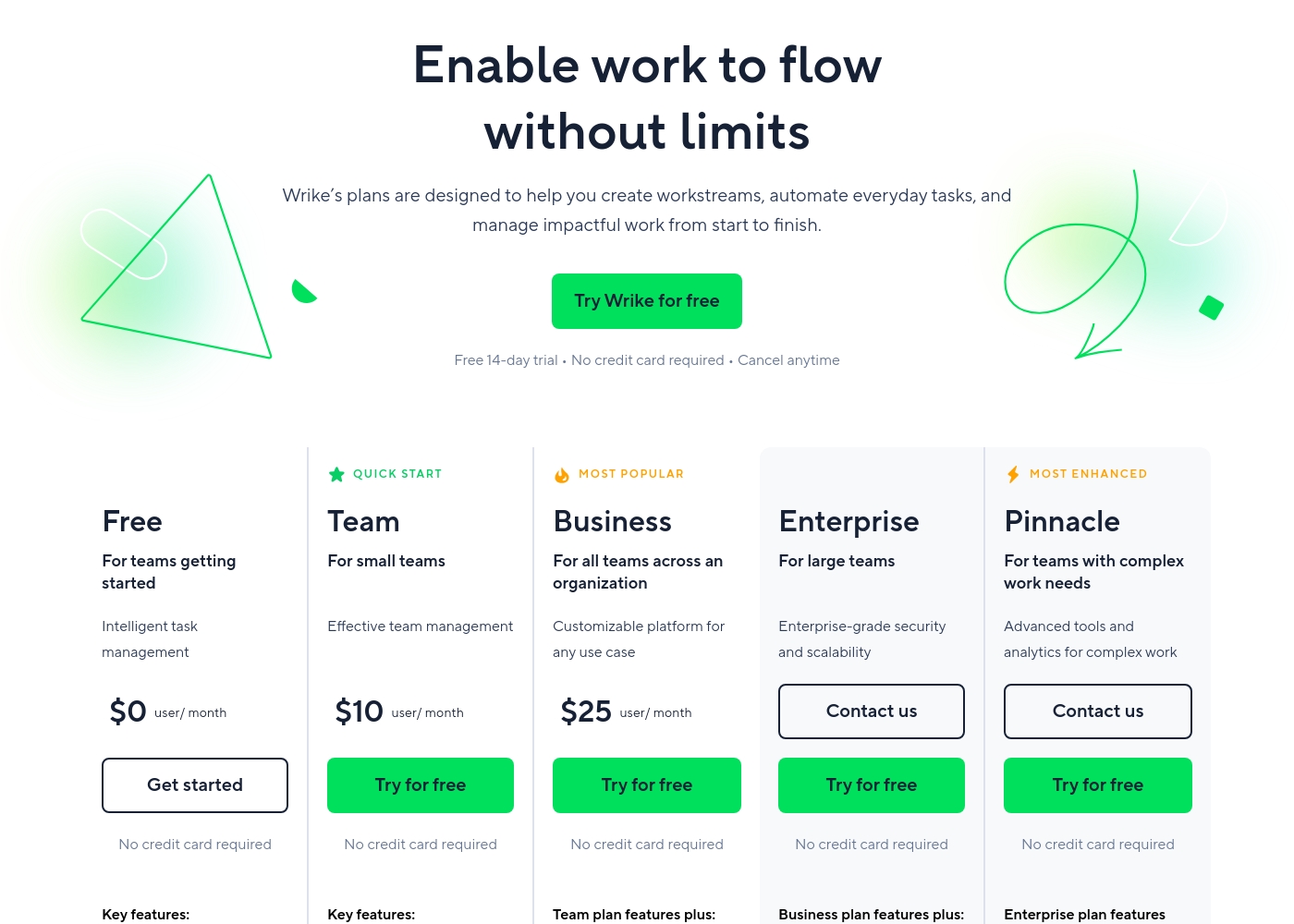
Wrike costs between $0 and $25 per user/month, with five plans: Free at $0/user/month, Team at $10/user/month, Business at $25/user/month, and Enterprise and Pinnacle which require users to contact sales.
- Web, desktop, and mobile apps
- Project and task management
- Board view (Kanban)
- Table view (spreadsheet format)
- Folders structure & nested projects
- Unlimited projects, tasks, & subtasks
- Gantt charts, Calendar & Chart view
- Generative AI, 2 GB storage per user
- Project Blueprints and Unlimited request forms
- Approvals & guest approvals
- Resource & Capacity Planning
- File and video proofing (30+ file formats)
- Real-time reports
- SAML-based SSO and Two-Factor Authentication (2FA)
- Password policies and custom access roles
- Customizable user types and Admin permissions
- User audit reports
Pricing Notes
- Wrike offers a permanent Free plan, while Process Street does not explicitly advertise a free tier.
- Paid Wrike plans (Team, Business, etc.) starting at $10/user/month require an annual commitment, paid yearly.
- Wrike subscriptions are sold per user in batches (e.g., groups of 5 or 25 for large teams).
- Users report that Wrike’s cancellation policies are rigid, sometimes leading to unexpected, aggressive renewal charges.
Pricing Head-to-Head
User Reviews
We aimed to synthesize external user sentiment for Process Street, balancing insights from both Trustpilot and Capterra. Although we located the Capterra listing URL, the provided materials did not contain specific textual snippets or testimonials from real users.
This severely limits our ability to report on recurring community themes regarding critical aspects like customer support responsiveness, the learning curve, or implementation success across various industries. Since Process Street employs a quote-based, non-public pricing model, external user feedback is crucial for assessing perceived value for money that customers experience after implementation.
Users consistently praise Wrike's powerful capabilities in transforming workflow management and driving organizational efficiency. Many reviewers, including team leads and large enterprise users, call it one of the best project management systems available, noting its strong suitability for high-level customization for specific methodologies like OKR.
Its ability to centralize communication, provide 360° visibility, and manage collaboration across large global teams is frequently highlighted as second to none. Furthermore, customer support is often described as exemplar, particularly regarding implementation and quick bug fixes.
Using Wrike for three years has completely changed how we manage our workflows. The biggest transformation is how streamlined and fast our operations have become. It's truly efficient for our large team.
Our Verdict
Deciding between Process Street and Wrike is simple once you define your core business objective. These two tools are not interchangeable project management substitutes at all. If your absolute priority is strategic project visibility and resource orchestration, Wrike excels. If you require process compliance, workflow enforcement, and audit-ready proof, Process Street is the clear winner. Process Street shines when managing repeatable, critical operations and enforcing quality standards. It turns your static SOP documents into live, AI-enforced workflows for every team. Cora, the Process Street AI agent, guarantees regulatory adherence to standards like SOC 2 or ISO 9001 with every action. Process Street ensures every mandated step is followed, consistently reducing major errors and ensuring real accountability. Wrike is explicitly built to handle the complex chaos of large, customized enterprise project management workflows. Teams gain essential 360° project visibility utilizing advanced tools like Gantt charts and deep resource planning. Wrike Connect integrates processes across 400+ third-party apps, offering superior custom and general automation capabilities. Large creative teams especially love Wrike's dedicated file and video proofing tools for rapid asset approval. The critical deciding factor is primary purpose: Do you need Project Management depth (Wrike) or Compliance Operations rigor (Process Street)? Also consider commitment: Wrike requires a rigid annual subscription for all paid plans. Process Street offers speedier implementation, whereas Wrike implementations often require expensive professional services for success. Choose Process Street if you operate in a regulated industry and must prove process governance to auditors. Pick Wrike if optimizing resources and managing massive, complex project portfolios is your strategic priority. Wrike is best for portfolio visibility; Process Street is best for dependable, critical operations.
Frequently Asked Questions
Which tool is better for compliance enforcement: Process Street or Wrike?
Process Street is purpose-built for compliance and audit needs. Its Cora AI enforces controls and provides audit-ready proof for standards like SOC 2. Wrike focuses on project management and tracking tasks, not regulatory enforcement.
Does Wrike offer the AI governance capabilities found in Process Street?
No, their AI focuses differ greatly. Process Street uses AI (Cora) to actively monitor and enforce compliance in workflows. Wrike uses advanced AI for predictive risk analytics and resource optimization for projects.
Which tool is better for comprehensive, 360° project visibility?
Wrike provides far deeper 360° visibility for complex project management needs and resource planning. Wrike offers Gantt charts, real-time dashboards, and capacity planning. Process Street visibility is limited to tracking workflow status.
Is Process Street easier to implement than Wrike?
Process Street tends to be easier to adopt due to its direct focus on sequential, live SOPs. Wrike is powerful but requires significant customization and often requires professional services for successful implementation in large organizations.
Does Wrike or Process Street have a better pricing structure?
Wrike offers a permanent Free plan and transparent starting rates for paid plans ($10/user/month). However, Wrike mandates rigid annual subscriptions for all paid tiers, which users often criticize. Process Street pricing requires contacting sales.
Which is better for marketing and creative teams needing approvals?
Wrike is superior for creative teams due to its dedicated file and video proofing tools. Wrike streamlines approval cycles for over 30 media formats and supports external guest approvals. Process Street lacks these specialized review features.
Ready to Choose?
Both tools have their strengths. Choose based on your specific needs.