Process Street vs Trello
Process Street and Trello are rarely direct competitors, offering very different value propositions. Process Street focuses on strict compliance and automated governance workflows. Trello champions unbeatable ease of use and flexible visual project tracking. This comparison is truly a battle between governance and immediate simplicity.
Best for: Regulated industries needing ISO 9001/SOC 2 compliance, Teams required to generate clear, audit-ready proof
Best for: Small teams or individuals needing a free, visual task tracker, Project managers needing diverse views (Calendar, Timeline, Map)
AI-Powered Compliance and Operational Standardization
We find Process Street highly effective for organizations needing to enforce strict operational policies and ensure consistency across large, distributed teams. Overall, the powerful combination of AI automation and centralized document control makes this an essential tool for compliance-driven scaling.
Pros
- AI-enforced workflows guarantee policy compliance.
- Cora AI agent monitors regulations and flags risks 24/7.
- Centralizes policies into live, audit-ready workflows (DOCS).
- Drives consistency and accountability across global teams.
Cons
- Pricing is not publicly disclosed, requiring custom quotes.
- No transparent tiers or fixed subscription costs available.
- Specific features and user limits depend on individualized packages.
- May be overwhelming or costly for very small teams without complex compliance needs.
Simple Project Management, Complex Login
We find Trello delivers exceptional value quickly due to its easy operation. Its Kanban visual organization is highly flexible for team workflows. Overall, Trello is a powerful tool, but stability issues and frustrating administrative friction points like the Atlassian login do hold it back.
Pros
- The simple, visual Kanaban board design offers great ease of use.
- A permanent Free plan is available and suitable for small teams or personal use.
- The platform is effective for team management and sharing context quickly.
- Supports extensive customization and functionality upgrades via Power-Ups.
Cons
- Users frequently report difficulty and friction with the Atlassian login process.
- Accessing billing information and invoices can be surprisingly complicated.
- The interface occasionally suffers from lag and server downtime.
- Key views like Calendar or Map require a paid Premium subscription.
AboutProcess Street
Process Street is the compliance operations platform. It helps your business automate consistency and ensure everything is documented correctly.
It's trusted by over a million users to standardize workflows and prove their execution. This tool uses AI to automate essential business processes and enforce policies rigidly.
It ensures you can always deliver audit-ready proof, consistently. The platform handles policy control (DOCS), workflow automation (OPS), and managing risk with its 24/7 AI compliance agent, CORA.
AboutTrello
Trello is designed to keep you at the top of your game by ensuring every to-do or idea, regardless of size, finds its proper place. The system helps you stay organized and efficient using three key components: Inbox, Boards, and Planner.
The Inbox quickly captures tasks as soon as they are on your mind, whether you are in the office or on the go. You manage your tasks using flexible Boards, where long lists become manageable by tracking items from “to-dos to tackle” to “mission accomplished!” Use the Planner to simply drag and drop your top tasks right into your calendar, ensuring you make time for what truly matters. 💡
Highlights
Feature Comparison
Features Overview
We highlight the main differences and pick a winner for each feature.
Governance & Audit
Process Street is built for compliance; Trello provides platform security certification.
Process Street delivers mandatory audit-ready proof and governance for standards. It handles ISO 9001, SOC 2, SOX, and FDA regulations. Process Street centralizes policies, making them live, searchable, and easy to audit. Trello is SOC 2 Type 2 certified and validated for information security management. Compliance is focused on the platform, not workflow enforcement. If your business absolutely requires guaranteed audit trails and policy execution, Process Street is the clear choice.
Ease of Use
Trello is famously easy and fast; Process Street requires more complex initial setup.
Process Street delivers strong compliance value but initial setup can feel non-trivial. The complexity focuses on systemizing mature processes. Trello is famous for its exceptional ease of use and visual Kanban design. Users report gaining business value in just 30 days. If rapid deployment and immediate team adoption are critical, Trello is the winner. The learning curve is shallow. Process Street helps standardize onboarding with live SOPs, but Trello is simply more intuitive from day one.
Workflow Enforcement
Process Street enforces steps to reduce errors; Trello uses voluntary task management.
Process Street uses AI-powered capabilities to automate and enforce controls. This structure ensures users follow standards every time. Process Street enforcement reduces rework and keeps task execution consistent. It prevents skipping steps that could jeopardize compliance. Trello's system is flexible; it tracks progress but does not enforce step completion order strictly. Trello relies on team collaboration. Process Street turns policies into mandatory workflows. Trello manages flexible tasks and priorities.
Visual Project Views
Trello offers powerful visual reporting; Process Street focuses mainly on task status visibility.
Process Street provides clear, real-time visibility into required tasks and workflows. This drives accountability for accountability. Trello offers superior visual views crucial for project managers in its Premium plan. These include Calendar, Timeline, Table, and Dashboard views. For high-level project oversight, Trello's visual flexibility is unmatched. These views help managers spot bottlenecks quickly. Process Street visibility is about *who* is doing *what* now. Trello is about *where* the project is going over time.
AI Capabilities
Process Street's AI monitors governance; Trello's AI streamlines task input.
Process Street features Cora, an AI compliance agent that monitors workflows. Cora flags risks and enforces compliance proactively. Trello uses Atlassian Intelligence (AI) to transform messages into organized to-do cards. This works great for emails and Slack messages. Process Street's AI operates at a governance and system integrity level. It prevents process failure. Trello's AI works at the individual productivity level, drastically simplifying task logging and capture.
Pricing Model
Trello has a beloved Free plan and transparency; Process Street seems geared toward custom quotes.
Process Street advertises plans starting from $1, but provides an opaque range of $1–9001. A free trial is not explicitly stated. Trello provides a generous permanent Free plan for small teams. Paid plans are transparent, ranging up to $17.50/user/month. Trello’s predictability and zero-cost entry offer better initial value perception. You know what you'll pay. Process Street’s value is locked in its advanced compliance features, often justifying higher costs for regulated businesses.
Scalability & Support
Trello offers detailed Enterprise support; Process Street focuses on organizational workflow standards.
Process Street supports 1 million users by standardizing processes across large, geographically dispersed teams. Support boasts a 5-minute average response time. Trello Enterprise provides organization-wide permissions and 24/7 Enterprise Admin support. This includes free SSO via Atlassian Guard. For defined technical and security oversight, Trello offers robust Enterprise controls. This is critical for centralized admin. Process Street scaling focuses on extending process enforcement. Trello scaling focuses on centralized user administration.
Onboarding New Users
Trello is easy to adopt; Process Street provides centralized SOPs for complex task learning.
New Process Street users benefit from centralized policies and live, searchable SOPs. This speeds audit preparation and training. Trello's visual Kanban structure is highly intuitive, requiring minimal instruction for basic task management. New users often grasp Trello instantly. Process Street excels when the process complexity is high and standardization is mandatory. Trello wins for quick integration of temporary or flexible staff. Process Street builds the infrastructure for compliant onboarding; Trello provides the easiest dashboard to start working.
The specific tiers and features included in Process Street's subscription models are not publicly listed in this documentation. Interested users are directed to contact their team for specific pricing.
Pricing Details Available Upon Contact
Best For: Businesses requiring streamlined compliance, AI-powered automation, and strict operational standardization. Other Features:
- The Cora AI compliance agent monitors regulations and flags risks 24/7.
- Automated workflows (OPS) turn policies into repeatable, trackable tasks.
- Centralized document control (DOCS) manages policies for ISO 9001 (and others).
- Real-time visibility into task status and workflow tracking.
- AI-powered intelligence helps generate new workflows quickly.
If you're ready to explore how Process Street can transform your compliance posture and operations, reaching out to their experts is the next step. This customized approach ensures your organization receives the exact feature set and support levels needed for consistent auditing and standardization, especially in highly regulated industries.
- Cora AI compliance agent
- Automated workflows (OPS)
- Centralized policy control (DOCS)
- AI-enforced operational consistency
- Knowledge management

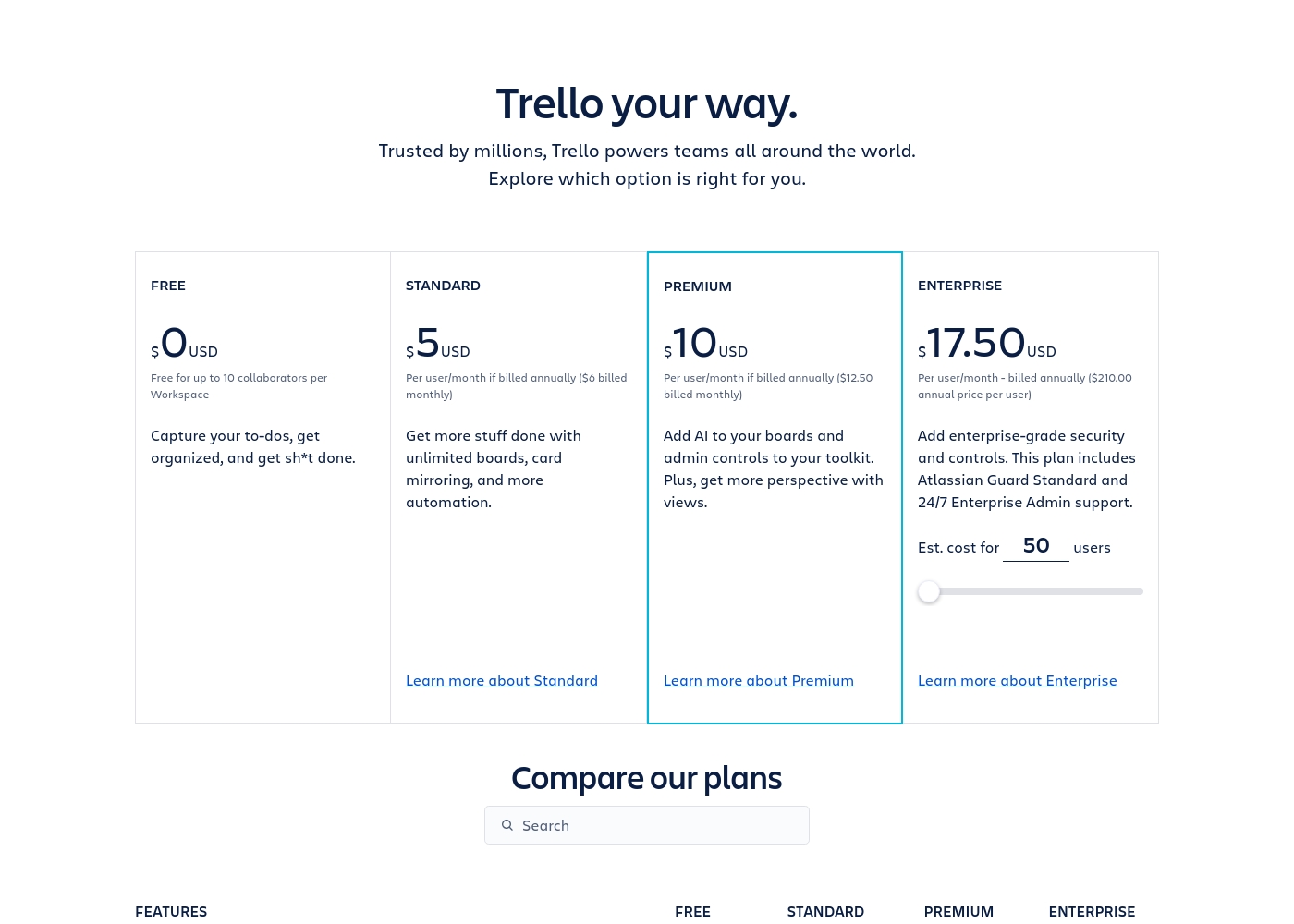
Trello costs between $0 and $17.50 per user/month, offering four plans: Free at $0, Standard at $5/user/month (annually), Premium at $10/user/month (annually), and Enterprise at $17.50/user/month (annually).
Trello offers flexible plans for individuals and large organizations. Let’s look closer at what each plan provides, based on annual pricing options.
Free
Price: $0 USD Best For: Capturing to-dos, fundamental organization Other Features:
- Unlimited cards
- Up to 10 boards per Workspace
- Unlimited Power-Ups per board
- 250 Workspace command runs per month
- 2-factor authentication
- Unlimited cards
- Unlimited Power-Ups per board
- Unlimited storage (10MB/file)
- 2-factor authentication
- Unlimited activity log
- Unlimited boards
- Card mirroring
- Advanced checklists
- Custom Fields
- Quick capture powered by AI
- Atlassian Intelligence (AI)
- Views: Calendar, Timeline, Table, Dashboard, and Map
- Admin and security features
- Workspace-level templates
- Simple data export
- Unlimited Workspaces
- Organization-wide permissions
- Free SSO and user provisioning with Atlassian Guard
- 24/7 Enterprise Admin support
- Public board management
Pricing Notes
- Trello offers a robust permanent Free plan suitable for small teams to start using.
- Trello's pricing is transparent, spanning from $0 up to $17.50 per user/month annually.
- Process Street's pricing is vague, listed as "$1–9001," suggesting custom enterprise quotes are required.
- Trello plans charge per Workspace member or Multi-Board Guest.
- A free trial for Trello Premium is available to test advanced views and features.
Pricing Head-to-Head
User Reviews
We aimed to synthesize external user sentiment for Process Street, balancing insights from both Trustpilot and Capterra. Although we located the Capterra listing URL, the provided materials did not contain specific textual snippets or testimonials from real users.
This severely limits our ability to report on recurring community themes regarding critical aspects like customer support responsiveness, the learning curve, or implementation success across various industries. Since Process Street employs a quote-based, non-public pricing model, external user feedback is crucial for assessing perceived value for money that customers experience after implementation.
Trello receives mixed but generally favorable external feedback, often lauded as an amazing app for personal and team organization. Users consistently praise its simple design and exceptional ease of use, which makes it perfect for startups and small businesses utilizing the generous free plan.
The core utility, including dynamic block control and strong real-time syncing, is highly appreciated. However, recurring pain points are frequently mentioned, stemming largely from the Atlassian acquisition.
Trello is a great tool for starting out, especially for small businesses. It has a robust free plan you can use for organization before deciding to go premium. It’s an excellent option for startups working with a limited budget.
Our Verdict
The decision between Process Street and Trello really hinges on your process maturity. It’s a choice between strict control and total simplicity. If governance and error reduction are your mission, Process Street wins the battle easily. If you value flexibility and speed, Trello is your champion. Process Street’s superpower is making compliance mandatory and painless. It turns dry regulations (like SOC 2 or FDA) into live, AI-enforced workflows. Cora, the AI, constantly monitors processes, flagging risks before audits even start. Process Street supports 1 million users by building auditable operations, not just tracking simple tasks. Trello’s superpower is visual organization that anyone can use right away. Users commend Trello for exceptional ease and quick deployment, often providing value within 30 days. Its flexible Kanban boards and free plan make it the default choice for immediate project visibility. Trello excels at helping global teams share context and manage flexible, changing priorities. The deciding factor is workflow enforcement versus flexibility. If you must enforce a 15-step checklist in order, choose Process Street. If your team needs to track 15 fluid ideas quickly, use Trello. Trello offers pricing transparency and a great free tier, while Process Street offers governance peace of mind. Choose Process Street if you operate in a regulated environment and need iron-clad audit defense. Pick Trello if you want quick, visual project tracking that prioritizes speed and low cost of entry. Trello is for managing projects; Process Street is for systemizing your entire critical operation.
Frequently Asked Questions
Which is better for compliance: Process Street or Trello?
Process Street is built specifically for compliance and governance needs. It enforces standards like ISO 9001 and delivers mandatory audit-ready proof. Trello is SOC 2 certified for security but does not enforce internal process compliance.
Does Trello have AI capabilities like Process Street's Cora?
Trello uses Atlassian Intelligence (AI) to transform emails into organized task cards. Process Street's Cora AI compliance agent monitors live workflows for mandated controls. Their AI features serve very different, distinct functions.
Is Process Street harder to set up than Trello?
Yes, Process Street setup can be 'non-trivial' due to its sophisticated capabilities. Trello is consistently praised for superior ease of use and fast setup time. Trello is easier and faster to deploy immediately.
How does the pricing compare between Process Street and Trello?
Trello offers a valuable, permanent Free plan and transparent per-user pricing up to $17.50/month. Process Street's pricing is opaque, listed as 'Plans from 1,' suggesting custom enterprise quotes are required.
Which tool is better for simple, visual project tracking?
Trello excels at simple, visual project tracking using adaptable Kanban boards. Trello Premium also offers Calendar and Timeline views. Process Street focuses more on standardized workflow execution.
Does Process Street offer the same advanced visual views as Trello?
Not explicitly. Trello Premium includes dedicated project views like Timeline, Map, and Calendar. Process Street focuses more on real-time task visibility within the workflow.
Ready to Choose?
Both tools have their strengths. Choose based on your specific needs.