Pngtree vs Shade
Pngtree and Shade serve very different creative needs. Pngtree is a massive library of downloadable PNG graphics. Shade is a centralized media hub for team storage and workflow. Your choice depends on whether you need assets or asset management.
Best for: Designers who frequently need transparent PNG assets, Marketers creating recurring seasonal campaign graphics
Best for: Creative and marketing teams, Video production departments
Fast PNG access with license details you should read carefully
Pngtree is helpful for fast access to PNGs and design templates, but commercial users should verify license scope, keep records, and weigh third-party customer complaints before committing.
Pros
- Large library of transparent PNGs, templates, backgrounds, and presentation assets.
- Paid plans advertise commercial-use licenses, faster downloads, and no attribution requirements.
- Useful built-in editing and AI tools for background removal and quick image variation.
- Free plan is available for testing search quality before paying.
Cons
- Individual license terms are single-seat and may not cover team or client-principal usage.
- Third-party reviews show recurring complaints about billing, support, and copyright-related notices.
- Promotional lifetime pricing can be attractive but should be checked against current terms.
- Generic stock assets may require editing to avoid a templated brand look.
Smart search, but pricing is opaque.
We find Shade offers a compelling centralized hub for media teams, with standout AI search and intelligent file streaming. Overall, it's a strong workflow tool, but the lack of public pricing for team plans is a significant drawback for prospective buyers.
Pros
- All-in-one platform for storage, review, and approval
- Intelligent file streaming for fast access to large files
- Powerful AI search and automated metadata
- Secure archiving for long-term project storage
Cons
- Team and enterprise pricing is not publicly disclosed
- Requires a sales demo for detailed quotes and scalability
- Limited external review data for deep validation
AboutPngtree
Pngtree is a stock graphics marketplace centered on PNG images, backgrounds, templates, illustrations, text effects, PowerPoint assets, and newer AI tools. Its individual pricing page advertises a large curated asset library, free daily downloads, premium commercial-use plans, faster download speed, background removal, online editing, and a lifetime plan option. The platform is best understood as a design-resource library rather than a full creative suite.
AboutShade
💡 Shade is an all-in-one platform for media storage and management. It's designed for creative and media teams who handle large files daily. It combines intelligent file streaming, review tools, and smart search in a single place.
Highlights
Feature Comparison
Features Overview
We highlight the main differences and pick a winner for each feature.
Core Purpose
Pngtree provides stock assets. Shade manages your own assets. They solve different problems.
Pngtree is a marketplace. You browse and download ready-to-use PNG images, templates, and backgrounds for your projects. It's like a giant library of creative ingredients. Shade is a storage and workflow hub. It's a central home for your team to upload, organize, search, and collaborate on your own media files like videos and graphics. The key difference is acquisition vs. management. Pngtree helps you get new assets. Shade helps you work with the assets you already have. A marketing team might use Pngtree to grab a Halloween graphic. That same team would use Shade to store and manage all their campaign videos.
Asset Library
Pngtree offers millions of downloadable assets. Shade has no library, only your own files.
Pngtree's main feature is its massive library. It specializes in transparent PNGs and has millions of items, including templates and illustrations. New assets are added daily. Shade does not provide any stock assets. Its library consists entirely of media files you and your team upload. It's a blank slate for your own content. This is the most fundamental difference. If you need graphics, Pngtree is the clear choice. If you need to organize existing files, Shade is the relevant tool. You'd choose Pngtree to find a specific birthday cake illustration. You'd choose Shade to archive last year's video project.
Search & Discovery
Shade's AI search finds files by description. Pngtree's search is for browsing its own library.
Pngtree has a search bar to find items within its own asset library. You search by keywords to discover new images and templates. Shade offers AI-powered search across your uploaded media. It uses automated metadata to help you find specific files even if you don't remember their name, based on content description. Shade's search is for management. Pngtree's search is for shopping. Shade helps you find what you have. Pngtree helps you find what you need to get. For example, you'd use Shade to find 'the sunset clip from the summer shoot.' You'd use Pngtree to search for 'transparent sunset graphic.'
Collaboration Tools
Shade has built-in review and approval workflows. Pngtree is a solo download experience.
Pngtree is designed for individual creators. The core action is browsing and downloading files for your own use. There are no team collaboration features. Shade includes tools for team review and approval. You can share media via secure links and gather time-stamped feedback directly on files, streamlining the approval process. This makes Pngtree a personal tool and Shade a team tool. Collaboration is a central part of Shade's value proposition. A freelance designer would use Pngtree. A video production team would need Shade to get client sign-offs on edits.
File Handling
Shade streams large files for instant access. Pngtree downloads standard-sized assets.
Pngtree downloads assets directly to your computer. Download speeds are high for premium users, but the action is a complete file transfer. Shade features intelligent file streaming. This allows team members to access and preview very large files like 4K video instantly in the browser without waiting for a full download. Streaming is a major advantage for media-heavy teams. It solves the bottleneck of working with huge files. Pngtree's assets are typically smaller and don't require this. Editing a video project in Shade can start immediately. Downloading a 5MB PNG from Pngtree is quick but a different workflow.
Commercial Licensing
Pngtree provides commercial licenses. Shade doesn't license assets—it stores your own.
Pngtree's paid plans include valid commercial licenses for their assets. You can also download official copyright certificates for legal protection on client work. Shade does not provide licenses. It is a storage platform. You are responsible for ensuring you have the rights to any files you upload and store in it. This is a critical difference for legal use. Pngtree handles the licensing for its own assets. Shade assumes you already have the rights to your files. Using a Pngtree image in a product design is covered by your subscription. Uploading your company's logo to Shade requires you to own that logo.
Learning Curve
Both are simple, but Pngtree is a familiar download site. Shade requires team onboarding.
Pngtree functions like any stock photo site. If you've used Shutterstock or Adobe Stock, you'll understand it instantly. It's a browse-and-download model. Shade is an all-in-one platform for storage and workflow. While reviews praise its intuitive interface, it requires setting up a central library and teaching team members the review and search processes. Pngtree has a lower initial learning curve for an individual. Shade has a higher setup curve but more long-term value for a team. An individual can be productive on Pngtree in minutes. A team might need a day to properly onboard to Shade.
Value Proposition
Pngtree's value is access to a huge asset library. Shade's value is team efficiency and organization.
Pngtree's value is clear: pay a fee to access millions of assets you can use commercially. The risk is whether the business practices (reports of aggressive upselling) undermine that value. Shade's value is efficiency and reduced chaos. It aims to save creative teams time searching for files and streamline feedback loops. Its value is harder to quantify but solves real workflow pain. The comparison is apples-to-oranges. One sells ingredients, the other sells a kitchen organization system. You'd calculate Pngtree's ROI on asset cost vs. hiring a designer. You'd calculate Shade's ROI on time saved searching and faster project turnarounds.
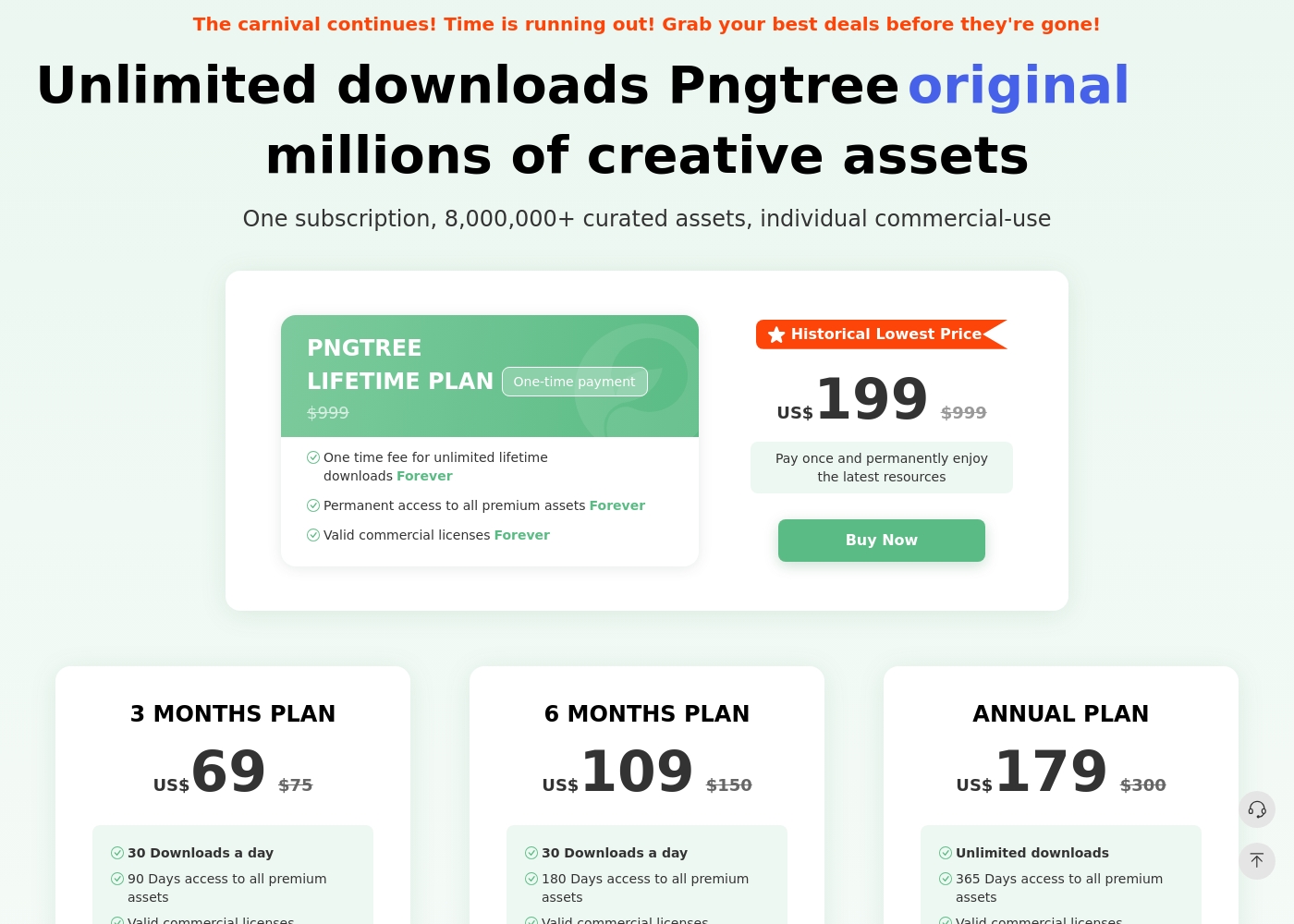
Pngtree has a free plan with limited daily downloads and several paid individual plans. The pricing page currently lists a 3-month plan, 6-month plan, annual plan, and a lifetime plan. The annual plan and lifetime plan emphasize unlimited downloads, while shorter paid plans list daily download limits. Paid plans advertise valid commercial licenses, faster downloads, no attribution requirements, and premium assets. The license terms still matter: the individual license is single-seat, and team or broader business authorization may require an enterprise plan.
- 1 Million Free assets
- 2 Downloads / day
- No Attribution required (for Free assets)
- Download speed up to 0.5MB/s
- 90 Days access to all premium assets
- Valid commercial licenses
- High-speed downloads (10MB/s)
- No attribution required for premium content
- 180 Days access to all premium assets
- Valid commercial licenses
- High-speed downloads (10MB/s)
- No attribution required for premium content
- Unlimited downloads
- 365 Days access to all premium assets
- Valid commercial licenses
- High-speed downloads (10MB/s)
- No attribution required for premium content
Shade costs an undisclosed amount with at least 1 plan: Start for Free at $0.
Finding the right plan depends on your team's specific media storage and workflow needs.
Start for Free
Price: $0 Best For: Individuals or small teams exploring AI search Other Features: Intelligent file streaming, review and approval, automated metadata, AI search, media archiving
- Intelligent file streaming
- Review and approval
- Automated metadata
- AI search
- Archive
Pricing Notes
- Pngtree offers clear, tiered pricing from $69 for 3 months to a $199 lifetime plan. All paid plans include commercial licenses.
- Shade has a free starting plan. Paid team/enterprise pricing is not public and requires contacting sales.
- Pngtree's free plan is very limited (2 downloads/day). Shade's free plan has no stated limits for initial testing.
- Pngtree has a 15-day money-back guarantee. Shade's refund policy is not stated.
Pricing Head-to-Head
User Reviews
Pngtree has strong utility as a fast graphics library, but buyers should balance that utility against license complexity and negative third-party customer feedback. The safest approach is to test the catalog first, document every commercial-use download, and avoid assuming that an individual plan automatically covers all team or client scenarios.
Back in 2020 I paid $199 for the Permanent Premium Lifetime Plan. Now they demand an upgrade to a new Enterprise Plan, accusing me of copyright infringement. Lifetime should mean lifetime without limits, but they continually try to extort more money.
External reviews for Shade show a generally positive sentiment, though the sample size appears small. Users on Capterra highlight the platform's ease of use and its strong AI-powered search functionality, which helps teams quickly find files.
Some reviewers note that the onboarding process was smooth and the customer support was responsive. A few mentions point to the value of the centralized media hub for collaboration.
The AI search is a game-changer. We can locate any footage in seconds without digging through endless folders. It has saved our team so much time on projects.
Our Verdict
For most individuals, Pngtree offers quick access to the PNG assets they need. For teams managing their own media, Shade provides a more valuable and ethical workflow solution. Pngtree's superpower is its sheer volume of transparent PNG images and templates. It's the go-to when you need a specific graphic fast for a design project. Shade's superpower is intelligent media management. Its AI search and streaming turn a chaotic file server into a streamlined creative hub. The deciding factor is your core need. Do you need to *find and buy* assets, or do you need to *organize and collaborate* on assets you already have? Choose Pngtree for individual, on-demand stock assets. Choose Shade if your team wastes hours searching for files or juggling feedback. The right tool depends entirely on your workflow.
Frequently Asked Questions
Which is better for small teams: Pngtree or Shade?
Shade is built for team collaboration and centralized storage. Pngtree's plans are individual and lack team features like shared libraries or review tools.
Does Pngtree have AI search like Shade?
No. Pngtree's search is for browsing its own library. Shade's AI search helps you find files within your own uploaded media based on content description.
Is Shade worth the extra cost over Pngtree?
It's a different cost structure. Pngtree sells assets directly. Shade's cost is for a workflow platform. The value depends on whether you need asset storage or asset acquisition.
Can I use Pngtree images commercially?
Yes, but only with a paid premium plan. The free plan does not include commercial licenses. Paid plans also offer downloadable copyright certificates.
Does Shade have a free trial?
Yes. You can start with a free plan to explore core features like AI search and file streaming before committing to a paid team plan.
Which tool has better customer support?
User reviews are mixed for both. Pngtree has a 1.4-star rating with complaints about aggressive practices. Shade has a 3.8-star rating but notes can be slow.
Ready to Choose?
Both tools have their strengths. Choose based on your specific needs.