Pinnacle Studio vs Vyond
Pinnacle Studio and Vyond both create stunning video content, but their approach is totally different. Pinnacle Studio is a robust, traditional editor for live-action footage and complex projects. Vyond uses AI to instantly generate animated explainers and training videos at scale. Your choice depends entirely on the type of video you need to create.
Best for: Solo video creators needing high-fidelity editing, Multi-camera tutorial producers
Best for: L&D and HR departments needing scalable training videos, Enterprise organizations requiring high security and scalable content production
Powerful features, critical flaws.
We found that Pinnacle Studio 26 advertises excellent advanced features like 8K video support and extensive creative bundles, often appealing through affordable one-time pricing. However, overwhelmingly negative user feedback regarding pervasive instability and completely absent customer support casts serious doubt on its usability. Overall, we cannot recommend this software until the severe stability and support issues reported by the user base are definitively addressed.
Pros
- Offers sophisticated, multi-track editing features (MultiCam, 8K support).
- Pricing model is an affordable one-time purchase (especially upgrade bundles).
- Includes comprehensive utility and asset bundles in higher-tier packages.
- Interface is considered user-friendly by some long-time users.
Cons
- Extremely frequent crashing and freezing are reported across multiple versions.
- Customer support is consistently described as non-existent and unhelpful.
- Users experience major issues with rendering, artifacts, and export failures.
- The software can fail to uninstall properly, requiring complex manual steps.
Powerful AI. Scaling Content. Poor Support.
Vyond offers an industry-leading AI video creation platform perfect for scaling secure, on-brand content quickly, trusted by numerous Fortune 500 companies. However, we found recurring issues regarding customer support responsiveness and problematic changes to subscription terms, undermining value for individual users. Overall, Vyond is a powerful tool best suited for high-budget corporate teams needing secure, high-volume production.
Pros
- Industry-standard quality for animated and explainer content.
- Fast video creation using AI (Vyond Go) from simple prompts or URLs.
- Excellent speech synchronization and audio generation from text scripts.
- UI is perfect and the animation assets are deemed top-notch and beautiful.
Cons
- Limited or non-existent customer support; help relies heavily on automation.
- Unethical practices reported, including automatic renewals and forced plan upgrades.
- Frequent removal or capping of features (e.g., community forums, themes) for paying users.
- Limited or 'screwed' free trial experience (e.g., maximum of three videos).
AboutPinnacle Studio
Pinnacle Studio 26 provides a welcoming, intuitive workspace designed for sophisticated video creation. It is a comprehensive tool that includes video editing, screen recording, and DVD authoring capabilities. Whether you are new to video editing or already an experienced producer, this software has a tier that meets your goals. Use it professionally for vlogging, creating channel content, or powerful business video production. Pinnacle Studio helps you achieve professional results while taking your edits to the next level. 💡
AboutVyond
Vyond is the all-in-one AI video creation platform that helps teams generate effective videos from simple prompts in multiple styles. It includes Vyond Go, which instantly turns your idea, document, or URL into a video, and an instant editor or studio for quick tweaks. Thousands of businesses and millions of users rely on Vyond, and 65% of the Fortune 500 rely on Vyond. 🎬
Highlights
Feature Comparison
Features Overview
We highlight the main differences and pick a winner for each feature.
Creation Speed
Vyond uses AI for instant content generation; Pinnacle Studio requires manual, frame-accurate work.
Pinnacle Studio focuses on precise, frame-accurate editing for post-production control. You get stability improvements and faster previews for a smoother manual workflow. Performance is key in Pinnacle Studio, but you still have to manually assemble scenes. Vyond's core feature is Vyond Go, instantly creating videos from simple text, URLs, or documents. This AI feature radically speeds up the initial video production cycle. Vyond is built for outputting large volumes of video communication quickly. The key trade-off is speed versus control. Pinnacle Studio offers fine-grained control; Vyond offers near-instantaneous animation creation. For rapid content turnover, Vyond is the clear winner. Vyond Go is invaluable for HR or Sales teams needing fast explainers based on daily policy updates.
Video Input Type
Pinnacle Studio handles raw live footage, while Vyond focuses entirely on generating animation.
Pinnacle Studio is a traditional editor supporting high-resolution live-action video inputs. You can import massive 8K footage for detailed film quality projects. Its functionality centers on cutting, refining, and applying effects to raw camera files. Vyond is an animation platform and does not focus on editing raw audio or video files. It uses AI, avatars, and templates to generate animated scenes. Vyond is not the right tool for editing a vacation video or interview. If your project starts with camera footage, Pinnacle Studio is the only viable option here. If your project starts with an explainer script, choose Vyond. Pinnacle Studio gives creators the tools to integrate effects like Green Screen into their live footage workflows.
Team Scaling & Security
Vyond offers dedicated Enterprise scaling; Pinnacle Studio is better suited for individual creators.
Pinnacle Studio provides a feature-rich experience for individual users who need extensive editing capabilities. The features are built for creator control rather than corporate deployment. It lacks explicit enterprise-level security guarantees. Vyond has a dedicated Enterprise solution focused on robust security and complete privacy guarantees. This supports the intensive, on-brand production needs of large teams and Fortune 500 companies. Vyond is built to deploy content at scale. For large organizations where data security and consistent branding are non-negotiable, Vyond is the clear choice. Pinnacle Studio targets the individual editing professional or enthusiast. Vyond ensures that high-volume training content meets rigorous security and compliance requirements.
Specialized Features
Pinnacle Studio excels at MultiCam; Vyond excels at AI characters and translation.
Pinnacle Studio offers dedicated tools like MultiCam editing and Stop Motion Animation. You can easily blend multiple camera angles and create tactile, frame-by-frame stories. Pinnacle Studio allows advanced color and lens correction. Vyond specializes in unique AI-driven tools like AI avatars and Instant Translation. It supports multiple visual styles (Photorealistic, Gen AI) that Pinnacle Studio does not offer. Vyond allows embedding dynamic charts for presentations. Both Pinnacle Studio and Vyond offer specialized toolsets, but for vastly different end goals. Pinnacle Studio is technical; Vyond is communicative. If you are producing YouTube tutorials from several camera feeds, Pinnacle Studio provides the essential utility.
Pricing Clarity
Pinnacle Studio has clear pricing; Vyond's pricing is quote-based and often lacks transparency.
Pinnacle Studio clearly publishes its price range, listing plans between $26 and $200. This provides a transparent entry point for users budgeting software costs. Users know exactly what they are paying for upfront. Vyond does not publish standard subscription costs, relying on quote-based sales and 'per seat' models. Users have complained heavily about sudden price increases and forced plan upgrades. Vyond's price is often a point of friction. For budget-conscious individuals or small groups, the cost transparency of Pinnacle Studio is highly preferable. Vyond requires direct sales contact for pricing. Given the user reports, obtaining reliable, fixed pricing can be a challenge with Vyond.
Support Reliability
Both Pinnacle Studio and Vyond receive significant negative reports regarding customer support.
Pinnacle Studio users frequently cite slow response times and inconsistent quality from their tech support team. This is frustrating when dealing with reported reliability issues like crashes and rendering failures. Vyond users also report automated, non-existent customer service responses and generic troubleshooting emails. Support often relies heavily on automation, leading to user frustration, especially with billing issues. Neither Pinnacle Studio nor Vyond appear to offer a consistently high level of responsive customer support based on user feedback. This creates a difficult situation when technical problems arise. Users must be prepared to rely on community forums or troubleshoot independently with either tool.
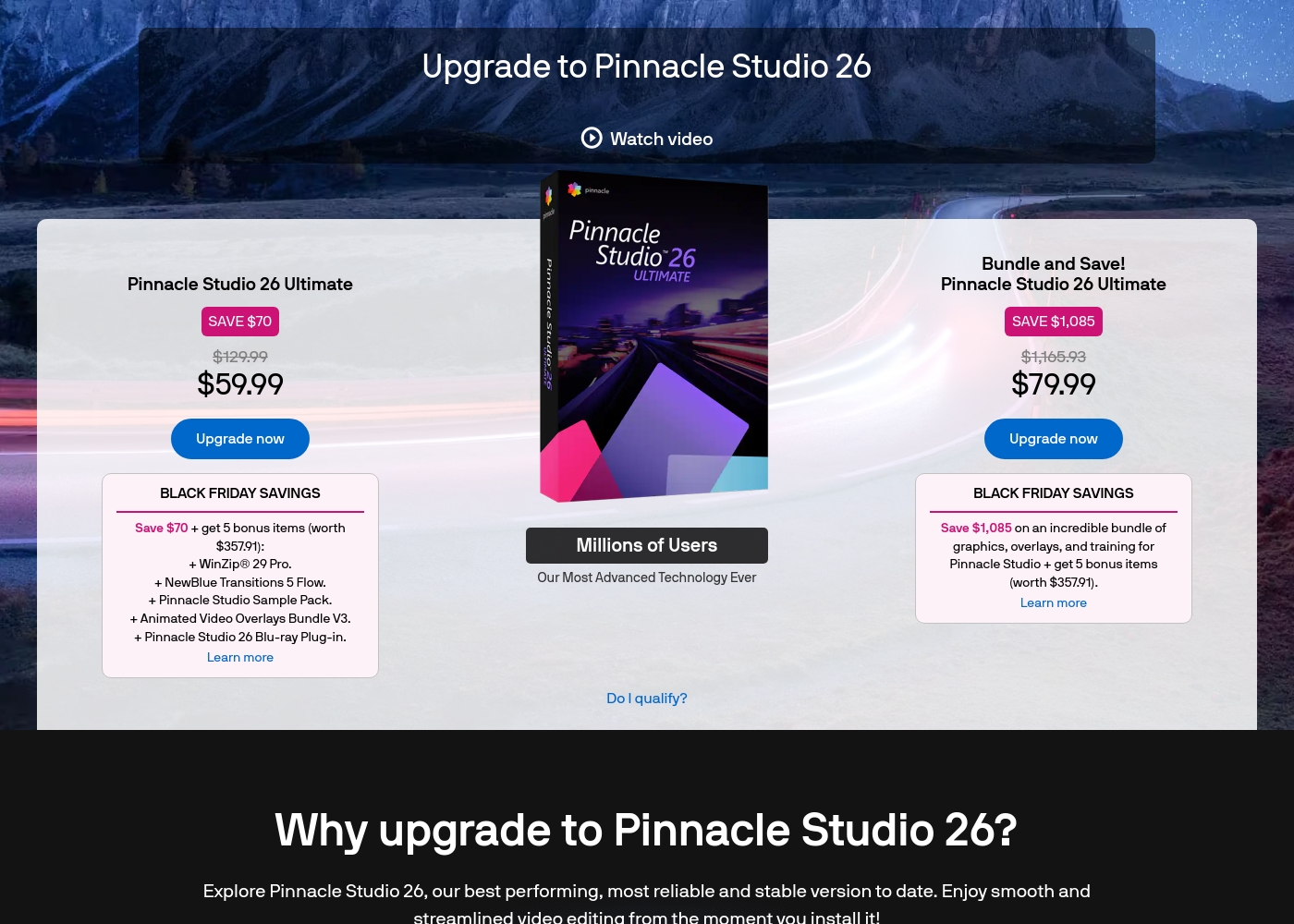
Pinnacle Studio 26 Ultimate acquisition costs range between $59.99 and $79.99 as a one-time upgrade purchase, with two main options: Pinnacle Studio 26 Ultimate at $59.99, and the Bundle and Save! version at $79.99.
These prices represent special Black Friday upgrade offers for users looking to access the latest features. Here is how the deals compare:
Pinnacle Studio 26 Ultimate
Price: $59.99 (One-time Upgrade Price) Best For: Current users who want the latest, most stable software version and specific utility tools. Other Features:
- Saves you $70 off the regular $129.99 price.
- Includes a total of 5 bonus items worth $357.91.
- Comes with WinZip® 29 Pro and NewBlue Transitions 5 Flow.
- Features the Pinnacle Studio 26 Blu-ray Plug-in.
- Includes the Pinnacle Studio Sample Pack and Animated Video Overlays Bundle V3.
- One-time price of $59.99 (was $129.99)
- 5 bonus items included (worth $357.91)
- Includes WinZip® 29 Pro
- Includes NewBlue Transitions 5 Flow
- Includes Pinnacle Studio 26 Blu-ray Plug-in
- One-time price of $79.99 (was $1,165.93)
- Includes all 5 bonus items (worth $357.91)
- Includes training, graphics, and overlays bundle
- Save $1,085 on the total package
You can explore Vyond's flexible options tailored to individual users and large organizations through these principal offerings.
Free Trial
Best For: Users wanting to test the platform's diverse video creation tools. Other Features:
- Instant, effortless video creation
- Access to AI avatars and Gen AI features
- Use of the comprehensive template library
- Ability to convert URLs or documents into video (Vyond Go)
If you're new to Vyond, starting with the free trial is the perfect way to explore its unique features without commitment. This allows you to evaluate practical tools like the instant editor and test Vyond Go's powerful text-to-video conversion before settling on a paid plan.
- Instant, effortless video for everyone
- Access to AI avatars, Gen AI, and Photorealistic styles
- Screen recording and mobile capture tools
- Instant creation using Vyond Go (text, document, or URL conversion)
- Efficiently create on-brand content at scale
- Complete privacy and security
- Supports rigorous security requirements of enterprise organizations

Pricing Notes
- Pinnacle Studio offers a clear, published price range between $26 and $200 for user transparency.
- Vyond utilizes a 'Per seat' model and requires contacting sales for specific costs, creating a less transparent pricing structure.
- Vyond users report significant frustration over increasing costs and unexpected plan upgrades.
- Pinnacle Studio includes a 10-day StudioBacklot trial for training and royalty-free content access.
Pricing Head-to-Head
User Reviews
User feedback for Pinnacle Studio is exceptionally poor, primarily focusing on extreme frustrations with the software's reliability and performance. Despite newer versions claiming improved stability, many users report constant crashing, freezing, and issues with rendering, even when using high-spec computers.
This instability leads to lost progress and wasted time. The second overwhelmingly negative theme is customer support.
I’ve been using this product for several years because it is user friendly and features many nice tools. However, the tech support when there is an issue is not good at all. I was extremely disappointed and uninstalled the software despite owning it.
Vyond faces a highly polarized reception, reflecting an extreme split between feature satisfaction and corporate practices. Many users praise the core animation tool, noting its industry-standard quality, ideal speech synchronization, and the simple creation of explainer videos quickly.
They appreciate the robust library of ready-to-use character assets, making the platform fantastic for increasing marketing engagement. However, the negative sentiment, particularly on Trustpilot (where the score is 2.0), focuses heavily on pricing and support.
There’s a wonderful selection of ready-to-use characters and environments to get started quickly. The animations are top-notch, and incorporating a text script for generated audio is effortless. I am really happy with this tool overall.
Our Verdict
The choice between Pinnacle Studio and Vyond is simple: do you need manual editing control or rapid AI animation production? If your workflow involves raw footage, MultiCam editing, or 8K imports, Pinnacle Studio is your preferred tool. It provides a robust, user-friendly editor and dedicated features like Green Screen and Color Correction. Pinnacle Studio is an affordable, fixed-price solution for traditional post-production workflows. Vyond has mastered the art of instant creation for corporate content. Its superpower is Vyond Go, which turns text or URLs into fully animated videos in seconds. If you run an L&D or HR department needing to scale secure, engaging explainers, Vyond is fantastic. Vyond excels at animated avatars, speech synchronization, and enterprise-grade security for large teams. However, both Pinnacle Studio and Vyond face user complaints regarding support quality. Buyers of Pinnacle Studio report stability and crash issues, while Vyond buyers cite frustrating price hikes and opaque 'per seat' pricing. Ultimately, if you are an individual working with complex, live-action footage, choose Pinnacle Studio. If you need secure, scalable, animated training content generated instantly for a large organization, the speed and automation of Vyond are unparalleled.
Frequently Asked Questions
Which is better for traditional video editing: Pinnacle Studio or Vyond?
Pinnacle Studio is explicitly designed for traditional editing workflows. It supports critical features like 8K input, MultiCam editing, and precise color correction. Vyond focuses on animation generation, not raw live-action footage editing.
Does Vyond have MultiCam editing like Pinnacle Studio?
No, Vyond does not include a traditional MultiCam editing feature. Pinnacle Studio offers dedicated tools for seamlessly switching between multiple camera angles. Vyond focuses on generating linear animated communication.
Is Vyond worth the high cost over Pinnacle Studio?
If you need rapid, high-volume animated explainers for Enterprise use, Vyond's speed justifies the cost. Pinnacle Studio offers a much lower, more transparent entry price ($26–$200) for powerful manual editing capabilities. Vyond's pricing lacks transparency.
Which tool offers greater content automation, Pinnacle Studio or Vyond?
Vyond offers significantly greater content automation via Vyond Go. It creates finished animated videos from text or URLs instantly. Pinnacle Studio requires editors to manually perform all cuts, effects, and assembly.
Which software has better customer support?
Based on user reviews, neither Pinnacle Studio nor Vyond consistently provides excellent support. Both tools receive frequent complaints regarding slow, automated, or unhelpful response times when issues arise.
Is Pinnacle Studio suitable for creating corporate L&D videos?
Pinnacle Studio is good for technical tutorials using screen capture and webcam footage. However, Vyond is better suited for L&D because its AI avatars and scalable animated content boost learning engagement.
Ready to Choose?
Both tools have their strengths. Choose based on your specific needs.