Notion vs Software B
Notion and VEA pull you in different directions. Notion offers versatility; VEA focuses on a lean dashboard. Decide based on your team's needs.
Best for: Remote teams of 5-50 needing a single workspace with AI and databases, Product teams consolidating docs, wikis, and lightweight project mgmt
Best for: Solo entrepreneurs, Small teams needing predictable per-user pricing and a simple dashboard
Powerful software, risky provider.
We found Notion is an exceptionally flexible and powerful productivity tool, praised globally for its block-based editor and ability to consolidate diverse workflows. However, external evidence highlights significant failures in subscription management and support responsiveness. Overall, we advise extreme caution regarding billing procedures due to recurring reports of unauthorized charges and cancellation difficulties.
Pros
- Exceptionally powerful and versatile block-based editor.
- Effective for personal knowledge management and team use.
- Consolidates multiple specialized tools (wikis, CRMs, project management).
- Strong native AI assistance integrated throughout the workspace.
Cons
- Widespread reports of deceptive or confusing billing practices.
- Extremely poor and unresponsive customer support experiences.
- Users report app is often slow and unreliable.
- Difficulty canceling subscriptions and obtaining timely refunds.
Pros
Cons
AboutNotion
Notion is your dedicated AI workspace and everything app. It is built to replace multiple specialized tools with one powerful platform. This centralized space lets teams consolidate project management, internal wikis, and basic CRM functions. Notion is trusted broadly; over 100 million users worldwide use it, and 62% of the Fortune 100 are customers. You can use it right in your browser or download specialized tools like Notion Mail and Notion Calendar to keep time and work together. ✅
AboutSoftware B
Highlights
Feature Comparison
Features Overview
We highlight the main differences and pick a winner for each feature.
AI power
Notion weaves AI throughout the workspace; VEA focuses on AI analytics in dashboards.
Notion builds AI into every team member's workspace for drafting and search.VEA includes AI analytics that surface insights from customers, invoices, and scheduling.Key difference: Notion embeds AI in daily tasks; VEA feeds decisions with analytics.Real-world impact: Notion speeds note-taking; VEA guides pricing and capacity planning.
Single platform
Notion aims to replace many apps; VEA centralizes core business ops.
Notion consolidates docs, projects, and wikis into one space.VEA centralizes customers, invoicing, work orders, and scheduling in one dashboard.Difference: Notion covers more domains; VEA stays tightly focused on ops.Impact: Fewer subscriptions; easier training for small teams.
Search & knowledge
Notion offers strong internal search; VEA emphasizes data-driven insights.
Notion provides unified search across knowledge and connected apps.VEA surfaces AI-driven insights from its data within a single view.Difference: Notion emphasizes discovery; VEA emphasizes actionable analytics.Impact: Quick knowledge retrieval vs. faster decision signals.
Security & compliance
Notion provides enterprise-grade controls; VEA's security details aren’t explicit.
Notion Enterprise includes SCIM provisioning, DLP/SIEM, and audit logs.Notion also offers zero data retention options for AI usage at high tiers.Difference: Notion offers documented security features; VEA lacks explicit details.Impact: Enterprises should verify policies before migration.
Pricing clarity
VEA uses clear per‑user pricing; Notion combines plans and tiers.
VEA charges $24.95 per user per month, no contracts shown.Notion prices range from free to Enterprise with per-seat pricing.Difference: VEAs pricing is simple; Notion requires evaluating tiers.Impact: Easier budgeting with VEA for small teams; Notion offers a free entry.
Analytics depth
Notion has workspace analytics; VEA has AI analytics for decisions.
Notion provides advanced page analytics and workspace-level insights.VEA delivers AI analytics across customers, invoicing, and scheduling.Difference: Notion emphasizes broad usage analytics; VEA ties analytics to actions.Impact: Notion suits governance; VEA helps data-driven operations.
Onboarding & setup
Notion offers a broad setup; VEA aims for quick start for small teams.
Notion supports complex templates and templates for teams.VEA provides a straightforward 4-step setup for freelancers.Difference: Notion can be heavier; VEA is designed for rapid start.Impact: Quick wins with VEA; deeper customization with Notion.
Guest access
Notion allows free page guests; VEA lacks documented guest terms.
Guests invited to specific Notion pages are free.VEA’s guest access terms aren’t documented in the available data.Difference: Notion supports flexible collaboration with guests.Impact: Easier external collaboration on Notion.
Mobile experience
Notion offers solid mobile apps; VEA’s mobile story isn’t clear.
Notion is accessible in web and dedicated apps on mobile devices.VEA’s mobile experience isn’t described in the provided data.Difference: Notion has explicit mobile support; VEA lacks detail.Impact: If you work on mobile, Notion is safer.
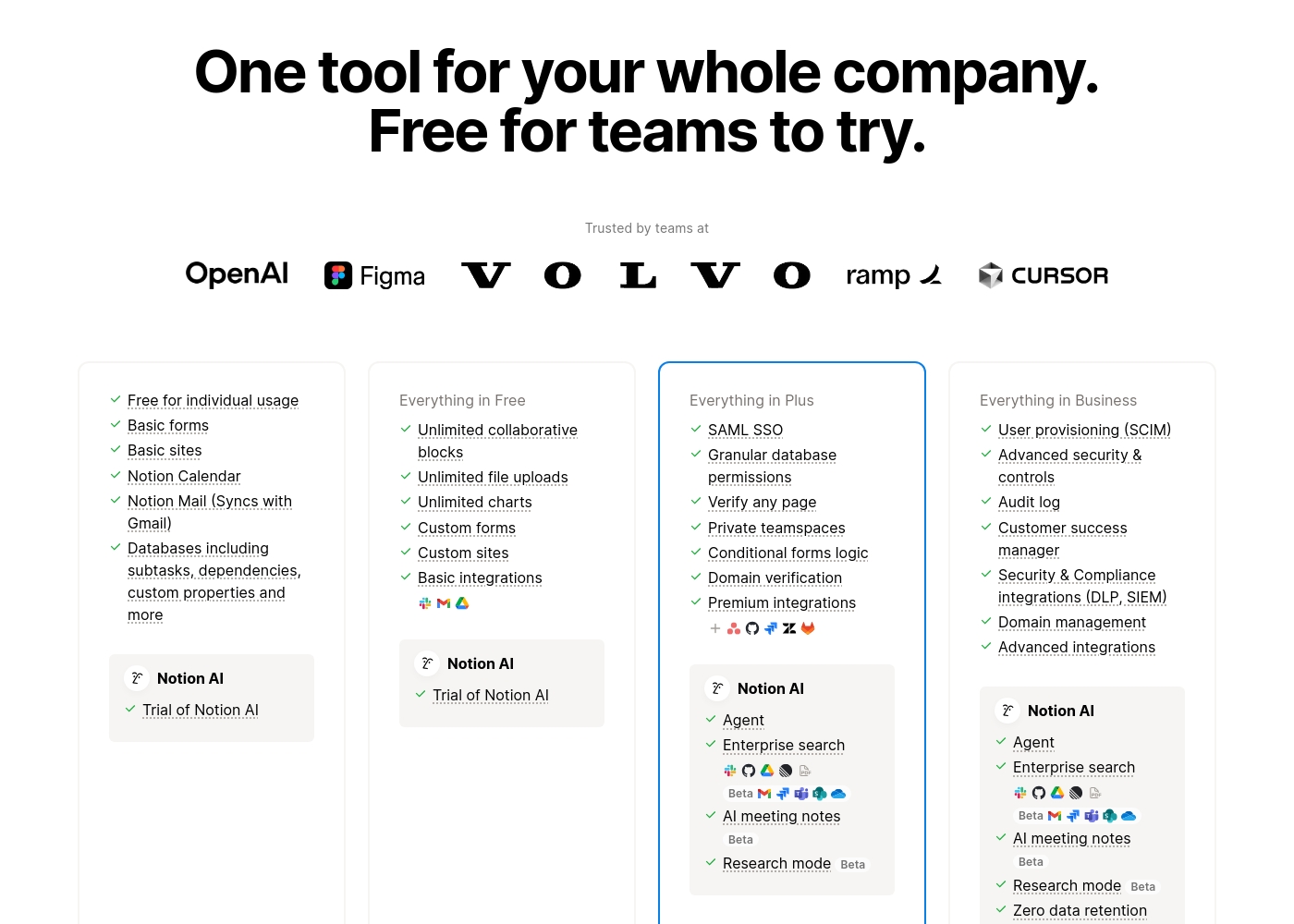
Notion costs between $0 and $20 per seat/month with four plans: Free at $0/seat/month, Plus at $10/seat/month, Business at $20/seat/month, and Enterprise (custom pricing).
Here’s a detailed look at the core features included in each subscription level.
- Unlimited pages and blocks for individuals
- Web publishing with 1 custom subdomain
- Basic forms and sites
- Notion Calendar and Mail synchronization
- Databases with subtasks and dependencies
- Unlimited blocks and file uploads
- 30 days of page history
- Basic SAML SSO
- Granular database permissions
- Access to unlimited charts
- 90 days of page history
- Advanced security controls and Audit log
- Conditional forms logic
- Domain verification
- Advanced page analytics (includes editor list)
- Unlimited page history and workspace analytics
- SCIM user provisioning
- Zero data retention with LLM providers for Notion AI
- Customer Success Manager support
- Security & Compliance integrations (DLP, SIEM)
Pricing Notes
- Notion charges per member; charges are prorated if you add mid-cycle.
- Notion's refunds and cancellation have reported billing friction in reviews.
- Notion Enterprise offers zero data retention for AI usage and a Customer Success Manager.
- VEA uses a straightforward per-user pricing with no contracts shown.
Pricing Head-to-Head
User Reviews
Trustpilot feedback paints a sharply divided picture of Notion. While many users praise the platform as a terrific tool—highlighting its power, versatility, and unique block-based editor for personal and professional organization—these compliments are often eclipsed by grave concerns regarding management and billing practices.
A recurring major theme across many reviews details frustrating experiences with unexpected charges, deceptive auto-upgrades (especially relating to annual plans and new members), and significant challenges when trying to cancel subscriptions or obtain timely refunds. Furthermore, support responsiveness is frequently described as unsatisfactory, unhelpful, or even condescending, often failing to resolve billing errors or login issues.
Enjoy using Notion a lot for my daily work interface. It helps me set up my employees and assign tasks with no issue at all. We upgraded from the free plan and will absolutely continue using the platform.
Our Verdict
Notion and VEA each shine in different ways. For most teams, Notion is the better bet overall. If you want a single powerhouse to replace multiple apps, Notion wins on versatility and ecosystem. But VEA wins on simplicity and clear pricing for small teams. Notion’s superpower is a truly all‑in‑one workspace. It blends AI across the platform and deep databases, making complex projects feel manageable. Notion’s search is fast, and you can consolidate docs, wikis, and lightweight CRM in one place. Trade‑off: it can feel daunting to new users, and billing has caused confusion for some teams. Real‑world impact: a large organization can cut tool sprawl from six apps to one. VEA’s superpower is a clean, per‑seat dashboard with AI analytics. It unifies customers, invoicing, scheduling, and tasks in one view. The pricing is straightforward at $24.95 per user per month with no contracts, which helps budgeting. Trade‑off: fewer documented integrations and a less flexible feature spread than Notion. Real‑world impact: lean teams scale by adding users without worrying about hidden fees. The deciding factor is your priority. If you value breadth, customization, and wide integrations, Notion is your pick. If you want simplicity, predictable costs, and fast start for a small team, VEA fits better. Either way, start with Notion Free to test the core ideas, then compare with VEA’s per‑user approach to finalize. Final verdict: Notion for teams needing a universal knowledge base and AI helpers; VEA for solo operators and small teams seeking a lean, affordable dashboard. Try Notion first for a month, then bring in VEA to confirm your budgeting and workflow fit.
Frequently Asked Questions
If I add new members to a paid plan mid-cycle, how are the charges calculated?
Charges are prorated immediately based on the remaining billing cycle. You’ll receive an invoice on the same day.
What happens if I remove a paid member from my workspace before the billing cycle renews?
You keep the paid seat until renewal. You can swap in a different user at no extra cost.
What is the official refund policy for Notion subscriptions?
You can request a full refund within three days of monthly billing or 30 days for annual. EU/UK rules may extend to 14 days for monthly plans.
Are guests charged the same per-seat rate as full members?
No. Guests invited to specific pages are always free of charge.
How are integrations categorized across the different plan levels?
Free includes Basic integrations (Slack, Google Drive). Plus adds Premium integrations. Enterprise offers Advanced integrations.
How does Notion AI protect my data, and is my content used for model training?
Notion encrypts data and keeps it private. AI data isn’t used to train models unless you opt in.
Ready to Choose?
Both tools have their strengths. Choose based on your specific needs.