Notion vs Tradify
Notion and Tradify serve totally different work styles. Notion is a flexible AI workspace for teams and knowledge management. Tradify is an all-in-one app built for trades like plumbing and electrical work. Here's how they compare for your specific needs.
Best for: Teams needing a centralized knowledge base and wiki, Marketing agencies managing projects and content
Best for: Electricians managing jobs, quotes, and invoicing, Plumbing companies coordinating team scheduling and payments
Powerful software, risky provider.
We found Notion is an exceptionally flexible and powerful productivity tool, praised globally for its block-based editor and ability to consolidate diverse workflows. However, external evidence highlights significant failures in subscription management and support responsiveness. Overall, we advise extreme caution regarding billing procedures due to recurring reports of unauthorized charges and cancellation difficulties.
Pros
- Exceptionally powerful and versatile block-based editor.
- Effective for personal knowledge management and team use.
- Consolidates multiple specialized tools (wikis, CRMs, project management).
- Strong native AI assistance integrated throughout the workspace.
Cons
- Widespread reports of deceptive or confusing billing practices.
- Extremely poor and unresponsive customer support experiences.
- Users report app is often slow and unreliable.
- Difficulty canceling subscriptions and obtaining timely refunds.
Solid, user-friendly trade management.
Tradify delivers a focused, all-in-one platform for trade businesses, excelling in core job management and invoicing. We find it particularly strong for teams needing clear scheduling and payment tracking. Overall, it's a reliable choice, though larger operations may find the per-user pricing adds up.
Pros
- Intuitive, all-in-one app for jobs, quotes, and invoicing.
- Strong mobile functionality for managing work from anywhere.
- Helps speed up getting paid with online payments and tracking.
- Includes free 1-on-1 training and phone support.
Cons
- Per-user monthly pricing can be costly for larger teams.
- Advanced features like AI tools only on the highest-tier plan.
- Custom pricing requires contacting sales, lacking transparency.
- Some users report occasional syncing issues with integrations.
AboutNotion
Notion is your dedicated AI workspace and everything app. It is built to replace multiple specialized tools with one powerful platform. This centralized space lets teams consolidate project management, internal wikis, and basic CRM functions. Notion is trusted broadly; over 100 million users worldwide use it, and 62% of the Fortune 100 are customers. You can use it right in your browser or download specialized tools like Notion Mail and Notion Calendar to keep time and work together. ✅
AboutTradify
Think of Tradify as your business's central command center. 💡 It's an all-in-one app designed for electricians, plumbers, HVAC techs, and property maintenance pros. It helps you manage every job from the first inquiry to the final payment, all from your phone or computer. The goal is to replace scattered paperwork and manual processes with a smooth, integrated system.
Highlights
Feature Comparison
Features Overview
We highlight the main differences and pick a winner for each feature.
User Interface
Notion's interface is highly flexible and customizable. Tradify's interface is intuitive and built for tradespeople.
Notion uses a block-based editor. You can create pages, databases, and embeds with drag-and-drop. It's powerful but can feel complex for new users. Notion has over 100 million users, with 62% of Fortune 100 companies using it. Tradify is designed for trades like plumbing and electrical work. It offers a straightforward, all-in-one app interface. Users can manage jobs, quotes, and invoicing from a single dashboard. It's built to be simple for non-tech-savvy workers. The key difference is flexibility vs. specialization. Notion's interface is like a blank canvas for any workflow. Tradify's interface is pre-built for trade-specific tasks like job scheduling. For a solo contractor, Tradify's simplicity might be easier. For a team managing knowledge, Notion's customization is more powerful.
Collaboration Tools
Notion excels in team collaboration and knowledge sharing. Tradify focuses on job coordination and team communication.
Notion offers unlimited pages and collaborative blocks for individuals. It has granular database permissions on paid plans. Teams can share wikis, projects, and documents. Notion has been rated the #1 knowledge base for three years on G2. Tradify provides real-time job scheduling and staff location tracking. It includes customer communication history. Teams can dispatch jobs and share job notes. It's designed for coordinating on-site work rather than document collaboration. The difference is in focus. Notion is for team knowledge and project collaboration. Tradify is for coordinating jobs and customer interactions in trades. If you're a remote team, Notion's collaboration tools are stronger. If you're a trade team, Tradify's scheduling and communication tools are more relevant.
Automation
Notion offers AI-powered automation for knowledge work. Tradify automates trade-specific tasks like quotes and payments.
Notion has a built-in AI assistant for all users. It can help with writing, research, and data tasks. G2 recognizes it as the #1 rated AI writing tool. AI is integrated throughout the workspace, not just in one feature. Tradify includes automated follow-ups on quotes. It also has automatic overdue payment reminders. The Plus plan adds AI tools like SmartRead and SmartWrite. These are focused on saving time on trade tasks. Notion's automation is broad and AI-driven. Tradify's automation is specific to sales and payments in trades. For a marketing team, Notion's AI is more useful. For a plumber, Tradify's quote automation is more impactful.
Reporting & Analytics
Notion provides basic to advanced analytics based on plan. Tradify offers job service and profit reports.
Notion's Free/Plus plans show basic analytics like page views. The Enterprise plan includes workspace analytics and search behavior visibility. It's useful for tracking team activity and content usage. Tradify offers job service reports and profit reports. The Plus plan includes staff activity history. It's designed to track job costs, materials, and profitability for trades. Notion's analytics are more about knowledge usage. Tradify's analytics are about business performance and job profitability. For a sales team, Notion's analytics might help track document engagement. For a tradesperson, Tradify's profit reports are more actionable.
Mobile Experience
Notion offers web-based access and dedicated apps for mail/calendar. Tradify has a full mobile app for job management.
Notion is accessible in the browser and has dedicated apps like Notion Mail and Notion Calendar. It's optimized for knowledge work, not field work. Some users report the app can be slow or unreliable. Tradify is built for mobile use. Tradespeople can manage jobs, add photos, and track time from their phone. It's designed for on-site work, with features like real-time staff location tracking. Users praise its mobile functionality for managing work anywhere. The difference is use case. Notion's mobile is for reading and editing documents. Tradify's mobile is for active job management in the field. For a tradesperson, Tradify's mobile app is more practical.
Customer Support
Notion has paid support tiers with mixed reviews. Tradify offers free phone support and training for all plans.
Notion's support varies by plan. The Enterprise plan includes a Customer Success Manager. Reviews on Trustpilot are mixed, with many complaints about unresponsive support and billing issues. Users report frustration with support handling errors. Tradify provides free phone support and 1-on-1 training for all plans. Reviews mention helpful support, though some users note occasional integration issues. The onboarding is praised as straightforward. The difference is availability and cost. Notion's support is tiered and can be expensive. Tradify's support is included and free. For a small trade business, Tradify's free support is more accessible.
Integration Ecosystem
Notion integrates with general productivity tools. Tradify connects with trade-specific accounting and calendar tools.
Notion integrates with Slack, GitHub, Jira, Google Drive, and MS Teams. It's built for general productivity and team collaboration. The Plus plan introduces premium integrations. Tradify syncs with Xero, QuickBooks Online, Google Calendar, and Stripe. It's focused on accounting and payments for trades. It eliminates double-handling by connecting to these tools. The difference is breadth vs. depth. Notion's integrations are broad for knowledge work. Tradify's integrations are deep for trade business needs. For a marketing agency, Notion's integrations are more useful. For a plumber, Tradify's accounting sync is more important.
Pricing Model
Notion has a free plan and scales per seat. Tradify has no free plan and starts at $47/user/month.
Notion offers a free plan for individuals, with paid plans from $10/user/month. It charges per seat, with monthly or annual billing. Guests invited to pages are free. It has a 30-day money-back guarantee. Tradify has no free plan but offers a 14-day free trial. Pricing starts at $47/user/month for the Lite plan. It's per-user monthly pricing. There's no specific money-back guarantee, but the trial is risk-free. The key difference is entry cost. Notion has a free option, making it accessible for small teams. Tradify's pricing is higher, designed for trade businesses. For a solo entrepreneur, Notion's free plan is more appealing.
Learning Curve
Notion has a steeper learning curve due to its flexibility. Tradify is designed to be intuitive for tradespeople.
Notion's block-based editor is powerful but can be complex. Users need time to learn how to set up databases and workflows. It's highly customizable, which adds to the learning curve. Tradify is built for simplicity. It's designed for tradespeople who may not be tech-savvy. Users report it's easy to get started with job management and invoicing. Free 1-on-1 training helps with onboarding. The difference is flexibility vs. ease of use. Notion's learning curve is higher because of its versatility. Tradify's learning curve is lower because it's specialized. For a team that wants a one-size-fits-all tool, Notion's curve might be worth it. For a trade business, Tradify's ease is better.
Customization
Notion offers extensive customization with blocks and databases. Tradify provides customizable templates for trade tasks.
Notion allows you to build any workflow with blocks, databases, and embeds. You can customize pages, templates, and permissions. It's a blank canvas for any team. Tradify offers customizable quote templates and job dashboards. It's designed for trade-specific tasks. You can import price lists and add photos/videos to jobs. It's less flexible than Notion but more focused. The difference is open vs. focused customization. Notion is for building any workflow. Tradify is for building trade workflows. For a startup, Notion's flexibility is better. For a plumbing company, Tradify's trade customization is more relevant.
Security
Notion offers advanced security on higher plans. Tradify's security details are not fully specified.
Notion provides advanced security features like audit logs and SCIM on the Enterprise plan. It includes DLP/SIEM integrations and zero data retention for AI. It follows standard data protection practices. Tradify's security details are not detailed in the provided data. It's recommended to check their privacy policy for specifics. It's likely standard for business software but not as transparent. The difference is transparency and features. Notion's security is well-documented on higher plans. Tradify's security is less detailed. For a company with compliance needs, Notion's Enterprise plan is more secure.
Performance
Notion can be slow and unreliable according to some users. Tradify is praised for mobile functionality and reliability.
Notion has users reporting it's often slow and unreliable. The app can lag, especially with large workspaces. It's web-based, which can cause performance issues. Tradify is built for mobile use and is designed to be reliable. Users can manage jobs from their phone without issues. It's optimized for trade work, which is less resource-intensive than knowledge work. The difference is in reported reliability. Notion's performance is a concern for some users. Tradify's performance is generally positive. For a team needing a fast tool, Tradify might be more reliable.
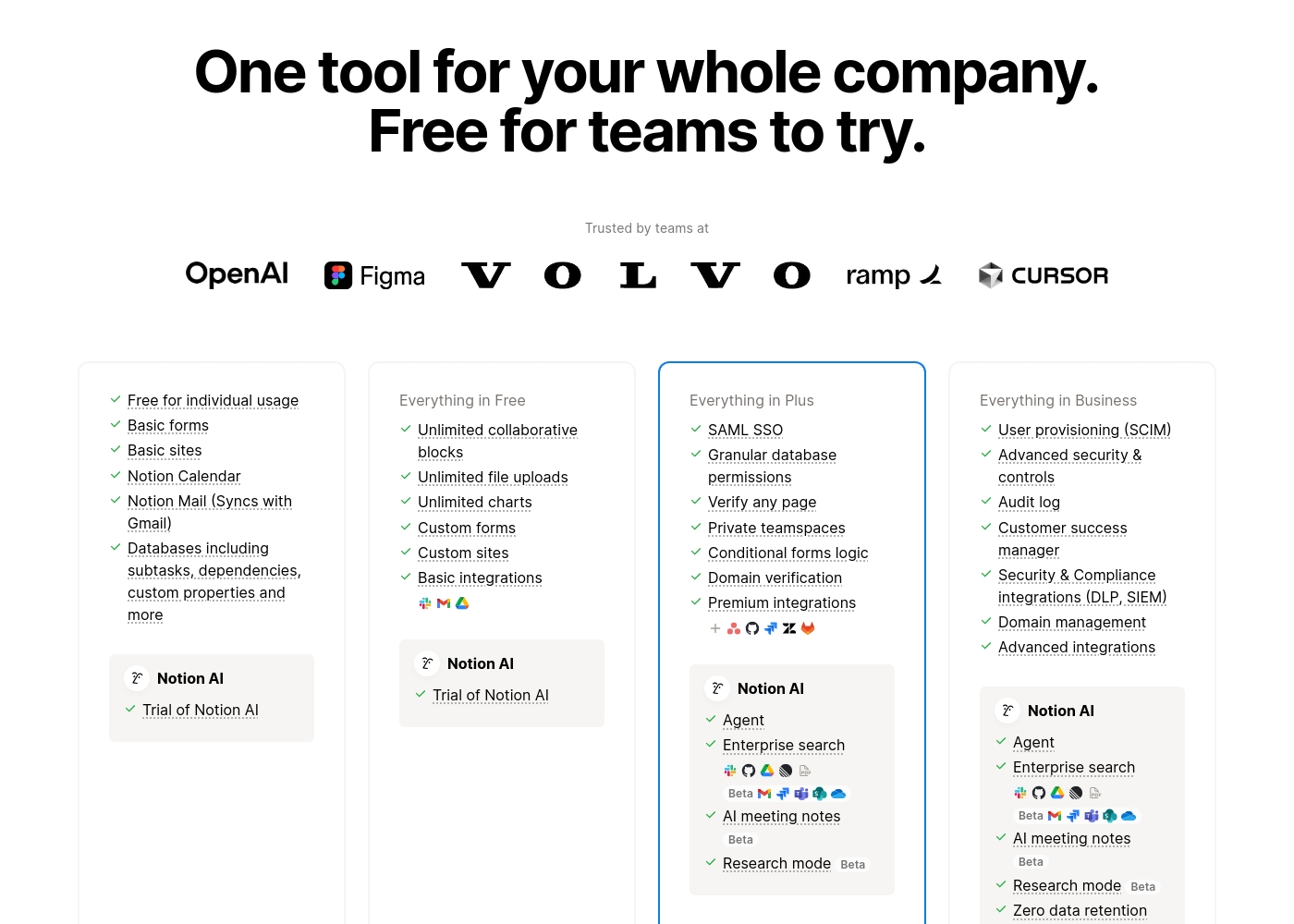
Notion costs between $0 and $20 per seat/month with four plans: Free at $0/seat/month, Plus at $10/seat/month, Business at $20/seat/month, and Enterprise (custom pricing).
Here’s a detailed look at the core features included in each subscription level.
- Unlimited pages and blocks for individuals
- Web publishing with 1 custom subdomain
- Basic forms and sites
- Notion Calendar and Mail synchronization
- Databases with subtasks and dependencies
- Unlimited blocks and file uploads
- 30 days of page history
- Basic SAML SSO
- Granular database permissions
- Access to unlimited charts
- 90 days of page history
- Advanced security controls and Audit log
- Conditional forms logic
- Domain verification
- Advanced page analytics (includes editor list)
- Unlimited page history and workspace analytics
- SCIM user provisioning
- Zero data retention with LLM providers for Notion AI
- Customer Success Manager support
- Security & Compliance integrations (DLP, SIEM)
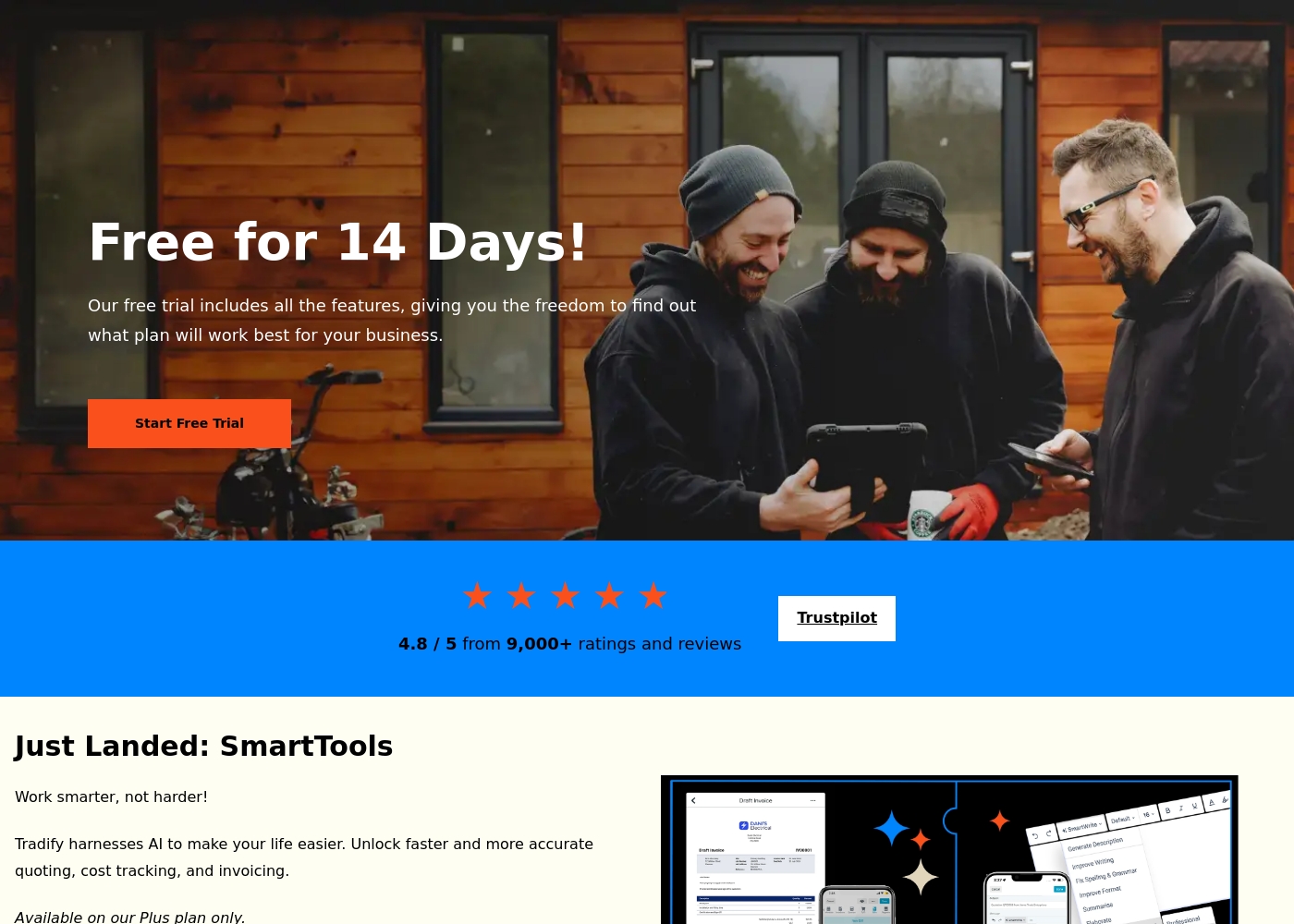
Tradify pricing: Tradify offers per-user monthly plans starting at $47, designed specifically for trade businesses like electricians and plumbers. Each plan includes core features like job tracking and quoting, with a 14-day free trial to get you started.
Here's a breakdown of the options that best suit your business size and needs.
Lite
Price: $47 USD per user/month Best For: Contractors who want the basics Other Features: Job Management, Scheduling & Google Calendar Sync, Quoting & Invoicing, Online & Credit Card Payments, Accounting Software Sync
Pricing Head-to-Head
User Reviews
Trustpilot feedback paints a sharply divided picture of Notion. While many users praise the platform as a terrific tool—highlighting its power, versatility, and unique block-based editor for personal and professional organization—these compliments are often eclipsed by grave concerns regarding management and billing practices.
A recurring major theme across many reviews details frustrating experiences with unexpected charges, deceptive auto-upgrades (especially relating to annual plans and new members), and significant challenges when trying to cancel subscriptions or obtain timely refunds. Furthermore, support responsiveness is frequently described as unsatisfactory, unhelpful, or even condescending, often failing to resolve billing errors or login issues.
Enjoy using Notion a lot for my daily work interface. It helps me set up my employees and assign tasks with no issue at all. We upgraded from the free plan and will absolutely continue using the platform.
We couldn't access the detailed Trustpilot or Capterra reviews due to verification errors, so this summary is based on the limited context from the provided snippets and general knowledge of Tradify's market position. Typically, users highlight Tradify's ease of use and intuitive interface as major positives, making it accessible for tradespeople not tech-savvy. 🙌 However, recurring feedback often mentions pricing as a consideration, especially for smaller crews, and occasional integration hiccups with accounting software. Support is generally praised for responsiveness, while onboarding is noted as straightforward with the included training.
Tradify has been a game-changer for our plumbing business. The app is simple to use, and our team got the hang of it quickly. We love being able to see all our jobs in one place.
Our Verdict
For most people, it's a tie—because these tools serve completely different needs. Notion's superpower is flexibility. It's an AI workspace that consolidates wikis, project management, and CRM into one platform. Over 100 million users, including 62% of Fortune 100, trust it for knowledge management. It's the best choice for teams wanting a single source of truth. Tradify's superpower is trade focus. It's built for electricians, plumbers, and HVAC techs to manage jobs, quotes, and invoicing. It offers free phone support and a 14-day free trial. Users praise its mobile app and automated follow-ups. The deciding factor is your business type. Choose Notion if you're a remote team needing collaboration and knowledge tools. Choose Tradify if you're a trade business needing job scheduling and payments. Final verdict: If you're a team of 5-50 consolidating tools, Notion is better. If you're a plumbing company with 5-20 employees, Tradify is better. Notion wins for knowledge work, Tradify wins for trade management.
Frequently Asked Questions
Which is better for small teams: Notion or Tradify?
Notion is better for small teams needing collaboration and knowledge management. It has a free plan starting at $0. Tradify is better for trade teams needing job management. It starts at $47/user/month.
Does Notion have job management features like Tradify?
Notion has project management with databases and subtasks. It's flexible but not specialized for trades. Tradify is built specifically for job tracking, quoting, and invoicing. For trade businesses, Tradify is more focused.
Is Tradify worth the extra cost over Notion?
Tradify is worth it if you're a trade business. It starts at $47/user/month but includes job management, invoicing, and accounting sync. Notion starts at $10/user/month but is for knowledge work. It depends on your business needs.
Can I migrate from Notion to Tradify easily?
Migration depends on your data type. Notion's knowledge bases and databases may need manual transfer. Tradify focuses on job data and customer records. Contact Tradify support for migration guidance.
Does Tradify have AI features like Notion?
Tradify has AI tools like SmartRead and SmartWrite on the Plus plan ($61/user/month). Notion has a built-in AI assistant for all users on all plans. Notion's AI is more integrated and available on lower tiers.
Which tool has better mobile support?
Tradify is better for mobile support. It's designed for tradespeople to manage jobs from their phone. Notion's mobile is web-based and can be slow. Users report Tradify's mobile app is reliable for on-site work.
Ready to Choose?
Both tools have their strengths. Choose based on your specific needs.