Notion vs Process Street
Notion and Process Street both organize critical work, but they serve vastly different masters. Notion is the ultimate flexible workspace, perfect for wikis and diverse projects. Process Street focuses purely on mandated, repeatable, and auditable workflows. Your decision hinges completely on whether you need freedom or strict enforcement.
Best for: Solo entrepreneurs and small teams needing centralized documentation, Users prioritizing high flexibility over workflow strictness
Best for: Enterprises in tightly regulated industries (ISO, FDA, SOC 2), Compliance officers needing real-time, auditable process proof
Powerful software, risky provider.
We found Notion is an exceptionally flexible and powerful productivity tool, praised globally for its block-based editor and ability to consolidate diverse workflows. However, external evidence highlights significant failures in subscription management and support responsiveness. Overall, we advise extreme caution regarding billing procedures due to recurring reports of unauthorized charges and cancellation difficulties.
Pros
- Exceptionally powerful and versatile block-based editor.
- Effective for personal knowledge management and team use.
- Consolidates multiple specialized tools (wikis, CRMs, project management).
- Strong native AI assistance integrated throughout the workspace.
Cons
- Widespread reports of deceptive or confusing billing practices.
- Extremely poor and unresponsive customer support experiences.
- Users report app is often slow and unreliable.
- Difficulty canceling subscriptions and obtaining timely refunds.
AI-Powered Compliance and Operational Standardization
We find Process Street highly effective for organizations needing to enforce strict operational policies and ensure consistency across large, distributed teams. Overall, the powerful combination of AI automation and centralized document control makes this an essential tool for compliance-driven scaling.
Pros
- AI-enforced workflows guarantee policy compliance.
- Cora AI agent monitors regulations and flags risks 24/7.
- Centralizes policies into live, audit-ready workflows (DOCS).
- Drives consistency and accountability across global teams.
Cons
- Pricing is not publicly disclosed, requiring custom quotes.
- No transparent tiers or fixed subscription costs available.
- Specific features and user limits depend on individualized packages.
- May be overwhelming or costly for very small teams without complex compliance needs.
AboutNotion
Notion is your dedicated AI workspace and everything app. It is built to replace multiple specialized tools with one powerful platform. This centralized space lets teams consolidate project management, internal wikis, and basic CRM functions. Notion is trusted broadly; over 100 million users worldwide use it, and 62% of the Fortune 100 are customers. You can use it right in your browser or download specialized tools like Notion Mail and Notion Calendar to keep time and work together. ✅
AboutProcess Street
Process Street is the compliance operations platform. It helps your business automate consistency and ensure everything is documented correctly.
It's trusted by over a million users to standardize workflows and prove their execution. This tool uses AI to automate essential business processes and enforce policies rigidly.
It ensures you can always deliver audit-ready proof, consistently. The platform handles policy control (DOCS), workflow automation (OPS), and managing risk with its 24/7 AI compliance agent, CORA.
Highlights
Feature Comparison
Features Overview
We highlight the main differences and pick a winner for each feature.
Core Purpose & Flexibility
Notion is a flexible wiki; Process Street enforces strict, linear process steps.
Notion is an AI 'everything app' designed for maximum adaptability. You can build wikis, project trackers, or CRMs using customizable blocks. Its power comes from unparalleled user freedom and lack of imposed structure. Process Street is a dedicated compliance platform focused on process automation. It turns Standard Operating Procedures (SOPs) into live, auditable workflows that must be sequentially followed. If you require rigid, step-by-step guidance for critical tasks, Process Street is the clear choice. The block-based structure of Notion thrives best on adaptation and informational pages.
Workflow Enforcement
Process Street mandates process completion; Notion relies on user discipline.
Process Street uses AI-powered controls to automate and strictly enforce policy standards. Users must complete steps in order, which creates highly dependable and consistent outcomes. This guaranteed governance travels with the process across all organizational teams. Notion offers project management tools with subtasks and functional dependencies. However, it completely lacks the strict system-level policy enforcement that Process Street embeds. For any regulated workflow requiring guaranteed execution and audit-ready proof, Process Street is functionally superior.
AI Utility
Notion AI creates content; Process Street AI monitors compliance and risk.
Notion includes a powerful, seamlessly built-in AI assistant for every team member. It excels at fast writing, summarizing, and generating content directly inside your pages. G2 independently rated Notion as the industry's #1 AI writing tool. Process Street uses CORA, its dedicated AI compliance agent, to proactively monitor workflows. CORA enforces controls and surfaces potential risks or workflow policy gaps before external audits. Both utilize powerful AI but for completely different needs; one for creation, one for enforcement.
Audit & Compliance
Process Street is purpose-built for SOC 2/FDA audits; Notion focuses on security logs.
Process Street is explicitly engineered for compliance governance and audit-readiness. It mandates coverage for standards like ISO 9001, SOC 2, SOX, and FDA. All user actions are automatically documented and captured as necessary audit proof. Notion offers advanced security features like Audit logs on Business and Enterprise plans. However, Notion’s primary focus is secure access control, not proactive compliance enforcement within live workflows. If your business environment is tightly regulated, Process Street provides critical peace of mind.
Knowledge Base Management
Notion is a top-rated wiki; Process Street centralizes live, searchable procedures.
Notion has been rated the #1 knowledge base on G2 for three straight years. It provides a simple single source of truth for consolidating all scattered documentation. This centralization enables seamless internal self-onboarding for all new hires. Process Street centrally stores policies and SOPs, instantly converting them into live, searchable workflows. While excellent for documenting steps, Process Street is not designed for broad long-form knowledge articles. Notion is the superior platform for building a company-wide informational wiki and documentation repository.
Customer Service Reputation
Process Street gets rave support reviews; Notion users report severe support failures.
Process Street users consistently praise its responsive customer support during setup and implementation. Reliable support is essential for managed, compliant workflows. Notion faces widespread reports of extremely poor and unresponsive customer support experiences. Users complain about difficulty canceling subscriptions and resolving confusing, erroneous billing issues. Independent external reviews highly suggest Process Street offers a far more reliable support system than Notion.
Pricing Model
Notion is transparently priced; Process Street operates on undisclosed enterprise quotes.
Notion offers a generous Free plan and clear, published per-seat pricing up to $20/month. This fixed pricing makes budgeting predictable for teams scaling up to the highest tiers. Process Street’s pricing is opaque, indicating high-value custom quotes and enterprise sales cycles. Their listed range of 1 to 9001 confirms a high-touch, custom investment model. Notion provides significantly better visibility and lower barrier to entry regarding cost.
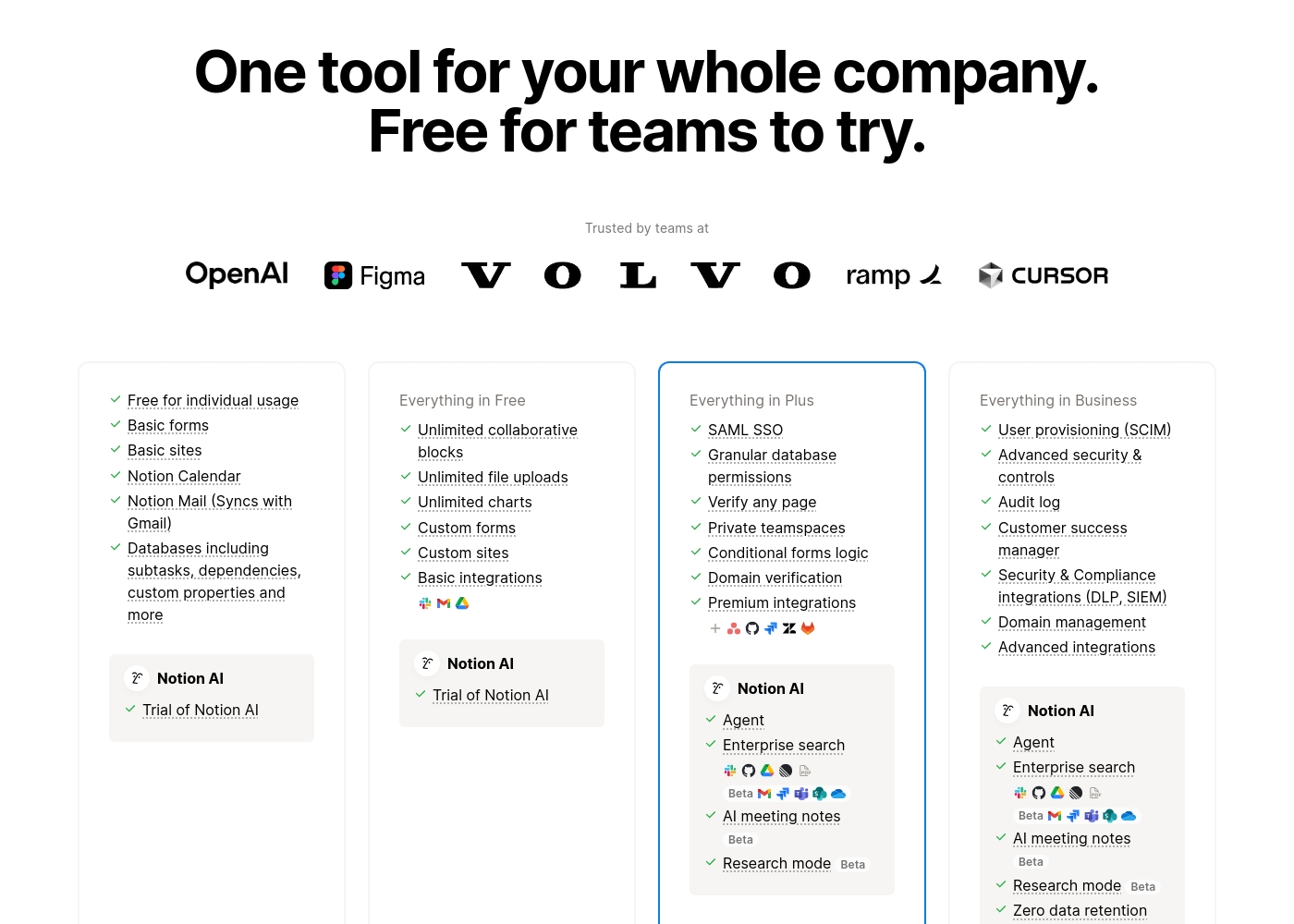
Notion costs between $0 and $20 per seat/month with four plans: Free at $0/seat/month, Plus at $10/seat/month, Business at $20/seat/month, and Enterprise (custom pricing).
Here’s a detailed look at the core features included in each subscription level.
- Unlimited pages and blocks for individuals
- Web publishing with 1 custom subdomain
- Basic forms and sites
- Notion Calendar and Mail synchronization
- Databases with subtasks and dependencies
- Unlimited blocks and file uploads
- 30 days of page history
- Basic SAML SSO
- Granular database permissions
- Access to unlimited charts
- 90 days of page history
- Advanced security controls and Audit log
- Conditional forms logic
- Domain verification
- Advanced page analytics (includes editor list)
- Unlimited page history and workspace analytics
- SCIM user provisioning
- Zero data retention with LLM providers for Notion AI
- Customer Success Manager support
- Security & Compliance integrations (DLP, SIEM)
The specific tiers and features included in Process Street's subscription models are not publicly listed in this documentation. Interested users are directed to contact their team for specific pricing.
Pricing Details Available Upon Contact
Best For: Businesses requiring streamlined compliance, AI-powered automation, and strict operational standardization. Other Features:
- The Cora AI compliance agent monitors regulations and flags risks 24/7.
- Automated workflows (OPS) turn policies into repeatable, trackable tasks.
- Centralized document control (DOCS) manages policies for ISO 9001 (and others).
- Real-time visibility into task status and workflow tracking.
- AI-powered intelligence helps generate new workflows quickly.
If you're ready to explore how Process Street can transform your compliance posture and operations, reaching out to their experts is the next step. This customized approach ensures your organization receives the exact feature set and support levels needed for consistent auditing and standardization, especially in highly regulated industries.
- Cora AI compliance agent
- Automated workflows (OPS)
- Centralized policy control (DOCS)
- AI-enforced operational consistency
- Knowledge management

Pricing Notes
- Notion offers a robust Free plan, while Process Street focuses heavily on enterprise contracts and custom pricing.
- Notion reviews heavily warn about deceptive billing practices and difficulty trying to cancel paid subscriptions.
- Process Street pricing is opaque, indicating large investments suitable for strictly regulated, major enterprises.
- Notion’s paid plans start affordably at $10/seat/month, covering most collaborative needs.
Pricing Head-to-Head
User Reviews
Trustpilot feedback paints a sharply divided picture of Notion. While many users praise the platform as a terrific tool—highlighting its power, versatility, and unique block-based editor for personal and professional organization—these compliments are often eclipsed by grave concerns regarding management and billing practices.
A recurring major theme across many reviews details frustrating experiences with unexpected charges, deceptive auto-upgrades (especially relating to annual plans and new members), and significant challenges when trying to cancel subscriptions or obtain timely refunds. Furthermore, support responsiveness is frequently described as unsatisfactory, unhelpful, or even condescending, often failing to resolve billing errors or login issues.
Enjoy using Notion a lot for my daily work interface. It helps me set up my employees and assign tasks with no issue at all. We upgraded from the free plan and will absolutely continue using the platform.
We aimed to synthesize external user sentiment for Process Street, balancing insights from both Trustpilot and Capterra. Although we located the Capterra listing URL, the provided materials did not contain specific textual snippets or testimonials from real users.
This severely limits our ability to report on recurring community themes regarding critical aspects like customer support responsiveness, the learning curve, or implementation success across various industries. Since Process Street employs a quote-based, non-public pricing model, external user feedback is crucial for assessing perceived value for money that customers experience after implementation.
Our Verdict
Choosing between Notion and Process Street requires understanding their core mandates. This is not about features; it’s about control. Notion wants to be a flexible workspace, but Process Street insists on audited, repeatable compliance. If you need adaptability and consolidation, Notion is your best bet on paper. Notion excels at unstructured work, knowledge management, and AI content creation. Its block-based editor consolidates wikis, Project Management, and documentation wonderfully. Notion's AI writing capability is a huge advantage for fast content generation. However, beware: the tool’s functional power is overshadowed by very negative reports of unresponsive support and confusing billing practices. Process Street is an audit-ready platform that enforces standards and policies rigorously. It guarantees repeatable processes must be followed sequentially, creating dependable audit-ready proof. If your company must abide by SOC 2, ISO, or FDA, Process Street provides the systemic reliability you absolutely need. Its Cora AI compliance agent monitors live workflows for hidden risks proactively. The key deciding factor is governance versus flexibility. Do you need the freedom to build anything and rely on user discipline (Notion)? Or do you need the confidence that every employee follows every mandated step without fail (Process Street)? If you run a small team prioritizing consolidation and AI creation, choose Notion cautiously. If you operate in a tightly regulated industry and demand auditability and zero errors, Process Street is the necessary enterprise investment.
Frequently Asked Questions
Which is better for compliance enforcement: Notion or Process Street?
Process Street is built specifically for compliance and enforcement in regulated industries. It provides audit-ready proof and enforces policies automatically. Notion offers security features like Audit Logs but lacks system-level workflow enforcement.
Does Notion have strict workflow features like Process Street?
No, Notion does not offer the strict, mandated workflow enforcement of Process Street. Notion allows for task dependencies and project tracking. Process Street guarantees steps are followed in order using AI-powered controls.
Which tool is better for creating a large internal knowledge base?
Notion is the superior choice for knowledge management and wikis. It has been rated the #1 knowledge base for three years running. Process Street focuses on turning SOPs into live, actionable process steps.
Is Process Street pricing transparent compared to Notion?
Notion offers clear, published per-seat pricing up to $20/month, starting with a robust Free tier. Process Street only uses custom quoting, indicating higher, enterprise-level costs.
Which has better customer support: Notion or Process Street?
Process Street receives much more favorable reviews for responsive customer support. Notion users frequently report poor, unresponsive support and severe difficulty resolving billing issues.
Which integrated AI is more capable, Notion AI or Process Street's Cora?
Notion AI is best for creative tasks like content generation, summarization, and writing. Process Street's Cora AI specializes in monitoring live workflows to flag compliance risks and enforce controls proactively.
Ready to Choose?
Both tools have their strengths. Choose based on your specific needs.