Net Nanny vs SpyBubble
Net Nanny and SpyBubble tackle monitoring goals using very different methods. Net Nanny is a visible defensive guard focused on filtering content and generating alerts for children. SpyBubble focuses on stealth tracking and passively logging device activity discreetly. Choose visibility or invisibility depending entirely on your specific monitoring needs.
Best for: Parents needing protective web blocking and filtering services first., Families with many devices, requiring coverage for up to 20 endpoints.
Best for: Users needing short-term, discreet monitoring of texts and calls., Small-scale surveillance projects (max 5 devices).
Unreliable protection paired with hidden costs.
We note Net Nanny boasts impressive dynamic filtering features and competitive volume pricing for large families. However, recent user feedback highlights critical operational failures, extreme difficulty managing subscriptions, and severely problematic customer service interactions. Overall, we advise prudence due to concerning reports regarding recurring billing practices and software reliability across platforms.
Pros
- Cost-effective protection for up to 20 devices annual plans.
- Includes dynamic filtering against adult content and sensitive material.
- Real-time alerts and visibility via the Family Feed feature.
- Full feature suite is included across all three annual pricing tiers.
Cons
- Software functionality is often unreliable (time limits fail, Mac freezing).
- Auto-renewal system is difficult or impossible to cancel online.
- Reports of severe bugs and inaccurate dashboard data tracking.
- Customer support is slow, unresponsive, and often unavailable.
Promises Fall Short of Performance
We note SpyBubble offers a clear pricing structure and includes a three-day trial, supporting Windows, Mac, and Android devices. However, user reports consistently reveal major issues regarding data reliability, security failures, and frustrating customer service. Overall, we cannot recommend this software until the significant performance issues, lack of reliable undetectable operation, and questionable refund practices are fully resolved.
Pros
- Straightforward $24.95 entry price for single-device monitoring.
- Professional plan covers up to five different devices.
- Includes a valuable 3-day free trial period.
- Effective tracking of media, messages, and call logs (when the app functions correctly).
Cons
- Application frequently malfunctions, failing to update or provide complete logs.
- Target device can display obvious detection warnings, violating the 'undetectable' claim.
- Essential features like audio/video streaming are often reported as non-functional.
- The setup process is sometimes described as stressful or difficult.
AboutNet Nanny
Net Nanny is widely trusted parental control software. It is consistently ranked as the Best Parental Control App. ✅ Millions of parents have trusted this software since 1996.
It’s designed to keep your kids safe from adult content when they browse online. The system allows children to use the internet safely while still being protected. It offers the visibility parents need today.
AboutSpyBubble
SpyBubble is a monitoring application designed for effective tracking. It offers an easy solution for those who need to keep tabs on digital device activity. Several customers found that after initial setup, the app handles everything else. User reports show that it delivers expected results and sometimes exceeds expectations. Installation requires physical access to the device; note that it can't be installed remotely. 💡
Highlights
Feature Comparison
Features Overview
We highlight the main differences and pick a winner for each feature.
Core Purpose
Net Nanny focuses on active filtering; SpyBubble records communication logs discreetly.
Net Nanny is a trusted parental control filter used since 1996. It boasts sharp dynamic web filtering and a powerful porn blocker. Its primary goal is actively preventing children from viewing inappropriate content. SpyBubble is a monitoring application built for harvesting digital logs and communications. It prioritizes tracking text messages and media for review. This tool focuses on collecting evidence rather than proactive filtering. The core trade-off is immediate content prevention versus comprehensive data logging. Net Nanny tries to block dangerous material; SpyBubble records the activity. If preventing young eyes from seeing inappropriate content is the main priority, Net Nanny is the clear winner here.
Stealth Monitoring
SpyBubble claims to be 100% undetectable; Net Nanny is a visible protective filter.
Net Nanny is clearly visible on the protected device as a known parental firewall. It is meant to be a transparent guard, governing behavior through its presence. SpyBubble is marketed as operating at 100% undetectable capacity in the background. Collected data is sent securely to a Web Based Control Panel for access. However, user reviews suggest the stealth feature often fails, showing obvious alerts. The distinction is transparent protection versus secret surveillance. SpyBubble offers stealth tracking, but user reports note performance issues. If discretion is paramount, you must carefully test SpyBubble's 3-day trial to confirm its true stealth capabilities.
Real-Time Alerts
Net Nanny provides instant crisis alerts; SpyBubble offers no proactive protection features.
Net Nanny actively monitors searches for highly sensitive material like weapons or suicide. It instantly alerts the parent via the Family Feed feature upon detection. This provides a crucial window for intervention. SpyBubble only collects passive logs of device activity and user communication. It completely lacks any proactive filtering or real-time alert functionality. Net Nanny actively attempts to stop children from progressing into dangerous web areas. SpyBubble simply tracks their entry into risky online spaces. For rapid intervention in an immediate crisis situation, Net Nanny's robust alert system is superior.
Mobile Compatibility
Net Nanny covers iOS and desktop; SpyBubble only supports Android and desktop devices.
Net Nanny offers comprehensive support for PC, Mac, and iOS devices with its Family Protection Passes. This accommodates multi-platform households effectively. The base 1 Desktop plan does not cover mobile, though. SpyBubble explicitly lists compatibility only for Windows, Mac, and Android operating systems. This immediately excludes all iPhone and iPad users entirely from using SpyBubble. If you require monitoring for any Apple mobile device, Net Nanny is the only viable option available. SpyBubble focuses purely on non-Apple mobile monitoring. Families requiring coverage for iOS devices must select Net Nanny for necessary functional support.
Device Scalability
Net Nanny quickly covers 20 devices; SpyBubble restricts monitoring to 5 devices maximum.
Net Nanny offers its powerful 20 Devices Family Protection Pass for large families. This high-volume plan reduces the annual cost to less than $5 per device. This makes it extremely scalable. SpyBubble's Professional plan allows monitoring for a maximum of 5 devices concurrently. This is only suited for very small families or focused individual surveillance needs. Net Nanny provides superior affordability and greater protection capacity for large homes. Twenty devices for $89.99 per year is exceptional value. Large or growing households with many digital devices should choose Net Nanny for cost efficiency and capacity.
Subscription Model
SpyBubble is monthly with a 3-day trial; Net Nanny requires a full annual commitment.
Net Nanny requires customers to commit to an annual subscription upfront. Prices range from $39.99 to $89.99 per year, depending on the number of devices. A free trial is not available. SpyBubble is priced monthly, starting at $24.95 for one device per month. Crucially, every plan includes a valuable 3-day free trial period. SpyBubble offers lower immediate expense and easier short-term usage or testing. Net Nanny provides deeper cost savings via its full commitment annual bundles. Users hesitant to commit fully should explore SpyBubble first due to its trial and monthly flexibility.
Communication Logs
SpyBubble logs texts and calls efficiently; Net Nanny focuses only on web search reporting.
SpyBubble excels at capturing discrete forms of digital communication. It can reliably view all text messages and call history from the target device. This is crucial for evidence collection. Net Nanny focuses primarily on web content filtering and search activity reporting via the Family Feed. It does not offer direct logging or capture of text messaging data. If monitoring communication content is vital, SpyBubble possesses the dedicated logging features needed. Net Nanny does not offer this specific function. For confirming suspicions via message logs, SpyBubble is the specialized tool, assuming it functions reliably.
Installation Process
SpyBubble requires mandatory physical access; Net Nanny installation is flexible and online-driven.
SpyBubble explicitly states that mandatory physical access to the target device is required. Installation cannot be performed remotely under any circumstances at all. Net Nanny installation is typically initiated online via the parent's dashboard install link. While device access is needed, the process is less restrictive than SpyBubble's stated requirements. SpyBubble imposes a strict barrier to entry by demanding guaranteed physical access for installation. Net Nanny is comparatively easier to deploy devices. If gaining mandatory physical access is a major roadblock, SpyBubble will be impossible to install correctly.
Net Nanny costs between $39.99 and $89.99 per year with three plans: 1 Desktop at $39.99, 5 Devices Family Protection Pass at $54.99, and 20 Devices Family Protection Pass at $89.99.
Let's explore which annual Net Nanny package works best for your family's needs.
1 Desktop
Price: $39.99 / Year (Currently discounted from $49.99) Best For: Single device use on PC or Mac Other Features:
- Protect one desktop device
- Includes all Net Nanny features
- Supports Windows and macOS
- Protect one desktop device (PC or Mac)
- Includes all Net Nanny features
- Supported on Windows 10 & 11 and macOS 10.13 to 11.x
- Protect up to 5 total devices
- Includes all Net Nanny features
- Supports PC, Mac, and iOS devices
- Costs $11 per device/year
- 30% Off For A Limited Time
- Protect up to 20 total devices
- Includes all Net Nanny features
- Supports PC, Mac, and iOS devices
- Costs less than $5 per device/year
- Labeled 'Best Value'
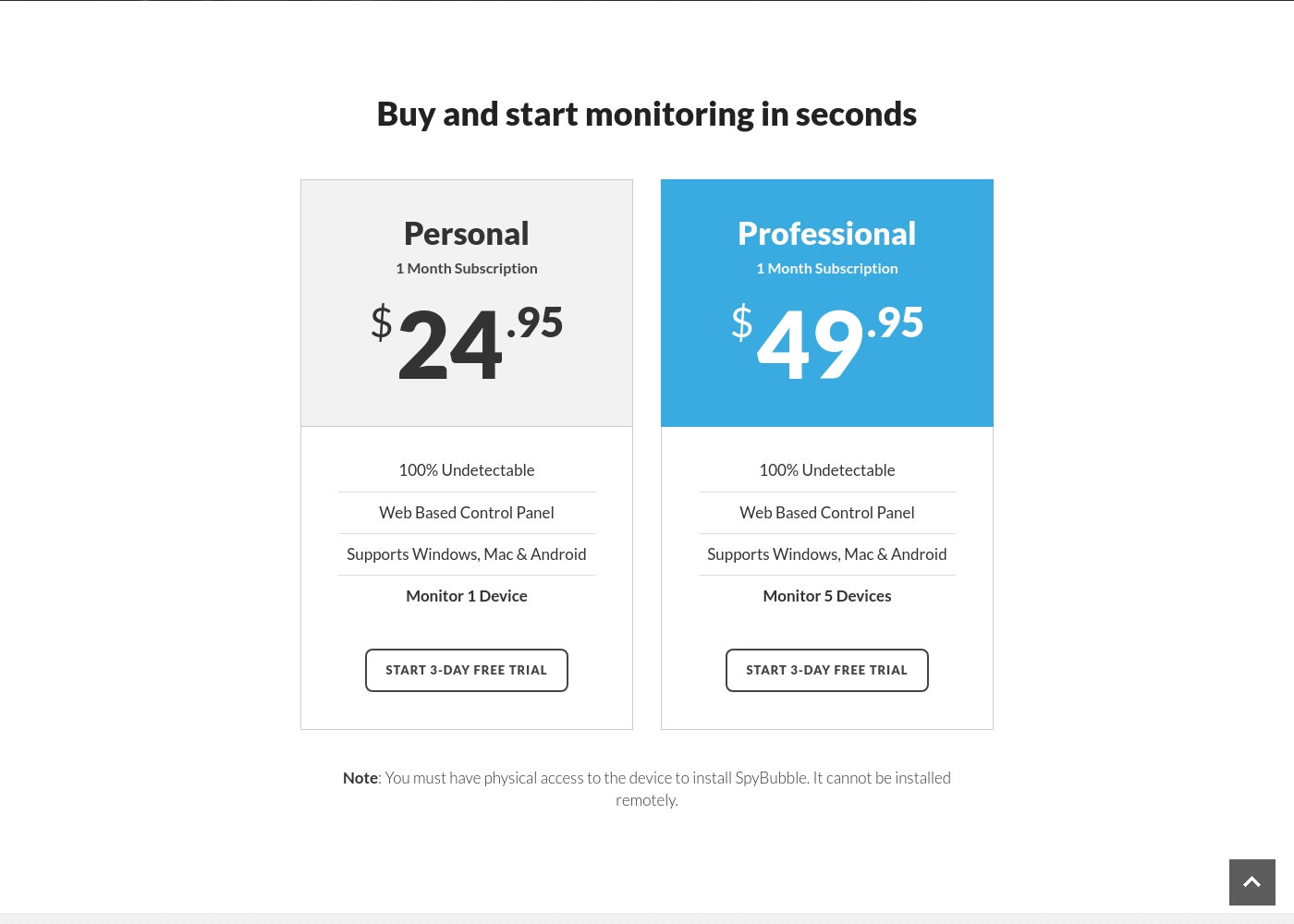
SpyBubble costs between $24.95 and $49.95 per month with 2 plans: Personal at $24.95, and Professional at $49.95.
You can choose between two straightforward monthly plans, depending on how many devices you need to monitor. Both options currently provide access to a 3-day free trial period.
Personal
Price: $24.95 per month Best For: Individual device monitoring Other Features:
- 100% Undetectable monitoring
- Web Based Control Panel access
- Supports Windows, Mac, and Android
- Monitor 1 Device
- 100% Undetectable
- Web Based Control Panel
- Supports Windows, Mac & Android
- Monitor 1 Device
- 100% Undetectable
- Web Based Control Panel
- Supports Windows, Mac & Android
- Monitor 5 Devices
Pricing Notes
- SpyBubble is priced monthly, offering a low barrier to entry and a 3-day free trial.
- Net Nanny requires an annual commitment but offers far greater savings via volume device licensing.
- The Net Nanny 20 Devices plan costs only $89.99 annually, making it less than $5 per device per year.
- SpyBubble’s highest tier costs $49.95 monthly but only covers a maximum of five devices.
Pricing Head-to-Head
User Reviews
Net Nanny currently holds a very poor 2.1 rating on Trustpilot, reflecting widespread customer dissatisfaction. Users frequently report critical failures in core functionality and serious concerns regarding billing practices.
Recurring complaints revolve around system reliability; many users state the software does not work properly on modern devices, citing issues like apps ignoring set time limits, device freezes, and wildly inaccurate dashboard reporting (e.g., usage times ticking up five minutes per second). Beyond technical faults, customers vehemently criticize Net Nanny’s handling of subscriptions and auto-renewal.
The software doesn't work consistently after a restart; I always have to sign in manually. Since installing it, my Mac freezes frequently during downloads. I have not yet received any response from customer service about these issues.
The 3.0-star rating on Trustpilot reflects a stark divergence between user experiences. On one hand, a few users praised SpyBubble as the best tracking app they’ve used, highlighting its quick setup and effective acquisition of media, messages, and call logs.
They specifically noted the convenience of media tracking and reports updating fast. However, the majority of detailed negative feedback aggressively challenges the service’s core promises and reliability.
The app suddenly showed a red mirroring icon on the target phone, instantly making the monitoring obvious. My entire goal was foiled because the target became suspicious and changed devices. Customer service could not resolve this major security flaw or offer a useful solution.
Our Verdict
The choice between Net Nanny and SpyBubble depends entirely on your monitoring philosophy. Neither solution is flawless, but they serve vastly different requirements. You must decide whether you need active content prevention or secretive activity logging. Net Nanny is the visible, safety-first defensive wall for protecting minors online. It excels with dynamic web filtering and its robust porn blocker. Furthermore, Net Nanny provides instant safety alerts for dangerous topics like illegal drugs or weapons. The 20 Devices Family Pass offers huge annual value for large, device-heavy families. SpyBubble specializes in discreet, background logging of communications and device usage. If you need recorded evidence, SpyBubble automatically tracks sent texts and call logs. Its monthly pricing starting at $24.95, and its included 3-day trial are its main upsides. Key differences like iOS support and scalability are deciding factors. Choose Net Nanny if you need to protect many different devices, including Apple and Android. Opt for SpyBubble only if you absolutely require secretive tracking of communication logs on a maximum of five devices. We recommend Net Nanny for most family use cases due to its superior coverage and essential proactive safety features. SpyBubble is solely for focused, short-term data logging on specific, non-Apple devices, despite reliability concerns.
Frequently Asked Questions
Does SpyBubble or Net Nanny provide better support for iOS devices?
Net Nanny provides comprehensive support for iOS (iPhone/iPad) devices on its family plans. SpyBubble does not currently support any iOS devices, focusing only on Android and desktop. If you own any Apple device, Net Nanny is the necessary choice.
Which tool is cheaper per device for large families: SpyBubble or Net Nanny?
Net Nanny is significantly cheaper for families needing volume protection. Net Nanny’s 20-device plan costs less than $5 per device annually. SpyBubble maxes out at 5 devices and is priced per month, making it much more expensive overall.
Does Net Nanny offer a free trial like SpyBubble does?
No, Net Nanny typically requires an annual purchase commitment upfront. SpyBubble includes a valuable 3-day free trial with all its monthly subscription plans. Use the SpyBubble trial period to test the app thoroughly.
Can I use Net Nanny to record text messages, or is that a SpyBubble feature?
Recording individual text messages and call logs is a core feature of SpyBubble. Net Nanny focuses on filtering web content and reporting search activity. You must use SpyBubble if message logging is your primary requirement.
Is SpyBubble truly undetectable, unlike Net Nanny?
SpyBubble claims to be 100% undetectable; Net Nanny is visible as a parental control tool. However, many SpyBubble user reviews report obvious detection failures, like popups or red mirroring icons. Reliability is a significant concern for both tools.
Does SpyBubble require physical access to install? What about Net Nanny?
SpyBubble explicitly requires mandatory physical access to the target device for every installation. Net Nanny does not state this restriction, using a more standard online installation method. If physical access is difficult, avoid SpyBubble.
Ready to Choose?
Both tools have their strengths. Choose based on your specific needs.