Munch vs Submagic
Munch and Submagic both leverage AI to repurpose long-form video content. Munch is powerful for high-volume content ideation and trend-tracking clips. Submagic wins easily on quality, efficiency, and professional captioning features. Your choice depends entirely on whether you prioritize quantity or high-end quality.
Best for: Brands needing high-volume content ideas for rapid testing across social media, Digital Marketers focused mainly on tracking trend insights and quick ideation
Best for: Professional Content Creators demanding high-quality, 4K resolution exports, Agencies scaling video production with strict brand consistency guidelines
High potential, hampered by technical issues.
We recognize Munch's advanced AI capabilities for smart video repurposing and its excellent interface design. However, recurring performance issues, including poor clip accuracy and inconsistent reliability, hinder the intended workflow and time savings. Overall, we see a tool with strong potential but significant technical growing pains that require user patience and manual correction.
Pros
- Intuitive, highly functional, and easy-to-navigate interface.
- Effective tool for high-volume content repurposing and rapid ideation.
- Automatically generates keywords, captions, and trend insights.
- Customer service is highly responsive for specific billing/subscription issues.
Cons
- Clip generation is frequently inaccurate, lacking context or proper cutoffs.
- Significant reliability concerns reported, including website freezing and bugs.
- Exported video and sound quality are often reported as poor.
- Rendering times can be excessively long compared to competitors.
Efficient AI video tool with outstanding support.
We’ve found that Submagic delivers impressive time savings and provides creators with highly accurate AI captions, making it a powerful resource for professional short-form video creation. The robust customer service team consistently earns excellent feedback for swift and professional resolutions. Overall, we recommend Submagic highly for individuals and teams prioritizing efficiency and reliable human support.
Pros
- Dramatically reduces editing time for subtitles (up to 80 minutes saved per video).
- Customer support is highly responsive, attentive, and consistently professional.
- High dictation accuracy, reliably handling jargon and various accents.
- The platform is intuitive and very easy to use for daily content creation.
Cons
- The free trial is limited, requiring a paid plan to remove the mandatory export watermark.
- Users desire more customization, such as the ability to replace video/re-sync captions without re-editing.
- Some advanced features are siloed and not broadly accessible across all paid plans.
AboutMunch
Munch is an advanced AI platform built to revolutionize content repurposing. It transforms your ready-made long-form content into engaging, stand-alone clips ✨. Instead of just randomly chopping up videos, Munch uses smart algorithms to identify the most engaging moments with context intact. For those needing a full marketing solution, Munch also offers Munch Studio. This new product plans, creates, and posts content for you, ensuring everything is always on-brand. Munch is ideal for Brands, Digital Marketers, Media Agencies, Social Media Managers, and Content Creators.
AboutSubmagic
Submagic is an all-in-one platform for effortless short-form video creation. It’s the new, fast way to edit videos and create captivating shorts that drive conversions. This powerful AI tool is widely trusted, used by over three million creators, and loved by established companies. ✅ Submagic is specifically designed to give teams and businesses everything they need to create professional and viral content much faster.
Highlights
Feature Comparison
Features Overview
We highlight the main differences and pick a winner for each feature.
AI Clip Generation & Accuracy
Munch produces high volume clips; Submagic delivers highly reliable, high-quality moment extraction.
Munch uses proprietary AI to find trend-tracking contextual "gold nuggets." Users report clips often lack context and frequently need extensive manual correction. This approach makes Munch better suited for rapid content ideation and testing volume. Submagic's AI instantly extracts the best moments from long videos to create viral shorts. Its core promise is efficiency and minimizing the need for manual clipping. The resulting clips are designed to be immediately impactful. The key trade-off is volume versus reliability in the output quality. Munch gives you many clips quickly but Submagic offers far more polished, reliable moments. If accuracy is your top concern, Submagic's output is consistently rated higher by users. Munch users frequently cite poor, unusable cutoffs.
Output Quality & Resolution
Submagic offers professional 4K export quality; Munch users frequently complain about poor, low-resolution exports.
Munch users widely report that the exported video and sound quality are often disappointingly poor. This low resolution severely limits using the content professionally or presenting it to clients. Technical complaints plague Munch's reviews. Submagic offers scalable output, including professional export in 4K resolution at 60 FPS. Its top tier ensures media agencies can maintain high brand and technical standards. Submagic focuses distinctly on technical quality. Submagic is clearly pushing professional, broadcast-ready technical quality across its plans. Munch relies heavily on the user fixing quality issues manually after export. For any team sharing clips publicly or professionally, Submagic's quality guarantee makes it superior. Munch is hard to justify for high-end digital production needs.
Captioning & Accessibility
Submagic excels with 99% accuracy across 48 languages; Munch offers automatic captions but lacks specific metrics.
Munch automatically generates captions, subtitles, and keywords to maximize content reach immediately. Its basic accessibility makes the clips searchable right away. No specific language support or accuracy metrics are currently revealed for Munch. Submagic provides beautiful, AI-powered captions with an impressive 99% accuracy in 48 languages. It includes trendy animated captions and global translation capabilities. This makes Submagic an extremely powerful tool for global audiences. Submagic’s focus on accessibility includes specialized features like a custom words dictionary for brand consistency in text. Munch’s captioning seems more of a necessary byproduct of the clipping process. If your audience is global or requires specialized, accurate terminology, Submagic offers the reliability and multi-language support you need immediately.
Editing Workflow
Submagic offers revolutionary text-based editing to simplify post-production; Munch relies more on effective automated clipping.
Munch accelerates the workflow by handling the heavy lifting of identifying clips from long-form video assets. The primary time savings come from reducing the initial manual search time. It is highly efficient for content extraction. Submagic allows users to edit video by simply trimming text, cutting silences, and filler words instantly. This powerful text-based trimming feature aims to save users 10 hours every single week. Submagic is an AI editing revolution. The core difference is that Submagic replaces significant manual *editing* steps. Munch replaces significant manual *sourcing* effort. Submagic also includes features like AI Eye Contact Correction to polish the speaker's delivery easily. Submagic turns raw footage into polished shorts within three rapid clicks.
Transparency & Pricing
Submagic offers clear, tiered pricing based on quota; Munch does not publish any pricing publicly, requiring sign-up access.
Munch does not publish specific pricing tiers or costs publicly on its current website pages. Customers must use the 'Try for Free' option to likely access the detailed subscription structure. This lack of pricing transparency often proves frustrating. Submagic provides transparent, predictable pricing, ranging from $12 to $69 per member per month. Costs scale clearly based on team size and video duration limits. This difference is vital: Submagic allows easy budget forecasting based on clear, published limits. Munch does not allow for quick budget review or comparison. Submagic allows users to immediately compare pricing and features across Starter, Pro, and Business plans before subscribing.
Customer Support
Submagic's support is consistently praised as professional and responsive; Munch's support is highly inconsistent, particularly for technical issues.
For Munch, positive user feedback confirms fast response times for billing or subscription issues. However, technical support and cancellation requests are often reported as slow or ignored. This lack of consistency is a major issue. Submagic users frequently praise the support team for being responsive, attentive, and highly professional. Priority support and faster rendering are benefits reserved for the top-tier plan. Submagic staff often anticipate user issues and proactively resolve complicated issues swiftly and professionally. Munch's technical reliability issues are compounded by slow technical support. If you need reliable assistance when troubleshooting, Submagic is clearly the safer choice based on overwhelming user sentiment and reviews.
User Sentiment & Reliability
Submagic has strong, positive sentiment confirming high efficiency; Munch has low sentiment centered on technical bugs and poor quality.
Munch currently holds a low Trustpilot rating of 2.9/5.0 due to recurring technical bugs and poor quality exports. Users frequently feel the necessary manual correction negates all the automation time savings. Reliability is a significant concern for Munch users. Submagic enjoys a high rating of 4.4/5.0, with users confirming the product delivers dramatic time savings. Reliable AI and consistently responsive customer support contribute to this high satisfaction. Submagic is considered a powerful and reliable AI tool. The core reliability of the AI clip generation and the technical output quality is the key difference in user opinion. This factor heavily divides the two tools. Submagic users feel the tool is reliable and worth the monthly cost; Munch users often note the tool is "too expensive" given the poor results they receive.
While the specific pricing tiers aren't visible right now, we can review what we know about the packages if they become available. Keep in mind that Munch uses advanced AI to distill the most engaging contextual clips from your long-form videos.
Since no specific plan details are currently displayed, we cannot list individual plan features, prices, or recommendations. If you are a content creator, digital marketer, or social media manager, Munch promises to simplify your workflow and keep you consistent across platforms by extracting effective clips automatically.
To begin using Munch, you'll see a clear option to Try for Free on their website. This indicates they offer a way to experience the tool without immediate financial commitment, either meaning a basic free plan or a time-limited free trial. Check the sign-up page for clarity on any limits associated with this free option.

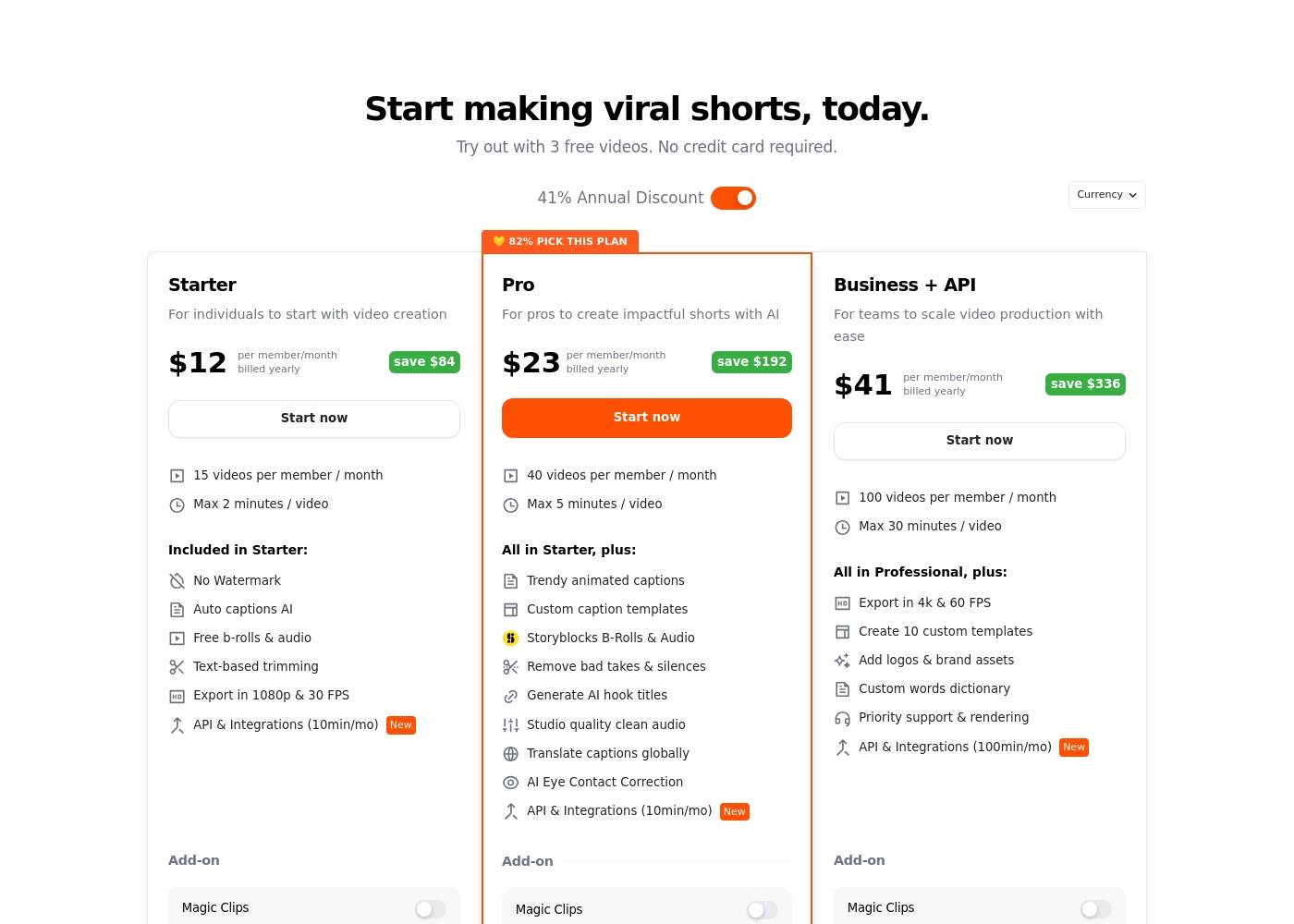
Submagic costs between $12 and $41 per member per month, billed annually, across three scalable plans: Starter at $12, Pro at $23, and Business + API at $41.
We structure our plans to fit your content needs, whether you are an individual creator or a large team. Here is a breakdown of what each plan offers.
Starter
Price: $12/member/month (billed yearly) or $19/member/month (billed monthly) Best For: Individuals to start with video creation Other Features:
- 15 videos per member/month
- Maximum video duration of 2 minutes
- No Watermark on exports
- AI Auto captions and text-based trimming
- Free B-rolls & audio
- Export in 1080p and 30 FPS
- No Watermark
- Auto captions AI
- Free b-rolls & audio
- Text-based trimming
- Export in 1080p & 30 FPS
- All Starter features
- Trendy animated captions
- Custom caption templates (3 templates)
- Storyblocks B-Rolls & Audio
- Remove bad takes & silences
- All Pro features
- Export in 4k & 60 FPS
- Create 10 custom templates
- Add logos & brand assets
- Custom words dictionary
Pricing Notes
- Munch does not publish its specific pricing tiers, requiring users to use the 'Try for Free' option to discover costs.
- Submagic costs range from $12/member/month (Starter, annual) up to $69/member/month (Business + API, monthly).
- Submagic uses a per-member, per-month quota model, making costs highly scalable with clear usage limits and constraints.
- Submagic offers significant savings, up to 41%, if users choose annual billing over month-to-month subscription.
- The Submagic free trial allows 3 videos but applies a large, mandatory watermark upon export.
Pricing Head-to-Head
User Reviews
Users have sharply contrasting experiences with Munch, resulting in a low overall Trustpilot rating of 2.8/5.0 💔. Positive feedback highlights the general ease of use and strong interface, noting its potential as a powerful ideation tool that generates usable content rapidly.
However, issues regarding accuracy and reliability are widespread. Many users report that the AI selects random clips, misses critical context, and features poor cutoffs, which makes the core technology frustrating.
The potential of Munch and the ease of use is why I upgraded immediately. This is a powerhouse app that quickly generates a ton of useful content. I'm excited to explore additional features and integrations.
Users praise Submagic overwhelmingly for its high efficiency and impressive AI capabilities. Many report dramatic time savings, sometimes reducing subtitling effort from 90 minutes to only 10 minutes.
The dictation accuracy is consistently highlighted as excellent, performing well even with complex scientific jargon or strong accents, confirming the tool’s core promise. A major strength is the customer support; staff members like Stefan and Delton are frequently mentioned for providing swift, professional, and attentive service, often resolving complicated issues quickly.
I received the quickest and most excellent service from Stefan at 12:38 a.m. on Sunday morning! He solved my problem promptly and proactively anticipated my worry about running out of credits. Thank you very much, Submagic support team.
Our Verdict
The choice between Munch and Submagic hinges on quality, reliability, and specific workflow needs. For the majority of professional creators and businesses, **Submagic** is the clearer, more reliable recommendation. It delivers superior, polished output consistently. Munch’s core superpower is high-volume, automated repurposing and trend-tracking capability. If your priority is generating dozens of fast, trend-focused content ideas, Munch delivers this volume quickly. But you must be ready to manage poor technical quality and manual correction of inaccurate clips later. Submagic focuses on making every single short video professional and highly viral-ready. Its editing features, like text-based trimming and AI Eye Contact Correction, save you serious manual time editing. Submagic also guarantees 99% accurate captions across 48 languages and offers clear, transparent pricing. The decisive factor is technical reliability and support quality. Submagic's guaranteed 4K export quality and highly responsive support team contrast sharply with Munch's inconsistency and major reported technical frustrations. Submagic provides the trust and stability required for serious creators. Choose Submagic if you need pristine quality, clear pricing, and reliable team features for scaling high-end production. If you strictly need high-speed ideation and are fine with technical uncertainty and manual fixes, you might sample Munch, but Submagic offers a professional path to consistent viral content.
Frequently Asked Questions
Which is better for scaling production: Munch or Submagic?
Submagic is definitively better for scaling, especially for agencies and teams. Its Business + API plan offers up to 100 videos a month and supports unlimited users. Munch focuses on automated clip volume but lacks these robust scaling structures.
Is Munch worth the risk given its reported technical issues?
Munch is a high-risk proposal based on user reviews, citing technical bugs and poor quality exports. Submagic offers far greater stability and reliability, confirmed by its high user ratings. You must weigh Munch's speed against its likely technical frustration.
Does Munch offer features like the AI Eye Contact Correction found in Submagic?
No, Munch focuses mainly on clip extraction and content ideation post-video. Submagic offers specialised polish features like AI Eye Contact Correction and text-based trimming to refine the final video quality.
Is the pricing for Munch or Submagic more transparent?
Submagic is much more transparent, offering detailed, per-member pricing from $12-$69/month. Munch does not publish its prices publicly, which creates friction and frustration for potential subscribers.
Which tool provides better video export quality?
Submagic provides significantly better export quality, offering up to 4K resolution at 60 FPS on its top tier. Munch users consistently complain that their exported clips are low-resolution and unusable professionally.
Can I use my team's custom brand assets in Munch or Submagic?
The Business + API plan in Submagic allows you to easily add logos and other custom brand assets. This crucial feature is not explicitly listed or guaranteed by the core Munch product offering.
Ready to Choose?
Both tools have their strengths. Choose based on your specific needs.