mSpy vs SpyBubble
Users compare mSpy and SpyBubble for deep mobile monitoring capabilities. mSpy offers powerful features like Keylogger and crucial iOS compatibility. SpyBubble provides a simpler, cheaper entry point and supports monitoring desktop OS devices. Here is how to decide which tool is right for your needs.
Best for: Parents needing deep, visual proof via Screenrecorder and Keylogger tools., Users who absolutely must monitor iOS devices (iPhone/iPad) via iCloud methods.
Best for: Users requiring monitoring for Windows or Mac computers, alongside Android devices., Buyers prioritizing a 3-day free trial period to test basic foundational tracking.
Effective Monitoring with Severe Pitfalls
We found mSpy offers a highly capable feature suite, including Keylogger, Screenrecorder, and robust GPS tools, which are powerful when functioning correctly. However, external reports show major issues surrounding reliability, hidden pricing, and difficult installation processes. Overall, this tool provides powerful monitoring features, but its severe operational and billing pitfalls prevent a strong recommendation.
Pros
- Excellent feature set including Keylogger and Screenrecorder capabilities.
- Effective remote features like call recording and microphone control (available in Extreme plan).
- Geofencing and GPS tracking are praised for accurately monitoring location.
- Family Kit successfully allows monitoring up to three devices simultaneously.
Cons
- Frequent reports of inaccurate data tracking, app failure, or connectivity issues.
- Users report that the service stops working after a short period, requiring constant reinstallation.
- Many customers report unauthorized billing, hidden costs, and surprise fees for required add-ons.
- The refund policy is considered very narrow, making returns extremely difficult to obtain.
Promises Fall Short of Performance
We note SpyBubble offers a clear pricing structure and includes a three-day trial, supporting Windows, Mac, and Android devices. However, user reports consistently reveal major issues regarding data reliability, security failures, and frustrating customer service. Overall, we cannot recommend this software until the significant performance issues, lack of reliable undetectable operation, and questionable refund practices are fully resolved.
Pros
- Straightforward $24.95 entry price for single-device monitoring.
- Professional plan covers up to five different devices.
- Includes a valuable 3-day free trial period.
- Effective tracking of media, messages, and call logs (when the app functions correctly).
Cons
- Application frequently malfunctions, failing to update or provide complete logs.
- Target device can display obvious detection warnings, violating the 'undetectable' claim.
- Essential features like audio/video streaming are often reported as non-functional.
- The setup process is sometimes described as stressful or difficult.
AboutmSpy
mSpy is the #1 Choice in the United States for trusted parental control. It is a powerful mobile monitoring solution, more than just a simple app. This tracker lets you see exactly what’s happening on their phone without needing to stand over them. It works great on your favorite device, offering solutions that are compatible with any operating system 💡. Installation is simple, allowing you to get the full monitoring power without restrictions, even offering local sync and non-jailbreak solutions.
AboutSpyBubble
SpyBubble is a monitoring application designed for effective tracking. It offers an easy solution for those who need to keep tabs on digital device activity. Several customers found that after initial setup, the app handles everything else. User reports show that it delivers expected results and sometimes exceeds expectations. Installation requires physical access to the device; note that it can't be installed remotely. 💡
Highlights
Feature Comparison
Features Overview
We highlight the main differences and pick a winner for each feature.
iOS Device Support
mSpy fully supports iOS monitoring; SpyBubble does not support iPhones or iPads.
mSpy is built as an iOS solution, using the iCloud credentials method. This allows mSpy to track Apple devices, often without needing physical access. It’s an essential feature for comprehensive mobile parental control. SpyBubble currently focuses on monitoring desktop (Windows/Mac) and Android devices only. SpyBubble is completely incompatible with all Apple iOS devices like iPhones and iPads. This significantly limits SpyBubble's usefulness for many family users. If monitoring an Apple device is non-negotiable, your clear choice must be mSpy. SpyBubble cannot provide the necessary coverage for iPhones or iPads. This feature alone is often the deciding factor between mSpy and SpyBubble.
Deep Data Capture
mSpy provides Keylogger and visual Screenrecorder; SpyBubble offers foundational logging only.
mSpy offers robust monitoring tools like the Keylogger. This feature captures every typed word, giving you comprehensive chat history. The integrated Screenrecorder provides regular visual proof of device activity, uploading screenshots. SpyBubble focuses on foundational tracking like text message logs and call history. It completely lacks the advanced visual and text capture tools of mSpy. Users rely solely on the app's ability to pull existing data logs. The difference is proactive recording versus reactive logging. mSpy captures activity as it happens; SpyBubble collects what the device saves. For true investigative depth, mSpy is far superior. SpyBubble's limited capture often leaves critical conversation gaps.
Reliability & Stealth
mSpy is functionally more stable; SpyBubble users report frequent app failures and detection problems.
mSpy operates in hidden mode and is praised for its effective monitoring features when data connectivity works. User complaints usually concern billing or installation, not detection. mSpy is designed to be truly invisible. SpyBubble claims 100% undetectable monitoring, but this promise often fails completely. Users report obvious detection warnings, such as red mirroring icons or popups on the target device. This compromises SpyBubble's effectiveness. If the app reveals itself, the entire monitoring operation is compromised instantly. mSpy provides better functional reliability for long-term discrete tracking. SpyBubble’s frequent detection failures make it a high-risk choice for stealth monitoring.
Pricing Clarity
SpyBubble clearly reveals its monthly costs; mSpy uses very vague, unpublished pricing.
mSpy does not publish specific monthly or annual rates for its Single Device or Family Kit plans. It only vaguely states the cost is 'under $1 per day.' This opacity leads to user complaints about surprise renewal fees. Optional mSpy support add-ons like mAssistance incur separate, non-refundable fees. SpyBubble displays clear and transparent monthly pricing: $24.95 for Personal and $49.95 for Professional. This predictable structure helps budget-conscious buyers immensely. SpyBubble also includes a 3-day free trial on all plans. If you hate financial surprises, SpyBubble offers superior pricing transparency from the start. mSpy's vague pricing structure often frustrates customers and leads to billing conflict.
Free Trial Option
SpyBubble includes a 3-day trial; mSpy offers no trial for active monitoring.
SpyBubble provides a valuable 3-day free trial on every single subscription tier. This allows users to test the installation and functionality before making a full financial commitment. It’s a great way to limit financial risk. mSpy does not offer a free trial for the active monitoring subscription itself. Users can create a free account to view the Control Panel demo, but this doesn't test real data collection. You must pay upfront to activate monitoring features. For testing and minimizing risk, SpyBubble is the winner due to its generous trial period. mSpy forces you to pay first and hope the app works reliably on your device.
Device Scaling
SpyBubble supports more devices per top plan than mSpy’s Family Kit.
mSpy's top-tier subscription, the Family Kit, allows monitoring for up to three devices concurrently. This is generally suitable for families with 2-3 children or multiple target devices. The device count is fixed at three. SpyBubble’s Professional plan covers up to five separate devices simultaneously. This significantly higher device count is ideal for larger families or situations requiring broader coverage. SpyBubble simplifies tracking across five devices. If maximum device capacity is your main concern, SpyBubble offers a better deal with five monitoring seats. mSpy is limited to a lower count of three devices.
mSpy offers a choice between two main subscription options, helping users align coverage with their specific monitoring needs. Both plans include the powerful suite of monitoring features available through your personal Control Panel.
Single Device Plan
Best For: Monitoring one child or device Other Features:
- Provides remote access to call logs and contact lists.
- Allows viewing of received, sent, and deleted text messages.
- Includes access to all GPS location history and geofencing alerts.
- Supports monitoring across all major social media and messenger apps.
- Offers features like Keylogger and Screenrecorder capabilities.
This plan is ideal if you only need to keep an eye on a single smartphone or tablet. It delivers the full range of mSpy features for comprehensive, invisible surveillance on one target device. This is the simplest and most accessible option for new users.
- Coverage for one device only
- Invisible monitoring mode
- Keylogger and Screenrecorder
- GPS Location Tracking
- Social Media monitoring (WhatsApp, Snapchat, etc.)
- Coverage for up to 3 devices simultaneously
- All features of the Single Device Plan
- Suitable for monitoring multiple children or mobile devices
- Centralized control via a single Control Panel
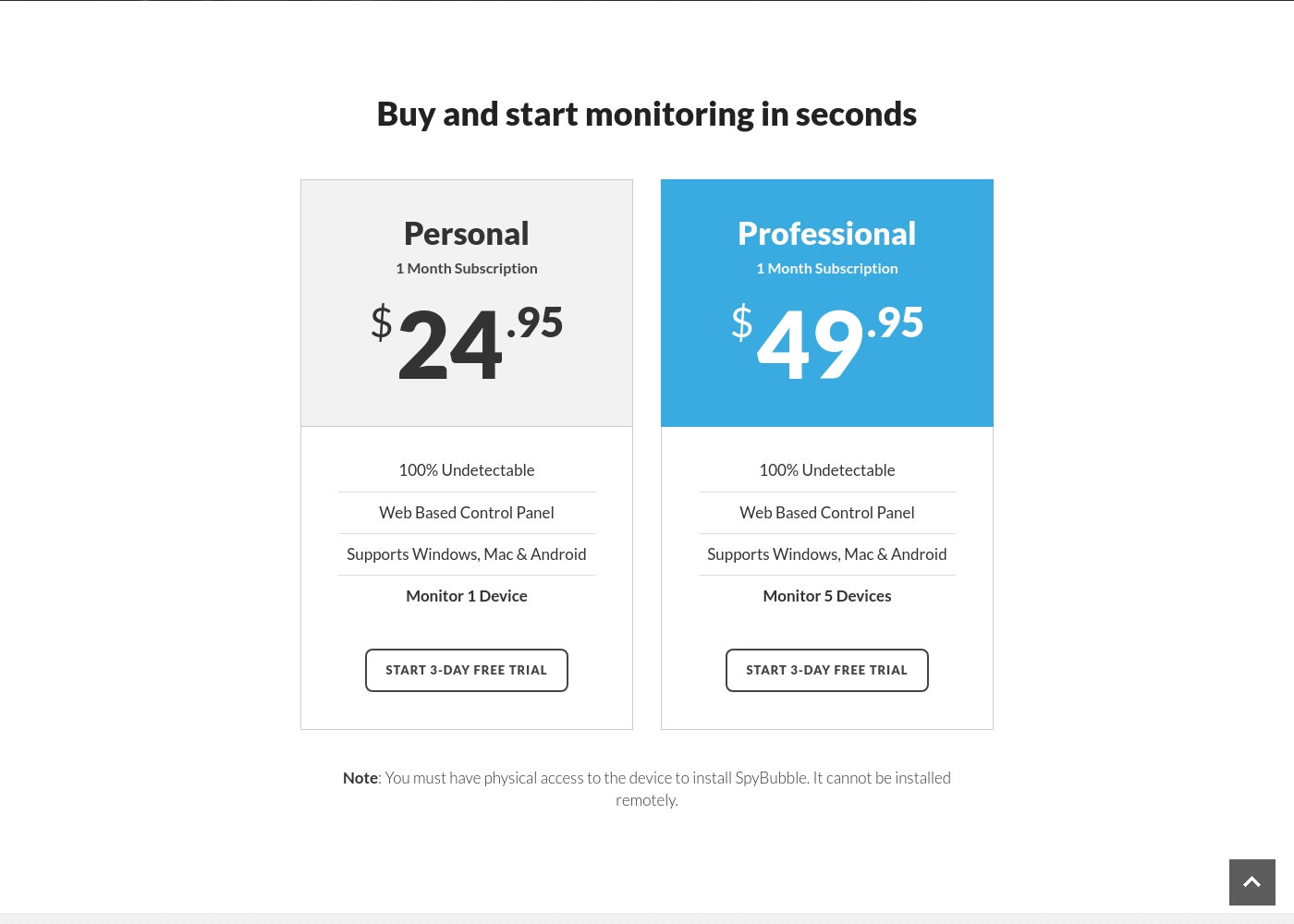
SpyBubble costs between $24.95 and $49.95 per month with 2 plans: Personal at $24.95, and Professional at $49.95.
You can choose between two straightforward monthly plans, depending on how many devices you need to monitor. Both options currently provide access to a 3-day free trial period.
Personal
Price: $24.95 per month Best For: Individual device monitoring Other Features:
- 100% Undetectable monitoring
- Web Based Control Panel access
- Supports Windows, Mac, and Android
- Monitor 1 Device
- 100% Undetectable
- Web Based Control Panel
- Supports Windows, Mac & Android
- Monitor 1 Device
- 100% Undetectable
- Web Based Control Panel
- Supports Windows, Mac & Android
- Monitor 5 Devices
Pricing Notes
- SpyBubble is transparent with monthly costs ($24.95 to $49.95), unlike mSpy's vague 'under $1 per day' quote.
- SpyBubble offers a critical 3-day free trial, which mSpy does not provide for active monitoring.
- mSpy requires users to pay separate, non-refundable fees for specific technical assistance services like 'mAssistance'.
- mSpy offers implied yearly options; SpyBubble only offers monthly subscriptions.
Pricing Head-to-Head
User Reviews
mSpy maintains a moderate 2.9-star rating on Trustpilot, reflecting significant variation in user experiences. Many satisfied customers specifically praise the effective monitoring features, such as remote call recording, screenshot capture, and the precise Geofencing alerts, which help parents track children's locations.
For those features that work, the software is considered powerful. However, the user base reports heavy friction regarding pricing, reliability, and support.
Matthew Stone was crucial when I needed an urgent reinstallation on my daughter’s phone. I only had ten minutes with the device, and he handled everything remotely. He got things rolling again quickly and professionally.
The 3.0-star rating on Trustpilot reflects a stark divergence between user experiences. On one hand, a few users praised SpyBubble as the best tracking app they’ve used, highlighting its quick setup and effective acquisition of media, messages, and call logs.
They specifically noted the convenience of media tracking and reports updating fast. However, the majority of detailed negative feedback aggressively challenges the service’s core promises and reliability.
The app suddenly showed a red mirroring icon on the target phone, instantly making the monitoring obvious. My entire goal was foiled because the target became suspicious and changed devices. Customer service could not resolve this major security flaw or offer a useful solution.
Our Verdict
Choosing between mSpy and SpyBubble means balancing feature depth against price and device needs. For almost all comprehensive mobile monitoring, mSpy is the superior yet more expensive choice. SpyBubble offers a cheaper entry point but struggles significantly with reliability. mSpy’s superpower is its deep intelligence gathering and powerful content control features. It gives parents true visual proof using its Keylogger and Screenrecorder capabilities. mSpy boasts robust features like Geofencing, Website Blocking, and monitoring of AI Chatbots like Gemini. Crucially, mSpy fully supports essential iOS device monitoring. SpyBubble shines with clear, predictable pricing and multi-platform coverage for desktops. You start at a clear $24.95 monthly cost and can monitor up to five devices. SpyBubble also includes a valuable 3-day free trial to test the basic functionality first. However, SpyBubble's most significant weakness is its operational failure and poor stealth mode. Users frequently report the SpyBubble app failing and becoming obviously detectable on the target device. This massive breakdown severely compromises SpyBubble's utility and reliability. If you need advanced, proactive control, Keylogging, or must monitor an iPhone, choose mSpy, despite its high cost friction. If your targets are Windows, Mac, or Android and you need coverage for five devices, SpyBubble is cheaper but expect potential functionality headaches.
Frequently Asked Questions
Which is better for monitoring iOS devices: mSpy or SpyBubble?
mSpy is the only option that officially supports iOS devices via the iCloud monitoring method. SpyBubble is incompatible with iPhones and iPads. If you need to monitor an Apple mobile device, mSpy is the clear winner.
Does SpyBubble have a Keylogger feature like mSpy?
No, SpyBubble does not offer a dedicated Keylogger or Screenrecorder like mSpy does. mSpy captures every keystroke and regular screenshots. SpyBubble only provides foundational data logging, making mSpy better for detailed analysis.
Which monitoring app has transparent pricing: mSpy or SpyBubble?
SpyBubble offers fully transparent monthly pricing, ranging from $24.95 to $49.95. mSpy uses vague pricing, quoting 'under $1 per day.' mSpy is less transparent and involves non-refundable add-on fees.
Can SpyBubble be installed remotely, or is physical access required?
Physical access to the target device is always mandatory for SpyBubble installation. mSpy, however, can often be installed remotely on iOS devices using the non-jailbreak iCloud method.
Which tool monitors more devices: mSpy or SpyBubble?
SpyBubble monitors more devices in its top tier. SpyBubble’s Professional plan covers up to five simultaneous devices. mSpy’s Family Kit is limited to only three concurrent devices.
Is mSpy truly undetectable compared to SpyBubble?
mSpy operates in effective stealth mode, with complaints focusing on data connectivity, not detection. SpyBubble's stealth claim is frequently broken, with users reporting the app becoming obviously visible on the device.
Ready to Choose?
Both tools have their strengths. Choose based on your specific needs.