Moosend vs Sender
Moosend and Sender both promise simple, affordable email marketing. Moosend is known for its budget-friendly plans and stellar live chat support. Sender stands out with its incredibly generous free plan and fast setup.
Best for: Small businesses prioritizing responsive live chat support, Marketers needing advanced automation and custom reporting on paid plans
Best for: Startups and solopreneurs on a zero budget, E-commerce stores using WordPress or WooCommerce
Affordable marketing powered by superb support.
We found Moosend excels in delivering powerful email marketing tools at a highly affordable price point, backed by exceptionally responsive live chat support. Overall, while the platform offers significant value for money and ease of use, we urge caution due to reported severe technical bugs affecting critical data reliability.
Pros
- Highly competitive and budget-friendly pricing structure.
- Exceptional and prompt 24/5 customer support via live chat.
- Intuitive interface supports easy campaign creation and setup.
- Effective e-commerce automation features with ready-to-use recipes.
Cons
- Reports of severe technical bugs, including unexpected data deletion.
- Inconsistent follow-up during the initial pricing and sales process.
- Trial periods sometimes end prematurely without explanation.
Simple, free, and effective for basics.
We found Sender to be a solid, no-frills tool for core email marketing tasks. Its free plan is a major draw for startups and small businesses. Overall, it delivers good value with a straightforward interface, though it may lack some advanced features for power users.
Pros
- Extremely generous free plan (2,500 contacts, 15k emails/month).
- Clean, user-friendly interface that's easy to learn.
- Transparent, affordable pricing with no hidden fees.
- Includes essential automation features from the start.
Cons
- Advanced features and segmentation are limited on lower tiers.
- Some users report occasional email deliverability issues.
- Integrations can be inconsistent with certain platforms.
- Free plan lacks SMS marketing capabilities.
AboutMoosend
Moosend provides truly affordable email marketing solutions designed for businesses of various sizes. They make a commitment to strong customer assistance, whether you have 500 contacts or 1,000,000. The pricing model emphasizes flexibility, so you choose what fits your budget best. 💡
AboutSender
Sender is an email marketing platform designed for businesses of all sizes. It helps you build, automate, and send email campaigns that people actually want to read. Think of it as your straightforward tool for staying in touch with your audience and driving sales. 🚀
Highlights
Feature Comparison
Features Overview
We highlight the main differences and pick a winner for each feature.
Pricing & Value
Moosend starts low but charges per contact. Sender offers a standout free tier for beginners.
Moosend's Pro plan begins at $7/mo for 500 contacts on annual billing. Pricing scales directly with your contact list. You can save 15-20% with longer commitments. Sender provides a robust Free Forever plan supporting 2,500 subscribers and 15,000 emails monthly. Paid plans start at $7/mo for 1,000 subscribers. The key difference is entry cost. Sender lets you start for free with a generous limit, while Moosend requires payment from day one. For a new blog with 500 subscribers, Sender's free plan is a no-brainer. Moosend's paid plan becomes better value once you need more advanced automation features.
Email Automation
Moosend offers powerful multi-step flows on higher tiers. Sender includes basic automation on all plans.
Moosend's entry-level Pro plan includes one published marketing automation workflow. The Moosend+ plan unlocks multi-step workflows and conditional visibility. Sender includes email automation sequences even on its free plan. This lets you set up welcome series or nurture campaigns immediately. Moosend's advanced automation is more sophisticated but locked behind higher-priced plans. Sender's is simpler but more accessible upfront. If you need complex customer journeys based on behavior, Moosend's paid tiers are more capable. For straightforward autoresponders, Sender gets you there faster.
Customer Support
Both offer live chat, but Moosend is 24/5 while Sender promises 24/7 availability.
Moosend provides 24/5 live chat and email support across all plans. Users praise the speed and quality of help from named agents. Sender offers 24/7 live support on every plan, including the free one. This around-the-clock access is a major plus. Moosend's support is highly rated but limited to weekdays. Sender's support window is larger, which is critical for off-hours emergencies. For a team working standard hours, Moosend's excellent weekday support may suffice. If you send campaigns on weekends, Sender's 24/7 help is invaluable.
Ease of Use
Both are user-friendly. Sender emphasizes a 5-minute setup, while Moosend focuses on intuitive campaign creation.
Moosend features an intuitive interface for building campaigns and managing contacts. The setup process is straightforward. Sender is designed for speed, claiming you can set up your first campaign in about 5 minutes. It integrates easily with WordPress. Both tools avoid overwhelming beginners. Sender's marketing leans into this rapid start, while Moosend focuses on ease of ongoing use. For a non-technical user launching their first newsletter, both will feel approachable. Sender might have a slight edge in initial speed.
Reporting & Analytics
Moosend offers real-time reporting on all plans with advanced options at higher tiers.
Moosend provides real-time reporting and analytics on all paid plans. Higher tiers unlock predicted analytics and custom dashboards. Sender's analytics are included but users note they could be more detailed. The focus is on essential metrics. Moosend gives you more data to work with from the start. Sender keeps it simple, which is fine for beginners but may frustrate data-driven marketers. If you live and die by campaign metrics, Moosend's reporting suite is more robust. If you just need open and click rates, both will do the job.
Integration Ecosystem
Moosend boasts 80+ native integrations. Sender focuses on core e-commerce and CMS platforms.
Moosend offers over 80 native integrations, covering a wide range of CRMs, e-commerce platforms, and other tools. API access is also available. Sender highlights key integrations like WordPress, WooCommerce, PrestaShop, and Zapier. The list is more curated. Moosend casts a wider net, which is great if you use niche software. Sender ensures seamless connection with the most popular platforms. For a business using a less common CRM, Moosend is more likely to have a direct integration. For a typical WooCommerce store, both offer what you need.
Scalability & Limits
Moosend scales with custom plans for large lists. Sender's pricing is clear up to 200k subscribers.
Moosend's Pro plan scales directly with contact volume. Moosend+ and Enterprise plans offer custom quotes for massive lists and needs. Sender's pricing page shows plans for up to 200,000 subscribers, with a custom Enterprise tier beyond that. Costs are transparent at each level. Moosend's custom Enterprise plan (with SLA, dedicated IP) is more suited for very large organizations. Sender provides clearer pricing for the mid-market. A business growing from 10k to 50k subscribers can see exact costs on Sender's site. Moosend will likely require a sales conversation for that scale.
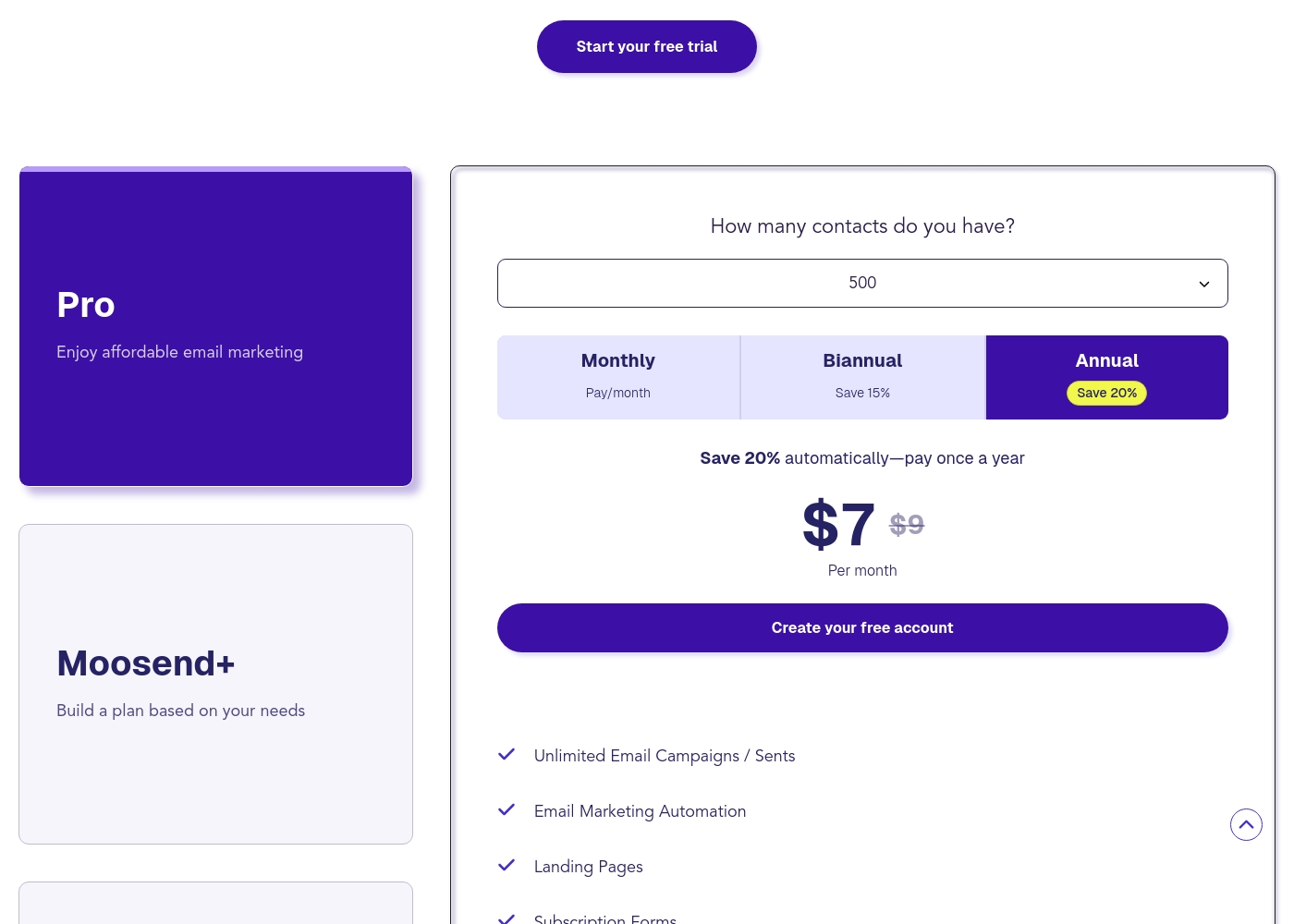
Moosend costs between $7 and custom pricing per month for paid plans, with three options available: Pro starting at $7/month (annually for 500 contacts), Moosend+ for customized needs, and Enterprise.
Let's explore which plan works best for your business goals.
Pro
Price: Starts at $7 per month (billed annually for 500 contacts) Best For: Affordable email marketing Other Features:
- Unlimited Email Campaigns / Sents
- Email Marketing Automation (1 Published Workflow)
- Landing Pages & Subscription Forms (1 Published each)
- Real-Time Reporting & Analytics
- Support for up to 2 Team Members
- Unlimited Email Campaigns / Sents
- Email Marketing Automation (1 Published Workflow)
- Subscription Forms (1 Published)
- Real-Time Reporting
- 2 Team Members
- Multi-step Marketing Automation Workflows
- Content AI-Engine
- Custom Reports (Dashboards)
- Conditional Visibility
- 5 Team Members
- Dedicated IP Add-on
- Priority Support
- Account Manager Add-on
- SSO & SAML Add-on
- SLA (Service-Level Agreement)
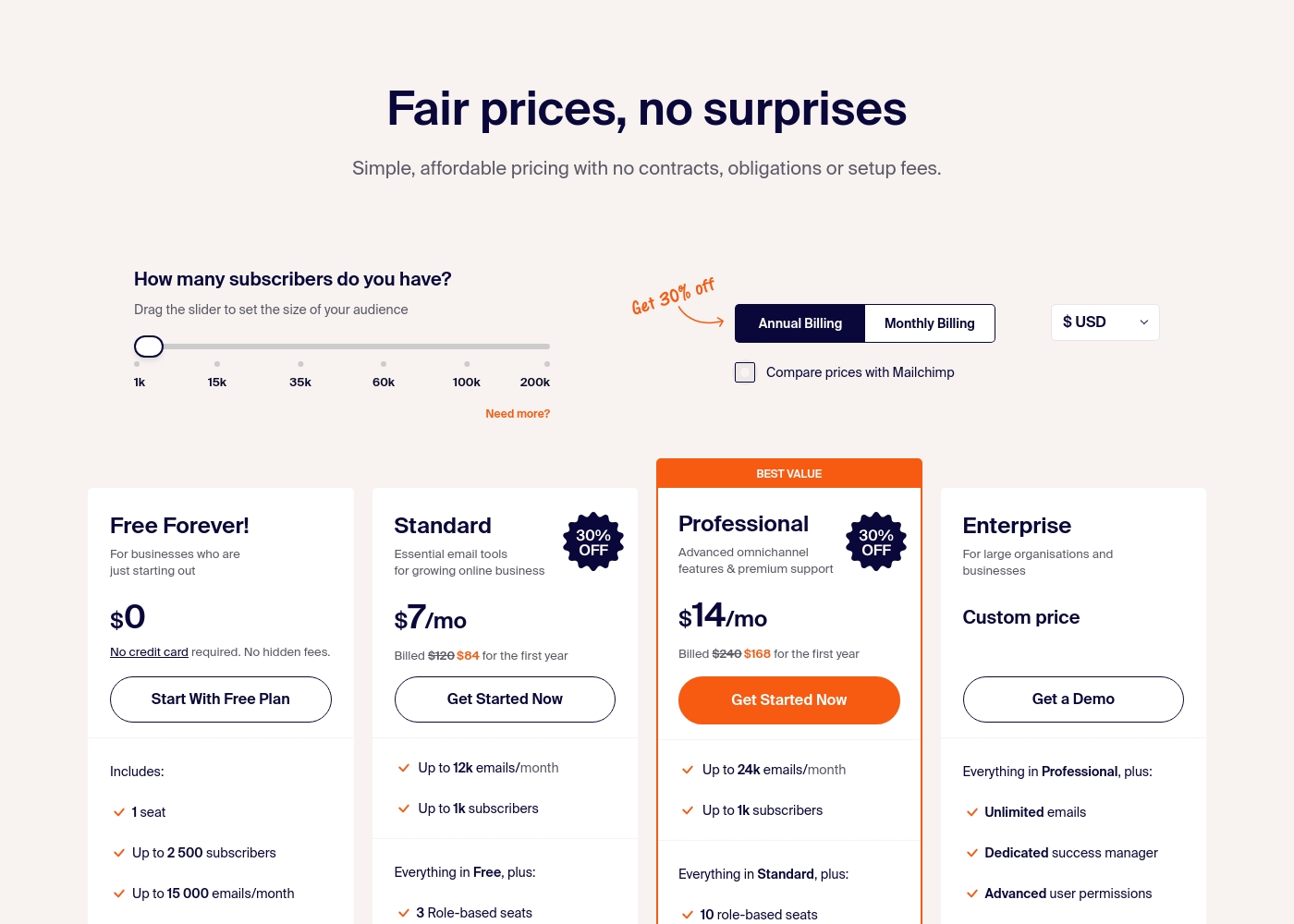
Sender costs between $0 and a custom price per month with 4 plans: Free Forever at $0, Standard at $7, Professional at $14, and Enterprise at Custom price.
Take a look at the specific features and limits included in each plan tier below.
Free Forever!
Price: $0 monthly Best For: Businesses who are just starting out Other Features: 1 seat, up to 2,500 subscribers, 15,000 emails/month, 24/7 live support, email automation.
- 1 seat
- Up to 2,500 subscribers
- Up to 15,000 emails/month
- 24/7 live support
- Email automation
- Up to 12k emails/month
- Up to 1k subscribers
- 3 Role-based seats
- Automated sequences
- Up to 24k emails/month
- Up to 1k subscribers
- 10 role-based seats
- Premium support
- Unlimited emails
- Dedicated success manager
- Advanced user permissions
Pricing Notes
- Moosend offers a 30-day free trial; Sender has a permanent free plan instead.
- Moosend's pricing is based on contact count. Sender's is based on subscriber count.
- Moosend Pro starts at $7/mo for 500 contacts (annual). Sender Standard starts at $7/mo for 1,000 subscribers (annual).
- Both offer annual discounts. Moosend saves 20%; Sender's discount is implied.
- Moosend charges for transactional emails as an add-on. Sender includes them.
- SMS marketing is available via credit purchase on Sender; not mentioned for Moosend.
Pricing Head-to-Head
User Reviews
Moosend generally receives highly positive feedback from established users, primarily centered on its exceptional value and rapid customer support. Many reviewers note that the platform is much friendlier for small business budgets 💰 compared to competitors, offering comparable features at a lower cost.
Support is frequently described as top-notch; live chat agents are praised for being friendly, knowledgeable, and solving issues within minutes, often by name (e.g., Rashid). Users appreciate the intuitive nature of the platform and the effectiveness of the e-commerce automations, leading to improved performance metrics like open and click-through rates.
As a nonprofit, pricing and ease of use are crucial for us. We switched from Mailchimp for an affordable solution and found the platform intuitive right away. The support team has been very helpful with recommendations to improve our newsletters.
User sentiment on Trustpilot and Capterra highlights Sender's generous free plan and ease of setup as major positives. Many praise the intuitive interface and reliable automation.
😊 However, some note occasional deliverability hiccups and a learning curve for advanced features. Customer support is frequently mentioned as responsive, though a few users report slow responses during peak times.
The free plan is unbeatable for a new business. I set up my first automation in minutes. The platform is simple and gets the job done without fuss.
Our Verdict
For most beginners and small businesses, Sender is the smarter starting point. Its free plan is genuinely useful and lets you grow without upfront costs. Moosend's superpower is its value on paid plans. You get unlimited sends and reliable weekday support for a very low price. Sender's superpower is accessibility. You can start for free today and have 24/7 help whenever you need it. The deciding factor is your budget and growth stage. If you have zero to spend, Sender wins. If you can afford a few dollars monthly for unlimited sends and better automation, Moosend is compelling. Choose Moosend if you need advanced automation and are ready to pay. Choose Sender if you want the best free start and simpler tools. Both are solid, but your budget will likely decide.
Frequently Asked Questions
Which is better for small teams: Moosend or Sender?
Both work well for small teams. Sender offers more user seats on lower tiers (3 on Standard plan). Moosend allows 2 users on its entry Pro plan. Sender's free plan also includes support for collaboration.
Does Moosend have a free plan like Sender?
No, Moosend does not offer a free plan. It does provide a 30-day free trial without requiring a credit card. Sender's Free Forever plan is permanent.
Is Sender worth the extra cost over Moosend?
It's not necessarily more expensive. Sender's Standard plan ($7/mo) starts at the same price as Moosend's Pro ($7/mo). Sender's main value is its free tier and 24/7 support.
Can I migrate from Moosend to Sender easily?
The provided data doesn't specify migration tools for either platform. You should check Sender's documentation or support for guidance on importing contacts from Moosend.
Which tool offers better automation features?
Moosend offers more advanced automation on its paid Moosend+ plan, including multi-step workflows. Sender includes basic automation on all plans, which is sufficient for many users.
Do both Moosend and Sender offer unlimited email sends?
No. Moosend offers unlimited sends on all its paid plans. Sender's plans have monthly email limits based on your subscription tier (e.g., 15k on free, 12k on Standard).
Ready to Choose?
Both tools have their strengths. Choose based on your specific needs.