Mobicip vs Webwatcher
Mobicip and Webwatcher both promise digital safety for kids, but their approaches differ wildly. Mobicip targets broad, consistent controls across many devices for the whole family. Webwatcher focuses on deep, discreet monitoring, often for older teens and high-risk behavior. Ultimately, the choice comes down to proactive control versus forensic surveillance.
Best for: Families needing consistent rules across 5-20 mixed devices (iOS, Windows, Android)., Parents prioritizing screen time limits and activity scheduling over deep surveillance.
Best for: Parents needing deep, discreet monitoring of one high-risk teenager's Android phone., Users prioritizing detailed capture of text messages, call logs, and social media activity (Snapchat).
Comprehensive Features, Criticized Reliability.
We found Mobicip offers comprehensive, multi-platform features like robust screen time limits and social media monitoring at a competitive annual price. Overall, we are concerned by multiple reports indicating that controls are easily circumvented by tech-savvy children, which fundamentally undermines the security promise of the product.
Pros
- App blocking and time schedules work effectively for basic enforcement.
- Supports a wide range of platforms (iOS, Android, Windows, Chromebooks).
- Competitive annual pricing tiers based on family device count.
- Email customer support is rated highly and is helpful during initial setup.
Cons
- Controls are easily bypassed by children changing device time or disabling the VPN.
- Settings frequently get corrupted or unblocked following software updates.
- Administrative functions, like account cancellation, are not available in the web portal and require contacting support.
- Technical glitches can cause connectivity problems and significant battery drain.
Extreme risk due to billing and support issues.
We found Webwatcher markets itself strongly on guaranteed functionality and comprehensive support for parental monitoring needs. However, our review of public user feedback showed severe, concrete accusations of fraudulent billing, refusal to issue refunds, and complete non-response from customer support. Overall, the serious financial and reliability risks reported by consumers necessitate a very low rating.
Pros
- Advertised compatibility across major devices (Android, iPhone, PC, Mac).
- Unlimited data storage is included in the current subscription plan.
- Setup is claimed to be quick and easy (under five minutes).
- Functionality is officially guaranteed with a full refund if issues cannot be resolved.
Cons
- Users report being refused refunds despite the official money-back guarantee.
- Specific claims of fraudulent double billing and funds theft were reported.
- Customer support was reported as non-responsive or misleading ('runaround').
- Product allegedly failed to work properly for some customers.
AboutMobicip
Mobicip is a comprehensive Smart Parental Control App built specifically for the needs of busy families. It aims to simplify digital parenting by offering reliable protection across many different platforms. 💡
Unlike tools restricted to a single company, Mobicip bridges the gap by applying consistent settings across nearly any device. It protects your family on iOS, Android, macOS, Windows, Chromebook, and even Kindle. The app is simple to set up and keeps detailed track of everything your child does online.
AboutWebwatcher
WebWatcher is a specialized parental monitoring app. It is primarily aimed at supervising teenagers who may be involved in risky online behavior. The software gives parents necessary visibility into their child's digital footprint.
It works across major platforms including Android, iPhone, PC, and Mac devices. You can monitor everything seamlessly from anywhere using your secure, web-based online account. The application is designed to be discrete and tamper-proof once it's correctly installed. 💡
Highlights
Feature Comparison
Features Overview
We highlight the main differences and pick a winner for each feature.
Cross-Platform Consistency
Mobicip supports many different platforms consistently; Webwatcher is primarily single-device focused.
Mobicip excels at robust, multi-platform control. You can manage 20 devices, ensuring consistent rules apply everywhere. Mobicip covers iOS, Android, Windows, macOS, Chromebook, and Kindle devices. This simplifies management for busy parents. Webwatcher is optimized for deep monitoring one device per purchase. While it supports PC and Mac, its core purchase plans focus heavily on Android. Mobicip is necessary if your family uses many different types of phones and computers.
Monitoring Depth
Webwatcher provides forensic surveillance data; Mobicip focuses on broader screen time controls.
Webwatcher prioritizes capturing raw data like text messages and call logs. It records websites visited and specific search terms. Webwatcher is designed for high-risk supervision where discreet data gathering is paramount. It captures private conversations reliably. Mobicip provides detailed activity reports and alerts for harmful content. Its strength lies in setting limits, not reading every private text. If you require full visibility (reading texts), only Webwatcher provides that level of detail.
Social Media Insight
Webwatcher records Snapchat screenshot data; Mobicip monitors general conversations for harmful content.
Mobicip monitors conversations on the top three social platforms. It sends proactive alerts if toxic or harmful content is detected. Mobicip uses its App Blocker to manage the time spent on distracting social media apps. It helps reduce overall exposure. Webwatcher performs deep analysis, capturing screenshots of Snapchat activity on Android. This gives tangible documentation of usage. Webwatcher provides better evidentiary data for high-risk social media use on Android devices.
Pricing & Value
Mobicip provides far better multi-device value, while Webwatcher charges high rates per device.
Mobicip costs between $2.99 and $7.99 per month when billed annually. This scalable structure supports up to 20 devices. Mobicip plans offer exceptional value for large families needing comprehensive coverage. The per-device cost is tiny compared to alternatives. Webwatcher costs $19.98 per month, billed quarterly, monitoring only one device. This quickly becomes unreasonable for three or more children. For value and scalability across a household, Mobicip is dramatically superior to Webwatcher.
Safety & Trust
Mobicip has technical bugs; Webwatcher has severe, documented allegations of financial fraud.
Mobicip users report bugs, like settings corruption and technical bypasses (VPN disabled). The issues are mostly about functionality limitations. Mobicip's customer service receives decent reviews, especially regarding initial setup assistance. Their support is generally responsive. Webwatcher users allege fraudulent double billing and theft of funds. Users say support ignores dozens of refund requests. The fundamental service credibility of Webwatcher is completely undermined by serious customer protection risks.
Advanced Controls
Mobicip offers device locking and geofencing; Webwatcher is limited to passive data collection.
Mobicip delivers key proactive parental controls. It allows parents to remotely lock devices instantly when needed. Mobicip features geofencing, alerting you when your child arrives or leaves frequently visited places. This is a critical safety feature. Webwatcher lacks these immediate controls and geographic safety features. Its focus remains strictly on capturing activity logs. Mobicip allows for immediate intervention and real-time movement monitoring; Webwatcher does not.
Self-Regulation
Mobicip includes tools to teach responsibility; Webwatcher is purely unilateral surveillance.
Mobicip encourages healthy device use with its Child Dashboard. Children can see their own remaining screen time limits. Mobicip supports positive habits using Goals and Rewards systems to motivate kids. It promotes collaborative digital management. Webwatcher operates entirely in the background, designed to be discrete and tamper-proof. It offers no features for the child. If you want to transition from control to trust, Mobicip offers the tools to help teach self-regulation effectively.
Installation & Setup
Mobicip applies rules broadly across platforms; Webwatcher requires specialized setup for iPhone monitoring.
Mobicip installation is straightforward across all supported platforms. It bridges protection easily across Windows, macOS and mobile. Mobicip ensures that the rules are consistent after easy initial onboarding. Support is often praised for helping with setup. Webwatcher installation is quick for Android, taking five minutes or less. It emphasizes deep data collection once installed. Webwatcher requires connecting the iPhone once to a local PC or Mac for initial setup, which adds complexity for Apple users.
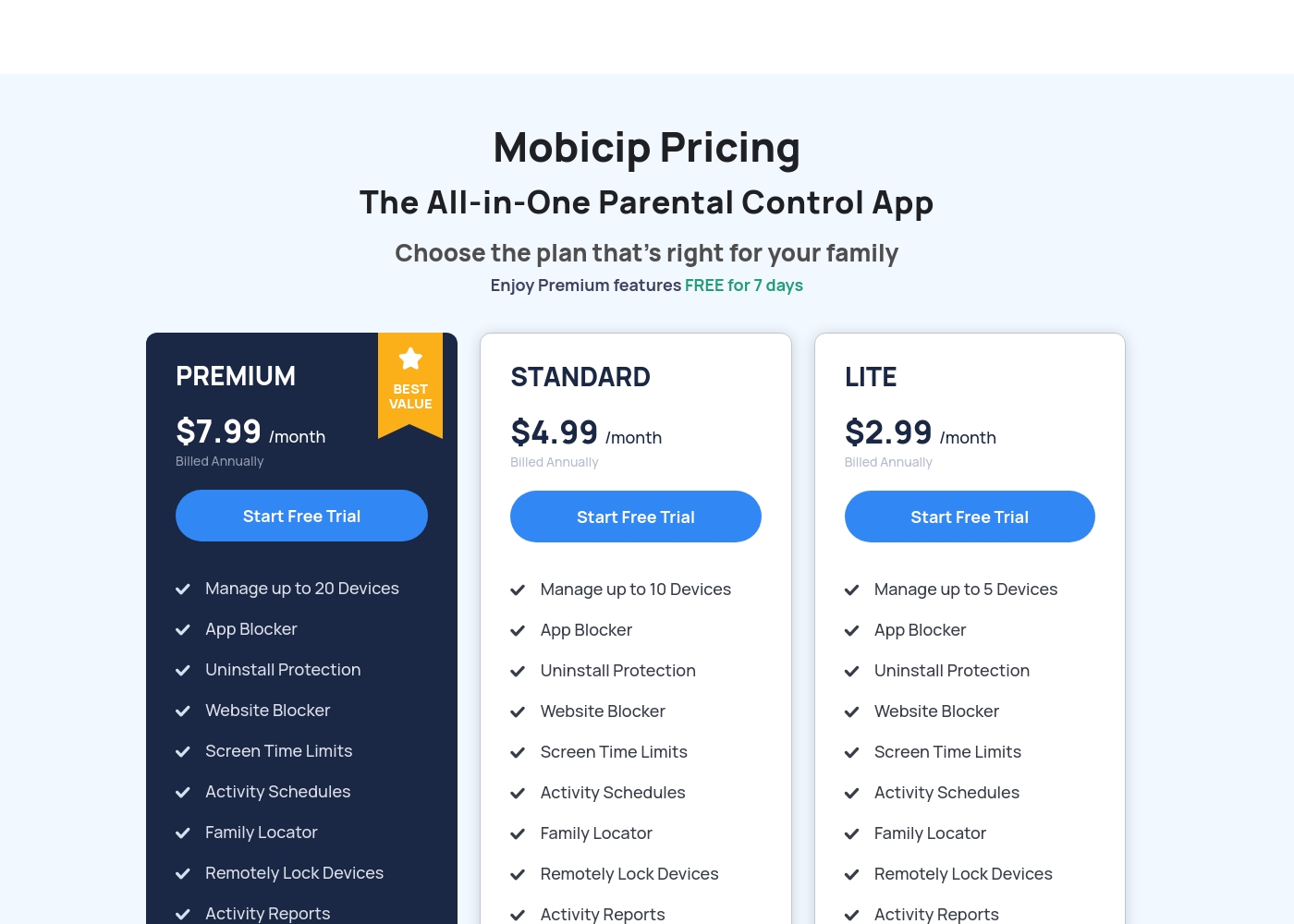
Mobicip costs between $2.99 and $7.99 per month (when billed annually) with three plans: LITE at $2.99/month, STANDARD at $4.99/month, and PREMIUM at $7.99/month.
You can easily choose the right plan for your family's needs below. All options include a 7-day free trial of Premium features.
LITE
Price: $2.99/month (Billed Annually) Best For: Families with 5 or fewer devices Other Features: Uninstall Protection, Website Blocker, Screen Time Limits, Activity Schedules, Activity Reports, Family Locator
- Manage up to 5 Devices
- App Blocker
- Uninstall Protection
- Website Blocker
- Screen Time Limits
- Manage up to 10 Devices
- App Blocker
- Uninstall Protection
- Website Blocker
- Screen Time Limits
- Manage up to 20 Devices
- App Blocker
- Uninstall Protection
- Website Blocker
- Screen Time Limits
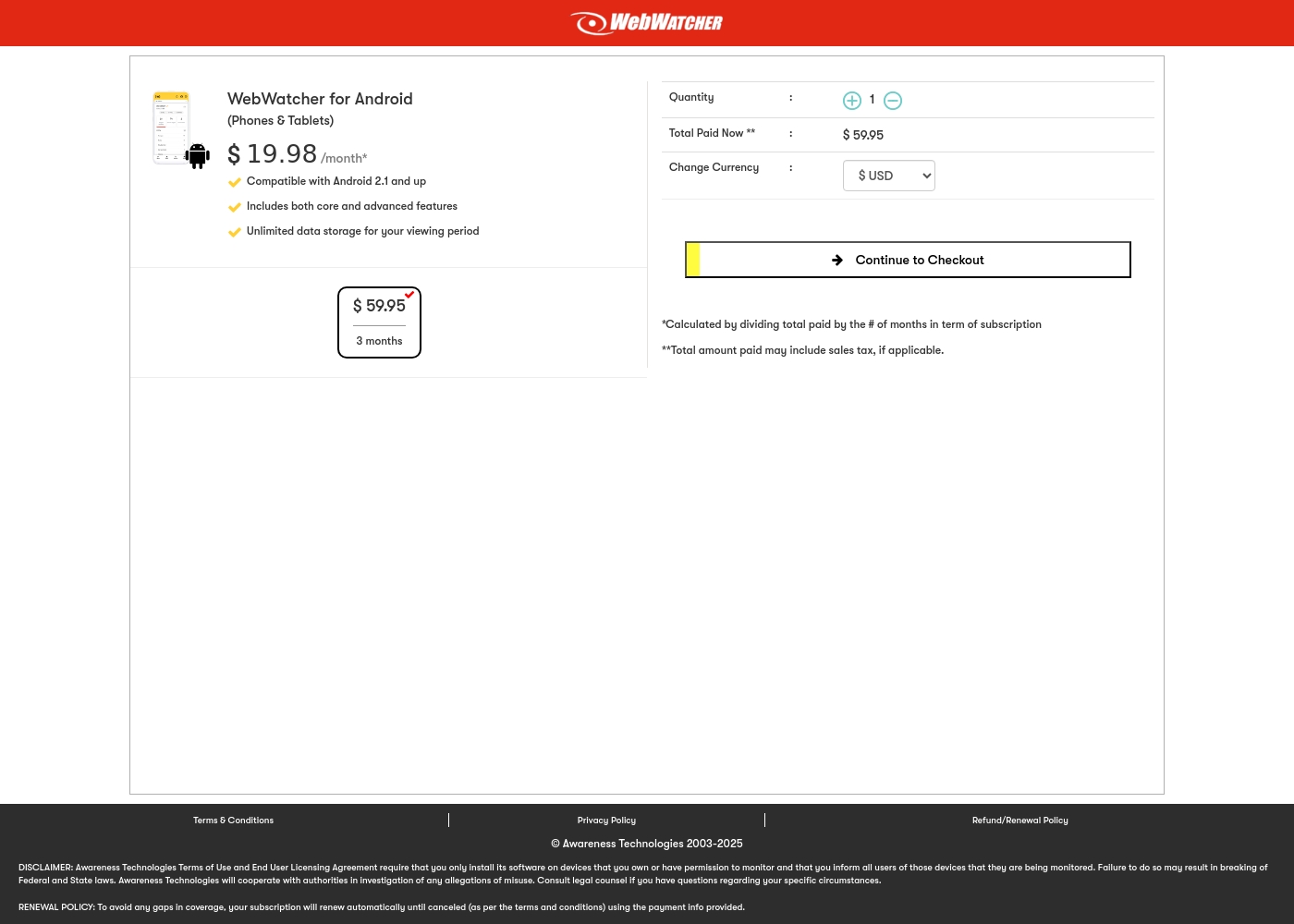
Webwatcher costs $19.98 per month with one explicitly priced plan: the 3-Month Android Subscription at $59.95 total.
Finding the right monitoring solution for your family is simple. Here is a detailed look at the pricing and features available in the current purchase flow.
3-Month Android Subscription
Price: $59.95 (paid every 3 months, calculated at $19.98/month) Best For: Parents monitoring Android phones and tablets Refund Policy: Full refund guaranteed if issues cannot be resolved Other Features:
- Compatible with Android 2.1 and newer versions
- Includes both core and advanced features
- Unlimited data storage for your full viewing period
- Compatible with Android 2.1 and up
- Includes both core and advanced features
- Unlimited data storage for your viewing period
Pricing Notes
- Mobicip requires annual prepayment, offering a significantly lower effective monthly cost for coverage.
- Webwatcher charges a substantial premium for monitoring one device compared to Mobicip's bulk device support.
- Mobicip's pricing scales elegantly to support families needing up to 20 devices on one plan.
- Webwatcher offers a refund guarantee for functionality failure, but user reports allege they frequently refuse to honor it.
Pricing Head-to-Head
User Reviews
Mobicip holds a "Great" 4.1-star rating on Trustpilot, though this score is based on a very limited number of reviews. Users generally appreciate the core functions like app blocking and setting screen time schedules, which successfully helps keep young children focused, and email customer service has been highly praised as "Excellent" during setup.
However, significant reliability concerns challenge Mobicip's effectiveness as a true parental control tool. Several parents report that the app is easily bypassed—teenagers can circumvent controls by changing phone time, disabling the VPN, or simply deleting the app to regain full access.
App blocking and screen time schedules work well, especially for keeping my children focused during class time. We successfully use it across both iPhones and Windows PCs. It is an effective tool for setting digital boundaries.
Webwatcher’s external feedback is extremely limited, stemming only from two reviews which resulted in a very low 2.9 TrustScore. While the platform advertises a strong 'risk-free' guarantee and promises excellent, responsive customer care, the limited user reports strongly contradict these claims.
Both reviewers cited severe issues primarily centered on billing and refunds. Users claim they were refused refunds entirely, even when requested within the advertised refund window, despite the monitoring product reportedly failing to work properly.
They refused to honor the risk-free money-back guarantee, even though I submitted the request properly. Furthermore, the product I purchased never actually worked for me as advertised. I absolutely feel like they are ripping me off.
Our Verdict
The choice between Mobicip and Webwatcher fundamentally boils down to control versus surveillance. For the vast majority of families, Mobicip is the clear, safer winner. Webwatcher’s severe user complaints about billing and support make it a serious financial risk. Mobicip's superpower is its powerful consistency and broad platform control. You can manage 20 devices—including iOS, Android, and Chromebooks—with one family rule set. It excels at flexible screen time scheduling and active AI web filtering. Mobicip encourages digital independence through its collaborative Child Dashboard feature. Webwatcher’s superpower is its deep, invisible Android surveillance capabilities. It captures sensitive data like text messages, call logs, and even Snapchat screenshots. Webwatcher is suitable for parents needing forensic evidence on one specific, high-risk device. It is built for secret data capture, not for open conversation. The deciding factor is trust and customer reliability. While Mobicip has technical flaws that tech-savvy kids can sometimes exploit, its core service functions reliably. Webwatcher has a 1-star rating due to documented allegations of fraudulent billing and ignoring refund requests. The risk profile strongly favors Mobicip’s stability. If you are a large family choosing prevention and healthy screen habits, move forward with Mobicip. If you need deep, covert surveillance of one Android phone immediately, Webwatcher offers the data—but be aware of the serious financial and support risks involved. Mobicip is the better, safer choice for comprehensive family control.
Frequently Asked Questions
Which is better for multi-device families, Mobicip or Webwatcher?
Mobicip is significantly better for multi-device households. Mobicip manages rules consistently across up to 20 mixed devices per account. Webwatcher is primarily priced per device, making it prohibitively costly for large families. Mobicip supports more platform types like Kindle.
Can Mobicip monitor text messages and phone call logs like Webwatcher?
Webwatcher specializes in communication capture, providing monitored text messages and call logs. Mobicip focuses more on app blocking and AI web filtering capabilities. Mobicip alerts parents to harmful content in social app conversations instead of capturing every private text.
Is Webwatcher’s high price per device justified over Mobicip's family plans?
Webwatcher's high price is only justified if you urgently need their specific discreet surveillance. Mobicip offers much better value for money. Mobicip supports up to 20 devices for less than Webwatcher supports one single device.
Which tool is more reliable, considering customer user reviews and support interactions?
Mobicip earns a much higher official trust rating despite noted technical bugs. Webwatcher has an extremely low 1-star rating due to severe user reports. Webwatcher users allege fraud, double-billing, and total support refusal, suggesting high operational risk.
Does Mobicip offer geofencing alerts for location tracking?
Yes, Mobicip includes a robust Family Locator feature with geofencing. You receive specific alerts when your child enters or leaves important designated locations. Webwatcher offers only basic, real-time GPS location monitoring.
Which software is designed for encouraging collaborative parenting and child autonomy?
Mobicip is designed for collaboration and self-regulation skills development. It features a Guardians function for co-parenting and a Child Dashboard for usage monitoring. Webwatcher is strictly a discreet, unilateral surveillance tool with no child-facing features.
Ready to Choose?
Both tools have their strengths. Choose based on your specific needs.