Mobicip vs Net Nanny
Mobicip and Net Nanny are long-time competitors in the digital safety space for kids. Mobicip takes the lead with wider device support and collaborative tools across many platforms. Net Nanny boasts specialized, highly dynamic web filtering against sensitive content. Reliability is a major concern for both, but Mobicip fares much better in customer reviews.
Best for: Households with mixed device platforms needing Chromebook/Kindle coverage, Parents who want proactive social media conversation monitoring
Best for: Parents prioritizing specialized dynamic filtering above all other features, Customers seeking immediate, critical alerts for high-risk content
Comprehensive Features, Criticized Reliability.
We found Mobicip offers comprehensive, multi-platform features like robust screen time limits and social media monitoring at a competitive annual price. Overall, we are concerned by multiple reports indicating that controls are easily circumvented by tech-savvy children, which fundamentally undermines the security promise of the product.
Pros
- App blocking and time schedules work effectively for basic enforcement.
- Supports a wide range of platforms (iOS, Android, Windows, Chromebooks).
- Competitive annual pricing tiers based on family device count.
- Email customer support is rated highly and is helpful during initial setup.
Cons
- Controls are easily bypassed by children changing device time or disabling the VPN.
- Settings frequently get corrupted or unblocked following software updates.
- Administrative functions, like account cancellation, are not available in the web portal and require contacting support.
- Technical glitches can cause connectivity problems and significant battery drain.
Unreliable protection paired with hidden costs.
We note Net Nanny boasts impressive dynamic filtering features and competitive volume pricing for large families. However, recent user feedback highlights critical operational failures, extreme difficulty managing subscriptions, and severely problematic customer service interactions. Overall, we advise prudence due to concerning reports regarding recurring billing practices and software reliability across platforms.
Pros
- Cost-effective protection for up to 20 devices annual plans.
- Includes dynamic filtering against adult content and sensitive material.
- Real-time alerts and visibility via the Family Feed feature.
- Full feature suite is included across all three annual pricing tiers.
Cons
- Software functionality is often unreliable (time limits fail, Mac freezing).
- Auto-renewal system is difficult or impossible to cancel online.
- Reports of severe bugs and inaccurate dashboard data tracking.
- Customer support is slow, unresponsive, and often unavailable.
AboutMobicip
Mobicip is a comprehensive Smart Parental Control App built specifically for the needs of busy families. It aims to simplify digital parenting by offering reliable protection across many different platforms. 💡
Unlike tools restricted to a single company, Mobicip bridges the gap by applying consistent settings across nearly any device. It protects your family on iOS, Android, macOS, Windows, Chromebook, and even Kindle. The app is simple to set up and keeps detailed track of everything your child does online.
AboutNet Nanny
Net Nanny is widely trusted parental control software. It is consistently ranked as the Best Parental Control App. ✅ Millions of parents have trusted this software since 1996.
It’s designed to keep your kids safe from adult content when they browse online. The system allows children to use the internet safely while still being protected. It offers the visibility parents need today.
Highlights
Feature Comparison
Features Overview
We highlight the main differences and pick a winner for each feature.
Platform Compatibility
Mobicip supports more device types than Net Nanny.
Mobicip provides necessary consistent protection across many unique device types. It supports iOS, Android, macOS, Windows, Chromebook, and even Kindle devices. Net Nanny supports traditional PC, Mac, and iOS devices only via Family Passes. Net Nanny's desktop-only plan excludes mobile monitoring entirely. For mixed-device families, Mobicip offers the versatility Net Nanny simply lacks. Mobicip provides more comprehensive cross-platform coverage.
Web Filtering Focus
Net Nanny specializes in content filtering above all else.
Mobicip uses powerful AI tools to filter web content and block inappropriate sites. It ensures comprehensive protection against adult material for busy parents. Mobicip also includes active monitoring of social app conversations. Net Nanny focuses heavily on its dynamic filtering, claiming a #1-Rated Internet Filter title. This proven system excels at stopping adult content exposure immediately. Net Nanny's filtering is arguably more specialized than Mobicip's broader suite. The real strength of Net Nanny is its immediate detection of concerning search queries. Net Nanny provides parents with specific, critical alerts for high-risk content. Mobicip's filtering is excellent, but Net Nanny's claim and high-risk alerts give it the edge here.
Sensitive Safety Alerts
Net Nanny provides vital real-time alerts for serious threats.
Mobicip offers detailed Activity Reports and monitors three major social apps for safety. Its alerts focus on harmful messages and location updates using geofencing. Mobicip also helps parents monitor generalized online habits. Net Nanny offers crucial real-time safety alerts regarding highly sensitive material. You get instant warnings for critical searches like suicide, weapons, or drug-related content. Net Nanny's alerts prioritize immediate danger intervention. Mobicip lacks explicit documentation of these severe content alerts found in Net Nanny. Net Nanny’s focus on serious safety threats provides a crucial layer of digital protection. If monitoring for potentially life-threatening searches is your priority, Net Nanny is the clear choice.
Reliability & Bugs
Mobicip is slightly more reliable than the buggy Net Nanny.
Mobicip users report that controls are easily bypassed by disabling the VPN or changing device time. Settings might also get corrupted after routine software updates. Mobicip's primary weakness is circumvention. Net Nanny reviews indicate the software often completely fails to function as intended. Users report ignored time limits, inaccurate data reporting, and frequent device freezing. Net Nanny customers often struggle with severe operational bugs. While Mobicip is bypassable, Net Nanny exhibits deeper functional failures and system instability. Compared head-to-head, Mobicip handles core tasks slightly better. Mobicip wins this category simply because its failures are less catastrophic than those reported for Net Nanny.
Social Media Safety
Mobicip actively monitors social media conversations.
Mobicip proactively monitors conversations on the top three social platforms for harmful content. It alerts parents when it detects potentially dangerous interactions. Mobicip provides necessary specific oversight for social engagements. Net Nanny provides visibility into which apps children are using on their devices. It does not advertise features for monitoring conversation content inside those social apps. Net Nanny's focus remains on search and web filtering. If monitoring what is said in messages is crucial, Mobicip offers the dedicated tool. Net Nanny's features are limited to general app visibility. Mobicip provides superior conversational safety monitoring over Net Nanny.
User Collaboration
Mobicip encourages youth self-regulation and parent sharing.
Mobicip includes a specific Child Dashboard allowing kids to monitor their own screen time usage. This crucial tool fosters self-regulation skills in youth. Mobicip also features a Guardians system for sharing parenting tasks. Net Nanny focuses purely on parental supervision and filtering controls. It does not offer a public-facing Child Dashboard for usage awareness or self-management. Net Nanny is strictly top-down control. Mobicip's collaborative tools help move beyond simple limits to build better habits. The Guardians feature ensures consistency when parents share duties. Net Nanny is a simpler, non-collaborative control system.
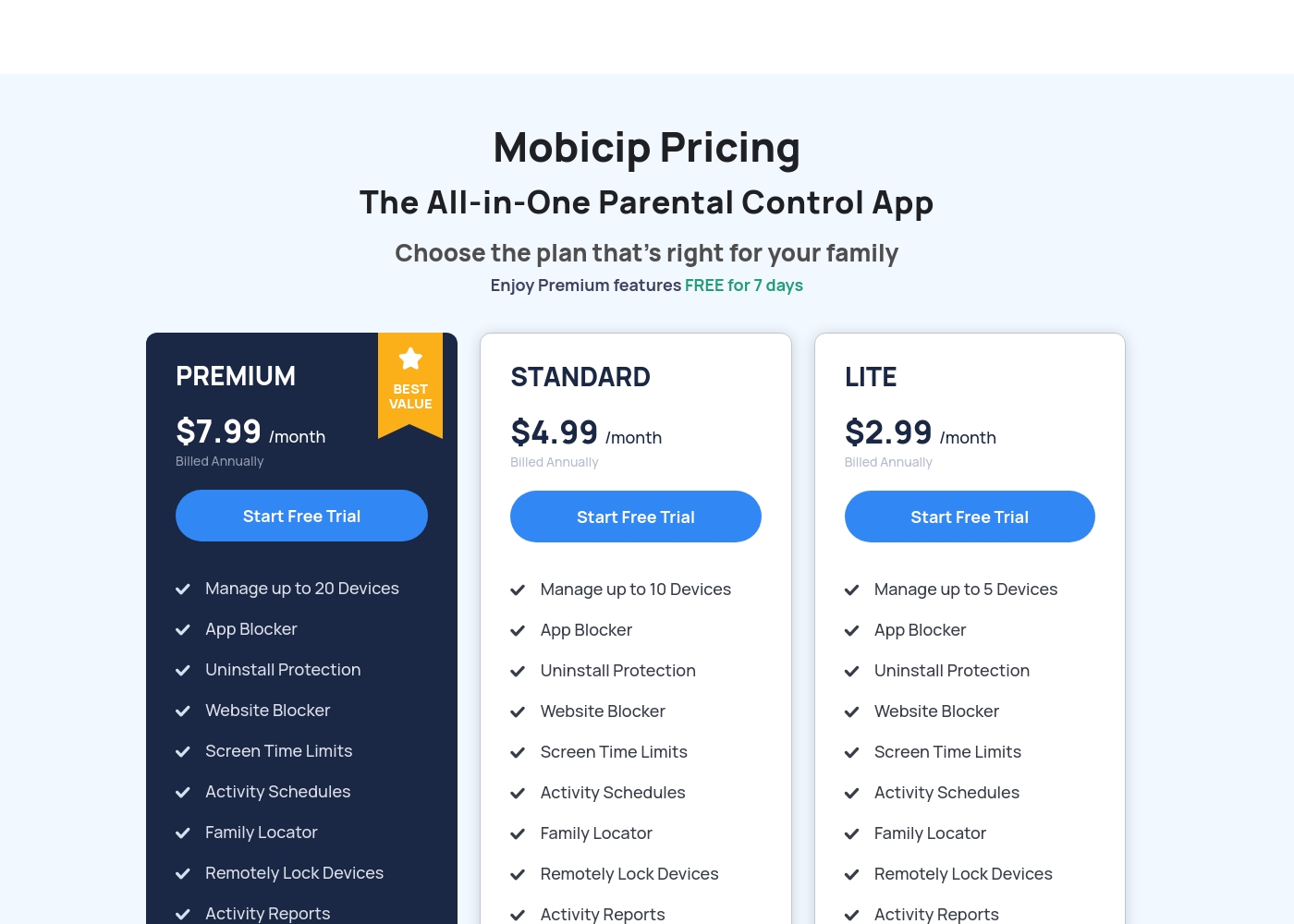
Mobicip costs between $2.99 and $7.99 per month (when billed annually) with three plans: LITE at $2.99/month, STANDARD at $4.99/month, and PREMIUM at $7.99/month.
You can easily choose the right plan for your family's needs below. All options include a 7-day free trial of Premium features.
LITE
Price: $2.99/month (Billed Annually) Best For: Families with 5 or fewer devices Other Features: Uninstall Protection, Website Blocker, Screen Time Limits, Activity Schedules, Activity Reports, Family Locator
- Manage up to 5 Devices
- App Blocker
- Uninstall Protection
- Website Blocker
- Screen Time Limits
- Manage up to 10 Devices
- App Blocker
- Uninstall Protection
- Website Blocker
- Screen Time Limits
- Manage up to 20 Devices
- App Blocker
- Uninstall Protection
- Website Blocker
- Screen Time Limits
Net Nanny costs between $39.99 and $89.99 per year with three plans: 1 Desktop at $39.99, 5 Devices Family Protection Pass at $54.99, and 20 Devices Family Protection Pass at $89.99.
Let's explore which annual Net Nanny package works best for your family's needs.
1 Desktop
Price: $39.99 / Year (Currently discounted from $49.99) Best For: Single device use on PC or Mac Other Features:
- Protect one desktop device
- Includes all Net Nanny features
- Supports Windows and macOS
- Protect one desktop device (PC or Mac)
- Includes all Net Nanny features
- Supported on Windows 10 & 11 and macOS 10.13 to 11.x
- Protect up to 5 total devices
- Includes all Net Nanny features
- Supports PC, Mac, and iOS devices
- Costs $11 per device/year
- 30% Off For A Limited Time
- Protect up to 20 total devices
- Includes all Net Nanny features
- Supports PC, Mac, and iOS devices
- Costs less than $5 per device/year
- Labeled 'Best Value'
Pricing Notes
- Mobicip requires annual billing despite showcasing monthly rates, averaging $7.99/month for the 20-device plan.
- Net Nanny is slightly cheaper for maximum coverage, offering 20 devices for $89.99 annually.
- Mobicip provides a 7-day free trial across all tiers; Net Nanny does not explicitly advertise one.
- Net Nanny users frequently report severe difficulty cancelling auto-renewal and unauthorized recurring charges.
- Net Nanny's 1 Desktop plan does not support mobile devices (iOS). Mobicip supports all devices across all tiers.
Pricing Head-to-Head
User Reviews
Mobicip holds a "Great" 4.1-star rating on Trustpilot, though this score is based on a very limited number of reviews. Users generally appreciate the core functions like app blocking and setting screen time schedules, which successfully helps keep young children focused, and email customer service has been highly praised as "Excellent" during setup.
However, significant reliability concerns challenge Mobicip's effectiveness as a true parental control tool. Several parents report that the app is easily bypassed—teenagers can circumvent controls by changing phone time, disabling the VPN, or simply deleting the app to regain full access.
App blocking and screen time schedules work well, especially for keeping my children focused during class time. We successfully use it across both iPhones and Windows PCs. It is an effective tool for setting digital boundaries.
Net Nanny currently holds a very poor 2.1 rating on Trustpilot, reflecting widespread customer dissatisfaction. Users frequently report critical failures in core functionality and serious concerns regarding billing practices.
Recurring complaints revolve around system reliability; many users state the software does not work properly on modern devices, citing issues like apps ignoring set time limits, device freezes, and wildly inaccurate dashboard reporting (e.g., usage times ticking up five minutes per second). Beyond technical faults, customers vehemently criticize Net Nanny’s handling of subscriptions and auto-renewal.
The software doesn't work consistently after a restart; I always have to sign in manually. Since installing it, my Mac freezes frequently during downloads. I have not yet received any response from customer service about these issues.
Our Verdict
The choice between Mobicip and Net Nanny is a battle of 'bad reliability' vs. 'terrible reliability and billing.' Mobicip is the safer bet due to better user sentiment and support. Mobicip’s superpower is its sheer device compatibility and collaborative design. Mobicip works consistently across Chromebook, Kindle, iOS, and others. The Mobicip Child Dashboard teaches self-regulation, moving beyond simple restrictions. Net Nanny is solely focused on being a powerful internet filter, a role it performs well technically. Net Nanny provides instant, critical alerts for dangerous search terms like suicide or weapons. If specific high-risk content filtering is your only priority, Net Nanny excels. The decisive element is the overwhelming negative feedback against Net Nanny’s execution. Net Nanny faces severe complaints about functional failure and unauthorized recurring charges. Mobicip’s issues are annoying (bypassing), but less fundamentally broken. Choose Mobicip for wider device support and easier customer service interactions. Only choose Net Nanny if you absolutely require their specialized high-risk content alerts and are prepared to fight auto-renewal.
Frequently Asked Questions
Which is better for multi-platform families: Mobicip or Net Nanny?
Mobicip is significantly better for multi-platform use. Mobicip supports iOS, Android, Windows, macOS, Chromebook, and Kindle devices. Net Nanny supports a more limited device set and requires a Family Pass for mobile devices.
Does Mobicip track high-risk search content like Net Nanny?
Net Nanny explicitly offers real-time alerts for highly sensitive content like suicide or weapons. Mobicip does not explicitly detail this specific feature in its documentation. Mobicip’s focus is broader web filtering and social media monitoring.
Which software supports Chromebook devices?
Mobicip supports Chromebook devices and other unique platforms like Kindle. Net Nanny does not offer support for Chromebook devices. Mobicip is the clear winner for families using these specific gadgets.
Is Net Nanny's poor review score a serious concern?
Yes, Net Nanny's extremely low 1.8-star rating is a critical concern. Users report that core software functions fail frequently and cancellation/billing is nearly impossible. Mobicip’s 3.8-star rating suggests better functional reliability.
How do Mobicip and Net Nanny compare on pricing?
Both Mobicip and Net Nanny scale efficiently for large families up to 20 devices. Net Nanny’s max plan is about $6 cheaper annually at $89.99/year. Mobicip is slightly more expensive but includes a valuable 7-day free trial.
Can I easily cancel my subscription with Mobicip or Net Nanny?
Neither service offers easy online termination. Mobicip requires contacting their support team to cancel administrative functions. Net Nanny users report auto-renewal is nearly impossible to stop, resulting in unauthorized charges.
Ready to Choose?
Both tools have their strengths. Choose based on your specific needs.