MMGuardian vs Webwatcher
MMGuardian and Webwatcher both promise comprehensive parental monitoring for total peace of mind. MMGuardian focuses heavily on tamper-proof reliability and proactive crisis alerts on mobile. Webwatcher instead delivers breadth, monitoring mobile, PC, and Mac activity seamlessly. Choosing relies on whether you need robust mobile prevention or broad device coverage.
Best for: Parents prioritizing crisis intervention and real-time safety alerts, Families with multiple children relying on an affordable Family Plan
Best for: Users requiring monitoring across PC, Mac, and mobile devices, Parents focusing on deep content visibility on Snapchat (Android)
Pros
Cons
Extreme risk due to billing and support issues.
We found Webwatcher markets itself strongly on guaranteed functionality and comprehensive support for parental monitoring needs. However, our review of public user feedback showed severe, concrete accusations of fraudulent billing, refusal to issue refunds, and complete non-response from customer support. Overall, the serious financial and reliability risks reported by consumers necessitate a very low rating.
Pros
- Advertised compatibility across major devices (Android, iPhone, PC, Mac).
- Unlimited data storage is included in the current subscription plan.
- Setup is claimed to be quick and easy (under five minutes).
- Functionality is officially guaranteed with a full refund if issues cannot be resolved.
Cons
- Users report being refused refunds despite the official money-back guarantee.
- Specific claims of fraudulent double billing and funds theft were reported.
- Customer support was reported as non-responsive or misleading ('runaround').
- Product allegedly failed to work properly for some customers.
AboutMMGuardian
MMGuardian is a comprehensive parental control solution trusted by families since 2012. It's designed for parents of children ages 7-17 who want to protect their phones and guide their digital lives. You can choose either a monitoring app for their existing Android or iPhone, or a tamper-proof MMGuardian Phone with built-in controls. ✅
AboutWebwatcher
WebWatcher is a specialized parental monitoring app. It is primarily aimed at supervising teenagers who may be involved in risky online behavior. The software gives parents necessary visibility into their child's digital footprint.
It works across major platforms including Android, iPhone, PC, and Mac devices. You can monitor everything seamlessly from anywhere using your secure, web-based online account. The application is designed to be discrete and tamper-proof once it's correctly installed. 💡
Highlights
Feature Comparison
Features Overview
We highlight the main differences and pick a winner for each feature.
Proactive Crisis Alerts
MMGuardian provides critical alerts for real-time threat detection; Webwatcher only provides log review.
MMGuardian delivers priority alerts for serious issues like cyberbullying or suicide threats. You receive crucial information instantly, allowing for immediate action. MMGuardian focuses on prevention and timely crisis intervention. Webwatcher focuses on logging historical data, including texts and web history. Intervention requires manually reviewing data after the fact. MMGuardian's capability gives parents a huge advantage in life-threatening situations. Webwatcher is better suited for checking on past behaviors or web usage patterns. Winner: MMGuardian.
Device Monitoring Scope
Webwatcher covers phones and computers; MMGuardian focuses solely on mobile devices.
Webwatcher works across Android, iPhone, PC, and Mac devices reliably. This covers the full ecosystem your teen uses daily. You can monitor all activity seamlessly from a single web account. MMGuardian is primarily mobile-focused, supporting Android and iPhone parent/child apps. MMGuardian does not offer built-in capability to monitor computer activity. Choose Webwatcher if monitoring PC or Mac desktop use is a critical requirement. MMGuardian is the better choice if your focus is only on phone safety. Winner: Webwatcher.
Communication Control
MMGuardian actively blocks contact; Webwatcher only records and logs communication details.
MMGuardian offers preventative communication control capabilities. You can block calls and SMS texts completely from all strangers or unwanted contacts. Parents can restrict all communication to only include an approved list of contacts. Webwatcher logs detailed call information and captures sent and received text messages. This logging provides visibility but never active control or real-time blocking. MMGuardian offers maximum security by preventing bad actors from contacting your child. Webwatcher relies on the parent checking logs to manage communication risks. Winner: MMGuardian.
Tamper Resistance
MMGuardian prevents deep bypasses; Webwatcher is just noted as being discreet and tamper-proof.
MMGuardian is explicitly designed to prevent sophisticated bypasses by tech-savvy teens. It stops children from disabling protections using safe mode or factory resets. This ensures that features like GPS tracking remain reliably constant. Webwatcher is described as discreet and tamper-proof once installed correctly. Specific details on defeating advanced bypass methods are not highlighted. If your teen is knowledgeable about device bypasses, MMGuardian offers higher security assurance. MMGuardian guarantees your supervision is constant and accurate. Winner: MMGuardian.
Family Cost Efficiency
MMGuardian offers five-device coverage for $99/year; Webwatcher is significantly more expensive per device.
The MMGuardian Family Plan covers up to five child devices for $99.98 annually. This is incredibly cost-effective for families with multiple children. A single device costs less than $1.70 per month on this MMGuardian plan. Webwatcher costs $59.95 for three months, equaling about $19.98 per month per device. Monitoring five devices with Webwatcher would be prohibitively expensive. MMGuardian provides superior value for money, especially for larger families. Webwatcher's pricing model is simply not built for family use. Winner: MMGuardian.
Snapchat Visibility
Webwatcher captures content depth on Android; MMGuardian limits monitoring to time caps.
Webwatcher specializes in monitoring high-risk apps like Snapchat on Android devices. It takes screenshots and captures received messages for full visual insight. This deep logging is crucial for monitoring disappearing message apps. MMGuardian allows you to set custom daily time limits on apps like Instagram or Snapchat. It focuses on regulating usage duration instead of viewing communication content. If viewing the actual content on Snapchat is a priority, choose Webwatcher (on Android). MMGuardian is effective for setting healthy usage boundaries. Winner: Webwatcher.
MMGuardian costs between $4.99 per month for the application and $229 for a physical phone with 2 plans: MMGuardian Apps at $4.99 /month and MMGuardian Phone at $229.
Take a look at the options below to find the best fit for your family's needs.
MMGuardian Apps
Price: From $4.99 /month Websites Supported: Not explicitly stated Best For: Parents who already have a phone for their child and want to add monitoring capabilities. Refund Policy: No refunds given (subscriptions are transferable across devices) Other Features: Full message access, App blocking, Web activity monitoring, Real-time location tracking, Smart safety alerts
- Full Message Access
- View all messages
- Strong Tamper-Proof Protection
- Real Time Location
- Block Apps
- Tamper-Proof Technology
- Premium Samsung Hardware
- Works with any Carrier
- Built-In Protection
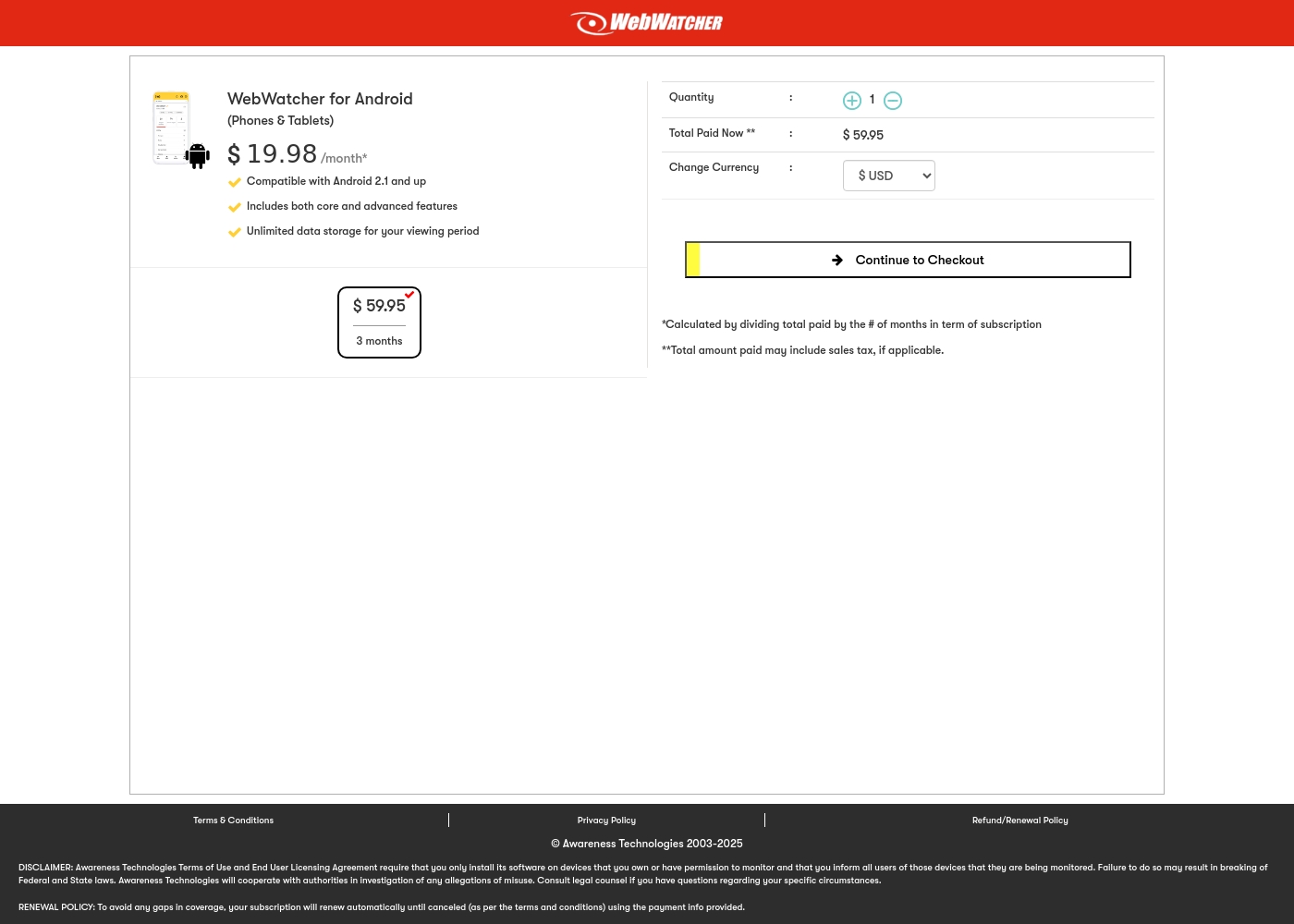
Webwatcher costs $19.98 per month with one explicitly priced plan: the 3-Month Android Subscription at $59.95 total.
Finding the right monitoring solution for your family is simple. Here is a detailed look at the pricing and features available in the current purchase flow.
3-Month Android Subscription
Price: $59.95 (paid every 3 months, calculated at $19.98/month) Best For: Parents monitoring Android phones and tablets Refund Policy: Full refund guaranteed if issues cannot be resolved Other Features:
- Compatible with Android 2.1 and newer versions
- Includes both core and advanced features
- Unlimited data storage for your full viewing period
- Compatible with Android 2.1 and up
- Includes both core and advanced features
- Unlimited data storage for your viewing period
Pricing Notes
- MMGuardian offers flexible single-device and family plans starting at $4.99 monthly.
- The MMGuardian Annual Family plan is dramatically cheaper, covering five devices for $99.98.
- Webwatcher operates on a three-month subscription billed upfront, equating to $19.98/month for one device.
- Despite Webwatcher guaranteeing refunds for functionality issues, severe external complaints cite fraudulent billing and refusals to honor the guarantee.
Pricing Head-to-Head
User Reviews
Webwatcher’s external feedback is extremely limited, stemming only from two reviews which resulted in a very low 2.9 TrustScore. While the platform advertises a strong 'risk-free' guarantee and promises excellent, responsive customer care, the limited user reports strongly contradict these claims.
Both reviewers cited severe issues primarily centered on billing and refunds. Users claim they were refused refunds entirely, even when requested within the advertised refund window, despite the monitoring product reportedly failing to work properly.
They refused to honor the risk-free money-back guarantee, even though I submitted the request properly. Furthermore, the product I purchased never actually worked for me as advertised. I absolutely feel like they are ripping me off.
Our Verdict
If your primary goal is proactive mobile device safety and peace of mind, MMGuardian is the clear choice. MMGuardian dramatically outperforms Webwatcher in terms of value, proactive features, and reliability. The financial risk associated with Webwatcher’s documented billing complaints is alarming, making MMGuardian the safer investment. MMGuardian’s superpower is its deep, preventative mobile safety features. It actively prevents threats like accessing harmful sites or receiving calls from strangers. Crucially, MMGuardian provides priority alerts for crises like cyberbullying or suicide threats. The affordable Family Plan covers up to five devices for just $99.98 annually, making MMGuardian perfect for growing families. Webwatcher focuses on breadth, supporting monitoring across PC, Mac, and mobile devices. If your child uses a laptop heavily, Webwatcher provides this crucial cross-platform coverage. Webwatcher also offers superior depth in capturing disappearing messaging content on Snapchat for Android phones. The deciding factor should be trust and scope: MMGuardian is reliable, proactive, and affordable for families. Webwatcher covers more devices but carries severe financial risks and lacks real-time prevention tools. Choose MMGuardian for comprehensive, honest, mobile parental control. Only pick Webwatcher if PC/Mac monitoring is non-negotiable, and you accept the reported risks.
Frequently Asked Questions
Which software is better for setting boundaries: MMGuardian or Webwatcher?
MMGuardian is better for setting boundaries and limits. MMGuardian allows you to set custom time limits on apps like Snapchat and Instagram. You can also actively control communication by blocking strangers. Webwatcher primarily tracks without offering active boundary control.
Can MMGuardian monitor computer activity like Webwatcher?
No, MMGuardian is designed specifically for monitoring and controlling mobile devices (Android and iPhone). Webwatcher’s strength is its ability to monitor activity across mobile phones, PC, and Mac computers. If desktop monitoring is essential, choose Webwatcher instead of MMGuardian.
Does Webwatcher offer the real-time crisis alerting that MMGuardian provides?
Webwatcher does not explicitly advertise proactive crisis alerting. MMGuardian provides crucial priority alerts for dangerous situations like suicide threats. Webwatcher mainly uses logging, requiring you to review data to find dangerous content.
Which tool is more cost-effective for a large family?
MMGuardian is vastly more cost-effective for families with multiple children. The MMGuardian Family Plan covers up to five devices annually for $99.98. Webwatcher costs $19.98 per month for a single device, making it very expensive for five children.
Is Webwatcher's money-back guarantee reliable for parents?
Webwatcher advertises a refund guarantee if the product fails to function. However, external user reviews cite many specific cases of alleged fraudulent billing and refusals to honor the refund guarantee. MMGuardian has no such negative reports in the data reviewed.
Which software is more resistant to being disabled by a child?
MMGuardian seems more resistant to tampering than Webwatcher. MMGuardian specifically guarantees it prevents bypasses using safe mode or factory resets. This ensures MMGuardian's protections, especially GPS tracking, cannot be circumvented.
Ready to Choose?
Both tools have their strengths. Choose based on your specific needs.