Minvo vs Vidyo.ai
Minvo and Vidyo.ai both excel at AI video repurposing for social clips. Minvo gives you intense AI editing power and scheduling for unlimited brands. Vidyo.ai focuses on maximizing content volume and reliability, offering unlimited B-Roll.
Best for: Professional content creators needing 4K resolution exports, Small creative teams (2-3 users) requiring built-in collaboration features
Best for: High-volume podcasters who need unlimited 1080p clips, Users prioritizing platform stability and trustworthy customer service
Advanced features marred by critical instability.
We found Minvo offers compelling features at competitive prices, including strong AI editing utilities and versatile content scheduling options. Overall, until core issues like severe bugs, slow rendering, and reported reliability problems are fully resolved, we cannot recommend it for critical or high-volume production schedules.
Pros
- Access to extensive AI tools (filler word removal, B-roll, 4K export, auto-framing).
- Cost-effective pricing starts low at $3.49/month (annual billing).
- Includes editing via text/transcript alongside traditional timeline controls.
- The interface is reported to be user-friendly and modern.
Cons
- Severe platform instability is reported, leading to bugs and lost edits.
- Exporting and rendering processes are often slow or fail entirely.
- Users report slow or unresponsive customer support.
- Controversial billing practices concerning free trials and denied refunds have been cited.
Smart AI repurposing with integrity.
We find Vidyo.ai offers a highly valuable AI toolset designed to drastically reduce video editing time and maximize content output across social channels. Based on its deep feature set and competitive annual pricing, it’s a strong contender for creators focused on high-volume short-form video. Overall, the platform is excellent for maximizing reach and is supported by reports of trustworthy operational integrity.
Pros
- AI repurposing features save a huge amount of editing time.
- Exceptional reported customer service (hassle-free refund noted by user).
- Strong annual pricing structure, with the Growth plan offering great value.
- Includes advanced features like unlimited B-Roll and AI silence removal.
Cons
- Extremely limited quantity of independent user reviews available.
- The Free plan limits rendering to 720p and applies a watermark.
- No explicit money-back guarantee is listed in the pricing details.
AboutMinvo
Minvo is an intuitive platform built for over 10,000 creators and businesses who need effective audience engagement. It handles the difficult parts of video editing using smart AI tools. Whether you’re cutting clips for TikTok or generating transcripts for LinkedIn, Minvo puts robust creation power right at your fingertips. 💡
It offers flexibility for every user. You choose how to edit: simply highlight text to cut content, just like editing a word document, or use the precision timeline editing meant for more advanced professionals.
AboutVidyo.ai
Vidyo.ai is an intelligent content creation platform focusing strongly on AI-powered video repurposing. This platform is built specifically for creators, influencers, and businesses who need to maximize their output efficiently. You can remove the time commitment involved in manual editing and streamline content distribution across social channels. 💡
Highlights
Feature Comparison
Features Overview
We highlight the main differences and pick a winner for each feature.
Output Volume
Vidyo.ai enables massive content volume; Minvo limits monthly uploads to a maximum of five hours.
Minvo restricts your monthly uploads to 1 hour on Creator and 5 hours on Pro/Pro+. Hitting this limit quickly stops your content production workflow. Vidyo.ai promotes generating 2x more short clips from one prompt. Paid plans offer unlimited 1080p exports, supporting huge content output. If you pump out many long videos weekly, Vidyo.ai's unlimited exports are more valuable. Minvo trades volume for detailed editing within its limits. For creators specializing in high-frequency social posting, Vidyo.ai offers superior volume scalability for 1080p clips.
Advanced AI Cleanup
Minvo offers more comprehensive sound and visual AI features, including studio audio enhancement.
Minvo provides robust AI Refining, including Cut Silences, Filler Words (um's and ah's), and Face Framing. Pro+ users also get Lightning 10x fast transcription. Vidyo.ai includes AI Filler & Silence Removal starting on the Essential plan. The focus is mainly on cleaning up the core audio flow for better viewer retention. Minvo's offering is more comprehensive, adding features like studio audio enhancement. It also auto-inserts Emojis and B-Roll footage. If professional audio quality straight from your editing app is critical, Minvo provides those superior, integrated refinement tools.
Team Collaboration
Minvo explicitly supports multiple users on paid plans; Vidyo.ai lacks defined user-based pricing or features.
Minvo clearly defines user access: 1 user on Creator, 2 on Pro, and 3 on Pro+. Minvo is suitable for small content teams who need shared project access. Vidyo.ai's pricing is not user-based, suggesting it’s primarily designed for individual creators. Pricing revolves around output volume and features instead. If your team needs explicit shared accounts and specific user management, Minvo is the clear choice for collaboration. Vidyo.ai works best if the content flow is primarily managed or overseen by a single manager or editor.
Social Distribution
Minvo supports unlimited brands; Vidyo.ai offers integrated content planning and slightly more scheduling targets.
Minvo includes unlimited social scheduling directly to five major platforms. Minvo can also manage unlimited brands and their specific social analytics in one dashboard. Vidyo.ai offers 1-Click scheduling to seven social platforms on the Essential plan. The Growth plan adds bulk publishing and unlimited scheduling. For managing many client accounts, Minvo’s unlimited brand structure is ideal. Vidyo.ai adds the AI Content Planner for strategic workflow. Both are strong, but Vidyo.ai's content planner offers a strategic edge Minvo currently overlooks.
Maximum Export Quality
Minvo supports professional 4K export quality; Vidyo.ai only offers unlimited exports at 1080p resolution.
Minvo offers 4K export capabilities in its Pro and Pro+ plans, catering to creators who demand the highest visual fidelity. Vidyo.ai focuses on high-volume production, providing unlimited exports in Full HD 1080p. This is standard for most social platforms. For YouTube channels or high-resolution displays, Minvo's 4K option is a necessary, superior feature. If 1080p output satisfies your needs, Vidyo.ai offers that unlimited volume for a cleaner annual price structure.
B-Roll Access
Vidyo.ai provides instant access to unlimited, copyright-free B-Roll; Minvo’s library access remains unclear.
Vidyo.ai delivers massive value with instant access to unlimited, copyright-free B-Roll stock footage. This removes all licensing concerns. Minvo mentions its AI can auto-insert Emojis and B-Roll footage, but the extent of the library is not guaranteed or unlimited. Direct access to unlimited stock footage is a significant asset Vidyo.ai bundles into its platform. Vidyo.ai simplifies the visual enhancement process immensely by providing this free resource immediately.
Platform Reliability
Vidyo.ai shows strong stability and integrity; Minvo faces severe user complaints regarding instability and bugs.
Minvo users report serious instability, including bugs, slow exports, and occasional lost work. This massive issue hampers Minvo’s feature usage. Vidyo.ai has positive anecdotal feedback regarding its core functionality and strong customer service integrity. Users reported quick, hassle-free refunds. Reliability is the biggest known weakness for Minvo and a reported key strength for Vidyo.ai. This difference impacts production hugely. If losing work or technical glitches are unacceptable risks, Vidyo.ai offers a safer, more stable environment for your production needs.
Language Support
Minvo confirms support for 50+ languages; Vidyo.ai offers multi-lingual features but without specific details.
Minvo excels in global reach, offering transcription and translation into 50+ languages. It includes AI animated captions in 20+ languages. Vidyo.ai lists a "Multi-lingual Feature" but does not detail the number of supported languages or specific translation capabilities. Minvo provides specific numbers, confirming its robust capability for true global content scaling and localization efforts. Creators targeting broader non-English audiences should confidently choose Minvo for detailed language support.
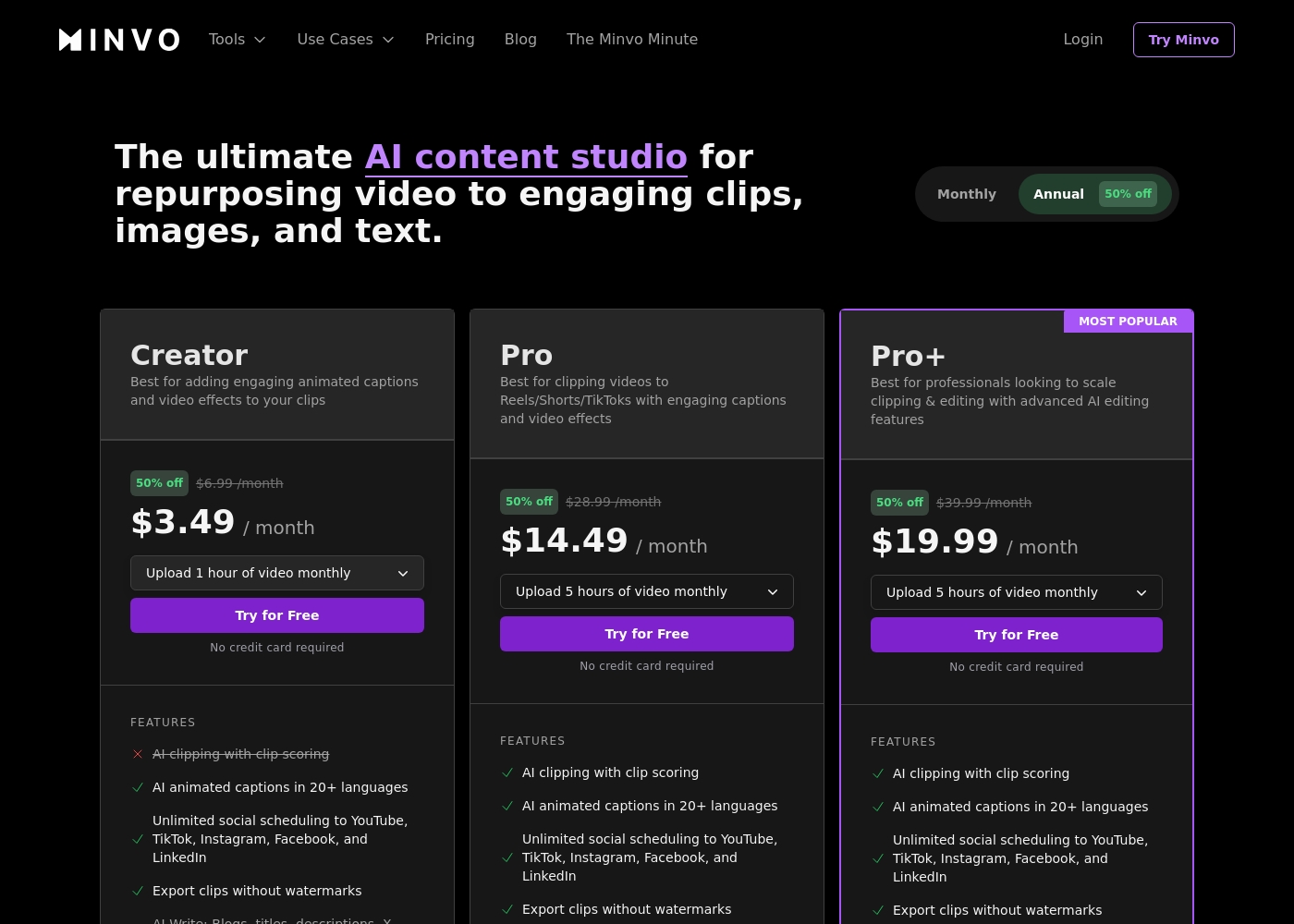
Minvo costs between $3.49 and $19.99 per month with three plans: Creator at $3.49/month, Pro at $14.49/month, and Pro+ at $19.99/month (all prices reflect the annual discount).
Let's look closely at what these video content plans offer.
Creator
Price: $3.49 / month (based on annual billing; standard monthly rate is $6.99) Websites Supported: Unlimited social scheduling to YouTube, TikTok, Instagram, Facebook, and LinkedIn Best For: Adding engaging animated captions and basic structuring to video clips Other Features:
- Upload 1 hour of video monthly
- AI animated captions in 20+ languages
- Export clips without watermarks
- AI Write tools (Blogs, titles, descriptions, X posts)
- 1 user and 14 days of video storage
- Upload 1 hour of video monthly
- AI animated captions in 20+ languages
- Unlimited social scheduling
- Export clips without watermarks
- AI Write tools (Blogs, descriptions, X posts)
- Upload 5 hours of video monthly
- AI clipping with clip scoring
- Includes full AI Editing suite (Cut Silences, Filler Words, Face Framing)
- Export in 4K
- Unlimited AI image generation
- Upload 5 hours of video monthly
- Lightning 10x fast transcription
- Includes all Pro features
- Max upload length: 3 hours
- 3 users included
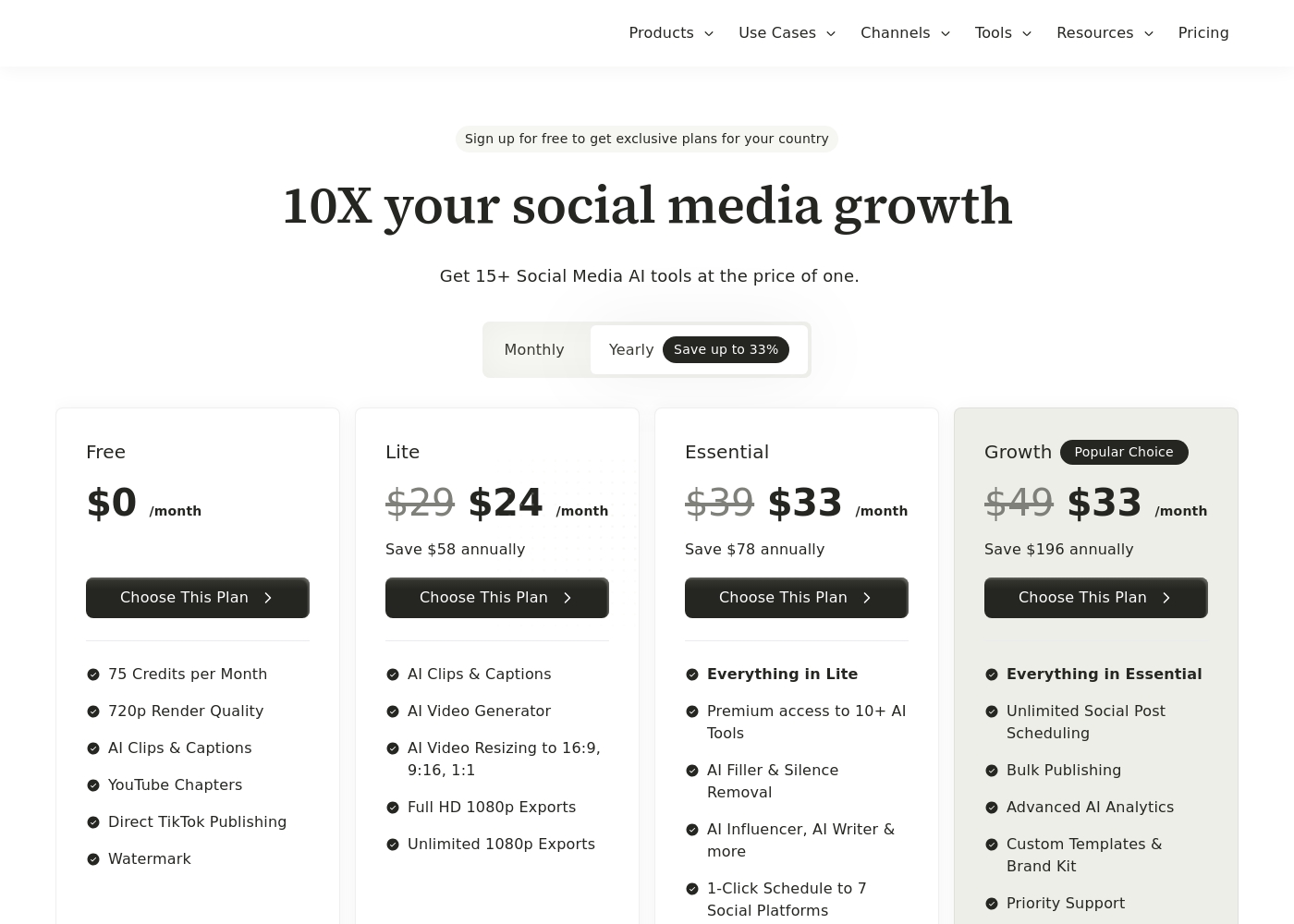
Vidyo.ai costs between $0 and $33 per month with four plans: Free at $0/month, Lite at $24/month, Essential at $33/month, and Growth at $33/month (annual prices).
If you choose yearly billing, you save significantly over the standard monthly rates. This structure helps you choose the right set of tools for your content needs. Here's a look at what each plan offers.
Free
Price: $0 /month Best For: Basic users and platform testing Other Features:
- 75 Credits per Month
- 720p Render Quality
- Direct TikTok Publishing
- Watermark
- 75 Credits per Month
- 720p Render Quality
- AI Clips & Captions
- YouTube Chapters
- Direct TikTok Publishing
- AI Clips & Captions
- AI Video Generator
- AI Video Resizing to 16:9, 9:16, 1:1
- Full HD 1080p Exports
- Unlimited 1080p Exports
- Everything in Lite
- Premium access to 10+ AI Tools
- AI Filler & Silence Removal
- AI Influencer, AI Writer & more
- 1-Click Schedule to 7 Social Platforms
- Everything in Essential
- Unlimited Social Post Scheduling
- Bulk Publishing
- Advanced AI Analytics
- Custom Templates & Brand Kit
Pricing Notes
- Minvo is significantly cheaper at the entry level, starting at $3.49/month annually with a 50% annual discount.
- Vidyo.ai offers unlimited 1080p video exports on paid plans, whereas Minvo limits usage based on maximum monthly upload hours (max 5 hours).
- The Vidyo.ai Essential and Growth plans cost the same ($33/month annually), making the feature-rich Growth plan the clear best value.
- Minvo explicitly offers up to 3 user seats, while Vidyo.ai's pricing does not account for multiple users or teams.
- Vidyo.ai provides a robust Free plan, allowing users to test its core features indefinitely (though watermarked at 720p).
Pricing Head-to-Head
User Reviews
Minvo receives mixed but largely critical feedback on Trustpilot, resulting in a Poor 2.6/5.0 rating across nine reviews. Users appreciate Minvo’s core potential, praising its modern interface, user-friendly editing features like transcript and timeline tools, and a wide array of trending capabilities like AI smart cuts and content scheduling.
When it works, some users report that it truly streamlines their creative workflow. However, reliability is a major concern.
Minvo has been a magic tool for my content creation workflow. The user-friendly platform lets me create engaging, professional videos in just a few clicks. It saved me hours of manual editing.
External sentiment for Vidyo.ai is based on extremely limited data, as the overall Trustpilot rating of 3.7 stems from only one detailed user review and there is no Capterra feedback available. Despite the low volume, the single 5-star testimonial provides powerful evidence regarding product efficacy and corporate integrity.
The user highlights that the platform is fantastic at extracting key clips from long-form videos and podcasts, calling it a huge time-saver for content creators. More notably, the review confirms exceptional customer service.
The platform was fantastic at extracting key clips from my long-form videos and podcasts. It was a HUGE time-saver for my content creation workflow. The product itself worked great when I used it daily.
Our Verdict
Minvo and Vidyo.ai are battling to automate video repurposing, but one clearly feels safer. If you need a reliable production platform right now, Vidyo.ai is the safer bet overall. Minvo’s incredible feature set is currently undermined by widespread reports of bugs and instability. Minvo’s superpower is its deep editing functionality and team support. It offers professional 4K export and specific user seats for small creative teams (up to three). Minvo also dominates language support, handling transcription for over 50 languages globally. Vidyo.ai’s strength lies in its output volume, stability, and integrity. You get unlimited 1080p exports and integrated unlimited B-Roll to maximize content delivery. User experiences widely praise Vidyo.ai’s trustworthy approach and reliable, hassle-free customer support. The major deciding factor is stability versus niche features. Go with Minvo if 4K or multi-user editing are absolutely critical, and you can tolerate current bugs. Choose Vidyo.ai if you need dependable content volume and a platform that won't lose your progress. **Final Verdict:** We recommend Vidyo.ai for high-volume, reliable content generation that requires minimal troubleshooting. Minvo is best for professional workflows requiring specific 4K output and team collaboration capabilities.
Frequently Asked Questions
Which is better for maximizing clip volume: Minvo or Vidyo.ai?
Vidyo.ai is better for volume creators. Paid plans offer unlimited 1080p exports, allowing you to scale content significantly. Minvo limits you to a maximum of five upload hours monthly, restricting high-volume users.
Does Minvo offer 4K export, and does Vidyo.ai?
Yes, Minvo offers 4K export capability on its Pro and Pro+ plans for high-fidelity needs. Vidyo.ai currently maxes out its core video exports at Full HD 1080p resolution.
Which tool is better for small teams needing collaboration features?
Minvo is better for teams, as it explicitly includes 2 or 3 user seats on its Pro tiers. Vidyo.ai uses usage-based pricing and does not define multi-user access in its plans.
Is Vidyo.ai's platform reliability better than Minvo's?
Yes, Vidyo.ai appears significantly more reliable; users report positive stability. Minvo users frequently report severe bugs, slow exports, and failed renders which can hinder production.
How does Minvo's pricing limit differ from Vidyo.ai's?
Minvo limits production by the total number of hours uploaded each month (Max 5 hours). Vidyo.ai limits usage by monthly credits but offers unlimited 1080p exports on paid plans.
Which tool includes integrated, unlimited royalty-free B-Roll footage?
Vidyo.ai includes instant access to unlimited, copyright-free B-Roll footage right in the app. Minvo can AI-insert B-Roll, but access to a guaranteed unlimited library is not specified.
Ready to Choose?
Both tools have their strengths. Choose based on your specific needs.