Microsoft Azure vs Vultr
Microsoft Azure and Vultr represent two totally different cloud strategies. Microsoft Azure offers deep enterprise integration and advanced security tools. Vultr focuses on raw, cutting-edge GPU power for demanding AI workloads. We'll show you how to pick your ideal cloud partner quickly.
Best for: Enterprise organizations focused on secure, complex cloud migration of legacy systems (SAP, Oracle)., IT teams requiring unified management across hybrid or multicloud environments (using Azure Arc).
Best for: Development teams needing rapid, cost-effective infrastructure deployment in under 60 seconds., AI researchers and startups requiring immediate access to cutting-edge NVIDIA HGX GPU clusters for training.
Powerful features, deeply problematic user experience.
Microsoft Azure offers powerful global infrastructure for AI, HPC, and large-scale data migration. However, external feedback reflects serious issues regarding customer support, billing transparency, and reliability protocols, especially concerning data retention. Overall, we see transformative technological potential, but the reported operational and service problems demand caution before heavy investment.
Pros
- Accelerates high-scale Generative AI solutions and deployment capabilities.
- Unmatched global reach across more worldwide regions than any other provider.
- Offers infrastructure flexibility through Azure Arc for hybrid environments.
- Streamlines migration for extensive legacy databases like SQL Server and SAP.
Cons
- Customer support is widely reported as unresponsive, slow, and purposefully difficult to access.
- Billing structure is confusing and often results in unexpected or deceptive hidden fees.
- Service unreliability causes downtime and high user stress.
- Policy allows automatic, permanent data deletion 90 days after an invoice is overdue.
Advanced Tech, Highly Problematic Support.
We recognize Vultr offers powerful, high-specification resources optimized for AI and HPC workloads, providing immediate access to cutting-edge global infrastructure. However, the user feedback clearly indicates severe instability regarding operational support, verification processes, and network reliability. Overall, Vultr is a high-risk provider where world-class technology is significantly undermined by pervasive customer service and account management failures.
Pros
- Access to cutting-edge AI and HPC hardware (NVIDIA HGX B200, AMD Instinct).
- Global reach with 32 cloud data center locations worldwide.
- Flexible hourly and monthly usage-based billing starting at $2.50/month.
- Managed services like Kubernetes Engine and databases are available.
Cons
- Customer support is consistently slow, unhelpful, ticket-based, and unresponsive.
- Arbitrary account suspensions and service terminations occur frequently (e.g., due to CPU spikes).
- Unreasonable, invasive mandatory verification steps (requiring ID, credit card photos).
- Reported difficulties obtaining refunds, especially for cryptocurrency deposits.
AboutMicrosoft Azure
Azure is a comprehensive cloud platform designed for limitless innovation. It facilitates solutions across everything from application development to robust data transformation. The platform specifically serves developers, IT professionals, data analysts, and organizational leaders. Azure provides the global infrastructure needed to go beyond the limits of on-premises datacenters. It offers more worldwide regions than any other provider. 💡
AboutVultr
Vultr provides a powerful full-stack cloud compute platform. It offers services ranging from configurable virtual machines to highly accelerated dedicated servers 💡. This platform is ideal for developers and enterprises focused on high-performance computing and complex AI model deployment. You can spin up general purpose or optimized configurations in under 60 seconds.
Highlights
Feature Comparison
Features Overview
We highlight the main differences and pick a winner for each feature.
AI & HPC Hardware
Vultr offers immediate access to the newest, specialized GPU clusters. Microsoft Azure focuses on integrated enterprise AI solutions.
Microsoft Azure has powerful HPC options optimized for deep learning and large compute tasks. It uses Azure AI Foundry for enterprise-scale generative AI solutions. Vultr offers immediate reserves for revolutionary hardware like the NVIDIA HGX B200. You can access specialized AMD Instinct GPUs for advanced training clusters instantly. Vultr provides faster access to the absolute newest, bleeding-edge GPU clusters available today. Microsoft Azure focuses on integrated, large-scale enterprise AI development. If raw, specialized compute power is your priority for AI research, Vultr is the clearer choice for demanding, next-generation training workloads.
Enterprise Migration Tools
Microsoft Azure simplifies moving legacy systems. Vultr focuses on deploying greenfield applications.
Microsoft Azure is built for established organizations, allowing seamless migration of massive legacy systems. You can easily move SQL Server, SAP, and Oracle with few code changes. Vultr focuses on starting fresh or deploying applications using highly configurable VMs. It does not advertise specialized tools for complex legacy system migration. Microsoft Azure's Azure Arc also unifies management across hybrid and multicloud environments. Vultr's tools are primarily limited to its own infrastructure. Companies needing to modernize massive, existing IT infrastructure will find Microsoft Azure uniquely suitable for complex, large-scale workload shifts.
Entry-Level Pricing
Vultr offers a dramatically lower entry point. Microsoft Azure costs are higher to start.
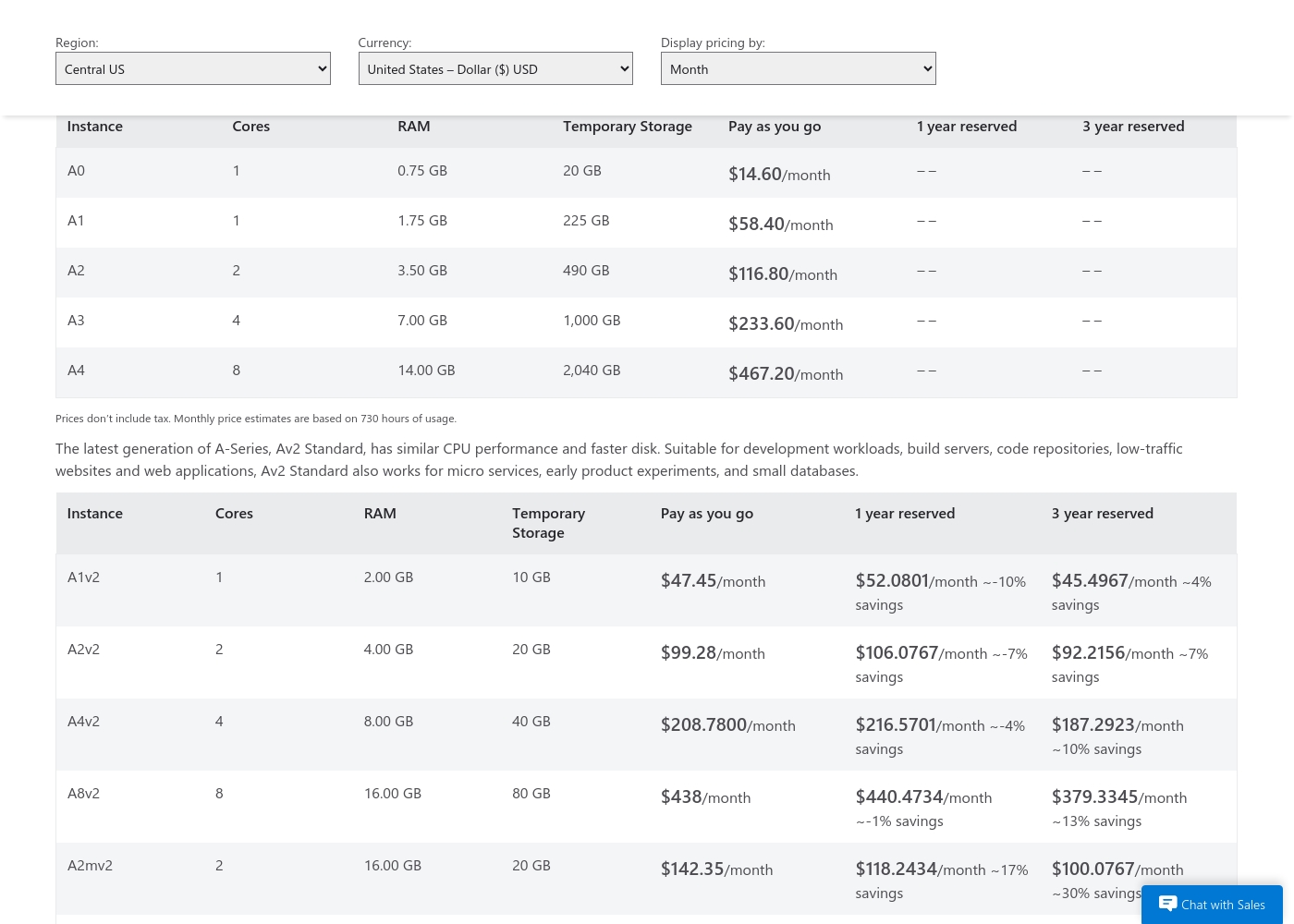
Microsoft Azure's cheapest VM instance (A0) starts at $14.60 per month. The platform uses consumption billing with reserved instance cost savings. Vultr offers incredibly competitive hourly/monthly pricing, starting at just $2.50/month. This entry-level price is for a Regular Performance IPv6-only instance. The core services of Vultr are significantly cheaper at the entry level than comparable Microsoft Azure instances. Vultr requires no commitment for basic usage. Vultr offers better raw value for testing, small projects, or personal development environments demanding minimum resources.
Ecosystem Depth
Microsoft Azure has a much richer suite of specialized managed tools. Vultr offers essential, focused managed services.
Microsoft Azure provides a vast suite of specialized managed services like Azure Cosmos DB. This is a crucial serverless NoSQL vector database for modern AI apps. Vultr offers robust managed services like Kubernetes Engine (VKE) and managed MySQL/PostgreSQL databases. It covers core compute needs very well. Microsoft Azure includes specialized enterprise tools like Microsoft Sentinel for advanced security analytics. Vultr does not offer this level of integrated security governance. A development team needing specialized vector storage and advanced security will generally require the feature depth provided by Microsoft Azure.
Customer Support & Trust
Both platforms receive terrible user reviews for support quality. Neither is reliable for fast help.
Microsoft Azure users report slow, unresponsive support that is difficult to access, often taking weeks to resolve tickets. They also report confusing billing practices. Vultr users also complain about consistently slow, ticket-based support that is unhelpful during network issues. Vultr users report arbitrary account suspensions. Both platforms suffer from poor user review sentiment specifically concerning the quality and availability of human customer service. Due to critical operational failures reported by users, both cloud providers require significant internal support knowledge.
AI Model Deployment
Vultr simplifies scaling inference via a serverless model. Microsoft Azure scales through enterprise infrastructure.
Microsoft Azure scales through its enterprise-grade infrastructure and Azure AI services. This often requires configuring specific services within its vast framework. Vultr simplifies scalability for AI models instantly via Vultr Serverless Inference. This service handles the complex underlying infrastructure management. Vultr offers a more direct, serverless path to scaling inference models for rapid AI application growth. It lets developers focus on the model, not the servers. Teams launching new AI products quickly may prefer Vultr Serverless Inference for its specialized, hassle-free approach to scaling models.
Microsoft Azure costs between $14.60/month and $467.20/month with four main instance categories: General Purpose A-Series, Av2 Standard, Memory Intensive, and Network Optimized.
We provide monthly price estimates based on 730 hours of usage. The cost you pay is determined by factors like instance size, region, and whether you choose reserved commitment or Pay as you go.
General Purpose (A-Series A0–A4)
Price: $14.60/month (A0) to $467.20/month (A4) Best For: Websites, small-to-medium databases, and other everyday applications Other Features:
- Instances range from 1 to 8 cores
- RAM options from 0.75 GB to 14.00 GB
- Temporary storage up to 2,040 GB
- 1 Core
- 0.75 GB RAM
- 20 GB Temporary Storage
- Best for everyday applications and testing
- 1 Core
- 2.00 GB RAM
- 10 GB Temporary Storage
- Similar CPU performance to A-Series
- Faster disk for low-traffic sites
- 8 Cores
- 56.00 GB RAM
- 2,040 GB Temporary Storage
- Ideal for large databases and high-throughput applications
- 16 Cores
- 224.00 GB RAM
- 2,000 GB Temporary Storage
- Designed for high performance computing (HPC)
- Uses Intel Xeon E5-2667 v3 processor
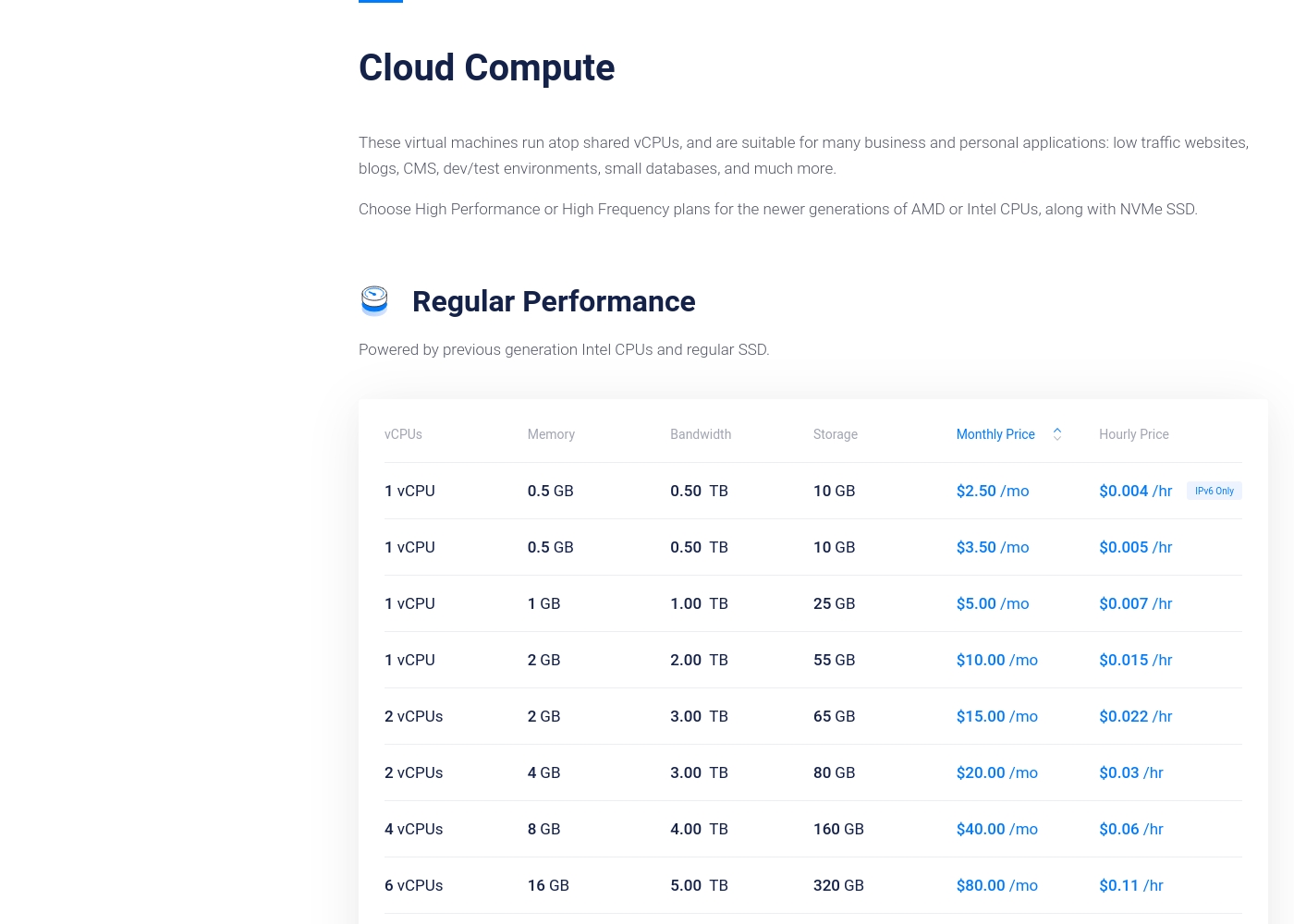
Vultr costs between $2.50 and $80.00 per month for Regular Performance Cloud Compute, featuring eight plans starting with the 1 vCPU / 0.5 GB configuration at $2.50/month.
Vultr’s Cloud Compute offerings are built on virtual machines using shared vCPUs. These machines are a great fit for everyday tasks like running low-traffic websites, simple databases, or small development environments. We've outlined a few of the available options below.
1 vCPU / 0.5 GB (IPv6 Only)
Price: $2.50 /month ($0.004 /hr) Best For: Basic testing or staging environments Other Features:
- 0.5 GB Memory
- 10 GB Storage
- 0.50 TB Bandwidth
- Powered by previous generation Intel CPUs
- 1 vCPU
- 0.5 GB Memory
- 10 GB Storage
- 0.50 TB Bandwidth
- 1 vCPU
- 1.0 GB Memory
- 25 GB Storage
- 1.00 TB Bandwidth
- 6 vCPUs
- 16 GB Memory
- 320 GB Storage
- 5.00 TB Bandwidth
Pricing Notes
- Vultr has a much lower entry point starting at $2.50/month, compared to Microsoft Azure's minimum of $14.60/month.
- Microsoft Azure offers a 30-day free trial with a $200 credit; Vultr uses strictly usage-based hourly billing.
- Vultr aggressively prices its new cutting-edge GPU hardware, often requiring prepaid 36-month commitments for the best rates.
- Microsoft Azure offers better long-term predictability and savings with optional 1-year and 3-year reserved instances for fixed workloads.
- Microsoft Azure's billing is frequently criticized as deceptive, resulting in unexpected fees, unlike Vultr, which is generally clearer on add-on costs like backups (20% fee).
Pricing Head-to-Head
User Reviews
External feedback drawn exclusively from Trustpilot is overwhelmingly critical, resulting in a significantly low TrustScore of 1.5. The primary source of frustration is customer service, which users frequently describe as unresponsive, difficult to reach, and lacking competence, sometimes taking weeks to address urgent tickets.
Many customers report opaque pricing and billing practices, including unexpected fees and continuous charging even after they deleted services entirely. Serious issues related to reliability and data security also emerged: multiple users noted account data was automatically and permanently deleted due to an overdue 90-day invoice policy, even when they struggled to make the payment through the system.
Azure's pricing is completely deceptive, hitting me with totally unexpected fees. I strongly advise everyone to avoid it. It’s definitely going to rip you off eventually.
Vultr receives poor external ratings, especially on Trustpilot (2.1), where customer experiences are highly polarized. While some users acknowledge Vultr's competitive pricing and the overall power of the servers, these positive attributes are frequently overshadowed by critical operational failures.
The most common complaint centers on terrible customer support which is described as slow, unresponsive, and strictly ticket-based. Users commonly report arbitrary account suspensions or terminations, often triggered by hitting unstated CPU usage limits or frivolous DMCA claims 😔.
The bad reviews here don't reflect my nine years of experience. I've been a customer for a long time only hosting one mail and web server. The initial offerings consistently held a great value, and the support used to be easy to reach.
Our Verdict
You’re comparing the enterprise powerhouse Microsoft Azure against the performance-focused Vultr. Your choice depends entirely on whether you need deep integration or raw compute power. Both platforms have notoriously poor customer service records, so be prepared to self-support. Microsoft Azure’s superpower is its seamless integration into the complex enterprise world. It simplifies complex migrations of massive systems like SAP, Oracle, and Windows Server. Moreover, Microsoft Azure provides centralized governance and security across hybrid environments using tools like Azure Arc. Vultr delivers sheer, raw, specialized compute power instantly and affordably. It provides immediate access to bleeding-edge GPUs like the NVIDIA HGX B200 for intense AI training. Crucially, Vultr is dramatically cheaper to start, with basic VMs beginning at just $2.50/month. The deciding factor is your existing complexity and budget. If you are a large enterprise migrating legacy systems, the powerful integration of Microsoft Azure is necessary. If you are a leaner, AI-focused team needing the newest hardware and lowest start-up cost, Vultr is the better technical fit. Choose Microsoft Azure for enterprise stability, maximum global reach, and powerful security ecosystems. Pick Vultr if you prioritize extreme AI hardware performance and a much lower entry-level price point. Be wary of customer service issues on both clouds.
Frequently Asked Questions
Which is better for migrating large, existing IT infrastructure: Microsoft Azure or Vultr?
Microsoft Azure is specifically designed for complex enterprise migrations. It offers tools for seamlessly moving large SQL Server, SAP, and Oracle databases. Vultr focuses on greenfield deployment and does not offer comparable specialized migration services.
Does Vultr offer a free trial like Microsoft Azure?
No, Vultr does not offer a free trial or credit. Microsoft Azure offers a 30-day free trial that includes a $200 credit to use on services. Vultr relies on its low hourly rate billing model instead of a free commitment period.
Which platform provides better access to bleeding-edge AI hardware?
Vultr provides immediate, direct access to the latest specialized GPU models like the NVIDIA HGX B200. This is ideal for research teams focused on high-performance model training. Microsoft Azure also offers HPC resources but Vultr specializes in instant access to raw power.
Is Microsoft Azure or Vultr cheaper for a basic cloud compute instance?
Vultr is significantly cheaper for entry-level use. Vultr starts at $2.50/month for a baseline VM. Microsoft Azure’s smallest comparable instance starts at $14.60/month, making Vultr better for budget-conscious testing.
Can I manage my infrastructure across other clouds or on-premises using Vultr?
No, Vultr does not offer a unified management plane for hybrid or multicloud setups. Microsoft Azure uses Azure Arc to unify infrastructure governance across your on-premises, hybrid, and cross-cloud environments.
Why are user reviews so poor for both Microsoft Azure and Vultr?
Users widely criticize both platforms for unresponsive customer support and high-friction account management issues. Microsoft Azure is specifically criticized for confusing billing. Vultr users report arbitrary service terminations and invasive verification requests.
Ready to Choose?
Both tools have their strengths. Choose based on your specific needs.