Livestorm vs Zoom
Livestorm and Zoom are top video platforms but serve very different core needs. Livestorm is built for professional marketing webinars and secure event management. Zoom is an AI-first collaboration engine for managing complex hybrid workforces. Your choice depends entirely on whether you are hosting external events or improving internal team communications.
Best for: B2B Marketing teams prioritizing lead generation and detailed analytics., Organizations requiring strict EU/GDPR data compliance and EU data residency.
Best for: Large, complex enterprises managing distributed or hybrid teams., Organizations that prioritize maximum weekly time savings via AI meeting summarization.
Comprehensive Webinar Tool, Complex Pricing.
We find Livestorm provides a robust, browser-based platform ideal for businesses needing strong data security and high automation capacity. The feature set is excellent, but we must note the recurrent serious concerns regarding subscription policies and dramatic, unannounced price hikes. Overall, Livestorm is a powerful tool with significant financial risk flags for long-term users.
Pros
- All-in-one browser-based platform (no software installation required).
- Strong data security (EU hosted, ISO 27001, GDPR compliant).
- Efficient automations and smooth event management processes.
- Good user experience delivers high attendance duration.
Cons
- Reports of sudden, major price increases for loyal customers (up to 350%).
- Rigid and unfriendly subscription/cancellation policies noted by users.
- Reliability issues reported, including constant freezing and delays.
- Video streaming quality is sometimes poor, especially for presenters.
Powerful features, poor customer commitment.
We recognize Zoom Workplace as a robust, AI-first platform offering industry-leading features for collaboration and potential time savings. However, we found that its operational reality, including support and subscription handling, presents major challenges that introduce significant risks for users. Overall, organizations must weigh the advanced functionality against the widely documented customer service and billing failures.
Pros
- AI Companion features like summarization save significant time (up to six hours weekly).
- Robust core video conferencing and meeting product that is quick to deploy.
- The integrated Zoom Workplace minimizes app switching and workflow friction.
- Supports enhanced organizational culture and managing hybrid workforces.
Cons
- Customer service and technical support are widely viewed as non-existent and impossible to reach.
- Widespread issues with unexpected auto-renewal, difficult cancellation processes, and refund refusals.
- Setting up specialized services like Zoom Phone is often complicated and poorly supported.
- User interface (UI/UX) is reported as confusing and lacking intuition on the desktop application.
AboutLivestorm
Livestorm is a powerful, unified platform offering dynamic discussions for any kind of online event. It is designed to be the webinar leader, ready for immediate use. You access Livestorm right through your browser, which means there is no software to install and no credit card required to start. This accessibility ensures you can achieve maximum participation every time. This platform serves thousands of customers, scaling easily from startups to large enterprises.
AboutZoom
Zoom is an AI-first Unified Communications as a Service (UCaaS) solution built for modern teams. It is a single platform dedicated entirely to collaboration. This integrated system, called Zoom Workplace, streamlines essential communication tools like Meetings, Chat, and Docs.
It’s designed for any business that needs to strengthen its organizational culture and effectively engage a hybrid workforce. Zoom also supports critical customer-facing functions, offering specialized AI-first contact center and Customer Experience (CX) solutions. This level of connection helps your entire team work together without friction. ✅
Highlights
Feature Comparison
Features Overview
We highlight the main differences and pick a winner for each feature.
Core Focus & Platform Design
Livestorm is dedicated to advanced external events; Zoom combines all internal comms for hybrid teams.
Livestorm is an all-in-one browser-based event platform. It streamlines the entire event lifecycle from registration to deep analytics reports. Livestorm requires no software installation, maximizing attendee turnout easily. Zoom is an AI-first Unified Communications as a Service (UCaaS) solution. Its Zoom Workplace integrates Meetings, Chat, and Docs seamlessly. Zoom aims to eliminate tab-juggling for better team efficiency. If you primarily run marketing events, Livestorm provides the better specialized tools immediately. If you need robust internal communication, Zoom Workplace is the unified choice for distributed teams. Zoom helps large teams save massive weekly time on internal communication friction. Livestorm focuses on maximizing lead generation and engagement in external events.
AI Productivity Tools
Zoom's AI Companion drives massive time savings; Livestorm uses AI mainly for accessibility features.
Livestorm leverages AI for content accessibility, providing transcripts and captions for replays easily. It focuses on post-event content optimization and consumption on demand. Livestorm does not publicly offer real-time meeting summarizing. Zoom's AI Companion actively summarizes meetings and drafts documents efficiently. This powerful feature is estimated to save users around six hours of meeting time weekly. Zoom is clearly ahead in leveraging AI for active productivity gains and workflow speed. Livestorm’s AI is currently better focused on making content searchable and accessible immediately. Teams struggling with internal information overload after meetings find Zoom’s summarizing AI highly valuable.
Pricing Structure
Livestorm uses transparent usage-based pricing; Zoom operates using completely hidden, custom quotes.
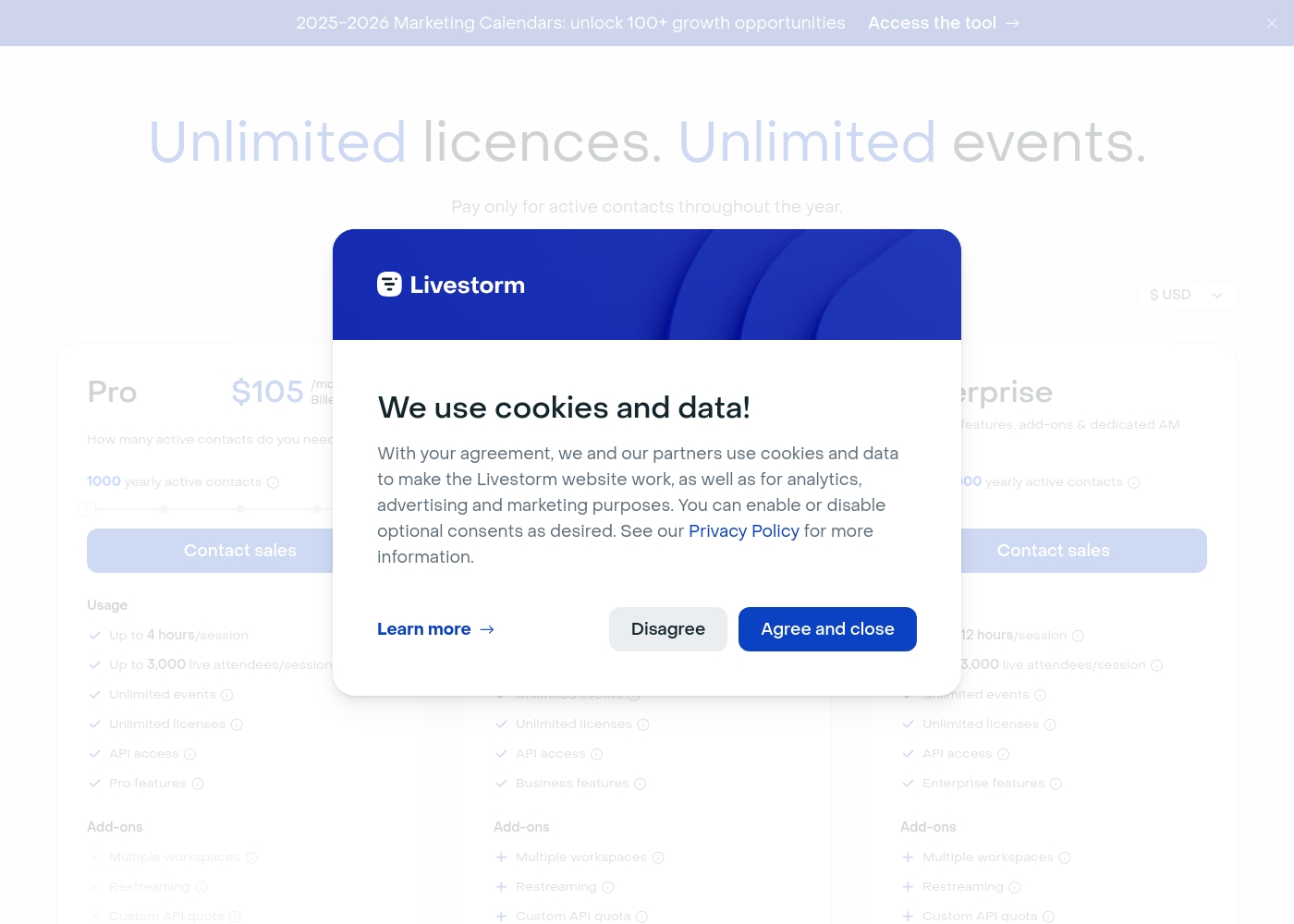
Livestorm uses a usage-based model based on annual Active Contacts. The Pro plan price ($105/month) is public and includes 1,000 yearly contacts. This model is clear but requires careful usage monitoring. Zoom’s pricing for Workplace is not publicly disclosed on their website at all. Customers must contact Sales directly for a personalized, custom quote. This lack of transparency makes upfront budgeting impossible for new users. Livestorm provides a clear entry point and transparent tiers for easier planning. Zoom’s custom quotes suggest a higher price barrier and negotiation dependency. However, both tools have severe complaints regarding aggressive financial practices and lack of support.
Security & Compliance
Livestorm is EU-hosted and GDPR-certified; Zoom offers standard enterprise security, but lacks explicit certifications.
Livestorm prioritizes maximum data security, being hosted in the EU, ISO 27001 certified and GDPR compliant. This assures users of maximum data protection standards easily. Enterprise tiers include specialized security review support if required. Zoom supports enterprise security features and maintains a robust Trust Center. However, it does not boast the same specialized EU-hosting or GDPR-by-design focus as Livestorm. Organizations operating strictly within the EU and needing stringent data controls should prefer Livestorm right away. If data residency and stringent EU regulatory compliance are non-negotiable, Livestorm is the safer choice immediately.
Customer Support & Billing
Livestorm has balanced support; Zoom users widely report support is impossible to reach and useless.
Livestorm’s support structure scales up to VIP Support with a Service Level Agreement (SLA). While users complain about high price hikes, the technical support is generally manageable. Livestorm’s complaints center mostly on financial rigidity. Zoom users consistently describe support as nonexistent and useless for critical billing issues. Reports include forced auto-renewal and fraudulent charging practices. This creates immense financial and operational risk. Livestorm, despite pricing issues, offers a viable pathway for resolution and support. Choosing Zoom means accepting minimal to no external recourse if account problems arise later on.
Event Management
Livestorm offers a specialized marketing suite; Zoom gives ultimate flexibility via the Video SDK.
Livestorm provides advanced tools like custom registration pages and branding templates. It includes Q&A upvoting, polls, and great CRM data sync for lead generation. It is built for a complete marketing funnel. Zoom offers robust webinar tools for large-scale demand generation events. Developers can use the Video SDK for deep flexibility and product customization. Zoom is built for massive reliability and scale. Livestorm is superior for non-technical marketing teams needing an all-in-one suite. Zoom is better for teams with developer resources needing to build video into custom apps.
Livestorm costs between $0 and $105+ per month with four plans: Free at $0, Pro at $105/month (when billed annually), Business at Contact sales, and Enterprise at Contact sales.
Livestorm pricing is based primarily on your required annual quota of "Active Contacts." Here is a breakdown of what you get with each plan.
Free
Price: $0 Best For: Testing the platform or small, quick events Other Features:
- Up to 30 active contacts/month
- 20 minutes maximum per session
- Up to 30 live attendees
- Unlimited team members
- Email support only
- Up to 30 active contacts/month
- 20 minutes maximum per session
- Up to 30 live attendees
- Unlimited team members
- Email support only
- 1,000 yearly active contacts included
- Up to 4 hours per session
- Up to 3,000 live attendees
- Unlimited events and licenses
- Standard Support
- From 10,000 yearly active contacts
- Up to 4 hours per session
- VIP Support
- Dedicated Account Manager and VIP onboarding
- Custom data extracts & dashboards
- From 10,000 yearly active contacts
- Up to 12 hours per session
- VIP Support & SLA
- Advanced Enterprise features
- Access to Technical Solution Partners
It looks like specific plan names, detailed features, and publicly advertised prices for Zoom Workplace are not available directly on this page. You’ll need to connect with the sales team for current rates.
Zoom Workplace (Plan Details Unavailable)
Best For: Businesses seeking a unified, AI-first platform for collaboration and customer experience. Other Features: AI Companion summarizing meetings, seamless integration, video SDK flexibility, Meetings, Chat, and Docs integration.
Since specific dollar amounts are not listed here, this indicates that pricing is likely customized based on your business size and feature usage. Get in touch with their team to define the right package for your organization. 💡
Pricing Notes
- Livestorm offers more transparent, publicly listed pricing starting from $105/month (annual price).
- Zoom requires direct contact with Sales for a personalized custom quote, hiding its true pricing structure.
- Livestorm uses a unique usage model based on 'yearly active contacts,' which requires careful monitoring to prevent overage charges.
- Both platforms have severe user complaints about subscription management: Livestorm for price hikes, Zoom for cancellation and auto-renewal issues.
Pricing Head-to-Head
User Reviews
The feedback for Livestorm is notably polarized, primarily focusing on pricing structure and technical reliability. Many users praise the platform's ease of use, describing it as a "good all around webinar software" with great design and efficient automations that help save time ⏱️.
Long-term users particularly value the streamlined invitation process and consistent performance for B2B organizations. However, the negative reviews are very strong, centered mostly on cost and customer service policies.
I use Livestorm at least twice weekly for customer outreach. It works reliably for me and has been great for reaching customers across Sweden. I have used the service for over three years consistently.
External sentiment, primarily from Trustpilot users, indicates extreme dissatisfaction with Zoom services outside of the core video product. While many users mention that Zoom’s video calls are generally reliable and quick to set up, the overwhelming majority of feedback centers on failures in essential business operations, particularly customer support and billing.
Users describe support as nonexistent, atrocious, and even a "myth." They consistently report inability to reach a human, long wait times (up to a week), and tickets being closed without resolution. This difficulty extends especially to Zoom Phone setup, which many call impossible and complicated.
I tried calling Sales because I couldn't reach Tech Support, but they refused to connect me unless I upgraded my account first. My account was already locked, waiting for some specific form verification. This is an absolutely disgraceful level of service for a paying customer.
Our Verdict
Choosing between Livestorm and Zoom requires clarifying your core use case quickly. Livestorm is laser-focused on external events; Zoom excels at internal team collaboration. Both are powerful, but both carry serious user complaints regarding cost and support. Livestorm's superpower is its specialized, end-to-end event management suite. It delivers high audience engagement tools and excellent branding potential right in the browser. Furthermore, Livestorm is ISO 27001 certified and GDPR compliant, making it the safer choice for EU-focused businesses. Zoom is the undisputed king of team communication, and the AI Companion is its greatest asset. Zoom’s AI can save workers six hours weekly by summarizing meetings automatically. Zoom Workplace unifies Meetings, Chat, and Docs, eliminating the need for context switching. However, potential users must acknowledge Zoom’s catastrophic customer support track record. Livestorm’s reported issues center mainly on price hikes, but Zoom users often claim their accounts are impossible to cancel. This is a crucial deciding factor for operational stability. If generating qualified leads via professional, branded webinars is the priority, go with Livestorm. If you need robust internal UCaaS and AI-powered productivity for a hybrid workforce, choose Zoom but be warned about the poor customer service.
Frequently Asked Questions
Which is better for marketing webinars: Livestorm or Zoom?
Livestorm is the clear winner for dedicated marketing webinars and lead generation. It offers specialized branding, deeper engagement tools, and better CRM integration for event workflows. Zoom is perfectly capable but is built primarily for general meetings.
Does Livestorm offer the AI summarization feature like Zoom?
No, Livestorm does not currently offer the same active AI meeting summarization as Zoom. Livestorm uses AI primarily for post-event transcripts and captions. Zoo's AI Companion actively summarizes meetings, potentially saving users six hours weekly.
Why are Livestorm and Zoom users so unhappy about their costs?
Livestorm users frequently report sudden, massive price increases upon renewal. Zoom users complain about inability to cancel, forced auto-renewal, and refund refusals. Both suffer from poor subscription practice reviews.
Is Livestorm or Zoom better for GDPR compliance?
Livestorm is better for strict compliance needs. It is ISO 27001 certified, EU-hosted, and explicitly GDPR compliant by design. Zoom offers strong security but lacks this specialized European compliance focus.
Is it easier to host an event using Livestorm or Zoom?
Livestorm is generally viewed as easier for hosting events, especially external ones, because it is browser-based. Attendees don't need to download any software to join. Zoom often requires an application install for the best experience.
Which tool is best for developers needing custom flexibility?
Zoom is better suited for developers due to its powerful Video SDK. This allows for massive flexibility and full customization when embedding video into custom applications. Livestorm offers an API and Plugin SDK, but Zoom's SDK is more robust.
Ready to Choose?
Both tools have their strengths. Choose based on your specific needs.