Leadfeeder vs LiProspect
Leadfeeder and LiProspect target B2B sales growth but approach the challenge differently. Leadfeeder finds companies visiting your website, capturing critical inbound intent data. LiProspect drives secure, compliant outbound sales execution on LinkedIn. Choosing depends largely on if your priority is passive identification or active campaign management.
Best for: Businesses with established B2B websites receiving high traffic volume, Sales teams needing immediate insight into known inbound buying intent
Best for: Sales professionals relying heavily on targeted, active LinkedIn prospecting efforts, Agencies managing many client LinkedIn accounts safely and concurrently
Advanced B2B Lead Identification, High Risk.
We found Leadfeeder offers powerful B2B visitor identification features, including robust filtering and unique remote employee recognition capabilities. However, we note consistent customer reports detailing unresolved CRM integration failures and problematic auto-renewal billing policies that undermine its fundamental value proposition. Overall, the powerful features are currently overshadowed by serious concerns regarding support responsiveness.
Pros
- Highest company recognition rate available, identifying remote workers.
- Quick setup requiring a simple Google Analytics connection.
- Robust filtering system using over 50 firmographic and behavioral signals.
- Allows identification of companies engaging with ad campaigns.
Cons
- Reportedly flawed and unresolved two-way Dynamics CRM integration features.
- Aggressive annual auto-renewal policy lacking timely notification reminders.
- Customer support is frequently criticized as non-existent or unhelpful.
- High subscription cost scaling based significantly on volume of identified companies.
Secure, strategic B2B LinkedIn growth.
We find LiProspect offers a robust, cloud-based solution focused clearly on compliant outreach and strategic B2B scaling. The platform provides strong features like advanced targeting and team network visualization, making it suitable for experienced users or larger agencies. Overall, this is a strong investment for businesses prioritizing safety and detailed analytics in their automation strategy.
Pros
- Entirely cloud-based, so no software installation or browser extension is needed.
- Uses a secure, compliant algorithm to minimize LinkedIn account risk.
- Supports management of multiple LinkedIn accounts seamlessly.
- Includes detailed real-time analytics for strategy optimization.
Cons
- Pricing for the 'Business' plan is not public or transparent.
- Specific feature limits related to contact volume for the Professional plan are unclear.
- No publicly stated refund or money-back guarantee is available.
AboutLeadfeeder
Leadfeeder is a powerful tool designed to help salespeople, marketers, and agencies find hidden opportunities in their web traffic. Its unique technology scans incoming traffic and identifies the companies visiting your website based on their IP address. This works even if employees are working from home. Once identified, the tool helps you uncover exactly what those companies are interested in, confirming their true buying intent. This crucial data processing meets all necessary GDPR legislation requirements. ✅
AboutLiProspect
LiProspect is a powerful, comprehensive LinkedIn Automation Suite designed to accelerate B2B sales and marketing tactics. This platform operates entirely on a cloud-based basis. You don't need to download a browser extension or install any software to use it. LiProspect is relevant for multiple groups, including entrepreneurs looking to connect with their target audience efficiently. It also helps sales teams boost their efforts and recruitment endeavors reach ideal candidates quickly. 💡
Highlights
Feature Comparison
Features Overview
We highlight the main differences and pick a winner for each feature.
Lead Generation Method
Leadfeeder uses passive web tracking; LiProspect drives active outbound campaigns.
Leadfeeder spots anonymous companies visiting your website via IP address technology. It helps identify true buying intent based on specific pages visited. This method relies entirely on valuable inbound traffic signals. LiProspect focuses on highly targeted, automated outbound campaigns on LinkedIn. It handles connection requests and personalized InMail messages. This allows user control over audience targeting and segmentation. The core difference is inbound intent data vs. outbound execution strategy. Leadfeeder supplies essential intent data; LiProspect executes the outreach sequence. If your website generates significant B2B traffic, Leadfeeder is likely essential. Choose LiProspect if you need to actively prospect specified accounts on LinkedIn.
Outreach Automation
LiProspect handles full outreach sequences; Leadfeeder uses automated lead scores and alerts.
Leadfeeder automates lead scoring to prioritize prospects showing high intent. It sends real-time alerts via email or Slack for high-value visits. Leadfeeder's automation is focused on internal prioritization and timing. LiProspect automates the entire outbound process for engagement. This includes connection requests, personalized messaging, and automated follow-up sequences. It also offers GIF and image hyper-personalization tools. LiProspect handles hands-free prospect engagement (outbound). Leadfeeder ensures timely attention to high-value inbound traffic. Teams focused on scalable, systematic outreach should prioritize LiProspect's sequencing capabilities.
Contact Data Access
Leadfeeder helps you export contacts; LiProspect keeps engagement within LinkedIn.
Leadfeeder helps you find specific decision-makers within the identified visiting company. You can reveal and export contact information like email and phone numbers. The Paid plan includes 25 contact export credits monthly. LiProspect focuses specifically on automating communication within the LinkedIn platform. It facilitates automated InMail and connection requests. It does not advertise exporting external contact data. Leadfeeder is explicitly designed to retrieve contact details for multi-channel follow-up. LiProspect is optimized for LinkedIn-first engagement. If getting specific emails and phone numbers is critical, Leadfeeder offers more direct value and capability.
Pricing Structure
Leadfeeder pricing scales by usage volume; LiProspect offers a predictable flat monthly rate.
Leadfeeder's cost is based entirely on the volume of unique companies identified visiting the website. Costs scale significantly; high volumes can mean high monthly fees. LiProspect's Professional plan is a fixed $79 per month, offering budget stability. Only the large-scale Business plan requires a custom quote. If your website traffic is highly variable, Leadfeeder's costs can fluctuate wildly. LiProspect offers a predictable, fixed cost for the entry tier. Small businesses with stable budgets prefer LiProspect for automated execution at a fixed monthly cost.
CRM Integration
Leadfeeder offers two-way sync in Paid plans; LiProspect restricts sync to its Business tier.
Leadfeeder includes native, two-way integrations that automatically sync visit data with major CRMs. This feature is available starting at its base Paid plan tier. This ensures high data continuity. LiProspect offers robust CRM integration, but only for users on the custom-priced Business plan. The Professional $79/mo plan lacks this critical system sync feature. Leadfeeder prioritizes integrating inbound data immediately into existing sales workflows. LiProspect reserves this capability for premium, large-scale clients. For teams needing affordable integration without requiring a custom enterprise quote, Leadfeeder is likely the better choice.
Team Management
LiProspect centralizes team networks; Leadfeeder includes unlimited users per subscription.
LiProspect's higher-tier Business plan features Expanded Network Visualization. This strategically centralizes and leverages the collective professional connections of all team members. This is ideal for agencies. Leadfeeder allows unlimited users on all plans, making it easy to share lead data across the whole team seamlessly. It charges based on website volume, not seat count. LiProspect explicitly gives large teams specialized tools to maximize their collective LinkedIn reach. Leadfeeder keeps costs simple by including everyone. For maximizing the reach of a large sales organization on LinkedIn, LiProspect offers a unique advantage.
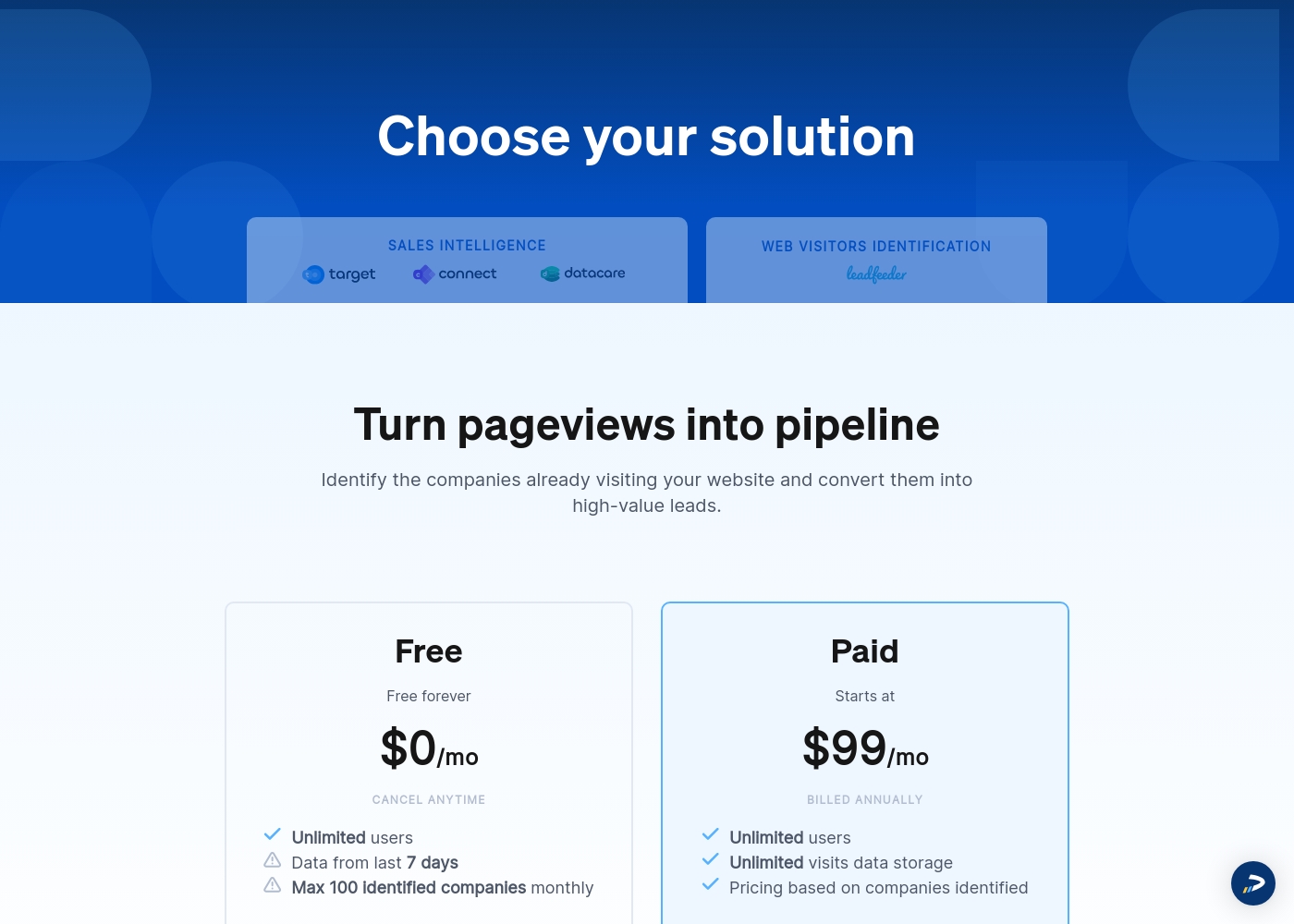
Leadfeeder costs between $0 and $99 per month (billed annually) with two plans: Free at $0 per month and Paid starting at $99 per month.
Here is a breakdown of what you get with each of the available identification solutions.
Free
Price: $0 per month Websites Supported: One per subscription (as subscriptions are priced per website) Best For: Small websites, evaluation, or testing the core feature set Refund Policy: Not applicable (It's free forever) Other Features: Unlimited users, data from the last 7 days, cancel anytime
- Free forever
- Unlimited users
- Verified company details (limited)
- Visitor data storage for the last 7 days
- Unlimited users
- Unlimited visits data storage
- All identified companies access
- Verified company details (firmographics & contact details)
- 25 contact export credits
We offer transparent plans that help businesses of all sizes find the perfect fit. Here’s a detailed look at what each plan offers to help you decide which one you need.
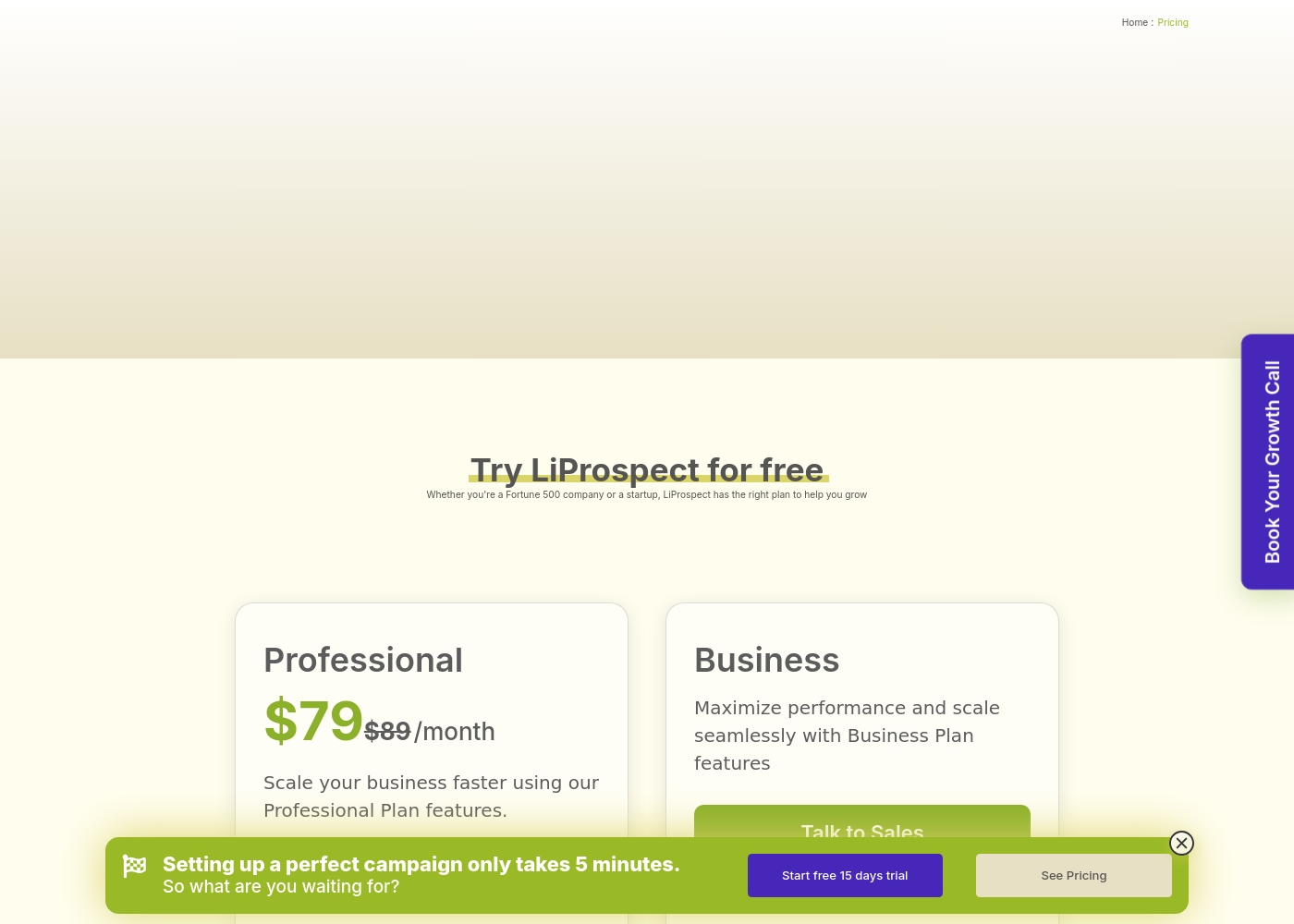
Professional
Price: $79/month or $790/year (saves up to 17%) Best For: Scaling your business faster Other Features:
- Cloud-based platform (no software installation or browser extension needed)
- Allows management of multiple LinkedIn accounts
- Secure algorithm ensuring compliant outreach
- Automated outreach tools (connection requests and messaging)
- Detailed analytics and campaign management
This plan is ideal if you are an individual entrepreneur or a small team ready to ramp up your lead generation efforts. You get secure, comprehensive automation without the hassle of downloading extra software. It’s a strong starting point for maximizing personalized LinkedIn outreach.
- Scale your business faster
- Cloud-based platform (no extension needed)
- Compliant outreach algorithm
- Manage multiple LinkedIn accounts
- Automated connection requests and messaging
- Maximize performance and scale seamlessly
- Integrate with current CRM systems
- Expanded Network Visualization
- Suitable for Fortune 500 or large scaling needs
Pricing Notes
- Leadfeeder offers a permanent Free plan, while LiProspect only provides a 15-day free trial.
- LiProspect's Professional plan is a simple, fixed $79/month, offering budget predictability for automation.
- Leadfeeder's costs scale directly and aggressively based on the identified volume of company website visitors.
- The pricing for LiProspect's powerful Business plan, which includes CRM integration, is not publicly disclosed.
- Leadfeeder offers significant savings (around 30%) if users opt for annual billing over monthly rates.
Pricing Head-to-Head
User Reviews
The customer feedback available paints a highly polarized picture of Leadfeeder. While users appreciate the core functionality—its ability to identify visiting companies and connect quickly with Google Analytics—recent experiences highlight significant operational and support issues.
Many users found the tool useful for generating leads when paired with high website traffic. However, recurring negative comments focus heavily on the financial practices.
Leadfeeder is a very useful tool and an honest company. It helps us correctly identify website visitors, which allows us to add high-quality prospects to our sales database. The support team has been genuinely helpful throughout our time using the product.
We currently do not have specific user feedback or review snippets available from Trustpilot or Capterra to synthesize a balanced summary of external user experiences. This means we cannot report on recurring themes concerning key aspects like onboarding smoothness, the accuracy of its targeting tools, or the effectiveness of customer support responsiveness.
While LiProspect markets itself as a powerful, cloud-based automation suite focused on compliant B2B growth, we lack direct public sentiment regarding the real-world reliability of its connection requests, the value derived from the $79 monthly Professional plan, or the ease of integration with external CRM systems. We strongly recommend that users leverage the generous 15-day free trial to thoroughly test the platform's claimed features, such as the secure outreach algorithm and Expanded Network Visualization for teams, to ensure performance meets specific scaling and automation needs.
Our Verdict
Choosing between Leadfeeder and LiProspect means deciding where to focus your sales effort. LiProspect offers a focused, flat-rate solution for active outbound execution. Conversely, Leadfeeder specializes in maximizing the sales potential of your existing web traffic (inbound intent). Both tools are powerful, but they solve very different problems for your B2B team. Leadfeeder is unmatched when it comes to identifying anonymous website visitors. It accurately provides deep intent data about which companies are browsing your pricing page right now. Leadfeeder also connects this data with critical decision-maker contact details (25 exports monthly). Use Leadfeeder if your high-traffic website is your primary source of intent. LiProspect automates your entire B2B sales development process on LinkedIn efficiently. It executes secure, complex outreach sequences, including personalized connection requests and automated messaging. LiProspect is better for agencies, supporting secure management of multiple accounts simultaneously. The key trade-off is flexible budget scaling versus integration complexity. Leadfeeder’s price increases sharply with your website traffic volume. LiProspect offers a stable $79/month cost. Choose LiProspect if budget predictability in outreach is more important than knowing every visitor name. Go with Leadfeeder if you must maximize the pipeline driven by existing marketing efforts and inbound traffic. Pick LiProspect if you need a specialized, safe B2B sales automation machine focused solely on driving active outreach on LinkedIn. Its Professional plan offers better predictability and fewer user complaints about billing.
Frequently Asked Questions
Which is better for small teams: Leadfeeder or LiProspect?
LiProspect is generally better for small teams focused on outbound sales. Its Professional plan is a flat $79/month, offering budget predictability. Leadfeeder's price is highly unpredictable due to volume-based tiering. Both offer unlimited users on their base plans.
Does Leadfeeder or LiProspect offer a permanent free plan option?
Yes, Leadfeeder offers a permanent Free plan, which is capped at identifying 100 companies per month. LiProspect does not offer a free plan. It only provides a sufficient 15-day free trial to test its full automation suite.
Which tool provides direct contact information (email/phone)?
Leadfeeder provides access to a database of decision-maker contacts. You get 25 credits monthly to reveal and export email and phone numbers. LiProspect focuses purely on automated outreach and engagement within the LinkedIn platform.
Is LiProspect's automation compliant with LinkedIn rules?
Yes. LiProspect emphasizes its use of a secure, compliant algorithm to minimize account risk. It is cloud-based, which helps ensure compliance compared to local browser extensions. Leadfeeder's compliance focuses on web data privacy (GDPR).
How do their pricing models differ for scaling businesses?
Leadfeeder uses usage-based pricing, escalating costs as your identified visitor volume grows. LiProspect uses a fixed rate ($79/mo) for its scaling Professional plan. LiProspect offers more cost stability, while Leadfeeder offers more pricing variability.
Which tool has better CRM integration options?
Leadfeeder offers native, two-way CRM integration right from its base Paid plan. LiProspect only includes CRM integration in its large-scale, custom-priced Business plan. Leadfeeder is more accessible for basic data synchronization.
Ready to Choose?
Both tools have their strengths. Choose based on your specific needs.