Komodo Decks vs Loom
Komodo Decks and Loom both use video to maximize efficiency, but they have distinct strengths. Loom is the established king of quick, asynchronous video messaging. Komodo Decks uses AI to instantly transform those recordings into documented Standard Operating Procedures (SOPs). Choose based on whether you need clearer communication flow or automated training assets.
Best for: Training teams and knowledge managers, Organizations needing a centralized, queryable AI Knowledge Library
Best for: Distributed companies relying on quick, asynchronous team briefs, Large enterprises requiring strict governance, SSO, and guaranteed uptime
Pros
Cons
Essential Video Messaging, Challenging Service.
Loom offers a powerful solution for asynchronous video communication, helping teams replace excessive meetings and emails with personalized recordings. We appreciate the strong feature set, including the new AI suite, but we cannot overlook the severe, frequent complaints regarding billing issues and the failure of customer support to respond to essential inquiries. Overall, its technical promise is undermined by critical operational deficiencies.
Pros
- Excellent tool for asynchronous video communication and remote team briefs.
- Comprehensive AI features streamline editing, summarizing, and note generation.
- Starter plan is free and provides essential recording and sharing tools.
- Paid tiers remove recording limits and support unlimited video storage and 4K quality.
Cons
- Customer service is largely non-existent, unresponsive, and fails to handle billing issues.
- High subscription price felt unreasonable for features widely available for free elsewhere.
- Technical instability includes slow website speeds and loss of unstable 4K recordings.
- Basic features like video download often require an unexpected paid upgrade.
AboutKomodo Decks
Komodo Decks is an AI-powered screen recorder that works right in your browser. 💡 It's built for teams in sales, education, and customer success who need more than just a video file. The platform automatically transcribes recordings and can generate SOPs, summaries, and action items from your sessions.
AboutLoom
Loom is a communication tool built around asynchronous video. It allows millions of people across 400,000 companies to share detailed information quickly using recordings instead of text. Professionals use Loom to connect personally with others without needing constant live meetings. It provides a way to amplify your communication with the team like nothing else has. ✅
Highlights
Feature Comparison
Features Overview
We highlight the main differences and pick a winner for each feature.
SOP Automation
Komodo Decks writes documentation instantly; Loom just records the video.
Komodo Decks records screen actions and instantly generates procedural text. It delivers a full, ready-to-share SOP guide within two minutes. This eliminates most manual documentation time. Loom captures great video messages, but requires extensive manual work afterwards. Users must still write the accompanying documentation themselves. Loom focuses on quick communication delivery. Komodo Decks is superior for all knowledge management and training documentation needs. You get actionable text guides, not just video footage. If you create complex instructional guides weekly, Komodo Decks saves immense staff time immediately. Loom cannot compete on automated knowledge creation.
Free Plan Value
Komodo Decks offers unlimited recording; Loom hits restrictive time limits quickly.
The Komodo Decks free plan provides truly unlimited screen recording length. Users can document lengthy processes without fear of hitting a time wall. Free recordings are stored for 60 days. The Loom Starter plan severely limits recordings to five minutes each. You are also capped at only 25 total videos per person. This structure quickly forces heavy users to upgrade. Komodo Decks wins for zero-cost exploration or documenting longer workflows. Loom is only practical for very quick, short messages on its free tier. For creators making tutorials longer than five minutes, Komodo Decks is the only viable free option.
AI Knowledge Retrieval
Komodo Decks AI queries the full library; Loom AI summarizes single videos.
Komodo Decks builds an 'intelligent knowledge library' queryable by its AI assistant. The AI can pull precise answers from your entire history of video guides. Answers link directly back to the original source. Loom uses its AI suite for summary generation and title creation on individual videos. Loom's focus is enhancing the single recording, not linking organizational knowledge. Komodo Decks transforms your video library into a centralized, searchable organizational brain. This is essential for internal support teams. Need to find one step buried in a 30-minute training video? Komodo Decks gets you the answer instantly; Loom requires watching the video.
Pricing Clarity
Loom shows clear costs; Komodo Decks hides subscription prices.
Loom clearly publishes its paid plans, starting at $15 per user monthly (annual). The costs are predictable and transparent for budgeting purposes. The AI tier is $20 per user. Komodo Decks has a great free plan, but specific price points for premium are undisclosed. Users must contact sales for details on their Pro/Premium plans. Loom wins by providing necessary cost information upfront to potential buyers. Komodo Decks creates friction by hiding its subscription pricing. If you need to budget for scaling a large team next quarter, Loom provides the financial certainty required.
Enterprise Security
Loom is enterprise-ready with SSO; Komodo Decks lacks high-level controls documentation.
Loom's Enterprise plan includes advanced security crucial for large organizations. This covers enforced Single Sign-On (SSO) and SCIM provisioning. It also promises high reliability. Komodo Decks does not specify offering critical features like SSO or SCIM in its documentation. Their features focus on creation efficiency, not governance. Loom ensures data compliance and user management control for massive teams. Komodo Decks is better suited for smaller, agile organizations. For companies needing a guaranteed 99.95% uptime SLA, Loom offers the reliability required for mission-critical operations.
Custom Branding
Komodo Decks offers deep white-label controls; Loom just removes its logo.
Komodo Decks Custom Branding Pro offers custom colors, logos, and subdomain support. Users can create custom landing pages utilizing full JS support for polished presentations. Loom's paid tiers allow for removing the standard Loom branding. This is helpful but offers minimal deep personalization options. Komodo Decks is designed for professional presentation and high-value sales enablement assets. It provides a true white-label experience. If you need videos to integrate seamlessly into your company website or CRM, Komodo Decks offers superior integration control.
Komodo Decks pricing: Komodo Decks offers a comprehensive free plan with no time limits or watermarks, making it easy to start recording immediately. Paid subscription options are available for users needing advanced AI features and team collaboration tools.
Solo tiers typically range from $7 to $12 per month, though specific price points may vary based on active promotions or specific seat requirements for teams. All plans are designed to help you document workflows without a credit card to start.
To get the most accurate and current pricing based on your team's size and needs, it's best to check their checkout page or billing dashboard after signing up for a free account. Some users may also find specific bundle options or enterprise quotes available through direct contact with their sales team.

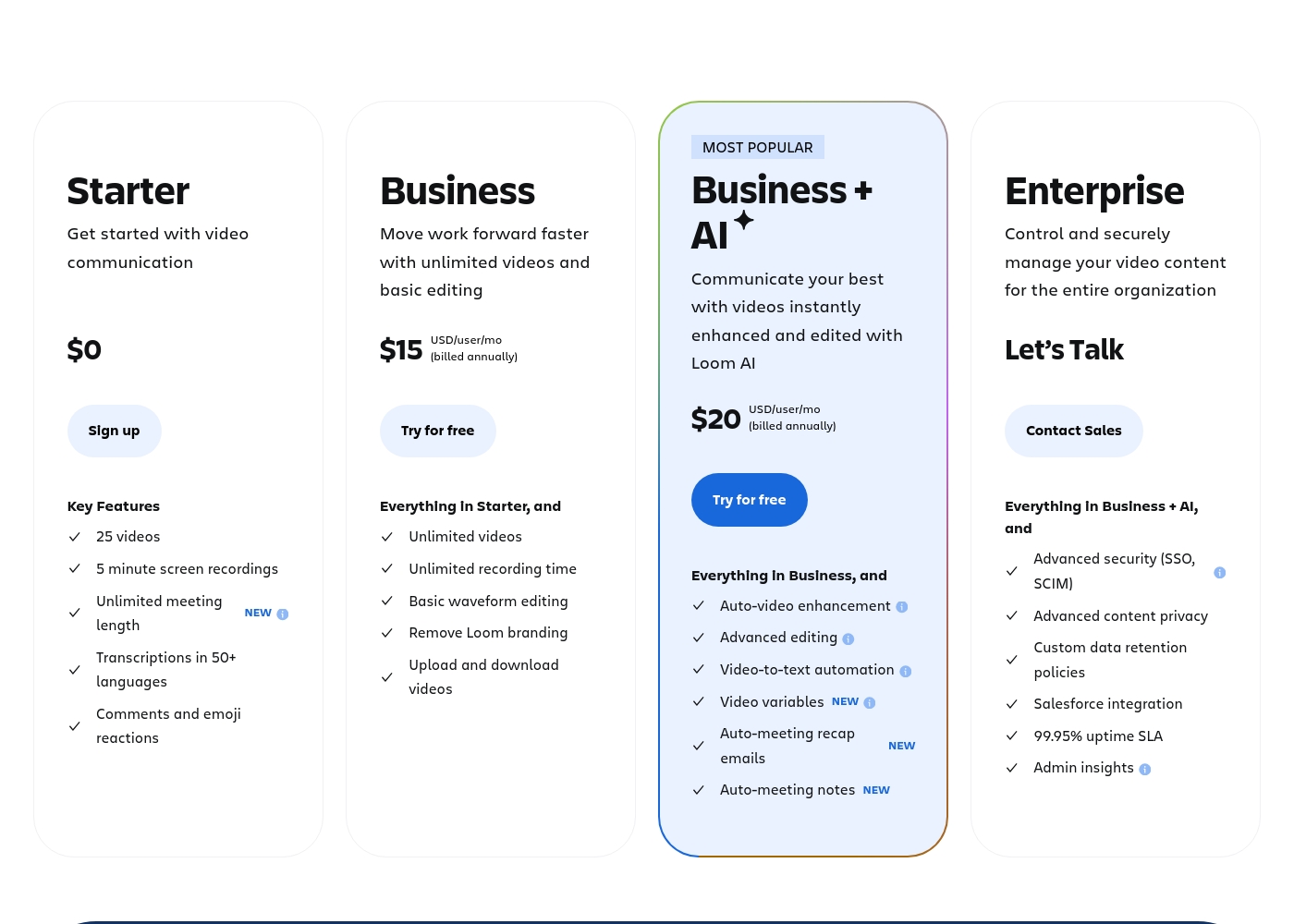
Loom costs between $0 and $20 per user per month (billed annually) with 4 plans: Starter at $0, Business at $15, Business + AI at $20, and Enterprise (custom pricing).
Here’s a breakdown of what each plan offers, helping you pick the right fit for your needs and your team.
Starter
Price: $0 Best For: Getting started with video communication Refund Policy: Not applicable (free) Other Features:
- 25 videos
- 5 minute screen recordings
- Unlimited meeting length
- Transcriptions in 50+ languages
- Up to 50 team members
- 5 minute screen recordings
- Unlimited meeting length
- Transcriptions in 50+ languages
- Up to 50 Workspace Members
- Unlimited videos and recording time
- Basic waveform editing
- Remove Loom branding
- High-def up to 4k video quality
- Auto-video enhancement and advanced editing
- Video-to-text automation and variables
- Auto-meeting notes and recap emails
- Comprehensive Loom AI Suite (Auto CTA, Titles, Summaries, etc.)
- Advanced security (SSO, SCIM)
- Advanced content privacy and custom data retention policies
- 99.95% uptime SLA
- Dedicated support and account manager
Pricing Notes
- Loom offers transparent, per-user pricing starting at $15/user/month (annual).
- Komodo Decks offers a robust free plan with truly unlimited recording duration.
- The free tier of Loom is heavily restricted to 5-minute videos and 25 total recordings.
- Komodo Decks requires contacting sales for specific pricing details on paid tiers.
- Loom offers a 14-day free trial of its feature-rich Business + AI plan.
Pricing Head-to-Head
User Reviews
The external feedback for Loom is starkly divided, reflected in a very low Trustpilot rating (1.8). While some long-term Pro users find it reliable and essential for team briefs, the overwhelming negative sentiment focuses heavily on pricing and customer support responsiveness.
Many users feel the value is low, noting that Loom charges a high annual price for basic recorder features available for free elsewhere. The company also faces strong criticism regarding billing, with multiple reports of unauthorized charges continuing after cancellation and prices allegedly changing without warning.
We canceled our account several months ago, but the charges kept appearing. Despite multiple attempts, customer service never responded. This lack of support is how good products eventually fail.
Our Verdict
The decision between Komodo Decks and Loom boils down to your core needs. If automated documentation is key, Komodo Decks wins. If you need clean, quick communication, Loom is the standard. Komodo Decks’ superpower is AI knowledge management and SOP creation. It automatically generates ready-to-share instructional guides from videos in under two minutes. The robust free plan offers truly unlimited recording time for documenting complex processes. Loom is unmatched, however, for standardizing speedy, asynchronous team communication flow. It offers clear, predictable pricing for scaling teams from $15/user/month. Large corporations benefit from Loom’s Enterprise features like strict SSO and a 99.95% uptime guarantee. Choose Komodo Decks if your biggest time sink is manual SOP documentation. Pick Loom if maximizing team communication flow and getting established tooling is the priority. Be cautious regarding Loom’s consistently poor customer support reputation. Komodo Decks is ideal for training managers and knowledge teams needing structure. Loom is best for distributed teams relying on short, personalized internal video messages.
Frequently Asked Questions
Does Komodo Decks have a 5-minute video limit on its free plan like Loom?
No, Komodo Decks provides truly unlimited screen recording length on its free plan. This is a massive benefit for documenting long processes without interruption. The Loom free plan limits videos to five minutes and 25 total recordings.
Which tool is better for creating detailed procedure manuals: Komodo Decks or Loom?
Komodo Decks is the definite winner for creating procedure manuals or SOPs. The AI function slices action steps and automatically writes the descriptive text. Loom requires users to write out the manual steps themselves.
Can I use Komodo Decks to summarize meeting notes, similar to Loom?
Yes, Komodo Decks offers an AI meeting recorder that syncs with your calendar. It generates comprehensive summaries and action items immediately. Loom also provides AI summaries and recap emails for effective meeting follow-up.
Which is more suitable for large enterprises: Komodo Decks or Loom?
Loom is generally better suited for large enterprises due to its governance features. Loom offers guaranteed 99.95% uptime and crucial security tools like SSO and SCIM. Komodo Decks focuses more on documentation efficiency.
Why does Loom have negative customer support reviews?
Loom users frequently report severe issues with unresponsive customer service and unresolved billing problems. Komodo Decks explicitly promises ‘real human customer support.’ This difference in sentiment is a critical comparison point.
Can I upload pre-recorded videos to Komodo Decks and Loom?
Komodo Decks allows users to upload and edit external videos even on the free plan. Loom restricts video upload capability to its paid Business plan and higher. Komodo Decks is more flexible for editing external content.
Ready to Choose?
Both tools have their strengths. Choose based on your specific needs.