Kit (formerly ConvertKit) vs Sender
Kit (formerly ConvertKit) and Sender are both solid email tools, but they serve very different audiences. Kit is built for solo creators, while Sender targets small businesses. This comparison breaks down who should pick which.
Best for: Authors and writers building a reader community, Newsletter creators focused on subscriber growth
Best for: Startups and small businesses on a tight budget, E-commerce stores needing simple cart abandonment emails
Creator-friendly, but check support.
We find Kit a capable and intuitive email marketing platform tailored specifically for creators, offering strong automation and a clean interface. Overall, it's a great starting point for growing an audience, though users should weigh the mixed customer support reviews and potential pricing scale against their needs.
Pros
- Intuitive, clean interface designed for creators and non-technical users.
- Powerful visual automations and sequences to nurture audiences.
- Generous free plan for up to 10,000 subscribers.
- Strong focus on deliverability and building owned audiences.
Cons
- Customer support responsiveness and quality receive frequent criticism.
- Pricing can become steep as subscriber counts increase significantly.
- Some users report unexpected account suspensions or deliverability issues.
- Advanced analytics and collaboration features are limited.
Simple, free, and effective for basics.
We found Sender to be a solid, no-frills tool for core email marketing tasks. Its free plan is a major draw for startups and small businesses. Overall, it delivers good value with a straightforward interface, though it may lack some advanced features for power users.
Pros
- Extremely generous free plan (2,500 contacts, 15k emails/month).
- Clean, user-friendly interface that's easy to learn.
- Transparent, affordable pricing with no hidden fees.
- Includes essential automation features from the start.
Cons
- Advanced features and segmentation are limited on lower tiers.
- Some users report occasional email deliverability issues.
- Integrations can be inconsistent with certain platforms.
- Free plan lacks SMS marketing capabilities.
AboutKit (formerly ConvertKit)
Kit is an email marketing platform specifically for creators like authors, podcasters, YouTubers, and entrepreneurs. It's the hub for growing your email list, sending beautiful newsletters, and selling digital products—all while keeping the experience intuitive and straightforward. 💡
AboutSender
Sender is an email marketing platform designed for businesses of all sizes. It helps you build, automate, and send email campaigns that people actually want to read. Think of it as your straightforward tool for staying in touch with your audience and driving sales. 🚀
Highlights
Feature Comparison
Features Overview
We highlight the main differences and pick a winner for each feature.
Ease of Use
Kit's interface is praised for being intuitive and creator-focused. Sender is also simple but feels more like a classic business tool.
Kit's design is clean and minimal. Users say it's perfect for non-technical creators who want to focus on content. The workflow feels natural, like building a story. Sender's interface is also straightforward. It's built for quick setup, often in 5 minutes. The experience is efficient but less tailored to the creative process. Kit wins for creators who value a focused, beautiful workspace. Sender is better if you want pure, no-frills efficiency for business tasks.
Automation Power
Both offer visual automations, but Kit limits them on its free plan. Sender includes full automation even on its free tier.
Kit provides powerful visual automations. The free plan includes only one basic sequence. Paid plans unlock unlimited automations for complex nurturing. Sender's Free Forever plan includes email automation. You can build welcome series and nurture campaigns without paying. This is a huge value for startups. The key difference is access. Sender gives you automation power from day one for free. Kit requires an upgrade for unlimited sequences. For heavy automation on a budget, Sender has the edge.
Free Plan Value
Kit's free plan is generous for large lists (10k subscribers). Sender's free plan is smaller but includes more features like automation.
Kit's Newsletter plan supports up to 10,000 subscribers with unlimited broadcasts. However, it includes only one basic automation. Sender's Free Forever plan offers 2,500 subscribers and 15,000 emails monthly. Crucially, it includes automation and 24/7 live support. For pure subscriber count, Kit wins. But for feature depth on a free tier, Sender is better. It depends on whether you need more subscribers or more tools.
Creator-Specific Features
Kit is packed with tools built for creators, like direct sales and cross-promotion. Sender lacks these specialized features.
Kit lets you sell digital products and subscriptions directly from emails. It has a Recommendations feature to cross-promote with other creators and grow your list fast. Sender focuses on general email marketing. It doesn't have built-in product sales or creator networking tools. Its strength is simplicity for business communication. If you're a creator trying to monetize and build a community, Kit's tools are unmatched. Sender is for those who just need to send campaigns.
Pricing & Scalability
Sender is significantly cheaper at every subscriber tier. Kit's pricing gets steep as your list grows.
Kit starts at $39/month for 1,000 subscribers (Creator plan). The Pro plan is $79/month for the same list size. Costs increase with your audience. Sender's Standard plan is $7/month for 1,000 subscribers. The Professional plan is $14/month. That's a massive difference for the same list size. For cost-conscious users, especially with growing lists, Sender offers far better value. Kit is a premium investment aimed at serious creators.
Customer Support
Sender offers 24/7 live support on all plans. Kit's support is mixed, with users reporting slow responses.
Sender includes 24/7 live support for every user, even on the free plan. This is a major advantage for beginners needing help. Kit's support is available on paid plans. User reviews frequently cite slow response times and unhelpful interactions. The Pro plan offers priority support. Reliability matters. Sender's consistent support access wins here. Kit's support quality seems to be a pain point for many users.
Integration Ecosystem
Kit has a dedicated app store with over 100 integrations. Sender relies more on core platforms and Zapier.
Kit's App Store connects with over 100 tools like Shopify, Canva, and Circle. It's built for creators stacking multiple platforms. Sender integrates with WordPress, WooCommerce, and PrestaShop. It uses Zapier for broader connections, which can be less seamless. If you use a lot of creative and community tools, Kit's ecosystem is stronger. For basic e-commerce and blog integrations, Sender covers the essentials.
Multi-User Collaboration
Kit's Pro plan offers unlimited seats. Sender includes 3-10 seats on paid plans, with none on free.
Kit's Pro plan allows unlimited team members. This is great for growing creator teams managing different tasks. Sender's Standard plan includes 3 user seats. The Professional plan includes 10. The free plan is for single users only. For larger teams needing collaboration, Kit's unlimited seats are a clear advantage. For small teams of 2-10, both offer workable solutions.
Reporting & Analytics
Kit's Pro plan adds a dedicated insights dashboard. Sender's analytics are more basic across plans.
Kit's Pro plan features an Insights Dashboard and Deliverability Reporting. This data is crucial for optimizing large campaigns. User reviews note that Sender's reporting could be more detailed. The focus is on core metrics rather than deep analytics. If data-driven decisions are key to your strategy, Kit's advanced reporting (on Pro) is superior. Sender keeps it simple.
Mobile Experience
Neither tool's data highlights a dedicated mobile app, suggesting both are primarily web-based.
The provided information for both Kit and Sender focuses on web interfaces. There's no mention of native iOS or Android apps. This means you'll manage campaigns from a mobile browser. Both platforms should be responsive, but the experience isn't app-optimized. It's a tie because neither offers a standout mobile app. If you need robust mobile management, check their current sites for updates.
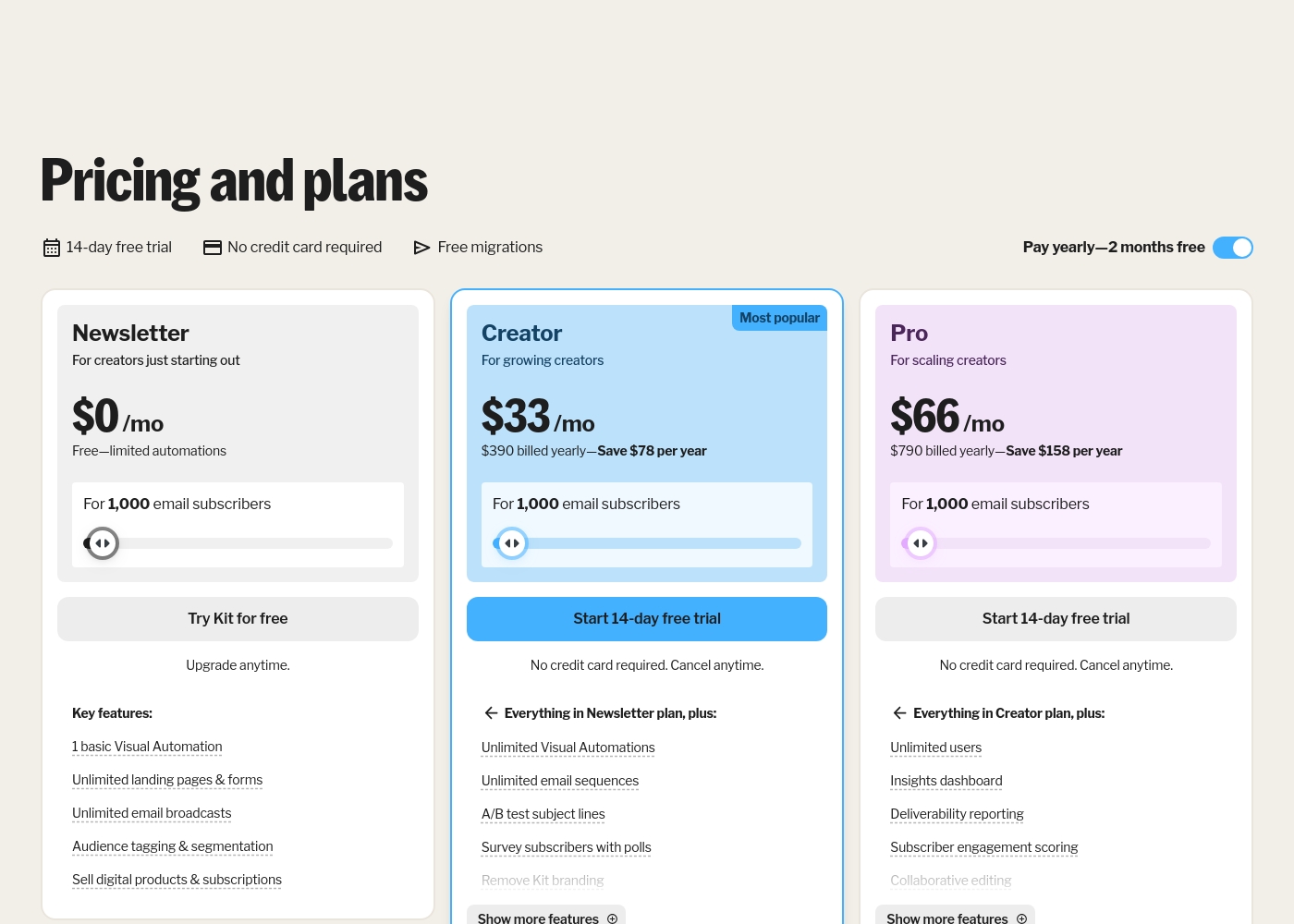
Kit (formerly ConvertKit) costs between $0 and $790 per year for 1,000 subscribers with 3 plans: Newsletter at $0, Creator at $390 billed yearly, and Pro at $790 billed yearly.
Take a look at the breakdown below to see which features fit your current creative goals.
Newsletter
Price: $0 per month Best For: New creators starting out Other Features: Unlimited landing pages, Audience tagging, Digital product sales, 1 basic Visual Automation
- 1 basic Visual Automation
- Unlimited landing pages & forms
- Unlimited email broadcasts
- Audience tagging & segmentation
- Sell digital products & subscriptions
- Everything in Newsletter plan
- Unlimited Visual Automations
- Unlimited email sequences
- A/B test subject lines
- Remove Kit branding
- Everything in Creator plan
- Unlimited users
- Insights dashboard
- Deliverability reporting
- Newsletter referral system
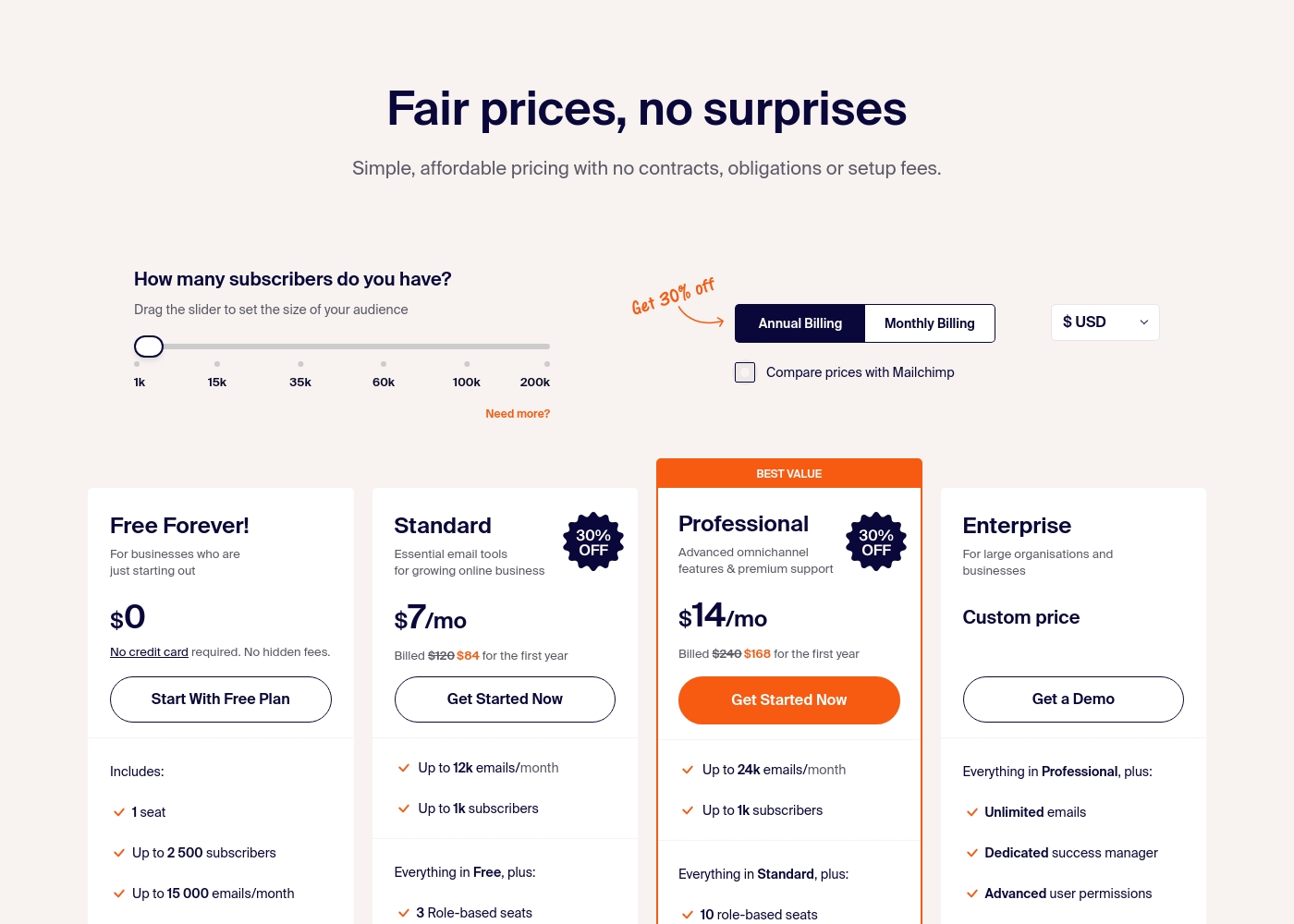
Sender costs between $0 and a custom price per month with 4 plans: Free Forever at $0, Standard at $7, Professional at $14, and Enterprise at Custom price.
Take a look at the specific features and limits included in each plan tier below.
Free Forever!
Price: $0 monthly Best For: Businesses who are just starting out Other Features: 1 seat, up to 2,500 subscribers, 15,000 emails/month, 24/7 live support, email automation.
- 1 seat
- Up to 2,500 subscribers
- Up to 15,000 emails/month
- 24/7 live support
- Email automation
- Up to 12k emails/month
- Up to 1k subscribers
- 3 Role-based seats
- Automated sequences
- Up to 24k emails/month
- Up to 1k subscribers
- 10 role-based seats
- Premium support
- Unlimited emails
- Dedicated success manager
- Advanced user permissions
Pricing Notes
- Kit's pricing starts higher ($39/month for 1,000 subscribers) but includes a generous free plan for up to 10,000 contacts.
- Sender is significantly cheaper at every tier, with the Professional plan at $14/month for 1,000 subscribers.
- Kit charges a 3.5% + $0.30 transaction fee on digital product sales, which is an extra cost to consider.
- Sender's free plan includes automation and 24/7 support, offering more value than Kit's limited free plan.
Pricing Head-to-Head
User Reviews
On Trustpilot, Kit (formerly ConvertKit) receives mixed feedback. Users frequently praise its ease of use, highlighting a simple, intuitive interface perfect for creators and beginners.
Many appreciate the automation features and clean design for emails and landing pages. However, a significant number of reviews cite poor customer support, with long response times and unhelpful agents.
ConvertKit is super easy to use. I love how simple it is to set up automations and sequences without any tech headaches. It's perfect for my newsletter.
User sentiment on Trustpilot and Capterra highlights Sender's generous free plan and ease of setup as major positives. Many praise the intuitive interface and reliable automation.
😊 However, some note occasional deliverability hiccups and a learning curve for advanced features. Customer support is frequently mentioned as responsive, though a few users report slow responses during peak times.
The free plan is unbeatable for a new business. I set up my first automation in minutes. The platform is simple and gets the job done without fuss.
Our Verdict
For most creators, Kit (formerly ConvertKit) is the better choice. Its tools are tailor-made for growing an audience and selling digital products. Kit's superpower is its creator-focused ecosystem. The Recommendation feature lets you cross-promote and gain thousands of subscribers. Direct sales and automations work seamlessly together. Sender's superpower is incredible value. Its free plan is robust, and paid plans are a fraction of Kit's cost. It's perfect for businesses that need straightforward, affordable email marketing. The deciding factor is your goal. Choose Kit if you're a creator building a personal brand. Choose Sender if you're a small business watching every dollar. Ultimately, Kit wins for creators, while Sender wins for budget-conscious businesses. Your choice depends on whether you need specialized creator tools or just the basics at a low price.
Frequently Asked Questions
Which is better for small teams: Kit (formerly ConvertKit) or Sender?
Sender is better for small teams on a budget. Its Standard plan includes 3 seats for $7/month. Kit requires the Pro plan ($79/month) for unlimited seats.
Does Kit (formerly ConvertKit) have automation like Sender?
Yes, but with limits. Kit's free plan only includes one basic automation. Sender includes full automation on its free plan. Both offer powerful visual automations on paid plans.
Is Sender worth the extra cost savings over Kit (formerly ConvertKit)?
It depends on your needs. Sender is dramatically cheaper. But Kit offers unique creator tools like direct sales and cross-promotion networks that Sender lacks.
Can I migrate from Kit (formerly ConvertKit) to Sender easily?
Sender doesn't highlight migration tools. Kit offers free migrations from other platforms. You should check Sender's documentation or support for current migration options.
Which tool has better customer support?
Sender generally has better support. It offers 24/7 live chat on all plans, including free. Kit's support reviews are mixed, with users reporting slower response times.
Which is easier to set up for a beginner?
Both are easy, but Sender is faster. It claims a 5-minute setup. Kit is also intuitive but may require more time to explore its creator-specific features.
Ready to Choose?
Both tools have their strengths. Choose based on your specific needs.