Kit (formerly ConvertKit) vs Mailchimp
Kit (formerly ConvertKit) and Mailchimp are both top email marketing platforms, but they serve different creators. Kit focuses on simplicity and automations for solo creators. Mailchimp is built for broader marketing teams and e-commerce. Here's how to pick the right one for you.
Best for: Authors and writers building a reader community, Newsletter creators focused on subscriber growth
Best for: Small to medium businesses and marketing teams, E-commerce stores needing deep Shopify/WooCommerce integration
Creator-friendly, but check support.
We find Kit a capable and intuitive email marketing platform tailored specifically for creators, offering strong automation and a clean interface. Overall, it's a great starting point for growing an audience, though users should weigh the mixed customer support reviews and potential pricing scale against their needs.
Pros
- Intuitive, clean interface designed for creators and non-technical users.
- Powerful visual automations and sequences to nurture audiences.
- Generous free plan for up to 10,000 subscribers.
- Strong focus on deliverability and building owned audiences.
Cons
- Customer support responsiveness and quality receive frequent criticism.
- Pricing can become steep as subscriber counts increase significantly.
- Some users report unexpected account suspensions or deliverability issues.
- Advanced analytics and collaboration features are limited.
Industry-Leading Features, Unstable Support Network
We find Mailchimp offers an industry-leading suite of email marketing features, backed by strong automation and valuable AI tools for content optimization. Overall, the platform is an excellent choice for businesses needing robust design and testing capabilities, provided they anticipate potential friction with customer service and complex billing structures.
Pros
- Intuitive UI and drag-and-drop builder simplify campaign design.
- Powerful automation features help save significant time for marketers.
- Valuable reporting tools offer insights and industry benchmarking.
- Generative AI features help improve content, including subject lines.
Cons
- Customer support is frequently cited as nonexistent, unhelpful, or slow to respond.
- Billing practices are reported as predatory, with unexpected charges for slight overages.
- Users often face technical access issues, especially with two-factor authentication.
- The interface is sometimes described as clunky or difficult to navigate.
AboutKit (formerly ConvertKit)
Kit is an email marketing platform specifically for creators like authors, podcasters, YouTubers, and entrepreneurs. It's the hub for growing your email list, sending beautiful newsletters, and selling digital products—all while keeping the experience intuitive and straightforward. 💡
AboutMailchimp
Mailchimp is recognized as the leading platform focused on email marketing and advanced automations. It's built to help businesses boost income by mastering digital outreach. With over 11 million global users and 22 years of experience, it’s a trusted choice for selling more.
This robust platform is ideal for businesses seeking seamless conversion tools, including integrated SMS campaigns. You can start sending your first email risk-free, and you don't even need a credit card to begin. Users on Standard or Premium plans may access a personalized product tour to start confidently. 💡
Highlights
Feature Comparison
Features Overview
We highlight the main differences and pick a winner for each feature.
Ease of Use
Kit is praised for its clean, intuitive creator-focused interface. Mailchimp's UI is powerful but can feel more complex for beginners.
Kit's platform is designed for creators, not just marketers. The interface is consistently praised as clean, simple, and accessible even for non-technical users. You can build automations and send emails without a steep learning curve. Mailchimp offers a powerful drag-and-drop builder that's great for designing professional campaigns. However, some users find the interface can become clunky or overwhelming as you explore advanced features like segmentation and automation workflows. The key difference is simplicity vs. breadth. Kit removes clutter to focus on core creator tasks. Mailchimp packs in more marketing tools, which can be a plus or a minus depending on your comfort level. For a solo author or podcaster, Kit's focused environment helps you stay in your creative flow. For a marketing team managing complex campaigns, Mailchimp's broader toolkit might be necessary.
Automation & Sequences
Both offer strong visual automation builders. Kit is renowned for its simplicity; Mailchimp adds AI-driven optimization on higher tiers.
Kit's visual automations let you build welcome series, nurture sequences, and sales funnels that run 24/7. Creators report tangible results, like a 30% sales growth from targeted automations. The system is straightforward and effective. Mailchimp's automations are powerful and can be highly sophisticated. On Standard and Premium plans, you get enhanced automations and generative AI tools that suggest ways to optimize your sends for better opens and clicks. The trade-off is depth vs. ease. Kit's automations are easier to set up and manage for standard creator journeys. Mailchimp's system offers more advanced personalization and optimization capabilities for data-driven marketers. If you need a "set it and forget it" system for nurturing an audience, Kit is ideal. If you want to A/B test and optimize every step of a complex customer journey, Mailchimp provides more levers to pull.
Reporting & Analytics
Mailchimp provides deeper analytics with funnel visualization and benchmarking. Kit offers focused insights on deliverability and basic engagement.
Kit provides an insights dashboard (Pro plan) and deliverability reporting. You can track open rates, click rates, and subscriber growth. The focus is on key metrics that matter for audience building, not marketing complexity. Mailchimp offers sophisticated reporting tools. You can use funnel visualizations to see where customers convert or drop off and compare your performance against industry benchmarks. Paid plan users often see up to 25x ROI attributable to their campaigns. The core difference is strategic insight vs. operational data. Mailchimp helps you diagnose and optimize your entire marketing funnel. Kit gives you the essential health metrics of your email list. For a business wanting to prove marketing ROI to stakeholders, Mailchimp's reporting is superior. For a creator focused on growing a loyal community, Kit's simpler metrics are often sufficient.
Customer Support
Both have mixed reviews. Kit offers 24/7 support on paid plans, but responsiveness is criticized. Mailchimp offers more channels but support quality is also a frequent complaint.
Kit provides 24/7 email and chat support on paid plans (Creator and Pro). Priority support is available on the Pro plan. However, a common criticism is slow response times and unhelpful interactions. Mailchimp offers 24/7 email and chat support starting on the Essentials plan. Premium plan customers get dedicated phone and priority support, plus personalized onboarding sessions. Yet, many users report support as "nonexistent" or "practically non-existent." The key issue for both platforms is inconsistent quality, not availability. Mailchimp offers more support channels and dedicated onboarding for larger plans. Kit's support is more limited in scope. Given the negative sentiment around support for both, you should not rely on either for immediate, mission-critical help. Both companies need to improve the responsiveness and helpfulness of their support teams.
Integration Ecosystem
Mailchimp has a significantly larger integration library. Kit offers a focused set of tools perfect for creators.
Kit connects with over 100 apps through its App Store, including key platforms for creators like Shopify, Canva, Circle, and Thinkific. You can also build custom integrations via its API. Mailchimp boasts over 300 reliable integrations. This includes major e-commerce platforms (Shopify), analytics tools (Google Analytics), design software (Canva), and accounting systems (QuickBooks Online). The difference is scale and specialization. Mailchimp aims to be the central hub for all business marketing data. Kit's integrations are curated to support a creator's core tech stack. If you use many different software tools and need deep data sync, Mailchimp's library is unmatched. If your needs are simpler—like connecting a course platform and an email list—Kit's integrations are more than enough.
Pricing Model
Kit's pricing is simpler and scales with subscribers. Mailchimp's pricing is based on contacts and includes email send limits and overage fees.
Kit's pricing is driven by your active subscriber count. The Newsletter plan is free up to 10,000 subscribers. Paid plans (Creator, Pro) start around $29-59/month for 1,000 subscribers, with costs increasing as your list grows. Mailchimp's pricing is based on contact count and includes monthly email send limits (10x-15x your contacts). The Free plan is limited to 500 contacts. Paid plans (Essentials, Standard) start at $13-20/month for 500 contacts, with overage charges for exceeding limits. The critical difference is simplicity vs. complexity. Kit's model is straightforward. Mailchimp's model includes more variables (contacts, sends, users) and potential surprise overage fees. Kit offers better long-term value for creators with large, engaged lists. Mailchimp's lower entry price is attractive, but costs can escalate quickly with overages or team expansion.
Mobile Experience
Both offer mobile apps for campaign management on the go. Specific details on feature parity are limited in the provided data.
Both Kit and Mailchimp provide mobile applications, allowing you to manage campaigns, view reports, and interact with subscribers from your phone. The core purpose is to keep you connected while away from your desk. For a creator, Kit's app lets you check stats or send a quick broadcast. For a marketer, Mailchimp's app might help you approve a draft while commuting. The value is in convenience, not full-featured editing. Without deeper data on app-specific features, it's hard to declare a clear winner. Both serve the same basic function of mobile campaign monitoring and light management. The deciding factor will likely be which platform's overall mobile app design and performance you prefer. Both recognize the need for on-the-go access.
Scalability
Mailchimp is built to scale for large teams and high-volume senders. Kit scales well for creators but may become expensive or feature-limited for large enterprises.
Kit scales with your audience. The Pro plan offers unlimited users, advanced reporting, and deliverability tools, making it suitable for growing creator businesses and small teams. However, it lacks advanced CRM or enterprise features. Mailchimp is explicitly built for scaling. The Premium plan offers unlimited contacts, unlimited users, role-based access, and dedicated onboarding for large teams. It's designed for high-volume, complex marketing operations. The difference is audience vs. organization. Kit scales with your subscriber list and team size within a creator context. Mailchimp scales with business complexity, team roles, and data volume. For a solo creator with a team of 2-5, Kit's Pro plan is sufficient. For a marketing department or enterprise managing 100,000+ contacts with multiple teams, Mailchimp's Premium tier is the clear choice.
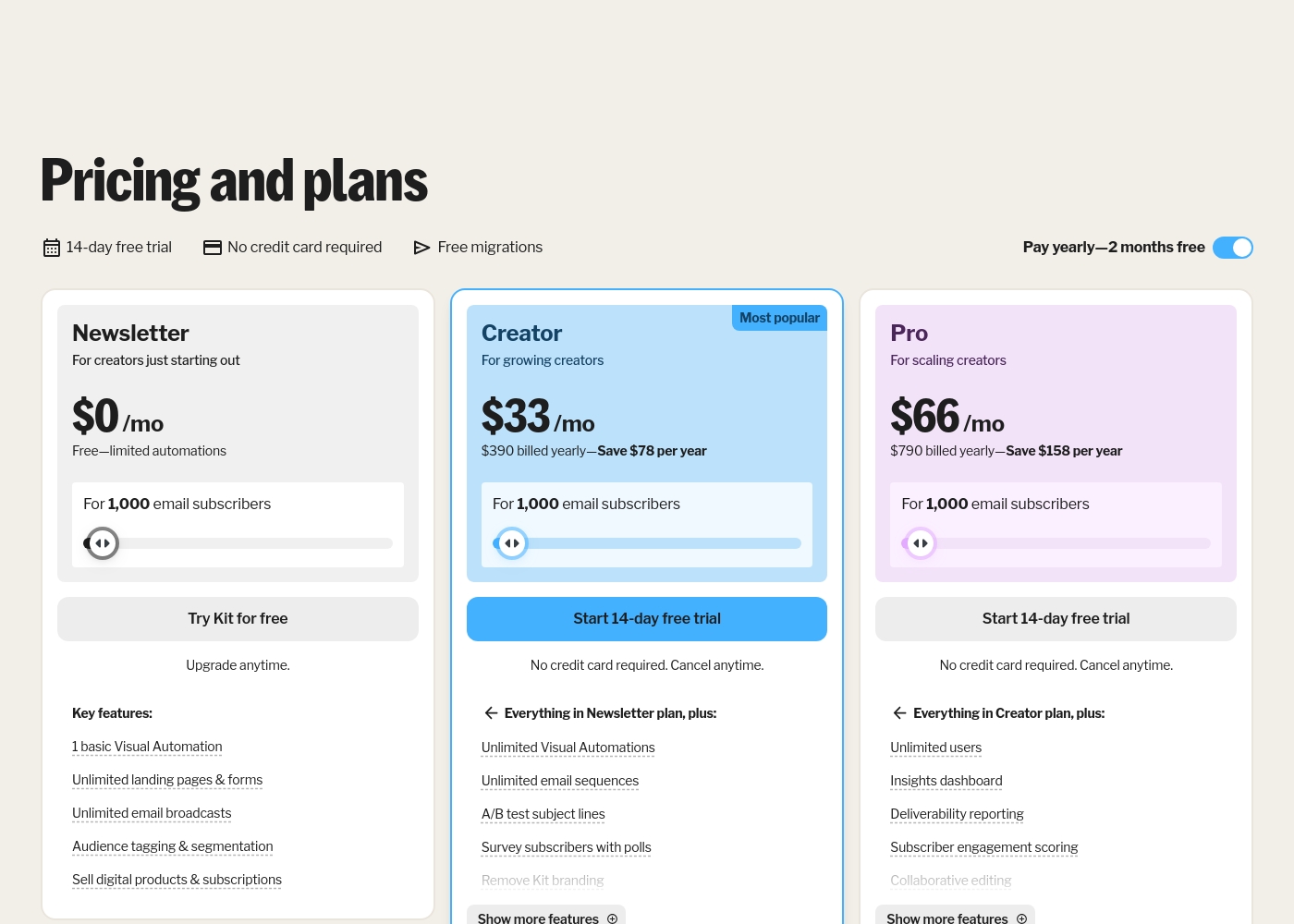
Kit (formerly ConvertKit) costs between $0 and $790 per year for 1,000 subscribers with 3 plans: Newsletter at $0, Creator at $390 billed yearly, and Pro at $790 billed yearly.
Take a look at the breakdown below to see which features fit your current creative goals.
Newsletter
Price: $0 per month Best For: New creators starting out Other Features: Unlimited landing pages, Audience tagging, Digital product sales, 1 basic Visual Automation
- 1 basic Visual Automation
- Unlimited landing pages & forms
- Unlimited email broadcasts
- Audience tagging & segmentation
- Sell digital products & subscriptions
- Everything in Newsletter plan
- Unlimited Visual Automations
- Unlimited email sequences
- A/B test subject lines
- Remove Kit branding
- Everything in Creator plan
- Unlimited users
- Insights dashboard
- Deliverability reporting
- Newsletter referral system
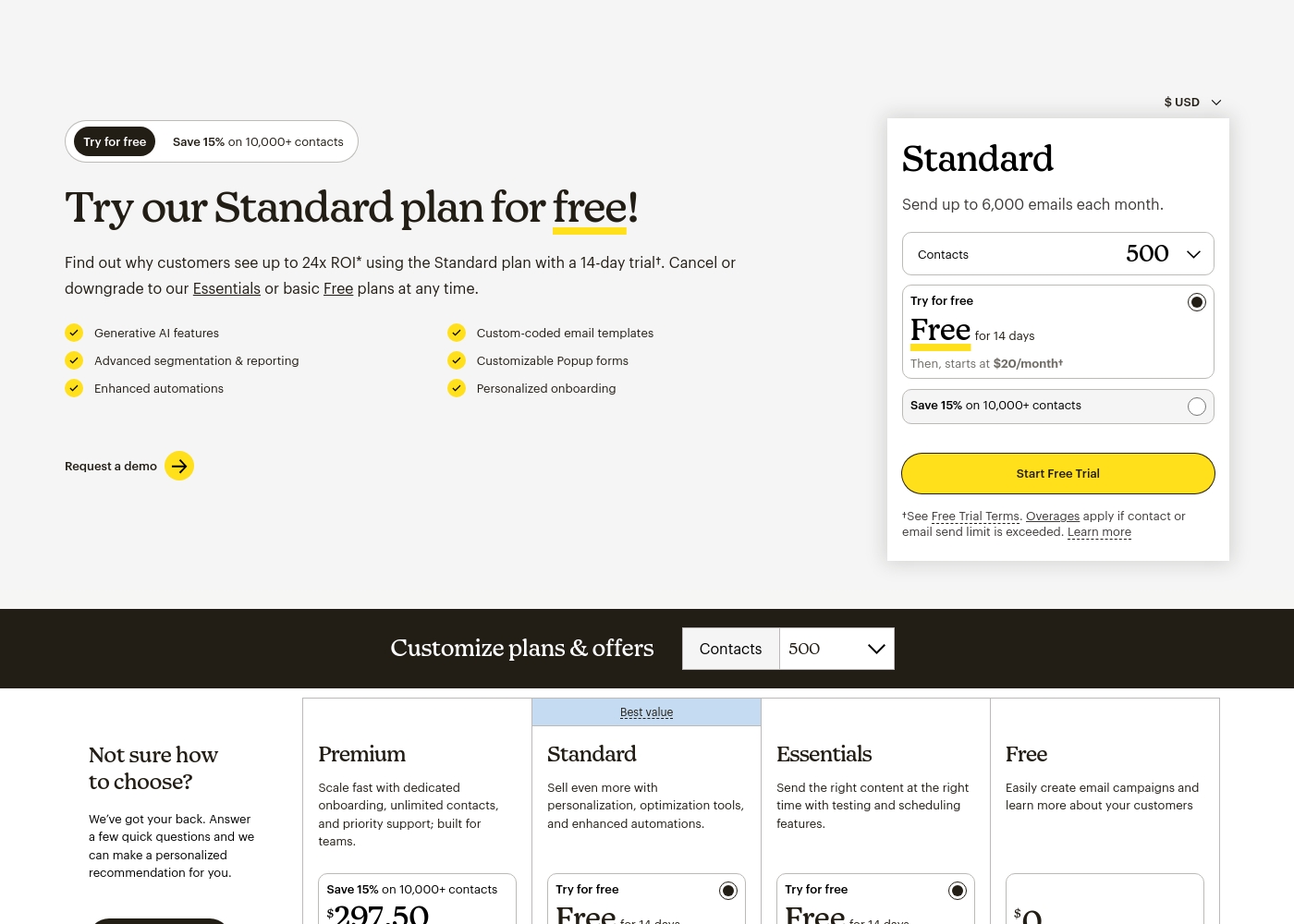
Mailchimp costs between $0 and $350 per month with four main plans: Free at $0, Essentials starting at $13/month, Standard starting at $20/month, and Premium requiring contact with sales for high volume quotes.
Here are the details about what each plan offers. Please note that prices shown here are typically for the minimum 500 contacts tier, or where noted, discounted rates for higher contact tiers.
Free
Price: $0/month Best For: Easily creating email campaigns and learning about your customers. Other Features:
- 1,000 emails per month maximum (500/day limit)
- 1 Seat (User)
- 1 Audience
- Email support for the first 30 days
- Easily create email campaigns
- Learn more about your customers
- Email support for first 30 days
- Send the right content at the right time
- Testing and scheduling features
- 24/7 Email & Chat Support
- Up to 3 users
- Sell even more with personalization
- Optimization tools
- Enhanced automations
- Generative AI features
- Custom-coded email templates
- Scale fast with dedicated onboarding
- Unlimited contacts
- Priority support; built for teams
- Generative AI Features
- Role-based Access (5 Roles)
Pricing Notes
- Kit's free Newsletter plan supports up to 10,000 subscribers with unlimited sends, which is exceptional value.
- Mailchimp's free plan is limited to 500 contacts and 1,000 emails per month, making it a short-term option.
- Kit's paid plans have no email send limits, which is a major advantage for active newsletters.
- Mailchimp charges automatic overage fees if you exceed contact or email limits, a frequent user complaint.
- Kit offers a 14-day free trial without requiring a credit card.
- Mailchimp's 14-day trial limits sends to 500 emails per month if you don't enter a credit card.
- For a list of 5,000 subscribers, Kit's Creator plan (~$111/month) is more predictable than Mailchimp's Standard plan (~$75/month) but without overage risks.
Pricing Head-to-Head
User Reviews
On Trustpilot, Kit (formerly ConvertKit) receives mixed feedback. Users frequently praise its ease of use, highlighting a simple, intuitive interface perfect for creators and beginners.
Many appreciate the automation features and clean design for emails and landing pages. However, a significant number of reviews cite poor customer support, with long response times and unhelpful agents.
ConvertKit is super easy to use. I love how simple it is to set up automations and sequences without any tech headaches. It's perfect for my newsletter.
Mailchimp receives polarized external feedback, highlighting a split between excellent product features and frustrating support experiences. Users consistently praise the platform's intuitive interface and ease of use, confirming that the drag-and-drop builder and extensive automation features are significant time savers for growing businesses.
Reviewers often appreciate the quality of available templates and the platform's robust integrations with CRM and website systems. However, a major concern revolving around customer support is widely reported.
The UI is easy to navigate, and the drag-and-drop email building feature is extremely well designed and simple to use. We use Mailchimp for all our prospective and current customer campaigns. It saves us a lot of time in production.
Our Verdict
It's a close call, but for most individual creators, Kit (formerly ConvertKit) is the better pick. Mailchimp, however, wins for businesses needing a full marketing suite. Kit's superpower is its laser focus on creators. It strips away complexity, giving you unlimited automations and sends on its free plan for up to 10,000 subscribers. You build an audience on land you own. Mailchimp's superpower is its breadth. It combines email with SMS, adds generative AI, and offers 300+ integrations. Its reporting shows you exactly how to boost your 25x ROI. The deciding factor is your goal. If you're a solo creator focused on building a loyal community, choose Kit. If you're a business team optimizing campaigns for revenue, choose Mailchimp. For authors, podcasters, and digital product sellers, Kit (formerly ConvertKit) is the simpler, more cost-effective path. For growing businesses and marketing departments, Mailchimp provides the advanced tools to scale.
Frequently Asked Questions
Which is better for small teams: Kit (formerly ConvertKit) or Mailchimp?
It depends on your needs. Kit's Pro plan offers unlimited users, making it cost-effective for a small, focused team. Mailchimp's paid plans include 3-5 seats, which may suffice for a marketing team, but costs add up with more users.
Does Kit (formerly ConvertKit) have SMS marketing like Mailchimp?
No. Kit (formerly ConvertKit) is focused solely on email marketing. Mailchimp offers SMS marketing as a paid add-on feature in select countries for Standard and Premium plan users.
Is Mailchimp worth the extra cost over Kit (formerly ConvertKit)?
It depends on your features. Mailchimp's cost can be justified by its AI tools, advanced analytics, and 300+ integrations. Kit (formerly ConvertKit) offers better value if you primarily need simple email automation without overage fees.
Can I migrate from Kit (formerly ConvertKit) to Mailchimp easily?
Yes. Both platforms offer tools to export your subscriber list. Mailchimp provides migration services for Premium plan customers. Kit (formerly ConvertKit) offers free migrations when you join them from another platform.
Which platform has a better free plan?
Kit (formerly ConvertKit) has a significantly better free plan. It supports up to 10,000 subscribers with unlimited email sends. Mailchimp's free plan is limited to 500 contacts and 1,000 emails per month.
How do the automation features compare?
Both have strong visual automation builders. Kit's automations are praised for simplicity and effectiveness for creators. Mailchimp's automations on higher tiers include AI-driven optimization suggestions to improve campaign performance.
Ready to Choose?
Both tools have their strengths. Choose based on your specific needs.