Kapwing vs Vyond
Kapwing and Vyond are top video platforms, but they serve completely different masters. Kapwing focuses on speed, utility, and browser-based real-time editing. Vyond is the heavyweight AI platform built for secure, enterprise-level animated training videos.
Best for: Solo entrepreneurs needing quick content turns, Social media managers focused on rapid repurposing
Best for: Learning & Development teams and educators, HR departments needing scalable onboarding content
Easy UI, high-risk business policies.
We recognize Kapwing offers a powerful, user-friendly online editor perfect for quick social media content creation, often cited as being simple to figure out. However, serious concerns exist regarding its business model, aggressive paywalling, and unresponsive customer support practices. Overall, we caution users strongly due to predatory billing and an irresponsible user data retention policy that repeatedly results in unexpected, permanent content loss.
Pros
- User-friendly and simple interface (easy to figure out quickly).
- Browser-based editing requires no software downloads.
- Useful tools for repurposing content (e.g., short clips from long videos).
- Offers specific powerful timeline controls, including keyframes and custom animations.
Cons
- Aggressive paywalls make the free version nearly useless for core editing tasks.
- Irresponsible data retention; projects are reportedly deleted after short payment delays or 30 days.
- Unresponsive customer service, often hiding behind a strict "no refund policy".
- Auto-renewal policies sometimes lack proper notification, leading to unexpected charges.
Powerful AI. Scaling Content. Poor Support.
Vyond offers an industry-leading AI video creation platform perfect for scaling secure, on-brand content quickly, trusted by numerous Fortune 500 companies. However, we found recurring issues regarding customer support responsiveness and problematic changes to subscription terms, undermining value for individual users. Overall, Vyond is a powerful tool best suited for high-budget corporate teams needing secure, high-volume production.
Pros
- Industry-standard quality for animated and explainer content.
- Fast video creation using AI (Vyond Go) from simple prompts or URLs.
- Excellent speech synchronization and audio generation from text scripts.
- UI is perfect and the animation assets are deemed top-notch and beautiful.
Cons
- Limited or non-existent customer support; help relies heavily on automation.
- Unethical practices reported, including automatic renewals and forced plan upgrades.
- Frequent removal or capping of features (e.g., community forums, themes) for paying users.
- Limited or 'screwed' free trial experience (e.g., maximum of three videos).
AboutKapwing
Kapwing is recognized as a powerful, yet incredibly user-friendly, online video service. It’s designed for anyone who needs to be immediately ready to create high-quality content. If you are a social media manager or someone who values speed and collaboration, this tool is described as essential for your bookmark list. Users consistently call it the most user friendly software they have ever used. 💡
AboutVyond
Vyond is the all-in-one AI video creation platform that helps teams generate effective videos from simple prompts in multiple styles. It includes Vyond Go, which instantly turns your idea, document, or URL into a video, and an instant editor or studio for quick tweaks. Thousands of businesses and millions of users rely on Vyond, and 65% of the Fortune 500 rely on Vyond. 🎬
Highlights
Feature Comparison
Features Overview
We highlight the main differences and pick a winner for each feature.
AI Creation Speed
Vyond turns documents into videos in seconds; Kapwing relies on manual editing utilities.
Kapwing offers intelligent tools like Smart Cut for efficiency during creation. You use Kapwing to edit raw footage faster, focusing on speed and productivity. Vyond boasts Vyond Go, which instantly generates video drafts from text, documents, or URLs. This feature drastically accelerates creation for training and explainers. Vyond is the undisputed champion if instant, AI-generated content is your priority. Kapwing requires more manual input, even with its utility tools. Use Vyond Go to instantly draft a training module from a policy PDF for a sales team update.
Target Content Style
Kapwing edits live-action footage; Vyond creates high-quality animated explainers.
Kapwing provides timeline controls, keyframes, and waveforms for precise video adjustments. It is built for social media videos and repurposing existing content. Vyond excels at industry-standard animated content, offering diverse visual styles like Photorealistic and Gen AI avatars. Vyond is perfect for engaging corporate storytelling. If your content relies on real video footage, Kapwing offers the necessary editing stack. If you need characters and animated environments, Vyond is essential. HR teams use Vyond to make dry onboarding content visually engaging and memorable.
Team Collaboration
Kapwing supports seamless, real-time shared editing; Vyond focuses on per-seat production scaling.
Kapwing is explicitly designed for seamless collaborative editing within a shared team workspace. This ensures real-time projects move forward swiftly. Vyond uses a per-seat model, enabling teams to scale content creation across departments securely. However, its focus is less on simultaneous editor screen sharing. For smaller teams needing to jump into the same video instantly, Kapwing provides superior workflow integration. Vyond supports scaled professional usage. Social media teams rely on Kapwing to quickly approve and edit content versions together before publishing.
Accessibility Tools
Kapwing offers excellent subtitling features; Vyond provides instant translation capabilities.
Kapwing is an impressive tool for creators prioritizing accessibility for all audiences, especially deaf viewers. Its subtitling features are highly rated. Vyond offers Instant Translation to expand your reach to diverse, global audiences quickly. This enables communication across different language regions. If your primary accessibility requirement is accurate, built-in captioning for English audiences, Kapwing is the top choice. Vyond handles multilingual outreach. You can utilize Kapwing’s features to ensure all social media videos meet accessibility standards immediately.
Data Security & Trust
Kapwing lacks project retention guarantees; Vyond prioritizes enterprise security and privacy measures.
Kapwing has concerning user reports stating projects were permanently deleted after short billing delays. This policy makes Kapwing a very risky choice for professionals. Vyond's Enterprise solution includes complete privacy and rigorous security guarantees. It is designed to meet high compliance corporate requirements. Vyond is the only choice if reliable content storage and strict security are non-negotiable needs. Kapwing's practices undermine professional trust. Avoid using Kapwing for mission-critical videos you cannot afford to lose suddenly.
Pricing Transparency
Kapwing lists transparent tiered pricing; Vyond keeps standard subscription costs confidential.
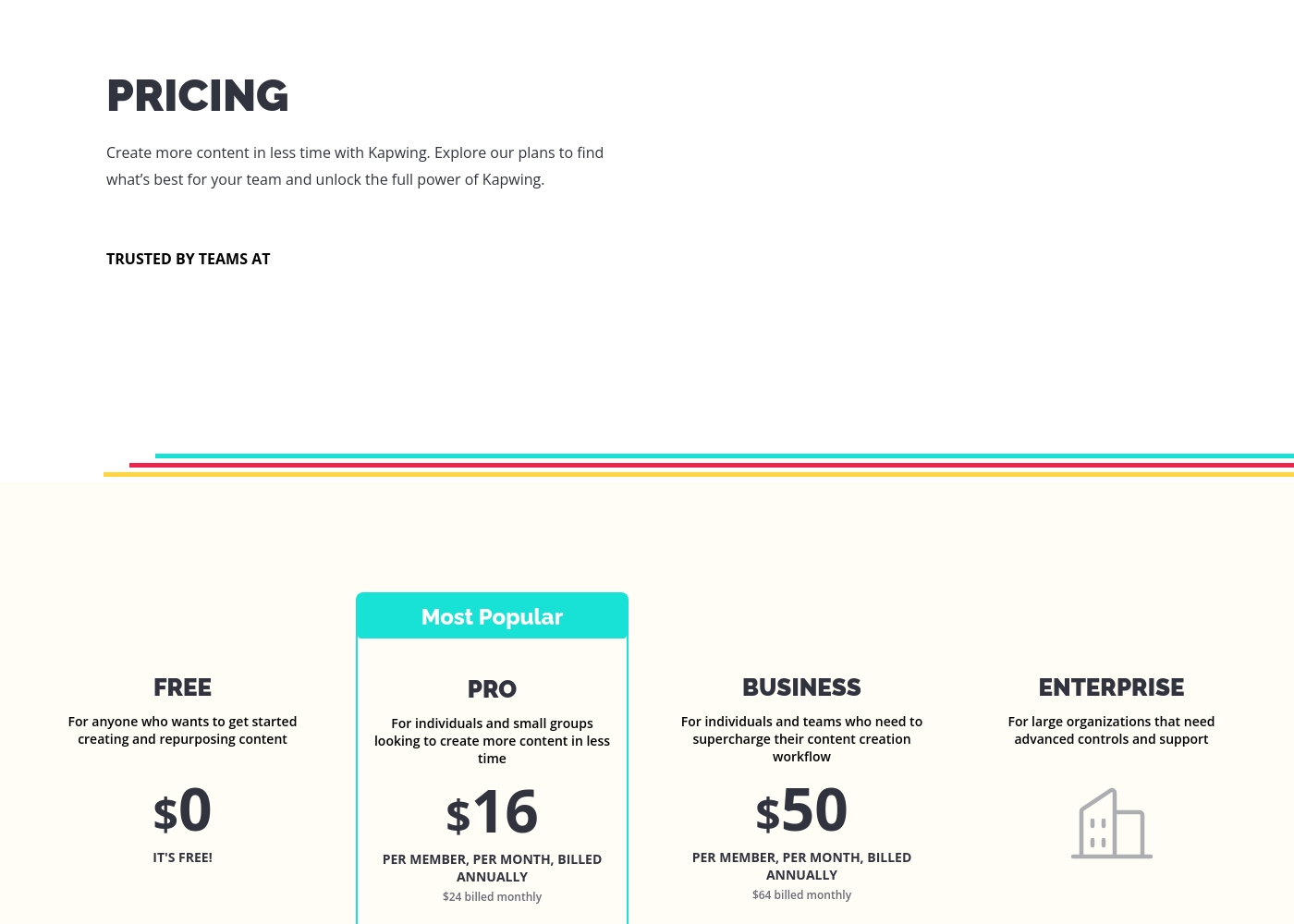
Kapwing clearly defines its Pro and Business plans, showing prices between $16 and $50 per member monthly (annually). You know exactly what you pay. Vyond's specific monthly or annual costs are not publicly visible; users must contact sales for details. This lack of transparency is frustrating. Kapwing is easier to budget for immediately, especially for individuals or small groups. Vyond's pricing suggests a higher overall corporate budget. Small businesses prefer Kapwing because budgeting for the $16/month Pro plan is simple and predictable.
These plans help you explore Kapwing's full power and create content faster in less time.
FREE
Price: $0 Best For: Anyone who wants to get started creating and repurposing content Other Features:
- It's free!
This is the perfect starting point if you are just beginning your content creation journey. You can access core tools without spending any money.
- Perfect for getting started creating and repurposing content
- Billed per member, per month
- For individuals and small groups
- Everything in Free, plus features for your team workspace
- Billed per member, per month
- For individuals and teams
- Everything in Pro, plus features for your team workspace
- For large organizations
- Advanced controls and support
- Everything in Business, plus features for your team workspace
You can explore Vyond's flexible options tailored to individual users and large organizations through these principal offerings.
Free Trial
Best For: Users wanting to test the platform's diverse video creation tools. Other Features:
- Instant, effortless video creation
- Access to AI avatars and Gen AI features
- Use of the comprehensive template library
- Ability to convert URLs or documents into video (Vyond Go)
If you're new to Vyond, starting with the free trial is the perfect way to explore its unique features without commitment. This allows you to evaluate practical tools like the instant editor and test Vyond Go's powerful text-to-video conversion before settling on a paid plan.
- Instant, effortless video for everyone
- Access to AI avatars, Gen AI, and Photorealistic styles
- Screen recording and mobile capture tools
- Instant creation using Vyond Go (text, document, or URL conversion)
- Efficiently create on-brand content at scale
- Complete privacy and security
- Supports rigorous security requirements of enterprise organizations

Pricing Notes
- Kapwing offers transparent, tiered pricing that is publicly listed for Pro ($16/month) and Business ($50/month) plans.
- Vyond utilizes a "Per seat" model, but specific monthly/annual subscription costs are not published and require contacting sales.
- Kapwing provides significant annual savings ($8-$14/member/month) compared to its flexible monthly rates.
- Vyond offers a free trial, while Kapwing provides a fully functional, permanent free plan instead of a traditional trial.
Pricing Head-to-Head
User Reviews
Users often praise Kapwing’s generally simple user interface, noting it’s super easy to use right in the browser without needing complex downloads. They appreciate specific powerful features like detailed timeline controls and the new “Repurpose Video” button for quick short-form content creation.
However, recent external feedback is overwhelmingly negative regarding business practices and high-risk policies. Many users complain they are misled by marketing, finding that nearly all useful tools are locked behind an immediate, expensive paywall, making the free plan useless.
Kapwing is such a great tool for editing videos and creating content. It’s super easy to use, so you don’t need to be a pro to figure it out. Everything’s right there in your browser—no downloads needed.
Vyond faces a highly polarized reception, reflecting an extreme split between feature satisfaction and corporate practices. Many users praise the core animation tool, noting its industry-standard quality, ideal speech synchronization, and the simple creation of explainer videos quickly.
They appreciate the robust library of ready-to-use character assets, making the platform fantastic for increasing marketing engagement. However, the negative sentiment, particularly on Trustpilot (where the score is 2.0), focuses heavily on pricing and support.
There’s a wonderful selection of ready-to-use characters and environments to get started quickly. The animations are top-notch, and incorporating a text script for generated audio is effortless. I am really happy with this tool overall.
Our Verdict
Choosing between Kapwing and Vyond is simple: it’s utility editor versus animated studio. If you need lightning-fast speed for social media content, Kapwing is probably your winner. If you work for a large corporation needing secure, scalable training videos, Vyond is the clear frontrunner. Kapwing’s superpower is making video editing incredibly fast and easy right in your browser. Kapwing gives you impressive timeline controls, keyframes, and excellent accessibility features like subtitling. You can repurpose a long YouTube video into 10 short TikTok clips in minutes. Vyond, however, is built to scale high-quality corporate content using powerful AI. Vyond Go instantly converts existing documents or URLs into finished animated draft videos. Vyond is trusted by huge organizations for creating secure, professional L&D and sales enablement content with engaging AI avatars. Your deciding factor must be data retention and cost structure. Kapwing offers transparent pricing but has alarming user reports of permanent content deletion. Vyond requires contacting sales for pricing but offers the high security and reliability corporate teams demand. If you are a solo creator who can back up content, pick Kapwing for its affordability and speed. If you need professional animated explainer videos for enterprise training, choose Vyond for security and specialized AI features.
Frequently Asked Questions
Which is better for creating corporate training videos: Kapwing or Vyond?
Vyond is explicitly designed for corporate training, L&D, and HR content creation. Vyond Go allows you to instantly generate explainer videos from documents or policies. Kapwing focuses more on generalized social media content and editing utilities.
Does Kapwing offer AI video generation like Vyond Go?
No, Kapwing does not feature a tool like Vyond Go to create video from documents or text prompts. Kapwing's AI tools focus on utility, such as Clean Audio or background removal. Vyond's AI accelerates content creation from complex sources.
Are there data security concerns when using Kapwing?
Yes, current external reviews strongly caution that Kapwing may permanently delete user projects without warning. This sometimes happens after a short billing delay or 30 days of inactivity. Vyond offers explicit security guarantees, especially for its Enterprise plan.
Is Vyond worth the extra cost over Kapwing?
If you need professional, secure animated content, Vyond is worth the investment. If you are a social media manager needing rapid editing and repurposing, Kapwing offers better immediate value. Remember, Vyond does not publicly list its pricing.
Which software has better team collaboration features?
Kapwing is better; it is explicitly built for seamless, real-time collaborative editing in a shared workspace. While Vyond offers per-seat scaling, Kapwing enables simultaneous, shared team workflow.
Does Kapwing or Vyond offer transparent pricing up front?
Kapwing offers fully transparent pricing for its Pro ($16/month) and Business ($50/month) plans. Vyond requires prospects to contact their sales team directly, as standard subscription costs are not publicly visible.
Ready to Choose?
Both tools have their strengths. Choose based on your specific needs.