Kajabi vs Knowmia
Kajabi and Knowmia spark tough choices for creators.Kajabi keeps 100% revenue; Knowmia guides a Screencast transition.Kajabi is all-in-one; Knowmia emphasizes continuity after retirement.
Comprehensive reliability for serious creators.
We find Kajabi to be a robust, all-in-one ecosystem that genuinely simplifies selling digital products by consolidating complex tools into a single, intuitive dashboard. While the pricing is premium, we believe the platform delivers exceptional value by prioritizing customer retention and offering swift, 24/7 human support.
Pros
- Provides 100% revenue retention for creators (no percentage cut).
- All-in-one system replaces numerous expensive third-party tools.
- Reliable, fast, 24/7 human customer support is highly praised.
- Highly intuitive design and easy accessibility for non-tech users.
Cons
- High price point; some long-term users report subscription increases.
- Built-in email marketing is considered underdeveloped by power users.
- AI chatbot support is often cited as unhelpful or slow to escalate to a person.
- Refunding forgotten trial charges may be difficult.
Essential tools with enhanced AI features.
Knowmia Pro users benefit from a clear, feature-rich transition to the Screencast platform, complete with modern AI assistance and strong integration with Camtasia and Snagit. We noted that while the software is praised universally, current user satisfaction is mixed due to frustrating changes to the annual subscription model and licensing limits. Overall, this remains a powerful and intuitive solution for quick video creation and sharing.
Pros
- Supported transition path from Knowmia to the modern Screencast platform.
- Screencast features strong integration with the TechSmith platform (Snagit, Camtasia).
- Intuitive workflow makes creating screen-based videos simple and fast.
- Screencast Pro includes modern AI features like auto-generated captions and chapters.
Cons
- Recent shift to mandatory annual subscriptions caused widespread customer backlash.
- New licensing model requires constant sign-ins when switching between personal devices.
- Email-based customer service can be slow and unresponsive.
- The free tier strictly limits video storage to 25 videos with a 12-month expiration.
AboutKajabi
Kajabi is an all-in-one platform designed for serious digital entrepreneurs and creators. It transforms your knowledge into multiple scalable income streams. Using customizable templates, you can easily launch polished online courses, deliver impactful coaching programs, or start a subscription podcast.
The platform supports numerous sources of revenue. You can launch newsletters, build your own community, or offer bundled memberships. Kajabi ensures that everything you need is smoothly integrated into one intuitive system. 💡
AboutKnowmia
Knowmia Pro officially retired in early 2025, but video producers still require a robust hosting solution. If you were a Knowmia user, Screencast is the recommended powerful successor. This tool provides features similar to what you trusted in the original platform. It ensures your video production remains reliable, and it includes the critical benefit of AI-assisted effortless workflows to help streamline your daily tasks. 💡
Highlights
Feature Comparison
Features Overview
We highlight the main differences and pick a winner for each feature.
UI & Ease
Kajabi wins on simplicity and all-in-one design. Knowmia/Screencast offers a transition path.
Kajabi provides a unified, code-free experience. You manage courses, pages, and payments in one place. Knowmia transitions users smoothly to Screencast, preserving workflows. The trade-off is potential friction during migration and adapting to Screencast's UI.
Collaboration Tools
Kajabi centers on built-in audience tools; Screencast emphasizes collaboration around media.
Kajabi includes CONTACTS and community features for direct engagement. Screencast offers media organization tools like Collections and comments. The trade-off: Kajabi feels more platform-wide; Screencast focuses on media-centric workflows.
Automation
Kajabi’s funnels and code-free paths drive automation; Screencast adds AI-assisted tasks.
Kajabi's funnels automate sales flows and lead capture. Screencast Pro adds AI features for captions and chapters. The trade-off: Kajabi covers marketing flows natively; Screencast boosts production efficiency in video workflows.
Analytics & Reporting
Kajabi provides built-in analytics; Screencast offers AI-backed media insights.
Kajabi surfaces dashboards for course and sales data. Screencast provides media-level analytics and AI-assisted insights. The trade-off: Kajabi's scope is broader; Screencast focuses on video engagement metrics.
Mobile Experience
Kajabi includes a mobile app; Knowmia/Screencast mobile is not highlighted.
Kajabi supports customers accessing content via a mobile app. Screencast's mobile experience isn’t emphasized in Knowmia's transition materials. The trade-off: Kajabi clearly prioritizes mobile access.
Customer Support
Kajabi boasts 24/7 human support; Screencast offers pro support with tech help.
Kajabi's support is repeatedly praised for responsiveness. ScreencastPro includes technical support with AI features. The trade-off: Kajabi’s support is highlighted as standout; Screencast support is solid but differently scoped.
Integration Ecosystem
Kajabi has broad integrations; Screencast centers on Camtasia/Snagit and media tools.
Kajabi integrates with Zapier, Drip, and MailChimp. Screencast emphasizes TechSmith ecosystem integration. The trade-off: Kajabi covers marketing integrations; Screencast nails media-tool continuity.
Pricing & Plans
Kajabi pricing isn’t explicitly stated; Screencast Pro is $99.99/year per user.
Kajabi uses subscription tiers; no revenue share. Screencast Pro costs $99.99 per user yearly with free tier options. The trade-off: Screencast is more transparent per-seat; Kajabi’s numbers aren’t disclosed here.
Learning Curve
Kajabi is designed for non-tech users; Knowmia requires migration to Screencast.
Kajabi offers code-free templates and a straightforward setup. Screencast requires adapting from Knowmia’s era and tools. The trade-off: Kajabi minimizes setup frictions; Screencast keeps workflows familiar for Knowmia users.
Customization
Both offer branding options; Kajabi leans on templates, Screencast provides logo options.
Kajabi uses customizable templates and blueprints. Screencast Pro includes a Custom logo and Collections. The trade-off: Kajabi emphasizes templates; Screencast adds media-specific branding controls.
Security & Compliance
Kajabi emphasizes industry-leading security; Screencast highlights secure media handling.
Kajabi focuses on secure checkout and payments. Screencast protects media with phrase-protected sharing in Pro. The trade-off: Both prioritize security in different areas.
Kajabi costs between Not explicitly stated and Not explicitly stated per Not explicitly stated. Specific plan names, pricing tiers, and their annual or monthly costs are not explicitly stated in the available content.
Kajabi confirms it uses multiple plan tiers designed to help your business grow. You can always choose the plan that fits best as your needs change. This structure ensures you only pay a subscription fee, avoiding the headache of complex integrations and fluctuating costs.
Kajabi is known for being an all-in-one solution that helps you simplify your process. A significant benefit is that Kajabi does not take a percentage of your revenue—ever. You earn it, you keep it.
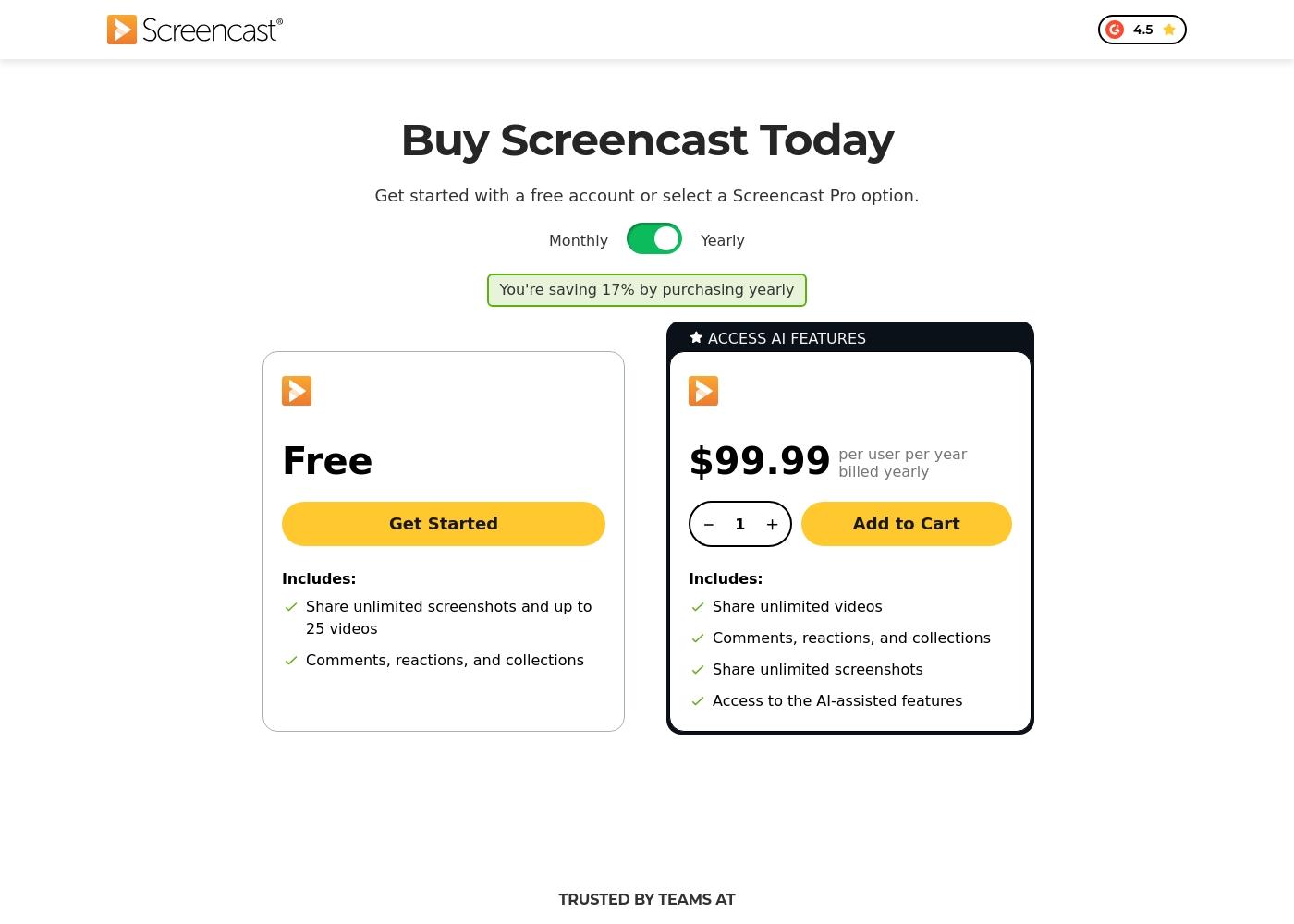
Screencast offers two tiers for knowledge sharing: a Free plan and the Screencast Pro plan, which costs $99.99 per user billed yearly.
Since Knowmia Pro was retired, the platform recommends Screencast as a similar product with integrated sharing features. We've organized the available Screencast tiers below to help you choose the best fit for your sharing needs.
Free
Price: Free Websites Supported: Not explicitly stated Best For: Users who need to share screenshots and upload a limited quantity of video content (up to 25 videos). Refund Policy: Not applicable Other Features:
- Share unlimited screenshots
- Video storage for up to 25 videos
- Video storage limit of 12 months
- Includes Comments, reactions, and collections functionality
- Share unlimited screenshots
- Store up to 25 videos
- Includes Comments, reactions, and collections
- Share unlimited videos and screenshots
- Unlimited video and image storage
- Access to AI-assisted features (captions, titles, chapters)
- Access phrase protected media
- Custom logo and Collections organization
Pricing Notes
- Kajabi emphasizes 100% revenue retention with no revenue sharing.
- Knowmia Pro retired; Screencast is the recommended successor with a Free plan and Pro tier.
- Screencast Pro pricing is per user/year, with 17% savings on annual billing.
- External tracking costs and tool sprawl are reduced with Kajabi's all-in-one approach.
Pricing Head-to-Head
User Reviews
Kajabi generally receives positive feedback across thousands of external reviews, centered on its comprehensive, all-in-one platform approach. Users frequently praise the system's intuitive design and ease of use, confirming it simplifies managing critical business functions—including websites, courses, payments, and sales pages—under one roof.
Reviewers consistently highlight the exceptional responsiveness and helpfulness of the 24/7 customer support team, noting quick resolutions and excellent step-by-step guidance. Customers value the presence of human support, often preferring agents over the sometimes less effective AI chatbot.
I have been using Kajabi for five years now, and despite cheaper competitors popping up, I never leave. Kajabi has everything I need in one place under a single subscription. It truly runs my entire business, from my website to my courses.
Users reviewing TechSmith products like Snagit and Camtasia, which integrate closely with Screencast, consistently highlight a strong duality in their experience. On the one hand, the software itself receives overwhelmingly positive feedback for being highly useful, intuitive, and simpler than powerful competitors like DaVinci Resolve.
Many users celebrate the intuitive workflow, calling the software “awesome” and essential for daily tasks. However, the recent shift to a mandatory annual subscription model is a major source of frustration 😡.
This is a great product that is dramatically simpler than other complex tools like those from Adobe. It has a deep enough feature set to handle many complex projects easily. We find the product itself essential.
Our Verdict
Kajabi wins for most creators, with Knowmia as a strong alternative for specific needs. Kajabi shines as a true all-in-one, removing tool sprawl and protecting revenue. Knowmia’s path to Screencast rocks for teams migrating from Knowmia Pro and needing AI-assisted video workflows. If you value a single, revenue-maximizing platform, Kajabi is your pick. If you’re migrating from Knowmia Pro and want AI-driven hosting with media controls, consider Knowmia/Screencast.
Frequently Asked Questions
Which is better for small teams: Kajabi or Knowmia?
Both work for small teams, but Kajabi is easier to set up. Knowmia's migration path to Screencast helps teams moving from Knowmia Pro.
Does Kajabi have AI features like Knowmia?
Kajabi has an AI chatbot, but Knowmia's Screencast Pro offers captions and chapters. AI utility varies by use case.
Is Knowmia worth the extra cost over Kajabi?
Knowmia's Screencast Pro adds AI and unlimited storage. If you need these, it can be worthwhile. If you want simplicity, Kajabi may be cheaper in total.
Can I migrate from Knowmia Pro to Screencast easily?
Yes. Screencast provides a direct, supported path from Knowmia Pro. Your videos and workflows stay intact.
Do Kajabi and Knowmia offer free trials?
Kajabi trial details aren’t explicit here. Knowmia offers a Free plan to test basic sharing features.
Which tool is better for mobile users?
Kajabi has a dedicated mobile app for customers. Knowmia/Screencast mobile capabilities aren’t highlighted here.
Ready to Choose?
Both tools have their strengths. Choose based on your specific needs.