Invideo vs Vyond
Invideo and Vyond are powerful AI video platforms, but they serve very different user bases. Invideo excels at rapid, cinematic video creation backed by exceptional human support. Vyond targets corporate and L&D teams with secure, specialized animated explainers. Your final choice depends on whether you value production speed or standardized corporate animation.
Best for: Solo entrepreneurs and small businesses, Marketing agencies running high-volume campaigns
Best for: Corporate Learning & Development (L&D) teams, HR departments focused on internal communications
Rapid AI Video Creation, Backed by Humans.
We found Invideo AI to be exceptionally effective at transforming text prompts into polished videos quickly, enabling users to cut production time significantly. The platform stands out due to its genuinely dedicated, 24/7 customer support, which navigates users past complexity and technical inconsistencies. Overall, Invideo is a powerful AI tool deserving of content creators looking for speed and reliability, especially given the human safety net.
Pros
- Exceptional 24/7 customer support delivered by responsive, real humans.
- Dramatically reduces video creation time, boosting workflow efficiency.
- Highly user-friendly for generating videos from simple text prompts.
- Allows sophisticated editing of audio, voice, and captions using natural language.
Cons
- Occasional inconsistencies or anomalous results in AI-generated content quality.
- Users report frustration being charged for unsatisfactory generative AI prompts.
- Generating time can be lengthy when making multiple revisions.
- The media and video library needs expansion to offer more content variety.
Powerful AI. Scaling Content. Poor Support.
Vyond offers an industry-leading AI video creation platform perfect for scaling secure, on-brand content quickly, trusted by numerous Fortune 500 companies. However, we found recurring issues regarding customer support responsiveness and problematic changes to subscription terms, undermining value for individual users. Overall, Vyond is a powerful tool best suited for high-budget corporate teams needing secure, high-volume production.
Pros
- Industry-standard quality for animated and explainer content.
- Fast video creation using AI (Vyond Go) from simple prompts or URLs.
- Excellent speech synchronization and audio generation from text scripts.
- UI is perfect and the animation assets are deemed top-notch and beautiful.
Cons
- Limited or non-existent customer support; help relies heavily on automation.
- Unethical practices reported, including automatic renewals and forced plan upgrades.
- Frequent removal or capping of features (e.g., community forums, themes) for paying users.
- Limited or 'screwed' free trial experience (e.g., maximum of three videos).
AboutInvideo
Invideo is an AI tool designed to give you the power to play and create. It transforms simple text prompts related to your business or casual ideas into cinematic videos, professional promos, and detailed explainers instantly.
This platform is perfect for creators, educators, non-profits, and marketing agencies seeking rapid content creation. Whether you need an engaging UGC ad or a detailed product reel, Invideo handles the complex work. You're empowered to generate and edit content that reaches new customers across various countries, languages, and beliefs worldwide. 💡
AboutVyond
Vyond is the all-in-one AI video creation platform that helps teams generate effective videos from simple prompts in multiple styles. It includes Vyond Go, which instantly turns your idea, document, or URL into a video, and an instant editor or studio for quick tweaks. Thousands of businesses and millions of users rely on Vyond, and 65% of the Fortune 500 rely on Vyond. 🎬
Highlights
Feature Comparison
Features Overview
We highlight the main differences and pick a winner for each feature.
Customer Support
Invideo offers exceptional 24/7 human support. Vyond users widely report poor, automated, and frustrating service.
Invideo receives widespread praise for its responsive, real-human 24/7 support staff. Agents often spend over an hour assisting users with complex issues. Vyond users frequently cite the customer support experience as the platform's worst feature. They report receiving long, generic troubleshooting emails instead of direct problem resolution. This makes Invideo the much safer bet for creators who need reliable, quick help when issues arise. You'll save significant frustration and production time with Invideo’s highly rated support team.
Pricing Transparency
Invideo provides public, clear, usage-based tiers. Vyond hides standard pricing and favors custom enterprise quotes.
Invideo provides transparent, tiered pricing from a free plan up to $899/month for the Team plan. Costs scale predictably based on AI credits and included iStock assets. Vyond does not make its standard subscription costs publicly available on its website. Users must contact sales for quotes, hinting at higher-cost, proprietary licensing models. This lack of transparency makes budgeting for Vyond nearly impossible for small teams. Invideo wins here by offering visible, easy-to-understand subscription options upfront.
AI Workflow
Invideo uses text prompts for cinematic editing; Vyond Go converts documents to animated explainers quickly.
Invideo allows users to 'edit like they think' by typing instructions for changes to images, audio, or captions. This natural language editing significantly accelerates the revision cycle for creators. Vyond's Vyond Go transforms documents, URLs, or text into structured animated videos instantly. The document-to-video function is invaluable for corporate content creation needs. The key difference is Invideo emphasizes flexible cinematic output speed, while Vyond prioritizes structured training content. Both tools offer market-leading AI generation methods for different required outcomes.
Target Audience
Invideo targets agencies and creators needing speed. Vyond focuses on secure, scalable enterprise L&D and HR.
Invideo is optimized for high-volume content creators, such as agencies needing rapid UGC ads and promotions. It prioritizes achieving speed and workflow efficiency immediately for marketing needs. Vyond is used by 65% of the Fortune 500, focusing on secure, standardized corporate training and internal communication. Vyond specializes in turning dry corporate topics into engaging lessons for employees. If you are an individual creator or a marketing team, Invideo is likely the better functional and financial fit.
Security Focus
Vyond is built for security-critical enterprises. Invideo reserves high security for its top-tier custom plan.
Vyond’s Enterprise solution ensures complete privacy and supports the rigorous security requirements of large organizations. Maintaining high compliance standards is a central part of Vyond's corporate focus. Invideo mentions advanced security is only available on its custom-quoted Enterprise plan. Standard Invideo plans are focused primarily on creative output for external consumption. If data security and corporate compliance are critical mandates, Vyond provides a more dedicated and proven corporate solution.
Animation Quality
Vyond offers an industry-standard animated asset library. Invideo relies more on generative AI and stock photography.
Vyond is highly praised for its selection of top-notch animation assets, characters, and environments for polished explainers. Users appreciate the studio's ability to deliver consistent, industry-standard animated results immediately. Invideo heavily leverages its massive iStock integration and generative AI to source diverse content. While Invideo is lightning fast, it does not specialize in Vyond's distinctive and scalable animation style. For professional, consistent, animated video quality, Vyond offers a superior toolset.
Speed of Production
Invideo excels at speed, cutting production time in half. Vyond is fast but tailored to comprehensive training module production.
Invideo users report cutting video creation time from half a day down to just 30 minutes, a massive efficiency gain. Its natural language editing avoids tedious timelines. Vyond Go instantly creates a video draft from a document or URL, which drastically speeds up the initial L&D process. However, the final detailing still requires time in the standard animation studio. For sheer volume and speed, particularly in marketing, Invideo delivers superior real-world performance improvements.
Stock Media Access
Invideo features explicit iStock asset quotas. Vyond's asset usage is focused internally on its animation library.
Invideo integrates premium stock access directly into its paid plans, offering up to 320 iStock assets monthly on its Max tier. This ensures high-quality source material for cinematic videos. Vyond’s focus is on its proprietary library of animated characters and backgrounds. While Vyond is the animation leader, Invideo clearly supports external content richness through its stock media quotas. If relying on high-quality external footage is key, Invideo is the better choice.
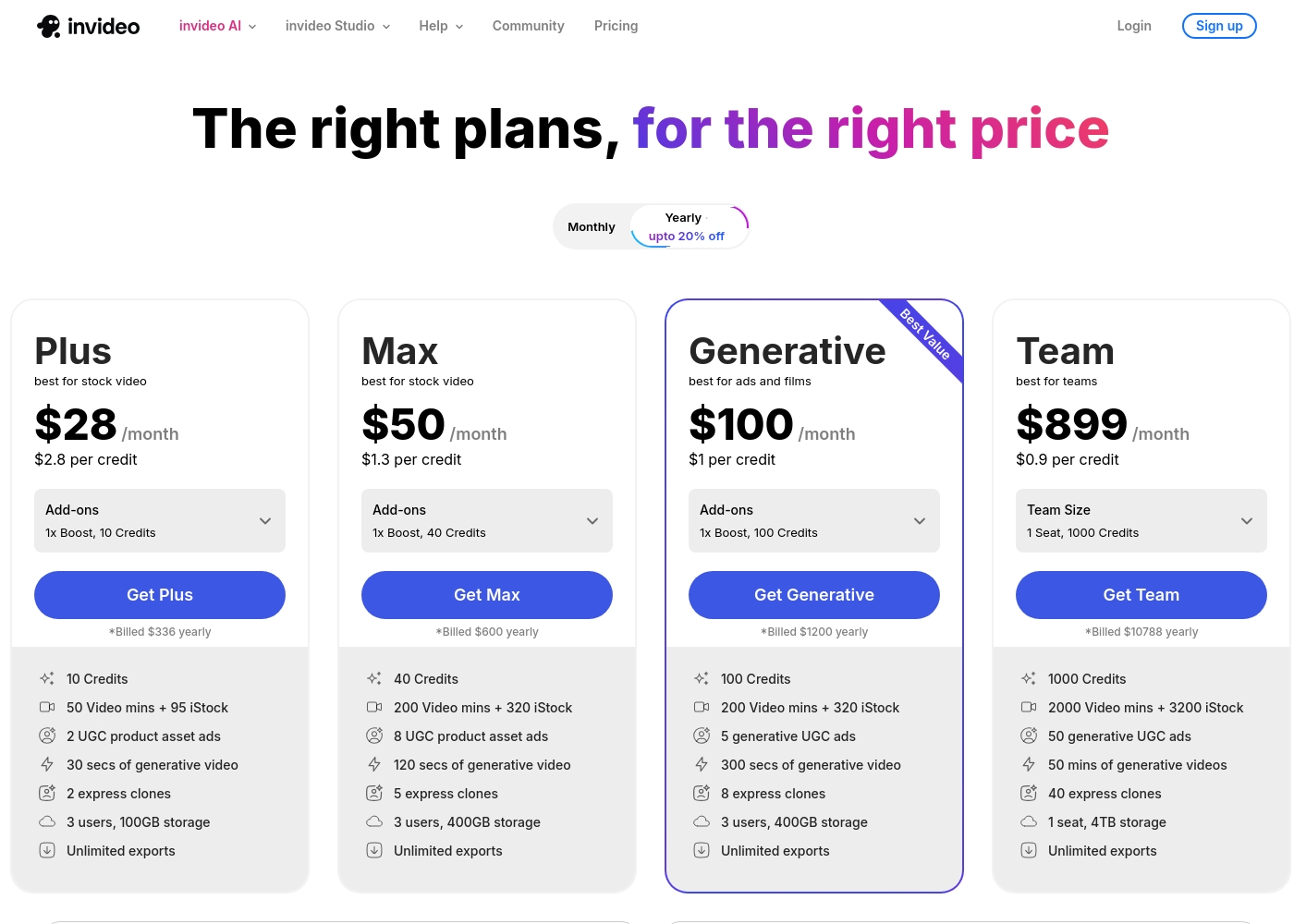
Invideo pricing ranges from $0 for the Free plan up to $899 per month for the Team plan, with three intermediate tiers: Plus at $28/month, Max at $50/month, and Generative at $100/month.
Here are the details for the plans available across monthly and yearly billing cycles.
- 10 Video mins and 1 AI credit per week
- 1 Express avatar
- 4 Exports per week with invideo watermark
- No access to generative features
- 10 Credits ($2.8 per credit)
- 50 Video mins + 95 iStock
- 2 UGC product asset ads
- 30 secs of generative video
- 2 express clones
- 40 Credits ($1.3 per credit)
- 200 Video mins + 320 iStock
- 8 UGC product asset ads
- 120 secs of generative video
- 5 express clones
- 100 Credits ($1 per credit)
- 200 Video mins + 320 iStock
- 5 generative UGC ads
- 300 secs of generative video
- 8 express clones
You can explore Vyond's flexible options tailored to individual users and large organizations through these principal offerings.
Free Trial
Best For: Users wanting to test the platform's diverse video creation tools. Other Features:
- Instant, effortless video creation
- Access to AI avatars and Gen AI features
- Use of the comprehensive template library
- Ability to convert URLs or documents into video (Vyond Go)
If you're new to Vyond, starting with the free trial is the perfect way to explore its unique features without commitment. This allows you to evaluate practical tools like the instant editor and test Vyond Go's powerful text-to-video conversion before settling on a paid plan.
- Instant, effortless video for everyone
- Access to AI avatars, Gen AI, and Photorealistic styles
- Screen recording and mobile capture tools
- Instant creation using Vyond Go (text, document, or URL conversion)
- Efficiently create on-brand content at scale
- Complete privacy and security
- Supports rigorous security requirements of enterprise organizations

Pricing Notes
- Invideo publishes clear, public pricing tiers suitable for individuals and teams up to its high-volume plan.
- Vyond refuses to list standard subscription prices, requiring users to contact sales, often indicating a significantly higher or proprietary cost structure.
- Invideo pricing is usage-based (AI credits/video minutes), but seats are limited to three on lower tiers.
- Vyond uses a 'Per seat' model, but the specific costs and usage details are entirely unknown to the public.
- Users widely report dissatisfaction with Vyond's perceived value due to hidden costs and reported automated renewal practices.
Pricing Head-to-Head
User Reviews
Invideo AI enjoys widely positive reception, particularly for the strength of its customer support. Users frequently highlight the responsiveness and genuine care of the support team, praising specific agents for being patient, kind, and knowledgeable in resolving complex issues like billing errors or login problems.
Reviewers consistently find the platform an invaluable tool that is super easy to use, delivering professional results and saving significant time; some creators even attribute substantial growth in their channels to using the software. However, sentiment isn't universally positive regarding the core AI engine.
I had made the mistake of removing the email connected to my plan and couldn't understand why I was being charged. Patrick immediately located the account, helped me cancel the subscription, and provided great service. The team is excellent!
Vyond faces a highly polarized reception, reflecting an extreme split between feature satisfaction and corporate practices. Many users praise the core animation tool, noting its industry-standard quality, ideal speech synchronization, and the simple creation of explainer videos quickly.
They appreciate the robust library of ready-to-use character assets, making the platform fantastic for increasing marketing engagement. However, the negative sentiment, particularly on Trustpilot (where the score is 2.0), focuses heavily on pricing and support.
There’s a wonderful selection of ready-to-use characters and environments to get started quickly. The animations are top-notch, and incorporating a text script for generated audio is effortless. I am really happy with this tool overall.
Our Verdict
The final decision between Invideo and Vyond depends on your exact project needs: speed versus specialized corporate animation. If you require modern, rapid video creation and hate complicated interfaces, Invideo is your clear winner. If your world revolves around secure, professional, standardized L&D content, Vyond is the specialized option. Invideo’s superpower is lightning-fast AI video generation using simple text prompts. You can cut video creation time from hours to minutes, achieving massive efficiency gains for quick marketing campaigns. Its natural language editing means you simply type commands to fix images or change audio. Crucially, the 24/7 human customer support is top-tier, making Invideo a highly reliable partner. Vyond’s superpower is its commitment to enterprise-grade animation and rigorous security compliance. It offers the industry standard for animated explainer videos, trusted by 65% of the Fortune 500 globally. Vyond Go can turn existing corporate documents into secure training videos instantly, making it invaluable for large L&D teams. However, Vyond’s opaque pricing and reported poor customer support are major points of concern. The deciding factor is budget transparency and the need for reliable support. Invideo publishes clear pricing and offers highly praised human support, significantly reducing financial risk. If you are a corporate user with flexible spending prioritizing security and proprietary animation, purchase Vyond. For 99% of creators and agencies wanting speed, support, and great value, Invideo offers the superior solution and user experience.
Frequently Asked Questions
Which is better for marketing agencies: Invideo or Vyond?
Invideo is superior for marketing agencies due to its focus on rapid UGC ad creation and efficiency gains. Invideo users report cutting creation time significantly, boosting sales outcomes. Vyond focuses primarily on internal corporate training videos and animated explainers.
Which tool has better customer support: Invideo or Vyond?
Invideo has vastly superior customer support, rated highly for human, 24/7 responsiveness. Vyond users widely report poor service, relying heavily on automation and receiving frustrating, generic troubleshooting emails. Invideo offers a much safer commitment.
Is Vyond worth the extra cost and complexity over Invideo?
Vyond is worth the cost only if you require highly specialized, secure, scalable animated corporate training and L&D content. Note that Vyond does not make its standard pricing public, unlike the transparent, tiered structure of Invideo.
Can I use natural language commands in Vyond like I can in Invideo?
No, Vyond relies on its standard, powerful studio editor for detailed animation adjustments. Invideo is unique with its natural language editing features. Invideo allows you to perform sophisticated edits on images, audio, and captions merely by typing a text instruction.
Which platform focuses more on corporate training and L&D?
Vyond is heavily marketed and optimized for L&D, HR, and corporate communication needs. Vyond Go instantly creates effective explainer videos from existing documents, a crucial feature for dedicated training teams. Invideo is more generalized for marketing and content creation.
Are the standard pricing plans public for Invideo and Vyond?
Invideo provides clear, public pricing tiers suitable for any budget, ranging from free up to $899/month. Vyond deliberately hides its standard subscription costs, requiring you to contact their sales team for specific figures and quotes.
Ready to Choose?
Both tools have their strengths. Choose based on your specific needs.