INE vs Knowmia
This comparison tackles a unique match-up: a deep IT training platform versus a modern video hosting tool. INE is built for mastering complex networking skills. Knowmia has been succeeded by Screencast, which is all about sharing video content.
Best for: IT managers building team training plans, Cybersecurity professionals seeking hands-on skill development
Best for: Teams migrating from retired Knowmia Pro, Educators and trainers hosting video content
Solid for deep, hands-on IT training.
We find INE is a powerful, specialized platform for building advanced networking and cybersecurity skills. Its single, all-inclusive subscription offers a vast library of content and labs. Overall, it's a strong choice for committed learners or teams, but its high annual cost and lack of transparent pre-purchase details may give some pause.
Pros
- Massive content library with 3,500+ hours of training.
- Strong emphasis on hands-on labs (750+ hours) for practical skills.
- Includes a free certification voucher with the annual subscription.
- Structured learning paths for popular certs like CCIE and AWS.
Cons
- Single pricing tier at $799/year is a significant upfront commitment.
- No free trial or clear money-back guarantee mentioned.
- Limited transparency on platform integrations and onboarding.
- Capterra review access was blocked, limiting external sentiment.
Essential tools with enhanced AI features.
Knowmia Pro users benefit from a clear, feature-rich transition to the Screencast platform, complete with modern AI assistance and strong integration with Camtasia and Snagit. We noted that while the software is praised universally, current user satisfaction is mixed due to frustrating changes to the annual subscription model and licensing limits. Overall, this remains a powerful and intuitive solution for quick video creation and sharing.
Pros
- Supported transition path from Knowmia to the modern Screencast platform.
- Screencast features strong integration with the TechSmith platform (Snagit, Camtasia).
- Intuitive workflow makes creating screen-based videos simple and fast.
- Screencast Pro includes modern AI features like auto-generated captions and chapters.
Cons
- Recent shift to mandatory annual subscriptions caused widespread customer backlash.
- New licensing model requires constant sign-ins when switching between personal devices.
- Email-based customer service can be slow and unresponsive.
- The free tier strictly limits video storage to 25 videos with a 12-month expiration.
AboutINE
INE is a workforce development platform focused on building practical skills. It's for businesses looking to train their teams and individuals pursuing personal growth in networking and cybersecurity. The core promise is award-winning, technically challenging training to master complex subjects. 💡
AboutKnowmia
Knowmia Pro officially retired in early 2025, but video producers still require a robust hosting solution. If you were a Knowmia user, Screencast is the recommended powerful successor. This tool provides features similar to what you trusted in the original platform. It ensures your video production remains reliable, and it includes the critical benefit of AI-assisted effortless workflows to help streamline your daily tasks. 💡
Highlights
Feature Comparison
Features Overview
We highlight the main differences and pick a winner for each feature.
Core Purpose
INE is for skill acquisition. Knowmia's successor, Screencast, is for content distribution.
INE is a learning platform. It provides 3,500+ hours of video training and 750+ hours of hands-on labs for IT professionals. The goal is to build real-world competence in networking and cybersecurity. Knowmia has been retired and succeeded by Screencast. Screencast is a video hosting and sharing tool. It allows users to upload, organize, and share their own screen recordings. The key difference is foundational. INE delivers expert content to you. Screencast helps you deliver your own content to others. They solve opposite problems in the tech stack.
Learning & Training
INE offers deep, structured training. Screencast is not designed for formal learning.
INE excels here. It offers structured learning paths for certifications like CCIE and AWS. The 750+ hours of labs provide the practical experience needed to master complex topics. Screencast has no formal training features. It does not offer courses, labs, or assessments. Its features focus on media storage, sharing, and basic organization like Collections. If your goal is upskilling a team, INE is the only relevant choice. Screencast is a tool for sharing information, not teaching skills.
Content Hosting
Knowmia's successor, Screencast, is built for hosting. INE hosts only its own content.
INE is not a content hosting platform for your files. It hosts its own library of training materials. You cannot upload your own videos or documents. Screencast is designed for this exact purpose. The Pro plan offers unlimited video and image storage. You can upload, organize, and share your own content indefinitely. For storing and distributing your organization's videos, Screencast is the clear tool. INE is a consumer of content, not a host.
AI & Automation
Screencast Pro includes helpful AI tools. INE focuses on human-led learning.
INE does not mention AI features. Its approach is a continuous, human-driven learn-by-doing model. The value is in the expert-crafted content and lab environments. Screencast Pro includes AI-assisted features. These can auto-generate captions, titles, and chapter markers for your videos. This automates tedious post-production tasks. The trade-off is clear. INE invests in content depth. Screencast invests in workflow efficiency for video creators. They target different parts of the process.
Pricing & Value
INE is a premium all-access pass. Screencast offers a low-cost entry point.
INE costs $799 per year for one user. This single price unlocks the entire library of courses and labs. It includes a free certification voucher, adding clear value for test-takers. Screencast has a free tier and a $99.99/year Pro plan. The free tier is limited to 25 videos. The Pro plan removes limits and adds AI tools for a much lower price than INE. For sheer cost, Screencast is more accessible. However, INE's value comes from the specialized, high-quality training it delivers. You're paying for expertise, not just storage.
Customer Support
Data is limited for both, but user sentiment differs.
INE does not detail its support channels or response times on the public site. It mentions building a team roadmap, suggesting business-level support is available upon inquiry. Screencast reviews highlight mixed support experiences. Live chat is often praised as quick and knowledgeable. However, email support is reported as slow, and some complex bugs go unresolved. Based on available info, we can't declare a definitive winner. INE's support is less transparent. Screencast's support is accessible but inconsistent.
INE costs $799 per year with 1 plan: INE Premium Subscription at $799.
Take a look at the full details of this comprehensive training package below.
INE Premium Subscription
Price: $799 per year Best For: I.T. professionals and certification seekers Other Features: Free yearly certification voucher, 750+ hours of hands-on labs, 3,500+ hours of training content, Learning paths for Networking, Cloud, and Cyber Security, and Quizzes and course files.
- Free Yearly INE Certification Voucher
- Unlimited Learning Paths
- 3500+ Hours of Training Content
- 750+ Hours of Hands-on Labs
- Usage Analytics

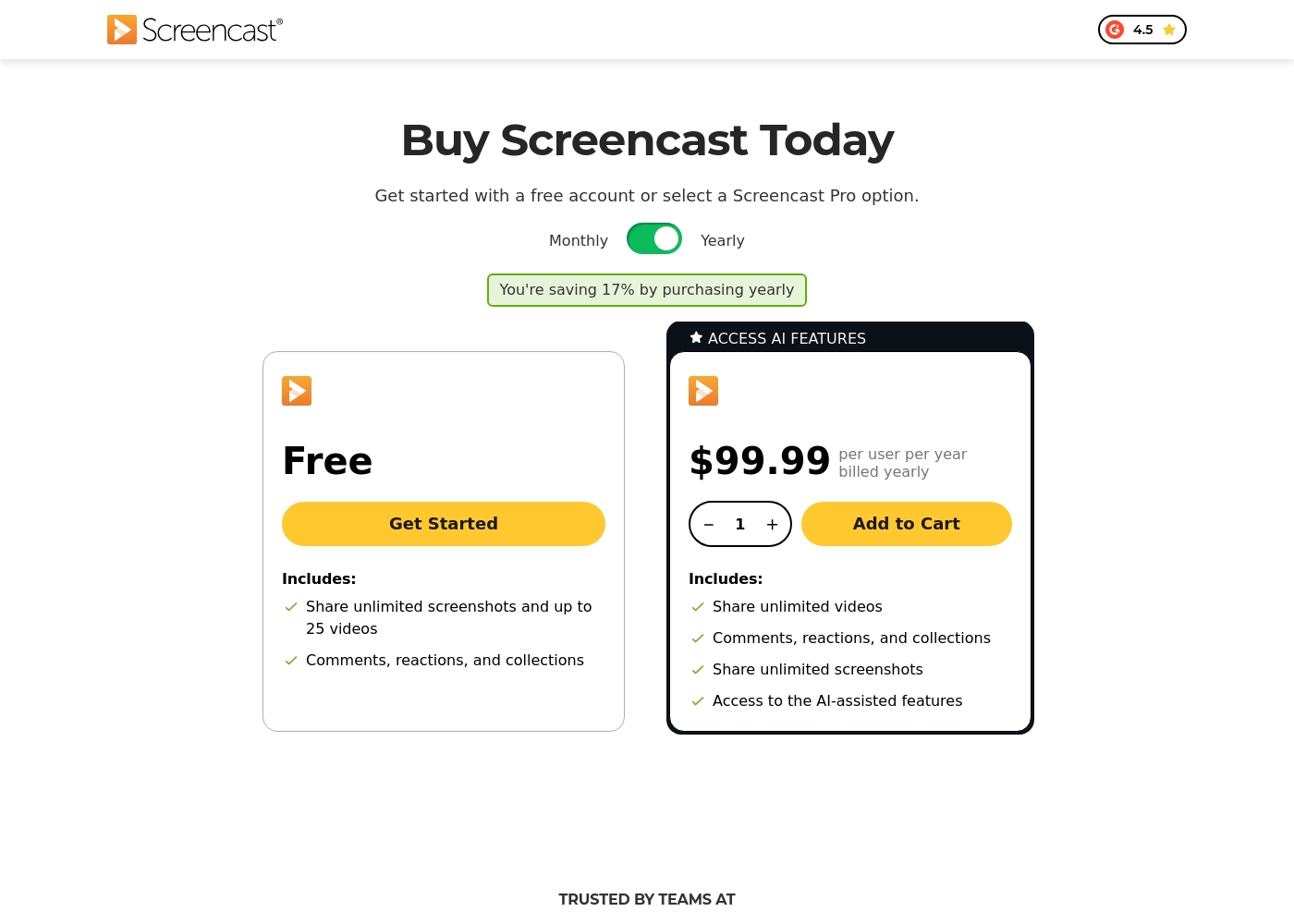
Screencast offers two tiers for knowledge sharing: a Free plan and the Screencast Pro plan, which costs $99.99 per user billed yearly.
Since Knowmia Pro was retired, the platform recommends Screencast as a similar product with integrated sharing features. We've organized the available Screencast tiers below to help you choose the best fit for your sharing needs.
Free
Price: Free Best For: Users who need to share screenshots and upload a limited quantity of video content (up to 25 videos). Refund Policy: Not applicable Other Features:
- Share unlimited screenshots
- Video storage for up to 25 videos
- Video storage limit of 12 months
- Includes Comments, reactions, and collections functionality
- Share unlimited screenshots
- Store up to 25 videos
- Includes Comments, reactions, and collections
- Share unlimited videos and screenshots
- Unlimited video and image storage
- Access to AI-assisted features (captions, titles, chapters)
- Access phrase protected media
- Custom logo and Collections organization
Pricing Notes
- INE has a single, all-inclusive pricing tier at $799 per year.
- Knowmia has been retired. Its successor, Screencast, offers a Free plan and a Pro plan.
- Screencast's Free plan limits storage to 25 videos for 12 months.
- Neither platform offers a free trial for their paid plans.
- Screencast Pro requires sign-in for each device, which users find frustrating.
Pricing Head-to-Head
User Reviews
Based on the limited data available (Capterra review access was blocked), we couldn't gather a full sentiment analysis. The Trustpilot link was provided, but no specific review snippets were included in the input.
Therefore, this summary reflects the provided context and the absence of detailed external feedback. 😐 We see INE positioned as a comprehensive, hands-on platform for networking and cybersecurity training, with a strong focus on practical skills and certification prep.
Users reviewing TechSmith products like Snagit and Camtasia, which integrate closely with Screencast, consistently highlight a strong duality in their experience. On the one hand, the software itself receives overwhelmingly positive feedback for being highly useful, intuitive, and simpler than powerful competitors like DaVinci Resolve.
Many users celebrate the intuitive workflow, calling the software “awesome” and essential for daily tasks. However, the recent shift to a mandatory annual subscription model is a major source of frustration 😡.
This is a great product that is dramatically simpler than other complex tools like those from Adobe. It has a deep enough feature set to handle many complex projects easily. We find the product itself essential.
Our Verdict
This isn't a fair fight. INE and Knowmia (now Screencast) are built for completely different jobs. Choosing between them is simple once you know your core need. INE's superpower is its deep, hands-on IT training. With 3,500+ hours of content and 750+ hours of labs, it's built for mastery. It's the right choice if you need to build serious networking or cybersecurity skills. Knowmia's successor, Screencast, excels at video hosting. Its integration with Camtasia and AI tools for captions make it a solid utility for sharing screen recordings. It's ideal if your goal is distributing your own content. The deciding factor is your primary goal. Do you need to learn complex technical skills? INE is your platform. Do you need to host and share video files? Screencast is your tool. For most organizations, the choice is clear. Pick INE to upskill your technical teams. Choose Screencast if you need a reliable home for your video library. They serve opposite ends of the tech workflow.
Frequently Asked Questions
Which is better for small teams: INE or Knowmia?
It depends on your goal. Choose INE if your team needs IT training. Choose Knowmia's successor, Screencast, if your team needs to share screen recordings. They solve different problems.
Can I upload my own videos to INE?
No. INE is a training platform that hosts its own expert content. You cannot upload your own videos. For hosting your own videos, Screencast is the correct tool.
Is Knowmia still available?
Knowmia Pro was retired in early 2025. TechSmith recommends Screencast as the direct successor. It offers a supported transition path for Knowmia users.
Does Screencast have free training courses like INE?
No. Screencast is a video hosting platform, not a learning management system. It does not offer courses or training content. INE specializes in IT training.
Which is cheaper: INE or Screencast?
Screencast has a free tier and a $99.99/year Pro plan. INE costs $799 per year. Screencast is significantly cheaper in absolute terms, but serves a different purpose.
Can Screencast integrate with my existing tools?
Yes, if you use TechSmith products. Screencast integrates with Snagit and Camtasia. INE is a standalone platform and does not mention integrations with other software.
Ready to Choose?
Both tools have their strengths. Choose based on your specific needs.