iContact vs Kit (formerly ConvertKit)
iContact and Kit (formerly ConvertKit) are both email marketing platforms, but they target very different users. iContact offers budget-friendly simplicity for small businesses. Kit is built for creators who want powerful automation and audience growth.
Best for: Small businesses needing basic, affordable email campaigns, New marketers who want a simple drag-and-drop builder
Best for: Authors and writers building a reader community, Newsletter creators focused on subscriber growth
Affordable Plans, Risky Service.
We note that iContact provides essential email marketing tools, including strong AI assistance and affordable starting plans at just $9 per month. However, we found the external reviews concerning, highlighting significant issues related to platform reliability, security vulnerabilities, and extremely poor customer service regarding billing and cancellations. Overall, we cannot recommend iContact until these fundamental support and security issues are resolutely corrected.
Pros
- Affordable pricing starting at $9 per month.
- Includes an AI-Powered Content Assistant to overcome writer's block.
- Simple drag-and-drop email builder with hundreds of templates.
- Offers a generous 30-day full-access free trial period.
Cons
- Customers report predatory billing and refusal to issue refunds.
- Significant support issues; representatives are often evasive and unprofessional.
- Platform downtime, including outages during holiday weekends.
- Reported security breach risks, despite claims of being user-friendly.
Creator-friendly, but check support.
We find Kit a capable and intuitive email marketing platform tailored specifically for creators, offering strong automation and a clean interface. Overall, it's a great starting point for growing an audience, though users should weigh the mixed customer support reviews and potential pricing scale against their needs.
Pros
- Intuitive, clean interface designed for creators and non-technical users.
- Powerful visual automations and sequences to nurture audiences.
- Generous free plan for up to 10,000 subscribers.
- Strong focus on deliverability and building owned audiences.
Cons
- Customer support responsiveness and quality receive frequent criticism.
- Pricing can become steep as subscriber counts increase significantly.
- Some users report unexpected account suspensions or deliverability issues.
- Advanced analytics and collaboration features are limited.
AboutiContact
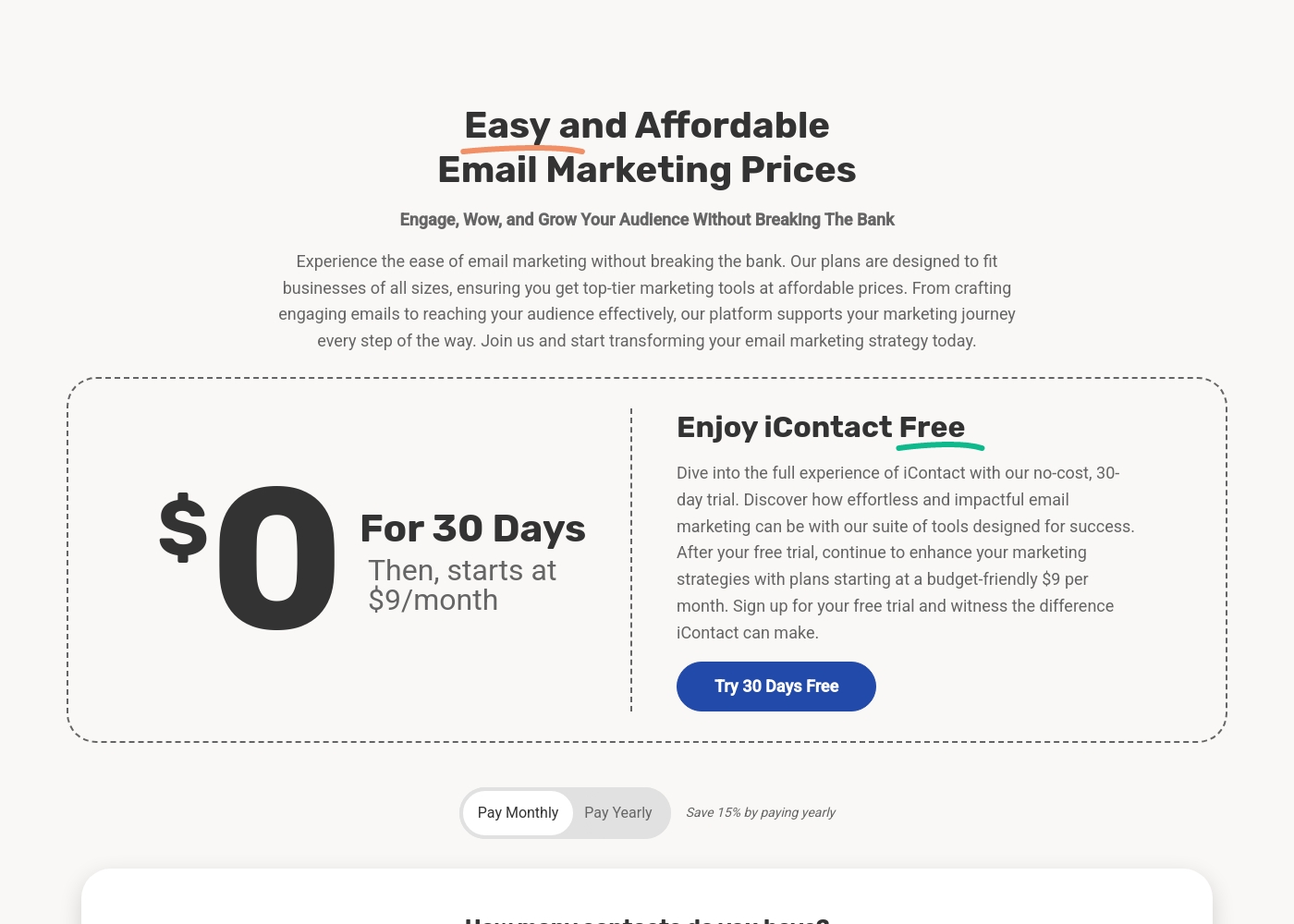
iContact is an easy and affordable email marketing platform specifically designed for small businesses and growing enterprises. This powerful tool helps you revolutionize your marketing strategy without breaking the bank. With plans starting as low as $9 per month, it provides flexible pricing to fit any budget, ensuring there are no hidden fees. Since 2003, iContact has empowered thousands of businesses by helping them send billions of emails efficiently. ✅ You can start creating stunning marketing emails immediately with a free 30-day trial that gives you full access to the platform.
AboutKit (formerly ConvertKit)
Kit is an email marketing platform specifically for creators like authors, podcasters, YouTubers, and entrepreneurs. It's the hub for growing your email list, sending beautiful newsletters, and selling digital products—all while keeping the experience intuitive and straightforward. 💡
Highlights
Feature Comparison
Features Overview
We highlight the main differences and pick a winner for each feature.
Ease of Use
Both platforms aim for simplicity, but iContact is more basic. Kit offers a clean, creator-focused workflow.
iContact uses a straightforward drag-and-drop builder. Its interface is designed for beginners to create emails quickly. \n\nKit's platform is intuitive and minimal. It guides creators through building automations and forms without complexity. \n\niContact's simplicity is its strength for basic blasts. Kit balances ease with more powerful, yet still simple, automation tools. \n\nIf you need to send a simple newsletter fast, both work. For building automated sequences, Kit feels more purpose-built.
Automation & Workflows
iContact lacks advanced automation. Kit is built around powerful visual sequences.
iContact provides basic contact management and segmentation. It does not specify a visual automation builder for complex sequences. \n\nKit's core strength is its visual automation builder. You can create multi-step welcome series and nurture funnels. Creators report 30% sales growth from targeted automations. \n\nThis is the biggest difference. iContact handles email blasts; Kit automates your entire marketing workflow. \n\nFor a business that needs 'set it and forget it' subscriber journeys, Kit is the clear choice.
Audience Growth & Monetization
Kit includes tools to grow and monetize your list directly. iContact focuses on managing existing contacts.
iContact helps you import and segment existing contacts. Growth relies on connecting external tools via integrations. \n\nKit provides unlimited landing pages, forms, and its Recommendations feature for cross-promotion. Users report gaining 22,000 subscribers via Recommendations. You can also sell digital products directly. \n\nKit is an all-in-one growth engine for creators. iContact is more of a traditional email sending tool. \n\nIf building a new audience and selling products are goals, Kit is designed for that.
Pricing & Value
iContact starts cheaper but has no free plan. Kit's free plan is generous for beginners.
iContact's Launch plan is $9/month for 500 contacts. There's a 30-day free trial, but no free tier. \n\nKit offers a free Newsletter plan for up to 10,000 subscribers. Paid plans start at $39/month (annual) for 1,000 subscribers. \n\nFor a very small list, Kit's free plan offers exceptional value. As lists grow, both scale up. \n\niContact's 30-day trial is longer than Kit's 14-day trial, offering more test time.
Customer Support
Both have mixed reviews, but iContact's feedback is particularly negative.
iContact lists chat, phone, and email support. However, reviews highlight evasive reps, billing issues, and poor cancellation experiences. \n\nKit offers email and chat support. Priority support is on the Pro plan. Reviews also cite slow responses and unhelpful agents. \n\nBoth platforms struggle with support quality according to users. iContact's issues appear more severe, involving billing and security concerns. \n\nIf reliable support is critical, neither excels, but iContact's reviews are more alarming.
Integration Ecosystem
iContact claims thousands of apps. Kit has a focused App Store of 100+ curated tools.
iContact connects to 'thousands of apps' via third-party integrations. Specific major tools aren't listed. \n\nKit's App Store features 100+ integrations with creator-centric tools like Shopify, Canva, and Circle. You can also use its API. \n\niContact offers breadth. Kit offers depth with tools creators actually use. \n\nIf you use standard business software, iContact may connect. If you run a creator business with Shopify or a course platform, Kit's integrations are more relevant.
Ready to find the right fit? You can explore these affordable options below.
Launch (Starting Tier)
Price: $9.00/month (or save 15% annually) Best For: Small businesses or new marketers needing up to 500 contacts Other Features:
- 500 contact limit
- Hundreds of predesigned email templates
- Access to the intuitive drag-and-drop builder
- AI-powered content assistant
- Contact management tools
This entry-level plan is perfect for small businesses and new marketers just starting their email lists. It offers essential features and 500 contacts without requiring a large financial commitment. You get the foundation you need to start building engagement right away. Start sending engaging emails quickly! 🚀
- 500 Contacts included
- Hundreds of Predesigned Email Templates
- AI-Powered Content Assistant access
- Drag + Drop Builder access
- Contact Management / Segmentation
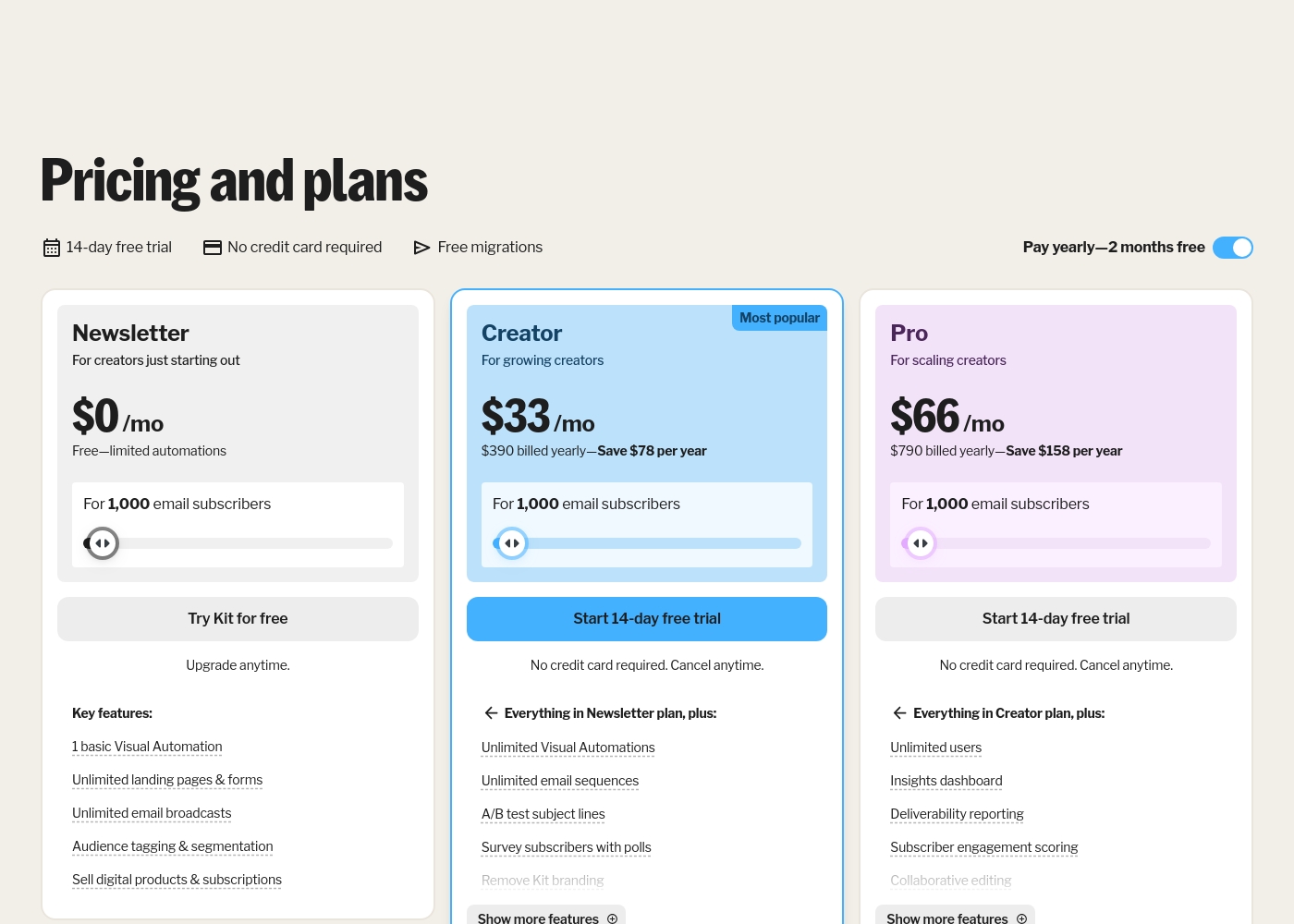
Kit (formerly ConvertKit) costs between $0 and $790 per year for 1,000 subscribers with 3 plans: Newsletter at $0, Creator at $390 billed yearly, and Pro at $790 billed yearly.
Take a look at the breakdown below to see which features fit your current creative goals.
Newsletter
Price: $0 per month Best For: New creators starting out Other Features: Unlimited landing pages, Audience tagging, Digital product sales, 1 basic Visual Automation
- 1 basic Visual Automation
- Unlimited landing pages & forms
- Unlimited email broadcasts
- Audience tagging & segmentation
- Sell digital products & subscriptions
- Everything in Newsletter plan
- Unlimited Visual Automations
- Unlimited email sequences
- A/B test subject lines
- Remove Kit branding
- Everything in Creator plan
- Unlimited users
- Insights dashboard
- Deliverability reporting
- Newsletter referral system
Pricing Notes
- iContact's pricing is based solely on contact list size, starting at $9/month for 500 contacts.
- Kit offers a free plan for up to 10,000 subscribers, but paid plans scale with subscriber count.
- iContact provides a 30-day free trial. Kit offers a 14-day free trial on paid plans.
- Kit's free plan is a significant value for new creators, while iContact has no free tier.
- Both platforms have hidden scalability costs as your list grows, but Kit's pricing structure is more transparent upfront.
Pricing Head-to-Head
User Reviews
While iContact markets itself as an easy email marketing platform, user feedback, primarily reflected by a low 2.3/5 TrustScore, paints a highly challenging picture. The most frequent complaints center on unacceptable billing practices and dysfunctional customer support.
Users report that the support team is dismissive, attempts to evade cancellation requests for over a month, and ultimately refuses timely refunds for erroneous or late charges. Some customers were charged as much as $900 for accounts that had been inactive for six months, labeling the approach as predatory.
The platform was marketed as user-friendly, but it nearly compromised my company’s websites and caused a serious security breach. Setting it up required a skilled IT team, contrary to the marketing. When I asked for a refund, support was dismissive and unprofessional.
On Trustpilot, Kit (formerly ConvertKit) receives mixed feedback. Users frequently praise its ease of use, highlighting a simple, intuitive interface perfect for creators and beginners.
Many appreciate the automation features and clean design for emails and landing pages. However, a significant number of reviews cite poor customer support, with long response times and unhelpful agents.
ConvertKit is super easy to use. I love how simple it is to set up automations and sequences without any tech headaches. It's perfect for my newsletter.
Our Verdict
This isn't a close race. For most people, Kit (formerly ConvertKit) is the smarter choice. It's built for modern creators who need automation, not just email blasts.\n\niContact's superpower is its low entry price and long trial. You can start sending campaigns for $9/month. But that simplicity comes with major red flags in user reviews about support and billing.\n\nKit's superpower is its all-in-one creator toolkit. It combines email, landing pages, automations, and product sales. It's designed to help you grow an audience you own.\n\nThe deciding factor is your goal. If you're a small business needing basic newsletters, iContact's price is tempting. If you're a creator building a business, Kit's free plan and automation are unbeatable.\n\nChoose iContact if budget is your #1 concern and you have a tiny list. Choose Kit if you're serious about growing and monetizing an audience. The free plan makes Kit the low-risk, high-reward starting point.
Frequently Asked Questions
Which is cheaper for a list of 1,000 contacts: iContact or Kit (formerly ConvertKit)?
Kit is cheaper. Its Creator plan starts at $39/month for 1,000 subscribers. iContact's Launch plan is $9/month for 500 contacts, but its pricing for 1,000 contacts isn't specified and likely costs more.
Can I sell courses or ebooks directly with iContact like I can with Kit (formerly ConvertKit)?
No. Kit (formerly ConvertKit) includes built-in features to sell digital products and subscriptions. iContact does not list this capability; it focuses on email marketing and contact management.
Does iContact have automation features as good as Kit (formerly ConvertKit)?
No. Kit (formerly ConvertKit) is known for its powerful visual automation builder for email sequences. iContact does not specify offering a similar advanced automation tool in its data.
Which platform has better customer support, iContact or Kit (formerly ConvertKit)?
Both have poor user reviews for support. iContact's feedback is worse, citing billing issues and unprofessional service. Kit (formerly ConvertKit) is criticized for slow responses, but its overall rating is higher.
Is the free plan from Kit (formerly ConvertKit) really free forever?
Yes. Kit (formerly ConvertKit)'s Newsletter plan is free for up to 10,000 subscribers with no time limit. It's a great way to start without paying.
How do the free trials compare between iContact and Kit (formerly ConvertKit)?
iContact offers a longer 30-day free trial. Kit (formerly ConvertKit) offers a 14-day trial on paid plans. iContact gives you more time to test before committing.
Ready to Choose?
Both tools have their strengths. Choose based on your specific needs.