Hoverwatch vs SentryPC
Hoverwatch and SentryPC both provide essential device monitoring, but they target very different users. Hoverwatch prioritizes absolute discretion, mainly focusing on Android tracking needs. SentryPC emphasizes comprehensive controls, advanced filtering, and massive multi-platform scalability. Your choice depends on your scale and whether you need to block content or just observe activity.
Best for: Individuals needing discreet mobile monitoring (Android), Users requiring SIM card change notifications
Best for: Large businesses needing 50+ licenses (Enterprise monitoring), Organizations managing mixed Windows, Mac, and Chromebook devices
Pros
Cons
Stealth Monitoring, Enterprise Ready.
We find SentryPC offers robust, cloud-based activity monitoring and usage scheduling features that scale well from basic home use to large corporate environments. Overall, the comprehensive feature set—including powerful filtering and stealth operation—makes it a viable choice, but potential users should weigh the mixed external feedback regarding long-term reliability and support experience.
Pros
- Software described positively as 'mind blowing' by some users.
- Comprehensive monitoring and control features are included in all plans.
- Scales effectively from single home use to 1,000+ enterprise licenses.
- Operates remotely and completely unseen in stealth mode.
Cons
- Extremely polarized reports on reliability and core functionality.
- Highly negative feedback reported regarding customer support quality.
- Requires an annual commitment; no free trial is explicitly offered.
AboutHoverwatch
Hoverwatch is a monitoring application for Android devices. 💡 It’s designed for parents who want to ensure their children’s safety, and for employers managing company devices. The software runs quietly in the background, tracking activity without disrupting the user. It works by recording data from the device itself.
AboutSentryPC
SentryPC is a completely cloud-based solution. It seamlessly combines activity monitoring, content filtering, and time management features into one secure platform. If you are a concerned parent or a business looking for employee monitoring, this software is your answer. SentryPC supports devices running Android, Chromebook, Mac, and Windows, helping you manage all your endpoints. Once installed, every activity is recorded in real-time and handled remotely in your account. 💡
Highlights
Feature Comparison
Features Overview
We highlight the main differences and pick a winner for each feature.
Platform Coverage
SentryPC supports more platforms, including Chromebooks, than Hoverwatch. Hoverwatch is heavily focused on robust Android monitoring capabilities.
Hoverwatch supports standard Android, Windows PC, and Mac computers for tracking. Its features are tailored heavily toward mobile device activity. SentryPC offers broader coverage, supporting Windows, Mac, Android, and Chromebook devices. This makes SentryPC superior for managing mixed environments. If you are running a business with Chromebooks, SentryPC is the clear choice. Hoverwatch is limited primarily to three major operating systems. SentryPC provides a highly centralized management platform for all of these diverse platforms.
Scalability & Limits
SentryPC scales to 1,000+ devices while Hoverwatch is strictly capped at 25 devices. SentryPC dominates enterprise use.
Hoverwatch limits its highest Business plan to monitoring 25 devices simultaneously. This makes Hoverwatch best suited for small teams or large families. The SentryPC platform scales dramatically up to 1,000 total licenses and beyond. SentryPC pricing is structured to heavily reward large annual bulk purchasing. If your needs exceed 25 devices, SentryPC is your only realistic option. Hoverwatch simply doesn't compete at the larger organizational scale. SentryPC licenses drop below $10 per year at the 1,000-license tier, offering immense enterprise value.
Content Control & Filtering
SentryPC offers powerful filtering and blocking; Hoverwatch focuses solely on passive monitoring. You must choose between observation or control.
Hoverwatch is purely a monitoring and observation tool focused on discreet data collection. It does not offer any filtering or blocking capability. SentryPC features flexible controls to block applications, websites, and specific sensitive keywords. You can enforce policies immediately. This is a fundamental choice: Hoverwatch shows you activity, but SentryPC lets you actively restrict it. SentryPC can send email alerts instantly when a user attempts to access a blocked activity.
Time Management
SentryPC includes rigid usage scheduling and limits; Hoverwatch lacks these active time control features. Control schedules easily with SentryPC.
Hoverwatch does not offer detailed usage scheduling or enforced time constraints on monitored devices. Monitoring is 24/7 if the device is running. SentryPC lets administrators create clear daily and weekly usage schedules for precise control. Set maximum usage limits for the day or week. SentryPC automatically restricts access when the time limit or schedule expires. Hoverwatch simply cannot restrict usage. This feature makes SentryPC indispensable for parents or managers enforcing screen time rules.
Discretion & Stealth
Hoverwatch is designed to be completely invisible; SentryPC is stealthy but offers an option for warning messages. Hoverwatch wins on absolute secrecy.
Hoverwatch prides itself on being completely invisible on the target device. This ensures monitoring remains discreet and users are not alerted. SentryPC also operates in stealth mode but includes an option to display warning messages. This option adds flexibility for different governance policies. If absolute, assured invisibility is your primary concern, Hoverwatch is the likely victor. SentryPC gives users the choice of hiding or warning. Hoverwatch also features SIM card change notifications, providing an extra layer of discrete security and tamper alerts.
Location Tracking
SentryPC provides dedicated geofencing with entry/exit alerts; Hoverwatch offers basic GPS and Wi-Fi-based geolocation. SentryPC has superior boundary awareness.
Hoverwatch uses GPS, Wi-Fi, and cell tower data for basic location awareness and tracking. You can see where the device has been. SentryPC features a proper Geofencing tool, allowing you to define virtual location boundaries. You can specify precise fence distances. SentryPC generates immediate alerts whenever a device enters or exits the established geofence boundary. Hoverwatch does not offer these boundary alerts. The proactive alert system in SentryPC makes it more useful for high-priority location monitoring needs.
Unique Capture Methods
Hoverwatch captures front-camera photos upon screen unlock; SentryPC excels with detailed keystroke logging. Each tool has a unique capture focus.
Hoverwatch captures a front-camera photo when the monitored device's screen is unlocked. This provides critical context around device access. SentryPC does not mention this front-camera feature but explicitly logs keystrokes, emails, and files accessed. This delivers comprehensive raw data. If seeing who accesses the device is important, Hoverwatch provides a unique visual tool. SentryPC focuses on capturing detailed text input data. Keystroke logging in SentryPC provides immediate visibility into every phrase typed by the user, enhancing investigative power.
Pricing Structure
Hoverwatch is flexible with monthly payments; SentryPC requires an annual commitment but offers better bulk discounts. Your required duration dictates the winner.
Hoverwatch uses a monthly subscription setup, allowing for short-term monitoring needs. Plans start at $0/month and scale up quickly. SentryPC requires an annual commitment for all purchases, even for a single license. A Basic Plan starts at $69.95 per year. If you only need monitoring for 1-3 months, Hoverwatch is more flexible and cost-effective. SentryPC locks you into a full year. However, annual pricing in SentryPC can drop to under $10 per license for large businesses, providing incredible long-term value.
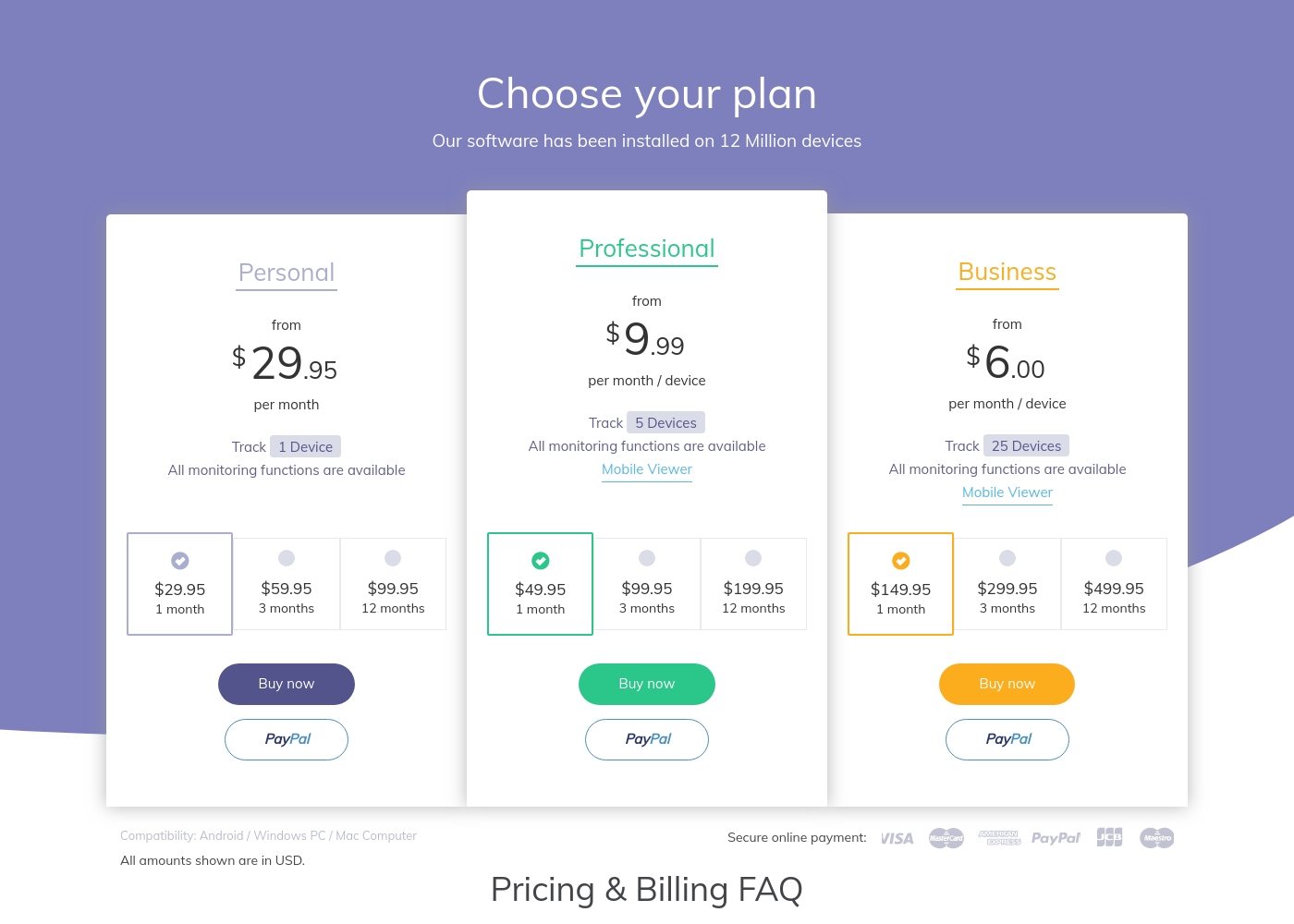
Hoverwatch pricing: Plans from $0/month Plans range: $0–$499.95/month Billing options: Monthly subscription
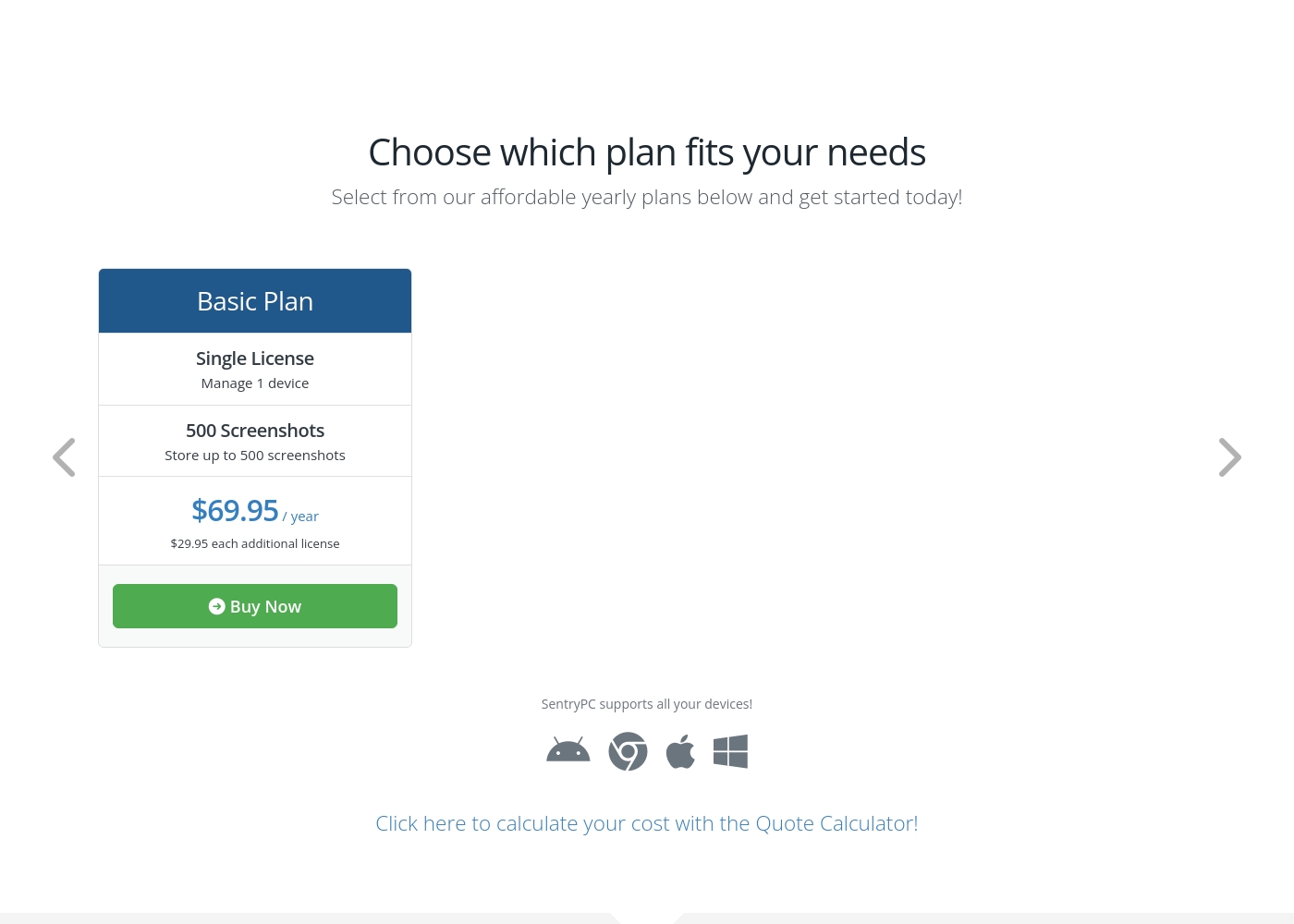
SentryPC costs between $69.95 and $9,995.00 per year with 6 plans: Basic Plan at $69.95, Business 50 at $1,495.00, Business 100 at $2,495.00, Business 250 at $4,995.00, Business 500 at $7,495.00, and Business 1,000 at $9,995.00.
SentryPC offers several affordable annual plans designed for both home users and large enterprises. Pricing is based entirely on the number of licenses and required screenshot storage.
Basic Plan
Price: $69.95 / year Best For: Home users Other Features:
- Single license to manage 1 device
- Includes 500 screenshots storage
- Additional licenses available for $29.95 each per year
- Single License (Manage 1 device)
- 500 Screenshots storage
- Free lifetime updates
- 50 Licenses (Manage up to 50 devices)
- 500 Screenshots storage
- Free lifetime updates
- 100 Licenses (Manage up to 100 devices)
- 1,000 Screenshots storage
- Free lifetime updates
- 250 Licenses (Manage up to 250 devices)
- 1,000 Screenshots storage
- Free lifetime updates
Pricing Notes
- Hoverwatch bills on a flexible 30-day monthly cycle, making it ideal for short-term needs.
- SentryPC operates on strictly annual subscriptions, requiring a minimum of one year commitment.
- SentryPC offers dramatic per-license cost reductions as device count increases (down to $9.99/license/year).
- Hoverwatch pricing scales based on devices (1, 5, or 25); SentryPC scales much higher up to 1,000 devices.
Pricing Head-to-Head
User Reviews
SentryPC’s external sentiment is sparse and highly polarized, based solely on the few available reviews. One user described the software as 'mind blowing,' suggesting strong satisfaction with its monitoring capabilities and performance. However, this positive view is sharply contrasted by a critical review claiming severe functionality issues and the 'WORST CUSTOMER SUPPORT EVER.' The negative review specifically mentioned that the product does not work well. The company provided detailed context for this critical feedback, noting a particular scenario where they provided remote installation assistance, issued a full refund upon request, and claimed the reported malfunction was caused by the user sending an uninstall command.
Given the extremely low volume of feedback, it's challenging to establish statistically significant recurring themes regarding ease of use, pricing, or integrations. The available data suggests a dramatic difference in user experience, ranging from total success (accuracy/liking) to fundamental failure (reliability/support). Customers should note the conflict surrounding technical support responsiveness and ultimate operational reliability 🧐 before committing to a subscription plan.
This software is simply mind blowing. I am currently using SentryPC and I am highly satisfied with its performance and comprehensive monitoring capabilities. It provides full transparency for device usage in real-time.
Our Verdict
The best choice between these two monitoring tools hinges entirely on whether you need observation or active control. If you require simple, unobtrusive monitoring on a small scale, Hoverwatch is your dependable option. SentryPC is designed for complex, large-scale deployments that need rigorous control features. Hoverwatch is the champion of absolute discretion, especially for small-scale mobile tracking. It’s completely invisible and even captures front-camera photos upon screen unlock. Hoverwatch’s monthly billing offers financial flexibility, perfect for temporary monitoring needs or family usage. SentryPC is engineered for enterprise-grade oversight and large device counts across multiple operating systems. Only SentryPC provides crucial content filtering, application blocking, and rigid usage scheduling controls. SentryPC easily manages hundreds of licenses across Windows, Mac, and Android from a single dashboard. The decisive factor is the need for *control* vs. *stealth and platform focus*. Choose Hoverwatch if you need simple, maximum stealth for Android devices only. If you manage 50+ devices and require strict time management and filtering, SentryPC offers the necessary governance and scalability. If your organization has 100+ employees and you need to enforce time constraints on desktop devices, secure SentryPC. For a parent monitoring 3-5 personal Android phones discreetly, the monthly flexibility and specialization of Hoverwatch is a clear winner.
Frequently Asked Questions
Which software supports Chromebooks: Hoverwatch or SentryPC?
SentryPC officially supports monitoring activity on Chromebooks, alongside Windows and Mac devices. Hoverwatch, however, does not list Chromebook support in its primary platform list. If you manage Chromebooks, SentryPC is the specialized tool for your needs.
Is Hoverwatch better than SentryPC for total content blocking?
No. Hoverwatch is purely an observation tool focused on data collection. SentryPC is far superior for control, offering content filtering and blocking for apps, sites, and keywords. SentryPC lets you actively restrict user behavior, which Hoverwatch cannot do.
What is the maximum number of devices Hoverwatch can monitor compared to SentryPC?
Hoverwatch is capped at a maximum of 25 devices on its highest plan. SentryPC offers Business plans capable of handling up to 1,000 licenses. SentryPC is the only viable solution for large-scale corporate monitoring needs.
Does SentryPC offer a monthly payment structure like Hoverwatch?
No, SentryPC pricing is based strictly on an annual subscription model. Hoverwatch uses flexible 30-day monthly billing cycles. If you require short-term commitment or monthly payments, Hoverwatch is better suited.
Which tool is more focused on absolute stealth operation?
Hoverwatch is marketed as completely invisible on the target device, making it the more discreet option. SentryPC operates in stealth mode but provides the option to enable user warning messages.
Can SentryPC alert me when a device leaves a specific location?
Yes, SentryPC features dedicated Geofencing capability with enter and exit alerts. Hoverwatch provides basic GPS location views but does not offer active boundary alerts.
Ready to Choose?
Both tools have their strengths. Choose based on your specific needs.