Hoverwatch vs Qustodio
Hoverwatch and Qustodio both monitor digital activity but serve vastly different intentions. Hoverwatch focuses on discreet, invisible tracking mainly on Android devices. Qustodio emphasizes open digital well-being and screen time management. Picking the right tool depends on whether you seek stealth or active parental control.
Best for: Individuals needing invisible monitoring on a single Android device, Employers tracking up to 25 company devices discreetly
Best for: Large families needing unlimited device coverage (mobile and desktop), Parents focused on setting and enforcing daily screen time limits
Pros
Cons
Robust features, unreliable performance, poor support.
We find Qustodio’s feature set impressive, offering tailored control regarding digital wellbeing across unlimited devices with its Complete plan. However, external feedback suggests serious concerns regarding core reliability and customer support responsiveness, especially dealing with technical issues and easy circumvention by children. Overall, we recommend caution due to significant reported performance flaws that undermine its comprehensive approach.
Pros
- Comprehensive digital wellbeing tools and detailed activity reports.
- The Complete plan offers coverage for an unlimited number of devices.
- Features AI-powered real-time alerts for concerning online activity.
- Provides unified supervision from a central, easy-to-use dashboard.
Cons
- Software is easily circumvented, uninstalled, or disabled by children/teens.
- Core functionality like time limits often fails or provides inaccurate usage reports.
- Customer support is widely reported as slow, non-existent, or unhelpful for paid users.
- Can interfere with mobile data and cause connectivity loss due to VPN architecture.
AboutHoverwatch
Hoverwatch is a monitoring application for Android devices. 💡 It’s designed for parents who want to ensure their children’s safety, and for employers managing company devices. The software runs quietly in the background, tracking activity without disrupting the user. It works by recording data from the device itself.
AboutQustodio
Qustodio is a comprehensive parental control tool designed specifically for modern families. It's an easy-to-use solution trusted by over eight million parents worldwide. The goal is to give parents peace of mind while fostering positive digital habits for their children. You manage everything from one simple dashboard, allowing supervision the way you want to. Because it's focused on digital wellbeing, it supports creating a risk-free environment for kids as they grow. ✨
Highlights
Feature Comparison
Features Overview
We highlight the main differences and pick a winner for each feature.
Monitoring Style
Hoverwatch is designed for complete invisibility; Qustodio is an open, visible parental control tool.
Hoverwatch markets itself on being completely invisible on the target Android device. This allows for discreet, passive observation without alerting the user instantly. It's built for quiet monitoring and minimal digital footprint. Qustodio operates visibly, focusing on digital wellbeing and shared control with the child. It is an active management system the user knows is installed for structure. The core difference is intent: Hoverwatch is surveillance; Qustodio promotes guided boundaries and safety. Users needing secret tracking must choose Hoverwatch. This distinction affects trust; Hoverwatch is useful for monitoring hidden activity, while Qustodio is for managing screen habits openly.
Platform Coverage
Qustodio supports 5 platforms including iOS; Hoverwatch focuses heavily on Android and desktop devices.
Hoverwatch supports Android mobile devices, Windows PCs, and Mac computers for its monitoring capabilities. Its primary strengths are clearly geared towards the Android ecosystem. Qustodio offers broad coverage across Windows, Mac, iOS, Android, and even Kindle devices for families. This wide support makes it simpler if you manage various gadget types. If you rely on comprehensive iPhone or iPad monitoring, Qustodio is the clear necessary choice. Hoverwatch lacks robust, cross-platform mobile functionality beyond Android. Families with mixed Apple, PC, and Android devices find Qustodio delivers unified management effortlessly.
Device Capacity
Qustodio Complete offers unlimited device coverage; Hoverwatch limits tracking to 25 devices max.
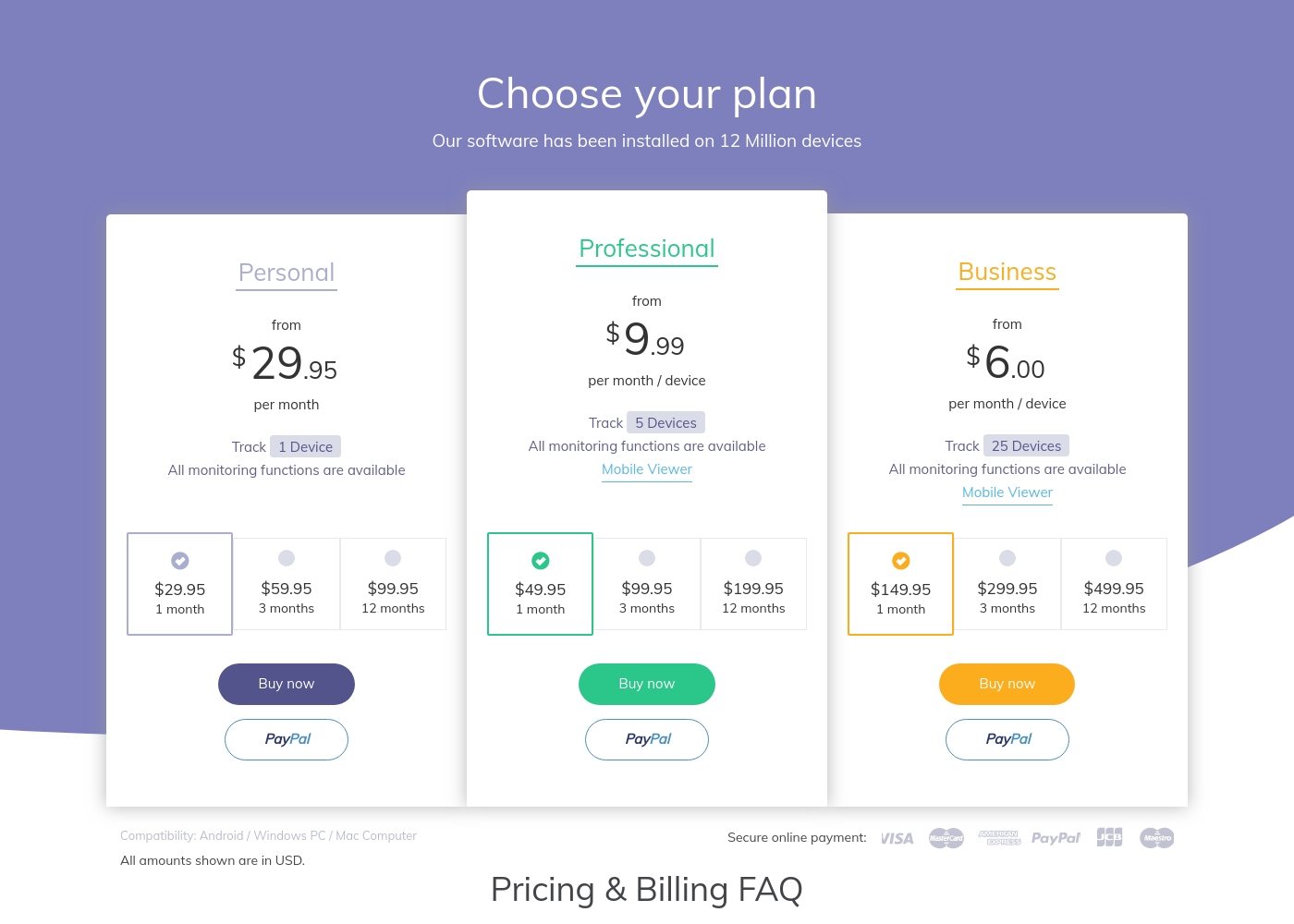
Hoverwatch offers tiered plans covering 1 device, 5 devices, or 25 devices for its highest Business tier. Its focus is less on massive scaling needs. Qustodio’s Complete plan provides coverage for an unlimited number of devices for your family seamlessly. This is ideal for large families or households with many connected gadgets. For smaller needs (5 devices or fewer), Hoverwatch is competitive, depending on the price chosen. Qustodio is unmatched for unrestricted device coverage. If you monitor ten or more active devices, Qustodio’s unlimited plan delivers significantly better long-term value and flexibility.
Screen Time Control
Qustodio provides excellent screen time limits; Hoverwatch has no scheduling or internet blocking features.
Hoverwatch focuses purely on capturing raw log data like calls, messages, and location history for later review. It does not include active intervention or time limits. Qustodio excels in proactive digital management with daily time limits and custom routines for study or bedtime. You can instantly pause all public internet access with one button. Qustodio helps users build healthy screen habits through scheduled boundaries and immediate control actions. Hoverwatch simply observes. If setting consistent rules, blocking distracting apps, and enforcing limits is key, Qustodio is the only viable option here.
Emergency Features
Qustodio has an SOS Panic Button and location alerts; Hoverwatch only provides basic passive location tracking.
Hoverwatch tracks location via GPS, Wi-Fi, and cell towers, reporting historical data. It lacks specific safety triggers, alarms, or geo-fencing capabilities. Qustodio includes a key physical safety feature: the SOS Panic button for Android users needing immediate help. It also alerts you when users arrive at or leave saved locations. The ability for a child to instantly notify a parent of an emergency makes Qustodio a better safeguard. Hoverwatch offers visibility, not proactive safety mechanisms. For families prioritizing real-time emergency responsiveness, Qustodio provides critical, immediate safety tools.
Discreet Photo Capture
Hoverwatch captures front-camera photos when unlocked; Qustodio totally lacks this unique physical awareness capability.
Hoverwatch automatically captures a front-camera photo every time the monitored device's screen is unlocked. This provides unique visual context regarding the user. Qustodio does not include any passive or remote feature for taking photos or videos using the device camera. Its focus is on log and activity monitoring. This stealth photo feature in Hoverwatch is crucial for confirming who is holding the device at any time. It guarantees identity context for the activity logs. Users prioritizing absolute confirmation of who is using the device must choose Hoverwatch’s unique front-camera snapshot capability.
Pricing Structure
Hoverwatch offers flexible monthly billing; Qustodio requires an annual commitment but includes better large-family value.
Hoverwatch utilizes a straightforward monthly subscription model across three tiers up to $499.95/month. This allows for short-term monitoring commitments. Qustodio operates on an annual subscription basis and requires paying upfront for the year ($54.95–$99.95/year). There is no true monthly payment option available. If you need monitoring only for a few months, Hoverwatch offers greater flexibility with its short-term billing cycle. Qustodio locks you into a full year. Qustodio offers better annual value, especially with unlimited devices on the Complete plan. Hoverwatch’s monthly cost can be high long-term.
Hoverwatch pricing: Plans from $0/month Plans range: $0–$499.95/month Billing options: Monthly subscription
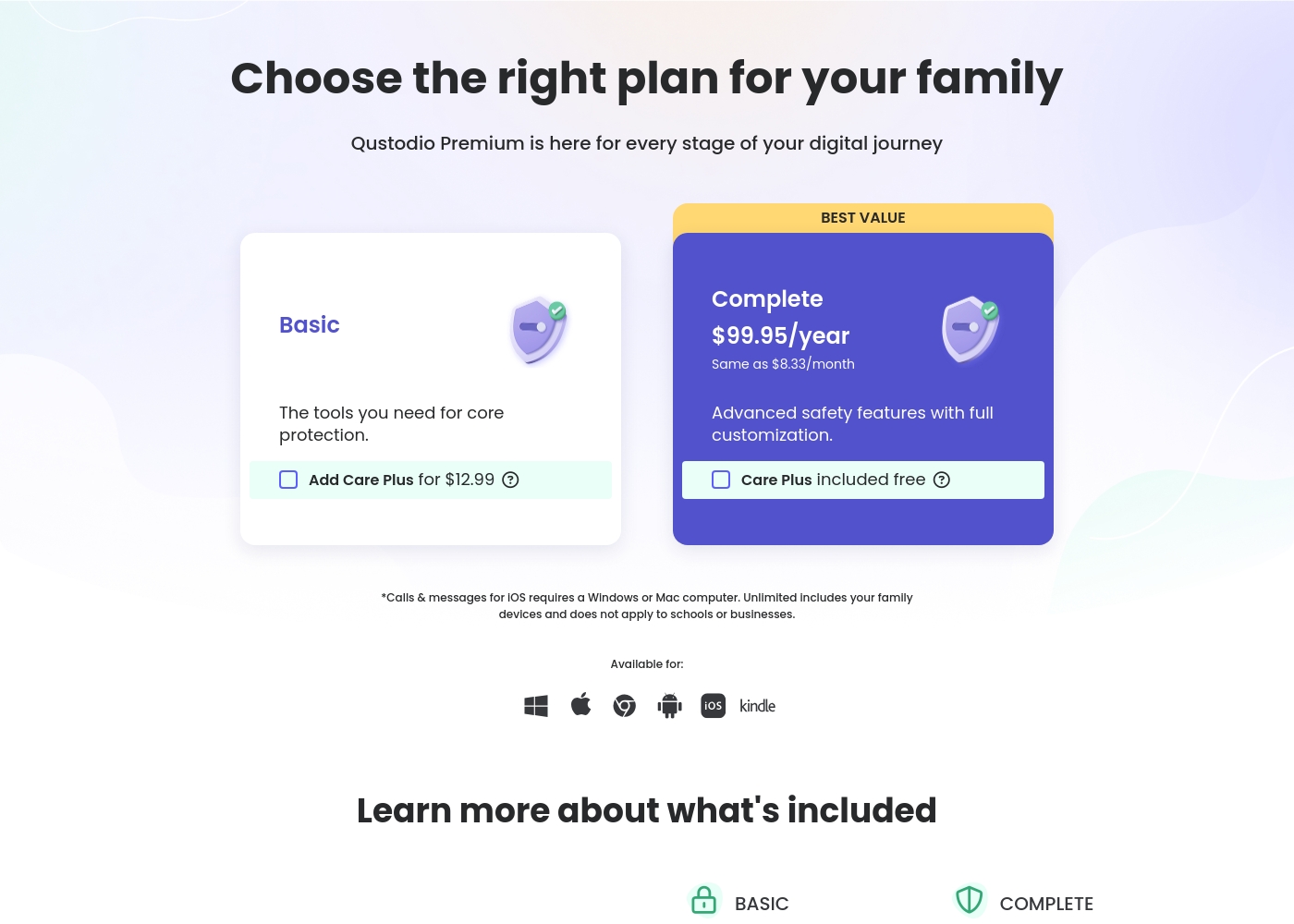
Qustodio costs between $54.95 and $99.95 per year with 2 Premium plans: Basic at $54.95/year and Complete at $99.95/year.
Let's look closely at what each Premium plan offers your family.
Basic
Price: $54.95/year (also listed as $67.94/year in some sections) Best For: Core protection or small families Refund Policy: 30-day money-back Other Features:
- Games & apps blocking
- Daily time limits
- Web filtering and location monitoring
- Pause internet access
- AI-powered alerts and social monitoring
- Games & apps blocking
- Daily time limits
- Web filtering
- Location monitoring
- Pause internet access
- All Basic features included
- Unlimited devices protected
- Calls & messages monitoring*
- Care Plus included free (Priority support, check-ins, personalized help)
- Custom rules for web, apps and games
- Basic protection features
Pricing Notes
- Hoverwatch uses a flexible monthly subscription model, while Qustodio requires an annual commitment.
- Qustodio offers a 30-day money-back guarantee, which is not stated by Hoverwatch.
- Qustodio is much cheaper annually, costing $99.95 for unlimited devices on the Complete plan.
- Qustodio includes priority phone support (Care Plus) only in its more expensive Complete annual plan.
Pricing Head-to-Head
User Reviews
User feedback on Qustodio is highly polarized, resulting in a low average rating (2.5/5 on Trustpilot). While the platform offers appealing features like comprehensive monitoring and time management, users frequently report major reliability issues.
A recurring critical complaint is that the software is easily disabled or uninstalled by children—sometimes by simply ending the process in Task Manager—rendering the expensive Premium subscription useless. Customers also struggled with core functionality; many noted that screen time limits were often inaccurate or failed to apply correctly, occasionally reporting usage during sleeping hours.
Zero customer support despite paying for the premium subscription. It was impossible to recover forgotten passwords. Plus, my 13-year-old son uninstalled the app in 15 seconds, making it useless right away.
Our Verdict
Choosing between Hoverwatch and Qustodio is simple: it’s Stealth vs. Active Control. They serve totally different user needs. Hoverwatch is specifically built for invisibility and discreet observation. It captures unique evidence like secret front-camera photos upon every device unlock. You get full log access, monitoring calls, texts, and social media traffic quietly. Hoverwatch is strictly for passive surveillance on Android and desktop devices. Qustodio is an active parental control powerhouse designed for the entire family suite. Qustodio provides powerful screen time limits, app blocking, and crucial safety features like the SOS Panic Button. Its Complete plan covers unlimited devices and supports Windows, Mac, Android, iOS, and Kindle. The key difference lies in intervention capability versus pure data logging. Hoverwatch captures data silently; Qustodio lets you actively intervene with limits and blocks. If you need robust rules and scheduling across mixed platforms, Qustodio is superior. If absolute stealth on an Android device is your number one priority, stick with Hoverwatch. If managing digital wellbeing, limiting screen time, and covering a very large family is your goal, Qustodio offers unmatched value.
Frequently Asked Questions
Which software is better for monitoring iPhones: Hoverwatch or Qustodio?
Qustodio is better as it explicitly supports iOS, Android, Mac, and Windows devices. Hoverwatch focuses heavily on discreet Android and desktop monitoring. For iOS device management, Qustodio provides far greater functionality.
Does Hoverwatch offer screen time lockdown features like Qustodio?
No, Hoverwatch is a passive tracking tool that only collects data logs and cannot enforce limits. Qustodio provides active controls like scheduling, app blocking, and remote internet pausing. Hoverwatch cannot intervene in device usage.
How many devices can Qustodio cover with its premium plans?
Qustodio’s Complete plan covers an unlimited number of devices for your entire household. The Basic plan is limited to monitoring five devices. Hoverwatch is capped at 25 devices maximum.
Is Hoverwatch completely invisible on the monitored device?
Yes, Hoverwatch is explicitly designed to remain completely invisible on the targeted Android device. This design prioritization enables maximum discreet data collection. Its goal is entirely undetectable monitoring.
Which tool is cheaper in the long run: Hoverwatch or Qustodio?
Qustodio is likely cheaper for families due to its large-capacity plans. The Complete plan offers unlimited device coverage for $99.95 annually. Hoverwatch bills monthly and its Business plan is significantly more costly.
Does Qustodio offer family emergency features like an SOS button?
Yes, Qustodio includes location tracking, arrival/departure alerts, and an SOS panic button for Android users. Hoverwatch offers only basic location awareness but lacks these crucial safety alerts.
Ready to Choose?
Both tools have their strengths. Choose based on your specific needs.