Hoverwatch vs mSpy
Hoverwatch and mSpy both promise invisible monitoring, but their feature sets target different needs. mSpy offers advanced spy-level features like Keylogger and Call Recording. Hoverwatch focuses on simplicity and broader support across Android, PC, and Mac devices. You must balance mSpy's power against its known billing and reliability issues.
Best for: Small businesses managing 5-25 cross-platform devices (Android, Windows, Mac), Users prioritizing simple, low-interaction monitoring over deep spying features
Best for: Parents requiring visual proof (Keylogger and Screenrecorder), Users who absolutely need iOS (iPhone/iPad) monitoring capability
Pros
Cons
Effective Monitoring with Severe Pitfalls
We found mSpy offers a highly capable feature suite, including Keylogger, Screenrecorder, and robust GPS tools, which are powerful when functioning correctly. However, external reports show major issues surrounding reliability, hidden pricing, and difficult installation processes. Overall, this tool provides powerful monitoring features, but its severe operational and billing pitfalls prevent a strong recommendation.
Pros
- Excellent feature set including Keylogger and Screenrecorder capabilities.
- Effective remote features like call recording and microphone control (available in Extreme plan).
- Geofencing and GPS tracking are praised for accurately monitoring location.
- Family Kit successfully allows monitoring up to three devices simultaneously.
Cons
- Frequent reports of inaccurate data tracking, app failure, or connectivity issues.
- Users report that the service stops working after a short period, requiring constant reinstallation.
- Many customers report unauthorized billing, hidden costs, and surprise fees for required add-ons.
- The refund policy is considered very narrow, making returns extremely difficult to obtain.
AboutHoverwatch
Hoverwatch is a monitoring application for Android devices. 💡 It’s designed for parents who want to ensure their children’s safety, and for employers managing company devices. The software runs quietly in the background, tracking activity without disrupting the user. It works by recording data from the device itself.
AboutmSpy
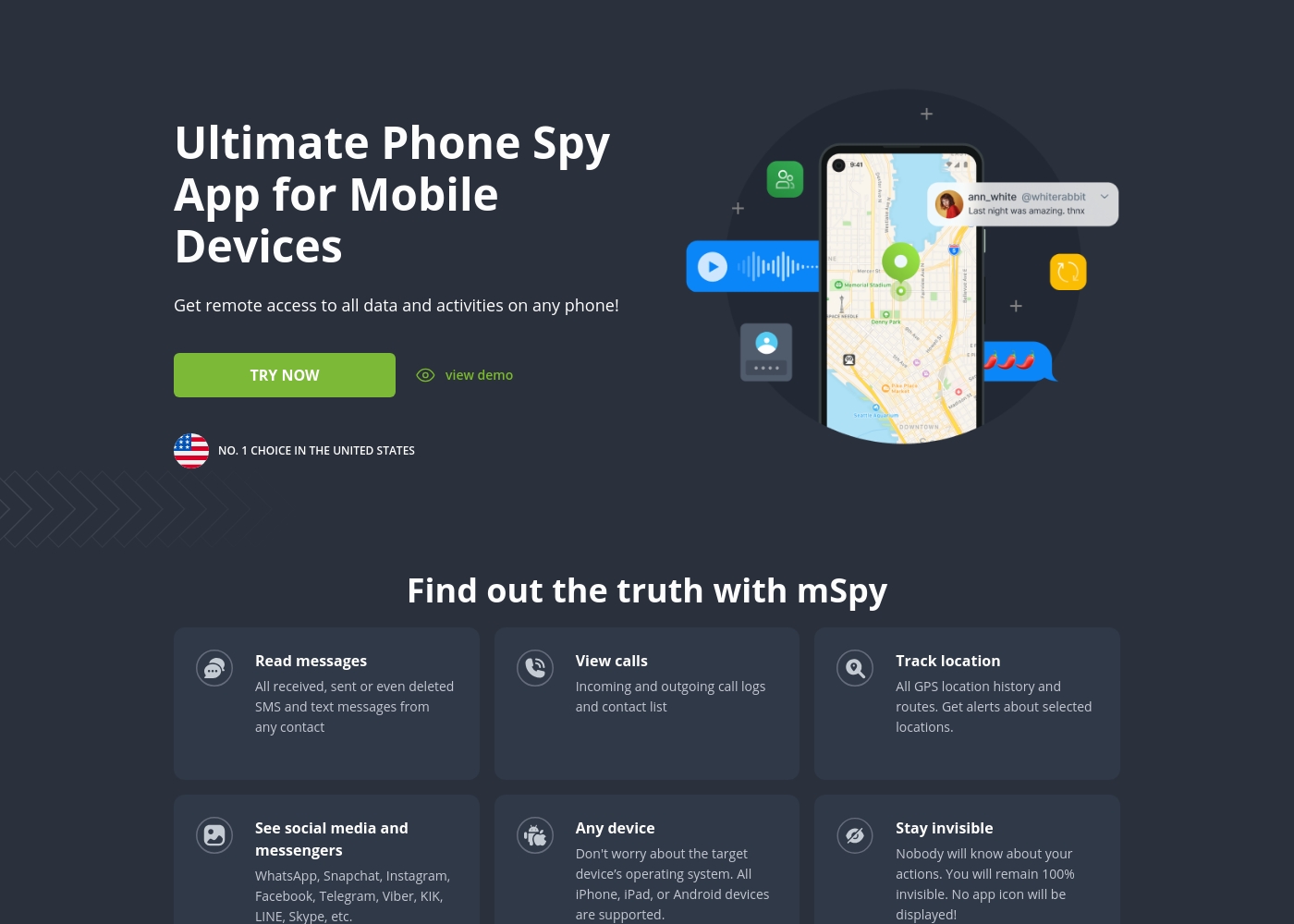
mSpy is the #1 Choice in the United States for trusted parental control. It is a powerful mobile monitoring solution, more than just a simple app. This tracker lets you see exactly what’s happening on their phone without needing to stand over them. It works great on your favorite device, offering solutions that are compatible with any operating system 💡. Installation is simple, allowing you to get the full monitoring power without restrictions, even offering local sync and non-jailbreak solutions.
Highlights
Feature Comparison
Features Overview
We highlight the main differences and pick a winner for each feature.
Advanced Features
mSpy provides powerful tools like Keylogger; Hoverwatch offers simpler activity views.
Hoverwatch captures basic Android screenshots and takes a front-camera photo upon unlock. It delivers essential activity views like internet history and app lists. mSpy excels with a full Keylogger, tracking every keystroke and search entry typed. It also features a robust Screenrecorder for visual proof of app activity. The trade-off is power versus complexity; mSpy delivers deeper, richer monitoring data. Hoverwatch is better suited for users needing simple, quick oversight. For tracking secretive apps like Snapchat or AI Chatbots, mSpy's Keylogger and Screenrecorder are far superior proof sources.
Platform Coverage
mSpy is best for mobile (Android/iOS); Hoverwatch covers mobile and desktop.
Hoverwatch supports monitoring on Android devices, Windows PCs, and macOS computers. This coverage is great for families with mixed types of devices. mSpy is primarily focused on mobile, supporting both Android and iOS devices extensively. It offers non-jailbreak iCloud sync monitoring for iPhones. If you need to monitor an iPhone or iPad, mSpy is your only strong choice here. Hoverwatch lacks any direct iOS support. However, if your monitoring includes a mix of phones and family desktop computers, Hoverwatch offers a more holistic solution.
Location Tracking
mSpy uses smart Geofencing; Hoverwatch offers basic GPS and cellular location tracking.
Hoverwatch uses standard GPS, Wi-Fi signals, and cell towers to locate the device continuously. It provides a reliable view of where the device has been. mSpy includes the GPS Tracker plus critical Geofencing Alerts for proactive safety notifications. You get alerted when the device enters or leaves defined safe zones. mSpy’s proactive alert system for defined zones provides a clear advantage for parental control. Hoverwatch requires manual checks of the location history. If you need immediate notification when a child leaves school or arrives home, mSpy’s Geofencing is a superior safety tool.
Device Capacity
Hoverwatch manages up to 25 devices; mSpy is strictly limited to three devices.
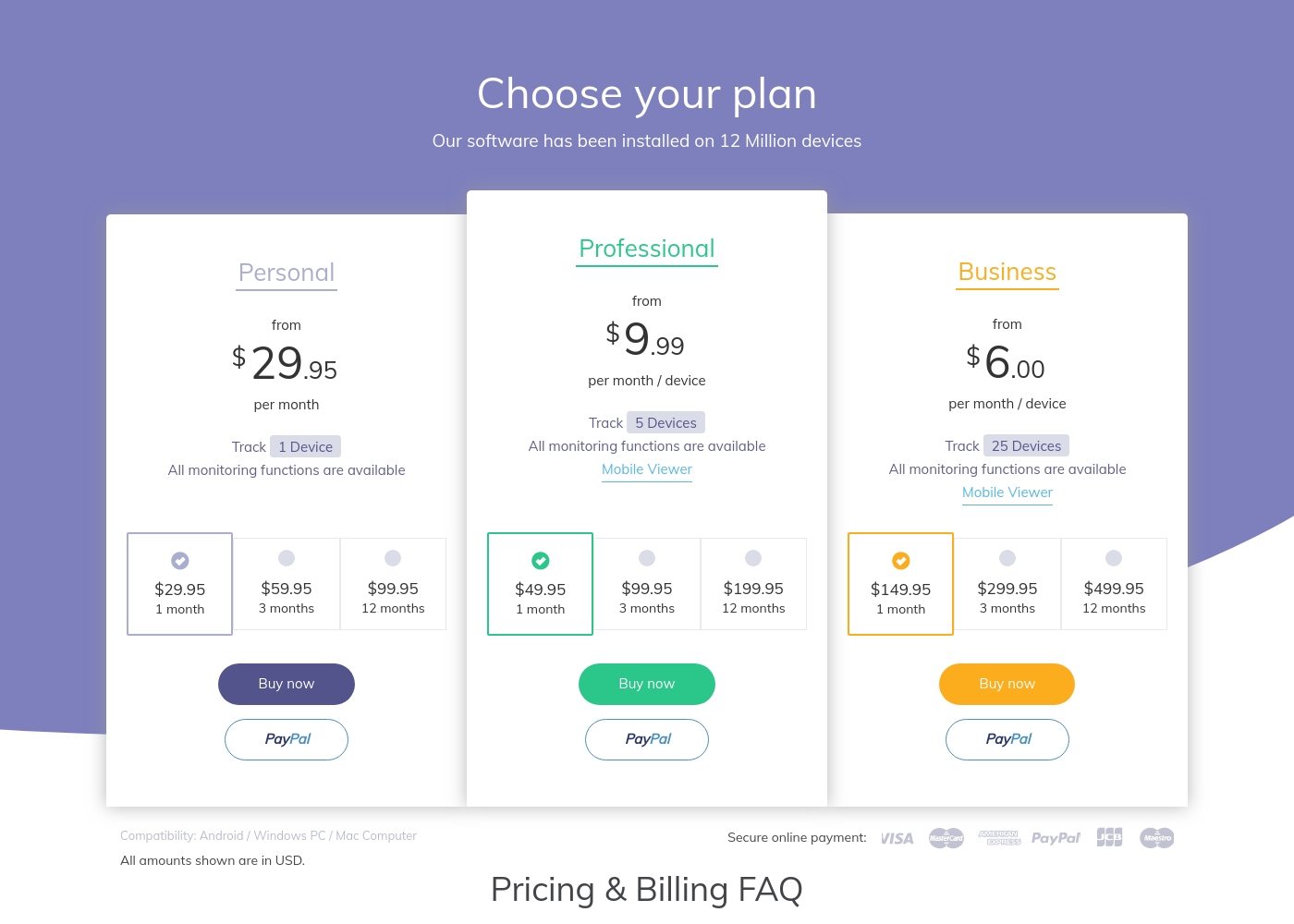
Hoverwatch’s Business plan can monitor up to 25 devices from a single account. The Professional plan covers up to five devices. mSpy offers a Standard plan for one device and a Family Kit for a maximum of three devices. This limitation is severe for larger families or small businesses. The difference is critical if you manage multiple assets or devices simultaneously. Hoverwatch offers significantly better scalability for volume. If you only need to monitor one or two children, mSpy’s Family Kit is sufficient, but Hoverwatch easily manages five devices.
Review Reliability
mSpy has severe reliability complaints; Hoverwatch lacks established public feedback.
Hoverwatch lacks public external ratings, keeping its operational reliability unknown to external users. The data does not provide user feedback. mSpy maintains a mixed 2.9-star rating, with many complaints about the app failing frequently post-installation. Users report needing constant reinstallation. Hoverwatch might be more stable, but that is impossible to confirm without external data. mSpy's reports of operational failure are a high risk. When buying mSpy, be aware you might encounter technical bugs and frustrating, necessary reinstallations soon after deployment.
Call/Media Monitoring
mSpy records calls and blocks apps; Hoverwatch tracks basic logs and media attachments.
Hoverwatch tracks call logs including duration, and allows viewing of media attached to messages. It captures contacts and calendar events. mSpy offers Call Recording, allowing users to listen to and save phone calls live with zero notifications. It also views private media via Photo/Video Viewer. mSpy provides unparalleled depth and control over communications, especially with the Call Recorder feature. Hoverwatch delivers fundamental logs only. If catching sensitive conversations is key, mSpy provides the definitive proof that Hoverwatch cannot match.
Hoverwatch pricing: Plans from $0/month Plans range: $0–$499.95/month Billing options: Monthly subscription
mSpy offers a choice between two main subscription options, helping users align coverage with their specific monitoring needs. Both plans include the powerful suite of monitoring features available through your personal Control Panel.
Single Device Plan
Best For: Monitoring one child or device Other Features:
- Provides remote access to call logs and contact lists.
- Allows viewing of received, sent, and deleted text messages.
- Includes access to all GPS location history and geofencing alerts.
- Supports monitoring across all major social media and messenger apps.
- Offers features like Keylogger and Screenrecorder capabilities.
This plan is ideal if you only need to keep an eye on a single smartphone or tablet. It delivers the full range of mSpy features for comprehensive, invisible surveillance on one target device. This is the simplest and most accessible option for new users.
- Coverage for one device only
- Invisible monitoring mode
- Keylogger and Screenrecorder
- GPS Location Tracking
- Social Media monitoring (WhatsApp, Snapchat, etc.)
- Coverage for up to 3 devices simultaneously
- All features of the Single Device Plan
- Suitable for monitoring multiple children or mobile devices
- Centralized control via a single Control Panel
Pricing Notes
- Hoverwatch provides clearer, published pricing tiers, whereas mSpy's pricing is vague (not explicitly stated, mentioned as less than $1 per day).
- mSpy's user reviews widely report unauthorized billing and hidden costs for necessary technical add-ons (like mAssistance).
- Hoverwatch offers high scalability with plans covering up to 25 devices, costing up to $499.95/month for the Business Plan.
- Neither Hoverwatch nor mSpy explicitly offers a free trial for the full monitoring subscription.
- Be cautious with mSpy: paid support services like mAssistance are strictly noted as non-refundable in the documentation.
Pricing Head-to-Head
User Reviews
mSpy maintains a moderate 2.9-star rating on Trustpilot, reflecting significant variation in user experiences. Many satisfied customers specifically praise the effective monitoring features, such as remote call recording, screenshot capture, and the precise Geofencing alerts, which help parents track children's locations.
For those features that work, the software is considered powerful. However, the user base reports heavy friction regarding pricing, reliability, and support.
Matthew Stone was crucial when I needed an urgent reinstallation on my daughter’s phone. I only had ten minutes with the device, and he handled everything remotely. He got things rolling again quickly and professionally.
Our Verdict
The decision between mSpy and Hoverwatch boils down to depth versus stability and scope. If you need the ultimate spy toolkit, mSpy is technically the 'winner' of features. However, be fully prepared for its documented operational failures and terrible billing practices. Hoverwatch’s superpower is its cross-platform capability and scalability. It monitors Android, Windows PC, and Mac, all from one dashboard. It supports a remarkable 25 devices on its high-tier plan, far exceeding mSpy’s three-device maximum. mSpy’s superpower lies in its advanced collection methods like the Keylogger, Screenrecorder, and Call Recorder. If you must know every word typed or said, mSpy provides that granular oversight. It also crucially supports iOS devices, which Hoverwatch ignores completely. The deciding factor should be iOS support and feature depth. If you monitor iPhones, mSpy is mandatory. If you need simple Android/PC oversight for five+ devices, choose Hoverwatch immediately for better capacity. Pick mSpy if advanced Keylogger proof is non-negotiable. Choose Hoverwatch if you value desktop monitoring and need to cover five or more devices without complexity.
Frequently Asked Questions
Which is better for advanced visual monitoring: Hoverwatch or mSpy?
mSpy is superior for advanced visual proof and activity monitoring. It includes a powerful Keylogger and Screenrecorder for regular screenshots. Hoverwatch only captures basic Android screenshots and a single front-camera photo upon unlock.
Does Hoverwatch support iOS devices like mSpy does?
No, Hoverwatch strictly supports Android, Windows PC, and Mac computers. mSpy is the necessary choice if you must monitor an iPhone or iPad, offering iCloud sync options. This is a crucial difference in mobile compatibility.
Is mSpy worth the extra cost over Hoverwatch?
mSpy is worth the cost only if you need its specific advanced features like Call Recording and Geofencing. Hoverwatch offers better multi-device coverage and clearer pricing. mSpy users frequently report hidden fees and difficult refund processes, raising the actual cost.
Which software can monitor the most devices simultaneously?
Hoverwatch wins the device count comparison hands down. The mSpy Family Kit caps coverage at three devices maximum. Hoverwatch offers plans that support up to 5 and a comprehensive Business plan for 25 devices.
Does Hoverwatch offer proactive safety alerts like mSpy’s Geofencing?
Hoverwatch does not offer Geofencing or Keyword Alerts like mSpy. It provides basic location tracking via GPS and cellular data. Hoverwatch does, however, provide a notification if the SIM card is changed on the device.
Which is more discreet on the monitored device?
Both Hoverwatch and mSpy operate primarily in a completely invisible, hidden mode. Hoverwatch emphasizes being 'completely invisible' to ensure discreet monitoring. Both tools aim to keep surveillance undetectable to the user.
Ready to Choose?
Both tools have their strengths. Choose based on your specific needs.