HostPapa vs Kinsta
Choosing web hosting often means balancing maximum budget against raw site muscle. HostPapa offers amazing support and low introductory prices for new websites. Kinsta provides premium performance built on Google Cloud for mission-critical sites. We'll help you decide if you need a reliable budget host or top-tier speed.
Best for: Budget-conscious individuals and small businesses, Users wanting accessible 24/7 phone and live chat support
Best for: High-traffic websites needing absolute top-tier speed and uptime, Agencies managing numerous client WordPress sites at scale
Exceptional support meets high-speed hosting.
We found HostPapa truly shines due to its commitment to superior customer support, which users consistently praise for being exceptionally fast and knowledgeable. Their investment in NVMe storage technology also ensures reliable, quick loading times for your website projects. Overall, HostPapa is a trustworthy and supportive choice, particularly for users who highly value accessible human assistance when technical issues arise.
Pros
- Exceptional customer support available instantly by phone or chat.
- Fast response times—issues are often resolved on the first attempt.
- Utilizes high-performance NVMe storage for quick speeds.
- Free, expert website migration assistance is provided.
Cons
- Lowest advertised rates require a substantial three-year contract.
- Renewal pricing is significantly higher than introductory discounted rates.
Performance hosting with world-class support.
We find Kinsta offers premium managed WordPress hosting characterized by phenomenal speed and reliability, powered by Google Cloud. Their 24/7 expert support team is consistently lauded as the industry benchmark for responsiveness and technical depth. Overall, we confidently recommend Kinsta for anyone running complex, high-traffic, or business-critical WordPress sites who requires unmatched peace of mind.
Pros
- Elite 24/7 support provided by genuine technical engineers, not first-tier reps.
- Exceptional speed and stability powered by Google Cloud's premium network.
- Seamless and painless "white-glove" migration service included free of charge.
- Dedicated tools like one-click staging environments and automated backups.
Cons
- Premium pricing structure may be restrictive for simple or small projects.
- Users noted limitations regarding thread boundaries and lack of automatic server scaling.
- Billing is strictly tied to monthly visits and bandwidth, leading to potential overage fees.
AboutHostPapa
HostPapa is a comprehensive provider offering robust web hosting services, trusted by over 500,000 website owners globally. They support everything from personal blogs to resource-intensive applications. Whether you need standard Web Hosting, tailored WordPress Hosting, dedicated VPS, or a Dedicated Server, HostPapa has a plan designed for your needs. Beyond hosting, HostPapa acts as a one-stop shop, helping you launch your online identity with domain registration, a professional website builder, and enterprise-grade business email solutions. 💡
AboutKinsta
Kinsta is recognized as a premier managed WordPress hosting provider. It serves over 140,000 businesses and brands worldwide, offering solutions tailored for agencies, enterprises, and small to medium businesses.
They specialize in taking away the complexity and stress often associated with managing high-performance WordPress sites. The goal is simple: offer a hassle-free hosting experience that helps your business grow, not slow. You get enterprise-grade speed and reliability without the common overhead. 💡
Highlights
Feature Comparison
Features Overview
We highlight the main differences and pick a winner for each feature.
Infrastructure & Speed
Kinsta uses Google Cloud for elite speed; HostPapa uses fast NVMe storage.
HostPapa utilizes advanced NVMe storage technology for data access. This ensures very quick response times for a shared host environment. Higher plans like WP Ultra allocate up to 8x the server resources to your site. HostPapa provides significant performance gains via hardware upgrades and resource allocation. Kinsta is powered by the Google Cloud Platform's premium tier network. They use high-CPU servers across 37 global data centers for maximum speed. This specialized architecture handles traffic surges smoothly and minimizes latency worldwide. HostPapa optimizes shared hardware, while Kinsta provides true enterprise-grade performance. Kinsta wins for sites where milliseconds matter and global access is crucial.
Customer Support
HostPapa offers all channels; Kinsta provides engineers, not tiered reps.
HostPapa offers award-winning 24/7 support via Phone, Live Chat, and Tickets. Their PapaSquad support scores an impressive 97% customer satisfaction rate. Support reps often fix issues quickly and provide hands-on assistance. Kinsta provides 24/7/365 support exclusively staffed by expert hosting engineers. You communicate directly with high-level technical teams, not entry-level personnel. Kinsta proactively monitors sites every three minutes to resolve issues instantly. HostPapa is better if you value instant phone support for general issues. Kinsta is superior for deep, complex technical diagnostics and solutions.
Pricing & Value
HostPapa is cheapest upfront; Kinsta offers better features at a premium price.
HostPapa offers extremely low introductory rates starting at $2.95/month. These require a substantial three-year commitment to lock in the savings. After the initial term, the plans renew at significantly higher standard rates. Kinsta is substantially more expensive, starting at $35/month when billed annually. Kinsta uses a usage-based pricing model tied to monthly visits and bandwidth limits. Kinsta includes over $300 worth of premium features standard that HostPapa charges extra for. HostPapa is the budget champion for simple sites looking for long-term savings. Kinsta justifies its premium cost with guaranteed infrastructure and expert service.
Security Stack
Kinsta includes WAF and free malware removal; HostPapa limits WAF to top plans.
HostPapa provides essential security features like Free SSL and CloudLinux isolation. A fully managed Web Application Firewall (WAF) is reserved for the top-tier WP Ultra plan. Free malware removal is limited or not standard on entry plans. Kinsta includes comprehensive, enterprise-level security on every plan. This includes two firewalls, Cloudflare DDoS protection, and a managed WAF. Kinsta backs this with a free, full malware removal service if your site is compromised. Kinsta’s proactive security posture is far more robust and inclusive across all tiers than HostPapa’s. Security requiring WAF protection is simply safer and easier with Kinsta.
WordPress Management
Kinsta has specialized tools for developers; HostPapa uses standard cPanel.
HostPapa utilizes the standard cPanel interface for server and email management tasks. WordPress staging environments are included only from the WP Plus plan upwards. Management is familiar and straightforward for traditional shared hosting users. Kinsta features an intuitive, proprietary dashboard built for efficiency. It offers developer-focused tools like one-click staging and bulk site actions. Kinsta also provides an open REST API for advanced site automation processes. Kinsta's specialized tools simplify complex tasks for agencies and high-volume developers. HostPapa is functional but lacks Kinsta’s high-level WP workflow management.
Scaling Resources
HostPapa offers 'unmetered' scaling; Kinsta uses stricter visit limits.
HostPapa advertises unlimited websites and unmetered NVMe storage on top tiers. This gives users the perception of boundless growth potential without strict limits. Lower HostPapa plans state precise technical limits like CPU cores and database size. Kinsta strictly defines resources by specific monthly visits (e.g., 35,000) and storage (e.g., 10GB). Exceeding these defined usage limits results in transparent, billed overage fees. Kinsta offers precise, measurable resources critical for high-traffic operations. HostPapa offers greater perceived flexibility for low-traffic or emerging sites.
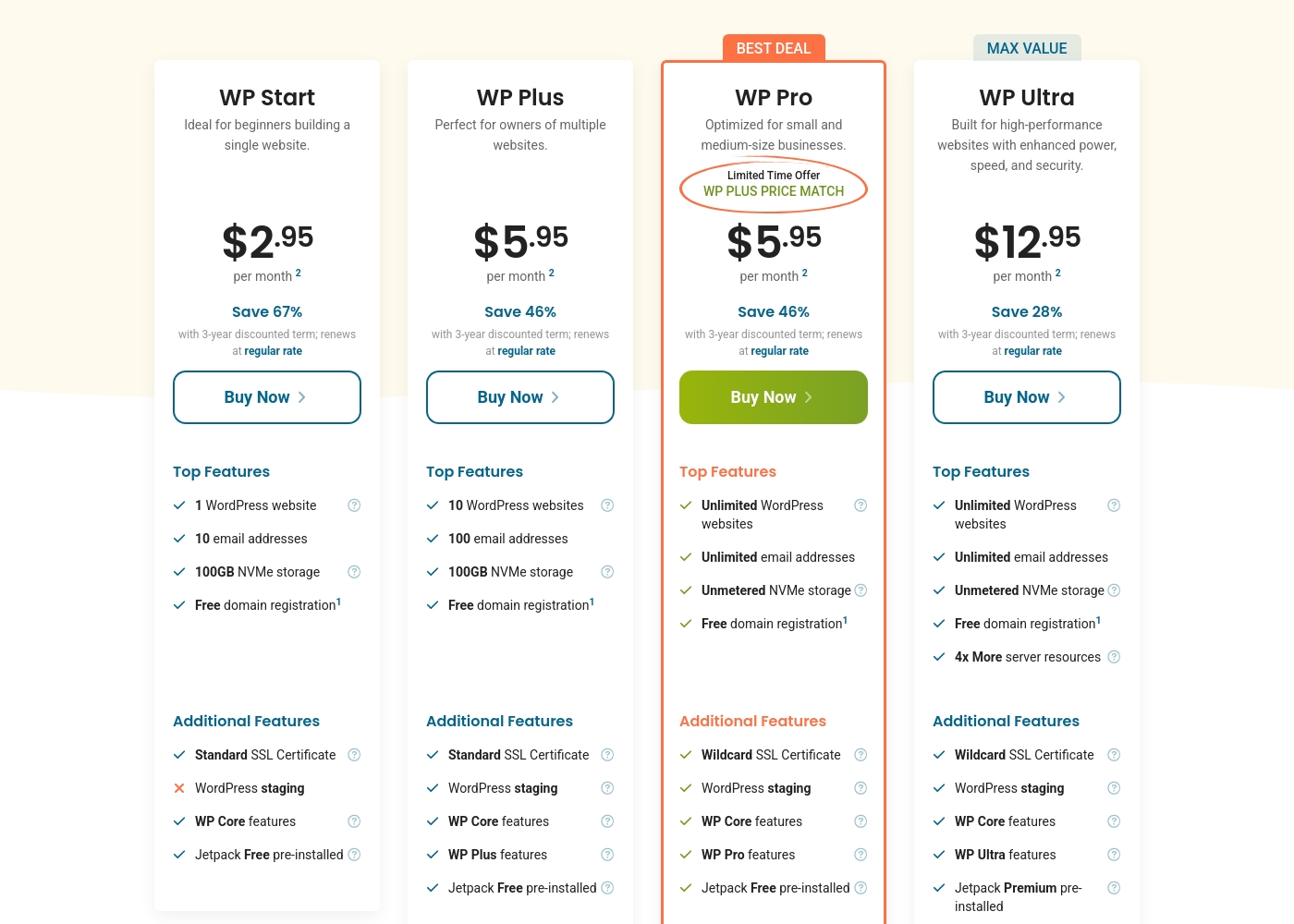
HostPapa's WordPress Hosting costs between $2.95 and $12.95 per month with four plans: WP Start at $2.95/month, WP Plus at $5.95/month, WP Pro at $5.95/month, and WP Ultra at $12.95/month.
Here’s a breakdown of the specific features and resources included with each plan. These prices reflect significant savings based upon choosing a 3-year term.
WP Start
Price: $2.95 per month (Requires 3-year term; renews at regular rate) Websites Supported: 1 WordPress website Best For: Beginners building a single website Refund Policy: 30-day money-back guarantee Other Features:
- 10 email addresses
- 100GB NVMe storage
- Standard SSL certificate
- Free domain registration
- 1 WordPress website
- 10 email addresses
- 100GB NVMe storage
- Free domain registration
- Standard SSL Certificate
- 10 WordPress websites
- 100 email addresses
- 100GB NVMe storage
- Free domain registration
- WordPress staging
- Unlimited WordPress websites
- Unlimited email addresses
- Unmetered NVMe storage
- Wildcard SSL Certificate
- 4x more CPU and MySQL resources
- Unlimited WordPress websites
- Unlimited email addresses
- Unmetered NVMe storage
- 4x More server resources (8x CPU)
- Wildcard SSL Certificate
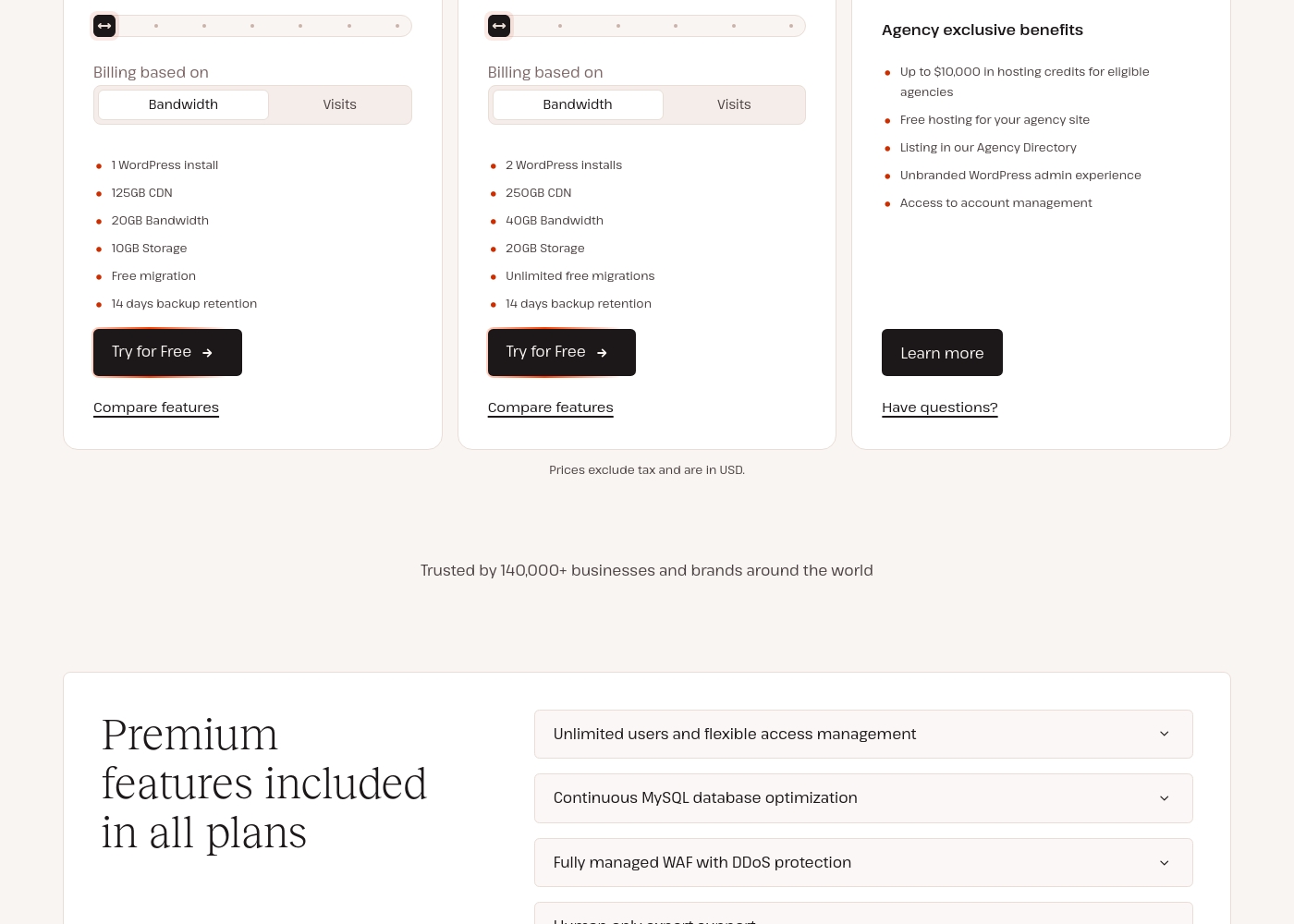
Kinsta costs between $350 and $6,750 per year across 3 main plan categories: Single-site starting at $350/year, Multiple-site starting at $700/year, and Agency starting at $3,400/year.
Kinsta offers different plan groups depending on your specific hosting needs. Let's look at the starting options available in the Single-site, Multiple-site, and Agency categories.
Single 35k
Price: $350 billed annually ($35 USD monthly) Websites Supported: 1 WordPress install Best For: Businesses, blogs, or stores — powerful hosting for one high-performing site. Refund Policy: 30-day money-back guarantee Other Features:
- 35,000 monthly visits
- 10GB storage
- 125GB CDN
- 14 days backup retention
- 1 WordPress install
- 35,000 monthly visits
- 10GB storage
- 125GB CDN
- Free migration
- 2 WordPress installs
- 70,000 monthly visits
- 20GB storage
- 250GB CDN
- Unlimited free migrations
- Agency exclusive benefits
- Up to $10,000 in hosting credits for eligible agencies
- Free hosting for your agency site
- Listing in our Agency Directory
- Unbranded WordPress admin experience
Pricing Notes
- HostPapa's low advertised price requires a mandatory 3-year commitment, renewing at higher rates.
- Kinsta's minimum monthly cost ($35) is vastly higher than HostPapa's cheapest entry point ($2.95).
- Kinsta’s plans are usage-based (visits/bandwidth), making overage fees a risk if traffic spikes.
- Kinsta integrates premium features worth over $300 annually into every plan, offsetting the cost.
- Both HostPapa and Kinsta offer a 30-day money-back guarantee on hosting services.
Pricing Head-to-Head
User Reviews
HostPapa receives overwhelmingly positive feedback from external users, primarily recognizing their award-winning customer service. Reviewers frequently highlight the efficiency, knowledge, and patience of the support staff, often mentioning representatives by name.
Users consistently praise the quick response times—reporting virtually no waiting and prompt solutions, often fixed in minutes, sometimes on the first attempt. This exceptional support, involving real humans who answer the phone quickly and use live chat effectively, stands out dramatically compared to competitors.
Jericho M was extremely knowledgeable and responsive. He responded to my question two seconds after I hit send. I have never received such fast responses in a chat in my life!
Customers consistently rate Kinsta highly for its expert service and superior performance, demonstrated by its exceptional 4.8-star Trustpilot rating. Reviewers frequently describe the support as outstanding, highlighting quick responses, deep technical knowledge, and the proactive help received from dedicated staff members like Dean.
This team truly acts like an extension of your own business, handling difficult issues quickly and without reliance on generic scripts. Users praise the platform's speed, citing a noticeable performance increase and robust stability after migrating.
Wayne from the support team was absolutely amazing! He showed incredible patience throughout the entire process of fixing my complex issue, sitting with me for hours if needed. Their technical team feels like an extension of our own staff.
Our Verdict
This comparison boils down to budget convenience versus specialized power. HostPapa provides fantastic value for money, while Kinsta offers premium infrastructure. Your decision should entirely align with your site's traffic and performance needs. HostPapa is great for a reliable start. HostPapa’s superpower is its affordability backed by amazing, personalized support via phone and chat. If you manage simple sites and value accessible human assistance, HostPapa is your go-to. Their NVMe storage still guarantees fast speeds for a shared hosting setup. Just remember the price jumps significantly once your initial 3-year term is complete. Kinsta’s superpower is its managed WordPress infrastructure built entirely on the Google Cloud Platform. You get unparalleled speed, reliability, and guaranteed enterprise security standard on every plan. Their support team consists solely of expert engineers available 24/7/365 via live chat. You buy true performance with Kinsta. If your site processes high traffic (35,000+ monthly visits) or is crucial to your daily revenue, Kinsta’s guaranteed performance is necessary. For simple blogs, personal sites, or projects focusing on saving money now, HostPapa is the clear winner for initial value. Choose HostPapa to save, choose Kinsta to scale effortlessly.
Frequently Asked Questions
Which is better for small budgets: HostPapa or Kinsta?
HostPapa is significantly better for small budgets, starting at $2.95/month. Kinsta starts much higher, at $35/month. However, HostPapa’s rate requires a long-term commitment and renews at a much higher price.
Does HostPapa offer the same level of security as Kinsta?
No. Kinsta includes a fully managed WAF, Cloudflare DDoS protection, and free malware removal on all plans. HostPapa reserves its advanced WAF features for its most expensive WP Ultra plan.
Is Kinsta faster than HostPapa?
Yes, overall. Kinsta runs exclusively on the Google Cloud Premium network and high-CPU servers. HostPapa uses fast NVMe storage, but it competes as a shared/VPS provider, not a premium managed solution.
Which service is better for agencies managing client sites?
Kinsta is explicitly better for agencies. Kinsta offers dedicated agency plans with exclusive benefits like free hosting for the agency site and unbranded admin experiences for clients.
What kind of customer support does HostPapa offer versus Kinsta?
HostPapa offers accessible 24/7 support via phone and live chat (PapaSquad). Kinsta offers 24/7 support only from expert hosting engineers via live chat for superior technical depth.
Are there limits on team members in Kinsta or HostPapa?
Kinsta allows unlimited users and team members on all plans. HostPapa does not explicitly state user limits, focusing more on resource allocation like CPU cores and storage.
Ready to Choose?
Both tools have their strengths. Choose based on your specific needs.