HelpDesk vs Seel
HelpDesk and Seel solve totally different problems. HelpDesk organizes your entire support team's workflow. Seel automates the post-purchase headache for e-commerce. The choice depends on what you need to fix.
Best for: Growing support teams needing a central ticketing hub, Businesses managing multi-channel support (email, phone, chat)
Best for: E-commerce merchants with high return or WISMO ticket volume, Online stores aiming to boost conversion rates with return guarantees
Intuitive Ticketing, Excellent Support, Clear Value.
HelpDesk excels by providing a highly usable, streamlined ticketing system perfect for growing teams needing organization. We found the UI clean and appreciated the consistently praised, responsive customer service available 24/7. Overall, this is a reliable and affordable solution for businesses prioritizing strong core support features.
Pros
- Clean, intuitive interface makes the system easy to adopt and use.
- Customer support is quick, friendly, and highly responsive.
- Setup is rapid, leading to immediate improvements in customer support speed.
- Affordable pricing structure includes valuable unlimited free viewer seats.
Cons
- Advanced features, such as macro customization, are currently limited.
- Transitioning from previous integrated products (like LiveChat) can be costly/frustrating.
Excellent post-purchase automation for e-commerce.
Seel effectively automates the post-purchase chaos, handling returns, tracking, and support with impressive AI. Overall, we find it's a robust, secure solution that delivers on its promise to reduce merchant workload and improve the customer experience, though it requires a custom consultation for pricing.
Pros
- Significantly reduces WISMO tickets with automated tracking updates.
- Provides 24/7 AI-powered live support for common shopper queries.
- Offers a branded, configurable resolution portal for returns/refunds.
- Integrates smoothly with platforms like Shopify.
Cons
- Pricing is not public; requires a custom demo and consultation.
- No free trial or free plan is explicitly offered.
- Initial onboarding and setup may require merchant effort.
- Services like 'One-click resale' are still in beta.
AboutHelpDesk
HelpDesk is comprehensive software designed for managing a wide range of customer support activities. Essentially, it acts as your support team’s central hub, or single point of contact (SPC).
This tool organizes messages and gives timely assistance by converting all communications into standardized tickets 🎟️. Whether users reach out through email, phone, or a web form, the system ensures every request is captured, prioritized, and tracked. It is suitable for growing teams just starting out, as well as large corporations with complex operational needs.
AboutSeel
Seel is a post-purchase infrastructure platform for online merchants. It provides the tools to manage the entire customer experience after the "Buy" button is clicked. Think of it as a centralized system for handling returns, refunds, and support queries, powered by AI and trained on millions of interactions. ✅
Highlights
Feature Comparison
Features Overview
We highlight the main differences and pick a winner for each feature.
Core Purpose
HelpDesk is a central hub for all customer support. Seel is a specialized post-purchase layer for e-commerce.
HelpDesk acts as a single point of contact, converting all communications into standardized tickets. It's designed for teams managing a high volume of support requests. Seel automates the entire journey after checkout. It handles returns, refunds, tracking, and post-purchase support queries specifically for online shoppers. The key difference is scope. HelpDesk manages your entire support operation. Seel solves the specific, chaotic problems of e-commerce post-purchase. If you sell products online and your support is drowning in return and shipping queries, Seel's focused approach might be a game-changer.
Automation
HelpDesk automates ticket routing and prioritization. Seel automates post-purchase workflows with AI.
HelpDesk uses predefined rules for ticket creation, assignment, and prioritization. You get up to 50 active rules on the Business plan. Seel uses AI trained on millions of interactions. Its Agentic Workforce automates support chats and delivery tracking to prevent tickets. HelpDesk's automation streamlines your team's workflow. Seel's automation deflects tickets before they're even created. For a support team, HelpDesk's rules save time. For a store owner, Seel's automation can slash ticket volume and boost conversions.
User Interface
HelpDesk offers a clean, intuitive ticketing dashboard. Seel provides a branded portal for shoppers.
HelpDesk's UI is frequently praised for being clean and easy to navigate. Users note it's straightforward for agents to track tickets and status. Seel's interface is the shopper-facing resolution portal. It's fully configurable to match your store's branding and policies. HelpDesk's interface is for your team. Seel's interface is for your customers. A great HelpDesk UI boosts agent productivity. A great Seel portal improves customer trust and experience.
Customer Support
HelpDesk provides 24/7/365 human support. Seel offers merchant support and an AI workforce.
HelpDesk advertises constant support from its team. Users praise the support heroes for being quick, friendly, and professional. Seel provides merchant support and a help center. Its core offering is an AI workforce to handle shopper queries automatically. You get direct help from humans with HelpDesk. With Seel, you're partly buying a tool that acts as an extension of your support team. HelpDesk's support is a reliable safety net. Seel's support model is about scaling your operations through automation.
Reporting
HelpDesk generates detailed performance reports. Seel provides merchant dashboards for oversight.
HelpDesk creates themed reports analyzing ticket volume, response times, and customer satisfaction. These help verify team effectiveness. Seel offers a merchant dashboard and resolution center. It's for monitoring post-purchase workflows and shopper statuses. HelpDesk's reporting is deep and team-focused. Seel's dashboards are for operational oversight. Use HelpDesk reports to train your team. Use Seel dashboards to monitor your return rates and shopper satisfaction.
Security
Both tools offer robust, enterprise-grade security and compliance.
HelpDesk uses 256-bit SSL encryption and complies with GDPR and Privacy Shield. It's built to protect support data. Seel goes further with SOC 2 Type II, GDPR, and CCPA compliance. It uses AES-256 encryption and holds an insurance license. Both take security seriously. Seel's compliance is more extensive, likely due to handling financial transactions and shopper data. Either platform provides a secure environment for sensitive customer and operational data.
Integration Ecosystem
HelpDesk integrates with popular support and business tools. Seel focuses on e-commerce platforms.
HelpDesk connects with apps like LiveChat, HubSpot, Salesforce, and Jira via its Marketplace. Seel's primary integration is with Shopify. It can be booked for demos to discuss other e-commerce platform compatibility. HelpDesk plugs into your existing support stack. Seel plugs into your e-commerce platform. Your choice depends on where you need to connect: your CRM or your storefront.
Pricing Model
HelpDesk uses clear, per-user pricing with a free trial. Seel uses custom, usage-based pricing.
HelpDesk charges $29-$50 per user per month, billed annually. There's a 14-day free trial with no credit card required. Seel's pricing is not public. It's likely based on usage and requires booking a demo for a custom quote. No free trial is mentioned. HelpDesk offers price transparency and a risk-free trial. Seel requires a sales conversation to understand costs. Budget-focused teams will prefer HelpDesk's clarity. Seel's value must be proven in a custom consultation.
Setup & Onboarding
HelpDesk promises a quick 5-minute setup. Seel may require configuration to match your policies.
HelpDesk's trial setup is estimated at five minutes. It's browser-based, so there's nothing to install. Seel's onboarding involves configuring resolution portals and training AI on your specific policies. Users note this requires some effort. HelpDesk gets you started instantly. Seel requires investment to tailor the platform to your brand. For immediate value, HelpDesk wins. For a tailored post-purchase system, the setup time for Seel is worthwhile.
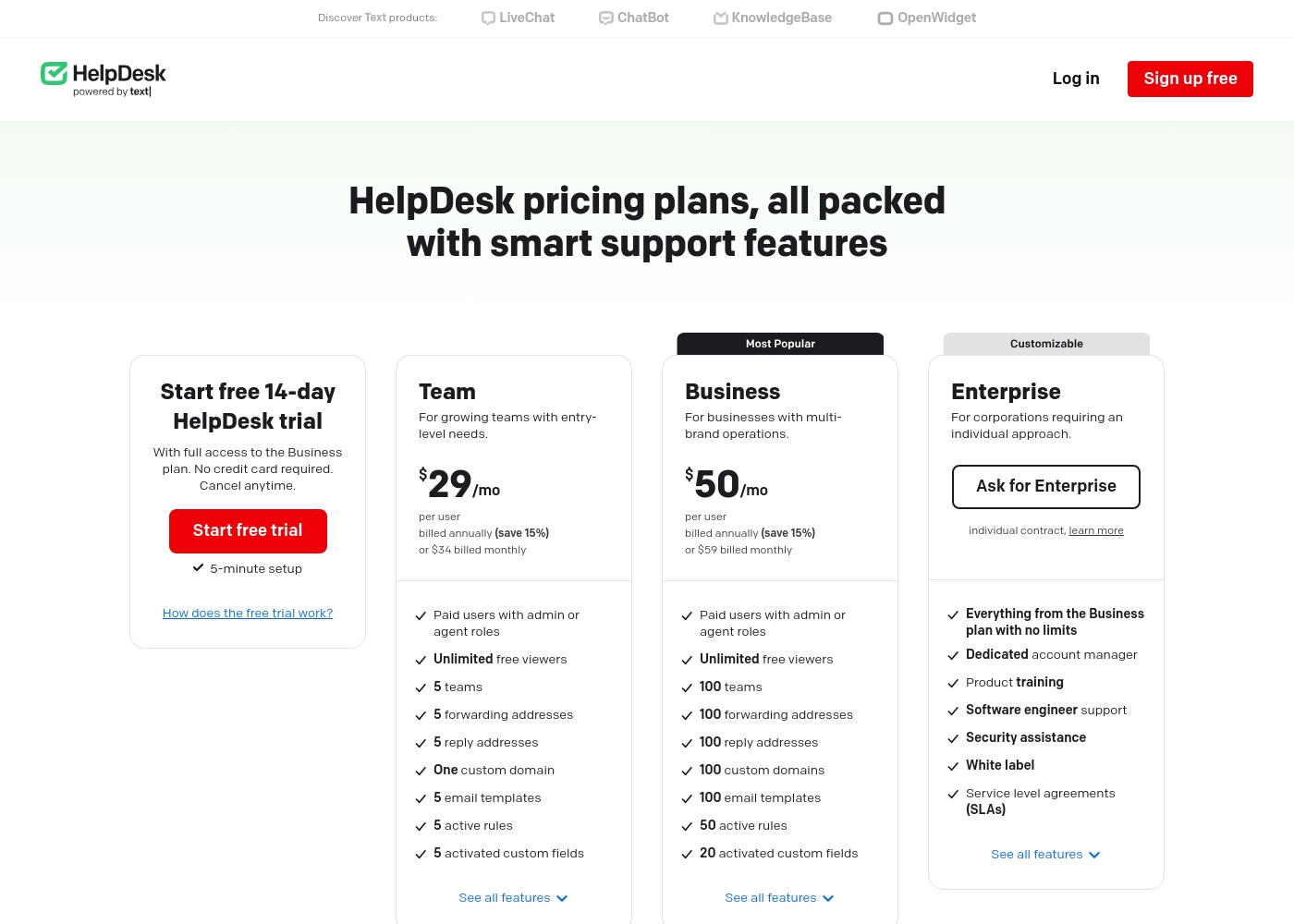
HelpDesk costs between $29 and $50 per user per month (billed annually) with three plans: Team at $29/mo, Business at $50/mo, and Enterprise (custom pricing).
The pricing is clear and structured to help you select the best fit for your operational needs.
Team
Price: $29/mo per user (billed annually) or $34/mo per user (billed monthly) Best For: Growing teams with entry-level needs Refund Policy: Reviewed individually by support Other Features:
- Unlimited free viewer roles
- 5 teams and customizable ticket views
- 5 email templates and 5 active automation rules
- One custom domain
- 5 activated custom fields
- Paid users with admin or agent roles
- Unlimited free viewers
- 5 teams
- 5 forwarding addresses
- 5 reply addresses
- Paid users with admin or agent roles
- Unlimited free viewers
- 100 teams
- 100 forwarding addresses
- 100 reply addresses
- Everything from the Business plan with no limits
- Dedicated account manager
- Product training
- Software engineer support
- Security assistance
Here's a look at the services Seel offers to help manage your post-purchase experience.
Worry-Free Purchase®
Best For: Online retailers wanting to offer comprehensive refunds and returns for any reason. Other Features: - Automatic return/refund processing, - Resolution portal for shoppers, - One-click resale (beta) functionality, - Configurable resolution requirements.
This service is perfect if you want to give your shoppers total confidence during checkout. It lets customers return items for reasons ranging from product issues to simple second thoughts. 🛍️
- Comprehensive refunds and returns for any reason
- Configurable resolution rules
- One-click resale listing (beta)
- Integration with Shopify gift cards
- 24/7 live AI support chat
- Automated delivery tracking
- Real-time resolution status for shoppers
- Custom AI training on brand policies
Pricing Notes
- HelpDesk's pricing is transparent and scales with your team size, from $29/user for small teams to $50/user for larger operations.
- Seel's costs are not publicly listed; you must book a demo for a custom quote based on your product volume and needs.
- HelpDesk offers a 14-day free trial with full Business plan access and no credit card.
- Seel does not explicitly offer a free trial or plan; initial exploration requires a sales consultation.
- Both platforms target different value propositions: HelpDesk's cost is per support agent; Seel's cost is tied to post-purchase automation volume.
Pricing Head-to-Head
User Reviews
HelpDesk generally receives excellent feedback on its usability and interface. Users frequently highlight the platform's clean, intuitive design, noting it is easy to set up and navigate. Many reviewers, including those migrating from competitors, found the ticketing structure to be highly efficient, leading to increased team productivity and decreased response times. The platform's automation features, ticket categorization, and the inclusion of unlimited free viewer seats are often appreciated. Support staff receive high praise for being quick, friendly, and highly professional, often going the extra mile to resolve issues quickly. 💪
However, the feedback is not universally positive. Some users transitioning from the company's older, integrated LiveChat system expressed frustration about the mandated separation and increased subscription cost, calling the new system “way dearer” for micro-businesses. A few users also mentioned that while the system handles essential ticketing functions very well, it lacks depth in advanced features, specifically citing limitations in the macro functionality. Overall, the platform is widely seen as affordable and offers good value for money for businesses focused on reliable core support functions.
Switching from Zendesk over to HelpDesk saved us money. This chat widget is very affordable and the UI/UX is much better now. The tool is very easy to use and provides us with much more data access.
We found user sentiment for Seel on Trustpilot to be overwhelmingly positive, with many praising the platform's impact on their operations. A recurring theme is the significant reduction in 'Where Is My Order?' (WISMO) tickets and post-purchase support workload, thanks to the reliable tracking and AI chat.
Users frequently highlight the ease of use for both merchants and shoppers, noting that integration is straightforward and the branded resolution portal feels seamless. Several reviews mention the accuracy and helpfulness of the customer support when issues arise.
Seel has been a game-changer for our support team. The automated tracking updates cut our WISMO tickets by a huge margin. It's easy to set up and the branded portal looks great.
Our Verdict
HelpDesk and Seel aren't direct competitors; they solve completely different problems. Choosing between them depends entirely on what part of your business is broken. HelpDesk's superpower is bringing order to chaos. It's the central nervous system for your entire support team, turning a flood of emails and chats into a organized, trackable queue. If your agents are drowning in tickets, HelpDesk gives them a lifeline. Seel's superpower is removing problems before they start. It automates the post-purchase nightmare for e-commerce, slashing 'Where Is My Order?' tickets and handling returns with AI. If your support team is swamped with shipping and return queries, Seel is your secret weapon. The deciding factor is your primary pain point. Are you managing a general support team that handles all kinds of customer issues? Go with HelpDesk. Are you an online store losing sleep over return logistics and post-checkout support? Seel is built for you. Pick HelpDesk if you need a robust ticketing system for your team. Choose Seel if you need to automate and improve the post-purchase experience for your shoppers. For many e-commerce businesses, the real answer might be both.
Frequently Asked Questions
Which is better for small teams: HelpDesk or Seel?
HelpDesk is generally better for small support teams. Its Team plan starts at $29/user/month and is designed for growing operations needing a central hub. Seel is specialized for e-commerce and requires a custom quote.
Does HelpDesk have AI chat like Seel?
No, HelpDesk focuses on rule-based automation for ticket routing and prioritization. Seel's standout feature is its AI-powered Agentic Workforce that handles 24/7 shopper support queries automatically.
Is Seel worth the extra cost over HelpDesk?
They aren't priced the same way. HelpDesk costs per support agent. Seel's value comes from reducing your operational workload and boosting e-commerce conversions. You'd need to compare Seel's quote to your team's current support costs.
Can I use HelpDesk for e-commerce support?
Yes, HelpDesk can manage any customer support, including for e-commerce. However, it doesn't have Seel's specialized features like global delivery tracking, automated return portals, or AI chat trained on post-purchase issues.
Does Seel replace my entire support team?
No, Seel is designed to extend your team's capacity. It automates routine post-purchase queries and tracks deliveries, freeing your human agents to handle complex issues. You still manage and train your core support staff.
Which platform has better security for customer data?
Both offer strong security. HelpDesk uses 256-bit SSL and complies with GDPR. Seel goes further with SOC 2 Type II, GDPR, CCPA compliance, and AES-256 encryption, making it highly secure for handling transactions.
Ready to Choose?
Both tools have their strengths. Choose based on your specific needs.